ICF-CD843V - Alarm clock radio SONY - Free user manual and instructions
Find the device manual for free ICF-CD843V SONY in PDF.


User questions about ICF-CD843V SONY
0 question about this device. Answer the ones you know or ask your own.
Ask a new question about this device
Download the instructions for your Alarm clock radio in PDF format for free! Find your manual ICF-CD843V - SONY and take your electronic device back in hand. On this page are published all the documents necessary for the use of your device. ICF-CD843V by SONY.
USER MANUAL ICF-CD843V SONY
TV/WEATHER/FM/AM CD Clock Radio
ICF-CD843V
Operating Instructions
DREAM MACHINE
Dream Machine is a trademark of Sony Corporation.
Owner's Record
The model number and the serial number are located on the bottom.
Record the serial number in the spare provider before. Refer to them whenever you call upon your 5ony dealer regarding this product.
Model No. ICF-CD843V
Serial No.
For customers who purchased this product in the USA
Please register this product on line at
http://www.sxy.com/productregistration
Please be registered with a name who will sell you personal mailings about new entrants, company and other important announcements.
Registering your product will also call us to
Product needs adjustment or modification. Thank you.
© 2004 Sony Corporation
Printed in China
http://www.sony.net/
SONY®
Portable Audio
LIMITED WARRANTY
[U.S. Only]
Sony Electronics Inc. ("Sorry") warrants this product against defects in material or workmanship for the three periods and as set forth below: Pursuant to this Limited Warranty, Sony will, at its option, (ii) repair the product using new or refurbished parts or (iii) replace the product with a new or refurbished product. For purposes of this Limited Warranty, "refublished" means a product or part that has been returned to its original specifications. In the event of a defect, these are your exclusive remeasure.
Labor: For a period of one (1) year from the original date of purchase of the product ("Labor Warranty"). Sony will, at its option, repair or replace with new or refurbished product, product determined to be defective. If Sony needs to replace the product after the Labor Warranty has expired but while the Parts Warranty below is still in effect, it will do so for the applicable labor charge.
Parts: For a period of one (1) year from the original date of purchase of product ("Parts Warranty"). Sorry will supply new or refurbished replacement parts in exchange for parts determined to be defective.
This Limited Warranty covers only the hardware components packaged with the Product, it does not cover technical assistance for hardware or software usage and it does not cover any software products whether or not contained in the Product; any such software is provided "AS IS" unless expressly provided for in any enclosed software Limited Warranty. Please refer to the End User License Agreements included with the Product for your rights and obligations with respect to the software.
Instructions: To obtain warranty service, you must deliver the product, bright prepaid, in either its original packaging or packaging affording an equal degree of protection to the Sony authorised service facility specified. It is your responsibility to backup any data, software or other materials you may have stored or preserved on your unit. It is likely that such data, software, or other materials will be lost or reformatted during service and Sony will not be responsible for any such damage or loss. A dated purchase receipt is required. For specific instructions on how to obtain warranty service for your product.
Visit Sony's Web Site:
www.sony.com/service
Or call the Sony Customer Information Service Center
1400-222-SONY (7,865)
For an accessory or port not available from your authorized dealer, call:
1-800-488-SUNY (7665)
Repair / Replacement Warranty: This Limited Warranty shall apply to any repair replacement part or replacement product for the remainder of the original Limited Warranty period or for ninety (80) days, whichever is longer. Any parts or product replaced under this Limited Warranty will become the property of Sony
This Limited Warranty only covers product issues caused by defects in material or workmanship during ordinary consumer use; it does not cover product issues caused by any other reason, including but not limited to product issues due to commercial use, acts of God, misuse, limitations of technology, or modification of or to any part of the Sony product. This Limited Warranty does not cover Sony products sold AS IS or WITH A.U. FAULTIS or consumables (such as fuels or batteries). This Limited Warranty is invalid if the factory-applied serial number has been altered or removed from the product. This Limited Warranty is valid only in the United States.
LIMITATION ON DAMAGES: SONY SHALL NOT BE LIABLE FOR ANY INCIDENTAL OR CONSEQUENTIAL DAMAGES FOR BREACH OF ANY EXPRESS OR IMPLIED WARRANTY ON THIS PRODUCT.
DURATION OF IMPLIED WARRANTIES: EXCEPT TO THE EXTENT PROHIBITED BY APPLICABLE LAW, ANY IMPLIED WARRANTY OF MERCHANTABILITY OR FITNESS FOR A PARTICULAR PURPOSE ON THIS PRODUCT IS LIMITED IN DURATION TO THE DURATION OF THIS WARRANTY.
Some states do not allow the exclusion or limitation of incidents or consequential damages, or allow limitations on how long an implied warranty lasts, so the above limitations or exclusions may not apply to you. This Limited Warranty gives you specific legal rights and you may have other rights which vary from state to state.
DN55714503
WARNING
To prevent fire or shock hazard, do not expose the
unit to rain or moisture
To avoid electrical shock, do not open the cabinet. Ruler servicing to qualified personnel only. Do not install the appliance in a confined space, such as a bookcase or built-in cabinet. To prevent fire or shock hazard, do not place objects filled with liquids, such as gases, or the apparatus.
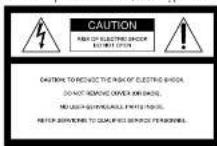

This symbol is intended to alert the user to the presence of uninsulated "dangerous voltage" within the product's closure. That may be of sufficient magnitude to constitute a risk of electric shock to persons.

This symbol is intended to alert the user to the presence of important operating and maintenance (servicing) instructions in the literature accompanying the appliance.
The graphical symbols are at the bottom of the unit.
INFORMATION
This equipment has been tested and found to comply with the limits for a Class B digital device, pursuant to Part 13 of the FCC Rules. These limits are designed to provide reasonable problems against harmful interference in a residential installation. This equipment provides use of harmful interference, or it is necessary to undergo energy and, if not installed and used in accordance with the instructions, may cause harmful interference to radio communication. However, there is no guarantees. Unit interference will not occur in a particular installation. If this equipment does cause harmful interference to radio or television compliance, which can be determined by turning the equipment oil and on the user is encouraged to try to correct the equipment by one or more of the following requirements:
Reorient or relocate the receiving antenna.
- Increase the separation between the
Connect the environment
Connect the component into an offset bar. This will differ even from that to which there
receiver is connected
- Consult the dealer or an experienced radio?
If you have any questions about this product, you may call: Sony Customer Information Services Center 1-800-222-7669 or write to: Sony Customer Information Services Center 12451 Gateway Blvd., Ft Myers, TL 33913
Declaration of Conformity Trade Name: SONY Model: ICF CD845V Responsible Party: Sony Electronics Inc. Address: 680 Kindesfarmack Road, Oradell, NJ 07619 USA Telephone: Numei-20-096-6872
This device complies with Part 15 of the PCX Rules. Operation is subject to the following two conditions (1) This device may not cause harmful interference, and (2) this device must accept any interference received, including interference that may cause undesired operation.
You are cautioned that any changes or modifications not expressly approved in this manual could void your authority to operate this equipment.
CAUTION
The use of optical instruments with this product will increase eye hazard.
Features
• TV/WEATHER/FM/AM 4 bond PLL (phase locked, ion) synthesized ice cream radio
- Easy preset digital tuning with 25 memory presets
- Bait-in CD player with CT-R/RW playback function
- Easy to see large Display with small footprint.
- Triple Alarm (Radio, buzzer or CD) with the extensible breeze function.
- Easy map timer - one push operation.
- LCD with backlight which has a brightness control switch.
• D.S.T. (Daylight Saving Time) - Summer time calculation
Precautions
- Operate the unit on the power source specified in the "Specifications."
- T be nameplate indicating operating voltage, etc. is located on the horset of the unit.
• To disconcer the power cord (main lead), pull it out by the plug, not the card. - Do not leave the unit in a location near a bear source such as a radiator or air duct, or in a place subject to direct sunlight, excessive dust, mechanical vibration, or shock.
- Allow adequate air circulation to prevent internal heat build-up. I'm not place the unit at a surface (a mg, a blanket, etc.) or near materials (a curtain) which might block the ventilation holes.
- Should any solid object or liquid fall into the unit, unplug the unit and have it checked by a qualified personnel being operated in each other.
part some there is opening it any further. - When the casing becomes soiled, clean it with a soft sixth lumpened with mild detergent solution. Never use abrasive cleansers or chemical solvents, as they may not be casing.
If you have any questions or problems concerning your unit, please consult your nearest Sony dealer.
Troubleshooting
Should any problem occur with the unit, make the following checks to determine whether or not prescribing is required. If the problem persists, consult the nearest Sony dealer. The clock does not show the correct time. • Has an electrical power outage lasting more than one minute occurred?
The CD, radio or buzzer alarm does not sound at the preset alarm time.
- Hasn't all ALARM indicator lights gone out! The CD or radio alarm is activated but no sound comes on at the preset alarm time. - Has VOLUME been adjusted!
The CD player does not operate.
• Did you close the CI lid?
• Did you place the disc correctly?
The case will be placed with the needed side up.
- Dusty or defective disc Clean the disc with an optional cleaning cloth. Wipe the disc from the center cut.
• Take out the CD and leave the CD compartment open for about an hour to get rid of moisture condensation.
Sporadic loss of sound in CD operation. • Dusty or detective disc Clean or replace the disc. • V. Dugation back - Revers the volume
• 2013.10.14: 2013.10.15
- 2017年
Specifications
AUDIO POWER SPECIFICATIONS POWER OUTPUT AND TOTAL HARMONIC DISTORTION
With 4-ohm loads, both channels drives from 100 - 10 000 Hz; rated 1.0 W per channel minimum RMS power, with no more than 10% total harmonic direction in AC operation.
CD player section
System: Compact disc digital audio system
Laser diode properties:
Wavelength: 750 nm Emission duration: Continuous Laser output: Less than 44.6 μW (This output is the value measured at a distance of about 200 mm from the objective lens surface on the optical pick-up level with 2 mm aperture.) Frequency response: 30-31.0 GHz Hz, 12 dB
WOW and HUTTER, BELOW MEASURE HIM!
Radio section
Frequency range: TV: 2–13 ch WEATHER: 1–7 ch FM: 87.5–108 MHz AM: 530–1710 kHz
General
Time display: 12-hour system Speaker: 66 min (2½ inches) dia., 4 Ω Power outputs:
1.2 W + 1.2 W (at 10% harmonic distortion) Power requirements: 120 V AC, 60 Hz Dimensions:
Approx. 185.5 × 176 × 210.5 mm (wha) (Approx. 7% × 3 × 8% indus) incl.
Mass: Approx. 1790 g (3 lb 15oz)
Design and specifications are subject to change without notice.

Lead-free solder is used for soldering. Halogenated flame retardants are not used in printed wiring boards.
IMPORTANT SAFEGUARDS
For your protection, please read these safety instructions completely before operating the appliance, and keep this manual for future reference. Carefully observe all warnings, precautions and instructions on the appliance and in the operating instructions, and adhere to them.
INSTALLATION
Water and Moisture Do not use powerline operated appliances near water - for example, near a bathtub, washbowl, kitchen sink, or laundry tub, in a wet basement, or near a swimming pool, etc.
Do not place the appliance rear or over a radiator or heat register, or where it is exposed to direct sunlight.
The slots and openings in the cabinet are provided for necessary ventilation, to ensure reliable operation of the appliance, and to protect it from overhealing, these slots and openings must never be blocked or covered.
- Never cover the slots and openings with a cloth or other materials. - Never block the slots and openings by placing the appliance on a bed, sola, rug or other similar surface.
Never place the appliance in a confined space, such as a brooscase, or built in cabinet, unless proper ventilation is provided.
Do not place the appliance or an unstable cart, stand, tripod, bracket, or table. The appliance may fall causing serious injury to a child or an adult, and serious damage to the appliance. Use only a cart, stand, tripod, bracket, or table is recommended by Sony. An appliance and cart combination should be moved with care. Quick stops, excessive force, and uneven surfaces may cause the appliance and cart combination to overturn.
Wall or Ceiling Mounting If your appliance can be mounted to a wall or ceiling, mount it only as recommended by Sorry
USE
Power Source
This appliance should be operated only from the type of power source indicated on the marking label. If you are not sure of the type at electrical power supplied to your home, consult your dealer or local power company. For these appliances designed to operate from battery power, or other sources, refer to the operating instructions.
Grounding or Polarization
This appliance is equipped with a polarized AC power cord plug to plug having one blade wider than the other, or with a three wire grounding type plug to plug having a third pin for grounding. Follow the instructions below:
-For the appliance with a polarized AC power cord plug:
This plug will hit into the power outlet only one way. This is a safety fixture. If you are unable to insert the plug fully into the outlet, try reversing the plug. If the plug should still fail to fit, contact your electrician to have a suitable outlet installation. Do not defeat the safety purpose of the polarized plug by forcing it in.
-For the appliance with a three-wire grounding type AC plug:
This plug will only fit into a grounding type power outlet. This is a safety feature. If you are unable to insert the plug into the outlet, contact your electrician to have a suitable outlet installed. Do not defeat the safety purpose at the grounding plug.
Overloading
Do not overload wall outlets, extension cords or convenience receptacles beyond their capacity, since this can result in fire or electric shock.
When not in use
Unplug the power cord of the appliance from the outlet when left unused for a long period of time. To discreened the cord, pull it out by grasping the plug. Never pull the plug out by the cord
Power-Cord Protection
Route the power cord so that it is not likely to be walked on or pinched by items placed upon or against them, paying particular attention to the plugs, receptacles, and the point where the card exits from the appliance.
Lightning
For added protection for this appliance during a lightning storm, or when it is left unattended and unused for long periods of time, unplug it from the wall outlet and disconnect the antenna or cable system. This will prevent damage to the appliance due to lightning and powerline surges.
Object and Liquid Entry
Never push objects of any kind into the appliance through openings as they may touch dangerous voltage paints or short out parts that could result in a fire or electric shock. Never spill liquid of any kind on the appliance.
Cleaning
Unplug the appliance from the wall outlet before cleaning or polishing it. Do not use liquid cleaners or removal cleaners. Use a cloth lightly compressed with water for cleaning, the exterior of the appliance. Clean the appliance only as recommended by Sony.
Attachments
Do not use attachments not recommended by Sony, as they may cause hazards.
ANTENNAS
Outdoor Antenna Grounding
If an outdoor antenna or cable system is installed, follow the precautions below. An outdoor antenna system should not be located in the vicinity of overhead power lines or other electric light or power circuits, or others can continue in contact with such power lines or circuits. WHEN INSTALLING AN OUTDOOR ANTENNA SYSTEM, EXTREME CARE SHOULD BE TAKEN TO KEEP FROM CONTACTING SUCH POWER LINES OR CIRCULS AS CONTACT WITH THEM IS ALMOST INVARIANT FATAL.
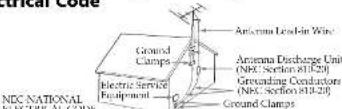
He sure the antenna system is grounded so as to provide some protection against voltage surges and built up static charges. Section 510 of the National Electrical Code provides information with respect to proper grounding of the mask and supporting structure, grounding of the lead-in wire to an antenna discharge unit, size of grounding conductors, location of antenna discharge unit, connection to grounding electrode and electrode suitable for the grounding electrode.
Antenna Grounding According to the National Electrical Code
SERVICE
Damage Requiring Service
Unplug the appliance from the wall outlet and refer servicing to qualified service personnel under the following conditions:
-When the power card or plug is damage be destroyed.
If liquid has been spilled or objects have fallen into the appearance. If the appliance has been exposed to rain or water.
The appliance does not appear to operate normally or exhibits a marked change in performance.
- If the appliance does not operate normally when following the operating instructions, adjust only those controls that are specified in the operating instructions. Improper adjustment of other controls may result in damage and will often require extensive work
by a qualified technician to restore the appliance to normal operation.
-If the appliance has been subject to excessive shock by being dropped, or the cabinet has been
Servicing
Do not attempt to service the appliance yourself as opening or removing covers may expose you to dangerous voltage or other hazards.
Refer all servicing to qualified service personnel.
Replacement parts
When replacement parts are required, be sure the service technician has used replacements, parts specified by Sony that have the same characteristics as the original parts. Unauthorized substitutions may result in five electric shock or other hazards.
Safety Check
Upon completion of any service or repairs to the appliance, ask the service technician to perform routine safety checks (is specified by Sony) to determine that the appliance is in safe operating condition.
Setting the Brightness of the Backlight
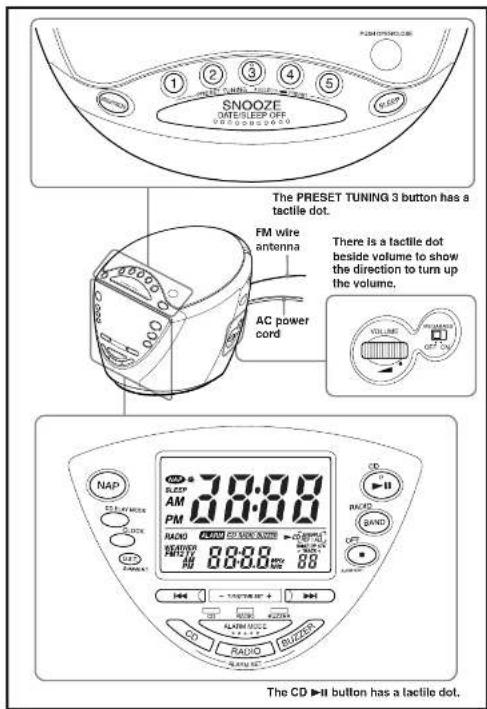
Press BRIGHTNESS to select high, middle or low for the display according to your preference.
Setting the Clock and Date
1 Plug in the clock radio.
The display will flash "AM 12:00".
2 Press CLOCK for a few seconds. You will bear a heap and the year will start to flush in the display.
3 Press TUNE/TIME SET + or - until the correct year appears in the display.
4 Press CLOCK
5 Repeat steps 3 and 4 to set the month, day, hour, and minute.
After setting the minutes, press CLOCK to start the clock, and you will hear two short steps.
To display the year and date, press SNOOZE-DATE/SLEEP OFF once for the date, and within 4 seconds press it again for the year. The display shows the date or year for a few seconds and then changes back to the current time.
To set the current time rapidly, hold down TUNE/TIME SET + or -
In step 5, when you press CLOCK after the minute setting to activate the clock, the sounds start counting from zero.
To change the display to the daylight saving time (summer time) indication
Press D.S.T./SUMMER T. “●” is displayed and the time indication changes to summer time. To deactivate the summer time function, press D.S.T./SUMMER T. again.
Playing a CD
An 8 cm (3-inch) CD can be played without an adaptor.
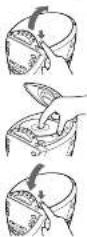
1 Push OPEN/CLOSE to open the CD compartment lid and place a disc.
2 Close the CD compartment lid.
[Non-Text]
[Non-Text]
Labeled surface up

Close the lid
3 Press CD ▶II
"▶CD" and "TRACK 01" appear on the display to indicate that track 1 of the CD is playing.
4 Press VOLUME to adjust the volume.
| To Press | |
| Pane CD ▶II | |
| Restore play after pause | CD ▶II again |
| I locate the beginning of ▶▼▼▼▼▼▼▼▼▼▼▼▼▼▼▼▼▼▼▼▼▼▼▼▼▼▼▼▼▼▼▼▼▼▼▼▼▼▼▼▼▼▼▼▼▼▼▼▼▼▼▼▼▼▼▼▼▼▼▼▼▼▼▼▼▼▼▼▼▼▼▼▼▼▼▼▼▼▼▼▼▼▼▼▼▼▼▼▼▼▼▼▼▼▼▼▼▼▼▼▼▲▼▼▼▼▼▼▼▼▼▼▼▼▼▼▼▼▼▼▼▼▼▼▼▼▼▼▼▼▼▼▼▼▼▼▼▼▼▼▼▼▼▼▼▼▼▼▼▼▼▼▼▼▼▼▼▼▼▼▼▼▼▼▼▼▼▼▼▼▼▼▼▼▼▼▼▼▼▼▼▼▼▼▼▼▼▼▼▼▼▼▼▼▼▼▼▼▼▼▼●▼▼▼▼▼▼▼▼▼▼▼▼▼▼▼▼▼▼▼▼▼▼▼▼▼▼▼▼▼▼▼▼▼▼▼▼▼▼▼▼▼▼▼▼▼▼▼▼▼▼▼▼▼▼▼▼▼▼▼▼▼▼▼▼▼▼▼▼▼▼▼▼▼▼▼▼▼▼▼▼▼▼▼▼▼▼▼▼▼▼▼▼▼▼▼▼▼▼▼↓▼▼▼▼▼▼▼▼▼▼▼▼▼▼▼▼▼▼▼▼▼▼▼▼▼▼▼▼▼▼▼▼▼▼▼▼▼▼▼▼▼▼▼▼▼▼▼▼▼▼▼▼▼▼▼▼▼▼▼▼▼▼▼▼▼▼▼▼▼▼▼▼▼▼▼▼▼▼▼▼▼▼▼▼▼▼▼▼▼▼▼▼▼▼▼▼▼▼▼▶▼▼▼▼▼▼▼▼▼▼▼▼▼▼▼▼▼▼▼▼▼▼▼▼▼▼▼▼▼▼▼▼▼▼▼▼▼▼▼▼▼▼▼▼▼▼▼▼▼▼▼▼▼▼▼▼▼▼▼▼▼▼▼▼▼▼▼▼▼▼▼▼▼▼▼▼▼▼▼▼▼▼▼▼▼▼▼▼▼▼▼▼▼▼▼▼▼▼▼▽▼▼▼▼▼▼▼▼▼▼▼▼▼▼▼▼▼▼▼▼▼▼▼▼▼▼▼▼▼▼▼▼▼▼▼▼▼▼▼▼▼▼▼▼▼▼▼▼▼▼▼▼▼▼▼▼▼▼▼▼▼▼▼▼▼▼▼▼▼▼▼▼▼▼▼▼▼▼▼▼▼▼▼▼▼▼▼▼▼▼▼▼▼▼▼▼▼▼▼ | |
About CD-Rs/CD-RWs
This unit is compatible with CD-Rs/CD-RWs but playback capability may vary depending on the quality of the disc, the recording device and application software.
Music discs encoded with
copyright protection technologies This product is designed to play back discs that conform to the Compact Disc (CD) standard. Recently, various music discs encoded with copyright protection technologies are marketed by some record companies. Please be aware that among these cases, there are some that do not conform to the CD standard and may not be playable by this product.
To handle compact discs
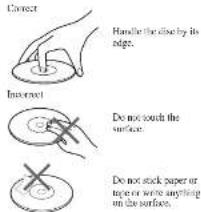
Notes
- Discs with non-standard shapes (e.g., heart, square, start cannot be played on this unit. Attempting to do so any change the unit. Do not use such discs
- If you press CD ▶H when there is no dose in the CD compartment, "00" flashes for about 5 seconds on the display and the unit torre off" automatically.
- After 20 minutes, playback will be stop when you press CD ▶H during play lock.
Various Modes of CD
Playback
You can play tracks repeatedly or in random order.
Press CD PLAY MODE.
Each process includes the play made as minutes;
Display Play Indication m
indication mode
none (normal piny)
"REP 1" (single repeat)
A single track is played repeatedly.
"REP ALL." (all repeat) All the tracks are played repeatedly
"SHUFFLE" (shuffle play) All the jacks are dropped once.
in random order.
"SHUFFLE REP" (shuffle repeat) All the tracks are played repeatedly in real-time order
Playing the Radio —Manual Tuning
1 Press RADIO-BAND to turn on the radio. "RADIO" senses on the display.
2 Press RADIO-BAND repeatedly to select the desired band. Each press characterizes the band as follows:
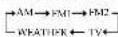
When using FM1 or FM2 press mode, you may listen to the mode an either mode (See "Presenting Your Favorite Station").
3 Use TUNE/TIME SET + or - to tune into a station.
Two short beeps sound when the minimum frequency of each band is received during tuning.
4 Adjust volume using VOLUME.
When you release TUNE/TIME SET + or - after locating your desired station, the display returns to the previous display after about 10 seconds.
To check the frequency of the tated-in station, press RADIO-BAND and the frequency appears far about 10 seconds.
To turn off the radio, press OFF ■-ALARM RESET.
Improving the Reception
TV/WEATHER/FM:
Extend the FM wire antenna fully to increase reception sensitivity.
AM: Rotate the unit horizontally for optimum reception. A ferrite but automatic is built into the unit.
Do not operate the unit over a steel desk or metal surface, as this may lead to interference of reception.
Presetting Your Favorite Station
—Preset Tuning
You can preset up to 10 stations in FM 15 stations in FM1, 5 stations in FM2, and 5 stations each in AM, TV, WEATHER.
Presetting a Station
1 Follow steps 1 to 4 in "Playing the Radio" and manually tune into the station you wish to press.
2 Hold down the PRESET TUNING button you wish to preset until you hear two short beeps.
Example: Display window when you press FM 90 MHz in the PRESET TUNING 2 button for FM2.
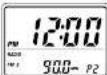
The frequency remains on the display for about 10 seconds and then returns to the previous display.
To preset another station, repeat these steps. To change the preset station, come into the desired station and build down the PRESET TUNING 1 to 5 button. The new station will replace the previous station on the PRESET TUNING button.
Tuning Into a Preset Station
1 Press RADIO·BAND to turn on the radio.
2 Press RADIO-BAND to select the band.
3 Press the desired PRESET TUNING button.
4 Adjust the volume using VOLUME. After about 10 seconds, the display will return to the previous display but the PRESET TUNING button number will remain.
Note
Holding down the desired PRESET TUNING button for more than a few seconds in step 3 will replace the previous station on the PRESET TUNING button with the station you are tuned into.
Setting the Alarm
This clock radio is equipped with 3 alarm modes CD, radio and buzzer. Before setting the alarm, make sure to set the clock uses "Setting the Clock and Date".
To Set the Alarm Time
To Set the CD Alarm:
For the CD alarm, the track you specified as the Wake-up track is played first. (If the CD play mode is set to "SHUFFLE" or "SHUFFLE REF", however, all the tracks are played in random order.)
1 With the alarm turned on, adjust the volume to the level you require.
2 Press ALARM SET CD for a few seconds "ALARM", "CD" appear on the display. After one beep, "ALARM" and the hour will start to flush in the display.
3 Press TUNE/TIME SET + or - until the desired hour appears. To set the hour rapidly, hold down TUNE/TIME SET + or -
4 Press ALARM SET CD.
The minore will flash.
5 Repeat step 3 to set the minute and press ALARM SET CD.
The wake up track zumber flashes on the display
6 Press TUNE/TIME SET + or - to select the desired wake-up track number. The wake-up track number can be set up to 35
7 Press ALARM SET CD.
Two short beeps will confirm the setting.
To Set the Radio Alarm:
For the radio alarm, the station you specified as the Wake-up station is played.
1 Tune into a starian and adjust the volume.
2 Press ALARM SET RADIO for a few seconds.
"ALARM" and "RADIO" appear on the display. After one heap, "ALARM" and the hair will start to flush on the display.
3 Press TUNE/TIME SET + or - until the desired hour appears. To set the hour rapidly, hold down TUNE/TIME SET + or -
4 Press ALARM SET RADIO. The minute will flash.
5 Repeat step 3 to set the rainhole and press ALARM SET RADIO. "WAKE UP STA" appears and the preset number holes on the display.
6 Press TUNE/TIME SET + or - to select the wake up station. Prase number changes in the order as follows:

"P-" is the last rowed station. You can directly select the desired wake-up station by pressing RADIO-BAND or the PRESET TUNING button while the indication
7 Press ALARM SET RADIO. Two short boeps will continue the setting.
To Set the Buzzer Alarm:
1 Press ALARM SET BUZZER for a few seconds.
"ALARM" and "BUZZER" appear on the display. After one beep, "ALARM" and the hour will start to flash on the display.
2 Press TUNE/TIME SET + or - until the desired hour appears.
To set the hour rapidly, hold down TUNE/TIME SET + of \~.
3 Press ALARM SET BUZZER. The minute will flash.
4 Repeat step 2 to set the minute and press ALARM SET BUZZER.
Two short beeps will confirm the setting.
To Set the Alarm Mode
Before setting the alarm mode, be sure to set the alarm time. (See "To Set the Alarm Time".)
Repeat the pressing of ALARM MODE to select the alarm mode you want. Every time you press ALARM MODE, CIVRADIUMRIJ7/ER indicator changes in the order as follows:
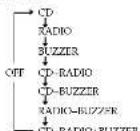
The alarm time which plays or sounds next is displayed.
To Check the Alarm Setting For ALARM SET CD, pressing once displays the alarm time, pressing twice displays the wake-up track number.
For ALARM SET RADIO, pressing once displays the alarm time, pressing twice displays the wake up station For ALARM SET BUZZER, pressing once displays the alarm time.
The display shows the return setting for a few seconds and then returns to the previous display.
Alarm time in CD alarm, radio alarm and buzzer alarm is set at AM 12:00 when you purchased the unit.
ALARM ON—
If you set the CD alarm and there is no close in the CD player, the hardware alarm will soon in its place at the time set.
For the buzzer alarm, the beeping of the alarm becomes more rapid after every few seconds in three progressive stages.
Note
When CD, radio and buzzer alarms are set for the same time, the CD alarm takes precedence. If the CD alarm is not set, the radio alarm takes precedence.
To Doze for a Few More Minutes Press SNOOZE-DATE/SLEEP OFF
The CD, radio or buzzer alarm turns off but will be automatically activated again after about 10 minutes. Every time you press SNOOZE-DATE/SLEEP OFF, the snooze time changes to follows:
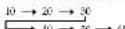
The display shows the snooze time for a few seconds and returns to show the current time. When you press SNOOZE+DATE/SLEEP OFF after the current time appears, the snooze time starts from 10 minutes again. The maximum length of the snooze time is 50 minutes.
ALARM OFF—
The CD, radio, or buzzer alarm is turned off automatically after 60 minutes.
To Stop the Alarm
Press OFF ■•ALARM RESET to turn of the alarm. The alarm will come on again at the same time the next day.
To Deactive the Alarm
Press ALARM MODE repeatedly until CD/RADION BUZZER indicator go off.
Using the NAP Timer (Count Down Timer)
The NAP timer sounds the buffer after a preset time duration.
Press NAP repeatedly until the desired minutes are displayed. Every press changes the display as follows:
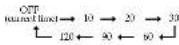
“NAP” the NAP time is displayed for a few
NAP times start counting down the NAP time. When the selected NAP time has passed, a beep sounds, and "NAP" appears in the display
To Stop NAP Timer Press NAP or OFF ■•ALARM RESET to turn off the burner.
To Deactive NAP Timer
“R&P” goes off in the display
Setting the Sleep Timer
You can fall asleep to the CD or the radio using the built-in sleep timer to turn off the CD or the radio automatically after a preset duration.
Press SLEEP during CD or radio play. You can set the sleep timer to durations of 90, 60, 30, or 15 minutes. Every push changes the display as follows:
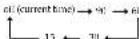
“SLEEP” will appear in the display when the duration time is set.
The CD or the radio will play for the time you set, then shear off.
To turn off the CD or the radio before the present time, press SNOOZE·DATE/SLEEP OFF.
Other Useful Functions
To Obtain Powerful Bass
Switch MEGA BASS to ON. The "MEGA BASS" system produces a powerful bass sound.