ICF-C740 - Alarm clock radio SONY - Free user manual and instructions
Find the device manual for free ICF-C740 SONY in PDF.


User questions about ICF-C740 SONY
0 question about this device. Answer the ones you know or ask your own.
Ask a new question about this device
Download the instructions for your Alarm clock radio in PDF format for free! Find your manual ICF-C740 - SONY and take your electronic device back in hand. On this page are published all the documents necessary for the use of your device. ICF-C740 by SONY.
USER MANUAL ICF-C740 SONY
Operating Instructions
DREAM MACHINE
Sony Corporation © 1994 Printed in Malaysia
WARNING
To prevent fire or shock hazard, do not expose the unit to rain or moisture.
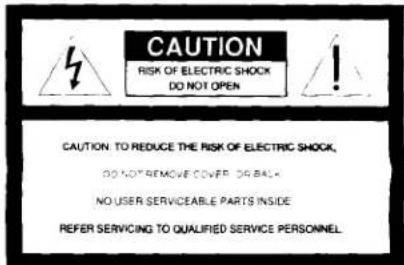

This symbol is intended to alert the user to the presence of uninsulated "dangerous voltage" within the product's enclosure that may be of sufficient magnitude to constitute a risk of electric shock to persons.

This symbol is intended to alert the user to the presence of important operating and maintenance (servicing) instructions in the literature accompanying the appliance.
* The graphical symbols are on the rear enclosure.
Before You Begin
Thank you for choosing the Sony Dream Machine*! The Dream Machine will give you many hours of reliable service and listening pleasure.
Before operating the Dream Machine, please read these instructions thoroughly and retain them for future reference.
*Dream Machine is a trademark of Sony corporation.
Features
• Large easy to read display
• Dual alarm
- Date display
• Display with adjustable brightness
• Forward/reverse time setting
- Full power backup to keep the clock and the alarm (radio and buzzer) during a power interruption with a 6F22 battery (not supplied) installed
[Non-Text]
PERSONAL/PORTABLE AUDIO PRODUCTS
SONY
LIMITED WARRANTY
SONY ELECTRONICS INC ("SONY") warrants this product against defects in material or workmanship, as follows:
For a period of 1 year from the date of retail purchase, SONY shall at its sole and absolute option either repair the defective product at no charge or replace the defective product with the same model or its equivalent model at no charge through a SONY SERVICE CENTER.
To obtain warranty service, you must take the product, or deliver the product prepaid, to one of the SONY SERVICE CENTERS located in the United States.
Proof of purchase in the form of a bill of sale or receipted invoice, which indicates that the product is within the warranty period, must be presented to obtain warranty service. SONY suggests that the purchaser retain the dealer's dated bill of sale as evidence of the date of retail purchase.
This warranty does not cover cosmetic damage, and damage to any part of the product, including the antenna, which results from acts of God, accident, misuse, abuse, improper maintenance, or connection to an improper voltage supply.
This warranty is valid only if the serial number appears on the product in the United States of America. This warranty is valid only
REPAIR OR REPLACEMENT AS PROVIDED UNDER THIS WARRANTY IS THE EXCLUSIVE REMED BY OF THE CONSUMER, SONY SHALL NOT BE LIABLE FOR ANY INCIDENTAL OR CONSEQUENTIAL DAMAGES FOR BREACH OF ANY EXPRESS OR IMPLIED WARRANTY ON THIS PRODUCT. EXCEPT TO THE EXTENT PROHIBITED BY APPLICABLE LAW, ANY IMPLIED WARRANTY OF MERCHANTABILITY OR FITNESS FOR A PARTICULAR PURPOSE ON THIS PRODUCT IS LIMITED IN DURATION TO THE DURATION OF THIS WARRANTY.
Some states do not allow the exclusion or limitation of incidental or consequential damages, or allow limitations on how long an implied warranty lasts, so the above limitations or exclusions may not apply to you. In addition, if you enter into a service contract with the Sony Partnership with 90 days of the date of sale, the limitation on how long an implied warranty lasts does not apply to you. This warranty gives you specific legal rights, and you may also have other rights which vary from state to state.
Please refer to the list of SONY SERVICE CENTERS on the reverse side for the SONY SERVICE CENTER nearest you.
For your convenience, Sony Electronics Inc has established the Customer Information Center to supply you with product or service information.
SONY CUSTOMER INFORMATION CENTER
201-930-SONY (7669)
714-821-SONY (7669)
708-250-SONY (7669)
or write to:
SONY CUSTOMER INFORMATION CENTER
Sony Drive, Mail Drop •T1-11
Park Ridge, New Jersey 07656
SONY ELECTRONICS INC
Sony Drive Park Ridge New Jersey 07656
[Unreadable due to extreme blurriness]
Installing the Battery
To keep good time, your Dream Machine needs one 6F22 battery (not supplied), in addition to house current. The battery keeps the clock operating in the event of a power interruption. Before setting the time on your Dream Machine, open the lid at the bottom of the unit, install the battery with correct polarity and then close the lid.
- After a power interruption, the displayed time may not be always correct. (It may gain or lose about 10 minutes per hour.)
Knowing When To Replace the Battery
- To check battery power, unplug the power cord from the wall outlet and plug it in again after a few minutes. If the displayed time is incorrect, replace the battery with a new one.
To obtain warranty service, please take the product, or deliver the product prepaid, to one of the following Sony Service Centers located around the United States.
All of the following items must be included when the product is shipped prepaid to the SONY SERVICE CENTER.
—Name, address and a phone number where you may be reached during the day.
—A copy of proof of purchase, as evidence that the product is within the warranty period.
—Brief description of the product defect.
- All supplied accessories with the product.
Sony Service Centers
| Arizona | Hawaii | Missouri |
| Phoenix2240 North Scottsdale RoadTempa, AZ 85281(002) 949-7669 | Honolulu950 Matarapura StreetHonolulu, HI 96819(008) 834-8622 | St. Louis1246/2-D Natural Bridge RoadBridgeton, MO 63044(314) 291-2201 |
| California | Illinois | New Jersey |
| Burbank (Los Angeles Area)4100 Riverside Drive, Suite ARusbank, CA 9505(0181) 842-7669Casta Mesa (Orange County area)2729 Bristol Street SouthCosta Mesa, CA 92626(0714) 549-8833San Bruno (San Francisco area)751 Canrine PlazaSan Bruno, CA 94056(0150) 871-2810San Diego8375 Complex DriveSan Diego, CA 92123(0189) 278-2724San Jose1359 OH Oakland RoadSan Jose, CA 95112(0408) 280-7669ColoradoDenverHavana Place Center10740 East MI AvenueAurora, CO 80014(0301) 715-7669 | Chicago1730 West Fulton, Suite 4Riverfront Shopping CenterChicago, IL 60814(021) 929-9595Miami (Chicago NM)7540 North Caldwell AvenueNees, IL 606-648(0188) 647-2400Westmont (Chicago SW)6038-39 South Cass AvenueWestmont, IL 50553(028) 959-0049KansasKansasCity1712 West 95th StreetOvland ParkKS 66214(013) 888-2622Maryland (Washington DC.)Washington DC5300 Sunnyvale AvenueBuffalo, MD 20305(030) 595-1818MassachusettsBoston780 University Avenue128 Westwood Industrial CenterWesenwood, MA 00090(0119) 329-5130MichiganDetroit43304 Elacom Mike RoadSunny, MI 48090(1133) 344-4044MinnesotaMinnesota4300 W. 38 1⁄2 Street51 North Park, NY 15418(0120) 920-8000 | Mahash (NY. Missopstown Area)286 Route 17 SouthMahash, NJ 07430(2071) 528-5655UnionBrookleet Shopping CenterUS Route 22 Az Maine AvenueUnion, NJ 07083(2070) 487-5555OhioCleveland6370 York RoadPampa Heights, OH 441302180 845-7669PennsylvaniaPhiladelphia654 Park AvenueKing of Phoenix, PA 19406(215) 768-8850PittsburghWestford Plaza10610 Perry Highway (ft. 191)Westford, PA 10090(412) 935-8466TexasDallas401 Preston Valley Shopping CenterDallas, TX 75230(216) 681-3537Houston7629 WesthamerHouston, TX 73053(713) 783-8161WashingtonSeattle835 FukuokaSeattle, WA 98108(206) 782-8000 |
| FloridaFort Lauderdale2850 North 28th TerraceHollywood, FL 33020(0305) 920-5600GeorgiaAdelaide120 Interstate North Parkway EastState #10Atlanta, GA 30339(0404) 953-5873 |
flowchart
graph TD
    A["CLOCK"] --> B["ALARM"]
    B --> C["RADIO"]
    C --> D["BLUNZER"]
    D --> E["TIME SET"]
    E --> F["+"]
    F --> G["SNOOZE/DATE/SLEEP OFF"]
    H["ALARM RESET/OFF"] --> I["SLEEP"]
    J["OFF RADIO ON"] --> K["BRIGHT LOW HIGH"]
    L["VOLUME"] --> M["BAND AM FM TUNING"]
flowchart
graph TD
    A["CLOCK"] --> B["ALARM"]
    B --> C["RADIO+"]
    C --> D["BLUZZER"]
    D --> E["B"]
    E --> F["TIME SET"]
    F --> G["+"]
    G --> H["SNOOZE/DATE/SLEEP OFF"]
    I["ALARM/RESET/OFF"] --> J["OFF"]
    J --> K["RADIO ON"]
    L["SLEEP"] --> M["ON"]
    N["BRIGHT LOW HIGH"] --> O["Monitor Box"]
    P["VOLUME"] --> Q["Am"]
    R["BAND AM"] --> S["FM"]
    T["TUNING"] --> U["Control knob"]
Setting the Clock and the Date
Setting the Clock
- Plug in the unit.
The display will flash "AM 12:00".
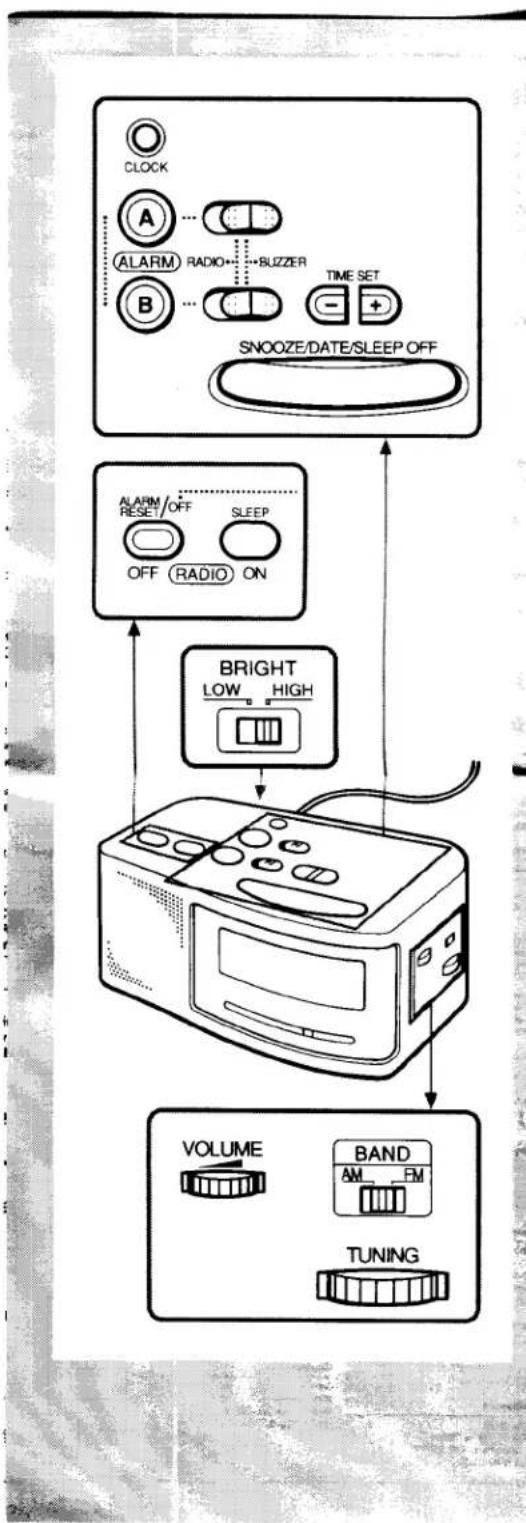
- While holding down CLOCK, press either + or - under TIME SET till the correct time appears in the display. When you release CLOCK, the clock begins to operate.
- To set the current time rapidly, keep pressing the + or - button while holding down CLOCK.
Setting the Date
- While holding down SNOOZE/DATE/SLEEP OFF, press either + or - under TIME SET till the correct date appears in the display. Then, release SNOOZE/DATE/SLEEP OFF.
- To display the date, press SNOOZE/DATE/SLEEP OFF. The display returns to the current time when you release SNOOZE/DATE/SLEEP OFF.
Changing the Brightness of the Display Window
To change the brightness of the display window, slide BRIGHT (brightness) to HIGH or LOW on the rear exterior of the unit.
Playing the Radio
-
Press RADIO ON/SLEEP to turn on the radio and adjust VOLUME.
-
Select FM or AM, and tune in a station using the TUNING dial.
- To turn off the radio, press RADIO OFF/ALARM RESET/OFF.
- To improve radio reception FM: Since the antenna is encased in the AC power cord, extend the cord to improve FM reception. AM: Rotate the unit horizontally for optimum reception. A ferrite bar antenna is built into the unit.
Setting the Alarm
To set the radio alarm, first tune in a station and adjust the volume.
- While holding down the ALARM A or B button (for example, A for the radio or B for the buzzer), press either + or - under TIME SET till the desired time appears in the display. When you release ALARM A or B, the ALARM A or B indicator and “:” stop flashing and light up, and the current time appears in the display.
- Set the ALARM A selector (for radio) to RADIO or ALARM B selector (for buzzer) to BUZZER. The alarm will come on at the preset time and automatically turn itself off after 59 minutes.
- If you set ALARM A and ALARM B at the same desired time, only ALARM A will work.
• To shut off the alarm, press RADIO OFF/ALARM RESET/
OFF. The alarm will come on at the preset time the next day. - To cancel either alarm, while holding down the ALARM A or ALARM B button, press RADIO OFF/ALARM RESET/OFF.
• To doze for a few more minutes, press SNOOZE/DATE/SLEEP OFF. The alarm will shut off, but will come on again after about 6 minutes. You can repeat this process as many times as you like.
• To adjust the radio alarm volume, turn VOLUME.
• To check the preset time, press ALARM A or B
Setting the Sleep Timer
Enjoy falling asleep to the radio using the built-in sleep timer that shuts off the radio automatically at a preset time.
1. Press RADIO ON/SLEEP
The radio turns on. It will go off after the preset time has passed. You can set the sleep timer of 90, 60, 45, 30 or 15 minutes.
Every push changes the display as follows.
Current time On → 90 → 60 15 ← 30 ← 45
The radio will play for the time you set, then shut off.
- To turn off the radio before the preset time, press SNOOZE/DATE/SLEEP OFF.
Precautions
- Operate the unit on the power sources specified in "Specifications".
- To disconnect the power cord, pull it out by the plug, not the cord.
- Do not place the unit on the surfaces (rugs, blankets, etc.) or near materials (curtains draperies) that block the ventilation holes
- Should anything solid object or liquid fall into the unit, disconnect the AC power cord and have the unit check by qualified personnel before operating it any further.
• To clean the casing, use a soft cloth dampened with a mild detergent solution.
Battery Warning
When the unit will be left unplugged for a long time, remove the battery to avoid undue battery discharge and damage to the unit from battery leakage.
If you have any questions or problems concerning your unit, please consult your nearest Sony dealer.
Specifications
Frequency range: FM: 87.6 - 108 MHz
AM: 530 - 1,610 kHz
Speaker: Approx. 6.6 cm (2 ^5 /8 inches) dia.
Power output: 120 mW (at 10% harmonic distortion)
Power requirements: 120 V AC, 60Hz
For power backup: 9 V DC, one 6F22 battery
Battery life: Approx. 35 hours using the Sony S-006P(U) battery
Dimensions: Approx. 221 × 99 × 117 mm (w/h/d) (8 3/4 × 4 × 4 3/4 inches) not incl. projecting parts and controls
Mass: Approx. 740 g (1 lb 10 oz) not incl. battery
Design and specifications are subject to change without notice.