ICF-CD832 - Alarm clock radio SONY - Free user manual and instructions
Find the device manual for free ICF-CD832 SONY in PDF.


User questions about ICF-CD832 SONY
0 question about this device. Answer the ones you know or ask your own.
Ask a new question about this device
Download the instructions for your Alarm clock radio in PDF format for free! Find your manual ICF-CD832 - SONY and take your electronic device back in hand. On this page are published all the documents necessary for the use of your device. ICF-CD832 by SONY.
USER MANUAL ICF-CD832 SONY
FM/AM CD Clock Radio
Operating Instructions
Owner's Record
The model number and the serial number are located on the bottom. Record the serial number in the space provided below. Refer to them whenever you call upon your Sony dealer regarding this product.
Model No. ICT-CD831/ICT-CD832
For customers who purchased this product in the USA Please register this product or line at http://www.sony.com/productsregistration. Proper registration will enable us to send you periodic mailings about new products, services, and other important announcements. Registering your product will also allow us to contact you in the unlikely event that the product needs adjustment or modification. Thank you.
DREAM MACHINE
Dream Machine is a trademark of Sony Corporation.
© 2003 Sony Corporation
Printed in China
11
http://www.sony.net/
SONY.
Tape Cassette Player;Recorder;CD Player;Mini Disc DAL/Radio/Head Photo;Speaker/MIC Personal
Portable Audio
LIMITED WARRANTY
Sony Electronics Inc. ("Sony") warrants this Product (including any accessories) against defects in material or workmanship as follows:
-
LABOR: For a period of one 'I'll year from the date of purchase, if this Product is determined to be defective, Sony will repair or replace the Product, at its option, at no charge, or pay the labor charges to any Sony authorized service facility. After the Warranty Period, you must pay for all labor charges
-
PARTS: In addition, Sony will supply, at no charge, new or rebuilt replacements in exchange for defective parts for a period of one (1) year. After the warranty period, you must pay for all parts costs.
-
ACCESSORIES: Parts and labor for all accessories are for one (10 year.
To obtain warranty service, you must take the Product, or deliver the Product Insight prepaid. In either its original packaging or packaging affording an equal degree of protection, to any authorized Sony service facility.
This warranty does not cover customer instruction, installation, set up adjustments or signal reception problems.
This warranty does not cover cosmetic damage or damage due to acts of God, accident, misuse, abuse, negligence, commercial use, or modification of, or to any part of the Product, including the antenna. This warranty does not cover damage due to improper operation or maintenance, connection to improper voltage supply, or attempted repair by anyone other than a facility authorized by Sony to service the Product. This warranty does not cover Products sold AS 8 or WITH ALL FAULTS, or consumables (such as boxes or batteries). This warranty is valid only in the United States.
Proof of purchase in the form of a bill of sale or reprinted invoice which is evidence that the unit is within the Warranty period must be presented to obtain warranty service
This warranty is invalid if the factory applied serial number has been altered or removed from the Product
REPAIR OR REPLACEMENT AS PROVIDED UNDER THIS WARRANTY IS THE EXCLUSIVE REMEDY OF THE CONSUMER SOYA SHALL NOT BE LIABLE FOR ANY INCIDENTAL OR CONSEQUENTIAL DAMAGES FOR BREACH OF ANY EXPRESS OR IMPLIED WARRANTY ON THIS PRODUCT EXCEPT TO THE EXTENT PROHIBITED BY APPLICABLE LAW, ANY IMPLIED WARRANTY OF MERCHANTABILITY OR FITNESS FOR A PARTICULAR PURPOSE ON THIS PRODUCT IS LIMITED IN DURATION TO THE DURATION OF THIS WARRANTY.
Some states do not at how the exclusion or limitation of incidental or consequential damages, or allow limitations on how long an implied warranty lasts, so the above limitations or exclusions may not apply to you. In addition, if you enter into a service contract with the Sony Partnership within 90 days of the date of sale, the limitation on how long an implied warranty lasts does not apply to you. This warranty gives you specific legal rights, and you may have other rights which vary from state to state.
For your convenience, Sony Electronics Inc. has established telephone numbers for frequently asked questions.
To locate the servicer or dealer nearest you, or for service assistance or resolution of a service problem, or for product information or operation, call
Sony Customer Information Services Center
or visit the Sunny Web Site:
www.tony.com
For an accessory or part not available from your authorized dealer call
1-800-488-SONY(7869)
0466714502
WARNING
To prevent fire or shock hazard, do not expose the unit to rain or moisture.
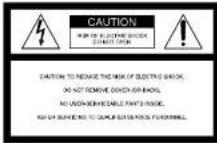

This symbol is intended to alert the user to the presence of uninslated "dangerous village" within the product's enclosure that may be of sufficient magnitude to constitute a risk of electric shock to persons.

This symbol is intended to alert the user to the presence of important operating and maintenance (servicing) instructions in the literature accompanying the appliance.
* The graphical symbols are on the bottom of the coclosure.
INFORMATION
This equipment has been tested and found to comply with the limits for a Class 8 digital device, pursuant in Part 15 of the FCC Rules. These limits are designed to provide reasonable protection against harmful interference in a residential installation. This equipment generates, uses, and can be radio or radio frequency energy end, if not installed and used in accordance with the instructions, may cause harmful interference to radio communications. However, there is no guarantee that interference will not occur at a particular installation. If this equipment does cause harmful interference to radio or television reception, which can be determined by turning the equipment off and on, the user is encouraged to try to correct the interference by one or more of the following:
measures:
Reorient or relocate the receiving antenna. —Remove the separation between the equipment and receiver.
—Connect the equipment into an outlet on a circuit.
different from that to which the receiver is
Consult the dealer or an experienced radio/TV
technician for help
You are continued that any changes or modifications not expressly approved in this manual could void your authority to operate this equipment.
CAUTION
The use of optical instruments with this product will increase eye hazard.
Before You Begin
Thank you for choosing the Sony CD clock radio! I will give you many hours of reliable service and listening pleasure.
Before operating the unit, please read these instructions thoroughly and retain them for future reference.
Features
• Build-in CD player with CD-R/RW playback
- Easy to see large green LED display with brightness control function
• W side to any track of a CD, Radio or Buzzer (dual alert)
- Easy nap timer one push operation
- Extendable groove time from 10 to 60 minutes - V-wave CD player with shuttlecock
function
Precautions
- Operate the unit on the power source specified in the "Energrande"
- The nameplate indicating operating voltage, etc. is located on the bottom of the unit.
- T is disacoustic the power word (mains leaf), pull it out by the plug, not the cord.
- Do not leave the unit in a levation near a heat source such as a radiator or air duct, or in a place subject to direct sunlight, excessive dust, mechanical vibration, and heat.
- Allow adequate air circulation to prevent internal heat built-up. Do not place the unit on a surface (a rug, a blanket, etc.) or near materials (a curtain) which might block the ventilation bulb.
- Should any solid object or liquid fall into the unit, unplug the unit and have it checked by a qualified personnel before operating it any further.
- To clean the casing, use a soft cloth dampened with a mild different solution.
If you have any questions or problems concerning your unit, please consult your nearest Sony dealer.
Troubleshooting
Should any problem persist after you have made the following checks, consult your nearest Sunday dealer. The clock does not show the correct time. • Has an electrical power outage lasting more than one minute occurred?
The CD, radio or buzzer alarm does not sound at the preset alarm time.
+ Is the ALARM indicator light on?
The radio alarm is activated but no sound
comes on at the preset alarm time. • Is the TUNING did set to a receivable radio station? • Has VOLUME been adjusted?
The CD player does not operate.
• Did you close the CD lid?
• Did you place the disc correctly?
sik. um
+ Dusty or detective disc Clean the disc with an
optional clarifying cloth. Wipe the case from the
• Take out the CD and leave the CD compartment open for about an hour to remove ministum: condensation
Sporadic loss of sound in CD operation.
- Dizzy or defective disc — Clean or replace the disc. - Volume too high — Reduce the volume. - Stumble vibration.
Specifications
AUDIO POWER SPECIFICATIONS
POWER OUTPUT AND TOTAL HARMONIC
DISTORION
With S-Cell Inset, both channels driven from 100-10 000Hz;rated 1.0V per channelminimum RMS power, with no more than 1.0% total harmonic distortion in AC operation.
CD player section
System: Compact disc digital media system
Later node properties: General OAS
Emission duration: C
Linear pump. Less than 44.5 μM
(This output is the value measured at a distance of
about 250 mm from the objective lens surface in
the optical pick-up blocks with 7mm aperture.
query response: 20 20 00012.
Radio section
Frequency range
FM 87.5-106 MHz
AM: 590-170KHz
General
Time display
12-exor system
Speaker:
30 min (2.7 minutes) cl., 8:22
Power outputs:
- 41 + 14 (ac. 5/3 - ha) m/z, 20-60
20V AC 60Hz
Dimensions:
Ampos. 229: 104-218 mm solid; Ampos. 9
9c. <14, 8 36 inches; incl. projecting parts and
cormis
Mass
Appena 1650 g (3 lb/10 sec)
Design and specifications are subject to change without notice.
IMPORTANT SAFEGUARDS
For your provisions, please read these safety instructions completely before operating the appliance, and keep this manual for future reference. Carefully observe all warnings, provisions and instructions on the appliance and in the operating
instructions, and adhere to them.
INSTALLATION
Water and Moisture
Do not use protective operated appliances near water - for example, near a half-tub, washbowl, kitchen sink, or laundry tub, in a wet basement, or near a swirraring pool, etc.
Heat
Do not place the appliance near or over a radiator or heat register, or where it is exposed to direct sunlight.
Ventilation
The slots and openings in the cabinet are provided for necessary ventilation. To ensure reliable
operation of the appliance, and to protect it from overheating, these slabs and openings must never be blocked or processed.
Never cover the slots and openings with a cloth or other materials.
- Never block the slots and openings by placing the appliance on a bed, sofa, rug or other similar surface.
- Never place the appliance in a confined space, such as a bookcase, or built-in cabinet, unless proper ventilation is provided.
Accessories
Do not place the appliance on an unstable cart, stand, tripod, bracket, or table. The appliance may fall, causing serious injury to a child or an adult, and serious damage to the appliance. Use only a carl, stand, tripod, bracket, or table recommended by snow.
- An appliance and cart combination should be moved with cars. Quick stops, excessive force, and unoven surfaces may cause the appliance and cart combination to overturn.
Wall or Ceiling Mounting
If your appliance can be mounted to a wall or ceiling, meant it only as recommended by Sony
USE
Power Source
This appliance should be operated only from the type of power source indicated on the marking label. If you are not sure of the type of electrical power supplied to your home, consult your dealer or local power company. For those appliances designed to operate from battery power, of other sources, refer to the operating instructions.
Grounding or Polarization
This appliance is equipped with a polarized AC power cord plug (a plug having one blade wider than the other), or with a three-wire grounding type plug (a plug having a third pin for grounding). Follow the instructions below:
-For the appliance with a polarized AC power cord plug:
This plug will lift into the power outlet only one way. This is a safety lecture, if you are unable to insert the plug fully into the outlet, try reversing the plug. If the plug should shift fail to lit, contact your electrician to have a suitable outlet installed. Do not defeat the safety purpose of the polarized plug by forcing it in.
-For the appliance with a three-wire grounding type AC plug:
This plug will only fit into a grounding-type power outlet. This is a safety feature. If you are unable to insert the plug into the outlet, contact your electrician to have a suitable outlet installed. Do not defeat the safety purpose of the grounding plug.
Overloading
Do not overload wall outlets, extension cords or convenience receptacles beyond their capacity, since this can result in line or electric shock.
When not in use
Unplug the process cord at the appliance from the outlet when left unused for a long period at time. To discern the cord, pull it out by grasping the plug. Never pull the plug out by the cord.
Power-Cord Protection
Route the power cord so that it is not likely to be walked on or pinched by items placed upon or against them, paying particular attention to the plugs, receptacles, and the point where the cord exits from the appliance.
Lightning
For added protection for this appliance during a lightning storm, or when it is left unattended and unused for long periods of time, unplug it from the wall outlet and disconnect the antenna or cable system. This will prevent damage to the appliance due to lightning and powering purges.
Object and Liquid Entry
Never push objects of any kind into the appliance through opcramps as they may reach dampy mass voltage points or short out parts that could result in a fire or electric shock. Never spill liquid of any kind on the appliance.
Cleaning
Unplug the appliance from the wall outlet before cleaning or polishing it. Do not use liquid cleaners or aerosol cleaners. Use a cloth lightly dampened with water for cleaning the exterior of the appliance. Clean the appliance only as recommended by Sany.
Attachments
Do not use attachments not recommended by Sony, as they may cause hazards.
ANTENNAS
Outdoor Antenna Grounding
If an outdoor antenna or cable system is installed, follow the precautions below
An outdoor antenna system should not be located in the vicinity at overhead power lines or other electric light or power circuits, or where it can come in contact with such power lines or circuits. WHEN INSTALLING AN OUTDOOR ANTENNA SYSTEM, EXISTIVE CARE SHOULD BE TAKEN TO KEEP FROM CONTACTING SUCH POWER LINES OR CIRCUITS AS CONTACT WITH THEM IS ALMOST INVARIABLY FATAL.
Be sure the antenna system is grounded so as to provide some protection against voltage surges and built-up static charges. Section 810 of the National Electrical Code provides information with respect to proper grounding of the mast and supporting structure, grounding at the lead-in wire to an antenna discharge unit, size of grounding conductors, location of antenna-discharge unit, connection to grounding electrodes, and requirements for the grounding electrode.
Antenna Grounding According to the National Electrical Code
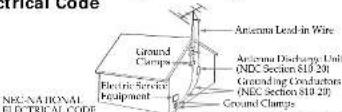
NEC-NATIONAL ELECTRICAL CODE
1105
Power Service Grounding Electrode System
(NTC Art 250 Part H)
SERVICE
Damage Requiring Service
Unplug the appliance from the wall outlet and refer servicing to qualified service personnel under the following conditions:
-When the power cord or plug is damage or trayed.
-If liquid has been spilled or objects have fallen into the appliance. If the appliance has been exposed to rainwater.
If the appliance has been exposed to rain or water. The appliance does not always be complete normally
- Fix appliance location appear to operate formally or exhibits a marked exchange of performance. Thus indicates a need for service.
- If the appliance does not operate normally when following the operating instructions, adjust only those controls that are specified in the operating instructions. Improper adjustment of other controls may result in damage and will often require extensive work.
by a qualified technician to restore the appliance to normal operation.
-If the appliance has been subject to excessive shock by being dropped, or the cabinet has been
danged
Servicing
Do not attempt to service the appliance yourself as opening or removing covers may expose you to dangerous moisture or other hazards.
Refer all servicing to qualified serv
Replacement parts
When replacement parts are required, be sure the service technician has used replacement parts
specified by Sorry That have the same characteristics as the original parts.
Oraclorized sur
Safety check Upon completion of any service or repairs to the appliance, ask the service technician to perform routine safety checks (as specified by Sony) to determine that the appliance is in safe operating condition.
Changing the Brightness of the Clock display
Press BRIGHTNESS to select high or low for the display according to your preferences.
Setting the Clock
- Plus in the unit.
The display will flash "AM 12:00".
2 Press CLOCK for a few seconds You will hear a beep and the hour will start to flash in the display
3 Press TIME SET + or - until the correct hour appears in the display.
4 Press CLOCK once.
5 Repeat steps 3 and 4 to set the minute. After setting the minute, press CLOCK to start the counting of the seconds, and you will hear two short beeps. - T is set the current time rapidly, hold down TIME SET + α =
- In step 5, when you press CLOCK after the minute setting to activate the clock, the seconds start counting from zero.
Playing a CD
An 8 cm (3-inch CD can be played without an adapter.
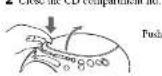
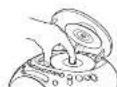
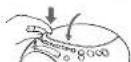
1 Push OPEN/CLOSE to open the CD
compatriotic and place a 0
Labeled surface up
Close the lid
3 Press CD ▶
The CD/RADIO indicate lights up and "TRACK 0" appears in the display to indicate that track 1 of the CD is playing. After you press CD ▶II, it takes about 10 seconds before the music starts. The indication in the display returns to the current time after about 4 seconds
4 Turn VOLUME to adjust the volume.
| To | Press |
| Pause | CD ▶II |
| Resume play after pause | CD ▶II again |
| Locate the beginning of the current track (AMS) | ▶◀*# |
| Locate the next track (AMS) | ▶◀*# |
| Go-back at high speed | Hod down ▶◀*# |
| Go rowed at high speed | Hod down ▶◀*# |
| Locate the previous track (AMS) | ▶◀ repeatedly*# |
| Locate the succeeding track (AMS) | ▶◀ repeatedly*# |
| Stop play | OFF ■ |
* AMS = Automatic Music Sensor
*These operations are possible during both play and play.
- During CD playback, every time you press CLOCK/TRACK, the current time and the track number appear in the display alternately.
About CD-Rs/CD-RWs
This unit is compatible with CD-Rs/CD-RWs but playback capability may vary depending on the quality of the disc, the recording device and application software.
Music discs encoded with copyright protection technologies
This product is designed to play back discs that conform in the Campus Disc (CD) standard. Recently, various music discs encoded with copyright protection technologies are marked by some record companies. Please be aware that among those discs, there are some that do not conform to the CD standard and may not be playable by this product.
To handle compact discs
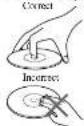
Handle the disc by its edge
Do not touch the surface.
Do not stick paper or tape not write anything on the surface.
Notes
- Discs with non-standard shapes (e.g., heart, square, star) cannot be played on this unit. Attempting to do so very damage the unit. Do not use such discs.
* If you press CD ▶ when there is no disc in the CD compartment, "01" flashes for about 5 seconds on the display and the unit turns off automatically.
Various Modes of CD
Playback
You can play tracks repeatedly or in random under.
Since CD T EAT MODE
changes as follows:
Legend on CD
PLAY MODE Play mode
"NORMAL" (normal play) All the raccles are played once
"REPEAT" (oil repeat)
All the trucks are played repeatedly.
"SHUFFLE" (shuffle play)
All the tracks are played close in smooth order.
All the tracks are played repeatedly in pan
1 Press RADIO-ON to turn on the radio.
The "CD/RADIO" indication will light up.
2 Adjust VOLUME
3 Select the BAND.
4 Tune in a station using the TUNING dial.
• To turn off the radio press OFF ■ • ALARM
RESET
Improving the reception
FM: Extend the FM wire antenna to improve
reception.
- A territe bar arrenta is built into the unit.
Do not operate the unit over a steel desk or metal surface, as this may lead to interference of recognition.
Setting the Alarm
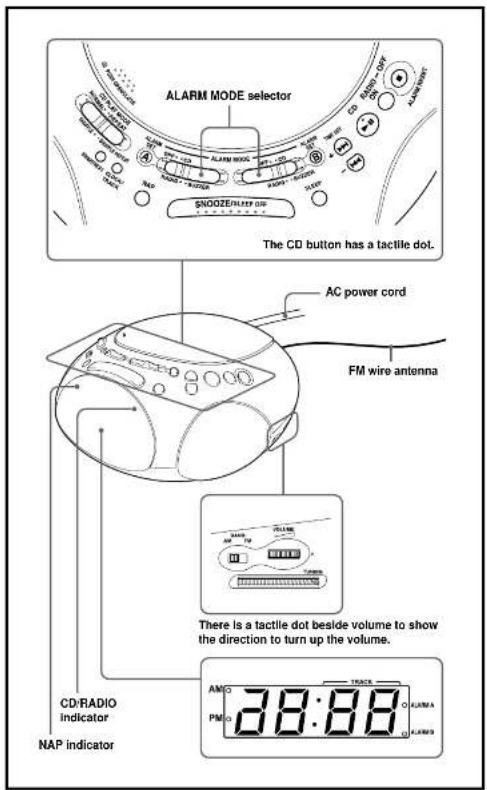
This clock radio is equipped with 3 alarm modes - CD, radio and buzzer. Before setting the alarm, make sure to set the clock (see "Setting the Clock"). This unit is also equipped with a dual alarm function. You can set the alarm for two different times ALARM SET A and ALARM SET B.
To Set the Alarm Time
1 If you will select the CD alarm or radio alarm, adjust the volume. Also, if you will select the radio alarm, tune in to the desired station.
2 Set the ALARM MODE selector to CD, RADIO or BUZZER. The ALARM A or ALARM B indicator lights up.
3 Press ALARM SET A or ALARM SET B for a few seconds. The ALARM A or
ALARM B indicator flashes, depending on which one you set.
After one keep, the hour will start to flash in the
4 Press TIME SET + or - until the desired hour appears.
To set the hour rapidly, hold down TIME SET +
5 Press ALARM SET
This minute will flash 6 Repeat step-4 to set the minute and press ALARM SET.
The wake up track number flashes on the display.
7 If you selected the CD alarm, press TIME SET + or - select the desired wake-up track number.
The wake-up track number can be set up to 59.
8 Press ALARM SET
Two short beeps confirm the setting, and the
ALARM A or ALARM B indicator
lights up
For the CD confirm, the track you specified as the
(If the CD play music is set to "SHUFFLE" or
"SHUFFLE REPEAT", however, all the tracks are closed in a custom color.
To Check the Alarm Time
Press ALARM SET A or ALARM SET B. The
If you press ALARM SET A or ALARM SET B again, the indication changes to the wake-up track number. After a few seconds, the display returns to the current time.
- Alarm time in CD alarm, radio alarm and buccal alarm is set at PM 12:00 when you purchased the unit.
ALARM ON
For the CD alarm, the track you specified as the
Make-up track is playal first. (If the CD play match is not to "SHUEELE" or "SHUEELE REPEAT")
however, all the tracks are placed in realum order.)
If you set the CD alarm when there is no disc in the CD player or the CD compartment lid is open, the buzzer alarm will sound at the set time.
For the radio alarm, the station that the tuning dial is set to will be received.
For the buzzor alarm, the keeping of the alarm
became more impact thus every few sieals in three progressive stages.
Note
When ALARM A and ALARM B are set for the same time, only ALARM A will result.
To Doze for a Few More Minutes
I press SNOOZE/SLEEP OFF.
The CD, radio or buzzer alarm turns off but will be automatically activated again after about 10 minutes. Every time you press SNOOZE/SLEEP OFF, the square time plan uses us follows:
10 → 20 → 30
(1)
4.3 → 1.1 → 1.0
The display shows the smoke time for a few seconds and returns to show the current time. When you press SNOOZE-SLEEP OFF after the current time appeared, the smoke time starts from 10 minutes again.
- The maximum length of the stroke time is 60 minutes.
ALARM OFF
The alarm is turned off automatically after 60 minutes.
To Stop the Alarm
Press OFF ■ · ALARM RESET to turn off the alarm
The alarm will come on again at the same time the must day.
To Deactivate the Alarm
Set the ALARM MODE selector to OFF. ALARM A or ALARM B indicator go off
Using the NAP Timer
(Count Down Timer)
The NAP timer sounds the buzzer after a present time duration.
Press NAP repeatedly until the desired minutes is
Each press changes the display as follows:
OFF (surreal time) → 10 → 20 → 30 ← 90120 → 80 ←
The NAP indicator turns on and the NAP time is displayed for a few seconds. NAP timer starts counting down the NAP time.
When selected NAP time has passed, the beep sound comes on, and the NAP indicator basis.
To Stop NAP Timer
Press NAP or OFF ■ • ALARM RESET to turn off the buzzer.
To Deactive NAP Timer
Press NAP
The NAF indicator goes off.
Setting the Sleep Timer
You can fall asleep to the radio or CD using the built-in sleep time that turns off the CD or the radio automatically after a preset duration.
Press SLEEP during CD or radio play. You can sit the sleep inner to durations of 90, 60, 30, or 15 minutes. Every push changes the display as follows:
OFF(current time) → 90 → 60 15 ← 30 ←
The CD or the radio will play for the time you set, then shot off.
- T u turn off the CD or radio before the preset time, press SNOOZE/SLEEP OFF.
To Use Both the Sleep
Timer and the Alarm
You can fall asleep to the CD or the radio and be awakened by the CD, radio or buzzer alarm.
1 Set the alarm. (See "Setting the Alarm 1") 2 Set the sleep timer. (See "Setting the Sleep Timer".)