ICF-CS970 - Alarm clock radio SONY - Free user manual and instructions
Find the device manual for free ICF-CS970 SONY in PDF.


User questions about ICF-CS970 SONY
0 question about this device. Answer the ones you know or ask your own.
Ask a new question about this device
Download the instructions for your Alarm clock radio in PDF format for free! Find your manual ICF-CS970 - SONY and take your electronic device back in hand. On this page are published all the documents necessary for the use of your device. ICF-CS970 by SONY.
USER MANUAL ICF-CS970 SONY
Parts Identification
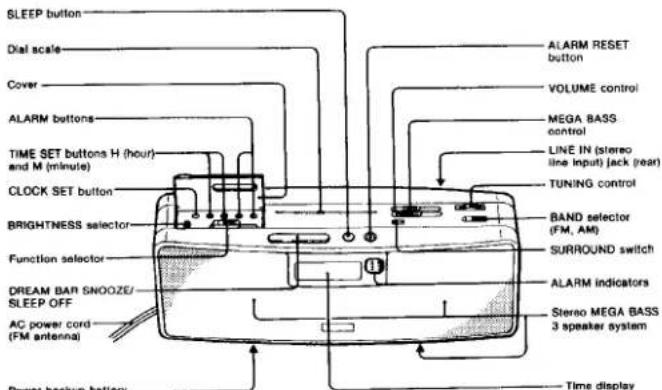
Power backup battery compartment (bottom)
Power Backup Function During Power Interruption
This function allows you to keep the clock operating and to hold the alarm time setting during a power interruption.
During a power interruption, the illumination of the display goes off and the alarm cannot come on.
SF23
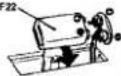
Bottom
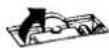
To check battery condition
unplug the AC power cord from the wall outlet and plug it in again after a few minutes. If the time indication is incorrect, the battery is weak or exhausted. In this case, replace the battery for battery life, see "Specifications"
Notes
- The battery is used only for the clock power backup function and not for the radio operating.
- When the unit is unplugged from the wall outlet for a long period of time, be sure to remove the battery to avoid undue battery discharge and damage from possible battery leakage.
- A difference of about +6 minutes per hour may result between the correct time and the times shown on the clock after the power interruption
Troubleshooting Guide
Should any problem persist after you have made the following checks, consult your nearest Sony dealer.
The clock does not show the correct time.
- There has been an electrical power interruption and the power back-up battery is exhausted or is not installed.
The radio or buzzer alarm sound does not come on at the preset alarm time.
- is the current time correctly set?
Check the AM/PM Indication
• is the alarm time correctly set?
Check the AM/PM indication.
• is the function selector correctly set?
For radio alarm set to RADIO
For table claim, set to 10 HOURS For investor claim, set to 10 RUTZ
For buzzer alarm set to ☐ BOLZER. For both radio and buzzer alarm set to DUAL ALARM.
For both radio and buzzer alarms set to double 142. For radio alarm in the desired station tuned in?
- For radio alarm, is the desired station limit. - In the VOLUME control adjusted respectively?
- Is the VOLUME control adjusted correctly? If it is down completely for radio alarm, the alarm sound will not be heard. Be sure to turn up the volume.
Features
- High quality AM/FM stereo radio combined with an electric digital alarm clock and timer.
- The Sony MEGA BASS system produces powerful sound. This unit incorporates a super woofer, which has its own amplifier separate from the one for the full-range speaker.
- The SURROUND switch sets up an exciting stereo sound.
- Because this unit is equipped with a stereo line input jack, you also can enjoy external sound—as from the Discman or Walkman—with MEGA BASS or SURROUND function.
- Choice of awakening to radio alarm, buzzer alarm, or dual alarm. Alarm (radio) and alarm (buzzer).
• Power backup function to keep the clock operating during a power interruption - DREAM BAR, feather-light touch to operate, and having function: snooze alarm and sleep timer off.
Precautions
• Operate the unit only on 120V AC, 60 Hz
- To disconnect the cord, pull it out by grasping the plug. Never pull it by the cord
- Do not leave the unit in a location near heat source such as a radiator or air duct, or in a place subject to direct sunlight, excessive dust, moisture, mechanical vibration, or shock.
- Allow adequate air circulation to prevent internal heat build-up. Do not place the unit on a surface (a rug, a blanket, etc.) or near materials (a curtain) which might block the ventilation holes.
- Should any solid object or liquid fall into the unit, unplug the unit and have it checked by qualified personnel before operating it any further.
- Since a strong magnet is used for the speaker, keep personal credit cards using magnetic coding or spring-wound watches away from the unit to prevent possible damage from the magnet.
- When the cabinet becomes soiled, clean it with a soft cloth dampened with a mild detergent solution. Never use abrasive cleansers or chemical solvents, as they may mar the cabinet.
If you have any question or problem concerning your unit that is not covered in this manual, please consult the nearest Sony dealer.
Specifications
Frequency range FM: 87.6 - 108 MHz
AM: 530 - 1,710 (498)
Antennas FM: AC power cord antenna AM-6ull in lavite bay anison
Speakers
AM Butein: remite bar anders
Full-ranger: 7.7 cm (31a inchest dia.
Super wooler: 7.7 cm (3W inches) dia.
Power output 1.2W + 1.2W
Зирен моюгет 2,4мг
Inputs LINE IN (tiered mini jack) Sensitivity 0.46V
Sensitivity 0.444
input impedance 47 KOhm
Power requirement
120V AC, 60 Hz
For power backup function: 9 V DC, one 6F22
Belly Avery, 45 hours using Sony belley S.00689
Battery line Approx. 40 hours using 3000-5000 psi Dimensions Angles: 370 x 140 x 120 mm (with)
14% = 5% = 4% (inches)
not incl projecting parts and controls
Weight Approx. 2.4 kg (5lb 5 oz) not incl. battery
Optional access
Connecting cord RK-G138 stereo mini plup
to stereo mini plug)
Connecting cord RK-G129 (two phone plugs to stereo mini plug)
Design and specifications subject to change without notice.
SONY
3-750-421-21(1)
Dual Alarm AM/FM Stereo Digital Clock Radio
ICF-CS970
1
192014 192015 192016
1.5 2(1)Y
Operating Instructions
to in truva?
Before operating the unit, please read this manual thoroughly and retain it for future reference.
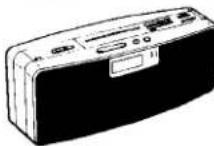
DREAM MACHINE MEGA BASS
Sony Corporation © 1980 Printed in Taiwan R.O.C.
WARNING
To prevent fire or shock hazard, do not expose the unit to rain or moisture.
CAUTION TO REDUCE THE RISK OF ELECTRIC SHOCK.
DO NOT REMOVE COVER (OR BACK)
NO USER SERVICEABLE PARTS INSIDE
REFER SERVICING TO QUALIFIED SERVICE PERSONNEL

This symbol is intended to alert the user to the presence of uninsulated 'dangerous voltage' within the product's enclosure that may be of sufficient magnitude to constitute a risk of electric shock to persons.

This symbol is intended to alert the user to the presence of important operating and maintenance (servicing) instructions in the literature accompanying the appliance.
How to Set the Clock
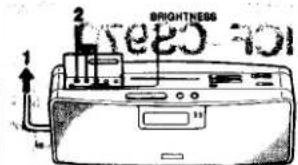

1 Connect the AC power cord to
a wall outlet Figure will access and begin to
blink
2 Open the cover and adjust the clock to the current time with the TIME SET buttons, H (hour) and M (minutes), while holding down the CLOCK SET button.
AM12:00 = midnight PM12:00 = noon
The hour and minute digits advance independently: The minute digits return to "00" after reaching "50".
Example:
To set to 8:15 AM
To advance the minute digits rapidly
Keep the H and M buttons pressed while holding down the CLOCK SET button.
To change the brightness of the time display
Open the cover and set the BRIGHTNESS selector to either L or H.
Zero second adjustment
Example: To set to 7:15 p.m.
1 Adjust the time to PM 7:14 as previously described.
Press CLOCK SET button and M button simultaneously the radio or telephone time signal, and then release
intario operation
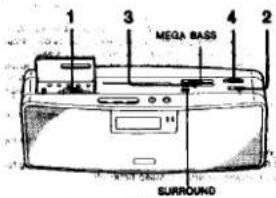
1 Set the function selector to RADIO ON.
2 Select the desired band (FM or AM).
3 Adjust the VOLUME control to get sound.
4 Tune in the desired station and adjust the volume.
To turn off the radio, set the function selector to OFF.
To adjust the sound quality
To obtain powerful bass
The "MEGA BASS" system gives powerful bass through the su
per woofer added to a normal speaker system. To increase the base, slide the MEGA BASIS control toward MAX
To enjoy external sound
You can enjoy a portable CD player to be connected to the LINE IN (stereo line Input) jack. Set the function selector to RADIO ON when the LINE IN jack is used.
Note: If the program source is monaursi, the surround effect cannot be obtained.
To bring about the stereo effect, press the SURROUND switch.
To Improve Receiving Condition
FM: Since the AC power cord serves as an FM antenna, extend it for better reception.
AM Since the reception is affected by the direction of the ra
dio, rotate the radio horizontally for optimum reception.
In weak signal areas, stereo sound may be changed to monaural sound automatically.
How to Set the Alarm
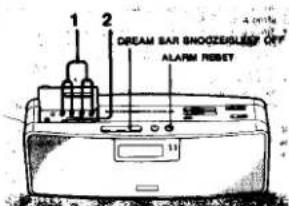
1 Set the alarm time for radio or buzzer.
Open the cover and set the radio alarm time with TIME SET
H and M while holding down ALARM A RADIO. Set the buzzer alarm time with TIME SET H and M while holding down ALARM D BUZZER.
To advance the minute digits rapidly
Keep the H and M buttons pressed while holding down the ALARM button.
2 Set the function selector to the desired alarm position: for radio alarm, to A RADIO, for buzzer alarm, to B BUZZER, for both radio and buzzer alarm, to DUAL ALARM.
For radio alarm
Tune in the desired station and adjust the VOLUME and MEGA BASS controls and the SURROUND switch as described in "Radio operation".
Notice for dual alarm
- If you set the radio and the buzzer to the same time, only the radio sound will be heard.
- If the buzzer alarm is set to the time before the radio alarm stops, the alarm shifts from radio to buzzer at the alarm preset time.
The desired alarm will automatically sound at the preset time, and automatically turn itself off after about 59 minutes.
If you want to listen to the radio continuously, set the function selector to RADIO ON.
Note on volume adjustment
The buzzer sound level is fixed, and independent of the VOLUME control setting. For radio alarm, however, be sure to adjust the volume.
To stop the radio or buzzer sound, set the function selector to OFF or press the ALARM RESET button.
Snoozs alarm function
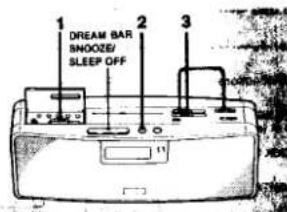
If you wake to the alarm sound in the morning but want to doze for a few more minutes, just lightly press the DREAM BAIS SNOOZE/SLEEP OFF.
The alarm sound will be silenced, but will automatically come on again after about nine minutes. If you want to doze more, press the bar again. You can repeat this snooze function as many times as you like. If you do not want the alarm sound any more after pressing the bar, press the ALARM RESET button.
To wake to the alarm sound at the same time the next day. Stop the radio or buzzer sound by pressing the ALARM RESET button. Leave the function selector as it is.
To check the preset time
Press the ALARM button, 📁 RADIO to check the radio preset time, and 🌐 BUZZER for the buzzer.
How to Set the Sleep Timer
By using the sleep timer, you can fall asleep while listening to the radio. You can set the sleep time so that the radio turns off up to 59 minutes later.
1 Set the function selector to
RADIO OFF.
2 Press the SLEEP button
The radio turns on. The radio will
turn off after 50 minutes.
To set the desired time
The digits will be reduced by keeping the SLEEP button pressed. So, you can set the desired time within the range from 50 minutes to 1 minute.

3 Tune in the desired station and adjust the volume. The radio will turn off automatically after the preset time had elapsed.
To turn off the radio before the preset time, press DREAM BAR SNOOZE/SLEEP OFF (which cancels the "sleep timer" function).
To check the remaining minutes, press the SLEEP button lightly.
if the preset alarm time comes while the sleep timer is operating, the alarm buzzer will not sound.