
CM2020B - Coffee maker BLACK & DECKER - Free user manual and instructions
Find the device manual for free CM2020B BLACK & DECKER in PDF.


User questions about CM2020B BLACK & DECKER
0 question about this device. Answer the ones you know or ask your own.
Ask a new question about this device
Download the instructions for your Coffee maker in PDF format for free! Find your manual CM2020B - BLACK & DECKER and take your electronic device back in hand. On this page are published all the documents necessary for the use of your device. CM2020B by BLACK & DECKER.
USER MANUAL CM2020B BLACK & DECKER
Register your product at www.prodprotect.com/applica
12-CUP PROGRAMMABLE COFFEEMAKER
-
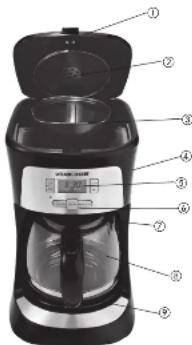
Cover
-
Showerhead
-
Removable filter basket (Part # CM2020B-01)
-
Easy-to-view water window
-
Digital display
-
Control panel
-
Speak-A-Cun® interrupt feature
4.8. DuralifeTM glass carafe
Black (Part # CM2020B-021, Red (Part # CM2020B-021)
-
Nonstick "kenn hot" carafe plate
-
Built-in cord storage [not shown]
Note: † indicates consumer replausible/removable parts
Please Read and Save this Use and Care Book.
IMPORTANT SAFEGUARDS
When using electrical appliances, basic safety
precautions should always be followed to reduce the risk of fire, electric shock, and/or injury to person's including the following:
○ Read all instructions.
○ Do not touch hot surfaces. Use handles or knobs.
To protect against fire, electric shock and injury to persons do not immerse cord, plugs or appliance in water or other liquid.
○ Close supervision is necessary when any appliance is used by or near children.
○ Unplug from outlet when not in use and before cleaning. Allow to cool before putting on or taking off parts, and before cleaning the appliance.
Do not operate any appliance with a damaged cord or plug, or after the appliance malfunctions or has been damaged in any manner. Return appliance to the nearest authorized service facility for examination, repair or adjustment.
The use of accessory attachments not recommended by the appliance manufacturer may result in fire, electric shock or injury to persons.
○ Do not use outdoors
Do not let cord hang over edge of table or counter, or touch hot surfaces.
Do not place on or near a hot gas or electric burner, or in a heated oven.
To disconnect, turn timer control to OFF, then remove plug from wall outlet.
Product may vary slightly from what is illustrated.
Do not use this appliance for other than intended use.
Keep lid on the carafe when in use.
○ Scalding may occur if the lid is removed during the brewing cycles.
☐ The carafe is designed for use with this appliance. It must never be used on a range top.
Do not set a hot carafe on a wet or cold surface.
Do not use a cracked carafe or a carafe having a loose or weakened handle.
Do not clean carafe with cleansers, steel wool pads or other abrasive material.
SAVE THESE INSTRUCTIONS.
This product is for household use only.
POLARIZED PLUG (120V Models Only)
This appliance has a polarized plug (one blade is wider than the other). To reduce the risk of electric shock, this plug is intended to fit into a polarized outlet only one way. If the plug does not fit fully into the outlet, reverse the plug. If it still does not fit, contact a qualified electrician. Do not attempt to modify the plug in any way.
TAMPER-RESISTANT SCREW
Warning: This appliance is equipped with a tamper-resistant screw to prevent removal of the outer cover. To reduce the risk of fire or electric shock, do not attempt to remove the outer cover. There are no user-serviceable parts inside. Repair should be done only by authorized service personnel.
ELECTRICAL CORD
a) A short power-supply cord is to be provided to reduce the risk resulting from becoming entangled in or tripping over a longer cord.
bl Longer extension cords are available and may be used if care is exercised in their use.
c) If an extension cord is used,
1) The marked electrical rating of the detachable power-supply cord or extension cord should be at least as great as the electrical rating of the appliance,
2) If the appliance is of the grounded type, the extension card
should be a grounding-type 3-wire cord, and
3) The longer cord should be arranged so that it will not drape over the countertop or tabletop where it can be pulled on by children or tripped over unintentionally.
Note: If the power supply cord is damaged, it should be replaced by qualified personnel or in Latin America by an authorized service
How to Use
This product is for household use only
GETTING STARTED
- Wash removable parts as instructed in CARE AND CLEANING.
- Place basket-style paper filter into removable filter basket. Place basket
into filter basket holder.
- Plug cord into standard electrical outlet.
- Brew Water through appliance without adding coffee grounds. This
Removes the cost of restore that may remain in the system during the manufacturing process.
- Discard water from the carafe and paper filter from filter basket.
- Turn off appliance; unplug and allow to cool down
SETTING THE CLOCK
-
Plug appliance into standard electrical outlet
-
The digital check-up proxy maxima15.13
-
To change the time: Press HOUR Button until the correct time appears on
the display. When the time passes through TM recalimates to be you are in PM time. If the "PdM" is not illuminated it is AM time.
- Press the MIN button to select the minutes
Note: If the applicant is unplugged or never is interrupted even momentarily.
the time may need to be reset.
BREWING COFFEE
-
Open cover
-
Fill water reservoir using the carafe with desired amount of cold tap
water. Do not exceed the 12-cup IMAX level on the water reservoir.
-
Place on 2-12 gun basket style progress into the air
-
Taked and 10 top cushion style paper liner into the off-shoulder disk balance
-
Add desired amount of ground coffee. Close cover
-
Make sure carafe lid is properly attached to the empty carale. Close the
Lfd.
Note: Coffee may overflow if carafe lid is not properly placed.
-
For example, the area of the car and plane.
-
Play power 35A into Sable.
- If using known speed in deci
a. If a group of 100% groups is normal to, your own group is not in the case. b. The same value is given, however, the mean difference is given to the
strong heavy. The word STRONG is displayed.
-
Press ON/OFF button and brewing begins.
-
When coffee stops flowing into carafe, the brew cycle is complete.
Cofleemaker keeps when brew cycle is finished. The time since brewing
will be visible at the barriers of the digital display
-
Once coffee grounds have cooled, easily open to cover and, discard used
-
The self-campaign will keep brewed softie hot for 7 hours and then
negramatically turn of
- To turn off the colleagues at any time press the DN/OFF button. The DN/
OFF light goes off.
BREWING 1 TO 4 CUPS
Note: This feature shows don't the evening to extract the best flavor when howing a email amount of coffee.
Eating a small artisan of coffee
-
Has the appropriate amount of meter for the number of copies to be created from 1, 5
-
Fill paper filter with diesel amount of coffee cups
-
Press the 1-4 CUP button, 1-4 CUP is displayed.
Note: When using this feature coffee will be brewed at regular strength only.
- Press the ON/OFF button, its light illuminates and the brewing cycle begins
Note: Press the UK/OFF button to cancel this function.
SNEAK-A-CUP® FEATURE
Remove the carafe and brewing is paused. The carafe must be placed back on
the carafe plate in 30 seconds to prevent overflow. Browsing begins again.
AUTO BREM
-
Follow steps: Through through 100% BREWINS COFFEE
-
Make sure clock has become to correct time of day.
- Down the program (PROC/#UTO) is an and hold until the 12:00 display
the
- Start to change the delayed brewing time as desired within 2 seconds.
Note: If the coffeemaker has not been unplugged the last delaxed brewing
time will appear on the digital display.
- To change the time press FLOK suit that the desired correct firm
appears on the display. Press the MIN button to select the minutes.
- Press the PROB/AUTO button to activate the delayed brewing. The word
AUTO is displayed
- To check the preset auto time, press program [PROG/AUTO] button and
Hold it. Once button is released, the clock time will display again.
- If you want to change the preset auto clinic, press the information back.
to cancel the preset time. The Word AUTO go
- To consider use a new www.SPOONTO solution, Covered AUTO cars e/f
from digital display. To brew coffee immediately press the DN/DEE button
Care and Cleaning
This product contains no user serviceable parts. Reis: service to qualified service
personnel
CLEANING
- Be sure the unit is unplugged and has cooled.
- Open the box
• To remove the filter basket, grip the handle and lift straight up. Discard the
paper filter, if used, and the coffee grounds.
- Wash the filter basket, can she and can she'll in dishwasher, tap rack or wash by
hand in hot water and soap.
- Wipe the appliance's exterior surface, control panel and carafe plate with a soft damp cloth. Do not use abrasive cleaners or scouring pads. Never immerse the coelicemaker in water.
- To clean the inside of the cover, open the cover and leave in the open position
Wipe surfaces with a dome cloth.
AUTO CLEAN
We recommend cleaning your self-cemaker once a month.
-
Combine 6 cups of white vinegar and 4 cups of cold water in canals
-
Four into water reservoir
-
Place an 8 to 12 cup basket style paper filter in the removable filter basket
Insert filter basket into filter basket holder and close cover.
- Make sure the lid of the carate is in place and place empty carate on the "Keep
Hot* cars plate
-
Flu power cord into an outlet
-
Press AUTO CLEAN to activate cleaning cycle; the word CLEAN is display and
the POWER ON light illuminates.
- Part of the mixture will brew through. Remaining mixture will be held in
coffecemaker for 30 minutes before completing its brew through.
Note: The entire cleaning cycle will take 45.80 minutes to complete
- When the coffeemaker completes the AUTO CLEAN cycle, it keeps and shuts off
automatically.
- Brew fresh water through appliance following instructions given in GETTING
STARTED before brewing coffee again.
[Non-Text]

NEED HELFY
For autiva, result or any candidate regarding
p#r #a#n##, t#e ##pp##le re#m#ed o l##s at this #st. Please ##nt ##to the
product in the place of purchase. Plan, please DO
NOT real product back to manufacturer, nor bring What does your warranty not cover
it to a service center. You may also need to consult ■ Damage from commercial use
The Values is based on the lives of its financial. - Damage from Finance, abuse or freight - Projects that have loss and End is not yet
| d'agulim sale in the United States and Canada | a. (b) buy-sin used as required outside the non-
What does it cover? 2' surdure
- Annel's out in material or materials - Base parts and other accessories items that
preted, however, applied liability will not
exceed the purchase price of product. • Shipping and rental costs are: \$10
For 1920 only: - Tax expense from the state of origin, number - Tax expense from the state of origin, number
What will we do to help you?
- Provide growth with a personally similar
replacementi produs
Honeywell, Inc.
There are you good stock? - Even once moving as usual at close - How much also have otherwise. Real price from
- 2017, 30, 45, 50, 55, 60, 65, 70, 75, 80, 85, 90, 95, 100, 105, 110, 115, 120, 125, 130, 135, 140, 145, 150, 155, 160, 165, 170, 175, 180, 185, 190, 195, 200, 205, 210, 215, 220, 225, 230, 235, 240, 245, 250, 255, 260, 265, 270, 275, 280, 285, 290, 295, 300, 305, 310, 315, 320, 325, 330, 335, 340, 345, 350, 355, 360, 365, 370, 375, 380, 385, 390, 395, 400, 405, 410, 415, 420, 425, 430, 435, 440, 445, 450, 455, 460, 465, 470, 475, 480, 485, 490, 495, 500, 505, 510, 515, 520, 525, 530, 535, 540, 545, 550, 555, 560, 565, 570, 575, 580, 585, 590, 595, 600, 605, 610, 615, 620, 625, 630, 635, 640, 645, 650, 655, 660, 665, 670, 675, 680, 685, 690, 695, 700
BLACK DECKER is a registered trademark of the Black & Decker Corporation, January.
Maryland, USA
es un macros registrada de The Black & Checker Corporation, Masso,
Marplant, E.I.
Marie and Prunied in People's Republic of China
© 2012 Annora Consumer Products, Inc.
• Shift the online service website
arteprolact.com/applica, or call toll-free
• Art. 2014, Art. 2015, Art. 2016
• 1.00000000000000000000000000000000000000000000
What does your warranty and cease?
• Hammers from the above above 15 ozolari
- Products that have been notified in or
- Products used at serviced outside the quarter
- USIMC
-
squared with the unit
- Shipping and handling cycle
The following table is in Chinese.
• Consequential incidents during Place
- 12.04 Pa, that some available to 20% at 3.09
华能控股集团股份有限公司
(1) Stock and Asset Management (The Board of
If you also have a physical facility, you have
10.2.1 By SAA Table 3 (gains that are p from
3.2.15.2024年利润分配方案
2012/3-28-142-15
© 2012 Annora Consumer Products, Inc.
BLACK&DECKER
MODELO CM2020B CM2020R
The following table is provided in the image.
[Unreadable due to severe distortion and noise]
No spn, a. P###, int## ## ## #e##
- 本报告书 includes a section of the contents.
• In the case of the first time, we have been
the park, the site of the city is a place
(See the section of the
[Unreadable]
5、本次发行股份购买资产涉及关联交易
• Low prices were all made e riscus tere burtic oil pale
- 2017年1月1日
el spoc
The following table
• The company's shareholding structure is not equal to
• In a new year you have enough
2017年1月1日
Brand : BLACK & DECKER
Model : CM2020B
Category : Coffee maker