68 - Garage door opener Skylink - Free user manual and instructions
Find the device manual for free 68 Skylink in PDF.


User questions about 68 Skylink
0 question about this device. Answer the ones you know or ask your own.
Ask a new question about this device
Download the instructions for your Garage door opener in PDF format for free! Find your manual 68 - Skylink and take your electronic device back in hand. On this page are published all the documents necessary for the use of your device. 68 by Skylink.
USER MANUAL 68 Skylink
PROGRAMMING THE TRANSMITTER
Thank you for your purchase of the Skylink garage door remote control, Model 68. There are 2 different steps you need to setup in order to use this universal garage door remote control to operate your existing garage door opener. These 2 steps are:
1) Frequency switch – select the correct frequency according to the brand of your existing garage door opener.
2) Code setting - Set the jumper connectors on the Model 68 so that they match the code setting of your existing garage door opener.
Please follow the detailed instructions below in order to set up the Skylink Model 68 to work with your existing opener. NOTE: Transmission range may be reduced with use on a metal garage door.
STEP 1 - SET FREQUENCY SWITCH
1a. Locate frequency switch on the bottom of the transmitter: (see diagram A)
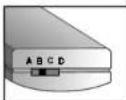
Diagram A

1b. Determine the brand of your garage door opener and set the frequency switch to the corresponding position. (see chart 1)
| Period of your owner | USD | EUR | ||
| Settlements | Settlements | |||
| no position | Frequency | no position | Frequency | |
| Chambering* | A | 300 | C1X | 31/5/94 |
| Lid-Argen* | A | 300 | C1X | 31/5/94 |
| Sens | A | 300 | C1X | 31/5/94 |
| Alstomgian (Lid)* | D/A | 876/992 | C1X | 31/5/94 |
| Machy Mechaton* | A | 300 | C1X | 31/5/94 |
| Candex (Pierking) | A | 300 | C1X | 31/5/94 |
| Candex (LP door lamp) | A | 300 | C1X | 31/5/94 |
| Overhead Door* | A | 300 | C1X | 31/5/94 |
| Ricoa (Lipstick's Door*) | B | 310 | B | 310 |
| Master Chest* | - | - | C1X | 31/5/94 |
| Linet | C | 310 | D | 310 |
| M-O-M* | C | 310 | D | 310 |
| Starley* | D/C | 876/992 | C | 310 |
| M-M-L-Cob* | D/C | 100/33 | P | 310 |
| Bakka*UR-00 | A | 300 | A | 300 |
Chart 1
STEP 2 - SET CODE CONNECTORS
2a. To program the model 68, open the case with a coin. (see diagram B)
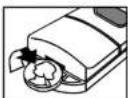
Diagram B
The model 68 transmitter has 12 columns of posts. each column has 3 posts. (see diagram C)
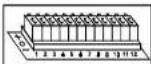
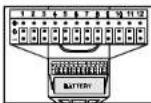
Diagram C
Each column contains one connector (see digram D) for a total of 12 connectors.

Diagram D
If the connector is placed on the top and middle posts, that column is set on "+" or "ON" or "CLOSE". If the connector is placed on the middle and bottom posts, that column is set on '-'
or "OFF" or "OPEN". If the
connector is removed completely, (not placed on any posts), it is set to *0* or the neutral position. (see diagram E for examples of how to set a column to the three different positions). When removing a connector to set a column to the neutral position, save the connector in case you change the code at a later date.
STEP 2 - SET CODE CONNECTORS
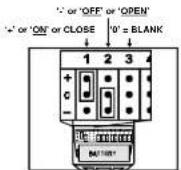
Diagram E
2b. There are 2 ways to program the model 68 so that it will communicate with your garage door opener. Open your existing transmitter, (the unit you currently use to open your garage), or look at the back of your garage door opener. If you see a column of small switches go to point 2c in this manual. If there are no switches, go to point 2e.
2c. To move the connectors, side an opened paper clip into the side of a connector and lift. (see diagram F) When repositioning connectors, place a connector on the two chosen posts, then push down on the connector with your finger.
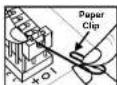
Diagram F
Code connector setting to match your open/motor
| Linear ^2 | Position 1 to 8 | + OR - | |
| M-C-W ^3 Position 1 to 8 | + OR - | ||
| Stanley (310) Gender Position 1 to 10 | + OR - | 11,12 sat to + or - | |
| Stanley (300) Position 1 to 10 | - OR | 11,12 sat to + or - | |
| Multi-Code Position 1 to 10 | + OR - | 11,12 sat to + or - | |
| Chamberlain Position 1 to 9 , 0 blank, OR | |||
| Lift Massor Position 1 to 9 , 0 blank, OR | |||
| Scars Position 1 to 8 , 3 blank, OR | |||
| Wayne Fallon Position 1 to 9 , 0 blank, OR - | |||
| Motor Mechanic Position 1 to 9 , 0 blank, OR | |||
| Genio (9 positions) Position 1 to 9 | + OR | ||
| Genio (12 positions) | Position 1 to 12 | - OR | |
| Master Cool | Position 1 to 12 | - OR - | |
| Pullar/Alder/Alder | Position 1 to 9 - 0 blank, OR - | ||
| Crafted Door | Position 1 to 9 - 0 blank, OR - |
*Please check the FAQ section from www.skylink.com or very old Linear / M-D-M system.
Set the connectors numbered 1 through 12 to match the switches of your existing transmitter or receiver. If your garage door opener is manufactured by (Stanley, Genie, Multi-Code, Linear, Moore-O-Matic) these switches may only have two positions. (+, ON, CLOSED' and "-, OFF, OPEN'). (see diagram G) Set the connectors on the model 68 to "+ if your existing switches are either +, ON, CLOSE" and set to "-" if your existing switches are either -, OFF, OPEN". Do not use the center position "0".
Examples of how to set Model 68
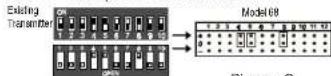
Diagram G
STEP 2 - SET CODE CONNECTORS
If your existing transmitter has fewer than 12 switches, see point 2d in this manual. Press the button on the transmitter. If the garage door does not open, reverse all of the connectors on the model 68. The “+” will be changed to the “-” position and the “-” position will be changed to the “+” position. (see diagram H)
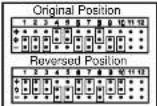
Diagram H
If your garage door opener is manufactured by (Chamberlain®, Sears®, Lift-Master®, Wayne Dalton®, Pulsar® or Master Mechanic®) the switches will have 3 positions. (+, 0, -). Set the connectors on the model 68 to match their corresponding positions.
If your opener is a Sears ^® , Chamberlain ^® or LiftMaster ^® and the existing transmitter has three buttons, (see diagram I), the first connector in the model #68 may need to be changed to another position.
If your Chamberlain ^a , Sears ^b , Lift-Master ^b has 9 DIP switches, match them to the first 9 connectors on the model 68 and remove the last 3 connectors (connectors 10, 11, 12). If there are only 8 DIP switches on your Chamberlain ^a , Sears ^b , Lift-Master ^b , match them to the 2-9 position on the model 68 and remove the last 3 connectors (connectors 10, 11, 12). Now you may have to change the positioning of the #1 connector on the model 68.
If the large button of Diagram I is used to open the garage door, set the #1 connector to “-” position. If the middle button is used, set the #1 connector to the “0” or “blank” position. If the smaller button on the left is used, set the #1 connector to the “+” position.
2d. If your existing transmitter or receiver has fewer than 12 switches, match only the first corresponding connectors. Leave the remaining posts blank, (remove the connectors).
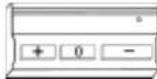
Diagram I
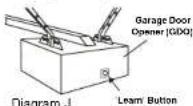
2e. If your existing opener does not have any switches, then it can "learn" the code needed to open your garage door. Set the connectors of the model 68 to any combination of ", 0 , . For security reasons, do not leave the connectors at the current position (see point 2c on how to move the connectors). Press the learn button on the garage door opener (unit with motor located in the ceiling of the garage, see diagram J) for approximately two seconds. The LED light located beside the learn button will go on. Then press the button on the model 68 transmitter and hold for about one second. The LED light on the garage door opener will flash then go off.
The model 68 is now programmed correctly and will open your garage door.
WARNING
If this transmitter triggers other garage doors in your neighborhood, change all your transmitters and receiver to a new code setting.
DO NOT let children use the garage door transmitter without adult supervision. Children can injure themselves or others by the garage door.
If, within one year from date of purchase, this product should become defective (except battery), due to faulty workmanship or materials. it will be repaired or replaced, without charge. Proof of purchase is required.
BATTERYWARR
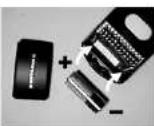
12 volt "cigarette lighter" type (size 23A) battery (included).
NTY
The Universal Garage Door Remote Control is approved by the FCC and it complies with Part 15 of the FCC Rules. Its operation is subject to the following two conditions:
-
This device may not cause harmful interference.
-
This device must accept any interference that may cause undesired operation.
WARNING:
Changes or modifications to this unit not expressly approved by the party responsible of compliance could void the user's authority to operate the equipment.
NOTE
If your Skylink Universal Remote Control does not activate your Garage Door Opener, the reason may be that your GDO age or manufacturer is not listed on the compatibility chart.
The solution is the Skylink UR-100 Universal Receiver.
If you would like to order Skylink's product or have difficulty getting your Skylink's remote control to work, please:
- visit our website FAQ at www.skylinkhome.com, or
- email us at support@skylinkhome.com
(reply within 24 hrs)
- call our toll free at 1-800-304-1187 from Monday to Friday, 9 am to 5 pm EST.
Skylink will not be held liable or responsible for any misuse or application of this product other than for its intended use.
CUSTOMER SERVICE
2213 Darwin Drive
MESESUEGA OYAR LEI-XI CANADA
(905)608-9223
1905:608 8744 FAX
Emailsupport@skyirkhome.com
(Reply: White 24 May) Customer Service: (800)806-1187
From Monday to Friday, Sam to 3am EST
http://www.szylinkhome.co
P# 1016180-00 100
581120 670552
Favills Pending
3602 SHUK K GROUP

GARAGE DOOR/GATE
REMOTE CONTROL
USER'S INSTRUCTIONS
(Model 68)