
BP761N - Blood pressure monitor OMRON - Free user manual and instructions
Find the device manual for free BP761N OMRON in PDF.


| Product Type | Automatic Blood Pressure Monitor |
| Brand | OMRON |
| Model | BP761N (REF HEM-7320T-Z) |
| Measurement Method | Oscillometric |
| Display | LCD Digital |
| Measurement Range | Pressure: 0 to 299 mmHg; Pulse: 40 to 180 beats/min |
| Accuracy | Pressure: ±3 mmHg or 2% of reading; Pulse: ±5% of display reading |
| Inflation | Fuzzy-logic controlled electric pump |
| Deflation | Automatic pressure release valve |
| Power Source | 4 x AA batteries (1.5V) or optional AC adapter (AC100-240V, 50/60Hz, 0.12A) |
| Battery Life | Approx. 1000 measurements (with new alkaline batteries) |
| Memory | Up to 60 readings per user, 2 users; average calculation |
| Bluetooth | Yes (Bluetooth Smart) for wireless data transfer to smartphone app |
| Arm Cuff | ComFit™ Cuff for arm circumference 9" - 17" (22 - 42 cm) |
| Weight (Monitor) | Approx. 385 g (13.6 oz) without batteries |
| Weight (Cuff) | Approx. 163 g (5.75 oz) |
| Dimensions (Monitor) | 124 mm (W) × 90 mm (H) × 161 mm (L) [4.9" × 3.5" × 6.3"] |
| Operating Environment | 50°F to 104°F (10°C to 40°C); 15% to 90% RH |
| Storage Environment | -4°F to 140°F (-20°C to 60°C); 10% to 95% RH; 700 to 1060 hPa |
| IP Classification | IP20 |
| Warranty | Monitor: 5 years; Arm Cuff: 1 year |
| Optional Accessories | AC Adapter (Model HEM-ADPTW5); Replacement cuff (HEM-FL31) |
| Special Features | Blood pressure color indicator (green/orange); Irregular heartbeat detection; Movement error detection; Guest mode |
Frequently Asked Questions - BP761N OMRON
User questions about BP761N OMRON
0 question about this device. Answer the ones you know or ask your own.
Ask a new question about this device
Download the instructions for your Blood pressure monitor in PDF format for free! Find your manual BP761N - OMRON and take your electronic device back in hand. On this page are published all the documents necessary for the use of your device. BP761N by OMRON.
USER MANUAL BP761N OMRON
natural_image
Simple curved line drawing without any text, numbers, or symbols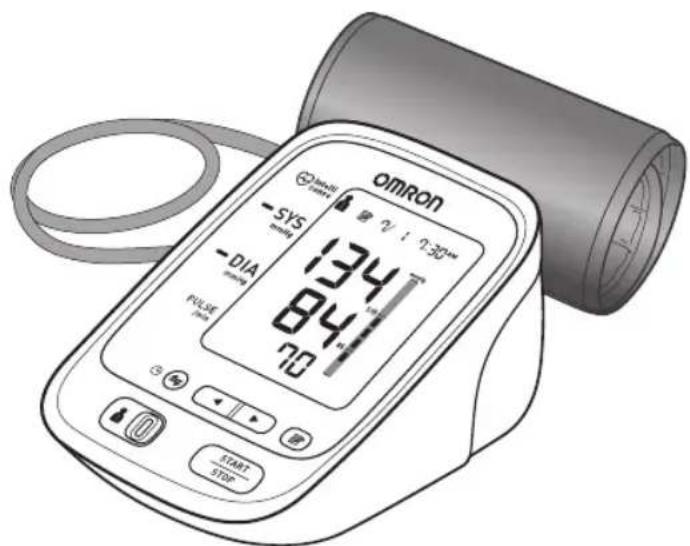
English
Español
7 series Blood Pressure Monitor
Model BP761N
Instruction Manual
All for Healthcare
Product includes:
natural_image
Illustration of a medical pressure monitor with a coiled tube and connector (no text or symbols)ComFit™ Cuff Brazalete ComFit™
Instruction Manual Manual de instrucciones
natural_image
Illustration of a person using a blood pressure monitor and medical equipment (no text or symbols)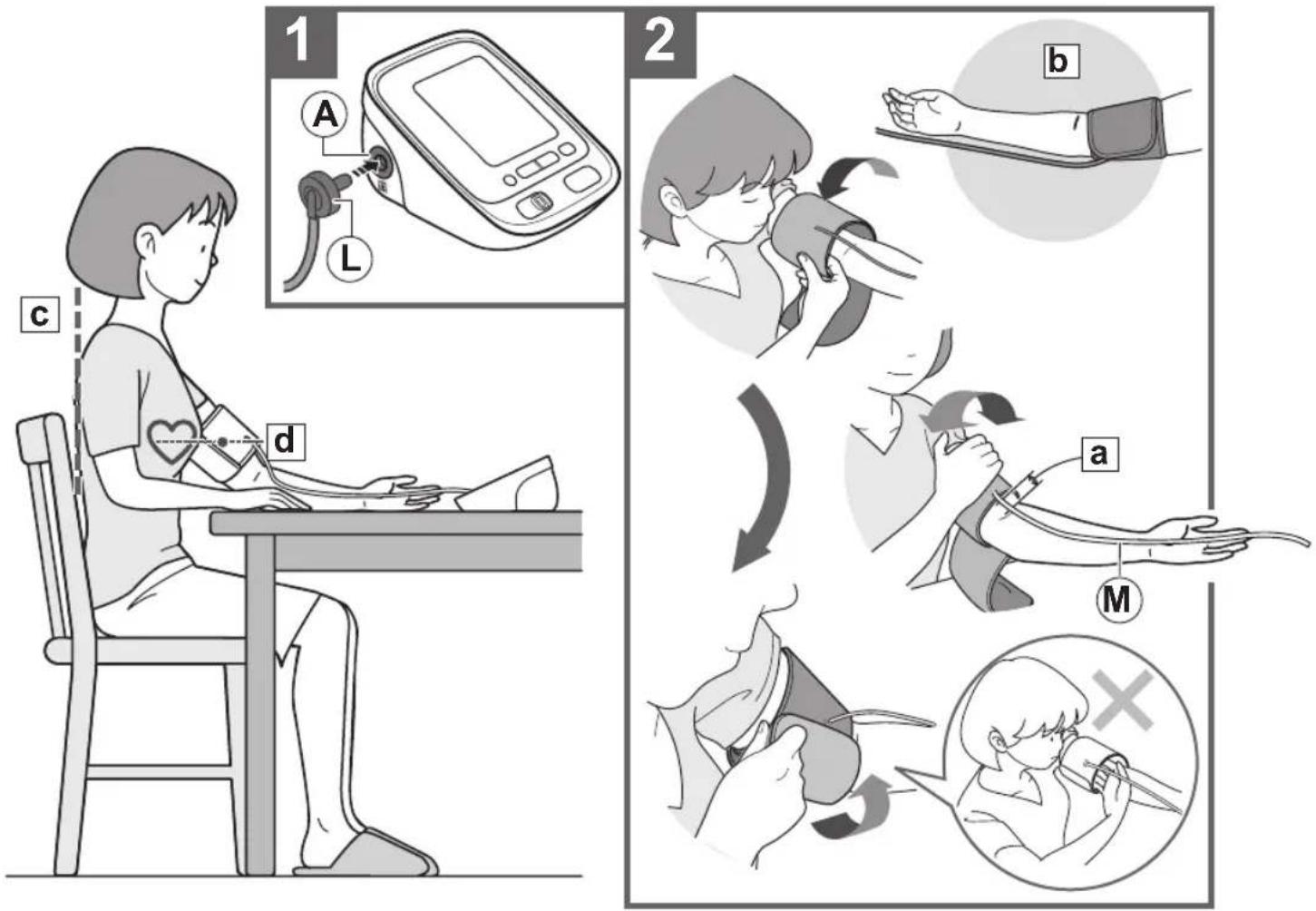
Contents
Thank you for purchasing the OMRON® BP761N Blood Pressure Monitor.
Your new blood pressure monitor uses the oscillometric method of blood pressure measurement. This means the monitor detects your blood movement through your brachial artery and converts the movements into a digital reading. An oscillometric monitor does not need a stethoscope so the monitor is simple to use.
Intended Use
This device is a digital monitor intended for use in measuring blood pressure and pulse rate in adult patient population. The device detects the appearance of irregular heartbeats during measurement and gives a warning signal with the measurement result.
Important Safety Information .... 1
- Know Your Device......4
1.1 Display Symbols....5
1.2 Before Taking a Measurement......6
- Preparation 7
2.1 Battery Installation....7
2.2 Setting the Date and Time 8
- Using the Device 10
3.1 Applying the Arm Cuff....10
3.2 How to Sit Correctly .....11
3.3 Taking a Measurement .....12
3.4 Using the Memory Function .....15
3.5 Turning "OFF" the Bluetooth ^® 22
- Error Messages and Troubleshooting... 24
4.1 Error Messages 24
4.2 Troubleshooting.... 26
- Maintenance and Storage 27
5.1 Maintenance....27
5.2 Storage 28
5.3 Optional Medical Accessories 29
-
Specifications ....31
-
FCC/IC Statement and Trademarks .....32
-
Limited Warranty 34
-
Guidance and Manufacturer's Declaration.... 35

Please read this instruction manual thoroughly before using the device.
Please keep for future reference. For specific information about your own blood pressure, CONSULT YOUR PHYSICIAN.
Important Safety Information
⚠ Warning: Indicates a potentially hazardous situation which, if not avoided, could result in death or serious injury.
(General Usage)
▲DO NOT adjust medication based on measurement results from this blood pressure monitor. Take medication as prescribed by your physician. Only a physician is qualified to diagnose and treat High Blood Pressure.
The monitor is not intended to be a diagnostic device.
Consult your physician before using the device for any of the following conditions: common arrhythmias such as atrial or ventricular premature beats or atrial fibrillation, arterial sclerosis, poor perfusion, diabetes, age, pregnancy, pre-eclampsia, renal diseases.
Note that PATIENT motion, trembling, shivering may affect the measurement reading.
Do not use the device on the injured arm or the arm under medical treatment.
Do not apply the arm cuff on the arm while on an intravenous drip or blood transfusion.
Consult your physician before using the device on the arm with an arterio-venous (A-V) shunt.
Do not use the device with other medical electrical (ME) equipment simultaneously.
Do not use the device in the area of HF surgical equipment, MRI, or CT scanner, or in an oxygen rich environment.
The air tube or the AC adapter cable may cause accidental strangulation in infants.
▲Contains small parts that may cause a choking hazard if swallowed by infants.
(Data Transmission)
Do not use this product on aircraft or in hospitals. Please remove the battery and AC adapter from the unit. This product emits radio frequencies (RF) in the 2.4 GHz band, use of this product in locations where RF is restricted is not recommended.
The use of RF in this product is licensed for use by the FCC, for further information on any potential restrictions refer to documentation on Bluetooth ^® usage by the FCC.
(AC Adapter (optional) Usage)
Do not use the AC adapter if the device or the power cord is damaged. Turn off the power and unplug the power cord immediately.
⚠️ Plug the AC adapter into the appropriate voltage outlet. Do not use in a multi-outlet plug.
▲ Never plug in or unplug the power cord from the electric outlet with wet hands.
Important Safety Information
Caution: Indicates a potentially hazardous situation which, if not avoided, may result in minor or moderate injury to the user or patient or damage to the equipment or other property.
(General Usage)
⚠ Always consult your physician. Self-diagnosis of measurement results and self-treatment are dangerous.
⚠️ Consult your physician before using the device for any of the following conditions:
• If you have had a mastectomy.
- Do not take measurements more than necessary. It may cause bruising due to blood flow interference.
- People with severe blood flow problems or blood disorders as cuff inflation can cause bruising.
⚠️ Remove the arm cuff if it does not start deflating during the measurement.
Do not use this device on infants or persons who cannot express their intentions.
Do not use the device for any purpose other than measuring blood pressure.
⚠ Use only the approved arm cuff for this device. Use of other arm cuffs may result in incorrect measurement results.
Do not use a mobile phone or other devices that emit electromagnetic fields near the device except when in use for wireless communications. This may result in incorrect operation of the device.
Do not disassemble the monitor or arm cuff. This may cause an inaccurate reading.
Do not use in a location with moisture, or a location where water may splash on the device. This may damage the device.
Do not use the device in a moving vehicle (car, airplane).
Read "If your systolic pressure is more than 210 mmHg" (page12) of this instruction manual, if your systolic pressure is known to be more than 210 mmHg. Inflating to a higher pressure than necessary may result in bruising where the cuff is applied.
(AC Adapter (optional) Usage)
⚠️ Fully insert the power plug into the outlet.
When disconnecting the power plug from the outlet, do not pull the power cord. Be sure to pull from the power plug safely.
When handling the power cord, take care not to do the following:
Do not damage. Do not break it.
Do not tamper with it. Do not forcibly bend or pull.
Do not twist. Do not bundle during use.
Do not pinch. Do not place under heavy objects.
Important Safety Information
⚠ Wipe the dust off from the power plug.
⚠ Unplug monitor when not in use.
⚠️ Disconnect the power plug before cleaning.
⚠ Use only an OMRON AC adapter designed for this device. Use of unsupported adapters may damage and/or may be hazardous to the device.
(Battery Usage)
Do not insert the batteries with their polarities incorrectly aligned.
⚠ Use only 4 “AA” alkaline or manganese batteries with this device. Do not use other types of batteries. Do not use new and used batteries together.
⚠️ Remove the batteries if the device will not be used for three months or more.
General Precautions
- Do not forcibly crease the arm cuff or the air tube excessively.
- Do not press the air tube while taking a measurement.
- To unplug the air plug, pull on the air plug at the connection with the monitor, not the tube itself.
- Do not drop the monitor or subject device to strong shocks or vibrations.
- Do not inflate the arm cuff when it is not wrapped around your arm.
- Do not use the device outside the specified environment. It may cause an inaccurate reading.
- Dispose of the device, components and optional accessories according to applicable local regulations. Unlawful disposal may cause environmental pollution.
1.Know Your Device
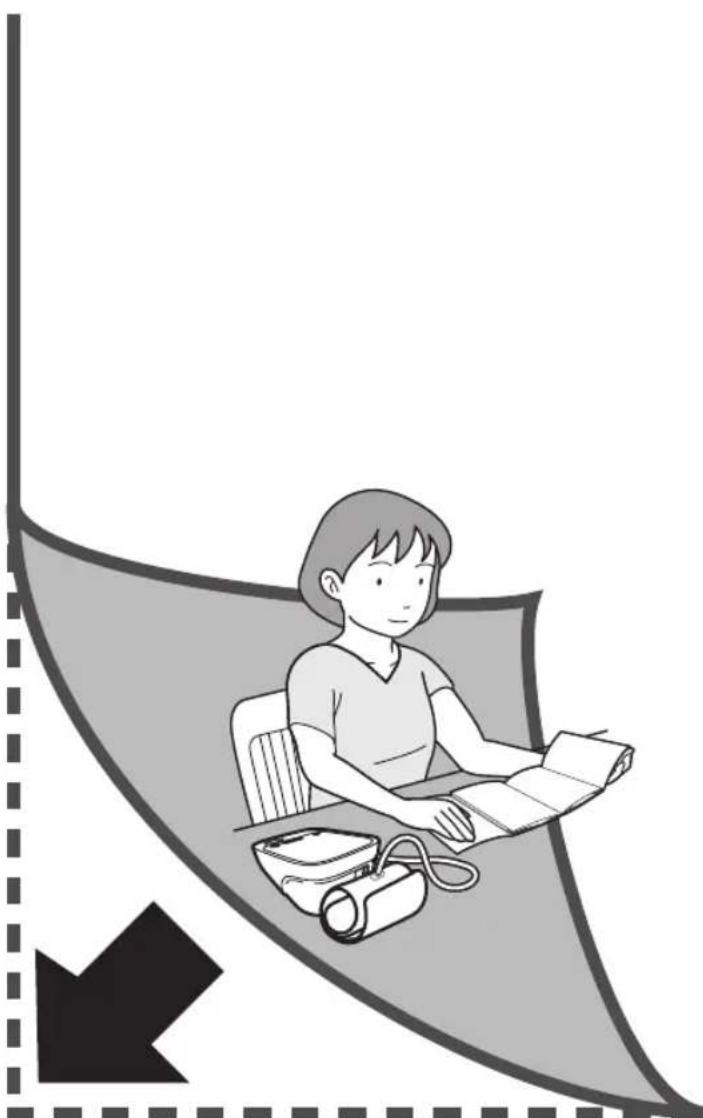
Open the rear cover page to read the following:
The letter identifiers on the rear cover page correspond to those in the body of this page.
Monitor
Ⓐ Air jack
⑧Blood pressure color indicator
©Connection button
⑭ USER ID selection switch
⑤ Display
⑤ Memory button
©START/STOP button
⑧ Up/Down buttons
① Battery compartment
① AC adapter jack (for optional AC adapter)
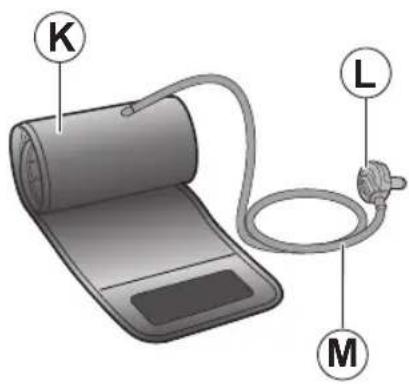
Arm cuff
©Arm cuff (Arm circumference 9" - 17" (22 - 42 cm))
Air plug
©Air tube
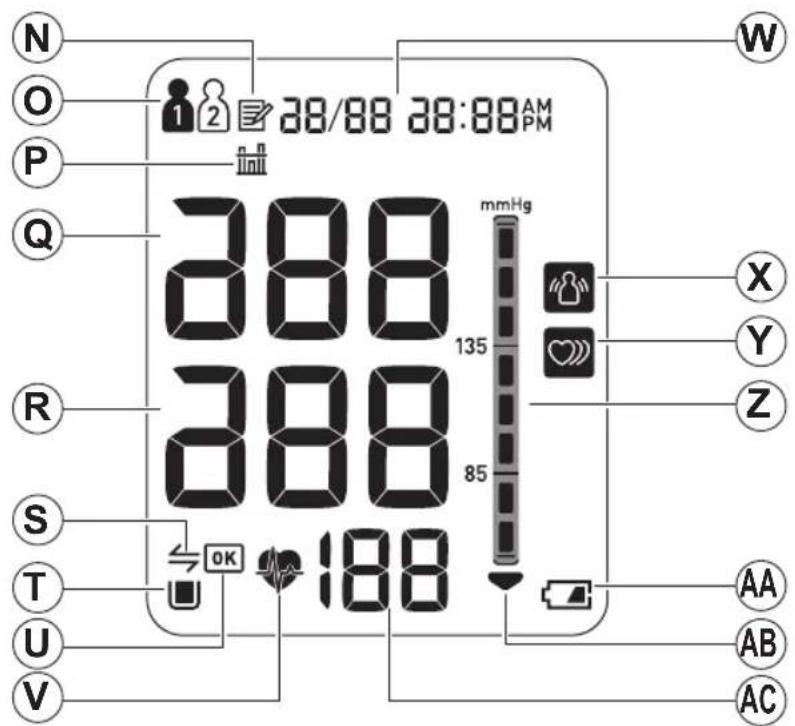
Display
© Memory symbol
©USER ID symbol
© Average value symbol
@ Systolic blood pressure
® Diastolic blood pressure
⑤ Connection symbol
① Memory full symbol
⑧ OK symbol
v Heartbeat symbol (Flashes during measurement)
Date/Time display
☒ Movement error symbol
Y Irregular heartbeat symbol
② Blood pressure level indicator
© Low battery symbol
AB Deflation symbol
⑥ Pulse display / Memory number
1. Know Your Device
1.1 Display Symbols
Irregular Heartbeat Symbol (♡)
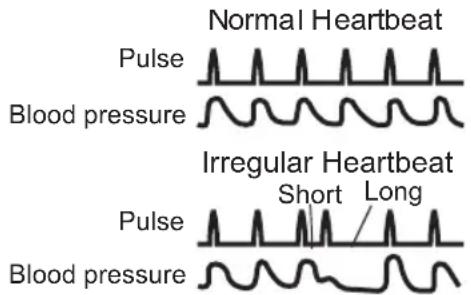
When the monitor detects an irregular rhythm two or more times during the measurement, the irregular heartbeat symbol will appear on the display with the measurement values.
An irregular heartbeat rhythm is defined as a rhythm that is 25% less or 25% more than the average rhythm detected while the monitor is measuring the systolic and diastolic blood pressure.
If the irregular heartbeat symbol displays with your measurement results, we recommend you consult your physician. Follow the directions of your physician.
Movement Error Symbol (
The movement error symbol is displayed if you move your body during the measurement. Please remove the arm cuff, and wait 2-3 minutes. Take another measurement, remain still during measurement.
Average Value Symbol (n)
The average value symbol is displayed when you press and hold the memory button for more than 3 seconds. The most recent average value appears on the display screen.
1. Know Your Device
Blood Pressure Color Indicator
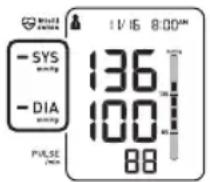
If your Systolic Blood Pressure is 135 mmHg or above and/or the Diastolic Blood Pressure is 85 mmHg or above, the blood pressure color indicator will light in “orange” when the measurement result is displayed. If the measurements are within the standard range, the blood pressure color indicator will light in “green”.
2013 ESH/ESC Guidelines for the management of arterial hypertension
Definitions of hypertension by office and home blood pressure levels
| Office Home | ||
| Systolic Blood Pressure | ≥ 140 mmHg | ≥ 135 mmHg |
| Diastolic Blood Pressure | ≥ 90 mmHg | ≥ 85 mmHg |
These are from statistical values for blood pressure.
1.2 Before Taking a Measurement
To help ensure an accurate reading, follow these directions:
- Avoid bathing, drinking alcohol or caffeine, smoking, exercising and eating for 30 minutes before taking a measurement. Rest for at least 15 minutes before taking the measurement.
- Stress raises blood pressure. Avoid taking measurements during stressful times.
- Measurements should be taken in a quiet place.
- Remove tight-fitting clothing from your arm.
- Sit on a chair with your feet flat on the floor. Rest your arm on a table so that the arm cuff is at the same level as your heart.
-
Remain still and do not talk during the measurement.
-
Keep a record of your blood pressure and pulse readings for your physician. A single measurement does not provide an accurate indication of your true blood pressure. You need to take and record several readings over a period of time. Try to measure your blood pressure at the same time each day for consistency.
2.Preparation
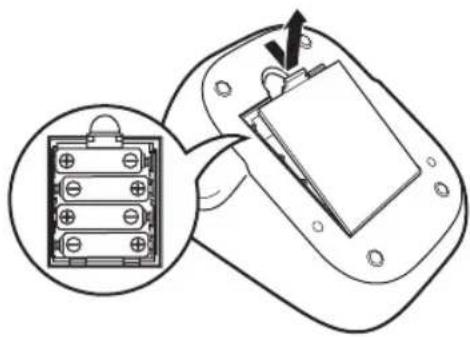
2.1 Battery Installation
- Remove the battery cover.
-
Insert 4 "AA" batteries as indicated in the battery compartment.
-
Replace the battery cover.
natural_image
Diagram showing a battery pack inside a device with an open panel inserted, and a magnified inset highlighting the internal structure (no text or symbols present)EN
Notes:
- When the low battery symbol ( ) appears on the display, turn the monitor off, then replace all batteries at the same time. Long life alkaline batteries are recommended.
- The measurement values continue to be stored in memory even after the batteries are replaced.
- Dispose of the device, components and optional accessories according to applicable local regulations. Unlawful disposal may cause environmental pollution.
2. Preparation
Open the rear cover page to read the following:
The letter identifiers on the rear cover page correspond to those in the body of this page.
2.2 Setting the Date and Time
The date and time will be automatically set when paired with your smartphone. To set manually, follow the instructions below.
1. Press the @connection button.
①If the device has not been paired with a smartphone, the year flashes on the Date/Time display.
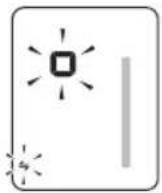
②If the device has been paired with a smartphone already, the connection symbol (¥ and the “” flashes on the device’s display. Then press the Ⓤconnection button again, and the year flashes on the Date/Time display.
Note: When the connection symbol (⇐) and the “☐” flashes on the device’s display, you can transfer the data, and refer to “To Transfer the Data” (page 19)
2. Preparation
2. Push or button to change the year.
Push button to confirm the year and then the month flashes. Repeat the same steps to change the month, day, hour, and minute.

flowchart
graph LR
    A["Year 20 14"] --> B["Month Change Confirm"]
    B --> C["Day Change Confirm"]
    C --> D["Hour 12:00 AM"]
    D --> E["Minute 0:00 AM"]
    E --> F["EN"]
    style A fill:#f9f,stroke:#333
    style F fill:#bbf,stroke:#333
3. Press the START/STOP button to turn the monitor off.
3. Using the Device

Open both the front and rear covers to read the following:
The letter identifiers on the cover page correspond to those in the body of this page.
3.1 Applying the Arm Cuff
Remove tight-fitting clothing or tight rolled up sleeve from your left upper arm. Do not place the arm cuff over thick clothes.
- Insert Ⓐ the air plug into Ⓐ the air jack securely.
- Apply the arm cuff to your left upper arm.
The bottom edge of the arm cuff should be 4/2 inch (1 to 2 cm) above the elbow.
Air tube is on the inside of your arm and aligned with your middle finger.
- Secure closed with the fabric fastener.
Notes:
- When you take a measurement on the right arm, the air tube will be at the side of your elbow. Be careful not to rest your arm on the air tube. --- b
- The blood pressure can differ between the right arm and the left arm, and the measured blood pressure values can be different. OMRON recommends to always use the same arm for measurement. If the values between both arms differ substantially, please check with your physician which arm to use for your measurements.
3. Using the Device
3.2 How to Sit Correctly
To take a measurement, you need to be relaxed and comfortably seated, at a comfortable room temperature. Avoid bathing, drinking alcohol or caffeine, smoking, exercising or eating 30 minutes before taking a measurement.
- Sit on a chair with your feet flat on the floor.
- Sit upright with your back straight. --- c
- Sit with your back and arm being supported.
- The arm cuff should be placed on your arm at the same level as your heart. --- d
3. Using the Device
3.3 Taking a Measurement
Notes:
- To stop a measurement, press the START/STOP button once to deflate the arm cuff.
- Remain still and quiet while taking a measurement.
The monitor is designed to take measurements and store the measurement values in the memory for 2 people using USER ID 1 and USER ID 2.
1. Select your USER ID (1 or 2).
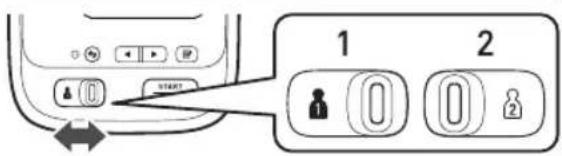
2. Press the START/STOP button.
The arm cuff starts to inflate automatically.
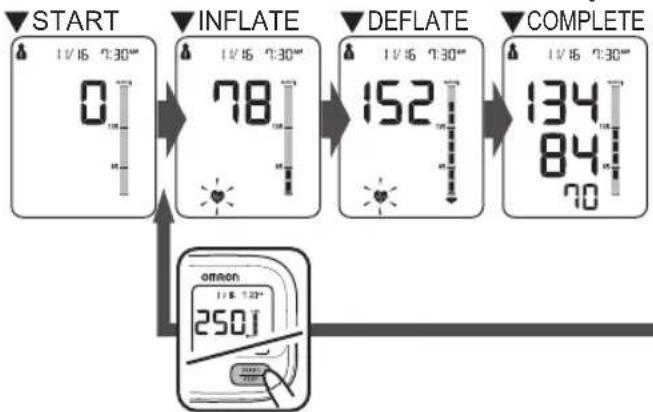
flowchart
graph TD
    A["START 1V/16 0:30" 0"] --> B["INFLATE 1V/16 7:30" 78"]
    B --> C["DEFLATE 1V/16 7:30" 152"]
    C --> D["COMPLETE 1V/16 7:30" 134 84 70"]
    D --> E["ON/OH 1V/16 1:23" 250J"]
    E --> F["Ground"]
If your systolic pressure is more than 210 mmHg
After the arm cuff starts to inflate, press and hold the START/STOP button until the monitor inflates 30 to 40 mmHg higher than your expected systolic pressure.
Notes:
• The monitor will not inflate above 299 mmHg.
⚠ Inflating to a higher pressure than necessary may result in bruising where the arm cuff is applied.
3. Using the Device
- Remove the arm cuff.
- Press the START/STOP button to turn the monitor off.
The monitor automatically stores the measurement result in its memory. It will automatically turn off after 2 minutes.
Note: Wait 2-3 minutes before taking another measurement. Waiting between measurements allows the arteries to return to the condition prior to taking a measurement.
EN
Using the Guest Mode
The monitor stores measurement values for 2 users in the memory. The guest mode can be used to take a single measurement for another user. No measurement values are stored in the memory when the guest mode is selected.
- Press and hold the START/STOP button for more than 3 seconds.

The USER ID symbol and the Date/Time display will disappear.
- Release the START/STOP button when the Date/Time display turns off.
The arm cuff will start to inflate automatically.
3. Using the Device
▲DO NOT adjust medication based on measurement results from this blood pressure monitor. Take medication as prescribed by your physician. Only a physician is qualified to diagnose and treat High Blood Pressure.
This monitor is not intended to be a diagnostic device.
⚠ Always consult your physician. Self-diagnosis of measurement results and self-treatment are dangerous.
Read "If your systolic pressure is more than 210 mmHg" (page12) of this instruction manual, if your systolic pressure is known to be more than 210 mmHg. Inflating to a higher pressure than necessary may result in bruising where the cuff is applied.
3. Using the Device
3.4 Using the Memory Function
The monitor automatically stores the results up to 60 readings for each user (1 and 2). It can also calculate an average value based on the last 3 measurement values taken within 10 minutes.
Notes:
- If there are only 2 measurement values in the memory for that period, the average will be based on these 2 values.
- If there is 1 measurement value in the memory for that period, this is displayed as the average.
- If the memory is full, the monitor will delete the oldest value.
- When viewing the measurement value taken without setting the date and time, “-/- -:-” is displayed instead of the date and time.
To View the Measurement Values Stored in Memory
1. Select your USER ID (1 or 2).
2. Press the 📋 button.
The Memory number appears for a second before the pulse rate is displayed. The newest set is numbered "1".
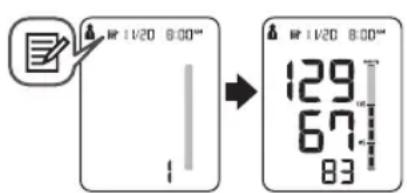
3. Using the Device
3. Press the ◄or ▶button to view the values stored in the memory.
◀ : To view the older values
▶ : To view the more recent values
To View the Average Value
1. Select your USER ID (1 or 2).
2. Press and hold the ☐ button for more than 3 seconds.
Notes:
- If the previous measurement was taken without setting the date and time, the average value is not calculated.
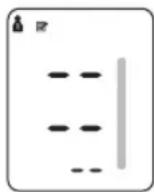
- If there are no measurement values stored in the memory, the screen to the right is displayed.
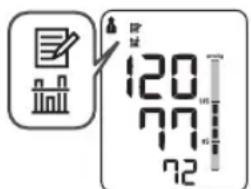
3. Using the Device
To Pair This Device With a Smartphone
- To begin, download and install the free "Omron Wellness" App onto your smartphone.


EN
- Open the App on your smartphone and follow set-up and pairing instructions.
Note: Please make sure that you do not currently have an active reading screen on. If your reading screen is on, press the START/STOP button to clear the screen to allow you to begin to transfer your readings.
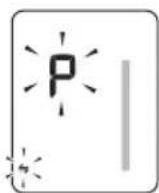
- Press and hold the Ⓐ button for more than 2 seconds.
The connection symbol (¥) and the "P" flashes on the device's display.
3. Using the Device
- Open the "Omron Wellness" App on your smartphone and follow the device pairing instructions shown on your smartphone, while the connection symbol is flashing on the device's display.
- Confirm if the device is connected successfully.
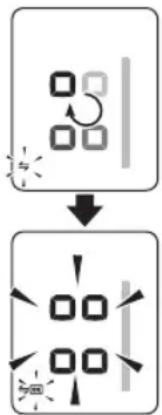
When the device is connected successfully to the smartphone, "OK" symbol and the display shown on the right will flash.
flowchart
graph TD
    A["Rectangular Block"] --> B["Grid with directional arrows and light effects"]
    B --> C["Arrow pointing inward toward the grid"]
    style A fill:#f9f,stroke:#333
    style B fill:#ccf,stroke:#333
    style C fill:#cfc,stroke:#333
The monitor will automatically turn off without any operations.
The date and time settings of your smartphone will automatically sync with the device when paired.
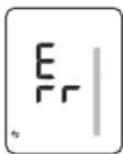
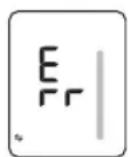
When “Err” appears, refer to “Connection failure.” in section 4.2 for more detail.
Notes:
- You can pair up to 4 destination smartphones with the monitor.
- When paired with 5 or more smartphones, any information previously stored in your device will be overwritten.
- Any readings currently saved in the blood pressure monitor's memory will automatically be transferred to the app after successful completion of the pairing process.
3. Using the Device
To Transfer the Data
After the measurement is complete, you can transfer the data (measurement results of blood pressure and pulse rate).
Notes:
- The stored data can be transferred all at once.
- The date and time settings of your smartphone will sync with the device when transferred.
*Sync occurs if the time between smartphone and device differs more than 10 minutes.
EN
- Open the app on your smartphone.
- Clear your reading screen by pressing the "START/STOP" button on your monitor. Next, tap the "transfer" icon in the Omron Wellness app to start the transfer.
* If the data transfer is not starting, refer to “Connection failure. Data cannot be sent.” in “4. Error Messages and Troubleshooting”.
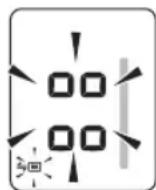
- Confirm with your device if the measurement data is transferred successfully.
If the display on the right is shown, the data is transferred successfully.
When "Err" appears, refer to "Data cannot be sent." in section 4.2 for more detail.
3. Using the Device
TO DELETE ALL RESULTS AND SETTINGS
To delete all the information stored in your monitor, follow the instructions below. Make sure that the monitor's power has been off.
- While holding the ④ button down, press the START/STOP button for more than 5 seconds.
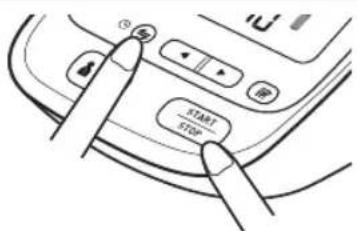
- Release the ④ button and START/STOP button when “CLr” appears on the display.
The "CLr" will appear on the display when your monitor has been initial setting.
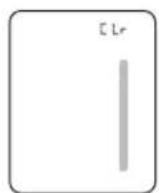
- Press the START/STOP button to turn the monitor off.
The monitor will automatically turn off after 10 seconds even forgetting the off the monitor.
Note:
- Initial setting of the monitor will not delete the information in the app.
• The monitor will automatically turn off after 2 minutes.
3. Using the Device
To Delete All the Values Stored in Memory
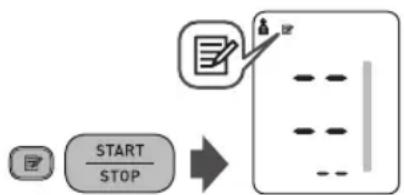
The values stored in the memory are deleted by USER ID.
- Select your USER ID (1 or 2).
- Press the Memory button, while the memory symbol (✗) appears.
- While holding the ☐ button down, press the START/STOP button for more than 3 seconds.
Note: You cannot partially delete the values stored in the memory. All values for the user you select will be deleted.
flowchart
graph TD
    A["Start"] --> B["STOP"]
    B --> C["Arrow pointing to a document icon with 'W' label"]
3. Using the Device
3.5 Turning "OFF" the Bluetooth®
Turn off the Bluetooth ^® of the monitor in the following areas where use of wireless equipment is prohibited.
- On aircraft
- In hospitals
- While abroad
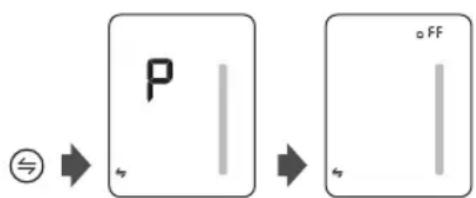
Make sure that the power has been off before starting the instructions below.
- Press and hold the connection ⏚ button for more than 10 seconds.
- Release the Ⓐ button when "OFF" appears on the display.
flowchart
graph LR
    A["Symbol"] --> B["P"]
    B --> C["Process Step"]
    C --> D["FF"]
- Press the START/STOP button to turn the monitor off.
Note: The monitor will automatically turn off after 2 minutes.
3. Using the Device
To turn "ON" the Bluetooth®
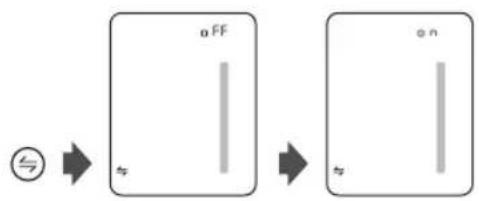
Make sure that the power has been off before starting the instructions below.
- Press and hold the connection ④ button for more than 10 seconds.
- Release the ⏻ button when "ON" appears on the display.
flowchart
graph LR
    A["Symbol: 5"] --> B["OFF"]
    B --> C["ON"]
- Press the START/STOP button to turn the monitor off.
Note: The monitor will automatically turn off after 2 minutes.
4. Error Messages and Troubleshooting
4.1 Error Messages
| Display Cause | Solution | |
 | Irregular heartbeats are detected. | Remove the arm cuff. Wait 2-3 minutes and then take another measurement.Repeat the steps in section 3.3. If this error continues to appear, contact your physician. |
 | Movement during measurement. | Carefully read and repeat the steps in section 3.3. |
 | The batteries are low. | You should replace the batteries with new ones ahead of time.Refer to section 2.1. |
 | The batteries are depleted. | You should replace the batteries with new ones at once.Refer to section 2.1. |
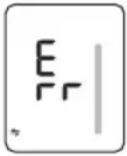 | Communication failed. | Refer to "Connection failure." in section 4.2. |
4. Error Messages and Troubleshooting
| Display Cause | Solution | |
| E1 | Air plug disconnected. | Insert the air plug securely.Refer to section 3.1. |
| Arm cuff is applied too loosely. | Apply the arm cuff tighter.Refer to section 3.1. | |
| Air is leaking from the arm cuff. | Replace the arm cuff with a new one.Refer to section 5.3. | |
| E2 | Movement during measurement and the arm cuff has not been inflated sufficiently. | Repeat measurement. Remain still and do not talk during measurement.Refer to section 3.3. |
| If “E2” appears repeatedly, inflate the arm cuff manually until it is 30 to 40 mmHg above your previous measurement result.Refer to section 3.3. | ||
| E3 | The arm cuff was inflated exceeding the maximum allowable pressure, and then deflated automatically when inflating the arm cuff manually. | Do not touch the arm cuff and/or bend the air tube while taking a measurement. Do not inflate the arm cuff more than necessary.Refer to section 3.3. |
| E4 | Movement during measurement. | Repeat measurement. Remain still and do not talk during measurement.Refer to section 3.3. |
| E5 | Clothing is interfering with the arm cuff. | Remove any clothing interfering with the arm cuff.Refer to section 3.1. |
| Er | Device error. Contact Customer Service. |
4. Error Messages and Troubleshooting
4.2 Troubleshooting
| Problem Cause and Solution | |
| No power.No display appears on the monitor. | Replace all batteries with new ones.Check the battery installation for proper placement of the battery polarities. Refer to section 2.1. |
| Measurement values appear too high or too low. | Blood pressure varies constantly. Many factors including stress, time of day, and how you wrap the cuff, may affect your blood pressure. Review the section 1.2 and section 3.3. |
| Connection failure.Data cannot be sent. | The destination device is too far away from the monitor. After checking that there are no sources of interference nearby, move the device to a distance within 16 ft. (5 m) of the monitor. |
| The Bluetooth® function on the destination device is turned off. Turn the on the Bluetooth® function and try sending the data again. | |
| The Bluetooth® function on the monitor is not turned on. Press the button, turn on the Bluetooth® function and try sending the data again. | |
| Pairing has not been completed. Perform pairing. Refer to "To Pair This Device With a Smartphone" in section 3.4 or visit the "Help" section in the Omron Wellness app for further help in pairing your smart device. | |
| The blood pressure monitor is not ready, follow the step "1. Press the connection button." in "Setting the Date and Time". | |
| The application on the destination device is not ready. Check the application then try sending the data again. Refer to "To Pair This Device With a Smartphone" in section 3.4.If the Err symbol still lights after checking the application, contact customer service. |
5. Maintenance and Storage
5.1 Maintenance
To protect your device from damage, please observe the following:
- Store the device and the components in a clean, safe location.
- Do not use any abrasive or volatile cleaners.
- Do not wash the device and any components or immerse them in water.
- Do not use gasoline, thinners or similar solvents to clean the device.

- Use a soft and dry cloth, or a soft and moistened cloth and neutral soap to clean on the monitor and the arm cuff.
- Changes or modification not approved by the manufacturer will void the user warranty. Do not disassemble or attempt to repair the device or components. Consult Customer Service.
5. Maintenance and Storage
5.2 Storage
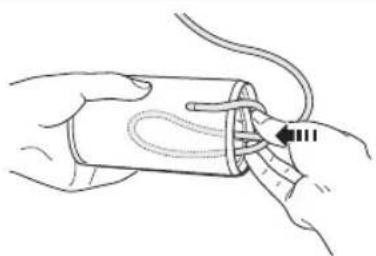
- Unplug the air plug from the air jack.
- Gently fold the air tube into the arm cuff.
Note: Do not bend or crease the air tube excessively.
natural_image
Line drawing of a hand holding a medical device with a cable inserted (no text or symbols)Do not store the device in the following situations:
- If the device is wet.
- Locations exposed to extreme temperatures, humidity, direct sunlight, dust or corrosive vapors such as bleach.
- Locations exposed to vibrations, shocks or where it will be at an angle.
5. Maintenance and Storage
5.3 Optional Medical Accessories
Arm Cuff
Arm circumference
9" - 17" (22 - 42 cm)
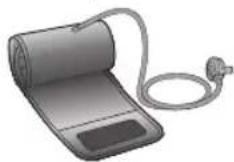
ComFit™ Cuff (CFX-WR17)
(Model: HEM-FL31)
AC Adapter
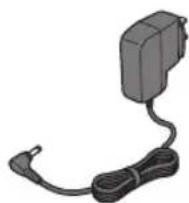
HEM-ADPTW5
5. Maintenance and Storage
Using the Optional AC Adapter
-
Insert the AC adapter plug into the AC adapter jack on the rear side of the monitor.
-
Plug the AC adapter into an electrical outlet.
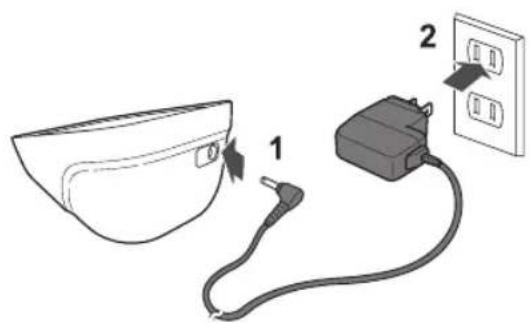
To disconnect the AC adapter, unplug the AC adapter from the electrical outlet first and then remove the AC adapter plug from the monitor.
6.Specifications
Model
BP761N REF HEM-7320T-Z
Display LCD digital display
Measurement range Pressure: 0 to 299 mmHg
Accuracy
Pulse: 40 to 180 beats / min.
Pressure: ±3 mmHg or 2% of reading
Pulse: ± 5% of display reading
Inflation Fuzzy-logic controlled by electric pump
Deflation Automatic pressure release valve
Measurement method Oscillometric method
IP classification IP 20
Power source
4 "AA" batteries 1.5V or optional AC adapter (INPUT AC100-240V 50/60Hz 0.12A)
Battery life Approximately 1000 measurements (using new alkaline batteries)
Operating temperature / humidity 50°F to 104°F (10°C to 40°C) / 15 to 90% RH
Storage temperature / humidity / air pressure -4°F to 140°F (-20°C to 60°C) / 10 to 95% RH / 700 to 1060 hPa
Weight Monitor : Approximately 13 5/8 oz. (385 g) not including batteries
Arm cuff: Approximately 5 3/4 oz. (163 g)
Dimensions
Monitor : Approximately 4 7/8" (w) × 3 1/2" (h) × 6 3/8" (l)
(124 mm × 90 mm × 161 mm)
Arm cuff: Approximately 5 3/4" × 21" (air tube: 29 1/2")
(145 mm × 532 mm (air tube: 750 mm))
Cuff circumference
9" to 17" (220 to 420 mm)
Memory
Contents
Applied part
Up to 60 per user
Monitor, arm cuff, battery set, instruction manual, quick start guide

= Type BF
Protection against electric shock
Internally powered ME equipment (When using only the batteries)

= Class II ME equipment (Optional AC adapter)
Notes:
• These specifications are subject to change without notice.
• In the clinical validation study, the 5th phase was used on 85 subjects for determination of diastolic blood pressure.
• This device has not been validated for use in pregnancy.
7. FCC/IC Statement and Trademarks
FCC CAUTION
Changes or modifications not expressly approved by the party responsible for compliance could void the user's authority to operate the equipment.
Note:
This equipment has been tested and found to comply with the limits for a Class B digital device, pursuant to part 15 of the FCC Rules. These limits are designed to provide reasonable protection against harmful interference in a residential installation. This equipment generates, uses and can radiate radio frequency energy and, if not installed and used in accordance with the instructions, may cause harmful interference to radio communications. However, there is no guarantee that interference will not occur in a particular installation. If this equipment does cause harmful interference to radio or television reception, which can be determined by turning the equipment off and on, the user is encouraged to try to correct the interference by one or more of the following measures:
- Reorient or relocate the receiving antenna.
- Increase the separation between the equipment and receiver.
- Connect the equipment into an outlet on a circuit different from that to which the receiver is connected.
- Consult the dealer or an experienced radio/TV technician for help.
This transmitter must not be co-located or operated in conjunction with any other antenna or transmitter.
This equipment complies with FCC/IC radiation exposure limits set forth for an uncontrolled environment and meets the FCC radio frequency (RF) Exposure Guidelines and RSS-102 of the IC radio frequency (RF) Exposure rules. This equipment has very low levels of RF energy that are deemed to comply without testing of specific absorption ratio (SAR).
7. FCC/IC Statement and Trademarks

This Product operates in the unlicensed ISM band at 2.4GHz. In case this Product is used around the other wireless devices including microwave and wireless LAN, which operate same frequency band of this Product, there is a possibility that interference occurs between this Product and such other devices. If such interference occurs, please stop the operation of other devices or relocate this Product before using this Product or do not use this Product around the other wireless devices.

Bluetooth®
SMART
The Bluetooth ^® Smart word mark and logos are registered trademarks owned by Bluetooth SIG, Inc. and any use of such marks by OMRON HEALTHCARE Co., Ltd. is under license. Other trademarks and trade names are those of their respective owners.
EN
Apple, the Apple logo, iPad, and iPhone are trademarks of Apple Inc., registered in the U.S. and other countries. App Store is a service mark of Apple Inc.
Android and Google Play are both trademarks of Google Inc.
8.Limited Warranty
Your BP761N Automatic Blood Pressure Monitor, excluding the arm cuff and batteries are warranted to be free from defects in materials and workmanship appearing within 5 years from the date of purchase, when used in accordance with the instructions provided with the monitor. The arm cuff is warranted to be free from defects in materials and workmanship appearing within 1 year from the date of purchase when the monitor is used in accordance with the instructions provided with the monitor. The above warranty extends only to the original retail purchaser.
We will, at our option, replace without charge any monitor or arm cuff covered by the above warranty. Replacement is our only responsibility and your only remedy under the above warranty.
To obtain warranty service contact Customer Service by calling 1-800-634-4350 for the address of the inspection center and the return shipping and handling fee.
Enclose the original printed receipt. Include a letter, with your name, address, phone number, and description of the specific problem. Pack the product carefully to prevent damage in transit. Because of possible loss in transit, we recommend insuring the product with return receipt requested.
THE FOREGOING IS THE SOLE WARRANTY PROVIDED BY OMRON IN CONNECTION WITH THIS PRODUCT, AND OMRON HEREBY DISCLAIMS ANY OTHER WARRANTIES, EXPRESS OR IMPLIED, INCLUDING IMPLIED WARRANTIES OF MERCHANTABILITY AND FITNESS FOR A PARTICULAR PURPOSE. IMPLIED WARRANTIES AND OTHER TERMS THAT MAY BE IMPOSED BY LAW, IF ANY, ARE LIMITED IN DURATION TO THE PERIOD OF THE ABOVE EXPRESS WARRANTY.
OMRON SHALL NOT BE LIABLE FOR LOSS OF USE OR ANY OTHER SPECIAL, INCIDENTAL, CONSEQUENTIAL OR INDIRECT COSTS, EXPENSES OR DAMAGES.
This warranty provides you with specific legal rights, and you may have other rights that vary by jurisdiction. Because of special local requirements, some of the above limitations and exclusions may not apply to you.
FOR CUSTOMER SERVICE
Visit our web site at:
Call toll free:
omronhealthcare.com
1-800-634-4350
9. Guidance and Manufacturer's Declaration
OMRON Automatic Blood Pressure Monitor
Information for accompanying documents in the scope of IEC60601-1-2:2007
Model: BP761N including AC-adapter
Important information regarding Electro Magnetic Compatibility (EMC)
With the increased number of electronic devices such as PC's and mobile (cellular) telephones, medical devices in use may be susceptible to electromagnetic interference from other devices. Electromagnetic interference may result in incorrect operation of the medical device and create a potentially unsafe situation. Medical devices should also not interfere with other devices.
In order to regulate the requirements for EMC (Electro Magnetic Compatibility) with the aim to prevent unsafe product situations, the IEC60601-
1-2 standard has been implemented. This standard defines the levels of immunity to electromagnetic interferences as well as maximum levels of electromagnetic emissions for medical devices.
Medical devices manufactured by OMRON Healthcare conform to this IEC60601-1-2:2007 standard for both immunity and emissions.
Nevertheless, special precautions need to be observed:
- The use of accessories and cables other than those specified by OMRON, with the exception of cables sold by OMRON as replacement parts for internal components, may result in increased emission or decreased immunity of the device.
- The medical devices should not be used adjacent to or stacked with other equipment.
In case adjacent or stacked use is necessary, the medical device should be observed to verify normal operation in the configuration in which it will be used.
• Refer to further guidance below regarding the EMC environment in which the device should be used.
• The MEDICAL ELECTRICAL EQUIPMENT BP761N including AC-adapter needs special precautions regarding EMC and needs to be installed and put into service according to the EMC information provided in this documentations.
- The Essential Performance of the BP761N including AC-adapter is to measure a blood pressure and a pulse rate and using the memory function.
The BP761N including AC-adapter may be interfered with by other equipment, even if that other equipment complies with CISPR EMISSION requirements.
| Guidance and manufacturer's declaration - electromagnetic immunity | ||
| OMRON BP761N including AC-adapter is intended for use in the electromagnetic environment specified below. The customer or the user of this OMRON BP761N including AC-adapter should assure that it is used in such environment. | ||
| Emissions test Compliance Electromagnetic environment - guidance | ||
| RF emissions CISPR 11 Group 1 | The OMRON BP761N including AC-adapter uses RF energy only for its internal function. Therefore, its RF emissions are very low and are not likely to cause any interference in nearby electronic equipment. | |
| RF emissions CISPR 11 Class B | The OMRON BP761N including AC-adapter is suitable for use in all establishments, including domestic establishments and those directly connected to the public low-voltage power supply network that supplies buildings used for domestic purposes. | |
| Harmonic emissions IEC 61000-3-2 | Class A | |
| Voltage fluctuations/flicker emissions IEC61000-3-3 | Complies | |
9. Guidance and Manufacturer's Declaration
| Guidance and manufacturer's declaration - electromagnetic immunity | |||
| OMRON BP761N including AC-adapter is intended for use in the electromagnetic environment specified below. The customer or the user of this OMRON BP761N including AC-adapter should assure that it is used in such environment. | |||
| Immunity test IEC 60601 test level Compliance level Electromagnetic environment - guidance | |||
| Electrostatic discharge (ESD)IEC 61000-4-2 | ±6 kV contact±8 kV air | ±6 kV contact±8 kV air | Floor should be wood, concrete, or ceramic tile.If floors are covered with synthetic material, the relative humidity should be at least 30 %. |
| Electrical fast transient/burstIEC 61000-4-4 | ±2 kV for power supply lines±1 kV for input/output lines | ±2 kV for power supply lines±1 kV for input/output lines | Mains power quality should be that of a typical commercial and/or hospital environment. |
| SurgeIEC 61000-4-5 | ±1 kV line(s) to line(s)±2 kV line(s) to earth | ±1 kV line(s) to line(s)±2 kV line(s) to earth | Mains power quality should be that of a typical commercial and/or hospital environment. |
| Voltage dips, short interruptions and voltage variations on power supply inputlinesIEC 61000-4-11 | <5 % UT(>95 % dip in UT)for 0.5 cycle | <5 % UT(>95 % dip in UT)for 0.5 cycle | Mains power quality should be that of a typical commercial and/or hospital environment. If the user of the OMRON BP761N including AC-adapter requires continued operation during power mains interruption, it is recommended that the OMRON BP761N including AC-adapter be powered from an uninterruptible power supply. |
| 40 % UT(60 % dip in UT)for 5 cycles | 40 % UT(60 % dip in UT)for 5 cycles | ||
| 70 % UT(30 % dip in UT)for 25 cycles | 70 % UT(30 % dip in UT)for 25 cycles | ||
| <5 % UT(95 % dip in UT)for 5 sec. | <5 % UT(95 % dip in UT)for 5 sec. | ||
| Power frequency (50/60 Hz)magnetic fieldIEC 61000-4-8 | 3 A/m 3 A/m | Power frequency magnetic fields should be at levels characteristic of a typical location in a typical commercial or hospital environment. | |
| Note: UTis the A.C. mains voltage prior to application of the test level. | |||
9. Guidance and Manufacturer's Declaration
| Guidance and manufacturer's declaration - electromagnetic immunity | |||
| OMRON BP761N including AC-adapter is intended for use in the electromagnetic environment specified below. The customer or the user of this OMRON BP761N including AC-adapter should assure that it is used in such environment. | |||
| Immunity test IE | IC 60601 test level | Compliance level | Electromagnetic environment - guidance |
| Conducted RFIEC 61000-4-6Radiated RFIEC 61000-4-3 | 3 V rms150 kHz to 80 MHz3 V/m80 MHz to 2.5 GHz | 3 V rms3 V/m | Portable and mobile RF communications equipment should be used no closer to any part of the OMRON BP761N including AC-adapter including cables, than the recommended separation distance calculated from the equation appropriate to the frequency of the transmitter.Recommend separation distanced = 1.2√Pd = 1.2√P80 MHz to 800 MHzd = 2.3√P800 MHz to 2.5 GHzwhere P is the maximum output power rating of the transmitter in watts (W) according to the transmitter manufacturer and d is the recommended separation distance in meters (m).Field strengths from fixed RF transmitters as determined by an electromagnetic site survey, ^a should be less than the compliance level in each frequency range. ^b Interference may occur in the vicinity of equipment marked with the following symbol:[IMAGE] |
| Note1: At 80 MHz and 800 MHz, the higher frequency range applies.Note2: These guidelines may not apply in all situations. Electromagnetic propagation is affected by absorption and reflection from structures, objects, and people. | |||
| ^a Field strengths from fixed transmitters, such as base stations for radio (cellular/ cordless) telephones and land mobile radio, AM and FM radio broadcast, and TV broadcast cannot be predicted theoretically with accuracy. To assess the electromagnetic environment due to fixed RF transmitters, an electromagnetic site survey should be considered. If the measured field strength in the location in which the OMRON BP761N including AC-adapter is used exceeds the applicable RF compliance level above, the OMRON BP761N including AC-adapter should be observed to verify normal operation. If abnormal performance is observed, additional measures may be necessary, such as reorienting or relocating the OMRON BP761N including AC-adapter. ^b Over the frequency range 150 kHz to 80 MHz, field strengths should be less than 3 V/m. | |||
9. Guidance and Manufacturer's Declaration
| Recommended separation distance between portable and mobile RF communications equipmentand the OMRON BP761N including AC-adapter | |||
| OMRON BP761N including AC-adapter is intended for use in an electromagnetic environment in which radiated RF disturbances arecontrolled. The customer or the user of this OMRON BP761N including AC-adapter can help prevent electromagnetic interference bymaintaining a minimum distance between portable and mobile RF communications equipment (transmitters) and the OMRON BP761Nincluding AC-adapter as recommended below, according to the maximum output power of the communications equipment. | |||
| Output Power of Transmitter in Watt | Separation distance according to frequency of transmitter in meter | ||
| 150 kHz to 80 MHz d = 1.2 P P | 80 MHz to 800 MHz d = 1.2 | 800 MHz to 2.5GHz d = 2.3 | |
| 0.01 0.12 0.12 0.23 | |||
| 0.1 0.38 0.38 0.73 | |||
| 1 1.2 1.2 2.3 | |||
| 10 3.8 3.8 7.3 | |||
| 100 12 12 23 | |||
| For transmitters rated at a maximum output power not listed above, the recommended separation distance d in meters (m) can be estimatedusing the equation applicable to the frequency of the transmitter, where P is the maximum output power rating of the transmitter in watts (W)according to the transmitter manufacturer.Note: At 80 MHz and 800 MHz, the separation distance for the higher frequency range applies.Note: These guidelines may not apply in all situations. Electromagnetic propagation is affected by absorption and reflection from structures,objects, and people. | |||
Contenido
natural_image
Diagram showing a battery pack inside a device with an open panel inserted, and a magnified inset highlighting the internal structure (no text or symbols present)Notas:

ES
flowchart
graph TD
    A["START/STOP"] --> B["Document Icon with 'UP' label"]
natural_image
Illustration of a hand holding a medical device with tubing (no text or symbols)ES
ES
6.Especificaciones
Modelo
natural_image
Illustration of a person using a blood pressure monitor and medical equipment, with no visible text or symbols.Manufactured for/Fabricado para:
OMRON HEALTHCARE Co., Ltd.
53, Kunotsubo, Terado-cho, Muko, Kyoto, 617-0002
JAPAN/JAPÓN
OMRON HEALTHCARE, INC.
1925 West Field Court Lake Forest, IL 60045 U.S.A/EE. UU.
omronhealthcare.com
© 2015 OMRON HEALTHCARE, INC.
Made in China/Hecho en China
- series Blood Pressure Monitor
- Model BP761N
- Instruction Manual
- Product includes:
- Contents
- Intended Use
- Important Safety Information .... 1
- Important Safety Information
- (General Usage)
- (Data Transmission)
- (AC Adapter (optional) Usage)
- (Battery Usage)
- General Precautions
- 1.Know Your Device
- Open the rear cover page to read the following:
- Monitor
- Arm cuff
- Display
- Know Your Device
- Display Symbols
- Irregular Heartbeat Symbol (♡)
- Movement Error Symbol (
- Average Value Symbol (n)
- Blood Pressure Color Indicator
- ESH/ESC Guidelines for the management of arterial hypertension
- Before Taking a Measurement
- 2.Preparation
- Battery Installation
- Notes:
- Preparation
- Setting the Date and Time
- Press the @connection button.
- Push or button to change the year.
- Press the START/STOP button to turn the monitor off.
- Using the Device
- Open both the front and rear covers to read the following:
- Applying the Arm Cuff
- How to Sit Correctly
- Taking a Measurement
- Select your USER ID (1 or 2).
- Press the START/STOP button.
- If your systolic pressure is more than 210 mmHg
- Using the Guest Mode
- Using the Memory Function
- To View the Measurement Values Stored in Memory
- Press the 📋 button.
- Press the ◄or ▶button to view the values stored in the memory.
- To View the Average Value
- Press and hold the ☐ button for more than 3 seconds.
- To Pair This Device With a Smartphone
- To Transfer the Data
- TO DELETE ALL RESULTS AND SETTINGS
- Note:
- To Delete All the Values Stored in Memory
- Turning "OFF" the Bluetooth®
- To turn "ON" the Bluetooth®
- Error Messages and Troubleshooting
- Error Messages
- Maintenance and Storage
- Maintenance
- Storage
- Optional Medical Accessories
- AC Adapter
- Using the Optional AC Adapter
- 6.Specifications
- Model
- Accuracy
- Dimensions
- Cuff circumference
- Protection against electric shock
- FCC/IC Statement and Trademarks
- FCC CAUTION
- 8.Limited Warranty
- Guidance and Manufacturer's Declaration
- Important information regarding Electro Magnetic Compatibility (EMC)
- Contenido
- Notas:
- 6.Especificaciones
- Modelo
Brand : OMRON
Model : BP761N
Category : Blood pressure monitor