
PWMA83UFM - Docking Station Pyle - Free user manual and instructions
Find the device manual for free PWMA83UFM Pyle in PDF.


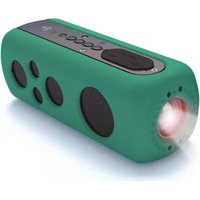
| Product Type | Docking Station with Speaker |
| Brand | Pyle |
| Model | PWMA83UFM |
| Display | 128x64 Black-and-White LCD |
| Power Source | 7.4V Lithium Battery |
| Battery Capacity | 1500mAh |
| Output Power | 100W |
| Frequency Response | 200Hz - 15KHz |
| Microphone Input | Wired Mic (-50dB/680Ω) |
| Charging Mode | DC 9V/500mA |
| Charging Time | Approx. 4 hours |
| Working Time | Approx. 6 hours |
| Material | ABS Plastic |
| Dimensions (W x H x D) | 5.5" x 4.5" x 2.8" (140 x 114 x 71 mm) |
| Weight | 1.5 lbs (680 g) |
| Supported Audio Formats | MP3, WMA |
| Radio | FM (87.5-108 MHz) |
| Connectivity | USB, SD Card Slot, 3.5mm Aux? (not specified) |
| Controls | SEEK+, SEEK-, MENU, PAUSE, Volume Knob |
| Additional Features | Echo Effect, Repeat Mode, EQ Settings |
| Care Instructions | Clean with a soft dry cloth; avoid liquids |
| Safety Warnings | Do not expose to rain or moisture; keep away from heat sources |
Frequently Asked Questions - PWMA83UFM Pyle
User questions about PWMA83UFM Pyle
0 question about this device. Answer the ones you know or ask your own.
Ask a new question about this device
Download the instructions for your Docking Station in PDF format for free! Find your manual PWMA83UFM - Pyle and take your electronic device back in hand. On this page are published all the documents necessary for the use of your device. PWMA83UFM by Pyle.
USER MANUAL PWMA83UFM Pyle
Basic functions....2
Preparation....2
Battery Charge 2
Button funcitons ....2
Button definition....2
Turn on/off....2
Ajust volume....2
Ajust volume....2
Time viewing....2
Main menu....2
Functions Applicatoon 2
Music Play 2
Music Interface 2
Submenu and operation....3
Submenu 1 and operation....2
Submenu 1 and operation ....3 Submenu2 and operation ....3
Radio....3
Radio Interface 4
Radio operation....4
Radio submenu and operation....4
System settings....4
System settings....4
System time....5
Language setting....5
Firmware version....5
Function Instruction ....5
Contract adjustment ....5
Contrast adjustment....5 How to use the Lavalier/Headset Microphone...6
How to use the Lavanel/Headset Microphone....6 Cautions 6
Cautions....6
Problems and Solutions ....6
Specifications....6
How to use the Lavalier/Headset Microphone
- Open the battery compartment by sliding up the cover.
- Put the battery into the compartment with correct polarity, and close the cover.
- Plug the Lavalier/Headset microphone part to the jack.
- Turn on the wireless microphone receiver by "WM/ECHO" knob on the main unit, then switch on the power of the transmission device in LRF, which is also taken
then switch on the power of the transmitter. when the LED light is brighting, the wireless microphone is ready to work - Be careful to adjust the main control
- Be careful to adjust the main control of the transmitter, start from least volume and slowly turn it to a appropriate level to hear your voice clearly and with feed
and the way that it is appropriate back. The system is ready to use. - After use, you have to take the battery out of the transmitter to avoid battery
leaking to damage the transmitter.

Cautions
To make customers use the player correctly, please follow the bellowing;
- Do not hit this product.
- Don't touch Noxious chemicals, such as benzene, thinner
- Don't close to high magnetic fields, electric field
- Avoid the direct
- Don't dismantle, mend or change the device by yourself
- Don't use the device when you are riding, driving
- Don't use too full blast to affect your hearing
- Don't use too large volume, in order not to harm your hearing. Packagins battery old electronic products should be sorted disc
• The following:
Problems and Solutions.
- the device can not start
Please check if the battery is used up, please charge it and restart it. - FM receiver not good
Please adjust the direction and position, and stretch the antenna
Please check, if there is any equipment interfere - Unrecognizable Code on covers
- Unrecognizable Code on screen
Please check if you choose the correct language
Specifications
| SCREEN | 128X64 black-and-white screen |
| Power | 7.4V Lithium battery |
| Maxoutput power | 100W |
| Frequency response | 200Hz-15KHz |
| Electric power consumption | 150MA |
| Current Consumption | 1500mA Lithium battery |
| Input signal | Wired microphone(-50dB/680 Ω) |
| Charge mode | DC 9V/500mA |
| Material | ABS |
| Charge time | About 4 hours |
| Working hours | About 6 hours afere full charge |
| Overall size | 6.5"X4.5"X2.8" |
| Weight | 1.5 lbs |
- Declaration: This manual only for reference. We try our best to make it accurate and integrated, errors may still exist in the manual, so please tell us your suggestions. Specification is subjected to change without notice.
System time
2011-01-01
10:09:00
SEEK+_KEY and SEEK-_KEY can adjust the time data, press MENU_KEY can change the option, and the last one of the menu is exit.
Language option

Press SEEK+_KEY and SEEK _KEY to choose, Press MENU to exit
Firmware version
?
2010/04/29
9.6.57.1017
ATJ2009B-110607
To show the version information, MENU_KEY for Press MENU to exit
Function Instruction

Basic functions
● 128*64 black-and-white screen
● Music play: support MP3, WMA, Linetin Play
- Support PM, Radio - Support Host
● Support USB 2.0 high speed transfer, compatible with USB 1.1
● Support catalogue : 8 grade catalogue
● Support files: can support 999 files per catalogue
Preparation
Please make sure the battery have enough power or insert the DC.9V as the external
power(the power supply should not less than 1.5A) .USB int
Battery charge
Connect to external power of DC.9V, then it will charge by itself, you can see red and green lights flash, when you see the light is dark, that means the power is low, when you see the blue light is very bright and fresh, the battery is full. Press short for confirming the choice, press long to exit the operation interface.
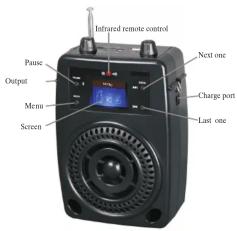
Button Functions
SEEK+ : Last song
SEEK- : Next song
MENU : Press short for confirming, press long this button to exit the operation interface.
PAUSE: Pause/Continue, Press this button for longer time to shift USB, FM, SD.
Button definition
| Action | Operation |
| Press shortly | pressthis button less than 2 seconds |
| Press longer | pressthis button more than 2 seconds |
| Press | press this button and keep on |
Turn on/off
Turn the knob of volume. Adjust volume
Adjust the volume to be the best status
The volume can be adjusted, total 16 level, from 0–15, can use the remote control to adjust
Main menu
Main menu have three functions: Music, FM and setting.
Press SEEK+ and SEEK- can choose function , press MENU can enter the menu , press PAUSE
can return to time menu. Inserv SD card ,external signal line of USB , can play directly
Function Application
Mic input: Wired microphone (-50dB/680 Ω) can turn on the Echo function
Signal Output: can connect to a speaker or power amplifier. Power charge DC 8V: Input the power then can charge direct
Music Play
Choose this under the main menu, insert card or USB to enter the music play, press long to exit
MENU
Music Interface

Submenu and operation
Submenu 1 and operation
When stop playing music, press MENU to enter the submenu, it will show as follows:
Card folder, Delete file, Delete all, Back, Exit
(USB folder, enter main menu, Exit) do not support delete the file of USB
Card folder: choose "Card folder". Press SEEK+ and SEEK- then can browse all the options, press
MENU to enter the menu list, to browse all the options.
USB folder: chose "USB folder". Press SEEK+ and SEEK- can browse all the options, press MENU to
enter the main list, to browse all the options.
Music play: Press PAUSE to start playing.
PAUSE: Press PAUSE can pause or go on playing.
File shift: While playing can shift songs by press SEEK+ and SEEK-.
Lyric display: If the playing song is with lyric, press "MENU" to see the lyric.
Delete file: choose "Delete file", and press MENU, enter the submenu. Can shift "YES" or
"NO" by pressing "NEXT" or "PREV".
Delete All: Operate is the same as delete file, delete all the files (can not delete the USB file)
Submenu 2 and operation
when playing, press MENU can enter submenu. It shows as follows:
Cycle Mode, EQ Setting, Repeat Mode, Lyric, Back, Exit
Cycle Mode: Choose "Cycle Mode", press MENU to enter.
| Cycle Mode | Icon | DEFINITION |
| Repeat All | Loop playing all files | |
| Random | Play the files at random | |
| Intro | Play the front 10 seconds of each songs in order. |
Sound mode: choose "EQ SETTING" to enter the needed sound mode.
| Sound mode | Icon | DEFINITION |
| Natural | RGB | Standard sound effect |
| Rock | LAC | Sound with strong feeling |
| Pop | P24 | All parts are average |
| Classic | CL4 | Soft sound |
| L57 | ||
| Soft | L61 | The sound is more soft |
| Jazz | L67 | Sweet sound with tender feeling |
| DBB | RGB | Heavy bass sound |
| SRS WOW | RGB | SRS HD EFFECT |
Repeat mode
-
Choose "Repeat mode", press MENU, return to "music play interface", while the LCD "file amount" change to an icon 📄, then it mean it is repeat mode, and "A" is twinkling.
-
Repeat: press SEEK+, set up the beginning of the repeat, and "B" will twinkle, press SEEK+ again, set up the re-reading ending. The system will start playing according to the "repeat times" and "repeat gap". If press "SEEK-", "A" is twinkling, then can reset "A", "B".
-
Press "MENU", stop repeat, and go on play music; Press PAUSE will return to "Music play interface"
Functions and Operation
LINEIN play LINEIN input. take away the LINEIN line to exit.
Radio
Choose FM under the main menu, press MENU enter the radio menu, press long to exit. Insert LINEIN can play LINEIN directly.
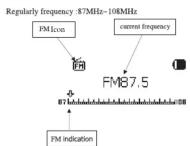
Radio Interface
After exiting, the radio will keep the status. When you start radio again, it will play last frequency station.
Radio operation
-
On the "FM MENU", press SEEK+ or SEEK-, then it will search the station by itself, and it will stop and play the station when it receive. If the station is saved, it will show on which number interface. If do not save, then need to save by yourself. After searching, press PAUSE can shift the station which were saved. Press SEEK+ or SEEK- can shift the station by 100KHz.
-
Press MENU enter the FM submenu.
-
Press long MENU to exit
Radio submenu and operation
Press MENU enter submenu under FM interface, as bellowing :

- Exit
The menu is :Save station, Delete station, Delete all, Auto Search, Exit.
SAVE STATION: search the station you wanted, press MENU enter submenu, choose "Auto Search" and press MENU, return to "RADIO INTERFACE", the station is saved. It can save 20 stations per wave band.
DELETE STATION: choose the station you want to delete, Press MENU enter submenu, choose "DELETE STATION", then press "MENU", the icon for the station, for example "CH02" already disappear, it means the station is deleted. If want to hear this station again, you need to search it.
Delete all: choose "DELETE ALL" and press "MENU", then all the station saved will be deleted.
System settings
Choose the SYS under the main interface interMENU to enter the system set up
System set up shows:
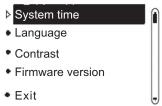
Press SEEK+_KEY and SEEK-_KEY can choose the set up, MENU_KEY to enter the setting menu.



- Cautions
- Problems and Solutions.
- System time
- Language option
- Firmware version
- Basic functions
- Preparation
- Battery charge
- Button Functions
- Turn on/off
- Main menu
- Function Application
- Music Play
- Music Interface
- Submenu and operation
- Submenu 2 and operation
- Repeat mode
- Radio
- Radio Interface
- Radio operation
- Radio submenu and operation
- System settings
Brand : Pyle
Model : PWMA83UFM
Category : Docking Station