
PWMA220BM - Docking Station Pyle - Free user manual and instructions
Find the device manual for free PWMA220BM Pyle in PDF.


| Product Type | Portable Karaoke PA Speaker Amplifier and Microphone System |
| Brand | Pyle |
| Model | PWMA220BM |
| Dimensions (L x W x H) | 9.7" x 5.2" x 9.5" (246 x 132 x 241 mm) |
| Weight | Approximately 5.5 lbs (2.5 kg) |
| Power Output | 60 Watt MAX |
| Speaker Impedance | 4 Ohm |
| Frequency Response | 25 Hz - 15 kHz |
| Power Supply | AC 120V, DC 12V, or internal rechargeable battery (11.1V Li-Ion, 1800mAh) or 6 x D batteries |
| Battery Life (Rechargeable) | Up to 10 hours |
| Bluetooth Version | V3.0 |
| Bluetooth Range | 30 ft (9.1 m) |
| Wireless Microphone Frequency | 203.4 - 215.2 MHz |
| USB Support | Up to 32GB, MP3 playback |
| Inputs | 1/4" MIC in, 3.5mm Keyboard in, 3.5mm Cassette in, USB port, Micro SD slot |
| Outputs | 3.5mm REC out |
| Audio Controls | Volume, Bass, Treble, Echo |
| Included Accessories | Wired handheld mic, headset mic, lavalier mic, belt pack transmitter, shoulder strap, power cable, 2 x AA batteries |
| USB Flash Drive Max Capacity | 32 GB |
| Main Unit Battery Type | 11.1V Li-Ion, 1800mAh (19.98Wh) |
| Maintenance | Keep away from humidity and heat; recharge internal battery every 2 months if not used |
Frequently Asked Questions - PWMA220BM Pyle
User questions about PWMA220BM Pyle
0 question about this device. Answer the ones you know or ask your own.
Ask a new question about this device
Download the instructions for your Docking Station in PDF format for free! Find your manual PWMA220BM - Pyle and take your electronic device back in hand. On this page are published all the documents necessary for the use of your device. PWMA220BM by Pyle.
USER MANUAL PWMA220BM Pyle
Need service or repair?
Want to leave a comment?
PyleUSA.com/ContactUs
PYLE
PYLE
PyleUSA.com


natural_image
Black audio amplifier with external microphone and earplifier (no visible text or symbols)☆☆☆☆☆☆☆
☆□□□□□□□□□□□□□□□□□□□□□□□□□□□□□□□□□□□□□□□□□□□□□□□□□□□□□□□□□□□□□□□□□□□□□□□□□□□□□□□□□□□□□□□□□□□□□□□□□□□□○□○
★★★□□★☆★▲○
Wireless BT Streaming, Built-in Rechargeable Battery
(Includes Belt Pack Transmitter, Headset, Lavalier & Wired Handheld Microphone)
USER MANUAL
\*Wireless Microphone Operating Frequency Range: 203.4 - 215.2 MHz
FEATURES
- Built-in Wireless BT Streaming MP3 player.
- Built-in one channel wireless microphone and one 6.35mm MIC in socket to connect wired dynamic MIC. Two persons can speak or sing at the same time.
- One 3.5mm keyboard in socket to connect electronic device. And one 3.5mm cassette in socket to connect cassette player or other audio player.
- One 3.5mm REC out socket can be connected to a recording device or to the input jack of a power amplifier to further amplify and enlarge the audio power.
- Master power/volume control. Bass, Treble and Echo controls. Suitable for karaoke.
- Powered externally with AC, 12V DC or internally with built-in 12V/1.8A lithium battery or (6) x 'D' Batteries. Suitable for both indoor and outdoor use.
- Ideal for many applications, including use in classrooms, conference/meeting rooms, churches, health clubs and small auditoriums.
CAUTION
- This unit is with speaker inside which can cause magnetic field. Keep this unit at least 60cm away from computer or TV.
- This unit is with built-in rechargeable battery. Please recharge the battery every 2 months if you are not going to use the unit for a long period of time or the battery may be damaged.
- If the battery is damaged please replace with same specifications battery and dispose the damaged battery environment friendly.
- Free from high temperature. Don't expose the device to the hot equipment.
- Don't place the device in the environment of humidity and dirtis.
- Place the device in the ventilated environment.
- Don't pull the power cord while you pull out the plug. Hold the plug tightly to pull it out.
- Pull out the AC power if you will not use the device for a long time.
- Your operation must be subjected to the specified voltage marked near the AC in jack and complied with this guide.
PARTS DESCRIPTION
- Echo control
- Treble control
- Bass control
- Power/volume switch
- MIC IN socket
- DC IN socket
- Power indicator
- Battery charging indicator
- Wireless receiver RF indicator
- Wireless receiver antenna
- MP3 LED display
- MP3 mode
- MP3 play/pause/repeat
- MP3 previous/volume down
- MP3 next/volume up
- USB port
- Microphone holder
- Speaker
- Keyboard in socket
- Cassette in socket
- REC out socket
- Battery compartment for (6) x 'D' Batteries


Plug one end of provided AC cord into the AC input jack on the left side of the amplifier. Then plug the other end of AC cord into AC power outlet. Turn on the unit using the power/volume switch.
NOTE: To avoid damaging your unit, make sure AC power is same as that marked near AC input jack)
This unit can be powered also using external 12V DC power. Connect external 12V DC power to DC input jack on the front of the amplifier. Observe the correct polarity as following.
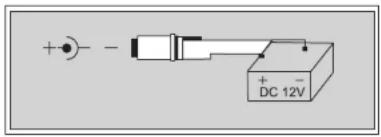
This unit can be powered internally using the built-in rechargeable battery. When AC power is connected, if battery charging indicator lights red, the rechargeable battery is not fully charged and will be allowed to charge while the unit is powered by the AC power. (Note: Turning off the unit power switch will allow the battery to recharge more quickly.) If the battery charging indicator lights green, the battery is fully charged and ready to power the unit alone. Shut off the power switch and disconnect the AC power. Turn the unit back on and the rechargeable battery will power the unit alone.
This unit can also be powered internally with (6) x 'D' Batteries. Insert the batteries while observing the correct polarity as marked. For longest operation use only alkaline or rechargeable batteries. Replace the batteries when the output volume drops or the range of the wireless decreases.
Note: This unit does not recharge batteries. When using 'D' Batteries, do not connect AC or DC power.
CONNECTION
- The KEYBOARD IN socket can be connected to a electronics device.
- The CASSETTE IN socket can be connected to a cassette player or other audio player.
- The REC OUT socket can be connected to a recording device or to the input jack of a power amplifier to further amplify and enlarge the audio power.
- The MIC IN socket can be connected to wired dynamic MIC. Keep MIC head away from the speaker of main unit to avoid feedback.
- Insert flash drive into USB port or Micro SD Memory Card into Micro SD card slot, system will play the music in flash drive or Micro SD Card automatically. If both flash drive and Micro SD Memory Card are inserted, system will play the music in flash drive. To play music in Micro SD Memory Card press MODE button to switch to SD mode.
- To play music from your mobile phone etc via bluetooth, press MODE button to switch to BT mode. Turn on bluetooth function of your mobile phone and search for Pyle Audio and connect. Then you can play your music in mobile phone.
ATTENTION
- If feedback (howling sound) occurs, try first turning down the treble control. If feedback still is present, try turning down the volume or repositioning this unit with respect to the wired or wireless microphone being used.
- Extend the antenna fully whenever using the wireless microphone to ensure optimum performance and maximum range.
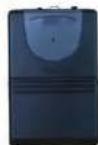
- Power On/Off/Mute switch
- MIC input socket
- Power/low battery Indicator
- Gain adjustment
- Battery compartment/cover
- Lapel MIC
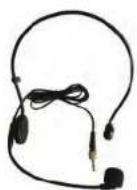
- Headset MIC

OPERATION
- Open battery cover and install 2PCS AA batteries into battery compartment with correct polarity. And then close the cover.
- Plug in either the clip-on or the headset microphone.
- To use the clip-on MIC, attach it at chest level. Do not place too close to the mouth- a distance of about six inches usually works best. To use the headset MIC, place it on the head and adjust the MIC boom so that the MIC is about one inch to the side of the front of the mouth.
Note: The clip-on or headset MIC wire is also the transmitting antenna. Rolling up or shortening the wire may reduce the effective operating range. Extend the wire fully during use and keep it as straight as possible.
-
Turn on the transmitter by sliding the power switch to ON position. Power indicator will give a single quick flash, indicating usable battery strength. In the case of a dead or low battery, the power indicator either will not go on at all or will stay on continuously, indicating that the battery should be replaced with a fresh one.
-
The RF indicator on the amplifier should now be lit.
-
Adjust the volume control of body pack and/or volume control of the amplifier to a comfortable listening level as desired.
-
If the transmitter is not going to be used for any length of time, slide power switch to OFF position and remove the battery.
PWMA220BM
Portable Karaoke PA Speaker Amplifier and Microphone System
Wireless BT Streaming, Built-in Rechargeable Battery (Includes Belt Pack Transmitter, Headset, Lavalier & Wired Handheld Microphone)
Features:
- Versatile Public Address Microphone & Speaker
- Bluetooth Wireless Music Streaming Ability
• Lightweight, Portable & Powerful
• Integrated Wired Handheld Microphone
• USB Flash Drive Memory Reader
• MP3 Digital Audio File Compatibility
• Built-in Rechargeable Battery, 10+ Hour Operation
• 1/4" Microphone Input Jack
5
• Audio (3.5mm) Output, Connect External Devices
• Full Range Stereo Sound Reproduction
- Impressive Bass Response
- Convenient Carry Handle
- Echo, Bass, Treble Audio Configuration Controls
• Perfect for Karaoke, Crowd Control, House Parties
*Ability to be Powered by External Wall Power Adapter (Not Included)
Bluetooth Connectivity:
• Wireless Music Streaming Audio
- Works with All of Your Favorite Devices
(Smartphone, Tablet, Computer, Laptop, MP3 Player, etc.)
- Bluetooth Version: V3.0
- Bluetooth Network Name: Pyle Audio
- Bluetooth Wireless Range: 30' ft.
What's in the Box:
• PA Speaker Amplifier
• Wired Handheld Microphone
- Headset Microphone
• Lavalier Microphone
- Belt Pack Transmitter
- Shoulder Carry Strap
- Power Cable
• (2) x 'AA' Batteries
Technical Specs:
• Power Output: 60 Watt MAX
• Speaker Impedance: 4 Ohm
• Frequency Response: 25Hz-15kHz
• Maximum USB Flash Memory Support: 32GB
• Digital Audio File Support: MP3
- Main Unit Rechargeable Battery, 11.1V Li-iOn, 1800mAh - 19.98Wh
- *Main Unit Speaker Optionally Battery Powered, Requires (6) x 'D' Batteries,
- Battery Operated Belt Pack, Requires: (2) x 'AA' Batteries (Included)
• Power: DC 12V, AC 120V
- Dimensions (L x W x H): 9.7" x 5.2" x 9.5"-inches
Not Included
*Wireless Microphone Operating Frequency Range: 203.4 - 215.2 MHz



- PYLE
- PyleUSA.com
- \*Wireless Microphone Operating Frequency Range: 203.4 - 215.2 MHz
- FEATURES
- CAUTION
- PARTS DESCRIPTION
- CONNECTION
- ATTENTION
- OPERATION
- PWMA220BM
- Portable Karaoke PA Speaker Amplifier and Microphone System
- Features:
- Bluetooth Connectivity:
- What's in the Box:
- Technical Specs:
- Not Included
Brand : Pyle
Model : PWMA220BM
Category : Docking Station