TX9100U-006 - Thermostat LUX - Free user manual and instructions
Find the device manual for free TX9100U-006 LUX in PDF.


User questions about TX9100U-006 LUX
0 question about this device. Answer the ones you know or ask your own.
Ask a new question about this device
Download the instructions for your Thermostat in PDF format for free! Find your manual TX9100U-006 - LUX and take your electronic device back in hand. On this page are published all the documents necessary for the use of your device. TX9100U-006 by LUX.
USER MANUAL TX9100U-006 LUX
Turn OFF the power to both your heating and cooling units at the circuit breaker.
2
flowchart
graph TD
    R --> G
    R --> Y
    R --> N
    Y --> G
    G --> N
    style R fill:#f9f,stroke:#333
    style Y fill:#f9f,stroke:#333
    style G fill:#ccf,stroke:#333
    style N fill:#cfc,stroke:#333

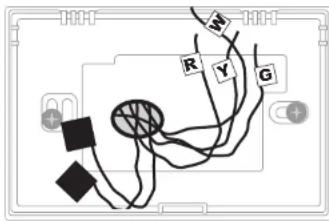
BEFORE removing thermostat, label your existing wire connections with the labels provided. Cover any "unused" wires with electrical tape.
LABEL WIRES
| 4 | 5 | 6 | A | AL |
| C | C1 | DH | E | F |
| H | H1 | H2 | MDO | L |
| O | OT | OT | R | R |
| PH | T | TC | V | V |
3
INSTALL NEW THERMOSTAT BASE
natural_image
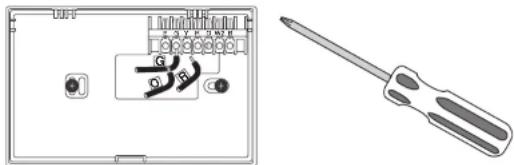
Technical diagram showing a screwdriver inserted into a device panel with labeled pins (no text or symbols present)Remove your old thermostat. Install the new thermostat base (using the same mounting holes if possible). Connect the wires matching the exact terminal letters from your wires, to the terminal letters on the new thermostat.
NOTE: If you have both a "B" and an "O" wire, see the notes on the back page of this instruction sheet.
4
INSTALL ALKALINE BATTERIES

Restore the power to your heating and cooling units.
Install new Alkaline batteries into the thermostat. NOTE: Please use Duracell or Energizer Alkaline batteries ONLY for all LUX® thermostats requiring batteries. BE SURE TO CHANGE THE BATTERIES AT LEAST ONCE A YEAR, to ensure consistent and reliable operation of your heating/cooling system.
5
Set the system switch to the desired temperature mode.
Adjust the SET Temperature to the desired comfort setting.
72F
(NOTE: this set point will only be temporary until the program
70F
periods are saved in memory.)
68F
6
SET THE CLOCK... SET THE TEMPERATURE PROGRAMS
Thank you for choosing LUX Products, and we hope that you will enjoy using your new thermostat along with its many energy saving features.
DOWNLOAD THE FULL INSTRUCTION MANUAL
This sheet is just a quick start guide, and there are many more instructions and topics covered in the full version of the manual for this product. The complete version PDF can be obtained at "http://www.luxproducts.com". Click on SUPPORT, then INSTRUCTION MANUALS.
ONLINE THERMOSTAT TROUBLESHOOTING GUIDES
If you are having difficulties with the installation or the operation of your thermostat, please review the online troubleshooting guides for your model. These troubleshooting guides cover the most common symptoms that you may observe. The Troubleshooting Guides are located at "http://www.luxproducts.com". Click on SUPPORT, then TROUBLESHOOTING GUIDES.
CONTACT OUR TECHNICAL SUPPORT DEPARTMENT
If you require need assistance with your product, please contact our Technical Assistance department between 8:00AM and 4:30PM Eastern Time from Monday through Friday, at 856-234-8803. Our website also permits you to email your technical questions to our support staff at your convenience by visiting "http://www.luxproducts.com", and clicking on the CONTACT US tab at the top of the page.
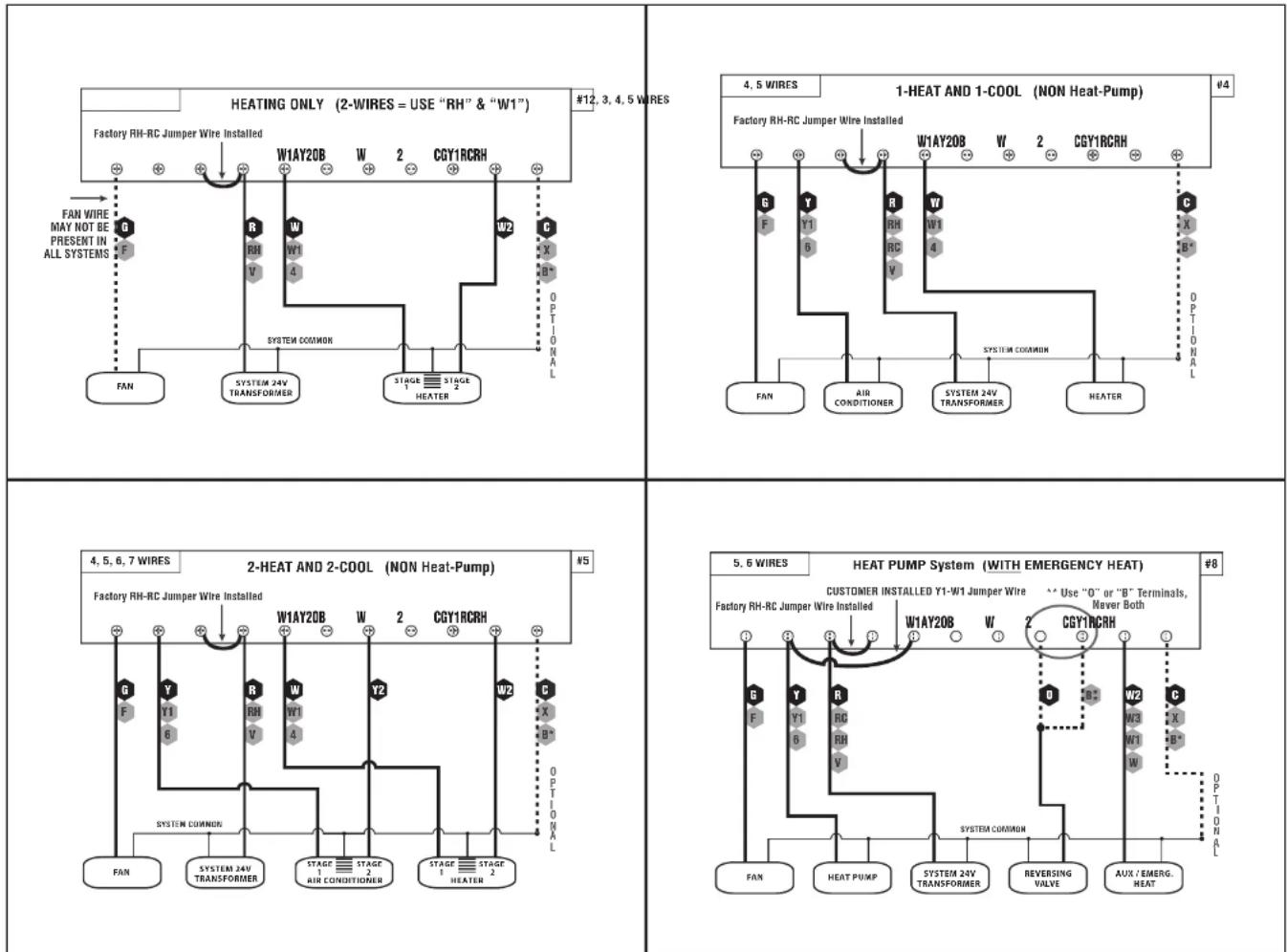
WIRING DIAGRAM NOTES:
- Label every wire terminal designation on your existing thermostat wiring before removing your old thermostat.
- Ignore the color of the wires since they may not comply with any standard. Please connect wires using the terminal letter designations.
- WARNING: All wiring must conform to the local codes and ordinances that are in your particular location.
- If the information provided in the following wiring diagrams does not clearly represent or match your system, please refer to the full version of the manual which can be obtained from our website, or contact us before removing your existing thermostat wires.
- All of the dashed wires shown in the wiring diagrams are either optional, or their usage depends upon your specific system type or brand. For example: Diagram #1 shows the fan wire as optional. If your system does not have a fan, than this terminal will not be used.
- The optional "C" terminal is used for powering the thermostat by the 24-volt system, using the System Common wire. This can be used alone, or in addition to installing batteries as a backup. NOTE: connecting the System Common wire to the thermostat is not necessary for heating and cooling to function properly.
- If your old thermostat has both a "Y" and "C" wire both present, then "C" is most likely a System Common wire.
- For Heat Pump systems, you will use either the "O" terminal or the "B" terminal on this thermostat, but not both. If your old thermostat has both an "O" and a "B" wire present, then "B" is likely a System Common wire and may be connected to the "C" terminal. Connecting a System Common wire to this thermostat's "B" terminal may damage the thermostat, and also your heating and cooling system.
- Some Heat Pump systems have a wire for AUX electric heat (usually W2), and also a separate wire for Emergency electric heat (usually E). This thermostat uses the W2 terminal for both AUX and Emergency Heat. Tape off your "E" wire, and confirm that all components function without it.
CAUTIONS AND WARNINGS:
- The thermostat requires batteries to operate and failure or sub-standard performance of the batteries may impair or prevent the correct operation of the thermostat. Use Duracell or Energizer alkaline batteries ONLY for all Lux thermostats requiring batteries. BE SURE TO CHANGE THE BATTERIES AT LEAST ONCE A YEAR. Failure to follow these battery instructions could result in property damage and/or personal injury.
- The electrical rating for this thermostat is 1.5 Amps per terminal, with a maximum total load of 3.0A for all terminals combined.
- The thermostat contains parts which may wear out through use and are susceptible to failure if over-loaded or used in a manner other than as indicated in the documentation.
- Check unoccupied residences regularly to ensure that all systems are operating properly.
- Check any heating/air-conditioning system including this product before operation and at regular intervals.
- Electrical interference, static electricity, failure or substandard performance of batteries, wiring defects in the installation and/or characteristics of the connected HVAC devices may prevent the system from regulating heating and cooling as anticipated.
- The thermostat is a sensitive device and dropping the product can cause damage to critical components. If the product is dropped or shaken violently during transport or installation then it should be replaced immediately.
- Persons with physical or mental limitations may not be able to promptly respond to a malfunction of the heating/air-conditioning system.
- All residents should be made aware of the potential in any system for malfunctions that could cause continuous heating or cooling and should be familiar with the operation and location of the heating/cooling appliance on/off switch.
- Read the instruction manual completely before installing the thermostat. Additional information is available at our website luxproducts.com. You should consult a qualified HVAC technician or an electrician if you do not fully understand the installation instructions.
**NOTE: The Black Terminal Letters Shown Below Are Standard, The Gray Terminal Letters Are Brand-Specific