AD-1101 - Network card / adapter Netis - Free user manual and instructions
Find the device manual for free AD-1101 Netis in PDF.


User questions about AD-1101 Netis
0 question about this device. Answer the ones you know or ask your own.
Ask a new question about this device
Download the instructions for your Network card / adapter in PDF format for free! Find your manual AD-1101 - Netis and take your electronic device back in hand. On this page are published all the documents necessary for the use of your device. AD-1101 by Netis.
USER MANUAL AD-1101 Netis
The following terms should be found in your package:
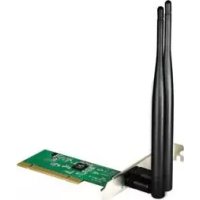
- Wired PCI(PCI-E) adapter
- Quick Installation Guide
CD-ROM
Make sure that the package contains above items. If any
of the above items is missing or damaged, please contact
the store you bought this product from.
2. Before Your Begin
Minimum Requirements:
Available PCI (PCI-E) slot
300 MHz processor and 32 MB of memory
CDROM drive
A device which can connection to a network, such as a
router or a switch
Microsoft® Windows®7, Vista®, XP, 2000 Sp4
3. Insert the CD
Turn on the computer and insert the included CD in the
CD-ROM drive. The install screen will appear. If not, click
the Start button and choose Run and enter
D:\CDView.exe (if 'D' is your CD-ROM drive)
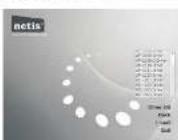
Select 'Install Driver' and follow the software instructions.
Choose the suitable driver for your adapter in the drop-
down menu
WeslFD[PGI G]Adaptor SynchiniRitumefide
Allent: The production of AD-
The following is the step-by-step instructions in
Windows XP. The steps and screens are similar for
the other Windows operating systems.
Preparing for setup
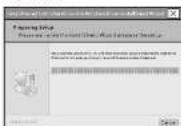
Figure 3-2
MedPE[PD-6]Apple/Intel/Intel/Intel
Click "Next >"
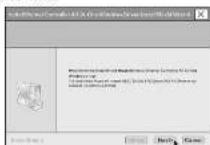
Figure 3-1
Click "Install"
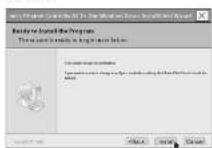
Figure 3-1
3
WiseFD [PCH] Adapter Quahleitallbartride
justeling
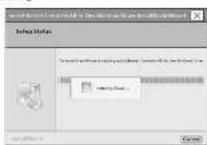
Fig.2X6
After few minutes, it will show the info as the following figure, mean the drivers has been installed.
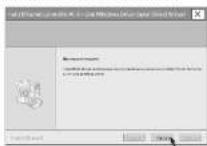
Figure 3-8
[Non-Text]
4
(See EPJ [PCH] Adapter Quick Installation Guide
4.Hardware Installation
PCI(PCI-E) Adapter
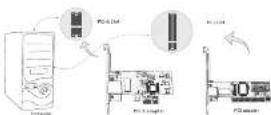
Power off your computer and insert the adapter into the slot of PCI(PCHE).
!Attention: Hardware warning:
Place the service a vent-lated place which far away from
-
Don't to work in the space, transportation and
-
Proxit fun perforating the surface of stuff like aicker alu
-
Dorsay, spreding the 2023 year
5. Connecting To Your Network
Now the installation is complete. You can connect the adapter to your network device such as switch by a cable, The Link LED should light up to indicate a proper physical connection between the adapter and the network.
5
WenlPOPS16/Adper Bank insolutarstelle
6. Configurating The Network Parameters
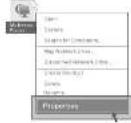
Click "My Network Places" with the right button of your mouse. Then select "Properties".
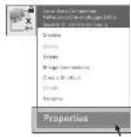
Click "Local Area Connection" with the right button of your mouse. Then select "Properties".
The quick brown fox jumps over the lazy dog.
-
Wes(F)F(1)D(4)E(2)D(3)D(4)D(5)
Double click the "Internet Protocol[TCP/IP]"
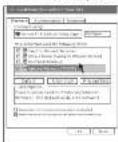
Fig. 6.5
Select the "Obtain an IP address automatically" as bellow, and click the button of "ok", then, your pc could get the parameters from the DHCP server which is in your network.
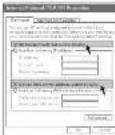
Figure 54
了
MedPEIPO4Alate data validation guide
FCC Statement
This equipment has been tested and found to comply with the limits for a Class B digital device, pursuant to part 15 of the FCC rules. These limits are designed to provide reasonable protection against harmful interference in a residential installation. This equipment generates, uses and can radiate radio frequency
energy and, if not installed and used in accordance with the instructions, may cause harmful interference to radio communications. However, there is no
to you communicate that information, there is no guarantee that interference will not occur in a particular installation. If this equipment does cause harmful interference to radio or television reception, which can be determined by turning the equipment off and on, the user is encouraged to try to correct the interference by one or more of the following measures given or relevant to the receiving extent:
- Increase the separation between the equipment and receiver
-Connect the equipment into an outlet on a circuit different from that to which the receiver is connected. -Consult the dealer or an experienced radio/TV
technician for help. To assure continued compliance, any changes or modifications not expressly approved by the party responsible for compliance could void the users authority to operate this equipment. (Example use only shielded interface cables when connecting to computer or peripheral devices).
This equipment complies with Part 15 of FCC RF Rules. Operation is subject to the following two conditions: 1) This device may not cause interference and 2) This device must accept any interference, including interference that may cause undesired operation of the device.
8
USA/Canada Technical Support:
Phone (all free in USA & Canada):
1-866-71-network or 1-966-716-3695
Email: usa_support@netis-systems.com
for North America only