
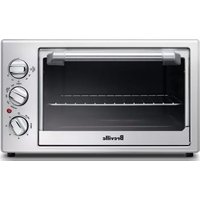
the All in 1 Compact Air Fryer Oven BOV660 - Oven BREVILLE - Free user manual and instructions
Find the device manual for free the All in 1 Compact Air Fryer Oven BOV660 BREVILLE in PDF.


| Product Type | Countertop Air Fryer Oven |
| Model | BOV660 |
| Brand | Breville |
| Dimensions (W x D x H) | Approx. 13.4 x 11.7 x 12.2 inches |
| Weight | Approx. 17.6 lbs |
| Power | 1800 Watts |
| Capacities | Fits 8 slices of toast or a 10-inch pizza |
| Cooking Functions | Air Fry, Bake, Broil, Toast, Reheat, Keep Warm |
| Temperature Range | 150°F - 450°F |
| Timer | Up to 120 minutes with auto shut-off |
| Controls | Digital LCD display with dial and buttons |
| Interior Light | Yes |
| Interior Coating | Non-stick |
| Cleaning | Removable crumb tray and non-stick interior for easy wipe-down |
| Safety Features | Auto shut-off, cool-touch handle, rear cooling vents |
| Spare Parts Availability | Replacement parts available through Breville customer service |
| Warranty | Limited 2-year warranty |
Frequently Asked Questions - the All in 1 Compact Air Fryer Oven BOV660 BREVILLE
User questions about the All in 1 Compact Air Fryer Oven BOV660 BREVILLE
0 question about this device. Answer the ones you know or ask your own.
Ask a new question about this device
Download the instructions for your Oven in PDF format for free! Find your manual the All in 1 Compact Air Fryer Oven BOV660 - BREVILLE and take your electronic device back in hand. On this page are published all the documents necessary for the use of your device. the All in 1 Compact Air Fryer Oven BOV660 by BREVILLE.
USER MANUAL the All in 1 Compact Air Fryer Oven BOV660 BREVILLE
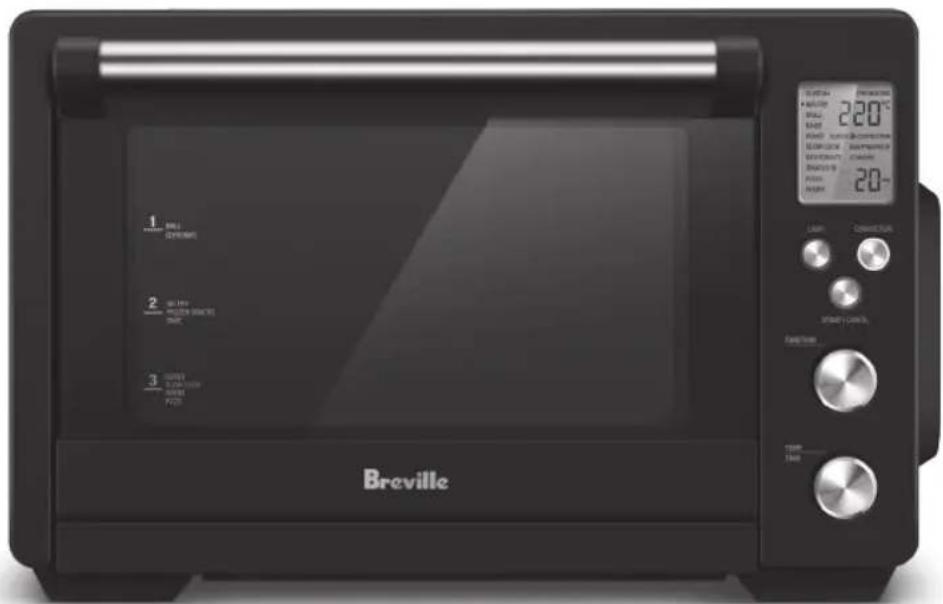
the All in 1 Compact ^TM Air Fryer Oven
Instruction Book - Suits all LOV660 models
Breville®

Contents
2 Breville recommends safety first
8 Components
9 Control panel & LCD display
10 Before first use
11 Oven functions overview
12 Functions
- CUSTOM 13
- AIR FRY 13
- GRILL HI/LOW 14
- BAKE 15
- ROAST 16
- SLOW COOK HI/LOW 16
- DEHYDRATE 17
-
FROZEN SNACKS 18
-
PIZZA 19
- WARM 20
21 Care & Cleaning
23 Troubleshooting
BREVILLE RECOMMENDS SAFETY FIRST
At Breville we are very safety conscious. We design and manufacture consumer products with the safety of you, our valued customer, foremost in mind. In addition, we ask that you exercise a degree of care when using any electrical appliance and adhere to the following precautions.
IMPORTANT SAFEGUARDS
READ ALL INSTRUCTIONS BEFORE USE AND SAVE FOR FUTURE REFERENCE
- Remove and safely discard any packaging material, and promotional labels before using the oven for the first time.
• To eliminate a choking hazard for young children, remove and safely discard the protective cover fitted to the power plug of this appliance (where applicable).
- Do not place the oven near the edge of a bench or table during operation.
- Ensure the surface is level, clean and free of water and other substances.
- Do not use the oven on a sink drain board.
- Do not place the oven on or near a hot gas or electric burner, or where it could touch another heated oven.
- When operating the oven, keep a minimum distance of 10cm of space on both sides of the oven and 15cm above.
- Position the oven at a minimum distance of 20cm away from curtains, cloths and other heat sensitive materials when in use. This will allow for adequate air circulation and prevent curtain and cloth discolouration due to radiated heat.
- A fire may occur if the oven is covered or touches flammable material, including curtains, draperies, and similar fabrics when in operation.
- Caution should be taken when grilling high oil content foods, such as pine nuts and walnuts, as they may catch fire. If this occurs, keep the oven door closed, switch off and unplug the oven from the outlet until flame has extinguished.
• Always operate the oven on a stable, heat resistant surface. Do not use on a cloth-covered surface, near curtains or other flammable materials.
- Do not place cardboard, plastic, paper, or other flammable materials in the oven.
- Do not place anything on top of the oven.
- Do not cover the crumb tray or any part of the oven with metal foil. This will cause overheating of the oven.
- Regularly clean the crumb tray to discard crumbs. Ensure to turn off the oven, remove the power plug from the power outlet and allow the oven to cool before pulling the crumb tray out.
• Always ensure the crumb tray is thoroughly dried after cleaning. Ensure that the crumb tray has been re-inserted before operating the oven.
- Caution should be exercised when using lids in the oven, as pressure build up in a covered pan or dish may cause hot ingredients to expel or the dish to crack.
- Do not place any part of the oven in the dishwasher.
• Always use extreme caution when removing any of the accessories or disposing of hot grease or other hot liquids.
- Do not place hands inside the oven during operation.
- Do not leave the door standing open for extended periods of time when the oven is turned on.
- The glass of the oven door has been specially treated to make it stronger, more durable and safer than ordinary glass, however it is not unbreakable. If struck extremely hard, the glass oven door may break or weaken, and could at a later time, shatter into many small pieces without apparent cause.
- Do not insert oversized foods into the oven as they create risk of fire or electric shock.
- It is recommended to only use the accessories supplied with this oven.
- When grilling, always insert the baking tray into the oven to act as a drip tray.
- Do not clean the interior with metal scouring pads as pieces can break off the pad and touch electrical parts of the oven, creating risk of electric shock.
-
Do not store any materials other than the supplied accessories in the oven when not in use.
-
Do not attempt to operate the oven by any methods other than those described in this booklet.
• Always ensure the oven is properly assembled before use. Follow the instructions provided in this booklet. - The oven is not intended to be operated by means of an external timer or separate remote control system.
- The top of the oven is very hot during and after operation. Do not store any item on top of the oven when in use and when stored.
- Do not leave the oven unattended at any time when in use.
- Caution should be exercised when using pans and dishes constructed of materials other than metal. If using ceramic or glass pans or dishes it is important that they are oven-safe to prevent cracking.
- Do not touch hot surfaces. Oven surfaces, including the door and outer surface of the oven are hot during and after operation. To prevent burns or personal injury, always use protective hot pads or insulated oven mitts, or use handles and knobs where available, when inserting, removing or handling items
from the oven. Alternatively, allow the oven to cool down before handling.
• Always turn off the appliance, ensure the oven has cooled, is turned off at the power outlet and the cord is unplugged from the power outlet before attempting to move the appliance, when not in use, if left unattended and before disassembling, cleaning or storing.
- Do not place the oven in direct sunlight. Colour fading and discolouration may occur when the oven is consistently exposed to UV light. - Keep the oven clean. Follow the cleaning instructions provided in this book.
IMPORTANT SAFEGUARDS FOR ALL ELECTRICAL APPLIANCES
- Fully unwind the power cord before use.
- Connect only to a 230V or 240V power outlet.
-
The appliance must be used on a properly grounded outlet. If unsure, please consult a qualified electrician.
-
Do not, under any circumstances, modify the power plug or use a power plug adapter.
- Do not place this appliance on or near a heat source, such as hot plate, oven or heater.
- Position the appliance at a minimum distance of 20cm away from walls, curtains and other heat or steam sensitive materials and provide adequate space above and on all sides for air circulation.
- Do not let the power cord hang over the edge of a bench or table, touch hot surfaces or become knotted.
- This appliance is for household use only. Do not use this appliance for anything other than its intended use. Do not use in moving vehicles or boats. Do not use outdoors. Misuse may cause injury.
- The appliance is not intended for use by persons (including children) with reduced physical, sensory or mental capabilities, or lack of experience and knowledge, unless they have been given supervision or instruction concerning use of the appliance by a person responsible for their safety.
• Children should be supervised to ensure that they do not play with the appliance.
• Always turn the appliance to the off position, switch off at the power outlet and unplug at the power outlet when the appliance is not in use.
- Before cleaning, always turn the appliance to the off position, switch off at the power outlet, unplug at the power outlet and remove the power cord, if detachable, from the appliance and allow all parts to cool.
• To protect against electric shock, do not immerse the power cord, power plug or appliance in water or any other liquid or allow moisture to come in contact with the parts, unless it is recommended in the cleaning instructions.
- Any maintenance other than cleaning should be performed at an authorised Breville Service Centre.
- It is recommended to regularly inspect the appliance. To avoid a hazard, do not use the appliance if power cord, power plug or appliance becomes damaged in any way. Return the entire appliance to the
nearest authorized Breville Service Centre for examination and/or repair.
- The installation of a residual current device (safety switch) is recommended to provide additional safety protection when using electrical appliances. It is advisable that a safety switch with a rated residual operating current not exceeding 30mA be installed in the electrical circuit supplying the appliance. See a qualified electrician for professional advice.
- During electrical storms, the appliance should be disconnected from the power source at the wall socket to prevent any electrical surges that may arise during the storm and which may inadvertently cause damage to the appliance and its electronic componentry.

CAUTION
Hot surfaces during and after use.

This appliance is marked with a hot surface symbol.

WARNING
To reduce the risk of FIRE, ELECTRIC SHOCK, EXPOSURE TO EXCESSIVE UV RADIATION, OR INJURY TO PERSONS:
• Always unplug the oven and let all parts (including the light bulb housing, glass cover and enclosure) cool completely before replacing the light bulb.
• Always use a soft cloth when handling the light bulb and do not directly touch the surface as oil from your skin can damage the light bulb.
- Do not look directly at glowing light bulb.
- Keep the light bulb away from materials that may burn.
- The light bulb gets hot quickly. Only use the light button to turn on the light.
- Do not operate the light if the light bulb housing, glass cover, UV filter or enclosure is missing or damaged.
FOR HOUSEHOLD USE ONLY SAVE THESE INSTRUCTIONS
Components
natural_image
Technical line drawing of two rectangular plastic containers labeled F and H, showing different internal patterns (no text or symbols beyond labels)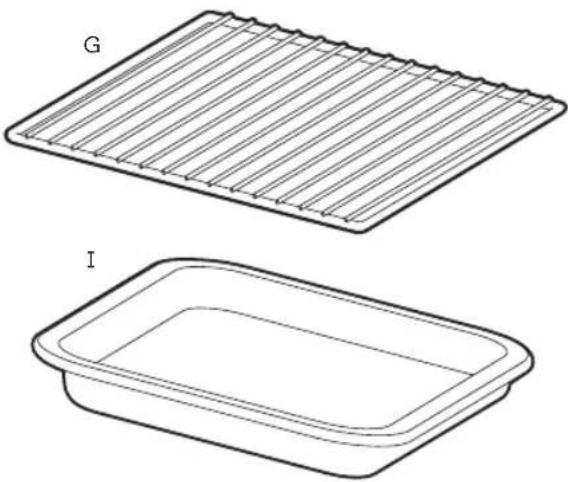
natural_image
Two technical line drawings of rectangular trays labeled G and I, showing different material surfaces (no text or symbols beyond labels)A. Large 24 litre capacity
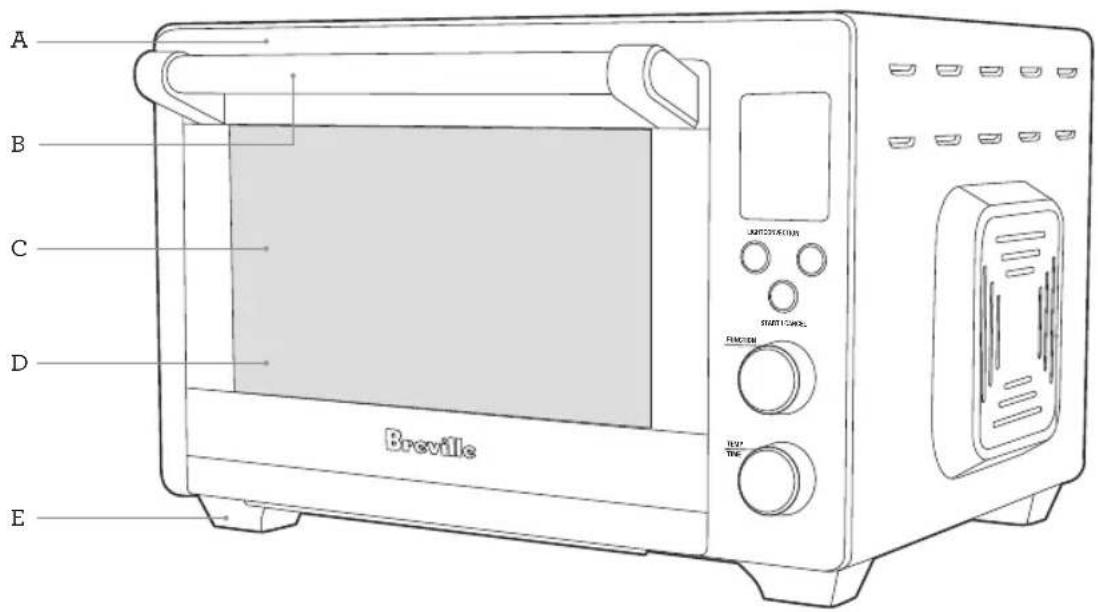
B. Cool touch handle for safe and easy handling
C. 3 optimised rack height positions
D. Dual-wall tempered glass door
E. Sturdy non-slip feet
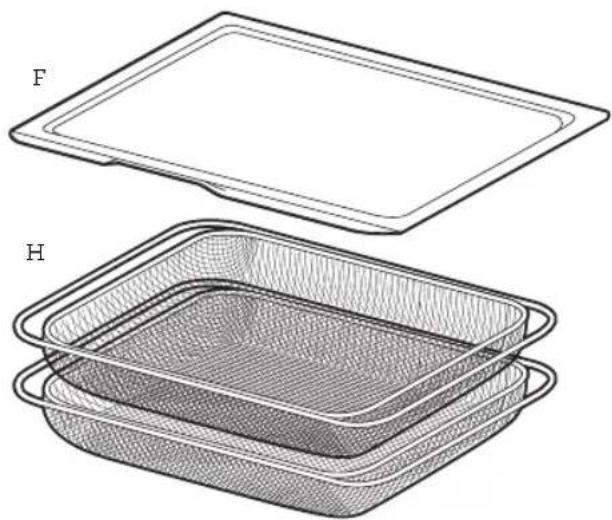
F. Crumb tray
G. Wire rack
H. Air fry basket x2
I. Baking tray
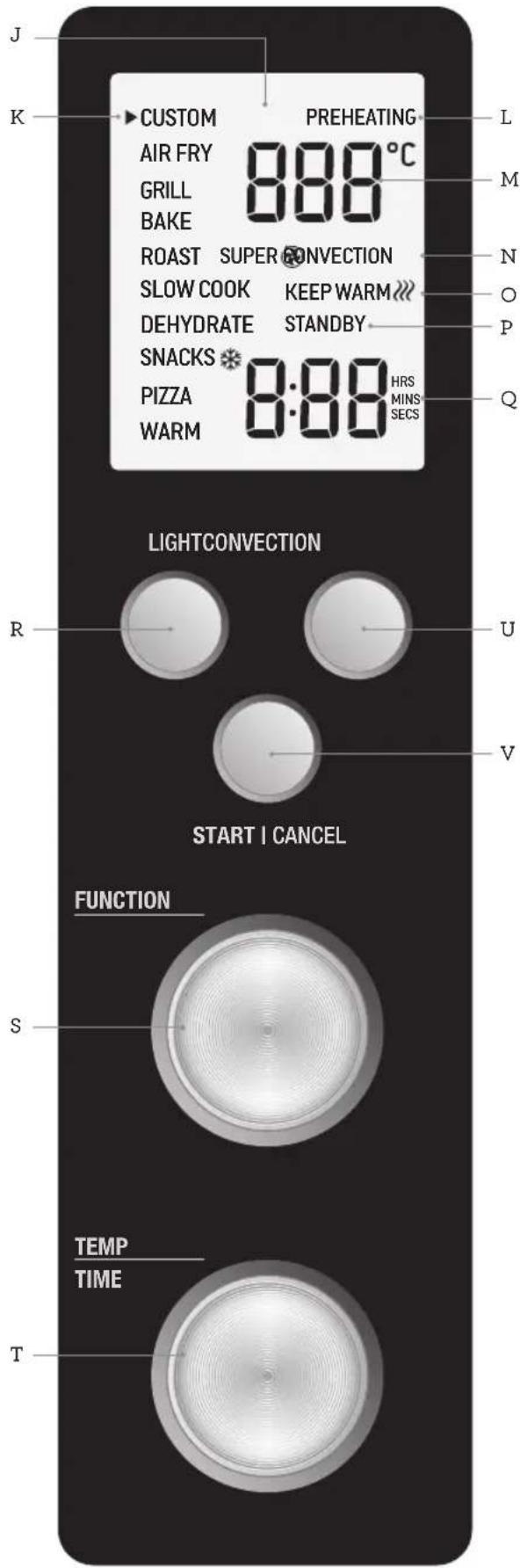

Control Panel & LCD Display
J. LCD screen
K. Function Indicator
L. Preheating
M. Temperature (°C)
N. Convection/Super Convection
O. Keep Warm
P. Standby Mode
Q. Time (HRS/MINS/SECS)
R. OVEN LIGHT button with light ring
S. FUNCTION dial
T. TEMPERATURE/TIME dial
U. CONVECTION
(CONVECTION/SUPER CONVECTION)
button with light ring
V. START/CANCEL button with light ring
Before first use
This guide is designed for first time use.
For safety and more information, refer to the rest of the Instruction Book.
PREPARING THE OVEN
- Remove and safely discard any packaging material, promotional labels and tape from the oven.
- Remove the Crumb Tray, Wire Rack, Air Fry Baskets and Baking Tray from the packaging. Wash them with a soft sponge in warm, soapy water then rinse and dry thoroughly.
- Wipe the interior of the oven with a soft, damp sponge. Dry thoroughly.
- Place the oven on a flat, dry surface. Ensure there is a minimum distance of 10cm of space on both sides of the appliance and 15cm above.
- Insert the crumb tray into the oven.
- Unwind the power cord completely and insert the power plug into a grounded power and turn the outlet on.
- The oven alert will sound, and the LCD screen will illuminate white.
BEFORE FIRST USE
Before first use, turn on the oven while empty for 20 minutes to remove protective substances from the heating elements. Ensure the area is well ventilated as the oven may emit vapours. These vapours are safe and are not detrimental to the performance of the oven.
- Turn the FUNCTION dial to the right until the indicator reaches the PIZZA function.
- Press the START/CANCEL button. The button backlight will illuminate red, the LCD screen will illuminate orange.
- Turn the TEMP/TIME dial to adjust the temperature to 230°C.
- The LCD screen will indicate a blinking 'PREHEATING'. Once the oven has completed the preheating cycle, an alert will sound.
- The timer will be displayed and automatically begin to count down.
- At the end of the cooking cycle, the oven alert will sound, the START/CANCEL button backlight will go out and the LCD screen will illuminate white.
- The oven is now ready to use.

NOTE
The top of the oven is very hot during and after operation. As a result, storing items on top of the oven is not recommended.

NOTE
The oven light can be turned on and off at any time.
OVEN FUNCTIONS OVERVIEW
| Function Rack | Position | Default Temp | Default Convection Fan Forced | Convection Fan Forced Range | Heating Elements | Temp Range | Default Cook Time | Time Range | Keep Warm | Preheat Time |
| CUSTOM MIDDLE 180°C | SUPER | CONVECTION | SUPER CONVECTION CONVECTION OFF | Top and bottom | 70°C - 230°C | 15 MINS | 1 MIN - 4 HRS | N/A | YES | |
| AIR FRY MIDDLE 220°C | SUPER | CONVECTION | N/A Top and bottom | 70°C - 230°C | 20 MINS | 1 MIN - 2 HRS | N/A | YES | ||
| GRILL (HI/LOW) | TOP | HI | N/A | N/A | Top | HI or LO | 10 MINS | 1 MIN- 20 MINS | N/A | N/A |
| BAKE | BOTTOM /MIDDLE (food dependent) | 160°C | CONVECTION | SUPER CONVECTION CONVECTION OFF | Top and bottom heating element cycle on and off to regulate temperature | 70°C - 230°C | 30 MINS | 1 MIN - 2 HRS | N/A | YES |
| ROAST | BOTTOM /MIDDLE | 180°C | SUPER CONVECTION | SUPER CONVECTION CONVECTION OFF | Top and bottom | 70°C - 230°C | 1 HR | 1 MIN - 4 HRS | Auto keep warm for 2 HRS at 70°C | |
| SLOW COOK (HI/LOW) | BOTTOM | Low Program | CONVECTION | SUPER CONVECTION CONVECTION OFF | Top and bottom heating element cycle on and off to regulate temperature | HI or LO | 8 HRS LOW 4 HRS HIGH | Before START/CANCEL Button Is Pressed: 8 - 12 hrs for Low 4 - 6 hrs for High After START/CANCEL Button Is Pressed: 1 min - 12 hrs for Low 1 min - 6 hrs for High | Auto keep warm for 2 HRS at 70°C | |
| High Program | ||||||||||
| DEHYDRATE & TOP | MIDDLE & TOP | 60°C | CONVECTION | CONVECTION OFF | Top and bottom heating element cycle on and off to regulate temperature | 40°C - 90°C | 3 HRS | 1 MIN - 12 HRS | N/A | N/A |
| FROZEN SNACKS | MIDDLE 200°C | SUPER CONVECTION | SUPER CONVECTION CONVECTION OFF | Top and bottom | 70°C - 230°C | 15 MINS | 1 MIN - 2 HRS | N/A | YES | |
| PIZZA | LOW | 220°C | CONVECTION | SUPER CONVECTION CONVECTION OFF | Top and bottom heating element cycle on and off to regulate temperature | 70°C - 230°C | 14 MINS | 1 MIN - 2 HRS | N/A | YES |
| WARM | MIDDLE /BOTTOM | 70°C | CONVECTION | SUPER CONVECTION CONVECTION OFF | Top and bottom heating element cycle on and off to regulate temperature | 50°C - 230°C | 1 HR | 1 MIN - 2 HRS | N/A | N/A |

Functions
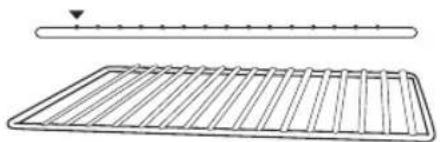
- Position the wire rack so the spokes face upward and insert it into the desired rack position. The suggested rack positions are conveniently printed on the oven door window.
natural_image
Technical line drawing of a grid-patterned panel with a horizontal bar and arrow indicator (no text or symbols)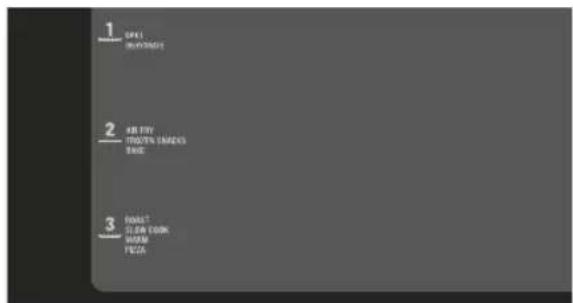
TEMP/TIME DIAL
- Turn the FUNCTION dial until the indicator on the LCD screen reaches the desired setting.
- The top figure on the LCD screen indicates the preset cooking temperature for the selected setting. Turn the TEMP/TIME dial to the left to reduce the cooking temperature or to the right to increase the cooking temperature. Confirm your selection by pushing the dial.
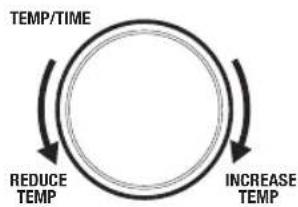
flowchart
graph TD
    A["INCREASE TEMP"] --> B["REDUCE TEMP"]
    B --> C["TEMP/TIME"]
    C --> A
- The bottom figure on the LCD screen indicates the preset cooking time for the selected setting. Turn the TEMP/TIME dial to the left to reduce the cooking time or to the right to increase the cooking time.
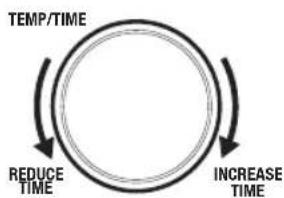
flowchart
graph TD
    A["TEMP/TIME"] --> B["REDUCE TIME"]
    B --> C["INCREASE TIME"]
    C --> A

NOTE
Push the TEMP/TIME dial to interchange between temperature and time setting.
- For settings without a preheat time GRILL (HI/LO), DEHYDRATE, WARM, place the food directly on the wire rack, air fry basket and/or baking tray. Ensure the food is centred in the oven for even cooking.
a) Close the oven door.
b) Press the START/CANCEL button. The button backlight will illuminate red, the oven alert will sound, and the LCD screen will illuminate orange.
c) The timer will be displayed and begin to count down. The cooking temperature and time can be adjusted during the cooking cycle.
- For settings that feature a preheat time CUSTOM, AIR FRY, FROZEN SNACKS, ROAST, BAKE, PIZZA, SLOW COOK press the START/CANCEL button before placing food in the oven. The button backlight will illuminate red, the oven alert will sound, and the LCD screen will display 'PREHEATING' while the oven is heating up.
a) When the oven is ready for use, the blinking 'PREHEATING' will disappear, the oven alert will sound, and the timer will start counting down. Place the food on the wire rack, air fry basket or baking tray. Ensure the food is centred in the oven for even cooking.
b) Close the oven door.
c) The timer will continue to count down. The cooking temperature and time can be adjusted during the cooking cycle.

NOTE
If using both air fryer baskets at the same time, make sure to switch them halfway through cooking to get better cooking results.
- At the end of the cooking cycle, the oven alert will sound, the START/CANCEL button backlight will go out and the LCD screen will illuminate white.

NOTE
The cooking cycle can be stopped at any time by pressing the START/CANCEL button. This will cancel the cycle and the button backlight will go out.

NOTE
Press the CONVECTION button to choose between no fan, convection, and super convection. Convection may adjust the temperature to compensate for the faster air flow.
CUSTOM FUNCTION
CUSTOM allows you to save your preferred cooking settings.
To save a new CUSTOM default temperature and time, turn the FUNCTION dial until the indicator on the LCD screen reaches the CUSTOM function.
The CUSTOM temperature is displayed as the top figure on the LCD screen. Turn the TEMP/TIME dial to adjust the temperature, push dial to confirm selection.
The CUSTOM time is displayed as the bottom figure on the LCD screen. Turn the TEMP/TIME dial to adjust.
Press and hold the START/CANCEL button for 3 seconds to save the new default temperature and time for the CUSTOM function. A beep will sound to confirm this has been saved.
AIR FRY FUNCTION
The AIR FRY function combines intense heat and maximum airflow to cook foods crispy and brown.
- Turn the FUNCTION dial until the indicator on the LCD screen reaches the AIR FRY function.
- The AIR FRY temperature and time settings can be adjusted before or during the AIR FRY cycle.
a) The AIR FRY temperature is displayed as the top figure on the LCD screen. Turn the TEMP/TIME dial to adjust the AIR FRY temperature from preset temperature of 220°C to 70°C-220°C. Confirm your selection by pushing the dial.
b) The AIR FRY time is displayed as the bottom figure on the LCD screen. Turn the TEMP/TIME dial to adjust the time up to a maximum of 2 hours.

NOTE
Switch between temperature and time settings by pushing the TEMP/TIME dial.
- Press the START/CANCEL button to start cooking cycle. The button backlight will illuminate red, the oven alert will sound, and the LCD screen will illuminate orange. The LCD screen will indicate a blinking 'PREHEATING'.
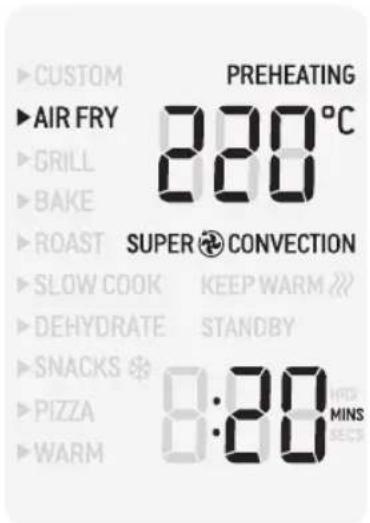
- Once the oven has finished preheating, an alert will sound, and food can be inserted into the oven.
- Arrange food evenly on the included air fry basket. For best results, place food in a single layer and leave space between pieces. Insert the air fry basket into the middle rack position and close the oven door.
- After the PREHEATING alert has sounded, the timer will automatically begin to count down. The cycle can be stopped at any time by pressing the START/CANCEL button.
- At the end of the AIR FRY cycle, the oven alert will sound. The START/CANCEL button backlight will go out and the LCD screen will illuminate white.

IMPORTANT
When cooking food with excess fat (e.g., chicken wings), we recommend placing a baking tray in the lowest rack position beneath the air fry basket (in the middle rack position) containing the food in order to prevent oil dripping directly onto the heating element. Discard excess oil in between batches.
GRILL FUNCTION
The GRILL function is ideal for cooking open faced sandwiches, poultry, fish, sausages and vegetables. Grilling can also be used to brown the tops of casseroles and gratins.
- Place food in the centre of the baking tray so that air can flow around the sides of the food.
- Insert the tray into the top rack height position. Close the oven door.
- Turn the FUNCTION dial until the indicator on the LCD screen reaches the GRILL function. The top figure on the LCD screen indicates the preset grilling temperature level 'HI', while the bottom figure indicates the preset time of '10 MINS'. Turn the TEMP/TIME dial to adjust grill to one of two presets grill settings: 'LO' or 'HI'.
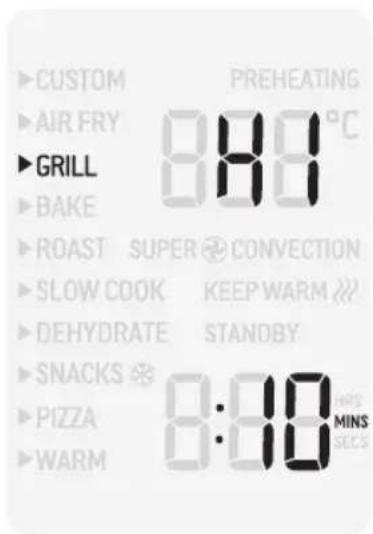
- Confirm your selection by pushing the dial. The grilling time is displayed as the bottom figure on the LCD screen. Turn the TEMP/TIME dial to adjust the time up to a maximum of 20 minutes.
- Press the START/CANCEL button to activate the GRILL function. The button backlight will illuminate red and the oven will start.
- The timer will be displayed and automatically begin to count down. The temperature level and time can be adjusted during the grilling cycle by turning the TEMP/TIME dial. The cycle can be stopped at any time by pressing the START/CANCEL button.
- At the end of the grilling cycle, the oven alert will sound. The START/CANCEL button backlight will go out and the LCD screen will illuminate white.
BAKE FUNCTION
The BAKE function is ideal for baking cakes, muffins, brownies, and pastries. The BAKE function is also ideal for cooking pre-packaged frozen meals such as lasagne and pies.
- Insert the wire rack, with the spokes facing upward, into the bottom/middle rack height position. Note that some baked goods, such as brownies or pastries, may be more suited to the middle rack height position.
- Close the oven door.
- Turn the FUNCTION dial until the indicator on the LCD screen reaches the BAKE function. The top figure on the LCD screen indicates the preset BAKE temperature of '160°C', while the bottom figure indicates the preset time of '30 MINS'. The preset CONVECTION setting will also be displayed.
- The baking temperature, time and convection settings can be adjusted before or during the baking cycle.
a) The baking temperature is displayed as the top figure on the LCD screen. Turn the TEMPERATURE dial to adjust the baking temperature from 70°C to a maximum of 230°C. Confirm your selection by pushing the dial.
b) The baking time is displayed as the bottom figure on the LCD screen. Turn the TIME dial to select up to a maximum of 2 hours.
- Press the START/CANCEL button to activate the BAKE function. The button backlight will illuminate red, the oven alert will sound, and the LCD screen will illuminate orange. The LCD screen will indicate a blinking 'PREHEATING'.
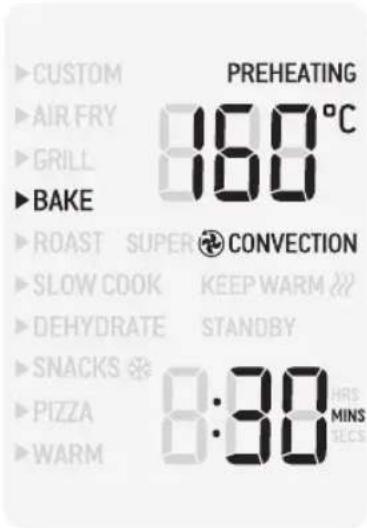
- Once the oven has finished preheating, an alert will sound, and food can be inserted into the oven.
- Position food on the centre of the wire rack so that air can flow around all sides of the food. Close the oven door.
- After the PREHEATING alert has sounded, the timer will automatically begin to count down. The cycle can be stopped at any time by pressing the START/CANCEL button.
- At the end of the BAKE cycle, the oven alert will sound. The START/CANCEL button backlight will go out and the LCD screen will illuminate white.
ROAST FUNCTION
The ROAST function is ideal for cooking a variety of meats and poultry. Food will be tender and juicy on the inside and roasted to perfection on the outside.
- Insert the wire rack, with the spokes facing upward, into the bottom/middle rack height position. Close the oven door.
- Turn the FUNCTION dial until the indicator on the LCD screen reaches the ROAST function. The top figure on the LCD screen indicates the preset ROAST temperature of 180^ C, while the bottom figure indicates the preset time of '1:00HR'. The preset SUPER CONVECTION setting will also be displayed.
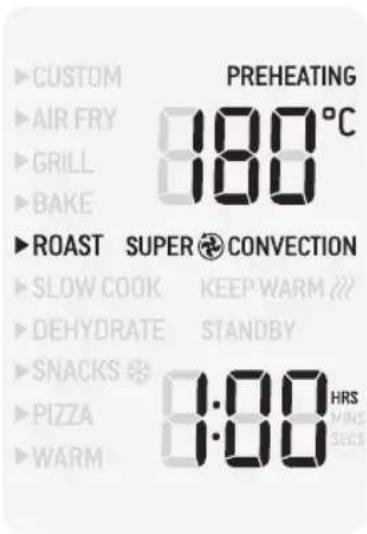
- The roasting temperature, time and convection settings can be adjusted before or during the roasting cycle.
a) The roasting temperature is displayed as the top figure on the LCD screen. Turn the TEMP/TIME dial to adjust the roasting temperature to a maximum of 230^ C.
b) The roasting time is displayed as the bottom figure on the LCD screen. Turn the TEMP/TIME dial to select up to a maximum of 4 hours.
-
Press the START/CANCEL button to activate the ROAST function. The button backlight will illuminate red, the oven alert will sound, and the LCD screen will illuminate orange. The LCD screen will indicate a blinking 'PREHEATING'.
-
Once the oven has finished preheating, an alert will sound, and food can be inserted into the oven.
- Place food, on the included baking tray and in the centre of the wire rack to allow for maximum air flow around all sides of the food. Close the oven door.
- After the PREHEATING alert has sounded, the timer will automatically begin to count down. The cycle can be stopped at any time by pressing the START/CANCEL button.
- At the end of the ROAST cycle, the oven will automatically switch to the KEEP WARM function. The LCD screen will display 'KEEP WARM' and a timer will commence counting up to 2 hours. The keep warm cycle can be stopped at any time by pressing the START/CANCEL button.
SLOW COOK FUNCTION
The SLOW COOK function has cooking profiles designed for long cook times, at low temperatures.
- Insert the wire rack, with the spokes facing upward, into the bottom rack height position.
- Close the oven door.
- Turn the FUNCTION dial until the indicator on the LCD screen reaches the SLOW COOK function. The top figure on the LCD screen indicates the preset SLOW COOK temperature of 'HI', while the bottom figure indicates the preset time of '4:00HRS'.
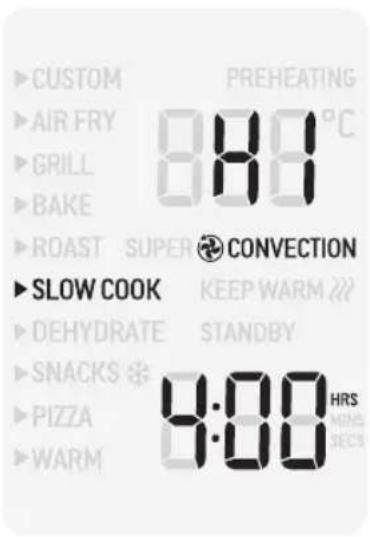
- The slow cook time can be adjusted before or during the slow cook cycle.
The temperature is displayed as the top figure on the LCD screen. Turn the TEMP/TIME dial to adjust slow cooking to one of two preset slow cook settings: 'LO' or 'HI'.
The time is displayed as the bottom figure on the LCD screen. Turn the TEMP/TIME dial to adjust the time up to 6 hours on 'HI' and up to 12 hours on 'LO'. Confirm your selection by pushing the dial.
- Press the START/CANCEL button to activate the SLOW COOK function. The button backlight will illuminate red and the LCD screen will illuminate orange. The LCD screen will indicate a blinking "PREHEATING".
- After the PREHEATING alert has sounded, the timer will automatically begin to count down. The cycle can be stopped at any time by pressing the START/CANCEL button.
- Place food inside covered oven proof cookware, on the centre of the wire rack so air will flow around all sides of the food. Close the oven door.
- At the end of the SLOW COOK cycle, the oven will automatically switch to the KEEP WARM function. The LCD screen will display 'KEEP WARM' and a timer will commence counting up to 2 hours. The keep warm cycle can be stopped at any time by pressing the START/CANCEL button.

NOTE
Do not pull the wire rack further than halfway out when inserting or removing cookware from the oven.
Do not allow heavy cookware to rest on the glass when the door is open.
TIPS FOR SLOW COOKING
- Ensure cookware is oven-proof and does not exceed 4 kgs when empty.
- Fill cookware to a minimum of 12 and maximum of 34 full to avoid over or under-cooking. To prevent spill over, do not fill cookware more than 34 full.
- Always slow cook with the lid on to prevent food from drying out. Cover cookware with a layer of aluminium foil before covering with lid to keep even more moisture in.
- Cold food will take longer to cook than food that has been pre-seared or heated so adjust cooking times as appropriate. Do not slow cook frozen foods.
- Cut large pieces of meat in half to allow heat to penetrate more evenly.
DEHYDRATE FUNCTION
The DEHYDRATE function combines low, consistent heat with maximum air flow to evenly dry food without overcooking or heating it up.
- Arrange food evenly on the included air fry basket. For best results, place the food in a single layer and leave space between each piece. Insert air fry basket into middle or top rack position.
- Close the door.
- Turn the FUNCTION dial until the indicator on the LCD screen reaches the DEHYDRATE function. The top figure on the LCD screen indicates the preset DEHYDRATE temperature of '60°C', while the bottom figure indicates the preset time of '3:00 HRS'.
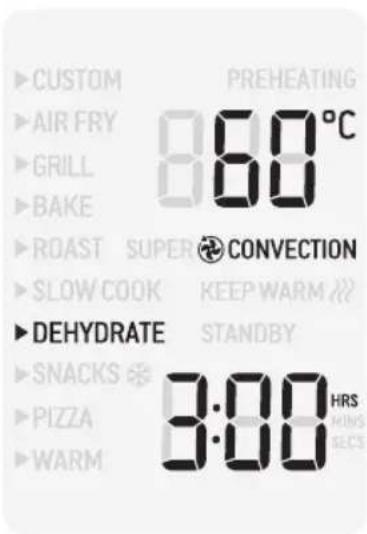
- The dehydrate temperature and time can be adjusted before or during the dehydrate cycle.
The temperature is displayed as the top figure on the LCD screen. Turn the TEMP/TIME dial to adjust the temperature up to '90°C'.
The time is displayed as the bottom figure on the LCD screen. Turn the TEMP/TIME dial to adjust the time up to 12 hours.
- Press the START/CANCEL button to activate the DEHYDRATE function. The button backlight will illuminate red, the oven alert will sound, and the LCD screen will illuminate orange. The oven will start.
- The timer will be displayed and automatically begin to count down. The time and temperature can be adjusted during the dehydrate cycle by turning the TEMP/TIME dial. The cycle can be stopped at any time by pressing the START/CANCEL button.
- At the end of the DEHYDRATE cycle, the oven alert will sound. The START/CANCEL button backlight will go out and the LCD screen will illuminate white.
TIPS FOR DEHYDRATING
- Use baking paper on top of the air fry basket when dehydrating foods with strong colour to prevent staining.
- When dehydrating foods that may drip, such as marinated jerky, use the included baking tray to catch any dripping liquid. Insert the baking tray into bottom rack position.
FROZEN SNACKS
The FROZEN SNACKS function is ideal for cooking all types of pre-packaged frozen meals such as chicken nuggets and party pies.
- Insert the wire rack, with the spokes facing upward, into the middle rack height position. Note that some frozen snacks, may be more suited to the bottom rack height position. Close the oven door.
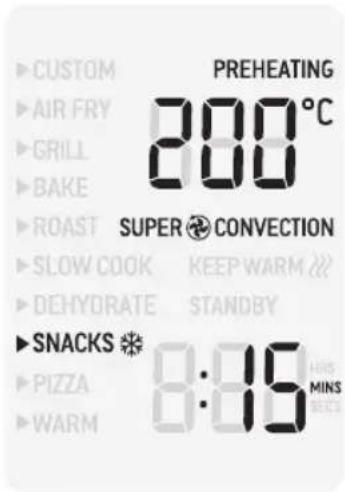
- Turn the FUNCTION dial until the indicator on the LCD screen reaches the FROZEN SNACKS function. The top figure on the LCD screen indicates the preset FROZEN SNACKS temperature of '200°C', while the bottom figure indicates the preset FROZEN SNACKS time of '15 MINS'. The preset SUPER CONVECTION setting will also be displayed.
-
Press the START/CANCEL button to activate the FROZEN SNACKS function. The button backlight will illuminate red, the oven alert will sound, and the LCD screen will illuminate orange. The LCD screen will indicate a blinking 'PREHEATING'.
-
Once the oven has finished preheating, an alert will sound, and food can be inserted into the oven.
- Arrange food evenly on the included air fry basket, baking tray or wire rack. For best results, place food in a single layer and leave space between pieces. Insert the air fry basket, baking tray or wire rack into top rack position. Close the oven door.
- After the PREHEATING alert has sounded, the timer will automatically begin to count down. The cycle can be stopped at any time by pressing the START/CANCEL button.
- At the end of the FROZEN SNACKS cycle, the oven alert will sound. The START/CANCEL button backlight will go out and the LCD screen will illuminate white.
PIZZA FUNCTION
The PIZZA function melts and browns cheese and toppings, while crisping up the pizza crust.
- Insert the wire rack, with the spokes facing upward, into the bottom rack height position.
- Close the oven door.
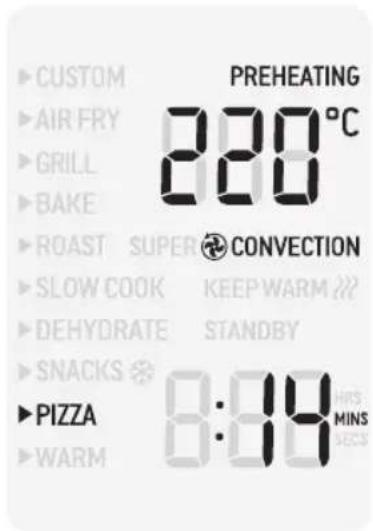
- Turn the FUNCTION dial until the indicator on the LCD screen reaches the PIZZA function. The top figure indicates the preset PIZZA temperature of 220°C. While the bottom figure on the LCD screen indicates the preset time of '14 MINS'
- The pizza temperature, time and convection, settings can be adjusted before or during the cycle.
The pizza temperature is displayed as the top figure on the LCD screen. Turn the TEMP/TIME dial to adjust the temperature from 70°C to a maximum of 230°C.
Confirm your selection by pushing the dial. The cooking time is displayed as the bottom figure on the LCD screen. Turn the TEMP/TIME dial to adjust the time up to 2 hours. - Press the START/CANCEL button to activate the PIZZA function. The button backlight will illuminate red and the LCD screen will illuminate orange. The LCD screen will indicate a blinking 'PREHEATING'.
- Once the oven has reached the set temperature, an alert will sound.
- Place food, positioned on the included baking tray on the centre of the wire rack so that air can flow around all sides of the food. Close the oven door.
- After the PREHEATING alert has sounded, the timer will automatically begin to count down. The cycle can be stopped at any time by pressing the START/CANCEL button.
- At the end of the PIZZA cycle, the oven alert will sound. The START/CANCEL button backlight will go out and the LCD screen will illuminate white.
WARM FUNCTION
The WARM function maintains hot foods at the recommended temperature to prevent bacterial growth, 70°C or above. This function may also be used to warm plates prior to serving food.
- Insert the wire rack into a rack position that best suits the type of food you are keeping warm.
- Place food, positioned on the included tray or other oven-proof dish, on the centre of the wire rack so air will flow around all sides of the food.
- Close the oven door.
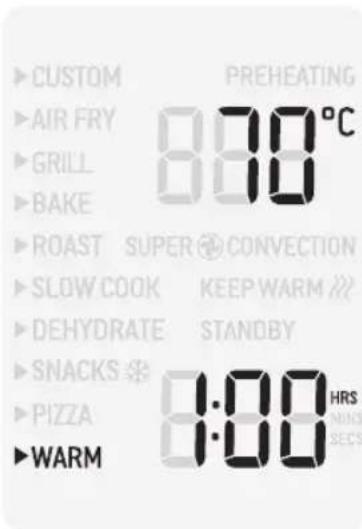
- Turn the FUNCTION dial until the indicator on the LCD screen reaches the WARM function. The top figure on the LCD screen indicates the preset temperature of 70^ C, while the bottom figure indicates the preset time of '1:00HR'.
- The temperature, time and convection settings can be adjusted before or during the warming cycle.
a) The temperature is displayed as the top figure on the LCD screen. Turn the TEMPERATURE dial to adjust the temperature from 50°C to a maximum of 230°C.

NOTE
The recommended temperature to prevent bacterial growth in food is 70^ C or above.
b) The time is displayed as the bottom figure on the LCD screen. Turn the TIME dial to adjust the time up to 2 hours.
-
Press the START/CANCEL button to activate the WARM function. The button backlight will illuminate red, the oven alert will sound, and the LCD screen will illuminate orange.
-
The timer will be displayed and automatically begin to count down. The temperature and time can be adjusted during the warming cycle by turning the TEMP/TIME dial. The cycle can be stopped at any time by pressing the START/CANCEL button.
-
At the end of the WARM cycle, the oven alert will sound. The START/CANCEL button backlight will go out and the LCD screen will illuminate white.
Care & Cleaning
Before cleaning, ensure the oven is turned off by removing the power plug from the power outlet. Allow the oven and all accessories to cool completely before disassembling and cleaning.
Cleaning the outer body and door
- Wipe the outer body with a soft, damp sponge. A non-abrasive liquid cleanser or mild spray solution may be used to avoid build-up of stains. Apply the cleanser to the sponge, not the oven surface, before cleaning.
- To clean the glass door, use a glass cleaner or mild detergent and a soft, damp sponge or soft plastic scouring pad. Do not use an abrasive cleanser or metal scouring pad as these will scratch the oven surface.
- Wipe the LCD screen with a soft cloth.
- Let all surfaces dry thoroughly prior to inserting the power plug into a power outlet and turning the oven on.

WARNING
Do not immerse the body, power cord, or power plug in water or any other liquid that may be present, as this may cause electrocution.
Cleaning the interior
To clean any splattering that may occur while cooking, wipe the walls with a soft, damp sponge. A non-abrasive liquid cleanser or mild spray solution may be used to avoid build-up of stains. Apply the cleanser to the sponge, not the oven surface, before cleaning. Avoid touching the heating elements.

WARNING
Use extreme caution when cleaning the heating elements. Ensure the oven is unplugged from the power source and allow the oven to cool completely, then gently rub a soft, damp sponge or cloth along the length of the heating element. Do not use any type of cleanser or cleaning agent. Let all surfaces dry thoroughly prior to inserting the power plug into a power outlet and turning the oven on.
Cleaning the crumb tray
- After each use, slide out the crumb tray and discard crumbs. Wipe the tray with a soft, damp sponge. A non-abrasive liquid cleanser may be used to avoid build-up of stains. Apply the cleanser to the sponge, not the tray, before cleaning. Dry thoroughly.
- To remove baked-on grease, soak the tray in warm soapy water then wash with a soft sponge or soft scouring pad. Rinse and dry thoroughly.
- Always reinsert the crumb tray into the oven after cleaning and prior to inserting the power plug into a power outlet and turning the oven on.
Cleaning the air fry basket, wire rack and baking tray
- Wash all accessories in warm soapy water with a soft sponge or soft plastic scouring pad. Rinse and dry thoroughly. Do not use abrasive cleansers, metal scouring pads or metal utensils to clean any of the accessories as they may damage the surfaces.
- Do not place any part or accessories of the oven in the dishwasher.

NOTE
Exposure to cooking oils and cleaning chemicals may cause colour fading and discolouration to the oven. If the oven is exposed to oils or chemicals, turn off and unplug the appliance and use a damp cloth to clean the surface of the oven. Dry thoroughly before use.
STORAGE
- Ensure the oven is turned off by removing the power plug from the power outlet.
- Allow the oven and all accessories to cool completely before disassembling and cleaning.
-
Ensure the oven and all accessories are clean and dry.
-
Ensure the crumb tray is inserted into the oven, the wire rack is inserted in the bottom rack height position, the baking tray is in the middle rack height position and the air fry basket is in the top rack height position.
- Ensure the door is closed.
- Store the appliance in an upright position standing level on its support legs. Do not store anything on top.
REPLACING THE OVEN LIGHT

WARNING
Always unplug the oven and let it cool before replacing the bulb.
- Remove the wire rack from the oven before replacing the light.
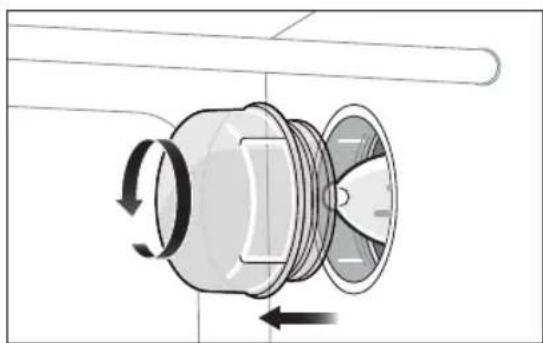
- The light is positioned on the right-hand side of the oven cavity. Securely position your fingers on the outside of the glass cover and turn the glass cover counterclockwise to unscrew it. The tabs on the cover should clear the grooves of the socket. Gently pull the cover out.
natural_image
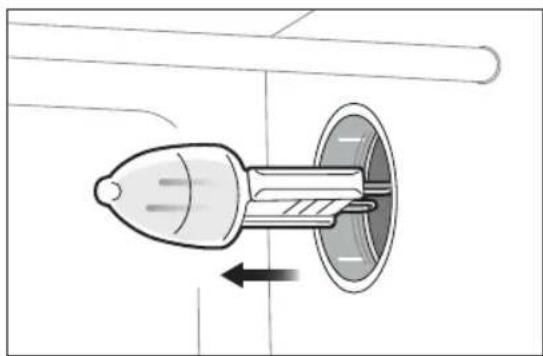
Mechanical component diagram showing rotational motion with arrows indicating direction (no text or symbols)- Remove the used bulb by pulling it directly out of its holder.
natural_image
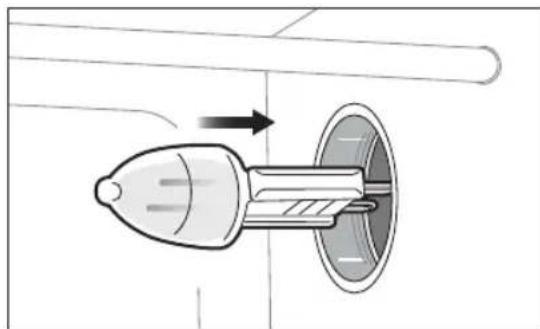
Diagram of a mechanical component with a rotating shaft and housing, showing internal flow or movement (no text or symbols)- Replace the light bulb with one of the same type. Using gloves or a soft dry cloth, remove the light bulb from its packaging. Touching the light bulb with your bare hand can damage the light bulb and shorten its life. Use a soft cloth to insert the new bulb into its holder.
REPLACEMENT LIGHT BULB
Please contact Breville Customer Service Centre for further support.
Only use a 25 Watt, 220-240V and G9 type oven bulb for this oven..
natural_image
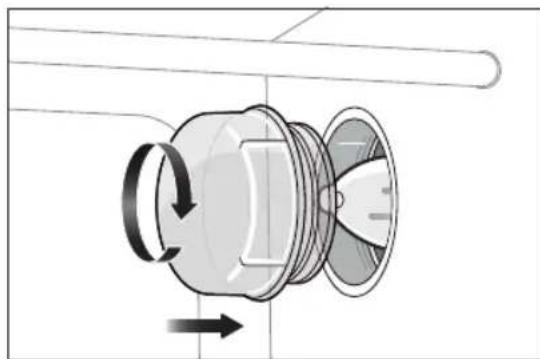
Diagram of a mechanical component with an arrow indicating direction, no text or symbols present- To replace the glass cover, securely position your fingers on the outside of the glass cover and place the tabs in the grooves of the socket. Turn the cover clockwise to tighten it in position.
natural_image
Diagram of a mechanical component with rotational arrows indicating motion (no text or symbols)
NOTE
The oven light bulb is not covered under warranty.
POSSIBLE PROBLEM EASY SOLUTION
| Oven will not turn "ON" | Check that the power plug is securely inserted into the outlet.Insert the power plug into an independent outlet.Insert the power plug into a different outlet.Reset the circuit breaker if necessary. |
| The pizza does not cook evenly | Some large pizzas may brown unevenly in compact ovens. Open the oven door halfway through the cooking time and turn the pizza 180 degrees for more even cooking and colour. |
| Steam is coming out from the oven door | This is normal. The door is vented to release steam created from high moisture content foods such as frozen breads. Be mindful that the steam can be hot. |
| Water is dripping onto counter from under the door | This is normal. The condensation created from high moisture content foods such as frozen breads will run down the inside of the door and can drip onto the bench. |
| Temperature changes when convection button is pressed | This is normal. The temperature is calibrated to compensate for the convection fan increasing cooking rates. |
| The LCD screen displays 'E01' | The LCD screen will display "E01" when there is a non-resettable issue with the appliance. Should this occur, immediately remove the power cord from the power outlet and call Breville Consumer Support. |
| The LCD screen displays 'E02' | The LCD screen will display "E02" when there is a non-resettable issue with the appliance. Should this occur, immediately remove the power cord from the power outlet and call Breville Consumer Support. |
| The LCD screen displays 'E03' | The LCD screen will display "E03" when there is a non-resettable issue with the appliance. Should this occur, immediately remove the power cord from the power outlet and call Breville Consumer Support. |
Breville Customer Service Centre
Australian Customers
Phone: 1300 139 798
Web: www.breville.com
New Zealand Customers
Phone: 0800 273 845
Web: www.breville.com
Breville®
Breville and the Breville Logo are trademarks of Breville Pty Ltd ("Breville") and
Breville's products are distributed in Australia and New Zealand under license.
Copyright Breville Pty. Ltd. 2023.
Due to continued product improvement, the products illustrated/photographed
in this booklet may vary slightly from the actual product.
LOV660 ANZ - D23
- the All in 1 Compact TM Air Fryer Oven
- Contents
- BREVILLE RECOMMENDS SAFETY FIRST
- IMPORTANT SAFEGUARDS
- IMPORTANT SAFEGUARDS FOR ALL ELECTRICAL APPLIANCES
- CAUTION
- WARNING
- FOR HOUSEHOLD USE ONLY SAVE THESE INSTRUCTIONS
- Components
- Control Panel & LCD Display
- Before first use
- PREPARING THE OVEN
- NOTE
- Functions
- TEMP/TIME DIAL
- CUSTOM FUNCTION
- AIR FRY FUNCTION
- IMPORTANT
- GRILL FUNCTION
- BAKE FUNCTION
- ROAST FUNCTION
- SLOW COOK FUNCTION
- TIPS FOR SLOW COOKING
- DEHYDRATE FUNCTION
- TIPS FOR DEHYDRATING
- FROZEN SNACKS
- PIZZA FUNCTION
- WARM FUNCTION
- Care & Cleaning
- Cleaning the outer body and door
- Cleaning the interior
- Cleaning the crumb tray
- Cleaning the air fry basket, wire rack and baking tray
- STORAGE
- REPLACING THE OVEN LIGHT
- REPLACEMENT LIGHT BULB
- Breville Customer Service Centre
- Breville®
Brand : BREVILLE
Model : the All in 1 Compact Air Fryer Oven BOV660
Category : Oven