
ET8115C - Switch INTERMATIC - Free user manual and instructions
Find the device manual for free ET8115C INTERMATIC in PDF.


| Product Type | Programmable Timer Switch |
| Brand | Intermatic |
| Model | ET8115C |
| Dimensions (H x W x D) | 4.0 x 1.8 x 1.2 inches (approx.) |
| Weight | 0.3 lbs (approx.) |
| Power Source | 120-277 VAC, 60 Hz |
| Maximum Load | 15 A resistive, 10 A tungsten, 1 HP motor |
| Number of Programs | Up to 7 on/off events per day (7-day programming) |
| Display Type | LCD with backlight |
| Battery Backup | Yes, retains time settings during power outage |
| Operating Temperature | 32°F to 104°F (0°C to 40°C) |
| Mounting | Wall box, fits standard single-gang switch box |
| Wiring | Single-pole or 3-way compatible |
| Certifications | UL Listed |
| Maintenance | Wipe clean with dry cloth; no user-serviceable parts |
| Safety | Built-in surge protection; use with proper grounding |
| Spare Parts | Not available separately; replace unit if defective |
| General Information | Designed for indoor use only; not for use with dimmers |
Frequently Asked Questions - ET8115C INTERMATIC
User questions about ET8115C INTERMATIC
0 question about this device. Answer the ones you know or ask your own.
Ask a new question about this device
Download the instructions for your Switch in PDF format for free! Find your manual ET8115C - INTERMATIC and take your electronic device back in hand. On this page are published all the documents necessary for the use of your device. ET8115C by INTERMATIC.
USER MANUAL ET8115C INTERMATIC
Installation and User Instructions
WARNING Risk of Fire or Electric Shock
- Disconnect power at the circuit breaker(s) or disconnect switch(es) before installing or servicing.
- Installation and/or wiring must be in accordance with national and local electrical code requirements.
- For outdoor locations or wet locations (rain-tight), conduit hubs that comply with requirements of the UL514B (standard for fitting conduit and outlet boxes) are to be used.
- This enclosure does not provide grounding between conduit connections. When metallic conduit is used, you must also install grounding type bushings and jumper wire.
- For plastic enclosures, bonding between conduit connections is not automatic and must be provided as part of the installation.
- Use #18 - #10 AWG wires, rated at least 75°C - COPPER conductors ONLY.
- If the power disconnect point is out of sight, lock it in the OFF position and tag it to prevent unexpected application power.
- Make sure there is no wire insulation under the terminal plate on the time switch connector. Firmly tighten terminal screws.
- Do not remove insulator that is covering terminals.
- KEEP DOOR CLOSED AT ALL TIMES when not servicing.
NOTICE
- Do NOT touch circuit board components, contact can create a static discharge, which can damage the microprocessor.
Description
The Intermatic ET8000 Series Electronic Astronomic 7-Day Time Switch automatically switches loads to a preset weekly schedule with to-the-minute accuracy.
- The astronomic feature provides an automatically adjusted sunset ON and sunrise OFF to eliminate the need for separate photo control devices.
- The independent 7-day programming provides complete flexibility for applications where load switching differs each day of the week.
- Astronomic programming can be combined with independent programming to provide a sunset ON and timed OFF program.
Use the ET8000 series as an ON/OFF timer in applications requiring 7-day astronomic load control such as lighting, air conditioning systems, pumps, etc. Each load output of the Time Switch can support up to 14 timed ON and 14 timed OFF events per day as well as Astro ON and Astro OFF events. The program can be overridden by pushing the ON/OFF load override button(s).
The ET8000 Series Time Switch is designed to directly switch tungsten or ballast loads up to its rating, and inductive or resistive loads up to 30A at 120, 208, 240, or 277 VAC.
Specifications
Time Switch
• Input Voltage: 120/208/240/277 VAC, 60 Hz
• Power Consumption: 6.0 W Max.
- Contact Configuration: SPST (ET8015C), DPST (ET8215C). See wiring diagrams on next page.
Switch Ratings—ET8015C, ET8215C (per pole)
• 30 A Inductive/Resistive, 120/240 VAC, 60 Hz
• 20 A Magnetic Ballast, 120-277 VAC, 60 Hz
• 1 A Electronic Ballast 120-277 VAC, 60 Hz
• 20 A Resistive, 28 VDC
• 5 A Tungsten: 120/240 VAC, 60 Hz
• 1 HP, 120 VAC, 60 Hz
• 2 HP, 240 VAC, 60 Hz
Set Points (Events)—Each load output of the Time Switch can support up to 14 timed ON and 14 timed OFF events per day as well as Astro ON and Astro OFF events.
Electronic Astronomic 7-Day Time Switch
With Battery Carryover
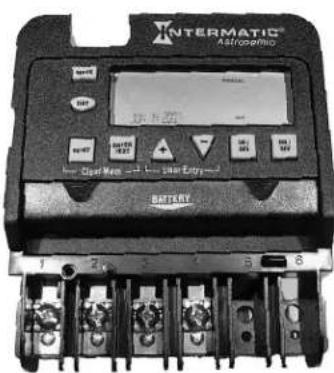
Front View
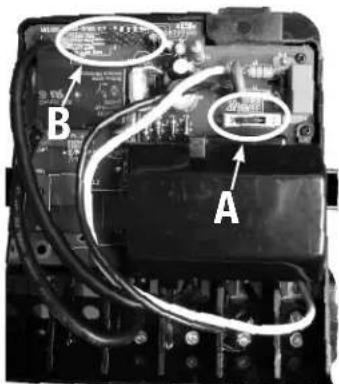
Rear View
Battery-Powered Clock Operation—3 years minimum (uses 2 AAA industrial grade alkaline batteries, supplied)
Minimum ON or OFF time—1 minute
Maximum ON or OFF time—6 days, 23 hours, 59 minutes
Shipping Weight—2.5 lb. (1.1 kg)
Enclosures—ET8xx5C-TYPE 1 indoor metal enclosure
Knockouts—Combination 1/2-3/4 inch size, 1 on back and each side, 2 on bottom
Wire Size—AWG #18 through #10
Installation Instructions
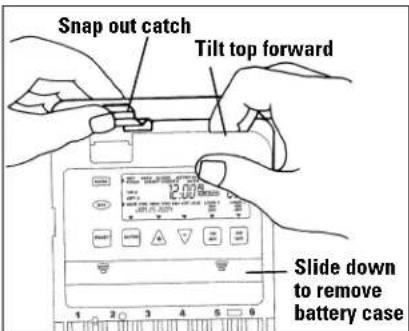
- Remove the mechanism from the case by depressing the catch at the top of the case and pulling out, as shown.
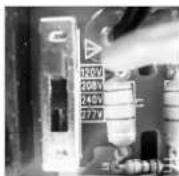
- Set voltage selector for desired input voltage. The timer is
shipped with voltage set for 277 VAC. To operate at 120, 208 or 240 VAC, move the selector switch to the desired setting as marked on the circuit board. See location A in Rear View above and detail at the right.
-
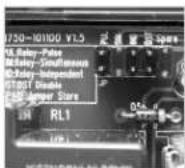
The timer is shipped with DST (Daylight Saving Time) enabled. To disable DST, insert a jumper at location marked DST. See location B in Rear View above and detail at the right.
-
ET8215C ONLY—Decide whether you want to control multiple loads simultaneously (SIM), independently (IND), or with a 2-second pulse (PUL) (e.g., for use with mechanically held contactors or bell ringing applications), and make sure the jumper is positioned accordingly. See location B in Rear View above and detail (The unit is shipped with the loads set for IND.)
- Mount the enclosure in the desired location using the 3 mounting holes provided.
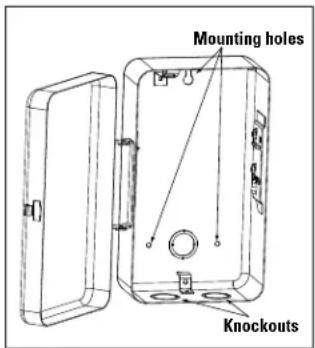
Position at eye level if possible, providing space to the left of the enclosure for the cover to swing open fully, as shown.
- Replace the mechanism in the enclosure.
- Lift the left side of the plastic insulator off the retaining post and pivot it up and away to expose the terminal strip.
- Strip the supply and load wires to 1/2". Use #18 - #10 AWG wires, rated at least 75°C - COPPER conductors ONLY
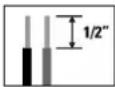
- Insert the wire ends under the proper terminal plates (see wiring diagrams elsewhere on this page) and tighten the screws firmly.
- Connect ground wire to grounding terminal at bottom of enclosure.
- Replace the plastic insulator on the retaining post.
- Remove the battery case by sliding it down as shown by the arrows, then install 2 AAA alkaline batteries. Make sure the batteries are pointing in the direction shown.
- Verify that the display is ON to make sure the batteries are OK. If the display shows scrambled information, press the RESET button to clear it up.
- Apply power to the Time Switch.
IMPORTANT: Press and hold the ENTER button, then press the RESET button. The screen will flash 12:00 AM and MON, and timer status is Manual Mode.
NOTE: You must reset the time switch using this procedure whenever you change the jumpers.
The Time Switch is now ready for programming.
Wiring Diagrams
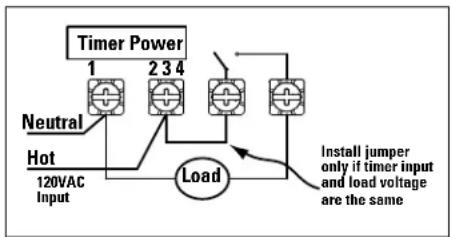
flowchart
graph TD
    A["Timer Power"] --> B["1"]
    A --> C["234"]
    A --> D["3"]
    E["Neutral"] --> F["Hot"]
    F --> G["120VAC Input"]
    G --> H["Load"]
    H --> I["Install jumper only if timer input and load voltage are the same"]
ET8015 configured for SPST, 120 VAC load
flowchart
graph TD
    A["Timer Power"] --> B["Line 1"]
    B --> C["120/208/240/277 VAC Input"]
    B --> D["ON"]
    B --> E["OFF"]
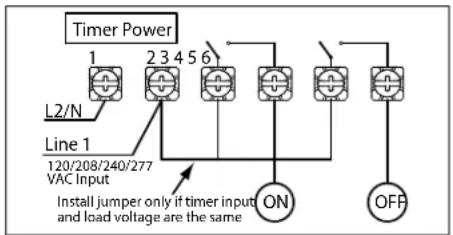
    F["Install jumper only if timer input and load voltage are the same"]
ET8215 configured for pulse SPST load with jumper set to PUL
flowchart
graph TD
    A["Timer Power"] --> B["L2/N"]
    B --> C["Line 1"]
    C --> D["120/208/240/277 VAC Input"]
    D --> E["Line 1"]
    E --> F["Load 1"]
    F --> G["Line 2"]
    G --> H["Load 2"]
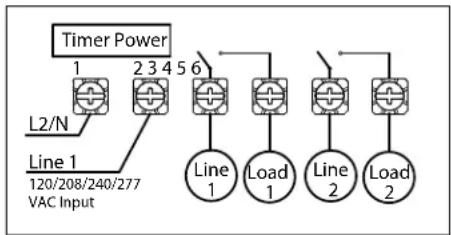
ET8215 configured for 2 SPST loads with jumper set to IND
flowchart
graph TD
    A["Timer Power"] --> B["Line 1"]
    A --> C["Line 2"]
    B --> D["240VAC Input"]
    C --> E["Install jumper only if timer input and load voltage are the same"]
    D --> F["Line 1"]
    E --> G["Line 2"]
    F --> H["Load"]
    G --> H
    H --> I["Line 1 23456"]
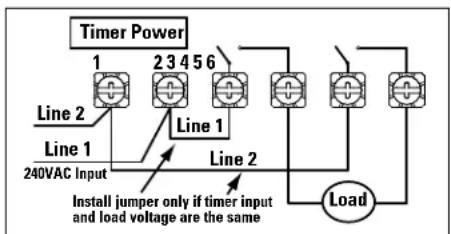
ET8215 configured for 240 VAC DPST load with jumper set to SIM
flowchart
graph TD
    A["Timer Power"] --> B["Line 1"]
    A --> C["Line 2"]
    A --> D["Line 3"]
    A --> E["Line 4"]
    A --> F["Line 5"]
    A --> G["Line 6"]
    B --> H["L2/N"]
    C --> I["120/208/240/277 VAC Input"]
    D --> J["Load 1"]
    E --> K["Load 2"]
    F --> L["Load 1"]
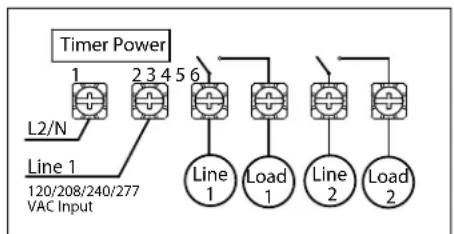
ET8215 configured for DPST loads with jumper set to SIM
Programming Overview
By pressing the MODE button, the Time Switch will cycle through the menus necessary for programming the current time, date, astro zone, astro events, and timed events.
The basic procedure is to use the MODE button to move from one menu to the next (e.g., DATE, TIME, etc.), the + or - buttons for the first part of a setting (e.g., MONTH), the ENTER button to move to the next part of the setting (e.g., YEAR), then MODE to exit and move to the next menu. To skip a menu, press MODE to move ahead.
If you make a mistake, press the MODE button repeatedly to cycle back around to the error, then make the correct entry.
NOTE: DATE and TIME must be set before you can access any other programming menus.
Setting Date
-
Press the MODE button repeatedly until the words SET and DATE appear in the upper area of the display.
-
Press the + or - buttons to enter the current Month.
- Press the ENTER button when the Month is correct to save the setting. The screen advances to current Date.
- Again press the + or - buttons to enter the current Date, followed by the ENTER button.
- Repeat to set the correct Year.
- Press the MODE button to exit and advance to setting the time.
Setting Time
- If necessary, press the MODE button repeatedly until the words SET and CLOCK appear in the upper area of the display.
- Press the + or - buttons to enter the current time.
NOTE: To go from AM to PM, keep pressing the + or - buttons to cycle through the day. You can hold the + or - buttons down for 3 seconds to make the time scroll quickly.
- Press the MODE button to exit and advance to setting Astro Zone.
Setting Astro Zone
Astro Zone is how far north or south the location is, to adjust for differences in sunrise and sunset for better accuracy in turning lights on and off at dawn and dusk.
- If necessary, press the MODE button repeatedly until the words SET and ASTRO ZONE appear in the upper area of the display.
- Press the + or - buttons to display the Zone that includes the location. Use the map at the right as a reference.
- Press the MODE button to exit and advance to setting exact Astro times.
Setting Exact Astro Times
When you choose an Astro Zone, the Time Switch uses an approximate time for sunup and sunset, adjusting automatically as the seasons change (earlier sunset in winter, etc.) You can set exact sunup and sunset times, which are available in the newspaper or on the Internet.
For multi-circuit time switch ET8215C, you can set multiple sunup and sunset times—useful, for example, in environments involving lighting with different warm-up times.
- If necessary, press the MODE button repeatedly until the words SET and SUNUP appear in the upper area of the display. The display also shows the default sunup time for the date and zone.
- Press the + or - buttons to adjust the sunup time. You can offset the time up to 120 minutes in either direction.
- Press the MODE button:
- If a multi-circuit time switch, SUNUP and LOAD 2 appear on the display.
a. Press the + or - buttons to set the exact Sunup time for Load 2.
b. Press the MODE button to advance to Sunset for Load 1.
- If a single-circuit time switch,
The words SET and SUNSET appear on the display, along with the default sunset time for the date and zone.
- Press the + or - buttons to adjust the sunset time. You can offset the time up to 2 hours (120 minutes) in either direction.
- Press the MODE button:
- If a multi-circuit time switch, SUNSET and LOAD 2 appear on the display.
a. Press the + or - buttons to set the exact Sunset time for Load 2.
b. Press the MODE button.
- If a single-circuit time switch,
The time switch exits and advances to setting events.
Setting SUNSET ON/SUNUP OFF Events
An ASTRO event will let you set Sunset ON and Sunup OFF events.
- If necessary, press the MODE button repeatedly until the words SET, ASTRO, and ON/OFF EVENTS appear in the upper area of the display.
- Press the ENTER button if necessary to display ON @.
- Make sure you know which days you want the Event to be active.
- If you want the Event to occur every day of the week, press the DAY button to display SUNSET and all days.
- If you want the Event to occur for a different combination of days, press the DAY button again as necessary to cycle through the days or combination of days you want.

NOTE: To remove an individual day, press the DAY button until the day is blinking, then press the - button.
- When you have set the event correctly, press the ENTER button to set the next Astro event, which is for Sunup OFF. The words SET, ASTRO, ON/OFF EVENTS, and OFF @ display.
- Repeat from Step 3 above to set the event for OFF instead of ON.
- Press the MODE button to exit and advance to setting fixed time events.
Setting SUNSET ON/SUNUP OFF Events on Multi-Circuit Time Switches (ET8215C)
An ASTRO event will let you set Sunset ON and Sunup OFF events. When the circuits of multi-circuit time switch ET8215C set to be independent of each other, you can set sunup and sunset times for either or both circuits.
- Verify that the two circuits are independent. Refer to Step 4 in Installation Instructions on page 1.
- If necessary, press the MODE button repeatedly until the words SET, ASTRO, ON/OFF EVENTS, and LOAD 1 appear in the display.
- Press the ENTER button if necessary to display ON @.
-
Make sure you know which days you want the Sunset ON event to be active.
-
If you want the Event to occur every day of the week, press the DAY button to display SUNSET and all days.
- If you want the Event to occur for a different combination of days, press the DAY button again as necessary to cycle through the days or combination of days you want.
NOTE: To remove an individual day, press the DAY button until the day is blinking, then press the - button.
- When you have set the event correctly, press the ENTER button to set the next Astro event, which is Sunset ON for Load 2. The words SET, ASTRO, ON/OFF EVENTS, LOAD 2, and ON @ appear in the display.
- Repeat from Step 4 above to set the event for ON.
- Press the ENTER button to set Sunup OFF for Load 1. The words SET, ASTRO, ON/OFF EVENTS, LOAD 1 and OFF @ appear in the display.
- Repeat from Step 4 above to set the Event for OFF instead of ON.
- Press the ENTER button to set Sunrise OFF for Load 2. The words SET, ASTRO, ON/OFF EVENTS, LOAD 2, and OFF @ display.
- Repeat from Step 4 above to set the event for OFF instead of ON.
- Press the MODE button to exit and advance to setting fixed time events.
Setting Fixed Timed Events
- If necessary, press the MODE button repeatedly until the words SET, FIXED, ON/OFF EVENT and EVENT 01 appear on the display.
- If necessary, press the ENTER button to display ON @ or OFF @ (depending on what you want to set).
- Press the DAY button to display 12:00 am and all days of the week.
- Press the + or - buttons to enter the time you want to set.
NOTE: To go from AM to PM, keep pressing the + or - buttons to cycle through the day. You can hold the + or - buttons down for 3 seconds to make the time scroll quickly.
- If you want the Event to occur for a combination of days rather than every day (e.g., weekends only, weekdays only, or individual days), press the DAY button again as necessary to cycle through the individual days or combination of days you want.
NOTE: To choose a combination not shown during cycling (e.g., Tuesday and Thursday), you must create an individual event for each of the days you want.
-
ET8215C ONLY—For a multi-circuit device with loads set independently, you can choose the load you want the event to control. The default setting is for both loads, as you can see on the display. Press the ON/OFF button under a load to remove the load from the event.
-
When you have set the event correctly, you have two choices:
-
Press the ENTER button to set the next fixed time event (up to 28 events).
- Press the MODE button to exit.
Setting Sunset ON / Fixed Time OFF
Experience in the field has shown that is the most commonly used setting for the Time Switch. These instructions cover the entire procedure.
- If necessary, press the MODE button repeatedly until the words SET, ASTRO, and ON/OFF EVENTS appear in the upper area of the display.
- Press the ENTER button if necessary to display ON @.
- Make sure you know which days you want the Sunset ON event to be active.
- If you want the Event to turn ON every day of the week, press the DAY button to display SUNSET and all days.
- If you want the Event to turn ON for a different combination of days, press the DAY button again as necessary to cycle through the days or combination of days you want.
To remove an individual day, press the DAY button until the day is blinking, then press the - button.
- Press the MODE button as necessary to display SET, FIXED and ON/OFF EVENT.
- Press the ENTER button as necessary to display OFF @ and EVENT 02.
- Press the DAY button to display 12:00 am and all days of the week.
- Press the + or - buttons to enter the time you want to set.
To go from AM to PM, keep pressing the + or - buttons to cycle through the day. You can hold the + or - buttons down for 3 seconds to make the time scroll quickly.
- If you want the Event to occur for a combination of days rather than every day (e.g., weekends only, weekdays only, or individual days), press the DAY button again as necessary to cycle through the individual days or combination of days you want.
NOTE: To choose a combination not shown during cycling (e.g., Tuesday and Thursday), you must create an individual event for each of the days you want.
- ET8215 ONLY—For a multi-circuit device with loads set independently, you can choose the load you want the event to control. The default setting is for both loads, as you can see on the display. Press the ON/OFF button under a load to remove the load from the event.
- When you have set the event correctly, you have two choices:
- Press the ENTER button to set the next fixed time event (up to 28 events).
- Press the MODE button to exit.
Operating the Time Switch
Press the MODE button repeatedly to select the desired operating mode on the display. There are 2 options:
- AUTO—where the Time Switch follows the events you have programmed, turning the circuits ON and OFF at the time(s) set.
NOTE: You can override programmed events and force the Time Switch ON or OFF by pressing the ON/OFF button. - MANUAL—where any events set are disabled and the Time Switch controls all circuits through the ON/OFF button.
NOTE: You can review or edit any programmed events at any time by pressing the MODE button repeatedly to return to the appropriate menu, then following programming instruction provided on this sheet.
OPTIONAL – Deleting (Clearing) an Event
Use this procedure to clear the settings programmed for an event.
- If necessary, press the MODE button repeatedly until the words SET, FIXED, and ON/OFF EVENTS are shown on the display.
- Press the ENTER button as necessary to cycle through events that have been set until you see the event you want to delete.
- Press the + or - buttons AT THE SAME TIME to display --:-- --.
- Press the MODE button to exit.
Battery Maintenance
- Batteries can be easily replaced without removing the Time Switch mechanism or field wiring.
- Press in and downward (in the direction of the arrows) on the battery cover.
- It is recommended to replace the batteries every 2-3 years with 2 AAA industrial grade alkaline cells as part of normal maintenance on the Time Switch.
- Be sure to observe battery polarity markings when installing batteries.
- No other battery maintenance is required.
LIMITED ONE-YEAR WARRANTY
If within the warranty period specified, this product fails due to a defect in material or workmanship, Intermatic Incorporated will repair or replace it, at its sole option, free of charge. This warranty is extended to the original household purchaser only and is not transferable. This warranty does not apply to: (a) damage to units caused by accident, dropping or abuse in handling, acts of God or any negligent use; (b) units which have been subject to unauthorized repair, opened, taken apart or otherwise modified; (c) units not used in accordance with instructions; (d) damages exceeding the cost of the product; (e) sealed lamps and/or lamp bulbs, LED's and batteries; (f) the finish on any portion of the product, such as surface and/or weathering, as this is considered normal wear and tear; (g) transit damage, initial installation costs, removal costs, or reinstallation costs.
INTERMATIC INCORPORATED WILL NOT BE LIABLE FOR INCIDENTAL OR CONSEQUENTIAL DAMAGES. SOME STATES DO NOT ALLOW THE EXCLUSION OR LIMITATION OF INCIDENTAL OR CONSEQUENTIAL DAMAGES, SO THE ABOVE LIMITATION OR EXCLUSION MAY NOT APPLY TO YOU. THIS WARRANTY IS IN LIEU OF ALL OTHER EXPRESS OR IMPLIED WARRANTIES. ALL IMPLIED WARRANTIES, INCLUDING THE WARRANTY OF MERCHANTABILITY AND THE WARRANTY OF FITNESS FOR A PARTICULAR PURPOSE, ARE HEREBY MODIFIED TO EXIST ONLY AS CONTAINED IN THIS LIMITED WARRANTY, AND SHALL BE OF THE SAME DURATION AS THE WARRANTY PERIOD STATED ABOVE. SOME STATES DO NOT ALLOW LIMITATIONS ON THE DURATION OF AN IMPLIED WARRANTY, SO THE ABOVE LIMITATION MAY NOT APPLY TO YOU.
This warranty service is available by either (a) returning the product to the dealer from whom the unit was purchased or (b) completing a warranty claim online at www.intermatic.com. This warranty is made by: Intermatic Incorporated, Customer Service 7777 Winn Rd., Spring Grove, Illinois 60081-9698. For warranty service go to: http://www.Intermatic.com or call 815-675-7000.
- Installation and User Instructions
- WARNING Risk of Fire or Electric Shock
- NOTICE
- Description
- Specifications
- Time Switch
- Switch Ratings—ET8015C, ET8215C (per pole)
- Electronic Astronomic 7-Day Time Switch
- Installation Instructions
- Programming Overview
- Setting Date
- Setting Time
- Setting Astro Zone
- Setting Exact Astro Times
- Setting SUNSET ON/SUNUP OFF Events
- Setting SUNSET ON/SUNUP OFF Events on Multi-Circuit Time Switches (ET8215C)
- Setting Fixed Timed Events
- Setting Sunset ON / Fixed Time OFF
- Operating the Time Switch
- OPTIONAL – Deleting (Clearing) an Event
- Battery Maintenance
- LIMITED ONE-YEAR WARRANTY
Brand : INTERMATIC
Model : ET8115C
Category : Switch