
MCDS4 - Telephone Bogen - Free user manual and instructions
Find the device manual for free MCDS4 Bogen in PDF.


User questions about MCDS4 Bogen
0 question about this device. Answer the ones you know or ask your own.
Ask a new question about this device
Download the instructions for your Telephone in PDF format for free! Find your manual MCDS4 - Bogen and take your electronic device back in hand. On this page are published all the documents necessary for the use of your device. MCDS4 by Bogen.
USER MANUAL MCDS4 Bogen
BOGEN®
Model MCDS4
Administrative Telephone Operating Instructions

natural_image
Black office telephone with cord and keypad (no visible text or symbols)The Bogen Model MCDS4 is a 12-push-button, touch-tone type telephone designed for use as an administrative telephone in Bogen communications systems. It incorporates an LCD display panel and unique display menu system to provide rapid, efficient and reliable control over the system's operational functions.
The MCDS4 also includes nine dedicated function pushbuttons and three programmable function buttons. The dedicated functions include: Speed Dial of up to 10 frequently dialed numbers, Redial last number, Speakerphone (for hands-free conversation), Line (to get dial tone when using the speaker), Hold, and Speaker Volume Control. The programmable func-
tion buttons can be used to direct dial a frequently called number or to activate one of the system's communications functions (alarm, external relay, etc.).
The MCDS4 provides five different ring signals to distinguish call alert, normal, urgent, emergency calls, and incoming outside line calls. It is fully compatible with the MCTC Board option and, when connected to a Multicom 2000 system's RS485 interface, can display the status of the first 8 outside lines and hold status for those lines.
The phone may be mounted on a wall or desktop. It includes a pull-out number index and a replaceable coil cord.
BOGEN®
COMMUNICATIONS, INC.
©2007 Bogen Communications, Inc.
All rights reserved.
54-5031-01G 1509
Overview of MCDS4
Dedicated Feature Buttons
SPEED DIAL
Used to select a number stored in memory
REDIAL
Redials the last number called
SPKR
Selects speakerphone mode
HOLD
Places a call on hold (must be connected to RS485 interface for hold to operate properly)
UP/DOWN
(Arrows)- Increases/decreases the ring volume; adjusts speaker volume; scrolls display menu, and adjusts handset volume
LINE
Provides direct access of an outside line or line that has been placed on hold

PAUSE
Used in programming, to place a pause between digits
SAVE
Used to save numbers in speed dial memory
Operation
To get dial tone: Lift handset or press SPKR button
To place a call:
Internal — Get dial tone. Dial ✦us the extension or classroom number to call classroom telephone, or, dial extension or classroom number to call classroom speaker.
Outside Line — Get dial tone. Press and then. You will be connected to the first available line, or, direct access by dialing the line architectural number, or, direct access by pressing LINE and line number desired (1 - 8).
To Redial the last number called: Get dial tone and press REDIAL button.
To Place a Call On Hold: Press the button. Note: For Multicom 2000 systems, when an outside line is placed on hold, an "H" will flash on the outside line status display. (RS485 wiring connection required.)
To Retrieve a Call:
Internal — Press the HOLD button.
Outside Line — Press LINE and the line number (1 - 8) using the numeric buttons.
To Disconnect a Call: Hang up the handset or, if in speaker mode, press SPKR
To Adjust Ring Volume: Make sure the phone is off-line. Press 📂 to increase ring volume. Press 🔒 to decrease volume.
To Adjust Speaker Volume: Press SPKR button. Press button to increase volume. Press to decrease volume.
To Adjust Handset Volume: Lift Handset. Press 📋 to increase volume. Press ↓ to decrease volume (4 volume steps).
Advanced Operation
Speed Dial Programming
-
Make sure handset is in cradle.
-
Press SPEED DIAL button.
-
Select a speed dial code by pressing 0OPER through 9WXY.
-
Pick up the handset or press SPKR button. Enter the extension number or outside number to be stored. Note: If you need to enter a pause in the dialing string to accommodate a PBX outside line function, for example, press the PAUSE button. Each press will create a pause of approximately 1 second.
-
Press SAVE button after completing the number string.
-
Press ⭐ to store the number in memory.
To Speed Dial: Get dial tone. Press SPEED DIAL button and the speed dial code (0 - 9).
Programmable Function Buttons
To program the function buttons, perform the following steps:
-
Make sure handset is in cradle.
-
Press one of the function buttons.
-
Pick up handset or press button. Enter the extension number, outside line number, or DTMF string to be stored (if storing events such as alarms, zone pages, etc.). Note: If you need to enter a pause in the dialing string to accommodate a PBX outside line function, for example, press the button. Each press will create a pause of approximately 1 second.
4 Press SAVE button after the complete number string.
- Press ⭐ to store the number in memory.
Wiring
Install the MCDS4 according to the diagram on the last page. If the optional outside line feature is installed, the MCDS4 must be correctly wired to the RS485 interface.
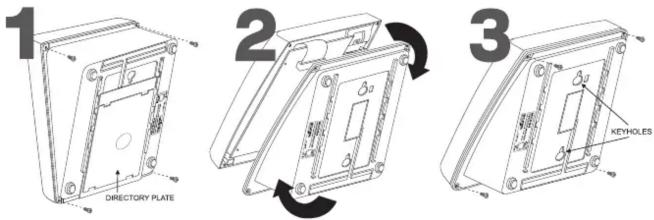
Wall-Mount Instructions
To Install MCDS4 as a wall-mounted phone, follow these steps:
- STEP 1: Remove (4) screws on bottom of unit, and also remove directory plate.
- STEP 2: Detach unit and rotate bottom of unit 180 degrees.
- STEP 3: Re-insert screws and hang from wall using keyholes.

- BOGEN®
- Model MCDS4
- Administrative Telephone Operating Instructions
- Overview of MCDS4
- Dedicated Feature Buttons
- SPEED DIAL
- REDIAL
- SPKR
- HOLD
- UP/DOWN
- LINE
- PAUSE
- SAVE
- Operation
- To place a call:
- To Retrieve a Call:
- Advanced Operation
- Speed Dial Programming
- Programmable Function Buttons
- Wiring
- Wall-Mount Instructions
Brand : Bogen
Model : MCDS4
Category : Telephone