Pro SJP110020 - Robot vacuum Bobsweep - Free user manual and instructions
Find the device manual for free Pro SJP110020 Bobsweep in PDF.


User questions about Pro SJP110020 Bobsweep
0 question about this device. Answer the ones you know or ask your own.
Ask a new question about this device
Download the instructions for your Robot vacuum in PDF format for free! Find your manual Pro SJP110020 - Bobsweep and take your electronic device back in hand. On this page are published all the documents necessary for the use of your device. Pro SJP110020 by Bobsweep.
USER MANUAL Pro SJP110020 Bobsweep
OWNER'S MANUAL
A guide to your intelligent floor cleaner
bObsweep Pro™
Model No.SJP110020
Congratulations!
Congratulations on your new intelligent floor cleaner! Bob is now at your service. To see Bob at his best, please read the Quick Start Guide and this manual thoroughly. Welcome to the bObsweep family and happy cleaning!
If you have any questions or concerns, feel free to contact our helpful team at: support@bobsweep.com or call 1-888-549-8847 for support in the US & Canada.
Our business hours are Monday – Friday 9 am – 5 pm, PST.

Important Safety Instructions

Box Contents

Bob's Anatomy

Get Bob Ready to Clean
Charge Bob 16
Bob's First Clean 18
Standby Mode 19

Charging Bob

Remote Control

Cleaning Schedule

Parts & Maintenance
Station Placement 22
Auto Charging 23
Manual Charging 24
Conserving Battery 25
Remote Buttons 28
Syncing Remote 30
Using the Navigational
Buttons 31
Set Schedule 34
Dustbin 38
Filter 39
Main Brush 40
Side Brush 41
Battery 42
Sensors 43
Wheels 44

Troubleshooting

Warranty Information

Cleaning Behavior

Bob's Challenges

End User License Agreement
Important Safety Instructions
Basic safety precautions should always be followed, including the following:
• To protect against electrical shock, do not immerse any part of Bob — with the exception of his mopping cloth — into water or other liquids.
• Turn Bob OFF and unplug him from outlet when he is not in use and before conducting maintenance.
• If Bob, his remote control, or charging station has been damaged in any way, do not operate them. Contact our customer care center at support@bobsweep.com.
- Do not handle Bob, his remote control, or charging station with wet hands; use only on dry surfaces.
• Do not use Bob outdoors.
- Bob is not intended for use by persons (including children) with reduced physical or mental capabilities, or lack of experience and knowledge, unless under the close supervision of a person responsible for their safety.
- Do not pull or carry the charging station by the cord, use the cord as a handle, close a door on the cord, or pull the cord around sharp edges or corners. Keep the cord away from heated surfaces. To unplug the cord, grasp the plug, not the cord.
- Do not mutilate or incinerate the battery, as it will explode at high temperatures.
- Leaks from battery cells can occur under extreme usage or temperature conditions. If the liquid gets on skin, wash quickly with water. If the liquid gets into the eyes, flush them immediately with clean water for a minimum of 10 minutes, and seek medical attention.
- Do not dispose of your battery in fire. Old batteries should be recycled safely (check with your local recycler).
- Do not attempt to open the charging station. Repairs on the station should only be carried out by our qualified customer care center.
- Do not expose Bob, his charging station, or remote control to temperatures higher than 113° F (45° C), moisture, or humidity.
- Do not let Bob pick up toxic materials (chlorine bleach, ammonia, drain cleaner, etc.).
- Do not let Bob pick up anything that is burning or smoking, such as cigarettes, matches, or hot ashes. Do not use Bob to pick up flammable or combustible liquids such as gasoline, nor use him in areas where they may be present.
- Do not use Bob in an enclosed space filled with vapors given off by oil-based paint, paint thinner, moth-proofing substances, flammable dust, or other explosive or toxic vapors.
• Bob is composed of electronic components that in rare and unintended cases can cause hazards of heating, fire, and other malfunctions. Furthermore, because Bob is capable of and
intended for autonomous movement and cleaning, his use poses the risk of collision with property, pets, and persons and unintended removal of articles, such as small valuables, jewelry, or hair of persons or pets lying on the floor.
• Do not look directly into the UV light.
- Do not use Bob for other than intended usage.
- Only use Bob's original adapter, battery, and charging station to avoid damaging Bob or causing a fire due to electric shock and high voltage.
- If you find that Bob or his accessories are damaged, do not continue to use him and contact our customer care center. Do not disassemble, modify, or remold Bob.
- Unplug Bob and flip his power switch off before performing any repair or maintenance on him.
- Do not touch the adapter if your hands are wet. If adapter's cord is damaged, do not use it.
Declaration of Conformity
This device complies with Part 15 of the FCC rules. Operation is subject to the following two conditions: (1) this device may not cause harmful interference, and (2) this device must accept any interference received, including interference that may cause undesired operation.
The manufacturer is not responsible for any radio or TV interference caused by unauthorized modifications or change to this equipment. Such modifications or change could void the user's authority to operate the equipment.
This equipment has been tested and found to comply with the limits for a Class B digital device, pursuant to part 15 of the FCC Rules. These limits are designed to provide reasonable protection against harmful interference in a residential installation. This equipment generates, uses and can radiate radio frequency energy and, if not installed and used in accordance with the instructions, may cause harmful interference to radio communications. However, there is no guarantee that interference will not occur in a particular installation. If this equipment does cause harmful interference to radio or television reception, which can be determined by turning the equipment off and on, the user is encouraged to try to correct the interference by one or more of the following measures:
- Reorient or relocate the receiving antenna.
- Increase the separation between the equipment and receiver.
- Connect the equipment into an outlet on a circuit different from that to which the receiver is connected.
- Consult the dealer or an experienced radio/TV technician for help.
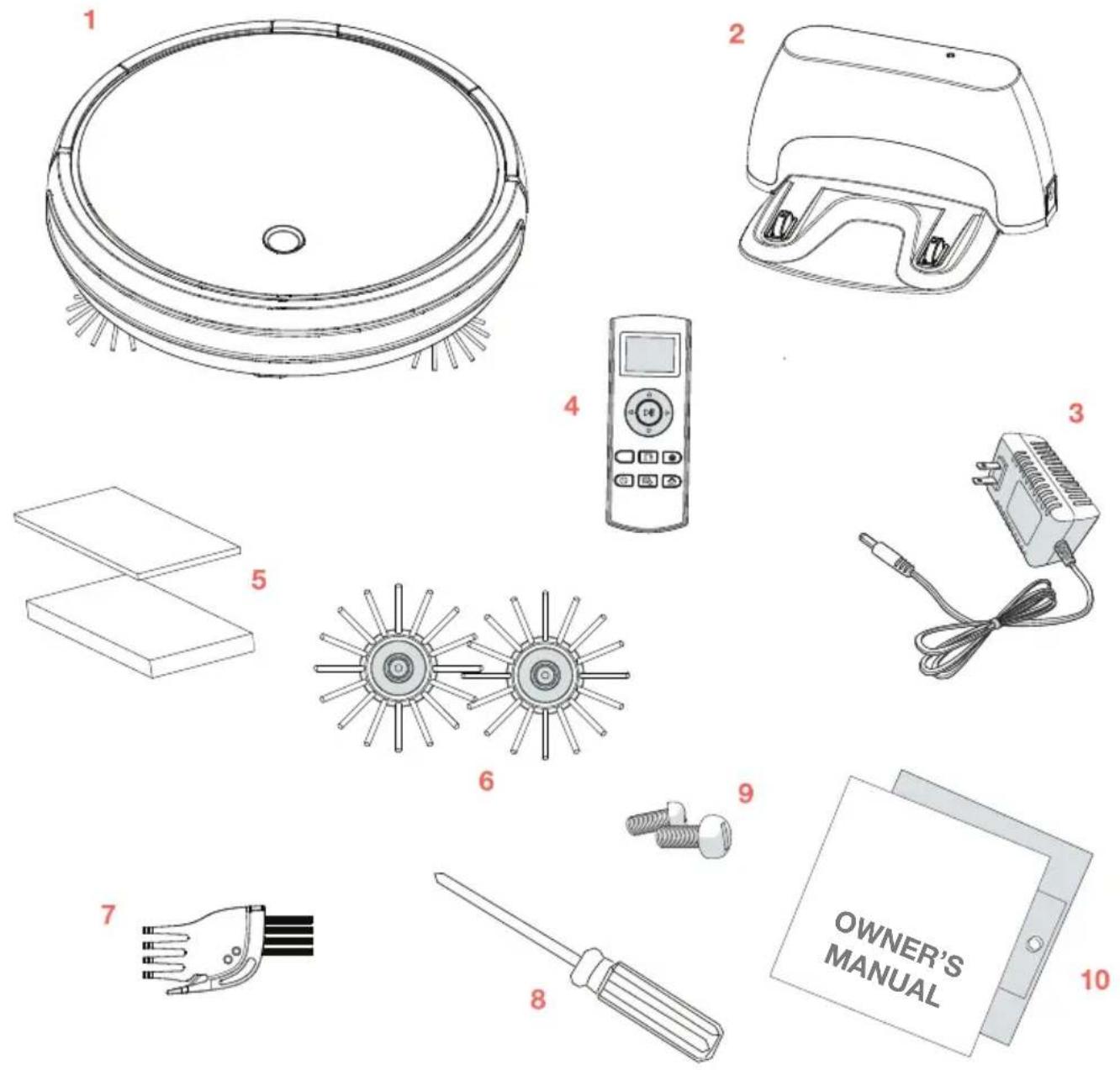
Box Contents
1 Bob, Your Intelligent Floor Cleaner
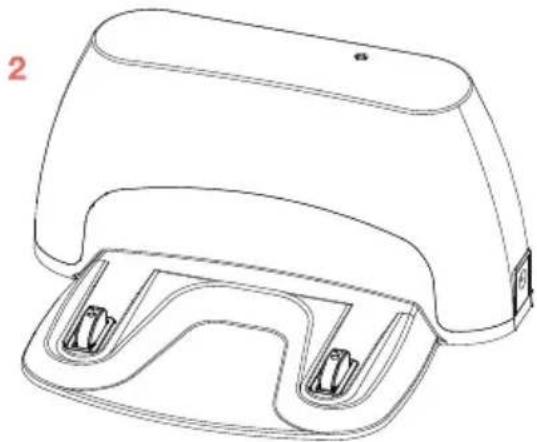
2 Charging Station
3 Charging Adapter
4 Remote Control
5 Filter Replacement
6 Spare Side Brushes (x2)
7 Cleaning Tool
8 Phillips Head Screwdriver
9 Pack of Screws
10 Owner's Manual, Quick Start Guide, and Warranty Card
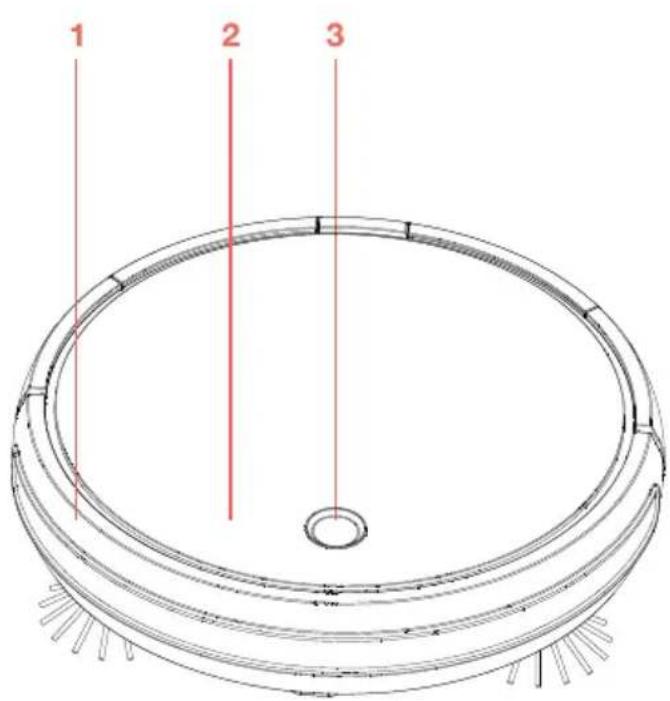
Bob's Anatomy
Top View
1 Bumper
2 Cover
3 Cover Button
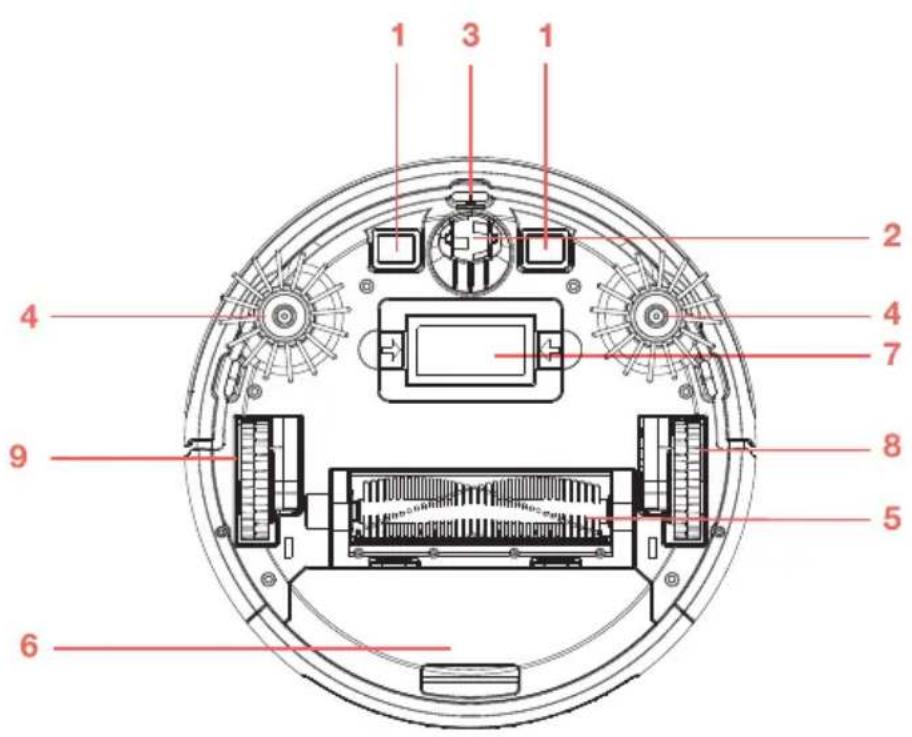
Bottom View
1 Charging Plates
2 Front Wheel
3 Edge Sensors
4 Side Brushes
5 Main Brush
6 Dustbin
7 Battery
8 Left Wheel
9 Right Wheel
1 Remote Control
2 Charging Station
natural_image
Illustration of a remote control device with buttons and a screen (no text or symbols)1
natural_image
Line drawing of a mechanical device with two side brackets and a handle (no text or symbols)
bubble
| Color | X | Y | |--------|-------|-------| | Green | 1.0 | 2.0 | | Purple | 1.0 | 3.0 | | Pink | 1.0 | 4.0 | | Yellow | 1.0 | 5.0 | | Brown | 1.0 | 6.0 | | Teal | 1.0 | 7.0 | | Beige | 1.0 | 8.0 | | Lavender | 1.0 | 9.0 | | Grey | 1.0 | 10.0 | | Navy | 1.0 | 11.0 | | Olive | 1.0 | 12.0 | | Dark Green | 1.0 | 13.0 | | Light Green | 1.0 | 14.0 | | Orange | 1.0 | 15.0 | | Pink | 1.0 | 16.0 | | Yellow | 1.0 | 17.0 | | Brown | 1.0 | 18.0 | | Teal | 1.0 | 19.0 | | Beige | 1.0 | 20.0 | | Lavender | 1.0 | 21.0 | | Grey | 1.0 | 22.0 | | Navy | 1.0 | 23.0 | | Olive | 1.0 | 24.0 | | Dark Green | 1.0 | 25.0 | | Light Green | 1.0 | 26.0 | | Orange | 1.0 | 27.0 | | Pink | 1.0 | 28.0 | | Yellow | 1.0 | 29.0 | | Brown | 1.0 | 30.0 | | Teal | 1.0 | 31.0 | | Beige | 1.0 | 32.0 | | Navy | 1.0 | 33.0 | | Olive | 1.0 | 34.0 | | Dark Green | 1.0 | 35.0 | | Light Green | 1.0 | 36.0 | | Orange | 1.0 | 37.0 | | Pink | 1.0 | 38.0 | | Yellow | 1.0 | 39.0 | | Brown | 1.0 | 40.0 | | Teal | 1.0 | 41.0 | | Beige | 1.0 | 42.0 | | Navy | 1.0 | 43.0 | | Olive | 1.0 | 44.0 | | Dark Green | 1.0 | 45.0 | | Light Green | 1.0 | 46.0 | | Orange | 1.0 | 47.0 | | Pink | 1.0 | 48.0 | | Yellow | 1.0 | 49.0 | | Brown | 1.0 | 50.0 | | Teal | 1.0 | 51.0 | | Beige | 1.0 | 52.0 | | Navy | 1.0 | 53.0 | | Olive | 1.0 | 54.0 | | Dark Green | 1.0 | 55.0 | | Light Green | 1.0 | 56.0 | | Orange | 1.0 | 57.0 | | Pink | 1.0 | 58.0 | | Yellow | 1.0 | 59.0 | | Brown | 1.0 | 60.0 | | Teal | 1.0 | 61.0 | | Beige | 1.0 | 62.0 | | Navy | 1.0 | 63.0 | | Olive | 1.0 | 64.0 | | Dark Green | 1.0 | 65.0 | | Light Green | 1.0 | 66.0 | | Orange | 1.0 | 67.0 | | Pink | 1.0 | 68.0 | | Yellow | 1.0 | 69.0 | | Brown | 1.0 | 70.0 | | Teal | 1.0 | 71.0 | | Beige | 1.0 | 72.0 | | Navy | 1.0 | 73.0 | | Olive | 1.0 | 74.0 | | Dark Green | 1.0 | 75.0 | | Light Green | 1.0 | 76.0 | | Orange | 1.0 | 77.0 | | Pink | 1.0 | 78.0 | | Yellow | 1.0 | 79.0 | | Brown | 1.0 | 80.0 | | Teal | 1.0 | 81.0 | | Beige | 1.0 | 82.0 | | Navy | 1.0 | 83.0 | | Olive | 1.0 | 84.0 | | Dark Green | | | | Light Green | | Brown | | Beige | | Teal | | Beige | | Navy | | Olive | | Dark Green | | Light Green | | Orange | | Pink | | Pink | | Yellow | | Brown | | Teal | | Beige | | Navy | | Olive | | Dark Green |

bubble
| Category | Value | | -------- | ----- | | A | 10 | | B | 25 | | C | 30 | | D | 40 | | E | 50 | | F | 60 | | G | 70 | | H | 80 | | I | 90 | | J | 100 | | K | 110 | | L | 120 | | M | 130 | | N | 140 | | O | 150 | | P | 160 | | Q | 170 | | R | 180 | | S | 190 | | T | 200 | | U | 210 | | V | 220 | | W | 230 | | X | 240 | | Y | 250 | | Z | 260 | | AA | 270 | | AB | 280 | | AC | 290 | | AD | 300 | | AE | 310 | | AF | 320 | | AG | 330 | | AH | 340 | | AI | 350 | | AJ | 360 | | AK | 370 | | AL | 380 | | AM | 390 | | AN | 400 | | AO | 410 | | AP | 420 | | AQ | 430 | | AR | 440 | | AS | 450 | | AT | 460 | | AU | 470 | | AV | 480 | | AW | 490 | | AX | 500 | | AY | 510 | | AZ | 520 | | BA | 530 | | BB | 540 | | BC | 550 | | BD | 560 | | BE | 570 | | BF | 580 | | BG | 590 | | BH | 600 | | BI | 610 | | BJ | 620 | | BK | 630 | | BL | 640 | | BM | 650 | | BN | 660 | | BO | 670 | | BP | 680 | | BPB | 690 | | BZ | 700 | | BW | 710 | | BWB | 720 | | BWN | 730 | | BWL | 740 | | BWM | 750 | | BWN | 760 | | BWO | 770 | | BWP | 780 | | BWQ | 790 | | BWR | 800 | | BWS | 810 | | BWT | 820 | | BWU | 830 | | BWV | 840 | | BWW | 850 | | BWX | 860 | | BWY | 870 | | BWZ | 880 | | BWA | 890 | | BWB | 900 | | BWC | 910 | | BWD | 920 | | BWE | 930 | | BWF | 940 | | BWG | 950 | | BWH | 960 | | BWI | 970 | | BWJ | 980 | | BWK | 990 | | BWL | 1000 | The data is already in CSV format and is not broken down into multiple decimal places for the last few rows. The last row contains the original data and only the first row contains the corresponding decimal places.Get Bob
Ready to Clean

bubble
| Category | Value | | -------- | ----- | | Pink | 10 | | Green | 20 | | Yellow | 30 | | Purple | 40 | | Brown | 50 | | Yellow | 60 | | Green | 70 | | Pink | 80 | | Yellow | 90 | | Purple | 100 | | Brown | 110 | | Yellow | 120 | | Green | 130 | | Pink | 140 | | Yellow | 150 | | Purple | 160 | | Brown | 170 | | Yellow | 180 | | Green | 190 | | Pink | 200 | | Yellow | 210 | | Purple | 220 | | Brown | 230 | | Yellow | 240 | | Green | 250 | | Pink | 260 | | Yellow | 270 | | Purple | 280 | | Brown | 290 | | Yellow | 300 | | Green | 310 | | Pink | 320 | | Yellow | 330 | | Purple | 340 | | Brown | 350 | | Yellow | 360 | | Green | 370 | | Pink | 380 | | Yellow | 390 | | Purple | 400 | | Brown | 410 | | Yellow | 420 | | Green | 430 | | Pink | 440 | | Yellow | 450 | | Purple | 460 | | Brown | 470 | | Yellow | 480 | | Green | 490 | | Pink | 500 | | Yellow | 510 | | Purple | 520 | | Brown | 530 | | Yellow | 540 | | Green | 550 | | Pink | 560 | | Yellow | 570 | | Purple | 580 | | Brown | 590 | | Yellow | 600 | | Green | 610 | | Pink | 620 | | Yellow | 630 | | Purple | 640 | | Brown | 650 | | Yellow | 660 | | Green | 670 | | Pink | 680 | | Yellow | 690 | | Purple | 700 | | Brown | 710 | | Yellow | 720 | | Green | 730 | | Pink | 740 | | Yellow | 750 | | Purple | 760 | | Brown | 770 | | Yellow | 780 | | Green | 790 | | Pink | 800 | | Yellow | 810 | | Purple | 820 | | Brown | 830 | | Yellow | 840 | | Green | 850 | | Pink | 860 | | Yellow | 870 | | Purple | 880 | | Brown | 890 | | Yellow | 900 | | Green | 910 | | Pink | 920 | | Yellow | 930 | | Purple | 940 | | Brown | 950 | | Yellow | 960 | | Green | 970 | | Pink | 980 | | Yellow | 990 | | Purple | 1000 | | Brown | 1100 | | Yellow | 1200 | | Green | 1300 | | Pink | 1400 | | Yellow | 1500 | | Purple | 1600 | | Brown | 1700 | | Yellow | 1800 | | Green | 1900 | | Pink | 2000 | | Yellow | 2100 | | Purple | 2200 | | Brown | 2300 | | Yellow | 2400 | | Green | 2500 | | Pink | 2600 | | Yellow | 2700 | | Purple | 2800 | | Brown | 2900 | | Yellow | 3000 | | Green | 3100 | | Pink | 3200 | | Yellow | 3300 | | Purple | 3400 | | Brown | 3500 | | Yellow | 3600 | | Green | 3700 | | Pink | 3800 | | Yellow | 3900 | | Purple | 4000 | | Brown | 4100 | | Yellow | 4200 | | Green | 4300 | | Pink | 4400 | | Yellow | 4500 | | Purple | 4600 | | Brown | 4700 | | Yellow | 4800 | | Green | 4900 | | Pink | 5000 | | Yellow | 5100 | | Purple | 5200 | | Brown | 5300 | | Yellow |Charge Bob
Charge Bob overnight before his first clean.
To charge Bob:

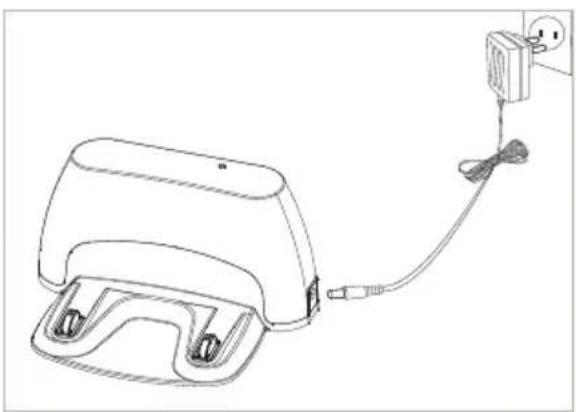
Plug the charging adapter into the side of the charging station. The station's green power light will turn on.
natural_image
Line drawing of a medical device with attached cable and power outlet (no text or symbols)
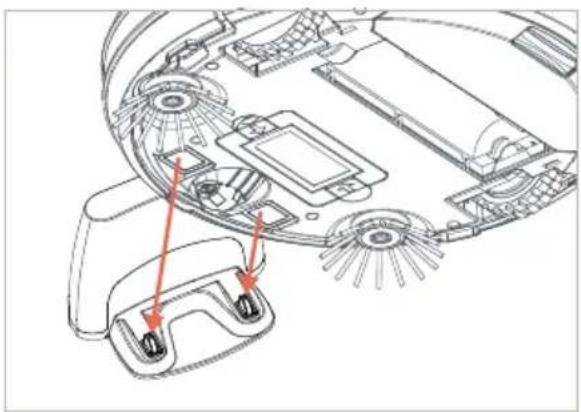
Place Bob on his charging station with the metal plates on his underside sitting on top of the nodes on his station.
natural_image
Technical line drawing of a robotic device interior with labeled components (no text or symbols)
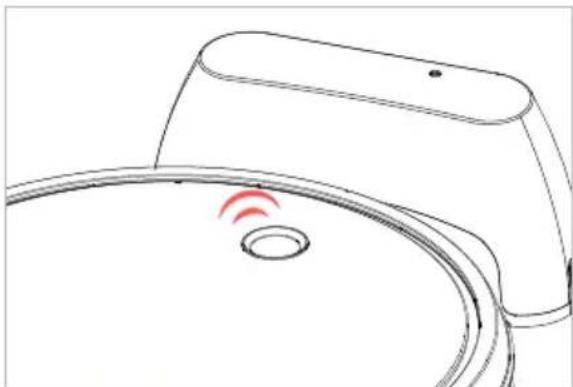
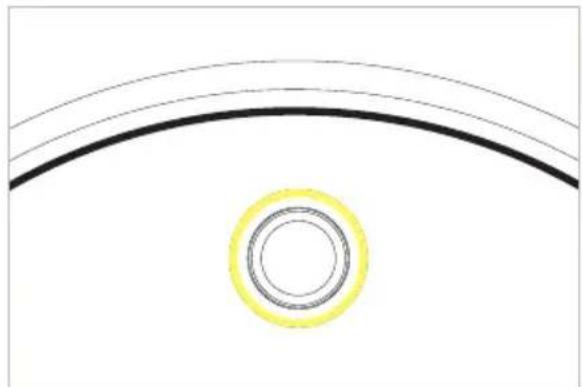
Bob will chirp once and blink his cover button to indicate that he is charging.
natural_image
Line drawing of a toilet with a red sensor icon and circular base (no text or symbols)
When Bob has fully charged, his cover button will stop blinking and remain solid.
natural_image
Simple diagram with curved lines and a yellow circle at the center (no text or symbols)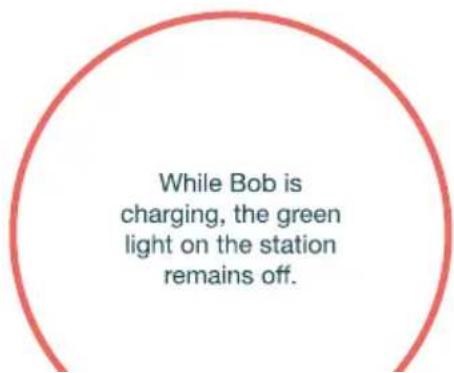
Bob's First Clean
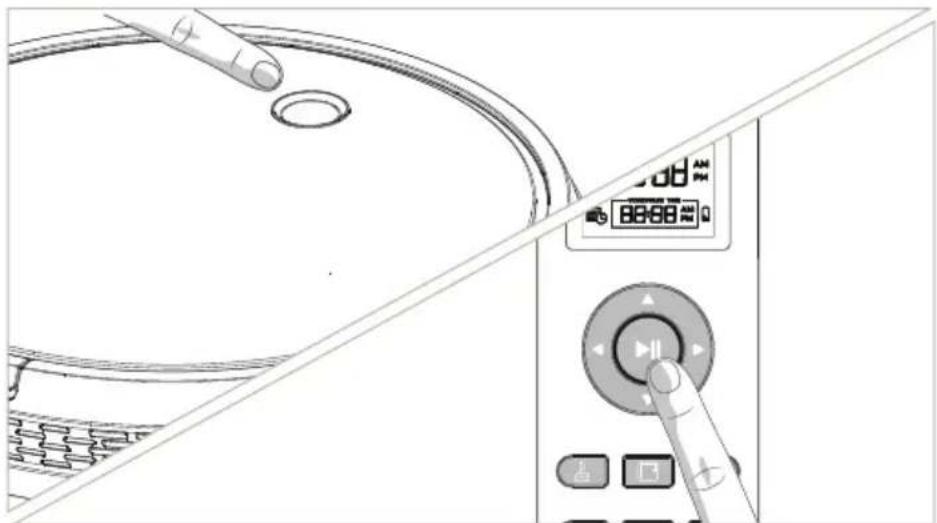
Make sure Bob is turned on.
If the light on Bob is off, then Bob is turned off too. To turn Bob on, press and hold the cover button for three seconds. Bob will chirp and his cover button will light up.
natural_image
Diagram showing a hand pressing down on a pot with a digital display and control panel (no text or symbols)Bob is now ready to clean!
After you've charged Bob and made sure he's turned on, he's ready to clean. Press Bob's cover button, or the ▶|| button on his remote, and he will clean on his default Robot mode.
Standby Mode
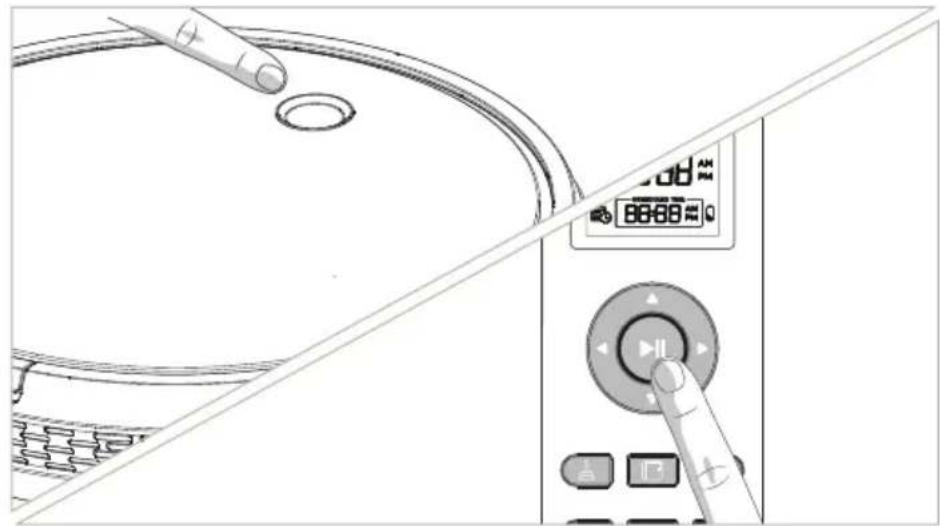
If Bob is left idling, he will enter standby mode to conserve his battery. When in standby mode, Bob is paused.
natural_image
Diagram showing a hand pressing down on a kitchen sink with a digital control panel and control buttons (no text or symbols)To take him out of standby mode, press his cover button or the ▶|| button on his remote.

Charging Bob


bubble
| Color | X | Y | |--------|-------|-------| | Green | 0.1 | 0.9 | | Pink | 0.2 | 0.8 | | Yellow | 0.3 | 0.7 | | Purple | 0.4 | 0.6 | | Magenta| 0.5 | 0.5 | | Teal | 0.6 | 0.4 | | Beige | 0.7 | 0.3 | | Grey | 0.8 | 0.2 | | Navy | 0.9 | 0.1 | | Navy | 1.0 | 0.0 |
bubble
| Category | Value | | -------- | ----- | | Pink | 10 | | Green | 8 | | Yellow | 6 | | Purple | 4 | | Brown | 3 | | Yellow | 7 | | Green | 5 | | Pink | 9 | | Yellow | 4 | | Purple | 2 | | Brown | 1 | | Yellow | 8 | | Green | 7 | | Pink | 6 | | Yellow | 5 | | Purple | 3 | | Brown | 2 | | Yellow | 9 | | Green | 8 | | Pink | 5 | | Yellow | 4 | | Purple | 2 | | Brown | 1 | | Yellow | 7 | | Green | 6 | | Pink | 8 | | Yellow | 5 | | Purple | 3 | | Brown | 2 | | Yellow | 9 | | Green | 7 | | Pink | 6 | | Yellow | 5 | | Purple | 3 | | Brown | 2 | | Yellow | 8 | | Green | 7 | | Pink | 6 | | Yellow | 5 | | Purple | 3 | | Brown | 2 | | Yellow | 9 | | Green | 8 | | Pink | 6 | | Yellow | 5 | | Purple | 3 | | Brown | 2 | | Yellow | 8 | | Green | 7 | | Pink | 6 | | Yellow | 5 | | Purple | 3 | | Brown | 2 | | Yellow | 9 | | Green | 8 | | Purple | 6 | | Brown | 5 | | Yellow | 4 | | Green | 7 | | Pink | 6 | | Yellow | 5 | | Purple | 3 | | Brown | 2 | | Yellow | 8 | | Green | 7 | | Purple | 5 | | Brown | 4 | | Yellow | 3 | | Green | 6 | | Pink | 5 | | Yellow | 4 | | Purple | 3 | | Brown | 2 | | Yellow | 9 | | Green | 8 | | Purple | 6 | | Brown | 5 | | Yellow | 4 | | Green | 7 | | Pink | 6 | | Yellow | 5 | | Purple | 3 | | Brown | 2 | | Green | 6 | | Pink | 5 | | Yellow | 4 | | Purple | 3 | | Brown | 2 | | Yellow | 9 | | Green | 8 | | Purple | 6 | | Brown | 5 | | Yellow | 4 | | Green | 7 | | Pink | 6 | | Blue | -2 | | Red | -1 | | Green | -2 | | Blue | -1 | | Red | -1 | | Green | -1 | | Blue | -1 | | Red | -1 | | Green | -1 | | Blue | -1 | | Red | -1 | | Green | -1 | | Blue | -1 | | Red | -1 | | Green | -1 | | Blue | -1 | | Red | -1 | | Green | -1 | | Red | -1 | | Blue | -1 | | Green | -1 | | Red | -1 | | Blue | -1 | | Green | -1 | | Red | -1 | | Blue | -1 | | Green | -1 | | Red | -1 | | Blue | -1 | | Green | -1 | | Red | -1 | | Blue | -2 | | Green | -2 | | Red | -2 | | Blue | -2 | | Green | -2 | | Red | -2 | | Blue | -2 | | Green | -2 | | Red | -2 | | Blue | -2 | | Green | -2 | | Red | -2 | | Blue | -2 | | Green | -2 | | Red | -2 | | Orange | -3 | | Yellow | -3 | | Purple | -3 | | Brown | -3 | | Green | -3 | | Blue | -3 | | Red | -3 | | Yellow | -3 | | Purple | -3 | | Brown | -3 | | Green | -3 | | Blue | -3 | | Red | -3 | | Yellow | -3 | | Purple | -3 | | Brown | -3 | | Green | -3 | | Blue | -3 | | Red | -3Charging Station Placement
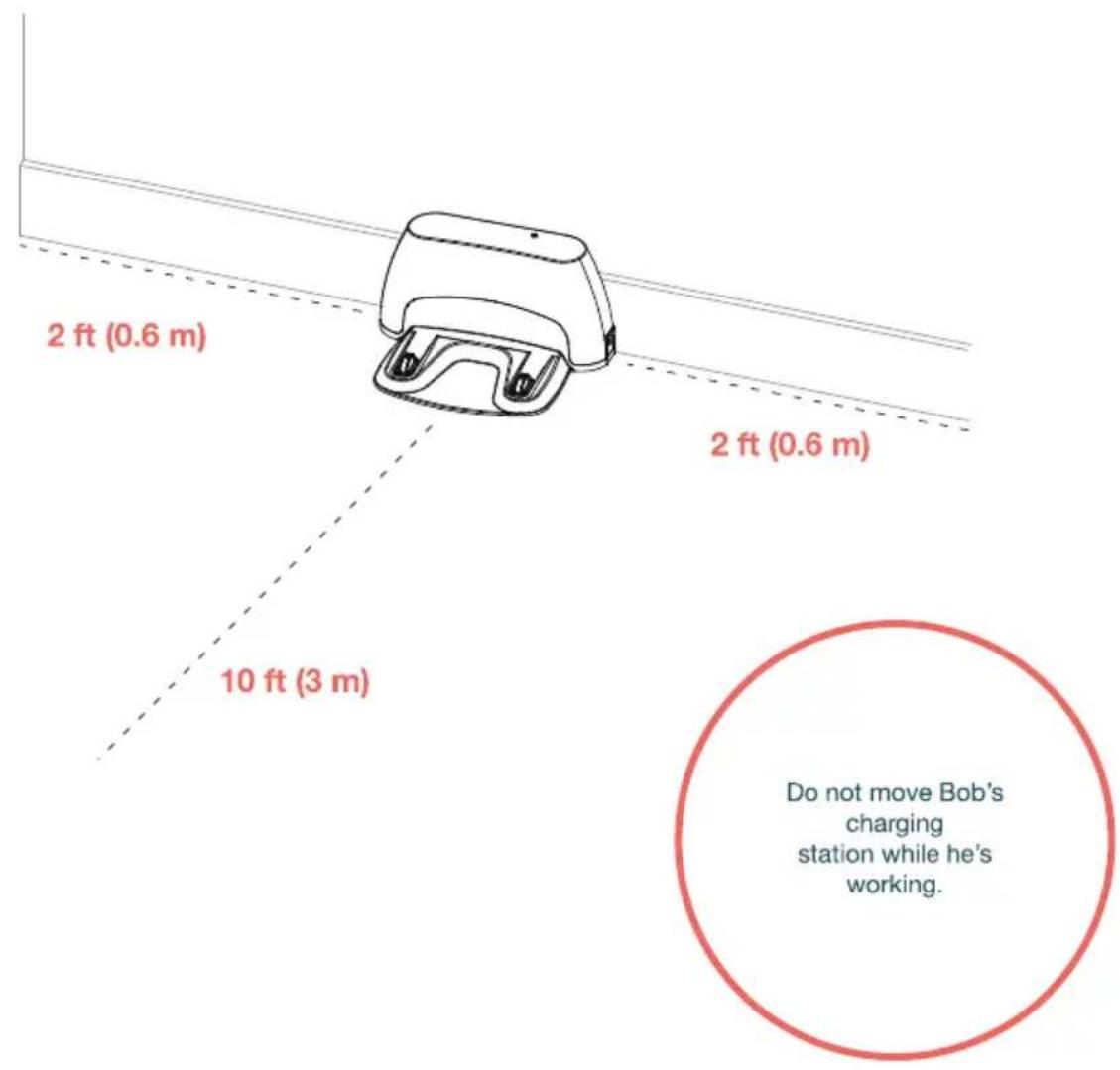
- Position the charging station against a wall on a hard, flat surface. If possible, avoid positioning the charging station on carpet or soft surfaces.
- Make sure there is at least 10 feet (3 m) of open space to the front and 2 feet (0.6 m) of open space to the sides.
If Bob's cover button is RED, that means his battery power is too low for him to return to his charging station. You will need to charge him manually.
Auto Charging
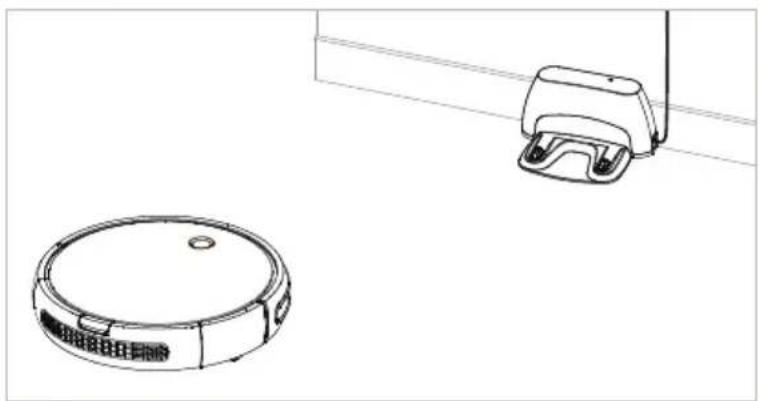
Bob is smart and will automatically search for his charging station when his battery reaches 15% capacity.
natural_image
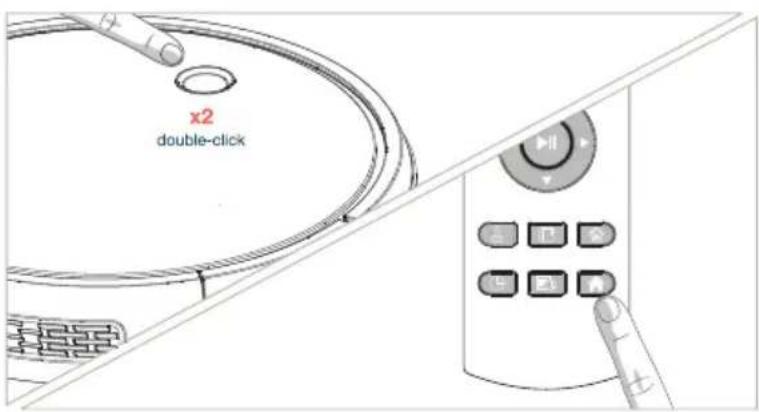
Technical line drawing of a vacuum cleaner and its mounting bracket (no text or symbols)You can also direct Bob to his charging station at any time by double-clicking his cover button or pressing 🔗 on his remote.
Manual Charging
To manually charge Bob:
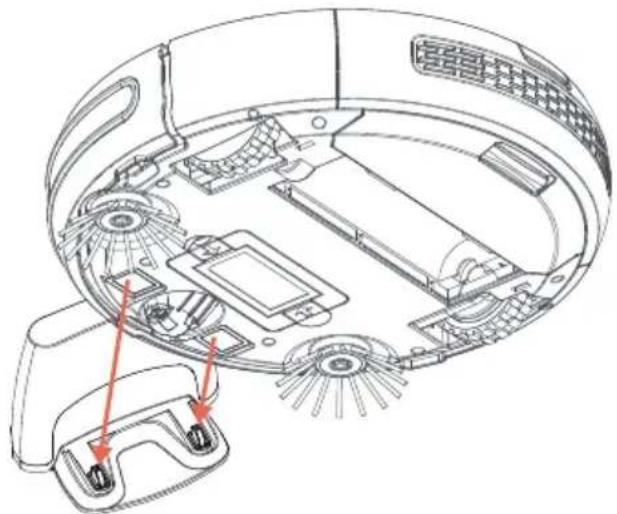
- Place Bob directly onto his plugged-in charging station.
• Make sure his charging plates sit directly on top of the nodes on his station.
natural_image
Technical line drawing of a device's internal components, showing labeled parts and red arrows indicating specific areas (no text or symbols present)When Bob is charging, his cover button flashes. When Bob is finished charging, his cover button remains solid.
Conserving Bob's Battery
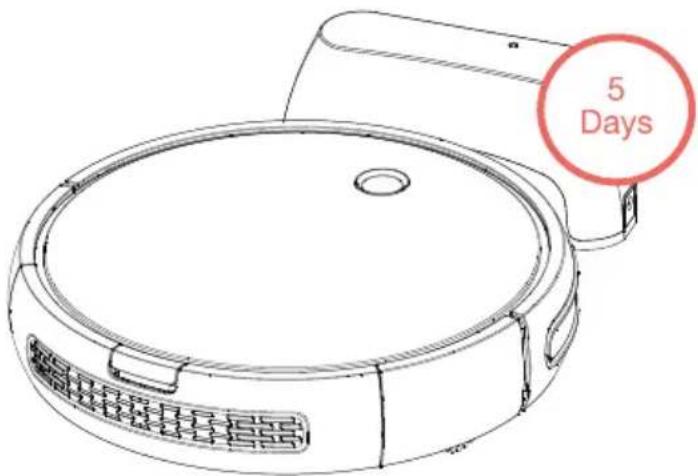
Bob should not sit on his charging station for more than 5 days. If you will not be using him at least once every 5 days, turn him off and remove him from the station to conserve his battery.

bubble
| Color | X | Y | |--------|----|----| | Green | 1 | 2 | | Purple | 2 | 3 | | Pink | 3 | 4 | | Yellow | 4 | 5 | | Red | 5 | 6 | | Dark Purple | 6 | 7 | | Light Green | 7 | 8 | | Green | 8 | 9 | | Purple | 9 | 10 | | Pink | 10 | 11 | | Yellow | 11 | 12 | | Red | 12 | 13 | | Dark Purple | 13 | 14 | | Light Green | 14 | 15 | | Green | 15 | 16 | | Purple | 16 | 17 | | Pink | 17 | 18 | | Yellow | 18 | 19 | | Red | 19 | 20 | | Dark Purple | 20 | 21 | | Light Green | 21 | 22 | | Green | 22 | 23 | | Purple | 23 | 24 | | Pink | 24 | 25 | | Yellow | 25 | 26 | | Red | 26 | 27 | | Dark Purple | 27 | 28 | | Light Green | 28 | 29 | | Green | 29 | 30 | | Purple | 30 | 31 | | Pink | 31 | 32 | | Yellow | 32 | 33 | | Red | 33 | 34 | | Dark Purple | 34 | 35 | | Light Green | 35 | 36 | | Green | 36 | 37 | | Purple | 37 | 38 | | Pink | 38 | 39 | | Yellow | 39 | 40 | | Red | 40 | 41 | | Dark Purple | 41 | 42 | | Light Green | 42 | 43 | | Green | 43 | 44 | | Purple | 44 | 45 | | Pink | 45 | 46 | | Yellow | 46 | 47 | | Red | 47 | 48 | | Dark Purple | 48 | 49 | | Light Green | 49 | 50 | | Green | 50 | 51 | | Purple | 51 | 52 | | Pink | 52 | 53 | | Yellow | 53 | 54 | | Red | 54 | 55 | | Dark Purple | 55 | 56 | | Light Green | 56 | 57 | | Green | 57 | 58 | | Purple | 58 | 59 | | Pink | 59 | 60 | | Yellow | 60 | 61 | | Red | 61 | 62 | | Dark Purple | 62 | 63 | | Light Green | 63 | 64 | | Green | 64 | 65 | | Purple | 65 | 66 | | Pink | 66 | 67 | | Yellow | 67 | 68 | | Red | 68 | 69 | | Dark Purple | 69 | 70 | | Light Green | 70 | 71 | | Green | 71 | 72 | | Purple | 72 | 73 | | Pink | 73 | 74 | | Yellow | 74 | 75 | | Red | 75 | 76 | | Dark Purple |

bubble
| Category | Value | | -------- | ----- | | A | 10 | | B | 25 | | C | 30 | | D | 40 | | E | 50 | | F | 60 | | G | 70 | | H | 80 | | I | 90 | | J | 100 | | K | 110 | | L | 120 | | M | 130 | | N | 140 | | O | 150 | | P | 160 | | Q | 170 | | R | 180 | | S | 190 | | T | 200 | | U | 210 | | V | 220 | | W | 230 | | X | 240 | | Y | 250 | | Z | 260 | | AA | 270 | | AB | 280 | | AC | 290 | | AD | 300 | | AE | 310 | | AF | 320 | | AG | 330 | | AH | 340 | | AI | 350 | | AJ | 360 | | AK | 370 | | AL | 380 | | AM | 390 | | AN | 400 | | AO | 410 | | AP | 420 | | AQ | 430 | | AR | 440 | | AS | 450 | | AT | 460 | | AU | 470 | | AV | 480 | | AW | 490 | | AX | 500 | | AY | 510 | | AZ | 520 | | BA | 530 | | BB | 540 | | BC | 550 | | BD | 560 | | BE | 570 | | BF | 580 | | BG | 590 | | BH | 600 | | BI | 610 | | BJ | 620 | | BK | 630 | | BL | 640 | | BM | 650 | | BN | 660 | | BO | 670 | | BP | 680 | | BPB | 690 | | BZ | 700 | | BW | 710 | | BWB | 720 | | BWN | 730 | | BWL | 740 | | BWM | 750 | | BWN | 760 | | BWO | 770 | | BWP | 780 | | BWQ | 790 | | BWR | 800 | | BWS | 810 | | BWT | 820 | | BWU | 830 | | BWV | 840 | | BWW | 850 | | BWX | 860 | | BWY | 870 | | BWZ | 880 | | BWA | 890 | | BWB | 900 | | BWC | 910 | | BWD | 920 | | BWE | 930 | | BWF | 940 | | BWG | 950 | | BWH | 960 | | BWI | 970 | | BWJ | 980 | | BWK | 990 | | BWL | 1000 | The chart displays a single column of color-coded dots (color names) for each row in the scatter plot. The x-axis is labeled 'a', and the y-axis is labeled 'b'. The values in the table represent the magnitude of each dot's position.Remote Control

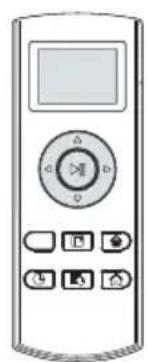
Remote Buttons
Set Bob's cleaning schedule, send him to charge, and control his movements all from his remote control.
1 Start / Stop
2 Charge
3 Auto
4 Wall Track
5 Quick Clean (30 min)
6 Set Current Time
7 Set Cleaning Schedule
8 Navigational Buttons
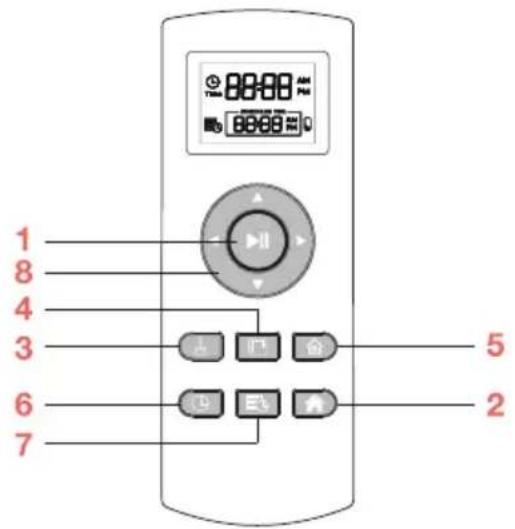
Bob's remote requires 2 AAA batteries (not included). Remove the batteries if you are not using the remote on a regular basis. Keep the remote at room temperature.
Start / Stop
• Bob will begin cleaning / Bob will pause cleaning
Charge
• Bob will begin looking for his charging station
Auto
• Bob will begin cleaning on his default setting (Robot mode)
Wall Track
• Bob will clean along corners and walls (Wall Track™ mode)
Quick Clean
• Bob will clean for 30 minutes and return to his charging station when done
Set Current Time
- Sets the current time and date
Set Cleaning Schedule
- Sets Bob's regular cleaning schedule
Navigational Buttons
• Guide Bob forward, backward, right, or left
When Bob is on, he chirps every time he receives a command from his remote control.
Syncing Remote
If Bob is not responding to his remote, he may need to be synced to it.
Before syncing, make sure Bob is turned on and the remote has fresh batteries.
To sync Bob's remote:

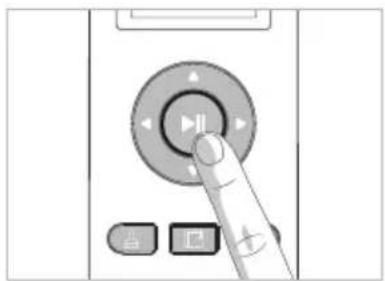
Hold down the ▶|| button on the remote.

While still holding down the ▶|| button, press and hold Bob's cover button for a few seconds.

Bob will chirp 3 times to let you know the sync was successful.
natural_image
Hand pressing a button on a device interface (no text or symbols visible)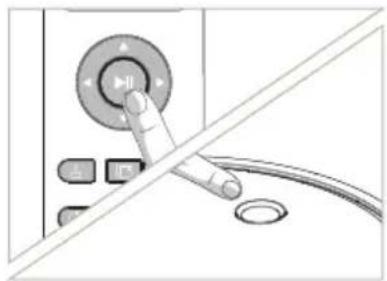
natural_image
Close-up of a hand pressing a button on a device with a circular dial and control buttons (no text or symbols visible)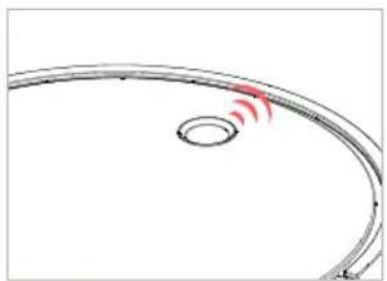
natural_image
Simple curved line diagram with a red wave indicator near the center (no text or symbols)Using the Navigational Buttons
To manually control Bob, hold down one of the navigational buttons on his remote. Release the button when you are done manually driving Bob, and press the ▶II button to return Bob to his default Robot mode.
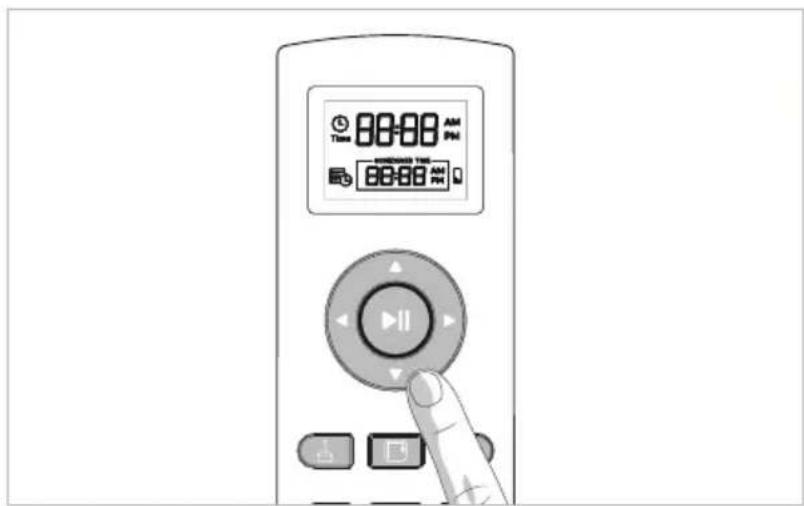
Bob's edge sensors are located along his front, not along his back. Do not reverse Bob towards edges, as he will fall.

bubble
| Color | X | Y | Size | |--------|-------|-------|------| | Green | 1.0 | 2.0 | 50 | | Purple | 1.0 | 3.0 | 60 | | Pink | 1.0 | 4.0 | 70 | | Yellow | 1.0 | 5.0 | 80 | | Brown | 1.0 | 6.0 | 90 | | Teal | 1.0 | 7.0 | 100 | | Beige | 1.0 | 8.0 | 110 | | Lavender | 1.0 | 9.0 | 120 | | Grey | 1.0 | 10.0 | 130 | | Navy | 1.0 | 11.0 | 140 | | Olive | 1.0 | 12.0 | 150 | | Dark Green | 1.0 | 13.0 | 160 | | Light Green | 1.0 | 14.0 | 170 | | Orange | 1.0 | 15.0 | 180 | | Pink | 1.0 | 16.0 | 190 | | Red | 1.0 | 17.0 | 200 | | Grey | 1.0 | 18.0 | 210 | | Navy | 1.0 | 19.0 | 220 | | Olive | 1.0 | 20.0 | 230 | | Brown | 1.0 | 21.0 | 240 | | Yellow | 1.0 | 22.0 | 250 | | Dark Green | 1.0 | 23.0 | 260 | | Light Green | 1.0 | 24.0 | 270 | | Orange | 1.0 | 25.0 | 280 | | Navy | 1.0 | 26.0 | 290 | | Olive | 1.0 | 27.0 | 300 | | Brown | 1.0 | 28.0 | 310 | | Yellow | 1.0 | 29.0 | 320 | | Dark Green | 1.0 | 30.0 | 330 | | Light Green | 1.0 | 31.0 | 340 | | Orange | 1.0 | 32.0 | 350 | | Navy | 1.0 | 33.0 | 360 | | Olive | 1.0 | 34.0 | 370 | | Brown | 1.0 | 35.0 | 380 | | Yellow | 1.0 | 36.0 | 390 | | Dark Green | 1.0 | 37.0 | 400 | | Light Green | 1.0 | 38.0 | 410 | | Orange | 1.0 | 39.0 | 420 | | Navy | 1.0 | 40.0 | 430 | | Olive | 1.0 | 41.0 | 440 | | Brown | 1.0 | 42.0 | 450 | | Yellow | 1.0 | 43.0 | 460 | | Dark Green | | | | | Grey | | | | | Navy | | | | | Olive | | | | | Brown | | | | | Yellow | | | | | Dark Green | | | | | Light Green | | | | | Orange | | | | | Navy | | | | | Olive | | | | | Brown | | | | | Yellow | | | | | Dark Green | | | | | Light Green + Grey (no label) in the image.Cleaning Schedule

bubble
| X | Y | Color | |----|----|-------| | 1 | 3 | Green | | 2 | 4 | Purple | | 3 | 2 | Pink | | 4 | 5 | Green | | 5 | 6 | Brown | | 6 | 7 | Yellow | | 7 | 8 | Purple | | 8 | 9 | Pink | | 9 | 10 | Green | | 10 | 11 | Brown | | 11 | 12 | Yellow | | 12 | 13 | Green | | 13 | 14 | Pink | | 14 | 15 | Green | | 15 | 16 | Brown | | 16 | 17 | Yellow | | 17 | 18 | Green | | 18 | 19 | Pink | | 19 | 20 | Green | | 20 | 21 | Brown | | 21 | 22 | Yellow | | 22 | 23 | Green | | 23 | 24 | Pink | | 24 | 25 | Green | | 25 | 26 | Brown | | 26 | 27 | Yellow | | 27 | 28 | Green | | 28 | 29 | Pink | | 29 | 30 | Green | | 30 | 31 | Brown | | 31 | 32 | Yellow | | 32 | 33 | Green | | 33 | 34 | Pink | | 34 | 35 | Green | | 35 | 36 | Brown | | 36 | 37 | Yellow | | 37 | 38 | Green | | 38 | 39 | Pink | | 39 | 40 | Green | | 40 | 41 | Brown | | 41 | 42 | Yellow | | 42 | 43 | Green | | 43 | 44 | Pink | | 44 | 45 | Green | | 45 | 46 | Brown | | 46 | 47 | Yellow | | 47 | 48 | Green | | 48 | 49 | Pink | | 49 | 50 | Green | | 50 | 51 | Brown | | 51 | 52 | Yellow | | 52 | 53 | Green | | 53 | 54 | Pink | | 54 | 55 | Green | | 55 | 56 | Brown | | 56 | 57 | Yellow | | 57 | 58 | Green | | 58 | 59 | Pink | | 59 | 60 | Green | | 60 | 61 | Brown | | 61 | 62 | Yellow | | 62 | 63 | Green | | 63 | 64 | Pink | | 64 | 65 | Green | | 65 | 66 | Brown | | 66 | 67 | Yellow | | 67 | 68 | Green | | 68 | 69 | Pink | | 69 | 70 | Green | | 70 | 71 | Brown | | 71 | 72 | Yellow | | 72 | 73 | Green | | 73 | 74 | Pink | | 74 | 75 | Green | | 75 | 76 | Brown | | 76 | 77 | Yellow | | 77 | 78 | Green | | 78 | 79 | Pink | | 79 | 80 | Green | | 80 | - | Purple...
bubble
| Category | Value | | -------- | ----- | | A | 10 | | B | 25 | | C | 30 | | D | 40 | | E | 50 | | F | 60 | | G | 70 | | H | 80 | | I | 90 | | J | 100 | | K | 110 | | L | 120 | | M | 130 | | N | 140 | | O | 150 | | P | 160 | | Q | 170 | | R | 180 | | S | 190 | | T | 200 | | U | 210 | | V | 220 | | W | 230 | | X | 240 | | Y | 250 | | Z | 260 | | AA | 270 | | AB | 280 | | AC | 290 | | AD | 300 | | AE | 310 | | AF | 320 | | AG | 330 | | AH | 340 | | AI | 350 | | AJ | 360 | | AK | 370 | | AL | 380 | | AM | 390 | | AN | 400 | | AO | 410 | | AP | 420 | | AQ | 430 | | AR | 440 | | AS | 450 | | AT | 460 | | AU | 470 | | AV | 480 | | AW | 490 | | AX | 500 | | AY | 510 | | AZ | 520 | | BA | 530 | | BB | 540 | | BC | 550 | | BD | 560 | | BE | 570 | | BF | 580 | | BG | 590 | | BH | 600 | | BI | 610 | | BJ | 620 | | BK | 630 | | BL | 640 | | BM | 650 | | BN | 660 | | BO | 670 | | BP | 680 | | BPB | 690 | | BZ | 700 | | BW | 710 | | BWB | 720 | | BWN | 730 | | BWL | 740 | | BWM | 750 | | BWN | 760 | | BWO | 770 | | BWP | 780 | | BWQ | 790 | | BWR | 800 | | BWS | 810 | | BWT | 820 | | BWU | 830 | | BWV | 840 | | BWW | 850 | | BWX | 860 | | BWY | 870 | | BWZ | 880 | | BWA | 890 | | BWB | 900 | | BWC | 910 | | BWD | 920 | | BWE | 930 | | BWF | 940 | | BWG | 950 | | BWH | 960 | | BWI | 970 | | BWJ | 980 | | BWK | 990 | | BWL | 1000 | | BWM | 1100 | | BWN | 1200 | | BWO | 1300 | | BWP | 1400 | | BWT | 1500 | | BWU | 1600 | | BWV | 1700 | | BWW | 1800 | | BWX | 1900 | | BWY | 2000 | | BWZ | 2100 | | BWA | 2200 | | BWB | 2300 | | BWC | 2400 | | BWD | 2500 | | BWE | 2600 | | BWF | 2700 | | BWG | 2800 | | BWH | 2900 | | BWI | 3000 | | BWJ | 3100 | | BWK | 3200 | | BWL | 3300 | | BWO | 3400 | | BWP | 3500 | | BWT | 3600 | | BWU | 3700 | | BWV | 3800 | | BWW | 3900 | | BWX | 4000 | | BWY | 4100 | | BWZ | 4200 | | BWA | 4300 | | BWB | 4400 | | BWC | 4500 | | BWD | 4600 | | BWE | 4700 | | BWF | 4800 | | BWG | 4900 | | BWH | 5000 | | BWI | 5100 | | BWJ | 5200 | | BWK | 5300 | | BWL | 5400 | | BWO | 5500 | | BWP | 5600 | | BWT | 5700 | | BWU | 5800 | | BWV | 5900 | | BWW | 6000 | | BWX | 6100 | | BWY | 6200 | | BWZ | 6300 | | BWA | - | | B | - | | A | - | | B | - | | C | - | | D | - | | E | - | | F | - | | G | - | | H | - | | I | - | | J | - | | K | - | | L | - | | M | - | | N | - | | O | - | | P | - | | Q | - | | R | - | | S | - | | T | - | | U | - | | V | - | | W | - | | W | - | | X | - | | Y | - | | Z | - | The values in the 'Value' column represent the sum of the 'Value' for each 'Value' in the 'Value' column. The 'Value' values are explicitly labeled on the chart.
bubble
| Category | Value | | -------- | ----- | | Pink | 10 | | Green | 8 | | Yellow | 6 | | Purple | 4 | | Brown | 3 | | Yellow | 7 | | Green | 5 | | Pink | 9 | | Yellow | 4 | | Purple | 2 | | Brown | 1 | | Yellow | 8 | | Green | 7 | | Pink | 6 | | Yellow | 5 | | Purple | 3 | | Brown | 2 | | Yellow | 9 | | Green | 8 | | Pink | 5 | | Yellow | 4 | | Purple | 2 | | Brown | 1 | | Yellow | 7 | | Green | 6 | | Pink | 8 | | Yellow | 5 | | Purple | 3 | | Brown | 2 | | Yellow | 9 | | Green | 7 | | Pink | 6 | | Yellow | 5 | | Purple | 3 | | Brown | 2 | | Yellow | 8 | | Green | 7 | | Pink | 6 | | Yellow | 5 | | Purple | 3 | | Brown | 2 | | Yellow | 9 | | Green | 8 | | Pink | 6 | | Yellow | 5 | | Purple | 3 | | Brown | 2 | | Yellow | 8 | | Green | 7 | | Pink | 6 | | Yellow | 5 | | Purple | 3 | | Brown | 2 | | Yellow | 9 | | Green | 8 | | Purple | 6 | | Brown | 5 | | Yellow | 4 | | Green | 7 | | Pink | 6 | | Yellow | 5 | | Purple | 3 | | Brown | 2 | | Yellow | 8 | | Green | 7 | | Purple | 5 | | Brown | 4 | | Yellow | 3 | | Green | 6 | | Pink | 5 | | Yellow | 4 | | Purple | 3 | | Brown | 2 | | Yellow | 9 | | Green | 8 | | Purple | 6 | | Brown | 5 | | Yellow | 4 | | Green | 7 | | Pink | 6 | | Yellow | 5 | | Purple | 3 | | Brown | 2 | | Green | 6 | | Pink | 5 | | Yellow | 4 | | Purple | 3 | | Brown | 2 | | Yellow | 9 | | Green | 8 | | Purple | 6 | | Brown | 5 | | Yellow | 4 | | Green | 7 | | Pink | 6 | | Blue | -2 | | Red | -1 | | Grey | -2 | | Grey | -1 | | Grey | -2 | | Grey | -1 | | Grey | -2 | | Grey | -1 | | Grey | -2 | | Grey | -1 | | Grey | -2 | | Grey | -1 | | Grey | -2 | | Grey | -1 | | Grey | -2 | | Grey | -2 | | Grey | -1 | | Grey | -2 | | Grey | -1 | | Grey | -2 | | Grey | -1 | | Grey | -2 | | Grey | -1 | | Grey | -2 | | Grey | -1 | | Grey | -2 | | Grey | -1 | | Blue | -2 | | Red | -1 | | Grey | -2 | | Grey | -1 | | Grey | -2 | | Grey | -1 | | Grey | -2 | | Grey | -1 | | Grey | -2 | | Grey | -1 | | Grey | -2 | | Grey | -1 | | Grey | -2 | | Grey | -1 | | Grey | -2 | | Grey | -1 | | Grey | -2 | | Grey | -1 | | Grey | -2 | | Grey | -1 | | Grey | -2 | | Grey | -1 | | Grey | -2 | | Grey | -1 | | Grey | -2Set Bob's Cleaning Schedule
Bob can be programmed to clean every day at the time of your choice through his remote.
To set Bob's cleaning schedule, you must first set the current time on his remote.
To set the current time:

Make sure Bob is turned on and synced to his remote. Press ⏻.

The hour digits will start flashing. Use ▲ and ▼ to adjust the hour digits.

Press ▶ to move on to the minute digits. Adjust using ▲ and ▼

Press ▶ to move on to "AM." Use ▲ and ▼ to select "AM" or "PM."

When done, press ⏻ to save your settings. Bob will chirp to let you know the current time is set.
After setting the time on Bob's remote, you may set his cleaning schedule.
To set the cleaning time:

Press

The hour digits will start flashing. Use ▲ and ▼ to adjust the hour digits.

Press ▶ to move on to the minute digits. Adjust using ▲ and ▼.

Press ▶ to move on to "AM." Use ▲ and ▼ to select "AM" or "PM."

When done, press ▶II to save your settings. Bob will chirp to let you know the cleaning schedule is set.

bubble
| Category | Color 1 | Color 2 | Color 3 | Color 4 | Color 5 | |----------|---------|---------|---------|---------|---------| | A | Green | Purple | Green | Green | Green | | B | Green | Green | Green | Green | Green | | C | Green | Green | Green | Green | Green | | D | Green | Green | Green | Green | Green | | E | Green | Green | Green | Green | Green | | F | Green | Green | Green | Green | Green | | G | Green | Green | Green | Green | Green | | H | Green | Green | Green | Green | Green | | I | Green | Green | Green | Green | Green | | J | Green | Green | Green | Green | Green | | K | Green | Green | Green | Green | Green | | L | Green | Green | Green | Green | Green | | M | Green | Green | Green | Green | Green | | N | Green | Green | Green | Green | Green | | O | Green | Green | Green | Green | Green | | P | Green | Green | Green | Green | Green | | Q | Green | Green | Green | Green | Green | | R | Green | Green | Green | Green | Green | | S | Green | Green | Green | Green | Green | | T | Green | Green | Green | Green | Green | | U | Green | Green | Green | Green | Green | | V | Green | Green | Green | Green | Green | | W | Green | Green | Green | Green | Green | | X | Yellow | Yellow | Yellow | Yellow | Yellow | | Y | Yellow | Yellow | Yellow | Yellow | Yellow | | Z | Yellow | Yellow | Yellow | Yellow | Yellow | | AA | Yellow | Yellow | Yellow | Yellow | Yellow | | AB | Yellow | Yellow | Yellow | Yellow | Yellow | | AC | Yellow | Yellow | Yellow | Yellow | Yellow | | AD | Yellow | Yellow | Yellow | Yellow | Yellow | | AE | Yellow | Yellow | Yellow | Yellow | Yellow | | AF | Yellow | Yellow | Yellow | Yellow | Yellow | | AG | Yellow | Yellow | Yellow | Yellow | Yellow | | AH | Yellow | Yellow | Yellow | Yellow | Yellow | | AI | Yellow | Yellow | Yellow | Yellow | Yellow | | AJ | Yellow | Yellow | Yellow | Yellow | Yellow | | AK | Yellow | Yellow | Yellow | Yellow | Yellow | | AL | Yellow | Yellow | Yellow | Yellow | Yellow | | AM | Yellow | Yellow | Yellow | Yellow | Yellow | | AN | Yellow | Yellow | Yellow | Yellow | Yellow | | AO | Yellow | Yellow | Yellow | Yellow | Yellow | | AP | Red | Red | Red | Red | Red | | AQ | Red | Red | Red | Red | Red | | AR | Red | Red | Red | Red | Red | | AS | Red | Red | Red | Red | Red | | AT | Red | Red | Red | Red | Red | | AU | Red | Red | Red | Red | Red | | AV | Red | Red | Red | Red | Red | | AW | Red | Red | Red | Red | Red | | AX | Red | Red | Red | Red | Red | | AY | Red | Red | Red | Red | Red | | AZ | Red | Red | Red | Red | Red | | BA | Red | Red | Red | Red | Red | | BW | Red | Red | Red | Red | Red | | CA | Red | Red | Red | Red | Red | | CO | Red | Red | Red | Red | Red | | CT | Red | Red | Red | Red | Red | | DE | Red | Red | Red | Red | Red | | FL | Red | Red | Red | Red | Red | | GA | Red | Red | Red | Red | Red | | HI | Red | Red | Red | Red | Red | | ID | Red | Red | Red | Red | Red | | IA | Red | Red | Red | Red | Red | | NJ | Red | Red | Red | Red | Red | | NM (Note: The red values are not explicitly provided in the code) are estimated based on the code's actual output format. The actual output format values for the red and green columns are not provided in the code.
bubble
| Category | Value | | -------- | ----- | | A | 10 | | B | 25 | | C | 30 | | D | 40 | | E | 50 | | F | 60 | | G | 70 | | H | 80 | | I | 90 | | J | 100 | | K | 110 | | L | 120 | | M | 130 | | N | 140 | | O | 150 | | P | 160 | | Q | 170 | | R | 180 | | S | 190 | | T | 200 | | U | 210 | | V | 220 | | W | 230 | | X | 240 | | Y | 250 | | Z | 260 | | AA | 270 | | AB | 280 | | AC | 290 | | AD | 300 | | AE | 310 | | AF | 320 | | AG | 330 | | AH | 340 | | AI | 350 | | AJ | 360 | | AK | 370 | | AL | 380 | | AM | 390 | | AN | 400 | | AO | 410 | | AP | 420 | | AQ | 430 | | AR | 440 | | AS | 450 | | AT | 460 | | AU | 470 | | AV | 480 | | AW | 490 | | AX | 500 | | AY | 510 | | AZ | 520 | | BA | 530 | | BB | 540 | | BC | 550 | | BD | 560 | | BE | 570 | | BF | 580 | | BG | 590 | | BH | 600 | | BI | 610 | | BJ | 620 | | BK | 630 | | BL | 640 | | BM | 650 | | BN | 660 | | BO | 670 | | BP | 680 | | BPB | 690 | | BZ | 700 | | BW | 710 | | BWB | 720 | | BWN | 730 | | BWY | 740 | | BWZ | 750 | | BWA | 760 | | BWY | 770 | | BWZ | 780 | | BWF | 790 | | BWH | 800 | | BWI | 810 | | BWJ | 820 | | BWK | 830 | | BWL | 840 | | BWM | 850 | | BWN | 860 | | BWO | 870 | | BWP | 880 | | BWQ | 890 | | BWR | 900 | | BWS | 910 | | BWT | 920 | | BWU | 930 | | BWV | 940 | | BWW | 950 | | BWX | 960 | | BWY | 970 | | BWZ | 980 | | BWZ | 990 | | BWY | 1000 | The chart displays a single column of color-coded dots (color names) for each row in the scatter plot. The x-axis is labeled 'a', and the y-axis is labeled 'b'. The values in the table represent the magnitude of each dot's position.Parts &
Maintenance

bubble
| Category | Value | | -------- | ----- | | Pink | 10 | | Green | 8 | | Yellow | 6 | | Pink | 4 | | Green | 3 | | Yellow | 2 | | Pink | 5 | | Green | 7 | | Yellow | 9 | | Pink | 12 | | Green | 11 | | Yellow | 13 | | Pink | 14 | | Green | 10 | | Yellow | 15 | | Pink | 16 | | Green | 12 | | Yellow | 17 | | Pink | 18 | | Green | 13 | | Yellow | 19 | | Pink | 20 | | Green | 14 | | Yellow | 21 | | Pink | 22 | | Green | 20 | | Yellow | 23 | | Pink | 24 | | Green | 21 | | Yellow | 25 | | Pink | 26 | | Green | 22 | | Yellow | 27 | | Pink | 28 | | Green | 23 | | Yellow | 29 | | Pink | 30 | | Green | 24 | | Yellow | 31 | | Pink | 32 | | Green | 25 | | Yellow | 33 | | Pink | 34 | | Green | 26 | | Yellow | 35 | | Pink | 36 | | Green | 27 | | Yellow | 37 | | Pink | 38 | | Green | 28 | | Yellow | 39 | | Pink | 40 | | Green | 31 | | Yellow | 41 | | Pink | 42 | | Green | 33 | | Yellow | 43 | | Pink | 44 | | Green | 35 | | Yellow | 45 | | Pink | 46 | | Green | 37 | | Yellow | 47 | | Pink | 48 | | Green | 39 | | Yellow | 49 | | Pink | 50 | | Green | 51 | | Yellow | 52 | | Pink | 53 | | Green | 54 | | Yellow | 55 | | Pink | 56 | | Green | 57 | | Yellow | 58 | | Pink | 59 | | Green | 60 | | Yellow | 61 | | Pink | 62 | | Green | 63 | | Yellow | 64 | | Pink | 65 | | Green | 66 | | Yellow | 67 | | Pink | 68 | | Green | 69 | | Yellow | 70 | | Pink | 71 | | Green | 72 | | Yellow | 73 | | Pink | 74 | | Green | 75 | | Yellow | 76 | | Pink | 77 | | Green | 78 | | Yellow | 79 | | Pink | 80 | | Green | 81 | | Yellow | 82 | | Pink | 83 | | Green | 84 | | Yellow | 85 | | Pink | 86 | | Green | 87 | | Yellow | 88 | | Pink | 89 | | Green | 90 | | Yellow | 91 | | Pink | 92 | | Green | 93 | | Yellow | 94 | | Pink | 95 | | Green | 96 | | Yellow | 97 | | Pink | 98 | | Green | 99 | | Yellow | 100 | | Pink | 101 | | Green | 102 | | Yellow | 103 | | Pink | 104 | | Green | 105 | | Yellow | 106 | | Pink | 107 | | Green | 108 | | Yellow | 109 | | Pink | 110 | | Green | 111 | | Yellow | 112 | | Pink | 113 | | Green | 114 | | Yellow | 115 | | Pink | 116 | | Green | 117 | | Yellow | 118 | | Pink | 119 | | Green | 120 | | Yellow | 121 | | Pink | 122 | | Green | 123 | | Yellow | 124 | | Pink | 125 | | Green | 126 | | Yellow | 127 | | Pink | 128 | | Green | 129 | | Yellow | 130 | | Pink | 131 | | Green | 132 | | Yellow | 133 | | Pink | 134 | | Green | 135 | | Yellow | 136 | | Pink | 137 | | Green | 138 | | Yellow | 139 | | Pink | 140 | | Green | 141 | | Yellow | 142 | | Pink | 143 | | Green | 144 | | Yellow | 145 | | Pink | 146 | | Green | 147 | | Yellow | 148 | | Pink | 149 | | Green | 150 | | Yellow | 151 | | Pink | 152 | | Green | 153 | | Yellow | 154 | | Pink | 155 | | Green | 156 | | Yellow | 157 | | Pink | 158 | | Green | 159 | | Yellow | 160 | | Pink | 161 | | Green | 162 | | Yellow | 163 | | Pink | 164 | | Green | 165 | | Yellow | 166 | | Pink | 167 | | Green | 168 | | Yellow | 169 | | Pink | 170 | | Green | 171 | | Yellow | 172 | | Pink | 173 | | Green | 174 | | Yellow |Dustbin
Do not force the dustbin gate beyond 180 degrees to avoid damaging it.
To empty and clean the dustbin:

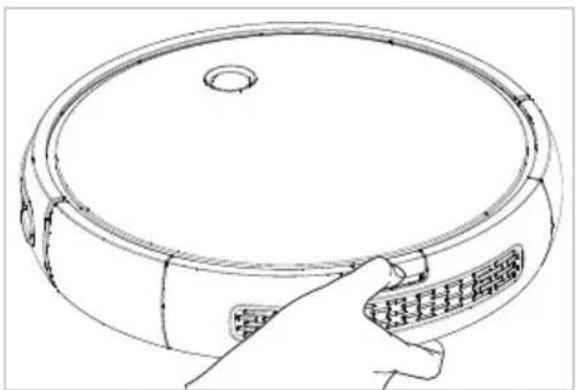
Push the center button on Bob's back to release the dustbin. Then, slide the dustbin out.

Carefully open the dustbin gate up to a 180 degree angle to empty the bin.
natural_image
Line drawing of a hand holding a circular device with a textured handle (no text or symbols)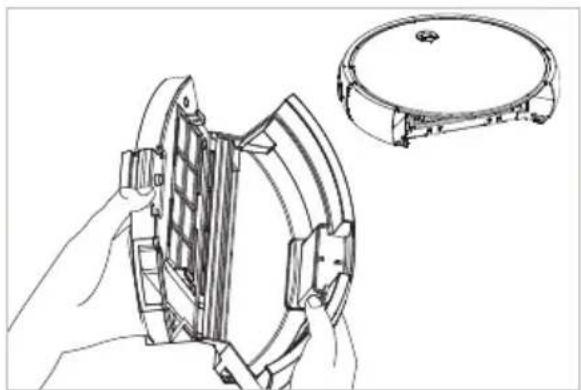
natural_image
Technical line drawing of a mechanical component with a close-up view of its circular housing (no text or symbols)Make sure the filters do not fall out of the dustbin as you empty it.
Filters
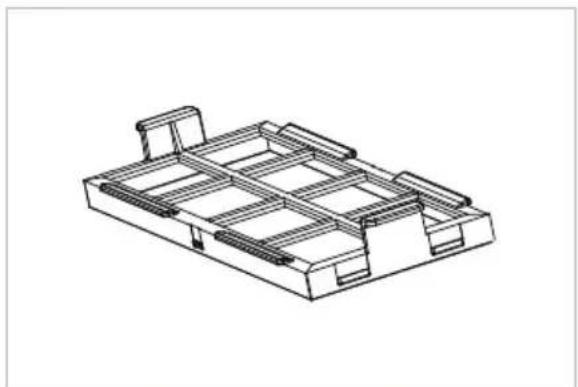
Three filters are located inside the dustbin's ceiling. These filters capture fine particles and prevent them from escaping the dustbin.
To remove and clean the filters:

Open the dustbin and pull out the filter tray.

Use the cleaning tool to brush dust off the filters.
natural_image
Isometric line drawing of a mechanical housing or enclosure with internal structural elements (no text or symbols)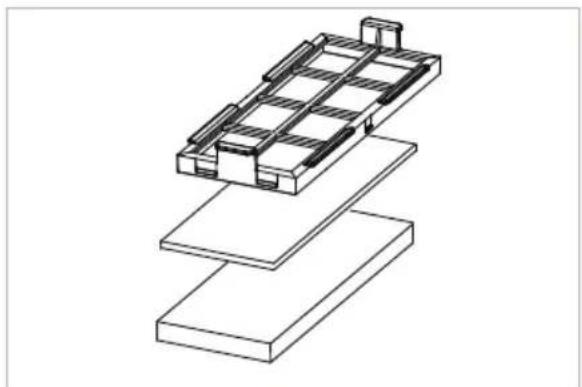
natural_image
Isometric line drawing of a layered electronic component or circuit board structure (no text or symbols)It is recommended that you change Bob's filters about once every 6 months.
Main Brush
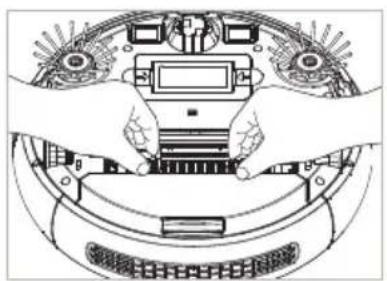
It is recommended that you remove and clean Bob's main brush weekly.
To do so:

Open the brush cage and remove the main brush.

Use the cleaning tool to remove debris from the brush ends as well as the brush compartment.

Cut away any hair or thread wrapped around the brush, and remove any congestion from the notches where the brush is held.
natural_image
Top-down diagram of hands operating a car with electronic components and a digital display (no text or symbols visible)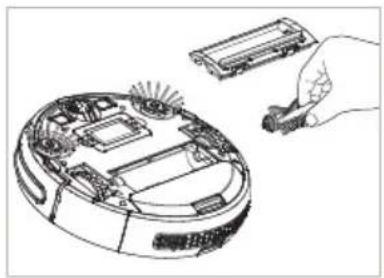
natural_image
Line drawing of a robotic vacuum cleaner with internal components and a hand holding a small device (no text or symbols)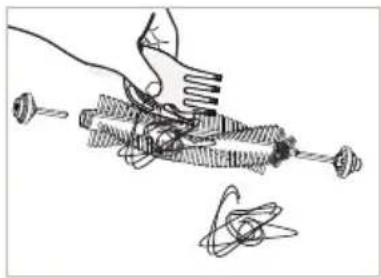
natural_image
Hand holding a tool with multiple screw-like components and a separate abstract diagram (no text or symbols)Side Brush
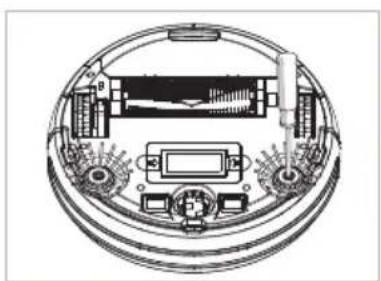
It is recommended that you remove and clean Bob's side brushes on a weekly basis.
To do so:

Remove the side brush using a Phillips head screwdriver.

Use the cleaning tool to brush off hair tangled around the side brush and in the socket where the side brush is held.

Replace the side brush and re-tighten the screw.
natural_image
Technical diagram of a circular electronic device with internal components and connectors (no text or symbols)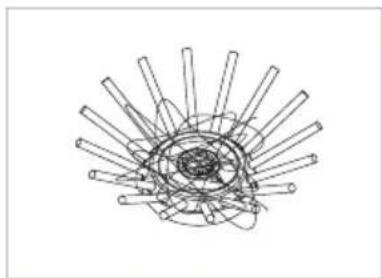
natural_image
Abstract line drawing of intersecting rods radiating from a central point (no text or symbols)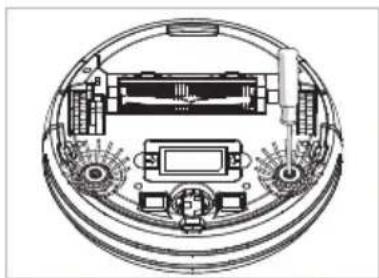
natural_image
Technical line drawing of a circular mechanical or electronic component with internal components and no visible text or symbolsBattery
To install Bob's battery:

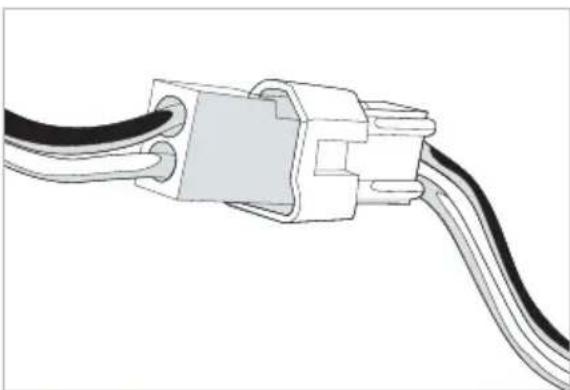
Remove the battery cover on Bob's underside. Plug in the battery at the circuit junction.

Tuck the wire into the side of the battery compartment and slide the battery inside Bob. Lastly, replace the battery cover.
natural_image
Diagram of a connector with two black wires and a central plastic housing (no text or symbols)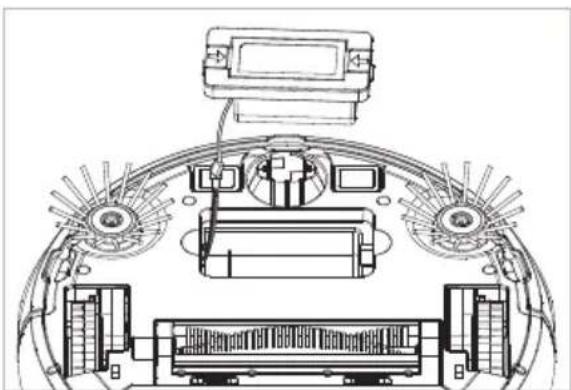
natural_image
Technical line drawing of a mechanical assembly with no visible text or symbolsStoring Bob
If you are not using Bob for an extended period of time, unplug his charging station, remove his battery, and store everything in a dry place at room temperature.
Do not leave Bob in direct sunlight.
Sensors
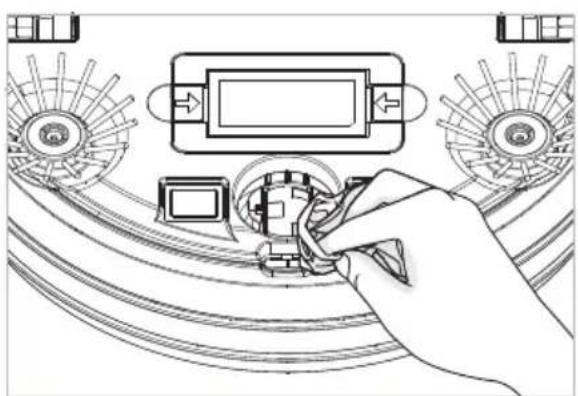
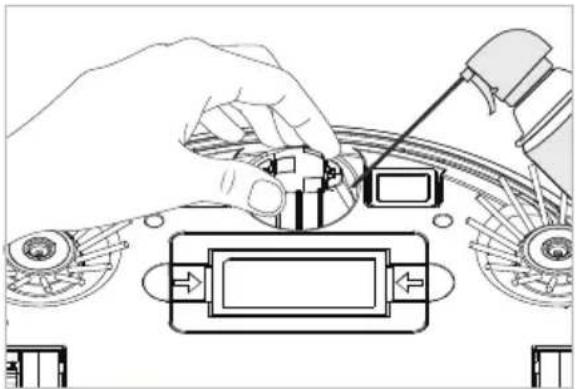
Dirt and dust on Bob's wall and edge sensors can reduce his performance. Bob's wall sensors are located along his bumper, and his edge sensors are located on his underside. Regularly cleaning these sensors ensures that Bob keeps working at his best.
To clean the sensors:

Wipe the 3 edge sensors on Bob's underside using a soft cloth slightly dampened with cold water or alcohol.

Use a clean, damp cloth to wipe away any debris from the strip on Bob's bumper. And, gently tap on the bumper and use compressed air to clear it of debris.
natural_image
Hand inserting a component into a device with fan-like components (no text or symbols visible)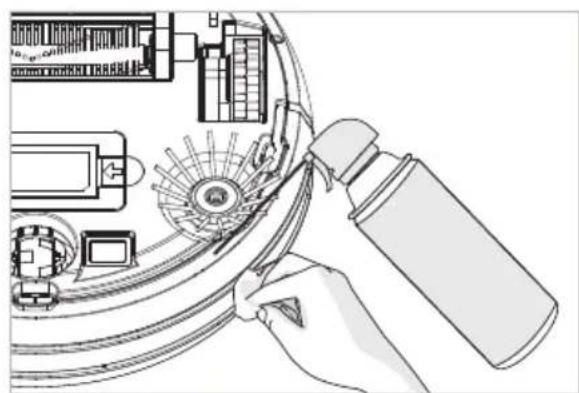
natural_image
Illustration of a hand using a spray can to clean or adjust mechanical components (no text or symbols visible)Wheels
To clean the wheels:

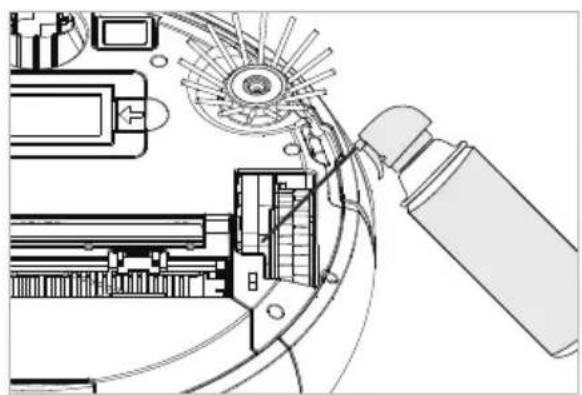
Use the cleaning tool or compressed air to remove any dust or debris inside or around the right and left wheels.
natural_image
Technical line drawing of a mechanical assembly with gears and components (no text or symbols)
Gently grip Bob's front wheel with your hand. Pull it up. Use a screwdriver for leverage if needed. Remove and clean the smaller wheel on Bob's front wheel. Ensure the wheel spins freely when holding the ends of its metal bar.
natural_image
Diagram of a hand operating a mechanical device with adjustment knobs and control buttons (no text or symbols)
bubble
| Category | Value | | -------- | ----- | | Green | 100 | | Pink | 80 | | Purple | 60 | | Yellow | 40 | | Brown | 20 | | Teal | 15 | | Beige | 10 | | Grey | 5 | | Pink | 30 | | Purple | 25 | | Yellow | 15 | | Brown | 10 | | Teal | 5 | | Beige | 3 | | Grey | 2 | | Pink | 1 | | Purple | 0.5 | | Yellow | 0.3 | | Brown | 0.2 | | Teal | 0.1 | | Beige | 0.05 | | Grey | 0.03 | | Pink | 0.02 | | Purple | 0.01 | | Yellow | 0.005 | | Brown | 0.003 | | Teal | 0.002 | | Beige | 0.001 | | Grey | 0.0005| | Pink | 0.0003| | Purple | 0.0002| | Yellow | 0.0001| | Brown | 0.00005| | Teal | 0.00003| | Beige | 0.00002| | Grey | 0.00001| | Pink | 0.000005| | Purple | 0.000003| | Yellow | 0.000002| | Brown | 0.000001| | Teal | 0.0000005| | Beige | 0.0000003| | Grey | 0.0000002| | Pink | 0.0000001| | Purple | 0.00000005| | Yellow | 0.00000003| | Brown | 0.00000002| | Teal | 0.00000001| | Beige | 0.000000005| | Grey | 0.000000003| | Pink | 0.000000002| | Purple | 0.000000001| | Yellow | 0.000000001| | Brown | 0.000000001| | Teal | 0.000000001| | Beige | 0.000000001| | Grey | 0.000000001| | Pink | 0.00000001| | Purple | 1.5 | | Yellow | 1.2 | | Brown | 1.1 | | Teal | 1.3 | | Beige | 1.4 | | Grey | 1.6 | | Pink | 1.7 | | Purple | 2.1 | | Yellow | 2.3 | | Brown | 2.4 | | Teal | 2.5 | | Beige | 2.6 | | Grey | 2.7 | | Pink | 2.8 | | Purple | 3.2 | | Yellow | 3.4 | | Brown | 3.5 | | Teal | 3.6 | | Beige | 3.7 | | Grey | 3.8 | | Pink | 3.9 | | Purple | 4.2 | | Yellow | 4.4 | | Brown | 4.5 | | Teal | 4.6 | | Beige | 4.7 | | Grey | 4.8 | | Pink | 4.9 | | Purple | 5.2 | | Yellow | 5.4 | | Brown | 5.5 | | Teal | 5.6 | | Beige | 5.7 | | Grey | 5.8 | | Pink | 5.9 | | Purple | 6.2 | | Yellow | 6.4 | | Brown | 6.5 | | Teal | 6.6 | | Beige | 6.7 | | Grey | 6.8 | | Pink | 6.9 | | Purple | 7.2 | | Yellow | 7.4 | | Brown | 7.5 | | Teal | 7.6 | | Beige | 7.7 | | Grey | 7.8 | | Pink | 7.9 | | Purple | 8.2 | | Yellow | 8.4 | | Brown | 8.5 | | Teal | 8.6 | | Beige | 8.7 | | Grey | 8.8 | | Pink | 8.9 | | Purple | 9.2 | | Yellow | 9.4 | | Brown | 9.5 | | Teal | 9.6 | | Beige | 9.7 | | Grey | 9.8 | | Pink | 9.9 | | Purple | 11.2 | | Yellow | 11.4 | | Brown | 11.5 | | Teal | 11.6 | | Beige | 11.7 | | Grey | 11.8 | | Pink | 11.9 | | Purple | 12.2 | | Yellow | 12.4 | | Brown | 12.5 | | Teal | 12.6 | | Beige | 12.7 | | Grey | 12.8 | | Pink | 12.9 | | Purple | 13.2 | | Yellow | 13.4 | | Brown | 13.5 | | Teal | 13.6 | | Beige | 13.7 | | Grey | 13.8 | | Pink | 13.9 | | Purple | 14.2 | | Yellow | 14.4 | | Brown | 14.5 | | Teal | 14.6 | | Beige | 14.7Troubleshooting



bubble
| Color | X | Y | Size | |--------|----|----|------| | Pink | 1 | 3 | 1 | | Green | 2 | 4 | 1 | | Yellow | 3 | 5 | 1 | | Purple | 4 | 2 | 1 | | Pink | 5 | 3 | 1 | | Green | 6 | 4 | 1 | | Yellow | 7 | 5 | 1 | | Purple | 8 | 2 | 1 | | Pink | 9 | 3 | 1 | | Green | 10 | 4 | 1 | | Yellow | 11 | 5 | 1 | | Purple | 12 | 2 | 1 | | Pink | 13 | 3 | 1 | | Green | 14 | 4 | 1 | | Yellow | 15 | 5 | 1 | | Purple | 16 | 2 | 1 | | Pink | 17 | 3 | 1 | | Green | 18 | 4 | 1 | | Yellow | 19 | 5 | 1 | | Purple | 20 | 2 | 1 | | Pink | 21 | 3 | 1 | | Green | 22 | 4 | 1 | | Yellow | 23 | 5 | 1 | | Purple | 24 | 2 | 1 | | Pink | 25 | 3 | 1 | | Green | 26 | 4 | 1 | | Yellow | 27 | 5 | 1 | | Purple | 28 | 2 | 1 | | Pink | 29 | 3 | 1 | | Green | 30 | 4 | 1 | | Yellow | 31 | 5 | 1 | | Purple | 32 | 2 | 1 | | Pink | 33 | 3 | 1 | | Green | 34 | 4 | 1 | | Yellow | 35 | 5 | 1 | | Purple | 36 | 2 | 1 | | Pink | 37 | 3 | 1 | | Green | 38 | 4 | 1 | | Yellow | 39 | 5 | 1 | | Purple | 40 | 2 | 1 | | Pink | 41 | 3 | 1 | | Green | 42 | 4 | 1 | | Yellow | 43 | 5 | 1 | | Purple | 44 | 2 | 1 | | Pink | 45 | 3 | 1 | | Green | 46 | 4 | 1 | | Yellow | 47 | 5 | 1 | | Purple | 48 | 2 | 1 | | Pink | 49 | 3 | 1 | | Green | 50 | 4 | 1 | | Yellow | 51 | 5 | | | Purple | (X) | (Y) | | The size of the bubbles in the chart is determined by the color values (e.g., 'Pink' for X, 'Green' for Y). The color values are used to determine the color position of each bubble in the scatter plot.Troubleshooting
When Bob encounters an issue, he communicates it through a combination of beeps and red light flashes.
If Bob's problem persists after attempting the suggested solutions, please contact our customer care center at 1-888-549-8847 or support@bobsweep.com. Our business hours are Monday – Friday 9 am – 5 pm, PST.
2 Red Light Flashes : Left Wheel
If Bob stops working, beeps once, and flashes a red light twice, then his left wheel may be congested.
What to do:
- Use the cleaning tool or compressed air to remove any dust or debris that may be jamming the left wheel.
3 Red Light Flashes : Right Wheel
If Bob stops working, beeps once, and flashes a red light three times, then his right wheel may be congested.
What to do:
- Use the cleaning tool or compressed air to remove any dust or debris that may be jamming the right wheel.
4 Red Light Flashes : Wheel Sensors
If Bob stops working, beeps once, and flashes a red light four times, then his wheel sensors may be off the floor.
What to do:
- Make sure Bob's wheels are not suspended in the air and can reach the floor evenly.
5 Red Light Flashes : Front Wheel
If Bob stops working, beeps once, and flashes a red light five times, then his front wheel may be congested.
What to do:
- Gently grip Bob's front wheel with your hand. Pull it up. Use a screwdriver for leverage if needed.
- Remove and clean the smaller wheel on Bob's front wheel. Ensure the wheel spins freely when holding the ends of its metal bar.
- Open the front wheel to clean its inner parts.
6 Red Light Flashes : Edge Sensors
If Bob stops working, beeps once, and flashes a red light six times, then his edge sensors may be dirty.
What to do:
- Bob's oval-shaped edge sensors are located on his underside, near his bumper. Clean the sensors using compressed air or a clean cloth lightly dampened with water or alcohol, as needed.
- Cover Bob's edge sensors if he is cleaning a dark carpet.
7 Red Light Flashes : Low Battery
If Bob stops working, beeps once, and flashes a red light seven times, then his battery power is below 2%.
What to do:
- Place Bob on his charging station and allow him to charge overnight.
8 Red Light Flashes : Touch Sensors
If Bob stops working, beeps once, and flashes a red light eight times, then his bumper may be congested.
What to do:
- Gently tap on Bob's bumper to clear out any obstructions.
- Use compressed air to clear out dust and debris trapped inside the bumper.
- Press on both ends of the bumper until you hear a tiny "click." If the bumper is not clicking on its ends, the touch sensors may need to be replaced.
9 Red Light Flashes: Main Brush
If Bob stops working, beeps once, and flashes a red light nine times, then his main brush may be congested.
What to do:
- Open the brush cage and remove the main brush. Clean both parts from end to end.
- You may use a pair of scissors to cut hair or thread wrapped around the brush, or a pair of tweezers to remove congestion from the notches where the brush is held.
Bob's main brush is not designed to clean shag carpet or rugs with long fringes. If you would like Bob to clean these types of surfaces, you may remove his main brush and allow him to vacuum without it. However, he will not clean as effectively.
10 Red Light Flashes : Side Brush
If Bob stops working, beeps once, and flashes a red light ten times, then one or both of his side brushes may be congested.
What to do:
- Remove both side brushes, and clean them and inside the side brush holders on Bob thoroughly from end to end.
- You may use a pair of scissors to cut hair or thread wrapped around Bob's side brush, or a pair of tweezers to remove congestion from the notches where the brushes are held.
11 Red Light Flashes : Wall Sensors
If Bob stops working, beeps once, and flashes a red light eleven times, then his wall sensors may be dirty.
What to do:
- Bob's wall sensors are located on his bumper. Clean the sensors using a clean, dry cloth and clean underneath the bumper using compressed air.
12 Red Light Flashes: Vacuum Motor
If Bob stops working, beeps once, and flashes a red light twelve times, then his vacuum motor is having an issue
What to do:
- Open Bob's dustbin and inspect the vacuum motor's blades. Clean using compressed air if congested.
14 Red Light Flashes : Power System
If Bob stops working, beeps once, and flashes a red light fourteen times, then his power system is having an issue.
What to do:
• Make sure Bob is turned off. Then, remove the battery cover and unplug the battery. Wait 30 seconds, then reinstall the battery.
- Inspect the charging adapter. Plug the charging adapter into the wall and make sure its green light turns on. Let Bob charge overnight.
If after attempting these solutions Bob still beeps and flashes red, he may need a replacement part. Contact support@bobsweep.com for further assistance. Or, call us toll-free at 1-888-549-8847. Our hours are Monday – Friday 9 am – 5 pm, PST.
Warranty Information
Every bObsweep Pro purchased from an authorized seller includes a 1-year limited warranty, 5 years of subsidized visits to the bObsweep hospital, and a lifetime of customer support. The warranty covers the battery and all labor and parts, except consumables like brushes and filters. Postal charges are not covered by the warranty.
Even after Bob's 1-year warranty is over, replacement parts and visits to the bObsweep hospital are subsidized between 25% - 50% for 5 years from the date he was first purchased.
To purchase additional coverage plans and to activate Bob's warranty, go to www.bobsweep.com. Keep your original receipt so you can register Bob with all his relevant information.
Bob's Cleaning Behavior
Bob's cleaning pattern may look quite different from the way a human would clean: he may spiral outward, follow along walls, or zigzag across a small area. Sometimes he may seem to be ignoring some spaces or spending too much time on others — but don't worry! Rest assured, Bob will efficiently clean your home within the course of a full cycle — just check his dustbin for the evidence!
It is best to let Bob work in his own way, even if his movements appear odd. Moving him around, manipulating his movements, or picking him up may confuse him and disrupt his cycle.
If you wish to control Bob's movements manually, you may use the navigational buttons on his remote.
Bob's Challenges
Unique Furniture
Bob is designed to maneuver around furniture of most shapes and sizes, but certain configurations may confuse him temporarily. Bob may sometimes find it difficult to clean under chairs with narrow legs, or furniture that is too low for his bumper sensors to detect. Specialty furniture, such as desk chairs with wheels or stools with circular bases, may also confuse him for a moment — but don't worry, Bob usually finds his way around with time.
Dark Carpet
Bob uses infrared light to detect edges and stairs; because dark-colored carpet absorbs most light, it may seem like empty space to Bob's sensors. Cover Bob's sensors if he is stopping while cleaning dark carpet.
Shag Carpet
Bob's main brush is not designed to clean shag carpet or rugs with long fringes. If you would like Bob to clean these types of surfaces, you may remove his main brush and allow him to vacuum without it. However, he will not clean as effectively.
Inclines
Sometimes Bob will attempt to drive up angled surfaces, get stuck for a few minutes, and then decide to clean somewhere else. This is because Bob wants to cover every spot in your home, and will try his hardest to overcome any obstacle!
As long as Bob does not stop cleaning, let him find his own way around. Take note of the areas Bob finds the most challenging, and if possible spread or adjust some of your furniture accordingly.

bubble
| Category | Color 1 | Color 2 | Color 3 | Color 4 | Color 5 | | -------- | ------- | ------- | ------- | ------- | ------- | | Top | Green | Purple | Green | Green | Green | | Top | Pink | Yellow | Yellow | Purple | Purple | | Top | Dark Red| Yellow | Yellow | Purple | Purple | | Bottom | Teal | Green | Green | Green | Green | | Bottom | Magenta | Pink | Pink | Green | Green | | Bottom | Olive | Yellow | Olive | Purple | Purple | | Bottom | Gold | Yellow | Yellow | Purple | Yellow | | Bottom | Pink | Pink | Pink | Green | Green | | Bottom | Brown | Yellow | Yellow | Purple | Purple | | Bottom | Grey | Yellow | Yellow | Green | Green | | Bottom | Grey | Pink | Pink | Green | Green | | Bottom | Grey | Pink | Pink | Green | Green | | Bottom | Grey | Pink | Pink | Green | Green | | Bottom | Grey | Pink | Pink | Green | Green | | Bottom | Grey | Pink | Pink | Green | Green | | Bottom | Grey | Pink | Pink | Green | Black | | Bottom | Grey | Pink | Pink | Green | Green | | Bottom | Grey | Pink | Pink | Green | Green | | Bottom | Grey | Pink | Pink | Green | Green | | Bottom | Grey | Pink | Pink | Green | Green | | Bottom | Grey | Pink | Pink | Green | Green | | Bottom | Grey | Pink | Pink | Green | Green | | Bottom | Grey | Pink | Pink | Green | Green | | Bottom | Grey | Pink | Pink | Green | Green | | Bottom | Grey | Pink | Pink | Green | Green | | Bottom | Grey | Pink | Pink | Green | Green | | Bottom | Grey | Black | Yellow | Yellow | Yellow | | Bottom | Grey | Grey | Grey | Grey | Grey | | Bottom | Grey | Grey | Grey | Grey | Grey | | Bottom | Grey | Grey | Grey | Grey | Grey | | Bottom | Grey | Grey | Grey | Grey | Grey | | Bottom | Grey | Grey | Grey | Grey | Grey | | Bottom | Grey | Grey | Grey | Grey | Grey | | Bottom - Top-12%: Grey-12%: Grey-12%: Grey-12%: Grey-12%: Grey-12%: Grey-12%: Grey-12%: Grey-12%: Grey-12%: Grey-12%: Grey-12%: Grey-12%: Grey-12%: Grey-12%: Grey-12%: Grey-12%: Grey-12%; Grey-12%: Grey-12%: Grey-12%: Grey-12%: Grey-12%: Grey-12%: Grey-12%: Grey-12%: Grey-12%: Grey-12%: Grey-12%; Grey-12%: Grey-12%; Grey-12%: Grey-12%; Grey-12%: Grey-12%; Grey-12%: Grey-12%; Grey-12%: Grey-12%; Grey-12%: Grey-12%; Grey-12%: Grey-12%; Grey-12%: Grey-12%; Grey-12%: Grey-12%; ...
bubble
| Category | Value | | -------- | ----- | | Green | 10 | | Pink | 20 | | Yellow | 30 | | Purple | 40 | | Brown | 50 | | Teal | 60 | | Beige | 70 | | Grey | 80 | | Pink | 90 | | Purple | 100 | | Brown | 110 | | Teal | 120 | | Beige | 130 | | Grey | 140 | | Pink | 150 | | Purple | 160 | | Brown | 170 | | Teal | 180 | | Beige | 190 | | Grey | 200 | | Pink | 210 | | Purple | 220 | | Brown | 230 | | Teal | 240 | | Beige | 250 | | Grey | 260 | | Pink | 270 | | Purple | 280 | | Brown | 290 | | Teal | 300 | | Beige | 310 | | Grey | 320 | | Pink | 330 | | Purple | 340 | | Brown | 350 | | Teal | 360 | | Beige | 370 | | Grey | 380 | | Pink | 390 | | Purple | 400 | | Brown | 410 | | Teal | 420 | | Beige | 430 | | Grey | 440 | | Pink | 450 | | Purple | 460 | | Brown | 470 | | Teal | 480 | | Beige | 490 | | Grey | 500 | | Pink | 510 | | Purple | 520 | | Brown | 530 | | Teal | 540 | | Beige | 550 | | Grey | 560 | | Pink | 570 | | Purple | 580 | | Brown | 590 | | Teal | 600 | | Beige | 610 | | Grey | 620 | | Pink | 630 | | Purple | 640 | | Brown | 650 | | Teal | 660 | | Beige | 670 | | Grey | 680 | | Pink | 690 | | Purple | 700 | | Brown | 710 | | Teal | 720 | | Beige | 730 | | Grey | 740 | | Pink | 750 | | Purple | 760 | | Brown | 770 | | Teal | 780 | | Beige | 790 | | Grey | 800 | | Pink | 810 | | Purple | 820 | | Brown | 830 | | Teal | 840 | | Beige | 850 | | Grey | 860 | | Pink | 870 | | Purple | 880 | | Brown | 890 | | Teal | 900 | | Beige | 910 | | Grey | 920 | | Pink | 930 | | Purple | 940 | | Brown | 950 | | Teal | 960 | | Beige | 970 | | Grey | 980 | | Pink | 990 | | Purple | 1000 | | Brown | 1100 | | Teal | 1200 | | Beige | 1300 | | Grey | 1400 | | Pink | 1500 | | Purple | 1600 | | Brown | 1700 | | Teal | 1800 | | Beige | 1900 | | Grey | 2000 | | Pink | 2100 | | Purple | 2200 | | Brown | 2300 | | Teal | 2400 | | Beige | 2500 | | Grey | 2600 | | Pink | 2700 | | Purple | 2800 | | Brown | 2900 | | Teal | 3000 | | Beige | 3100 | | Grey | 3200 | | Pink | 3300 | | Purple | 3400 | | Brown | 3500 | | Teal | 3600 | | Beige | 3700 | | Grey | 3800 | | Pink | 3900 | | Purple | 4000 | | Brown | 4100 | | Teal | 4200 | | Beige | 4300 | | Grey | 4400 | | Pink | 4500 | | Purple | 4600 | | Brown | 4700 | | Teal | 4800 | | Beige | 4900 | | Grey | 5000 | | Pink | 5100 | | Purple | 5200 | | Brown | 5300 | | Teal | 5400 | | Beige | 5500 | | Grey | 5600 | | Pink | 5700 | | Purple | 5800 | | Brown | 5900 | | Teal | 6000 | | Beige | 6100 | | Grey | 6200 | | Pink | 6300 | | Purple | 6400 | | Brown | 6500 | | Teal | 6600 | | Beige | 6700 | | Grey |End User License Agreement

IMPORTANT - READ BEFORE USING. Do not use the robot ("Bobsweep") accompanying this license agreement ("Agreement") until you have carefully read and agreed to the following terms and conditions.
By using the Bobsweep, you agree to the terms of this End User License Agreement ("EULA") and any amendment or addenda accompanying this Agreement. If you do not agree to the terms of this EULA, you may not use the Bobsweep. The Bobsweep contains an electronic and software interface that allows you to control or modify its behavior, and remotely monitor its sensors.
THIS IS A LEGAL AGREEMENT. BY ACCESSING AND USING THE PRODUCT AND PRODUCT SOFTWARE, YOU ARE ACCEPTING AND AGREEING TO THIS EULA ON BEHALF OF YOURSELF OR THE ENTITY YOU REPRESENT IN CONNECTION WITH THE ACCESS. YOU REPRESENT AND WARRANTY THAT YOU HAVE THE RIGHT, AUTHORITY, AND CAPACITY TO ACCEPT AND AGREE TO THIS EULA ON BEHALF OF YOURSELF OR THE ENTITY YOU REPRESENT. YOU REPRESENT THAT YOU ARE OF SUFFICIENT LEGAL AGE IN YOUR JURISDICTION OR RESIDENCE TO USE OR ACCESS THE PRODUCT SOFTWARE AND TO ENTER INTO THIS EULA. IF YOU DO NOT AGREE WITH ANY OF THE PROVISIONS OF THESE TERMS, YOU SHOULD CEASE USING THE PRODUCT AND PRODUCT SOFTWARE. Terms and Conditions
LICENSE: Subject to all of the terms of this Agreement, Bobsweep Inc. ("Bobsweep") grants to you one (1) revocable, royalty-free, personal, non-exclusive, nontransferable, non-assignable, non-commercial intellectual property license to use the Bobsweep software contained on the Bobsweep, including the protocol for communicating with the Bobsweep software contained on the Bobsweep ("Bobsweep Software"), to use the Bobsweep.
NONCOMMERCIAL LICENSE: You may use the Bobsweep Software and the Bobsweep only for personal, noncommercial, educational, and research purposes. The Bobsweep Software and the Bobsweep may not be used for any other purpose, whether "for prot" or "not for prot." Any work performed or produced using the Bobsweep, including Your Software, cannot be performed or produced for the benefit of other parties for a fee, compensation, or any other reimbursement or remuneration. A separate license is required for each additional use and/or individual user in all other cases. If you are an entity, Bobsweep grants you the right to designate one individual within your organization to have the sole right to use the Bobsweep Software and the Bobsweep in the manner provided above. RESTRICTIONS: You agree not to: (i) use or copy the Bobsweep Software or the Bobsweep except as provided in this Agreement; (ii) rent or lease the Bobsweep Software or the Bobsweep to any third party; (iii) assign this Agreement or transfer the Bobsweep Software or the Bobsweep except as provided in this Agreement; (iv) modify, adapt, or translate the Bobsweep Software or the Bobsweep in whole or in part except as expressly provided in this Agreement; (v) reverse engineer, reverse compile, or disassemble the Bobsweep Software or the Bobsweep; or (vi) distribute, sublicense or transfer the source code form of Your Software and derivatives thereof to any third party except as provided in this Agreement. YOUR SOFTWARE: Use and distribution of any software that you create for your Bobsweep ("Your Software") is also subject to the following limitations: You (i) shall be solely responsible for any update or support obligation or other liability which may arise from your use or distribution, (ii) shall not make any statement that Your Software is "certied," or that its performance is guaranteed, by Bobsweep, (iii) shall not use Bobsweep's name or trademarks, (iv) shall prohibit disassembly and reverse engineering of the Bobsweep Software and the Bobsweep, (v) shall not publish reviews of Bobsweep products designated as beta without written permission from Bobsweep, and (vi) shall indemnify, hold harmless, and defend Bobsweep and its suppliers from and against any claims or lawsuits, including attorney's fees, that arise or result from Your Software, including your use and your distribution. TITLE: Title to the Bobsweep Software remains with Bobsweep or its suppliers. The Bobsweep Software is licensed, not sold. Except as expressly provided herein, Bobsweep does not grant any express or implied right to you under Bobsweep patents, copyrights, trademarks, or trade secret information. You will not remove any copyright or patent notice from the Bobsweep Software or the Bobsweep. ONE-TIME TRANSFER: The initial user of the Bobsweep Software and the Bobsweep may make a one-time permanent transfer of this Agreement, the Bobsweep Software, and the Bobsweep to another end user, provided that the initial user retains no copies of the Bobsweep Software and the Bobsweep. This transfer must include the Bobsweep Software, the Bobsweep, and all of the materials accompanying the Bobsweep (including all component parts and printed materials, any upgrades, and this End User License Agreement document). The transfer may not be an indirect transfer, such as a consignment. Prior to the transfer, the end user receiving the Bobsweep Software and the Bobsweep must agree to all the terms of this Agreement. NO WARRANTY AND LIMITED REPLACEMENT: EXCEPT AS STATED IN THE LIMITED WARRANTY TO THE ORIGINAL PURCHASER, THE BOBSWEEP SOFTWARE AND THE BOBSWEEP ARE PROVIDED "AS IS" WITH NO WARRANTIES, EXPRESS OR IMPLIED, INCLUDING BUT NOT LIMITED TO ANY IMPLIED WARRANTY OF MERCHANTABILITY, FITNESS FOR A PARTICULAR PURPOSE, NON-INFRINGEMENT OF INTELLECTUAL PROPERTY RIGHTS, OR ANY WARRANTY OTHERWISE ARISING OUT OF ANY PROPOSAL, SPECIFICATION, OR SAMPLE, NO ORAL OR WRITTEN INFORMATION OR ADVICE GIVEN BY BOBSWEEP OR ITS AGENTS SHALL CREATE A WARRANTY. If the Bobsweep Software or the Bobsweep is found to be defective in material or workmanship under normal use for a period of one (1) year from the date of receipt, Bobsweep's entire liability and your exclusive remedy shall be the replacement of the Bobsweep Software or the Bobsweep. This offer is void if the defect results from accident, abuse, misapplication, or software that you developed for your Bobsweep. Any updates or supplements to the Bobsweep Software or the Bobsweep provided to you after the expiration of the one (1) year period are not covered by any
warranty or condition, express, implied or statutory. SOME JURISDICTIONS DO NOT ALLOW THE EXCLUSION OF IMPLIED WARRANTIES, SO THE ABOVE EXCLUSION MAY NOT APPLY TO YOU. LIMITATION OF LIABILITY: THE ABOVE REPLACEMENT PROVISION IS THE ONLY WARRANTY OF ANY KIND. BOBSWEEP OFFERS NO OTHER WARRANTY EITHER EXPRESS OR IMPLIED INCLUDING THOSE OF MERCHANTABILITY, NON INFRINGEMENT OF THIRD- PARTY INTELLECTUAL PROPERTY OR FITNESS FOR A PARTICULAR PURPOSE. NEITHER BOBSWEEP NOR ITS SUPPLIERS SHALL BE LIABLE FOR ANY DAMAGES WHATSOEVER (INCLUDING, WITHOUT LIMITATION, VICARIOUS LIABILITY, CONSEQUENTIAL DAMAGES, INCIDENTAL DAMAGES, DAMAGES FOR LOSS OF BUSINESS PROFITS, BUSINESS INTERRUPTION, LOSS OF BUSINESS INFORMATION, OR OTHER LOSS) ARISING OUT OF THE USE OF OR INABILITY TO USE THE BOBSWEEP SOFTWARE, THE BOBSWEEP, OR SOFTWARE THAT YOU DEVELOPED FOR YOUR BOBSWEEP, EVEN IF BOBSWEEP HAS BEEN ADVISED OF THE POSSIBILITY OF SUCH DAMAGES. BECAUSE SOME JURISDICTIONS PROHIBIT THE EXCLUSION OR LIMITATION OF LIABILITY FOR CONSEQUENTIAL OR INCIDENTAL DAMAGES, THE ABOVE LIMITATION MAY NOT APPLY TO YOU UNAUTHORIZED USE: THE BOBSWEEP SOFTWARE AND THE BOBSWEEP ARE NOT DESIGNED, INTENDED, OR AUTHORIZED FOR USE IN ANY AERONAUTICAL, NUCLEAR, MEDICAL, LIFE SAVING OR LIFE SUSTAINING SYSTEMS, OR FOR ANY OTHER APPLICATION IN WHICH THE USE OF THE BOBSWEEP SOFTWARE OR THE BOBSWEEP COULD CREATE A SITUATION WHERE PERSONAL INJURY OR DEATH MAY OCCUR. Should you use the Bobsweep Software or Bobsweep for any such unintended or unauthorized use, you shall indemnify and hold harmless Bobsweep and its ocers, subsidiaries and aliases against all claims, costs, damages, and expenses, and reasonable attorney fees arising out of, directly or indirectly, any claim of product liability, personal injury or death associated with such unintended or unauthorized use, even if such claim alleges that Bobsweep was negligent regarding the design or manufacture of the Bobsweep Software, the Bobsweep, or any part or portion thereof.
USER SUBMISSIONS: You agree that any material, information or other communication, including all data, images, sounds, text, and other things embodied therein, that you transmit or post to a Bobsweep website or provide to Bobsweep ("Communications") will be considered non-condential. Bobsweep will have no confidentiality obligations with respect to the Communications. You agree that Bobsweep and its designees will be free to copy, modify, create derivative works, publicly display, disclose, distribute, license and sublicense through multiple tiers of distribution and licensees, incorporate and otherwise use the Communications, including derivative works thereof, for any and all commercial or non-commercial purposes without the payment of any royalty to you, and that such license will survive the termination of this Agreement.
TERMINATION: This Agreement becomes effective on the date you accept this Agreement and will continue until terminated as provided for in this Agreement. You may terminate this Agreement voluntarily at any time. Bobsweep may terminate this Agreement at any time if you are in breach of any of its terms and conditions, and may refuse to license the Bobsweep Software or the Bobsweep to you after termination. Upon termination by either party, you will immediately return to Bobsweep or destroy the Bobsweep Software and the Bobsweep and all your copies thereof. Articles 5 and 7 through 17 of this Agreement shall survive such termination. U.S. GOVERNMENT RESTRICTED RIGHTS: The Bobsweep Software and the Bobsweep are provided with "RESTRICTED RIGHTS." Use, duplication or disclosure by the Government is subject to restrictions set forth in FAR52.227-14 and DFAR252.227-7013 et seq. or its successor. Use of the Bobsweep Software or the Bobsweep by the Government constitutes acknowledgment of Bobsweep's rights in them.
NO EXPORT: You may not export the Bobsweep Software or the Bobsweep in violation of applicable export laws.
INTERPRETATION ION: The provisions of this Agreement are severable. If any provision of this Agreement is held to be unenforceable, such provision shall be reformed only to the extent necessary to make it enforceable. Any law or regulation which provides that the language of a contract shall be construed against the drafter shall not apply to this Agreement.
INTEGRATION: This Agreement represents the complete agreement concerning the subject matter hereof, and any and all understandings, conversations and communications, proposals, and counterproposals, oral and written (including any draft of this Agreement) are merged into and superseded by this Agreement and shall be of no force or effect, except as expressly provided herein. No such understandings, conversations, communications, proposals, counterproposals or drafts shall be referred to in any proceeding concerning this Agreement. Further, no understanding contained in this Agreement shall be modified, altered or amended, except by a writing signed by the party against whom enforcement is sought.
ARBITRATION: All disputes relating to this Agreement (excepting any dispute relating to intellectual property rights) shall be subject to nal and binding arbitration, with the losing party paying all costs of arbitration. Any arbitration relating to this Agreement shall be held in California, under the auspices of an arbiter selected by Bobsweep. Any litigation relating to this Agreement shall be subject to exclusive venue and jurisdiction in the federal and state courts of California, with the losing party responsible for costs, including without limitation, court costs and reasonable attorneys fees and expenses.
APPLICABLE LAWS: Any claim arising under or relating to this Agreement shall be governed by the internal substantive laws of the Commonwealth of California, without regard to its principles of conict of laws. The application of the United Nations Convention on Contracts for the International Sale of Goods is expressly excluded.