ATW-DA2218 - Wireless Microphone Audio-Technica - Free user manual and instructions
Find the device manual for free ATW-DA2218 Audio-Technica in PDF.


User questions about ATW-DA2218 Audio-Technica
0 question about this device. Answer the ones you know or ask your own.
Ask a new question about this device
Download the instructions for your Wireless Microphone in PDF format for free! Find your manual ATW-DA2218 - Audio-Technica and take your electronic device back in hand. On this page are published all the documents necessary for the use of your device. ATW-DA2218 by Audio-Technica.
USER MANUAL ATW-DA2218 Audio-Technica
Part names and functions
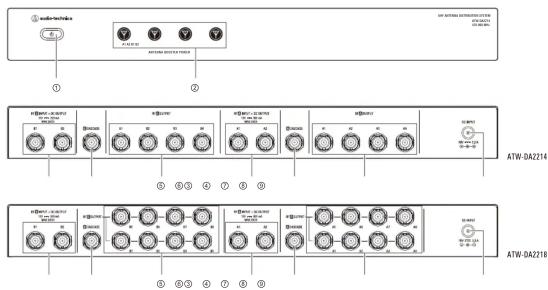
① Power button
Press to turn the power ON/OFF.
An indicator lights up when the power is ON.
② Antenna power switch with indicator
By turning the antenna power switch ON.
12V DC can be supplied to the antenna input jacks while the switch lights up.
③ Antenna B input jack
These are two antenna combination jacks for Channel B 12V DC can be supplied from the antenna jacks.
④ Antenna B cascade output jack
This is a Channel B cascade output jack. The signal with insertion loss compensation it can be supplied to the antenna input jack of another ATW-DA2214 or ATW-DA2218.
⑤ Antenna B output jack
These are four distribution output jacks of ATW-DA2214 or eight distribution output jacks of ATW-DA2218 for Channel B.
⑥ Antenna A input jack
These are two antenna combination jacks for Channel A. 12V DC can be supplied from the antenna jacks.
⑦ Antenna A cascade output jack
This is a Channel A cascade output jack.
The signal with insertion loss compensation it can be supplied to the antenna input jack of another ATW-DA2214 or ATW-DA2218.
⑧ Antenna A output jack
These are four distribution output jacks of ATW-DA2214 or eight distribution output jacks of ATW-DA2218 for Channel A.
⑨ Power input jack
Input jack for the AC adapter
Specifications
| Frequency range 470 to 990 MHz | |
| Input/output | ATW-DA2214 : 2 × 2 combination input, 2 × 4 distribution output, 2 × 1 cascade outputATW-DA2218 : 2 × 2 combination input, 2 × 8 distribution output, 2 × 1 cascade output |
| Input/output jack BNC | |
| OIP3 | +23dBm (Δf = 10MHz) |
| RF output gain | +1.0 dB ± 2.0 dB |
| Input/output gain | +1.0 dB ± 2.0 dB |
| Antenna input power supply | 12 V DC, maximum 300 mA × 4 |
| Power supply | 100 to 240 V AC (50/60 Hz) to 18V DC 3.3 A (center positive) switched mode external power supply |
| Operating temperature range | -5°C to 45°C (23°F to 113°F) |
| Dimensions | 402 mm (15.83")×44.5 mm (1.75")×232 mm (9.13") (Wx+HxD) (excluding protrusions) |
| Weight | ATW-DA2214 : 3.5 kg (7.7 lbs) / ATW-DA2218 : 4.2 kg (9.3 lbs) |
| Accessories | Rack-mount kit (rack-mount × 2, mounting screw × 6), BNC cable × 10(ATW-DA2214) / 18(ATW-DA2218), AC adapter |
For product improvement, the product is subject to modification without notice.
Audio-Technica Corporation
2-46-1 Nishi-naruse, Machida, Tokyo 194-8666, Japan
www.audio-technica.com
©2019 Audio-Technica Corporation
Global Support Contact: www.at-globalsupport.com
MAR-2024 From No. ATGC-0290-24-WM

ATW-DA2214
ATW-DA2218
User Manual
UHF Antenna Distribution System
audio-technica
Introduction
Thank you for purchasing this Audio-Technica product. Before using the product, please read through this user manual when necessary, to ensure that you use the product correctly.
Safety precautions
Although this product was designed to be used safely, failing to use it correctly may result in an accident. To ensure safety, observe all warnings and cautions while using the product.
Important information
Warning:
• To prevent fire or shock hazard, do not expose this apparatus to rain or moisture.
Caution:
- Do not expose this apparatus to drips or splashes
- To avoid electric shock, do not open the cabinet.
• Refer servicing to qualified personnel only. - Do not expose this apparatus to excessive heat such as sunshine, fire or the like.
- Do not subject this apparatus to strong impact.
- This apparatus should be located close enough to the AC outlet so that you can easily grasp the AC adapter at any time.
• In case of emergency, disconnect the AC adapter quickly. - Do not place any objects filled with liquids, such as vases, on this apparatus.
• To prevent fire, do not place any naked flame sources (such as lighted candles) on this apparatus. - Do not install this apparatus in a confined space such as a bookcase or similar unit.
• Install this apparatus only in the place where ventilation is good.
Notes on use
- Be sure to read the connected device's user manual before use.
- Turn off the power of the connected device before connecting or disconnecting cables.
- If you use the product near a TV or radio antenna, you may hear unwanted noise in the television or radio. If this occurs, move the product away from the device.
- The wireless system may be affected by electromagnetic noise from light dimmers, computers, OA devices, or electric musical instruments.
Position the components of the system in a place where they are less likely to be affected. - Only use the product in combination with devices specified by Audio-Technica.
- Indicates that the AC adapter is only suitable for use in areas below 2000m above sea level.
- Indicates that the AC adapter is only suitable for use in nontropical areas
Rack-mounting the product
- Screws for rack-mounting the product are not included.
- Consider ventilation when rack-mounting to avoid heat building up in the rack.
- When installing the product on a rack, make sure that the temperature inside the rack does not reach or exceed 45°C. Higher temperatures may
negatively affect the internal parts of the product, causing the product to malfunction. - Ensure at least a 10-millimeter space between the product and other devices or the top and side faces of the rack.
- Do not place any objects around the rear of this apparatus to ensure proper ventilation of this apparatus.
• The required rack specifications are as follows:
· EIA-standard 19-inch rack
. 1U-size attachable rack
– Rack with a shelf on which the product is placed or a guide rail that supports the product.
Maintenance
- If the product becomes dirty or covered with dust, be sure to turn off the connected device before wiping the product off with a dry and soft cloth.
- Do not use benzine, thinner or electrical contact cleaner, etc. They may deform or otherwise damage the product, or cause operational failure.
- When storing the product for an extended period, wrap the product in plastic to protect it from dust.
Making connections
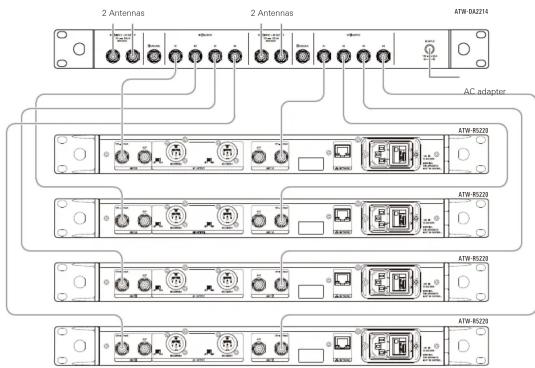
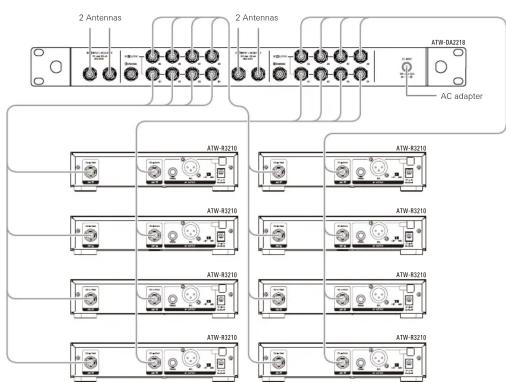
Cautions when connecting
- Make sure to turn off the antenna power supply setting on the connecting wireless receiver. For setup methods, refer to the user manual of the wireless receiver.
- Before connecting an antenna, be absolutely sure to turn off the antenna power switch. When supplying power to an antenna, first connect the antenna and then turn on the antenna power switch.
- Confirm the frequency band of the connecting wireless receiver, antenna and accessories before use.
flowchart
graph TD
    A["ATW-82210"] --> B["AC adapter"]
    C["ATW-R2210"] --> B
    D["ATW-8210"] --> B
    E["ATW-82310"] --> B
    F["ATW-R2310"] --> B
    G["ATW-82210"] --> B
    H["ATW-82210"] --> B
    I["ATW-82310"] --> B
    J["ATW-82310"] --> B
    K["ATW-82310"] --> B
    L["ATW-82310"] --> B
    M["ATW-82310"] --> B
    N["ATW-82310"] --> B
    O["ATW-82310"] --> B
    P["ATW-82310"] --> B
    Q["ATW-82310"] --> B
    R["ATW-82310"] --> B
    S["ATW-82310"] --> B
    T["ATW-82310"] --> B
    U["ATW-82310"] --> B
    V["ATW-82310"] --> B
    W["ATW-82310"] --> B
    X["ATW-82310"] --> B
    Y["ATW-82310"] --> B
    Z["ATW-82310"] --> B
    AA["ATW-82310"] --> B
    AB["ATW-82310"] --> B
    AC["ATW-82310"] --> B
    AD["ATW-82310"] --> B
    AE["ATW-82310"] --> B
    AF["ATW-82310"] --> B
    AG["ATW-82310"] --> B
    AH["ATW-82310"] --> B
    AI["ATW-82310"] --> B
    AJ["ATW-82310"] --> B
    AK["ATW-82310"] --> B
    AL["ATW-82310"] --> B
    AM["ATW-82310"] --> B
    AN["ATW-82310"] --> B
    AO["ATW-82310"] --> B
    AP["ATW-82310"] --> B
    AQ["ATW-82310"] --> B
    AR["ATW-82310"] --> B
    AS["ATW-82310"] --> B
    AT["ATW-82310"] --> B
    AU["ATW-82310"] --> B
    AV["ATW-82310"] --> B
    AW["ATW-82310"] --> B
Brand : Audio-Technica
Model : ATW-DA2218
Category : Wireless Microphone