WV-X4573LM - Security Camera i-PRO - Free user manual and instructions
Find the device manual for free WV-X4573LM i-PRO in PDF.


| Product Type | Network Security Camera |
| Model | WV-X4573LM |
| Brand | i-PRO |
| Resolution | 4K (3840 x 2160) at 30 fps |
| Sensor | 1/2.8-inch progressive CMOS |
| Compression | H.265, H.264, MJPEG |
| Lens | Fixed focal, 2.8mm (horizontal angle 100°) |
| Night Vision | IR LED range up to 30 meters |
| Weatherproof Rating | IP66, IK10 |
| Power Supply | PoE (Power over Ethernet) IEEE 802.3af |
| Power Consumption | 12.95 W max (PoE) |
| Dimensions (W x H x D) | 70 x 60 x 150 mm |
| Weight | Approximately 0.85 kg (without bracket) |
| Operating Temperature | -30 °C to +60 °C |
| Storage Temperature | -40 °C to +70 °C |
| Audio Support | Two-way audio (built-in mic & speaker optional) |
| Alarm Input/Output | 1 input, 1 output terminal |
| Interface | RJ45 for network, microSD slot (up to 256GB) |
| Maintenance | Gently clean lens with dry cloth; avoid solvents |
| Safety | Complies with UL/CE, surge protection built-in |
| Spare Parts | Not user-serviceable; contact i-PRO support |
| Supported Protocols | IPv4, IPv6, TCP, UDP, HTTP, HTTPS, RTSP, SNMP |
| Warranty | 3 years limited warranty |
Frequently Asked Questions - WV-X4573LM i-PRO
User questions about WV-X4573LM i-PRO
0 question about this device. Answer the ones you know or ask your own.
Ask a new question about this device
Download the instructions for your Security Camera in PDF format for free! Find your manual WV-X4573LM - i-PRO and take your electronic device back in hand. On this page are published all the documents necessary for the use of your device. WV-X4573LM by i-PRO.
USER MANUAL WV-X4573LM i-PRO
natural_image
Technical line drawing of a cylindrical mechanical component with three recessed slots and a central cavity (no text or symbols)WV-X4573L
About the user manuals
Product documentation is composed of the following documents.
- Installation Guide (accessory): Provides information about “Precautions”, “Precautions for installation” and the installation method.
- Basic Information (this document): Provides information about “Precautions for use” and “Detail specifications”.
- Operating Instructions (in the following website): Explains how to perform the settings and how to operate this camera. https://i-pro.com/global/en/surveillance/documentation_database
"
- SDXC/ SDHC/ SD memory card is described as SD memory card.
- The external appearance and other parts shown in this manual may differ from the actual product within the scope that will not interfere with normal use due to improvement of the product.
Contents
Limitation of liability....3
Disclaimer of warranty....3
About notations....4
System requirements for a PC 4
Network security 5
Precautions for use 6
Parts and functions 9
Troubleshooting....12
Detail specifications .... 14
Limitation of liability
THIS PUBLICATION IS PROVIDED "AS IS" WITHOUT WARRANTY OF ANY KIND, EITHER EXPRESS OR IMPLIED, INCLUDING BUT NOT LIMITED TO, THE IMPLIED WARRANTIES OF MERCHANTABILITY, FITNESS FOR ANY PARTICULAR PURPOSE, OR NON-INFRINGEMENT OF THE THIRD PARTY'S RIGHT.
THIS PUBLICATION COULD INCLUDE TECHNICAL INACCURACIES OR TYPOGRAPHICAL ERRORS. CHANGES ARE ADDED TO THE INFORMATION HEREIN, AT ANY TIME, FOR THE IMPROVEMENTS OF THIS PUBLICATION AND/OR THE CORRESPONDING PRODUCT (S).
Disclaimer of warranty
IN NO EVENT SHALL i-PRO Co., Ltd. BE LIABLE TO ANY PARTY OR ANY PERSON, EXCEPT FOR REPLACEMENT OR REASONABLE MAINTENANCE OF THE PRODUCT, FOR THE CASES, INCLUDING BUT NOT LIMITED TO BELOW:
(1) ANY LOSS OR DAMAGE, INCLUDING WITHOUT LIMITATION, DIRECT OR INDIRECT, SPECIAL, CONSEQUENTIAL OR EXEMPLARY, ARISING OUT OF OR RELATING TO THE PRODUCT;
(2) ANY INCONVENIENCE, LOSS, OR DAMAGE CAUSED BY INAPPROPRIATE USE OR NEGLIGENT OPERATION OF THE USER;
(3) ALL MALFUNCTIONS OR TROUBLES FROM UNAUTHORIZED DISASSEMBLE, REPAIR OR MODIFICATION OF THE PRODUCT BY THE USER, REGARDLESS OF THE CAUSE OF THE MALFUNCTION OR TROUBLE;
(4) INCONVENIENCE OR ANY LOSS ARISING WHEN IMAGES ARE NOT DISPLAYED, DUE TO ANY REASON OR CAUSE INCLUDING ANY FAILURE OR PROBLEM OF THE PRODUCT;
(5) ANY PROBLEM, CONSEQUENTIAL INCONVENIENCE, OR LOSS OR DAMAGE, ARISING OUT OF THE SYSTEM COMBINED BY THE DEVICES OF THIRD PARTY;
(6) ANY CLAIM OR ACTION FOR DAMAGES BROUGHT BY ANY PERSON OR ORGANIZATION AS A PHOTOGRAPHED SUBJECT DUE TO VIOLATION OF PRIVACY CONCERNING A SURVEILLANCE CAMERA'S PICTURE OR SAVED DATA, FOR SOME REASON (INCLUDING USE WHEN USER AUTHENTICATION ON THE AUTHENTICATION SETTING SCREEN IS SET TO OFF), BECOMING PUBLIC OR BEING USED FOR ANY PURPOSE;
(7) LOSS OF REGISTERED DATA CAUSED BY ANY FAILURE (INCLUDING INITIALIZATION OF THE PRODUCT DUE TO FORGOTTEN AUTHENTICATION INFORMATION SUCH AS A USER NAME AND PASSWORD).
About notations
The following notations are used when describing the functions limited for specified models. The functions without the notations are supported by all models.
X4573L
The functions with this notation are available when using the model WV-X4573L.
X4573LM
The functions with this notation are available when using the model WV-X4573LM.
S4551L
The functions with this notation are available when using the model WV-S4551L.
S4551LM
The functions with this notation are available when using the model WV-S4551LM.
System requirements for a PC
CPU: Intel® Core™ Processor family *1
- Intel
® Core™ i5-6500 or faster
- Intel
® Core™ i7-6700 or faster recommended
Memory: 4 GB (2 GB x 2, Dual Channel) or more recommended.
Network interface: 10BASE-T/100BASE-TX 1 port
Audio interface: Sound card (when using the audio function)
Monitor: Image capture size: 1024 x 768 pixels or more
High-resolution monitoring: 3840 x 2160 pixels or more
Color: 24-bit True color or better
OS: Microsoft Windows 10
Microsoft Windows 8.1
Web browser: Internet Explorer 11 (32-bit)
Microsoft Edge
Firefox
Google Chrome™
Others: Adobe ^® Reader ^® or Acrobat Reader ^®
(It is necessary to view the PDF file.)
*1 In order to view camera images with Internet Explorer, we recommend using the hardware decode function. For details, refer to our support website
IMPORTANT:
- For information on the operation verification of the supported operating systems and web browsers, refer to our support website
. - When using a PC that does not meet the above requirements, displaying of images may become slower or the web browser may become inoperable.
- Audio may not be heard if a sound card is not installed on a PC. Audio may be interrupted depending on the network environment.
- When using Microsoft Windows 8.1, use it in the desktop. The software cannot be used in the Modern UI design.
- When using the 4K monitor, it may be necessary to install an additional video card on the PC in use. For further information, refer to our website (https://i-pro.com/global/en/surveillance/training_support/support/technical_information).
Network security
As you will use this unit connected to a network, your attention is called to the following security risks.
① Leakage or theft of information through this unit
② Use of this unit for illegal operations by persons with malicious intent
③ Interference with or stoppage of this unit by persons with malicious intent
It is your responsibility to take precautions such as those described below to protect yourself against the above network security risks.
- Use this unit in a network secured by a firewall, etc.
- If this unit is connected to a network that includes PCs, make sure that the system is not infected by computer viruses or other malicious entities (using a regularly updated anti-virus program, anti-spyware program, etc.).
- To prevent unauthorized access, use user-authentication, set user names and passwords, and limit which users can log in.
- Apply measures such as user authentication to protect your network against leakage or theft of information, including image data, authentication information (user names and passwords), alarm mail information, FTP server information and DDNS server information.
• After the unit is accessed by the administrator, make sure to close the browser. - Change the administrator password periodically. Additionally, save user authentication information (user names and passwords) in such a way that it is kept out of the hands of third parties.
- Do not install the camera in locations where the camera or the cables can be destroyed or damaged by persons with malicious intent.
Precautions for use
When the product is accessible from the Internet
To prevent unauthorized access, note the following.
- Leave user authentication turned on.
- Periodically change passwords that are used to access the product.
Refer to the Operating Instructions for information about how to change passwords.
To keep on using with stable performance
Do not use this product in hot and humid conditions for a long time. Failure to observe this causes component degradation resulting in life shortening of this product. Do not expose this product to direct heat sources such as a heater.
Usage such as switching the power ON/OFF frequently could lead to failure of the camera.
Handle this product with care.
Do not drop this product, nor apply shock or vibration to the product. Failure to observe this may cause trouble.
Do not subject dome cover to strong impact.
Doing so may cause damage or immersion.
Do not directly touch the dome cover.
A dirty dome cover causes deterioration of picture quality.
When an error is detected, this product will restart automatically.
This product will be inoperable for around 2 minutes after the restart just as when the power is turned on.
About the automatic status detection function
When this product malfunctions due to exogenous noise, etc. for 30 seconds or more, the product will automatically reset and will return to normal state. When the product is reset, initialization will be carried out as when the power of the product is turned on. When the product repeatedly resets, exogenous noise level around the product may be high and that may cause malfunction. Contact your dealer for instructions.
Periodically images on the screen appear to be distorted
When the camera is installed in a location where it is subject to small vibrations (for example, when it is installed near devices that vibrate), images may appear distorted and stretched lengthways. This phenomenon is a characteristic of image pickup devices that use CMOS sensors and is caused by the relationship between the periodic movements of the camera and the timing that the image sensor reads images. This is not a problem with the camera. To reduce the possibility of this phenomenon occurring, install the camera in a secure location.
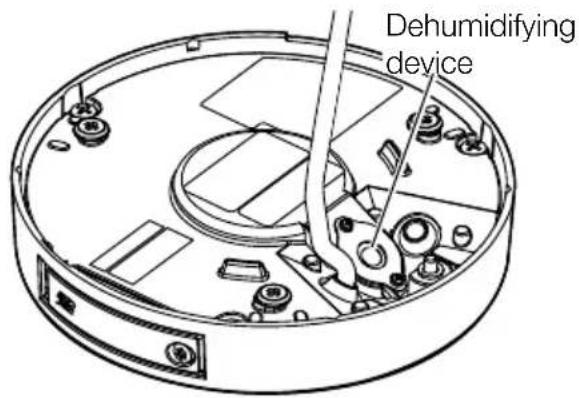
About the dehumidifying device
- This product has dehumidifying device to keep the inside at low moisture level, preventing condensation and quickly dissipating dew if produced.
- Dew may be produced depending on the conditions of temperature, humidity, winds, and rain, and it may take time to dehumidify.
- The dehumidifying device is mounted inside the enclosure. In order to maintain normal operation of the dehumidifier function, do not caulk (fill the clearance with sealants or other materials) the clearance between the enclosure and the ceiling or wall.
What to do if "WARMING UP-PLEASE WAIT" appears on the display.
This message indicates that the temperature inside the camera has become extremely low. The camera will be automatically restarted when the inside the camera is warmed up. Please wait for a while.
We shall not be liable for content compensation, losses of recorded or edited content and any direct or indirect consequent damages caused by failure to record or edit due to faults with this unit or the SD memory card. In addition, the same provisions apply after unit is repaired.
About the CMOS image sensor
- When continuously shooting a bright light source such as a spotlight, the color filter of the CMOS image sensor may become deteriorated and this may cause discoloration. Even when changing the fixed shooting direction after continuously shooting a spotlight for a certain period, the discoloration may remain.
- When shooting fast-moving subjects or objects crossing the shooting area may look to be bending askew.
Cleaning this product body
Be sure to turn off the power before cleaning. Failure to observe this may cause injury. Do not use benzine, thinner, alcohol, or any other types of solvents or detergents. Otherwise, it may cause discoloration. When using a chemical cloth for cleaning, read the caution provided with the chemical cloth product.
- Do not loozen or remove screws unless instructed to do so in the product documentation.
Cleaning of the dome cover
Use lens cleaning paper (used to clean camera or spectacles lenses) to remove any dirt on the dome cover. (If dust or the like is adhered at this time, the dome cover may get scratched. We recommend rinsing for stubborn stains.)
AVC Patent Portfolio License
THIS PRODUCT IS LICENSED UNDER THE AVC PATENT PORTFOLIO LICENSE FOR THE PERSONAL USE OF A CONSUMER OR OTHER USES IN WHICH IT DOES NOT RECEIVE REMUNERATION TO (i) ENCODE VIDEO IN COMPLIANCE WITH THE AVC STANDARD ("AVC VIDEO") AND/OR (ii) DECODE AVC VIDEO THAT WAS ENCODED BY A CONSUMER ENGAGED IN A PERSONAL ACTIVITY AND/ OR WAS OBTAINED FROM A VIDEO PROVIDER LICENSED TO PROVIDE AVC VIDEO. NO LICENSE IS GRANTED OR SHALL BE IMPLIED FOR ANY OTHER USE. ADDITIONAL INFORMATION MAY BE OBTAINED FROM MPEG LA, L.L.C. SEE HTTP://WWW.MPEGLA.COM
Product disposal/transfer
Data saved on this product or a storage device used with this product may lead to personal information leakage. When it is necessary to dispose or give this product to someone, even when for repair, make sure that there is no data on this product.
When abandoning the memory media, it is recommended to destroy it physically after deleting data by PC.
Effects on images and image quality
Under the following conditions, image quality may deteriorate or images may become difficult to see.
- When there are raindrops on the dome cover due to wind during rainfall.
- When there is snow on the dome cover due to wind during snowfall. (varies depending on the amount and quality of snowfall).
- When the dome cover is dirty due to dust in the air or vehicle exhaust.
Router
When connecting this product to the Internet, use a broadband router with the port forwarding function (NAT, IP masquerade).
Refer to the Operating Instructions for further information about the port forwarding function.
Time & date setting
It is necessary to set the time & date before putting this product into operation. Refer to the Operating Instructions for descriptions of how to perform the settings.
Parts and functions
Cables
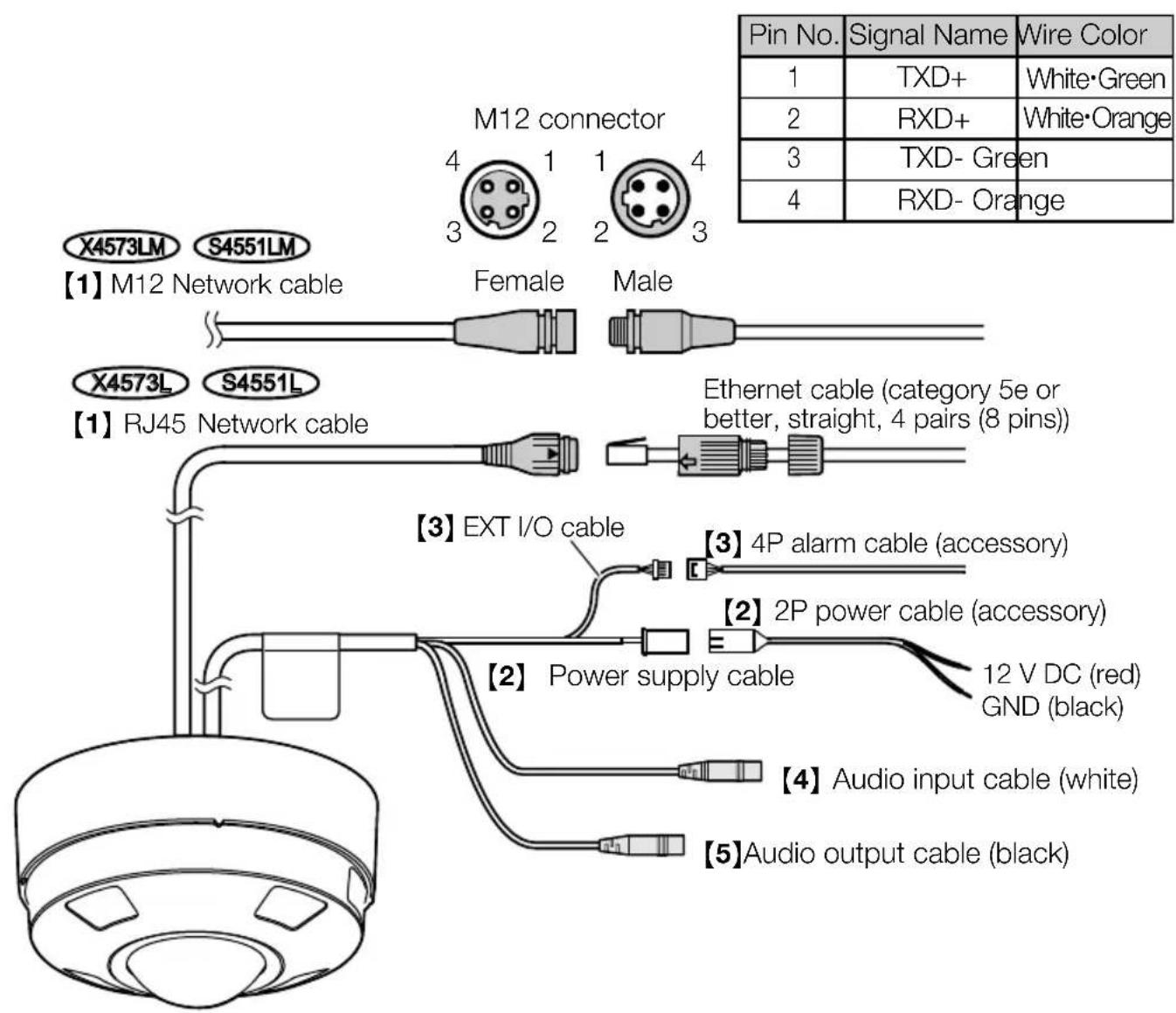
[1] X4573L S4551L RJ45 Network cable / X4573LM S4551LM M12 Network cable
Connect an Ethernet cable (category 5e or better, straight, 4 pairs (8 pins)) to the RJ45 Network cable or the M12 Network cable.
IMPORTANT:
- Use all 4 pairs (8 pins) of the Ethernet cable.
- The maximum cable length is 100 m {328 feet}.
- Make sure that the PoE device in use is compliant with IEEE802.3af standard.
- When connecting both the 12 V DC power supply and the PoE device for power supply, 12 V DC will be used for power supply.
- When the Ethernet cable is disconnected once, reconnect the cable after around 2 seconds. When the cable is quickly reconnected, the power may not be supplied from the PoE device.
[2] Power supply cable / 2P power cable (accessory)
Connect the output cable of the AC adaptor to the 2P power cable (accessory) and then connect the 2P power cable to the power connection cable.
IMPORTANT:
- Be sure to use the 2P power cable (accessory) provided with this product.
- Be sure to fully insert the 2P power cable (accessory) into the power supply cable. Otherwise, it may damage the camera or cause malfunction.
- When installing the camera, make sure that excessive force is not applied to the power cable.
- Be sure to use an AC adaptor compliant with the Specifications (written in the indication label on the bottom side of this unit) regarding power source and power consumption.
[3] EXT I/O cable / 4P alarm cable (accessory)
Note:
- Off, input, and output of the ALARM IN2 and 3 can be switched by configuring the setting. Refer to the Operating Instructions for further information about the ALARM IN2 and 3 settings ("Off", "Alarm input", "Alarm output" or "AUX output").
- Alarm input1 / Black & white input / Auto time adjustment input, Alarm input2, Alarm input3 Input specification: No-voltage make contact input (4 V - 5 V DC, internally pulled up)
OFF: Open or 4 V - 5 V DC
ON: Make contact with GND (required drive current: 1 mA or more)
- Alarm output, AUX output
Output specification: Open collector output (maximum applied voltage: 20 V DC)
OPEN: 4 V - 5 V DC by internal pull-up
CLOSE: Output voltage 1 V DC or less (maximum drive current: 50 mA)
4P alarm cable

IMPORTANT:
- Install external devices so that they do not exceed the rating of the network camera.
- When using the ALARM IN2 and/or 3 as the output terminals, ensure they do not cause signal collision with external signals.
- Recommended microphone: Plug-in power type (locally procured) (Sensitivity of microphone: -48dB± 3dB (0 dB=1 V/Pa,1 kHz))
- Input impedance: Approx. 2 kΩ (unbalanced)
• Supply voltage: 2.5 V ±0.5 V - Recommended cable length: Less than 1 m {3.28 feet}
- Input level for the line input: Approx. -10 dBV
- Recommended cable length: Less than 10 m {32.8 feet}
【5】 Audio output cable (black)
Connect an external speaker* using a stereo mini plug (ø3.5 mm). (Audio output is monaural.)
- Output impedance: Approx. 600 Ω (unbalanced)
- Recommended cable length: Less than 10 m {32.8 feet}
- Output level: -20 dBV
* Use a powered speaker.
IMPORTANT:
- Connect/disconnect the audio cables and turn on the power of the camera after turning off the power of the audio output devices. Otherwise, loud noise may be heard from the speaker.
- Make sure that the stereo mini plug is connected to this cable. When a monaural mini plug is connected, audio may not be heard.
When connecting a monaural speaker with amplifier, use a locally procured conversion cable (mono-stereo).
Note:
- The audio output can be switched to the monitor output. Refer to the Operating Instructions on the our support web site for descriptions of how to switch the output. *1
- The monitor out is set to NTSC in the default settings of the camera. If you want to change the monitor out setting to PAL, refer to the Operating Instructions on the our support website.
*1 The camera does not have an independent monitor output terminal. Switch the audio output cable to monitor output, and connect a monitor for adjustment during installation or service.
IMPORTANT:
- The adjustment monitor is used for checking the adjustment of the angular field of view when installing the camera or when servicing. It is not provided for recording/monitoring use.
- Depending on the monitor, some characters (date, time, camera title, etc.) may not be displayed on the screen.
Troubleshooting
Before asking for repairs, check the symptoms with the following table.
Contact your dealer if a problem cannot be solved even after checking and trying the solution in the table or a problem is not described below.
| Symptom Cause/solution | Reference pages | |
| Power is not turned on. | When using a PoE device for power supplyAre the PoE device (IEEE802.3af compliant) and the RJ45 Network connector connected using an Ethernet cable?Check whether the connection is appropriately established.Depending on the PoE device, the power supply will stop when the demanded power exceeds its total power limit for all PoE ports.Refer to the operating instructions of the PoE device in use. | Installation Guide |
| When using DC power supplyIs the 2P power cable (accessory) firmly inserted into the power supply cable of the camera?Confirm the power plug is firmly connected.Is the AC adaptor in use compliant with the Specifications?Check the Specifications regarding AC adaptor. | ||
| The LINK indicator does not light in orange even when the Ethernet cable is connected to the camera. | Is the Ethernet cable connected appropriately?Connect the Ethernet cable appropriately.Is the hub or router connected to the camera operating appropriately?Check if the hub or router in use is operating appropriately.Isn't the Ethernet cable connected to the camera broken?Replace the cable with another one. | Installation Guide |
| SD ERROR/ABF indicator lights redX4573L X4573LMSD ERROR indicator lights redS4551L S4551LM | This indicator lights up red when data cannot be saved on the SD memory card.Isn't the write protect switch of the inserted SD memory card set to "LOCK"?Unlock the write protect switch of the SD memory card.Hasn't the inserted SD memory card been formatted on a PC?Use an SD memory card formatted on the camera.Or install the software to format the SD memory card on the PC. Refer to our websitefor further information about the supported software.Isn't the inserted SD memory card faulty?Replace the card with a normal one. | Installation Guide |
| Audio input contains noise. | Check the following.Grounding of the camera, a switching hub or peripheral devices are not done.The camera is used near an electrical power line.The camera is used near a device which produces strong magnetic field or radio waves (such as near a TV/radio antenna, a motor of an air conditioning system, a transformer, etc.)When audio input still contains noise even after checking the above possibilities, use a powered microphone or connect audio output with low output impedance. | Installation Guide |
Detail specifications
- Basic
| Power source *1: DC 12 V | X4573L S4551L PoE (IEEE802.3af compliant)X4573LM S4551LM PoE (IEEE802.3af compliant) (Alternative A) |
| Power consumption *1: | X4573L X4573LMDC 12 V: 1.04 A/ Approx. 12.5 WPoE DC 48 V: 260 mA/ Approx. 12.5 W (Class 0 device)S4551L S4551LMDC 12 V: 930 mA/ Approx. 11.2 WPoE DC 48 V: 240 mA/ Approx. 11.5 W (Class 0 device) |
| Operating environmentAmbient operating temperature: | -40 °C to +60 °C 2 {-40 °F to +140 °F}(Power On range: -20 °C to +60 °C {-4 °F to +140 °F})10 % to 100 % (no condensation) |
| Ambient operating humidity: | |
| Storage environmentStorage temperature:Storage humidity: | -30 °C to +60 °C {-22 °F to +140 °F}10 % to 95 % (no condensation) |
| Monitor output *3(for adjustment): | VBS: 1.0 V [p-p]/75 Ω, composite, ø3.5 mm mini jackAn NTSC or PAL signal can be outputted from camera(either press the INITIAL SET switch quickly (within 1 second) or use software to select NTSC or PAL signal). |
| EXT I/O terminals: ALARM IN1 | (Alarm input 1/ Black & white input/ Auto time adjustment input) (x1)ALARM IN2 (Alarm input 2/ ALARM OUT) (x1)ALARM IN3 (Alarm input 3/ AUX OUT) (x1) |
| Audio input: ø3.5 mm stereo mini jackFor microphone input: | Recommended applicable microphone: Plug-in power type(Sensitivity of microphone: -48 dB±3 dB (0 dB=1 V/Pa, 1 kHz))Input impedance: Approx. 2 kΩ (unbalanced)Supply voltage: 2.5 V ±0.5 VApprox. -10 dBV |
| For line input: Input level: | |
| Audio output *3: | ø3.5 mm stereo mini jack (Audio output is monaural.)Output impedance: Approx. 600 Ω (unbalanced)Output level: -20 dBV |
| Waterproof *4: | IP66 (IEC 60529), Type 4X (UL50ENEMA 4X compliant) |
| Shock resistance: | 50 J (IEC 60068-2-75 compliant), IK10 (IEC 62262) |
| Wind resistance: | Up to 40 m/s {approx. 89 mph} |
| Dimensions: | X4573L S4551L When using base bracket :ø164 mm × 96.3 mm (H) {ø6-15/32 inches × 3-25/32 inches (H)}Dome radius 35 mm {1-3/8 inches}When using attachment plate only:ø154 mm × 60.3 mm (H) {ø6-1/16 inches × 2-3/8 inches (H)}Dome radius 35 mm {1-3/8 inches} |
| Mass: | When using base bracket :Approx. 1.3 kg {2.87 lbs.}When using attachment plate only :X4573L X4573LM Approx. 880 g {1.94 lbs}S4551L S4551LM Approx. 870 g {1.92 lbs} |
| Finish: | Main body: Aluminum die cast, i-PRO whiteOuter fixing screws: Stainless steel (Corrosion-resistant treatment)Dome cover: Polycarbonate resin, Clear |
| Others: Tamper-resistant enclosure | *5EN50155 (railroad standard)X4573LM S4551LM ECE-R10 (E approval) |
*1 Refer to our support website
*2 When using with the IR LED light constantly lit, the upper limit of the operating temperature range is +50 °C {+122 °F}.
*3 The audio output can be switched to the monitor output. Refer to the "Operating Instructions" on our support website for descriptions of how to switch the output.
*4 Only when installation work is properly performed according to the Installation Guide and appropriate waterproof treatment is performed.
*5 Component that has a structure on which the screws that are accessible after installation cannot be screwed or unscrewed using an ordinary screwdriver.
- Camera
| Image sensor: | X4573L X4573LM Approx. 1/2 type CMOS image sensorS4551L S4551LM Approx. 1/3 type CMOS image sensor |
| Effective pixels: | X4573L X4573LM Approx. 12.4 megapixelsS4551L S4551LM Approx. 5.1 megapixels |
| Scanning area: | X4573L X4573LM5.54 mm (H) × 5.54 mm (V) {7/32 inches (H) × 7/32 inches (V)}S4551L S4551LM3.55 mm (H) × 3.55 mm (V) {1/8 inches (H) × 1/8 inches (V)} |
| Scanning system: Progressive | |
| Minimum illumination: | X4573L X4573LMColor : 0.3 lx {0.0279 footcandle}(50IRE, F1.9, Maximum shutter: Off (1/30 s), AGC: 11)0.02 lx {0.0019 footcandle}(50IRE, F1.9, Maximum shutter: max. 16/30 s, AGC: 11)*BW : 0 lx {0 footcandle}(50IRE, F1.9, Maximum shutter: Off (1/30 s), AGC: 11, when the IR LED is lit))0.04 lx {0.0037 footcandle}(50IRE, F1.9, Maximum shutter: Off (1/30 s), AGC: 11)0.003 lx {0.0003 footcandle}(50IRE, F1.9, Maximum shutter: max. 16/30 s, AGC: 11)*S4551L S4551LMColor : 0.15 lx {0.0139 footcandle}(50IRE, F2.4, Maximum shutter: Off (1/30 s), AGC: 11)0.01 lx {0.0009 footcandle}(50IRE, F2.4, Maximum shutter: max. 16/30 s, AGC: 11)*BW : 0 lx {0 footcandle}(50IRE, F2.4, Maximum shutter: Off (1/30 s), AGC: 11, when the IR LED is lit))0.02 lx {0.0019 footcandle}(50IRE, F2.4, Maximum shutter: Off (1/30 s), AGC: 11)0.0013 lx {0.0001 footcandle}(50IRE, F2.4, Maximum shutter: max. 16/30 s, AGC: 11)** Converted value |
| Intelligent Auto: On/ Off | |
| Wide dynamic range:X4573L X4573LM | On/ OffThe level can be set in the range of 0 to 31. |
| Super Dynamic:S4551L S4551LM | On/ OffThe level can be set in the range of 0 to 31. *1 |
| Dynamic range: | X4573L X4573LM84 dB typ. (Wide dynamic range On, Level: 31)S4551L S4551LM120 dB typ. (Super Dynamic: On, Level: 31) |
| Maximum gain: The level can be set in the range of 0 to 11. | |
| Adaptive black stretch: The level can be set in the range of 0 to 255. | |
| Back light compensation (BLC) /High light compensation (HLC): | X4573L X4573LBLC/ HLC/ OffThe level can be set in the range of 0 to 31. (only when Wide dynamic range/ Intelligent auto: Off)S4551L S4551MBLC/ HLC/ OffThe level can be set in the range of 0 to 31. (only when Super Dynamic/ Intelligent auto: Off) |
| Fog compensation: On/ Off | The level can be set in the range of 0 to 8.(only when Intelligent Auto, auto contrast adjust: Off) |
| Light control mode setting: Indoor scene (50 Hz)/ Indoor scene (60 Hz)/ ELC | |
| Maximum shutter: [30fps mode] | |
| Max. 1/10000 s, Max. 1/4000 s, Max. 1/2000 s, Max. 1/1000 s,Max. 1/500 s,Max. 1/250 s, Max. 1/120 s, Max. 1/100 s, Max. 2/120 s,Max. 2/100 s,Max. 3/120 s, Max. 1/30 s, Max. 2/30 s, Max. 4/30 s,Max. 6/30 s,Max. 10/30 s, Max. 16/30 s[25fps mode]Max. 1/10000 s, Max. 1/4000 s, Max. 1/2000 s, Max. 1/1000 s,Max. 1/500 s,Max. 1/250 s, Max. 1/100 s, Max. 2/100 s, Max. 3/100 s,Max. 1/25 s,Max. 2/25 s, Max. 4/25 s, Max. 6/25 s, Max. 10/25 s,Max. 16/25 s | |
| Color/BW: Off/ On(IR Light Off)/ | On(IR Light On)/Auto1(IR Light Off)/ Auto2(IR Light On)/ Auto3(SCC) |
| IR LED Light: High*/ Middle/ Low/ Off | *Maximum irradiation distance: 10 m {Approx. 33 ft}(Mounting height : Approx. 3 m {Approx.10 ft}, Peripheral intensity control: On) |
| White balance: ATW1/ ATW2/ AWC | |
| Digital noise reduction: The level | can be set in the range of 0 to 255. |
| Privacy zone: On/ Off | Up to 8 zones available |
| Camera title on screen: On/ Off | Up to 20 characters (alphanumeric characters, marks) |
| Video Motion Detection (VMD): | On/ Off4 areas available |
| Fixing angle adjustment: +5°, 0°, -5° | |
*1 When a mode other than "Fisheye" is used, the range that can be set is 0 to 29.
- Lens
| Zoom ratio: x1 | |
| Digital (electronic) zoom: Choose from 3 levels of x1, x2, x4 | |
| Focal length: | X4573L X4573LM 1.4 mm {1/16 inches}S4551L S4551LM 0.84 mm {1/32 inches} |
| Maximum aperture ratio: | X4573L X4573LM 1:1.9S4551L S4551LM 1:2.4 |
| Focus range: | X4573L X4573LM 0.5 m {19-11/16 inches} -∞S4551L S4551LM 0.3 m {11-13/16 inches} -∞ |
| Aperture range: | X4573L X4573LM F1.9 (Fixed)S4551L S4551LM F2.4 (Fixed) |
| Angular field of view: | X4573L X4573LM Horizontal: 183° / Vertical: 183°S4551L S4551LM Horizontal: 186° / Vertical: 186° |
- Network
| Network: 10BASE-T/100BASE-TX, | |
| X4573L S4551L RJ45 connectorX4573LM S4551LM M12 connector | |
| Resolution*1:H.265/ H.264JPEG (MJPEG) | |
| X4573L X4573LMFisheye mode (max. 30 fps / 25 fps)2992×2992, 2192×2192, 1280×1280, 640×640, 320×320Quad PTZ mode (max. 15 fps / 12.5 fps)2560×1920, 2048×1536, 1600×1200, 1280×960, 800×600, VGA, QVGASingle PTZ mode (max. 15 fps / 12.5 fps)2560×1920 *2, 2048×1536, 1600×1200, 1280×960, 800×600, VGA, QVGAS4551L S4551LMFisheye mode (max. 30 fps / 25 fps)2192×2192, 1280×1280, 640×640, 320×320Quad PTZ mode (max. 30 fps / 25 fps)1600×1200, 1280×960, 800×600, VGA, QVGASingle PTZ mode (max. 30 fps / 25 fps)1600×1200, 1280×960, 800×600, VGA, QVGA | |
| X4573L X4573LMDouble Panorama mode (max.15 fps / 12.5 fps)2560×1440, 1920×1080, 1280×720, 640×360, 320×180Fisheye + Double Panorama mode (max. 15 fps / 12.5 fps)(Fisheye) 2992×2992, 2192×2192, 1280×1280, 640×640, 320×320(Double Panorama) 1280×720, 640×360, 320×180Fisheye + Quad PTZ mode (max.15 fps / 12.5 fps)(Fisheye) 2992×2992, 2192×2192, 1280×1280, 640×640, 320×320(Quad PTZ) 1280×960, 800×600, VGA, QVGAAquad streams mode(Single PTZ (Quad streams)) 1280×960, 800×600, VGA, QVGA (max. 15 fps / 12.5 fps)(Quad PTZ) 2560×1920, 2048×1536, 1600×1200, 1280×960/800×600, VGA, QVGA (max. 5 fps)S4551L S4551LMDouble Panorama mode (max. 30 fps / 25 fps)1920×1080, 1280×720, 640×360, 320×180Fisheye + Double Panorama mode (max. 30 fps / 25 fps)(Fisheye) 2192×2192, 1280×1280, 640×640, 320×320(Double Panorama) 1280×720, 640×360, 320×180Fisheye + Quad PTZ mode (max. 30 fps / 25 fps)(Fisheye) 2192×2192, 1280×1280, 640×640, 320×320(Quad PTZ) 1280×960, 800×600, VGA, QVGAAquad streams mode(Single PTZ (Quad streams)) 1280×960, 800×600, VGA,QVGA (max. 30 fps / 25 fps)(Quad PTZ) 1600×1200, 1280×960, 800×600, VGA, QVGA (max. 5 fps)<Wall>X4573L X4573LMPanorama mode (max.15 fps / 12.5 fps)2560×1440/ 1920×1080/ 1280×720/ 640×360/ 320×180Fisheye + Panorama mode (max.15 fps / 12.5 fps)(Fisheye) 2992×2992/ 2192×2192/ 1280×1280/ 640×640/ 320×320(Panorama) 1280×720/ 640×360/ 320×180S4551L S4551LMPanorama mode (max. 30 fps / 25 fps)1920×1080, 1280×720, 640×360, 320×180Fisheye + Panorama mode (max. 30 fps / 25 fps)(Fisheye) 2192×2192, 1280×1280, 640×640, 320×320(Panorama) 1280×720, 640×360, 320×180 | |
| Image compression method *3:H.265/ H.264 Transmission priority:Constant bit rate/ VBR/ Frame rate/ Best effortFrame rate:[30fps mode]1 fps/ 3 fps/ 5 fps*/ 7.5 fps*/ 10 fps*/ 12 fps*/ 15 fps*/ 20 fps*/30 fps*[25fps mode]1 fps/ 3.1 fps/ 4.2 fps*/ 6.25 fps*/ 8.3 fps*/ 12.5 fps*/ 20 fps*/25 fps*(The frame rate is limited to “bit rate”. When a value with an asterisk (*) is selected, the actual frame rate may be lower that the value selected.)Bit rate per client:64 kbps/ 128 kbps*/ 256 kbps*/ 384 kbps*/ 512 kbps*/768 kbps*/1024 kbps*/ 1536 kbps*/ 2048 kbps*/ 3072 kbps*/ 4096 kbps*/6144 kbps*/ 8192 kbps*/ 10240 kbps*/12288 kbps*/ 14336 kbps*/16384 kbps*/ 20480 kbps*/24576 kbps*/ --FREE ENTRY--* The available range of the bit rate varies depending on the setting selected for “image capture size”.Image quality:For "Constant bit rate", "Frame rate", and "Best effort":Low(Motion priority)/ Normal/ Fine(Image quarity priority)"VBR":0 Super fine/ 1 Fine/ 2/ 3/ 4/ 5 Normal/ 6/ 7/ 8/ 9 LowTransmission type:Unicast port (AUTO)/ Unicast port (MANUAL)/ Multicast | |
| JPEG (MJPEG) | Image quality:0 SUPER FINE/ 1 FINE/ 2/ 3/ 4/ 5 NORMAL/ 6/ 7/ 8/ 9 LOW(10 steps: 0-9)Transmission type: PULL (Refresh interval) / PUSH (MJPEG)Refresh interval:[30fps mode]0.1 fps/ 0.2 fps/ 0.33 fps/ 0.5 fps/ 1 fps/ 2 fps/ 3 fps/ 5 fps/ 6 fps/10 fps/ 12 fps/ 15 fps/ 30 fps*[25fps mode]0.08 fps/ 0.17 fps/ 0.28 fps/ 0.42 fps/ 1 fps/ 2.1 fps/ 3.1 fps/ 4.2 fps/5 fps/ 8.3 fps/ 12.5 fps/ 25 fps*JPEG frame rates are limited when using JPEG and H.265/H.264 simultaneously.When the dynamic range is set to a level of 30 or higher, the refresh interval is limited to 15 fps or 12.5 fps.※S4551L S4551LM only |
| Smart coding: GOP(Group of pictures) controlOn(Frame rate control) */ On(Advanced) */ On(Mid)/ On(Low)/ Off*On(Frame rate control) and On(Advanced) are only available with H.265.Auto VIQSON/ Off | |
| Audio compression method: G.726 (ADPCM): 16 kbps/ 32 kbpsG.711: 64 kbpsAAC-LC *4: 64 kbps/ 96 kbps/ 128 kbps | |
| Bandwidth control: Unlimited/ 64 kbps/ 128 kbps/ 256 kbps/ 384 kbps/ 512 kbps/768 kbps/ 1024 kbps/ 2048 kbps/ 4096 kbps/ 6144 kbps/ 8192 kbps/10240 kbps/ 15360 kbps/ 20480 kbps/ 25600 kbps/ 30720 kbps/35840 kbps/ 40960 kbps/ 51200 kbps | |
| Protocol: IPv6: TCP/IP, UDP/IP, HTTP, HTTPS, SMTP, DNS, NTP, SNMP,DHCPv6, RTP, MLD, ICMP, ARP, IEEE 802.1X, DiffServIPv4: TCP/IP, UDP/IP, HTTP, HTTPS, RTSP, RTP, RTP/RTCP, SMTP,DHCP, DNS, DDNS, NTP, SNMP, UPnP, IGMP, ICMP, ARP,IEEE 802.1X, DiffServ | |
| Security: User authentication, Host authentication, HTTPS*,Alteration detection of video file** The certification is pre-installed. | |
| OS *5: Microsoft Windows 10 | Microsoft Windows 8.1 |
| Browser *5: Internet Explorer 11 | (32-bit)Microsoft EdgeFirefoxGoogle Chrome |
| Maximum concurrent access number: | 14* (Number of sessions that can connect to cameras at the same time)* Depends on network conditions |
| Multi-screen: Up to 16 camera | images can be displayed simultaneously on a multi-screen.(Including the camera itself) |
| Compatible SDXC/SDHC/SD memory card *6, *7, *8 : | SD speed class 6 or higherSDXC memory card : 64 GB, 128 GB, 256 GBSDHC memory card : 4 GB, 8 GB, 16 GB, 32 GBSD memory card : 2 GB(except miniSD memory card and microSD memory card) |
| Mobile terminal/Tablet terminal compatibility: | iPad / iPhone (iOS 8 or later), Android^TM terminals |
*1 H.265/H.264 can be selected for each stream.
*2 When "Single PTZ" mode is used in wall installations, the 2560×1920 resolution cannot be used.
*3 Transmission for 2 streams can be individually set.
*4 *When recording audio on an SD memory card, only use AAC-LC (Advanced Audio Coding - Low Complexity).
*5 For information on the operation verification of the supported operating systems and web browsers, refer to our support website
*6 For possible number of images and duration (an indication) that can be saved on the SD memory card, refer to our support website below.
Possible number of JPEG images that can be saved:
*7 Refer to our support website
*8 When repeatedly recording images on a SD memory card using the auto overwrite function, make sure to use a SD memory card with high reliability and durability.
i-PRO Co., Ltd.
Fukuoka, Japan
https://www.i-pro.com/
Authorised Representative in EU:
i-PRO EMEA B.V.
Amsterdam, Netherlands
i-PRO EMEA B.V. UK Branch
1010 Cambourne Business Park,
Cambridgeshire CB23 6DP


- About the user manuals
- Contents
- Limitation of liability
- Disclaimer of warranty
- About notations
- System requirements for a PC
- IMPORTANT:
- Network security
- Precautions for use
- When the product is accessible from the Internet
- To keep on using with stable performance
- Usage such as switching the power ON/OFF frequently could lead to failure of the camera.
- Handle this product with care.
- Do not subject dome cover to strong impact.
- Do not directly touch the dome cover.
- When an error is detected, this product will restart automatically.
- About the automatic status detection function
- Periodically images on the screen appear to be distorted
- About the dehumidifying device
- What to do if "WARMING UP-PLEASE WAIT" appears on the display.
- About the CMOS image sensor
- Cleaning this product body
- Cleaning of the dome cover
- AVC Patent Portfolio License
- Product disposal/transfer
- Effects on images and image quality
- Router
- Time & date setting
- Parts and functions
- Cables
- [1] X4573L S4551L RJ45 Network cable / X4573LM S4551LM M12 Network cable
- [2] Power supply cable / 2P power cable (accessory)
- [3] EXT I/O cable / 4P alarm cable (accessory)
- Note:
- 4P alarm cable
- 【5】 Audio output cable (black)
- Troubleshooting
- Before asking for repairs, check the symptoms with the following table.
- Detail specifications
Brand : i-PRO
Model : WV-X4573LM
Category : Security Camera