
ATV43FHDW-1124 - Television Bauhn - Free user manual and instructions
Find the device manual for free ATV43FHDW-1124 Bauhn in PDF.


User questions about ATV43FHDW-1124 Bauhn
0 question about this device. Answer the ones you know or ask your own.
Ask a new question about this device
Download the instructions for your Television in PDF format for free! Find your manual ATV43FHDW-1124 - Bauhn and take your electronic device back in hand. On this page are published all the documents necessary for the use of your device. ATV43FHDW-1124 by Bauhn.
USER MANUAL ATV43FHDW-1124 Bauhn
natural_image
Cartoon illustration of a smiling rectangular character with arms and legs, waving (no text or symbols)Hey!
Let's get your new TV ready to use, fast!
1 Have you got everything?

You will also need:
• Phillips-head screwdriver
- Someone to help lift the TV
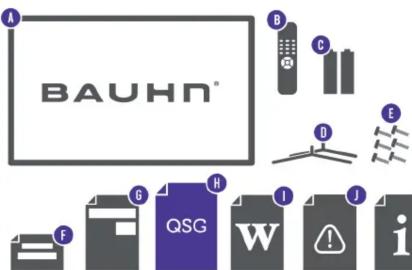
Unpack the box (be gentle) and make sure all of these items are there:
A. 43" FULL HD SMART TV
B. Remote
C. AAA Activ Energy Batteries (2)
D. TV Stands (2)
E. Screws for TV Stands (4)
F. Warning Sheet
G. TV Toppling Safety Message
H. Quick Start Guide
I. Warranty Certificate
J. General Safety Warnings
K. User Manual

Attach the TV stand
Unless you are wall-mounting the TV, you will need to attach its stand/legs. If you do want to wall mount the TV, see page 7 of the User Manual.
Lay the TV face-down on a soft, flat surface (like the sofa, or a towel on a table).
Match stands to the installation points on the underside of the TV.
Attach the stand to the TV at the installation points using the screws provided. (Grab a screwdriver for this bit).

natural_image
3D diagram of a mechanical assembly with labeled components and dashed lines indicating motion (no text or symbols)
This TV is heavy! We recommend asking someone to help you lift it.
3 Which plug goes where?
Want to hook up your new TV to a DVD player or something else?
Use the basic guide below to see what the plug and port should look like for different connections.
You can find more of these on page 10-11 of the User Manual.
(These cables do not come with your TV)
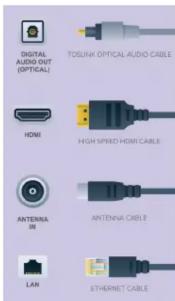
Use this to connect your soundbar, amplifier, digital receiver, or other external audio equipment.
Use this connection for a DVD player, gaming console, computer and camera.
To watch free-to-air TV channels, you need an antenna connection.
Use this cable to connect the TV to your modem for internet access. This TV also has Wi-Fi connectivity.

2
1
2
3
4 Get to know the remote

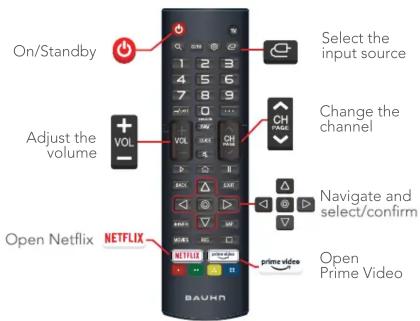
Familiarise yourself with the magic remote - you'll be spending a lot of time together.
Here are some of the buttons you'll be using most often.
On-screen set-up & Remote Pairing

Follow the on-screen set-up prompts to set your language, country, time zone and connect to the internet.
Note: during the remote pairing interface, please press any button on the remote to skip the process as this model does not include the
.etomeR cig
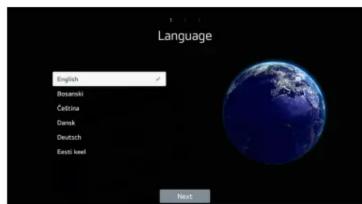

Press to confirm a selection. You will automatically go to the next step.
? Uh-oh, this isn't right...
Set-up not going smoothly? We've got you! We just need you to check a few things first:
Is it plugged in?
A new TV is exciting! So it's easy to forget something simple - like plugging it into the power outlet. Psst... make sure the outlet is switched ON.

natural_image
Illustration of a cartoon-style purple rectangular character with a sad face and limbs (no text or symbols)i Look at the manual!
More often than not, the answer you need is right there in the User Manual. The troubleshooting section on pages 39-41 may come in handy for tricky stuff.
Ok, time to give us a call
What? You mean the User Manual didn't have ALL the answers? Speak to us! We'd love to help you get up and running as quickly as possible. Call our After Sales Support on 1300 002 534.
Operating hours: Monday-Friday, 8:30am-6pm; Saturday, 9am-6pm AEST


Brand : Bauhn
Model : ATV43FHDW-1124
Category : Television