DR-2525.4D - Receiver Crunch - Free user manual and instructions
Find the device manual for free DR-2525.4D Crunch in PDF.


User questions about DR-2525.4D Crunch
0 question about this device. Answer the ones you know or ask your own.
Ask a new question about this device
Download the instructions for your Receiver in PDF format for free! Find your manual DR-2525.4D - Crunch and take your electronic device back in hand. On this page are published all the documents necessary for the use of your device. DR-2525.4D by Crunch.
USER MANUAL DR-2525.4D Crunch
Many new and factory radios require a reset code when disconnected from battery power. This is an anti-theft feature. Before unplugging power, you must determine if your radio/source unit requires a reset code. Check the operation manual for your vehicle or contact the dealer.
Power / Ground
cable size
It is critical to use the proper power and ground cable. Select the size listed here for your amplifier model. Always use high quality copper cable.
Cable size recommendations for multi amp systems are available on our website.
Model
Fuse Size
Cable Size
| DR-1325.1 | External 80A |
| DR-2125.1D | External 80A |
| DR-2725.1D | External 100A |
| DR-3725.1D | External 150A |
| DR-2125.2D | External 100A |
| DR-3125.2D | External 125A |
| DR-1325.4D | External 60A |
| DR-2525.4D | External 80A |

Installation

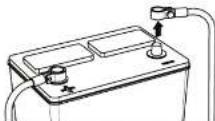
Disconnect
negative battery
terminal
Place terminal in a secure position so that it won't accidentally contact the negative battery post

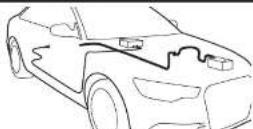
Run Cables
Properly route power, speaker and RCA cables through the vehicle.

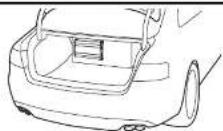
Mount Amplifier
Choose a mounting location that will provide adequate air ventilation. Mount the amplifier to a secure surface. Do not mount the amplifier upside down.

Chassis Ground

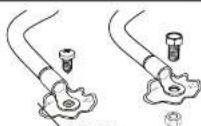
Bare metal
The chassis ground connection is critical to the performance of the amplifier. Choose a location that is close to the amplifier. Completely scrape away the paint and use a nut and ball if possible.
DO NOT USE AN EXISTING FACTORY BOLT!

Power Connections
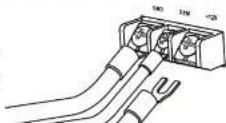
Using spade terminals, connect the +12V to the power cable from the battery, the REM to the source unit turn-on wire and the GND to the chassis ground.

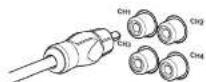
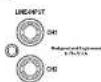
Signal Input Low Level RCA
Connect the RCA cables to the INPUT connectors. The OUTPUT can be used to provide input for a second amplifier.

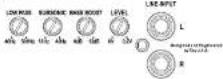
Level Control

Turn the LEVEL control completely counter-clockwise to minimum.


Positive Battery Connection
Connect the power cable to the positive battery terminal. The power cable must be fused within 18 inches of the battery terminal
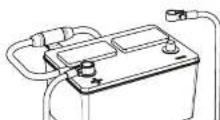

Be prepared to disarm your vehicle's alarm and to enter your radio / source unit code.


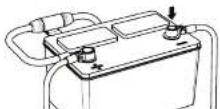
Re-connect Negative Battery Terminal
Re-connect the negative battery terminal making sure it is securely tightened.
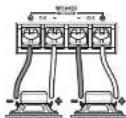
Common System Setup
4ch - Full Range
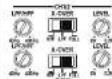

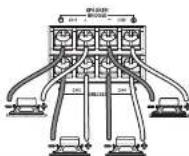
4ch - Mixed Mono
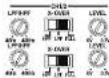

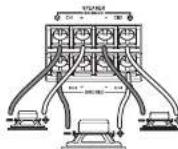
2ch
Mono

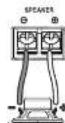
Setup

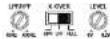
Xover Mode
The XOVER Mode switch sets the type of crossover that will be active. 4 channel models will have two switches, one for each set of channels.


High pass Adjustment
The HPF (high pass filter) control will limit the output below the selected frequency. This is typically used to protect midrange and high frequency speakers from damage and to allow a smooth transition from a subwoofer.


Low pass Adjustment
The LPF (low pass filter) control will limit output above the selected frequency. This is used to allow a smooth transition to the higher frequency speakers.


Bass Boost
The BASS BOOST or BASS EQ control will increase the output at 45Hz for more pronounced bass. Exercise caution. Increase the level in email amounts until distortion is noticed, then back off a little


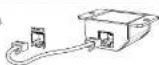
Remote Level Control
Some models include a base remote. Avoid adjusting the base remote while operating vehicle.

Level Setting
This is a critical step to insure your amplifier is properly adjusted to match the signal output level of your source unit.

THIS IS NOT A VOLUME CONTROL!
- If possible, with the source unit off, confirm that the primary volume control is turned down (counter clockwise).
- Turn on the source unit (CD, or MP3 player). Re-confirmed that the volume is turned down. Make sure the source unit controls; balance, faster, bass and treble are all set to center or "D" adjustment. Make sure that the green LED on the end of the amplifier is illuminated.
- Play a clean musical selection of which you are very familiar. CD is preferred. Do not use radio signals for level setting. Hit play and start turning the volume of the source unit up.
- Stop increasing the source unit volume when you reach 3/4 (about 75%) or until you hear speakers begin to slightly start producing distortion.
- Increase the amplifier level (clockwise) until distortion is heard, then back the level down (counter clockwise) until the distortion is eliminated. Small adjustments may need to be made to balance the levels of multiple amplifiers.

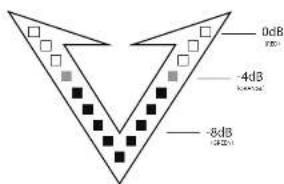
This is a step to control the illuminated on the front of the amplifier.
3-MODES: VU Meter mode. All red LED mode, and logo illumination off.
THIS IS NOT A REPLACEMENT FOR AN OSCILLOSCOPE - PLEASE USE PROPER TOOLS WHEN SETTING GAIN!
text_image
0dB -4dB -8dBPlease visit crunchcaraudio.com for more on this setup
The information contained within this document is intended to offer some basic guidelines for a few of the most common installations. More complex audio systems should be installed by a competent professional. Additional installation information available at www.maxxsonics.com
WARRANTY
Maxxosnics, LLC. warrants this product to the original consumer purchaser, to be free from defects in material and workmanship for a period of one (1) year from the date of purchase. Maxxosnics, LLC. will, at its discretion, repair or replace defective products during the warranty period. Components that prove to be defective in materials and workmanship under proper installation and use must be returned to the original authorized Maxxosnics, LLC. retailer from where it was purchased. A photocopy of the original receipt must accompany the product being sold on or before 30 days of sale. The sale price is \$250,000.00 per share of MMaxxosnics, LLC. This warranty is limited to defective parts and specifically excludes any incidental or consequential damages connected therewith. To view the full warranty, please visit the website.
Crunch products are designed and engineered in the USA by
MAXXSONICS
CHDOSO D -

CRUNCH
Quick Start
Installation Guide
text_image
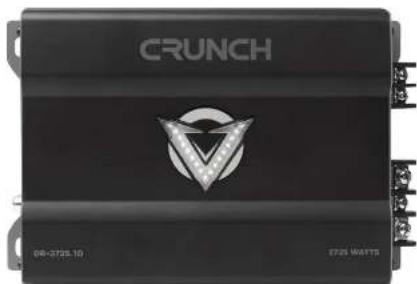
CRUNCH 08-3725.10 ST26 WATTSDR-1325.1 DR-2125.2D DR-2125.1D DR-3125.2D DR-2725.1D DR-1325.4D DR-3725.1D DR-2525.4D
Congratulations on your choice of an Autotek amplifier. This "Quick Start Installation" guide is meant to help you "hook up" and play music. For more detailed information, on system setting, speaker and subwoofer configuration and full specifications by model visit the website, http://crunchcaraudio.com/manuals.html