
CR5 - Wireless Earbuds COWON - Free user manual and instructions
Find the device manual for free CR5 COWON in PDF.


| Product Type | Wireless Bluetooth Earbuds |
| Brand | Cowon |
| Model | CR5 |
| Weight | 4g per earbud, 41g charging cradle |
| Battery Capacity | Earbuds: 3.7V / 50mAh; Cradle: 5V / 500mAh |
| Charging Time | Earbuds: about 1 hour; Cradle: about 1 hour |
| Music Playback Time | Single Mode: about 7.5 hours; Dual Mode: about 5 hours |
| Standby Time | Up to 150 hours |
| Bluetooth Version | V5.0 |
| Bluetooth Profiles | HSP / HFP / A2DP / AVRCP |
| Operating Distance | Up to 10m (free space) |
| Input | DC 5V / 500mA |
| Charging Cradle Capacity | 3-4 full charges for earbuds |
| LED Indicators | White: charging/complete; Blue: power/pairing/standby |
| Controls | Multi-function button: power, call, pairing, play/pause, track skip |
| Microphone | Yes; left earbud in dual mode, both in single mode |
| Audio Modes | Dual Mode (stereo), Single Mode (mono) |
| Voice Assistant | Press multifunction button for 1 second (Google Assistant, Siri, Cortana) |
| Care & Cleaning | Wipe with a soft, dry cloth. Do not use liquids or abrasives. |
| Safety Precautions | Avoid extreme temperatures, keep away from water, and do not disassemble. |
Frequently Asked Questions - CR5 COWON
User questions about CR5 COWON
0 question about this device. Answer the ones you know or ask your own.
Ask a new question about this device
Download the instructions for your Wireless Earbuds in PDF format for free! Find your manual CR5 - COWON and take your electronic device back in hand. On this page are published all the documents necessary for the use of your device. CR5 by COWON.
USER MANUAL CR5 COWON
* Actual package contents may differ from the above images.
+ Before you start \_ Names of Parts and Functions
CR5 Charging Cradle

Multi-Function Button
Power / Call / Pairing
Play / Previous · Next Track
+ Before you start \_Precautions

natural_image
Two identical diagrams showing a device with a red package and circular components, each with an upward arrow indicating motion (no text or symbols)For charging please remove the protective film from the earphone charging terminal.
+ Before you start \_ Charging
CR5 Charging

natural_image
Simple line drawing of a battery pack with two side compartments and curved arrows indicating flow (no text or symbols)Charging : The white LED Indicator on your earphones turns on
Charging Complete : The white LED Indicator on your earphones turns off
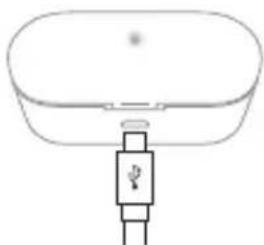
Charge the Charging Cradle
natural_image
Simple line drawing of a device with a plug and connector (no text or symbols)Charging Status : Charging cradle LED Indicator blink blue
0%\~25%=1time
25%\~50% = 2times
50%\~75%=3times
75%\~100%=4times
Fully Charged = Stays solid
* Please charge the charging cradle periodically. When the cradle battery is discharged, the earphone units may turn-on instead of being charged, causing the earphone to be discharged.
+ Using the Product \_ Power On / Off
Auto

flowchart
graph TD
    A["Out: Power On"] --> B["In: Power Off"]
    B --> C["Output"]
Manual
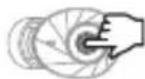
Power On / Off : 4 Sec Press
+ Using the Product \_ Pairing & connection
After the initial pairing, the CR5 and your smartphone will connect automatically when the CR5 is on and Bluetooth is enabled on your phone.
Dual Mode Single Mode

Dual Mode: The CR5's left and right earphones can be used together in stereo.
- When both earphones are removed at the same time from the charging cradle, they will automatically turn on, connect to each other, and enter pairing mode following an audible beep.
- Turn on Bluetooth on your smartphone or Bluetooth-capable device, and select 'CR5 Bluetooth L' from the list of detected devices to pair and connect automatically.
* To use Dual Mode, both the left and right earphones must be turned on.

Single Mode: The CR5's left and right earphones can be used individually in mono.
- Pair the CR5 in Dual Mode as previously shown.
- Turn off both the left and right earphones.
- Press and hold the button on the right earphone for 6 seconds to enter pairing mode for only the right earphone. (Even if you have heard the "Power On" voice, please continue to press until you hear "Pairing Mode".) Pair the detected right earphone(CR5 Bluetooth R) to your smartphone.
You can now turn on and use only the desired unit.
+ Using the Product \_ Listening to Music · Calling

Listening to Music Calling
| Play : Pause |  |
| Next Track | [KEZA] |
| Previous Track |


* Press and hold the multifunction button for 1 second to launch the voice recognition feature of your smartphone or tablet. (Android OS : Google Assistant / iOS : Siri / Window OS : Cortana - Except during calls)
* When using Dual Mode, the sound can be heard from both left and right earphones during calls, Mic only operates on left earphone so make sure to put the left earphone near your mouth during calls.
* In Single Mode, each earphone will output sound with both microphones enabled for use.
* In Dual Mode, L unit connects to your smartphone.
* By using the CR5 in Single Mode, you can alternate between charging the left and right earphones for extended use. (Audio books, Podcasts, etc.)
* Since Single Mode uses only one earphone, you can stay aware of environmental sounds and use the device more safely when walking or bicycling.
* Keep the product and a mobile phone within 1 meter when pairing.
* If passkey input is required, enter a password or a PIN No.'0000'.
* When the CR5 is off, press and hold the multifunction button for 6 seconds to enter pairing mode.
* When powered on, the earphones will automatically connect to the most recently connected devices.
- Status LED
| Status Blinking Pattern | |||
| CR5 Earbuds | Charging White LED stays on | ||
| Charging Complete White LED turns off | |||
| Power On Blue LED Blinks once | |||
| Power Off White LED Blinks once | |||
| Pairing Mode | White and blue LED blinks alternately | ||
| Play / Standby Mode | Blue LED blinks every 7 seconds | ||
| Status | Battery Power | Blinking Pattern | |
| Charging Cradle | Charging | 0~25%25~50%50~75%75~100% | White LED blinks onceWhite LED blinks twiceWhite LED blinks three timesWhite LED blinks four times |
| Charging Complete | 100% White | LED stays on | |
- Voice Prompts
| Status Voice Prompts | ||
| CR5 Earbuds | Power On/ Power Off "Power ON" / "Power Off" | |
| Pairing Mode "Pairing Mode" | ||
| L, R Connection (Dual Mode) | L : "Left Channel"R : "Right Channel" | |
| Connected to Bluetooth Device | "Pairing Successful" | |
| Bluetooth Connection (Dual Mode) | "Connected" | |
| Disconnected "Disconnected" | ||
| Incoming call "Incoming Call" * | ||
| Low Battery "Battery Low" | ||
* For iPhone, user ringtone will be applied.
- Specification
| Bluetooth Version V5.0 | |
| Bluetooth Profiles HSP / HFP / A2DP / AVRCP | |
| Standby Time Up to 150 hours | |
| Music-Playing Time | Single Mode : About 7.5 hoursDual Mode : About 5 hours |
| Charging Time | CR5 : About 1 hours*Charging Cradle : About 1 hours |
| Battery | CR5: 3.7V / 50mAhCharging Cradle : 5V / 500mAh |
| Input DC 5V / 500mA | |
| Operating Distance Up to 10m (Free space) | |
| Weight | CR5 : 4g x 2Charging Cradle : 41g |
* Number of available CR5 charges using charging cradle (500mAh) : 3\~4 times (with fully charged charging cradle)
DIGITAL PRIDE.
©WON
Brand : COWON
Model : CR5
Category : Wireless Earbuds