
CX5 - Wireless Earbuds COWON - Free user manual and instructions
Find the device manual for free CX5 COWON in PDF.


| Product Type | True Wireless Bluetooth Earphones |
| Brand | Cowon |
| Model | CX5 |
| Bluetooth Version | 5.0 |
| Bluetooth Profiles | HSP, HFP, A2DP, AVRCP |
| Standby Time | Up to 150 hours |
| Music Playing Time (Single Mode) | Approx. 7.5 hours |
| Music Playing Time (Dual Mode) | Approx. 5 hours |
| Charging Time (Earbuds) | Approx. 1 hour |
| Charging Time (Charging Cradle) | Approx. 1 hour |
| Battery Capacity (Earbuds) | 3.7V / 50mAh each |
| Battery Capacity (Charging Cradle) | 5V / 500mAh |
| Input Power | DC 5V / 500mA |
| Operating Distance | Up to 10m (free space) |
| Weight (Each Earbud) | 5g |
| Weight (Charging Cradle) | 36g |
| Charging Cradle Capacity | 3-4 full charges for earbuds |
| Controls | Multifunction button (power, pairing, play/pause, calls) |
| Voice Prompts | Power On/Off, Pairing, Connection, Low Battery |
| LED Indicators | White/Blue LEDs for charging status and pairing |
| Operating Modes | Dual Mode (stereo) and Single Mode (mono) |
| Compatibility | Smartphones, tablets with Bluetooth |
| Maintenance | Wipe with dry cloth; store in charging cradle |
| Safety Precautions | Do not expose to water; use original charger |
| Repair & Parts | Contact Cowon support; ear tips replaceable |
Frequently Asked Questions - CX5 COWON
User questions about CX5 COWON
0 question about this device. Answer the ones you know or ask your own.
Ask a new question about this device
Download the instructions for your Wireless Earbuds in PDF format for free! Find your manual CX5 - COWON and take your electronic device back in hand. On this page are published all the documents necessary for the use of your device. CX5 by COWON.
USER MANUAL CX5 COWON
* Actual package contents may differ from the above images.
COWON CX5 2
+ Before you start \_ Names of Parts and Functions
COWON CX5 Portable Charging Cradle
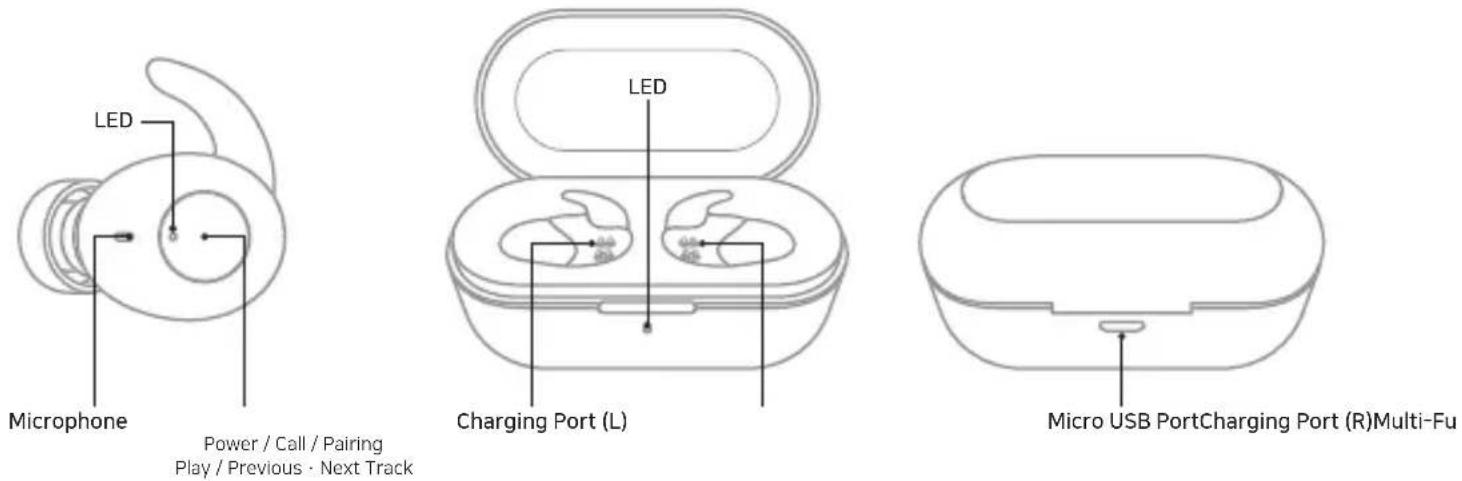
Power / Call / Pairing
Play / Previous · Next Track
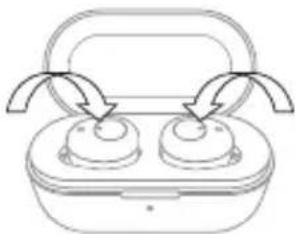
+ Before you start \_ Charging
CX5 Charging
natural_image
Line drawing of a two-port appliance with curved arrows indicating flow or movement (no text or symbols)Charging : The white LED
Indicator on your earphones turns on
Charging Complete : The white LED Indicator on your earphones turns off
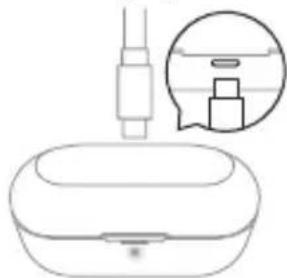
Charging
the Changing Cradle
natural_image
Line drawing of a medical or laboratory device with a pipette inserted, showing internal components and a magnified inset (no text or symbols)Charging Status : Charging
cradle LED Indicator blink blue
0%\~25%=1time
25%\~50%=2times
50%\~75% = 3times
75%\~100%=4times
Fully Charged = Stays solid
* Please charge the charging cradle periodically. When the cradle battery is discharged, the earphone units may turn-on instead of being charged, causing the earphone to be discharged,
+ Using the Product \_ Power On / Off
Auto
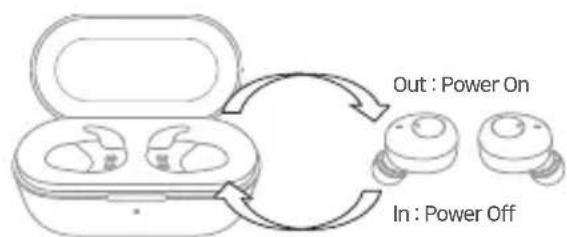
flowchart
graph TD
    A["Out: Power On"] --> B["In: Power Off"]
    B --> C["Power Supply Icon"]
Manual
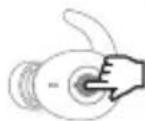
Power On / Off : 4 Sec Press
+ Using the Product \_ Pairing & connection
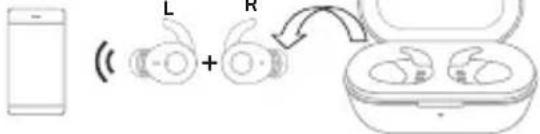
Dual mode
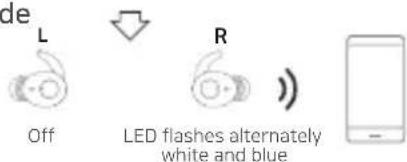
Single mode
* Use one of the following methods to switch from Single Mode to Dual Mode.
- Press the multifunction button on the earphone that is not connected and wait briefly to switch to Dual Mode.
- Turn off both units, then turn them on again (power cycling). Connect the units in Dual Mode.
* Keep the product and a mobile phone within 1 meter when pairing.
* If passkey input is required, enter a password or a PIN No. '0000'.
* When the CX5 is off, press and hold the multifunction button for 6 seconds to enter pairing mode.
* When powered on, the earphones will automatically connect to the most recently connected devices.
After the initial pairing, the CX5 and your smartphone will connect automatically when the CX5 is on and Bluetooth is enabled on your phone.
Dual mode: The CX5's left and right earphones can be used together in stereo.
- When both earphones are removed at the same time from the charging cradle, they will automatically turn on, connect to each other, and enter pairing mode following an audible beep.
- Turn on Bluetooth on your smartphone or Bluetooth-capable device, and select 'CX5 Bluetooth L' from the list of detected devices to pair and connect automatically.
* To use Dual Mode, both the left and right earphones must be turned on. Single mode: The CX5's left and right earphones can be used individually in mono. - Pair the CX5 in Dual Mode as previously shown.
- Turn off both the left and right earphones.
- Press and hold the button on the right earphone for 6 seconds to enter pairing mode for only the right earphone. Pair the detected right earphone(CX5 Bluetooth R) to your smartphone.
You can now turn on and use only the desired unit.
* In Dual Mode, L unit connects to your smartphone.
* By using the CX5 in Single Mode, you can alternate between charging the left and right earphones for extended use. (Audio books, Podcasts, etc.)
* Since Single Mode uses only one earphone, you can stay aware of environmental sounds and use the device more safely when walking or bicycling.
+ Using the Product \_Listening to Music · Calling
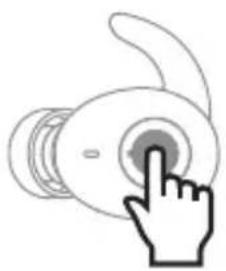
natural_image
Simple line drawing of a hand pressing a button on a circular device (no text or symbols)Listening to Music Calling
| Play·Pause |  |
| Next Track | [027X] |
| Previous Track | [4155] |
| Answering a callEnding a call |  |
| Rejecting a call |  |
* When using Dual Mode, sound will only be output to the left earphone during calls.
* In Single Mode, each earphone will output sound with both microphones enabled for use.
* Press and hold the multifunction button for 1 second to launch the voice recognition feature of your smartphone or tablet,
(Android OS: Google Assistant / iOS:Siri / Window OS: Cortana - Except during calls)
+ Using the Product \_Precautions
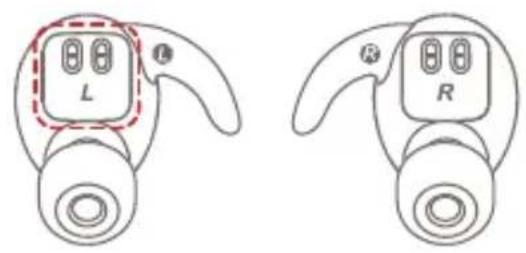
Do not let the silicone covers cover the earphone charging protrusions.
natural_image
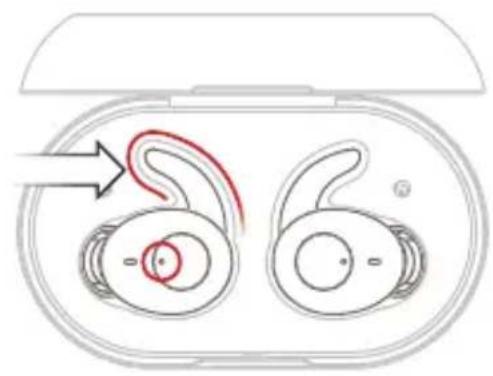
Diagram of two earbuds with a red curved arrow indicating motion or force, no text or symbols presentMake sure that the earphone hook is properly positioned in the fixing groove of the charging cradle and check if the earphone LED is on.
COWON CX5 7
- Status LED + Voice Prompts
| Status Blinking Pattern | |||
| CX5 Earbuds | Charging White LED stays on | ||
| Charging Complete White LED turns off | |||
| Power On Blue LED Blinks once | |||
| Power Off White LED Blinks once | |||
| Pairing Mode | White and blue LED blinks alternately | ||
| Playback / Standby Mode | Blue LED blinks every 7 seconds | ||
| Status | Battery Power | Blinking Pattern | |
| Charging Cradle | Charging | 0~25%25~50%50%~75%75~100% | White LED blinks onceWhite LED blinks twiceWhite LED blinks three timesWhite LED blinks four times |
| Charging Complete | 100% White LED stays on | ||
| Status Voice Prompts | ||
| CX5 Earbuds | Power On/ Power Off Power ON | / Power Off |
| Pairing Mode Pairing | ||
| L, R Connection (Dual Mode) | L : Left ChannelR : Right Channel | |
| Bluetooth Connection (Single Mode) | Connected | |
| Bluetooth Connection (Dual Mode) | Second Device Connected | |
| Disconnected Disconnected | ||
| Incoming call Incoming Call | ||
| Low Battery Low Battery |
- Specification
| Bluetooth Version V5.0 | |
| Bluetooth Profiles HSP / HFP / A2DP / AVRCP | |
| Standby Time Up to 150 hours | |
| Music-Playing Time | Single Mode - About 7.5 hoursDual Mode - About 5 hours |
| Charging Time | CX5 - About 1 hours*Battery Case - About 1 hours |
| Battery | CX5: 3.7V / 50mAhCharging cradle 5V / 500mAh |
| Input DC 5V / 500mA | |
| Operating Distance Up to 10m (Free space) | |
| Weight | CX5: 5g x 2Charging cradle : 36g |
* Number of available CX5 charges using charging cradle (500mAh): 3\~4 times (with fully charged charging cradle)
DIGITAL PRIDE.
©WON
Brand : COWON
Model : CX5
Category : Wireless Earbuds