
ZEN DAC - Headphone amplifier iFi Audio - Free user manual and instructions
Find the device manual for free ZEN DAC iFi Audio in PDF.


User questions about ZEN DAC iFi Audio
0 question about this device. Answer the ones you know or ask your own.
Ask a new question about this device
Download the instructions for your Headphone amplifier in PDF format for free! Find your manual ZEN DAC - iFi Audio and take your electronic device back in hand. On this page are published all the documents necessary for the use of your device. ZEN DAC by iFi Audio.
USER MANUAL ZEN DAC iFi Audio
Thank you for purchasing the DAC from ZEN series. The DAC is a balanced USB-audio DAC amplifier.
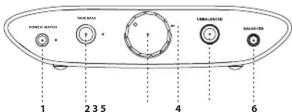
1. PowerMatch ^® (high/low)
PowerMatch® setting should be on low for IEMs and on high for on/over headphones.
Warning: Due to the high power of ZEN DAC, before changing the PowerMatch setting, always start off at a low volume level so that there is no risk of damage to your headphones, speakers or your hearing. iFi audio is not responsible for any hearing or equipment damage from misuse.
2. TrueBass ^® (high/low)
Many headphones lack the correct bass response. TrueBass ^® is an analogue circuit designed to 'add back' the lost bass response for the most accurate playback.
Tip: Open-back headphones and some IEMs usually sound better with TrueBass set high. Adjust to suit.
3. Analogue Volume control
The analogue volume control in ZEN DAC is superior to any digital volume control. It can be used to control the headphone volume or the pre-amplifier volume (when set to 'Variable'). If the output at the rear is set to 'Fixed' the volume control is bypassed.
4. Audio Format LED (kHz)
The LED colour scheme indicates the audio format and sampling frequency received by ZEN DAC from the music source.
LED Mode
Green PCM 44/48/88/96kHz
Yellow PCM 176/192/353/384kHz
Cyan DSD64/DSD128
Blue DSD256
Magenta MQA
5. Single-ended 6.3mm output
Connect single-ended 6.3mm headphones. With single-ended 3.5mm headphones, connect with a 3.5mm to 6.3mm adapter.
6. Balanced 4.4mm analogue output
Connect balanced 4.4mm headphones.
Tip: As ZEN DAC is balanced, we recommend the 4.4mm output.
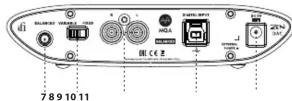
7. Balanced 4.4mm analogue output
This is an analogue output via 4.4mm > XLR or other balanced interconnects. You could use this for an active speaker or an amplifier.
Tip: As ZEN DAC is balanced, this is the recommended output.
8. Variable/Fixed switch
When the rear UnBAL/BAL analogue outputs are used, this switch will determine whether or not ZEN DAC analogue volume control is used.
9. RCA analogue output
This is an analogue output
10. USB-audio and power input
This is a USB input. It connects ZEN DAC to the computer audio source and provides the power supply.
11. DC 5V power
ZEN DAC is powered by 5 volts, either via the enclosed USB cable (for connection to laptop or PC) or DC power supply (not included).
Tip: For best performance upgrade the USB power supply to a super-low noise power adapter such as iFi iPower or iPower X.
Specification
Input: USB3.0 B Socket (USB2.0 compatible)
Formats: 44.1/48/88.2/96/176.4/192kHz PCM 2.8/3.1/5.6/6.2/11.2/12.4MHz DSD 353/384KHz DXD
DAC: Bit-Perfect DSD & DXD DAC by Burr Brown
Line Section
Output: Audio RCA (UnBAL) 2.1V fixed 1V / (2.3V max (variable))
1V / 3.5V max. (variable) 4.4mm Pentacenn (RAL) 4.2V fixed
4.4min Pentacohin (BAL) 4.2V fixed 2V (6.2V max (variable)
Zout: <= 100 Ohm (UnBAL)
<= 200 Ohm (BAL)
SNR: <-116dB(A) @ 0dBFS (UnBAL/BAL)
DNR: >116dB(A) @ -60dBFS (UnBAL/BAL)
THD+N: <0.0015% @ 0dBFS (UnBAL/BAL)
Headphone Section
Output: 6.3mm (UnBAL) 1V / 3.3V max.
12 Ohm - 300 Ohm Headphone
4.4mm Pentaconn (BAL) 2V / 6.2V max.
Output Power: UnBAL >280mW @ 32R; >36mW @ 300R BAL >380mW @ 50R; >70mW @ 600R
Output Impedance: < 1 (UnBAL/BAL)
THD & N: <0.005% (125mW @ 32R)
SNR: >113dBA (3.3V UnBAL / 6.2V BAL)
Power consumption: No Signal \~0.5W
\~2.5W
Dimensions: 117(l) x 100(w) x 30(h)mm
Weight: 491g (1.08 lbs)
Warranty period: 12 months
Specifications are subject to change without notice.
ifi-audio.com
Ver1.2
- PowerMatch ® (high/low)
- TrueBass ® (high/low)
- Analogue Volume control
- Audio Format LED (kHz)
- LED Mode
- Single-ended 6.3mm output
- Balanced 4.4mm analogue output
- Balanced 4.4mm analogue output
- Variable/Fixed switch
- RCA analogue output
- USB-audio and power input
- DC 5V power
- Specification
- Line Section
- Headphone Section
Brand : iFi Audio
Model : ZEN DAC
Category : Headphone amplifier