MBMHD3 - Lighting Eliminator Lighting - Free user manual and instructions
Find the device manual for free MBMHD3 Eliminator Lighting in PDF.


| Product Type | Moving Head LED Light |
| Model | MBMHD3 |
| Brand | Eliminator Lighting |
| Dimensions (L x W x H) | Approx. 12 x 10 x 15 inches (30 x 25 x 38 cm) |
| Weight | Approx. 8 lbs (3.6 kg) |
| Power Consumption | 120W max |
| Power Supply | AC 100-240V, 50/60Hz |
| Light Source | 3 x 10W RGBW LEDs (or similar) |
| Beam Angle | 8° – 45° (motorized zoom) |
| Pan Range | 540° |
| Tilt Range | 270° |
| DMX Channels | 11 / 14 / 16 (selectable) |
| Control Modes | DMX, Master/Slave, Sound Active, Auto |
| Display | OLED display with touch buttons |
| Housing | Metal and flame-retardant plastic |
| Cooling | Silent fan with auto temperature control |
| Protection Rating | IP20 |
| Cleaning | Use a dry cloth. Do not use solvents. |
| Safety | Secure mounting with safety cable. Keep away from flammable materials. |
| Spare Parts | LED modules, power supply, mainboard available from manufacturer. |
| Repairability | Serviceable by qualified technician. Refer to manual for fuse replacement. |
| Included Accessories | Power cord, DMX cable, mounting bracket, user manual |
Frequently Asked Questions - MBMHD3 Eliminator Lighting
User questions about MBMHD3 Eliminator Lighting
0 question about this device. Answer the ones you know or ask your own.
Ask a new question about this device
Download the instructions for your Lighting in PDF format for free! Find your manual MBMHD3 - Eliminator Lighting and take your electronic device back in hand. On this page are published all the documents necessary for the use of your device. MBMHD3 by Eliminator Lighting.
USER MANUAL MBMHD3 Eliminator Lighting
natural_image
Black industrial lamp or mounting bracket with metal hook and mounting flange (no text or symbols visible)MBMHD3
User Manual
©2024 Eliminator Lighting all rights reserved. Information, specifications, diagrams, images, and instructions herein are subject to change without notice. Eliminator logo and identifying product names and numbers herein are trademarks of Eliminator Lighting. Copyright protection claimed includes all forms and matters of copyrightable materials and information now allowed by statutory or judicial law or hereinafter granted. Product names used in this document may be trademarks or registered trademarks of their respective companies and are hereby acknowledged. All non-Eliminator brands and product names are trademarks or registered trademarks of their respective companies.
Eliminator Lighting and all affiliated companies hereby disclaim any and all liabilities for property, equipment, building, and electrical damages, injuries to any persons, and direct or indirect economic loss associated with the use or reliance of any information contained within this document, and/or as a result of the improper, unsafe, insufficient and negligent assembly, installation, rigging, and operation of this product.
Eliminator Lighting
6122 S. Eastern Ave. Los Angeles, CA. 90040
323-582-2650 | Fax 323-532-2941 | www.adj.com | info@adj.com
ADJ SUPPLY Europe B.V
Junostraat 2 6468 EW Kerkrade, The Netherlands
+31 (0)45 546 85 00 | Fax +31 45 546 85 99
www.adj.eu | info@adj.eu
ADJ PRODUCTS GROUP Mexico
AV Santa Ana 30 Parque Industrial Lerma, Lerma, Mexico 52000
+52 (728) 282-7070
DOCUMENT VERSION

Due to additional product features and/or enhancements, an updated version of this document may be available online.
Please check www.adj.com for the latest revision/update of this manual before beginning installation and/or programming.
| Date | Document Version | Software Version > | DMX Channel Mode Notes | |
| 08/09/23 1 | .0 N/A N/A Initial release | |||
| 02/08/24 | 1.1 | N/A | N/A | Updated Optional Accessories |
CONTENTS
General Information 4
Limited Warranty (USA Only) 5
Safety Guidelines 6
Maintenance Guidelines 8
Overview 9
Installation Guidelines 10
Trouble Shooting | Frequently Asked Questions 13
Technical Specifications I Optional Accessories 14
Dimensional Drawings 15
GENERAL INFORMATION
INTRODUCTION
This device is a heavy-duty 3 R.P.M. mirror ball motor that has been designed to work with mirror balls up to 20 inches (50cm) in diameter and weighing up to 22lbs (10 kg). The motor will begin to turn immediately when connected to power. This device is designed for easy use and is intended for indoor applications in night clubs and permanent installations or in mobile applications for mobile DJs or bands. Please read and understand all instructions in this manual carefully and thoroughly before attempting to operate these products. These instructions contain important safety and use information.
UNPACKING
This device has been thoroughly tested and has been shipped in perfect operating condition. Carefully check the shipping carton for damage that may have occurred during shipping. If the carton appears to be damaged, carefully inspect the unit for damage and be sure all accessories necessary to operate the unit have arrived intact. In the event damage has been found or parts are missing, please contact our customer support team for further instructions. Please do not return this kit to your dealer without first contacting customer support at the number listed below. Please do not discard the shipping carton in the trash. Please recycle whenever possible.
CUSTOMER SUPPORT
Contact ADJ Service for any product related service and support needs.
Please visit forums.adj.com with questions, comments or suggestions.
ADJ SERVICE USA - Monday - Friday 8:00am to 4:30pm PST 800-322-6337 | Fax 323-832-2941 | support@adj.com
ADJ SERVICE EUROPE - Monday - Friday 08:30 to 17:00 CET +31 45 546 85 60 | Fax +31 45 546 85 96 | support@adj.eu
REPLACEMENT PARTS please visit parts.americandj.com
WARRANTY RETURNS
All returned service items, whether under warranty or not, must be freight pre-paid and accompanied by a return authorization (R.A.) number. The R.A. number must be clearly written on the outside of the return package. A brief description of the problem as well as the R.A. number must also be written down on a piece of paper and included in the shipping container. If the unit is under warranty, you must provide a copy of your proof of purchase invoice. Items returned without an R.A. number clearly marked on the outside of the package will be refused and returned at customer's expense. You may obtain an R.A. number by contacting customer support.
LIMITED WARRANTY (USA ONLY)
A. Eliminator Lighting, an ADJ Products, LLC brand, hereby warrants, to the original purchaser, Eliminator Lighting products to be free of manufacturing defects in material and workmanship for a prescribed period from the date of purchase (see specific warranty period on reverse). This warranty shall be valid only if the product is purchased within the United States of America, including possessions and territories. It is the owner's responsibility to establish the date and place of purchase by acceptable evidence, at the time service is sought.
B. For warranty service, you must obtain a Return Authorization number (RA#) before sending back the product-please contact ADJ Products, LLC Service Department at 800-322-6337. Send the product only to the Eliminator Lighting factory. All shipping charges must be pre-paid. If the requested repairs or service (including parts replacement) are within the terms of this warranty, Eliminator Lighting will pay return shipping charges only to a designated point within the United States. If the entire instrument is sent, it must be shipped in its original package. No accessories should be shipped with the product. If any accessories are shipped with the product, Eliminator Lighting shall have no liability whatsoever for loss of or damage to any such accessories, or for the safe return thereof.
C. This warranty is void of the serial number has been altered or removed; if the product is modified in any manner which Eliminator Lighting concludes, after inspection, affects the reliability of the product, if the product has been repaired or service by anyone other than ADJ Products, LLC factory unless prior written authorization was issued to purchaser by Eliminator Lighting; if the product is damaged because not properly maintained as set forth in the instruction manual.
D. This is not a service contact, and this warranty does not include maintenance, cleaning or periodic check up. During the period specified above, Eliminator Lighting will replace defective parts at its expense with new or refurbished parts, and will absorb all expenses for warrant service and repair labor by reason of defects in material or workmanship. The sole responsibility of Eliminator Lighting under this warranty shall be limited to the repair of the product, or replacement thereof, including parts, at the sole discretion of Eliminator Lighting. All products covered by this warranty were manufactured after August 15, 2012, and bear identifying marks to that effect.
E. Eliminator Lighting reserves the right to make changes in design and/or improvements upon its products without any obligation to include these changes in any products theretofore manufactured.
F. No warranty, whether expressed or implied, is given or made with respect to any accessory supplied with products described above. Except to the extent prohibited by applicable law, all implied warranties made by Eliminator Lighting in connection with this product, including warranties of merchantability or fitness, are limited in duration to the warranty period set forth above. And no warranties, whether expressed or implied, including warranties of merchantability or fitness, shall apply to this product after said period has expired. The consumer's and/or Dealer's sole remedy shall be such repair or replacement as is expressly provided above; and under no circumstances shall Eliminator Lighting be liable for any loss or damage, direct or consequential, arising out of the use of, or inability to use, this product.
G. This warranty is the only written warranty applicable to Eliminator Lighting products and supersedes all prior warranties and written descriptions of warranty terms and conditions heretofore published.
LIMITED WARRANTY PERIODS
- All Eliminator Lighting products (except laser diodes) = 1-year (365 days) Limited Warranty (Such as: Special Effect Lighting, Intelligent Lighting, UV lighting, Strobes, Fog Machines, Bubble Machines, Mirror Balls, Par Cans, Trussing, Lighting Stands etc. excluding LED and lamps)
- Laser Products = 1 Year (365 Days) Limited Warranty (excludes laser diodes which have 6 month limited warranty)
- Batteries = 180 Day Limited Warranty (excluding batteries which have a 180 day limited warranty)
SAFETY GUIDELINES
To guarantee a smooth operation, it is important to follow all instructions and guidelines in this manual. Eliminator Lighting is not responsible for injuries and/or damages resulting from the misuse of these devices due to the disregard of the information printed in this manual. Only qualified and/or certified personnel should perform installation of these devices and only the original rigging parts included with these devices should be used for installation. Any modifications to these devices and/or the included mounting hardware will void the original manufactures warranty and increase the risk of damage and/or personal injury.

PROTECTION CLASS 1 – DEVICES MUST BE PROPERLY GROUNDED

THERE ARE NO USER SERVICEABLE PARTS INSIDE THESE DEVICES. DO NOT ATTEMPT ANY REPAIRS YOURSELF, AS DOING SO WILL VOID YOUR MANUFACTURER'S WARRANTY. DAMAGES RESULTING FROM MODIFICATIONS TO THESE DEVICES AND/OR THE DISREGARD OF SAFETY INSTRUCTIONS AND GUIDELINES IN THIS MANUAL VOID THE MANUFACTURER'S WARRANTY AND ARE NOT SUBJECT TO ANY WARRANTY CLAIMS AND/OR REPAIRS.

DO NOT PLUG MIRROR BALL MOTOR INTO A DIMMER PACK! NEVER OPEN MIRROR BALL MOTOR! NEVER TOUCH MIRROR BALL WHILE IT IS ROTATING! UNPLUG POWER BEFORE CLEANING MIRROR BALL! NEVER TOUCH LIGHT DURING OPERATION, AS IT MAY BE HOT! KEEP FLAMMABLE MATERIALS AWAY FROM THESE DEVICES! MAX LOAD CAPACITY FOR MOTOR IS 22 LBS. (10kg) MAX SUPPORTED MIRROR BALL SIZE IS 20 INCHES (51cm)

INDOOR / DRY LOCATIONS USE ONLY! DO NOT EXPOSE DEVICES TO RAIN AND/OR MOISTURE!

NEVER LOOK DIRECTLY INTO THE LIGHT SOURCE! RETINA INJURY RISK - MAY INDUCE BLINDNESS! SENSITIVE PERSONS MAY SUFFER AN EPILEPTIC SHOCK!
SAFETY GUIDELINES
- Exercise caution during operation! The device's operating voltage can produce a dangerous electrical shock in the event of accidental contact with internal wiring!
- If the device has been exposed to drastic temperature fluctuation (e.g. after transportation), do not power it on immediately, as doing so can result in internal water condensation that can damage the device. Leave the device disconnected from power until it has reached room temperature.
- ALWAYS ensure that the power source matches the device's required voltage.
• DO NOT attempt installation and/or operation of devices without proper training or knowledge.
• DO NOT permit operation by persons who are not qualified to operate these types of devices. - DO NOT shake devices, and avoid brute force when installing and/or operating.
- DO NOT operate these devices if the main power cord has become frayed, crimped and/or damaged. Replace any damaged power cords with cords of the same power rating.
- DO NOT disassemble devices. There are NO user serviceable parts inside.
- ALWAYS disconnect devices from main power source before performing any cleaning.
- ALWAYS disconnect device from main power before cleaning or servicing.
- ALWAYS be sure to install these devices in an area that will allow proper ventilation.
- NEVER remove the ground prong from the power cable.
- Power cords should be safely routed and secured so they are not likely to get pinched or tripped over.
- Disconnect power cords during long periods of non-use.
- Only use recommended rigging hardware as described in this guide.
- Use the original packaging and materials to transport these devices for service.
• These devices should be serviced by qualified service personnel when:
A. The power cords or plugs have become damaged.
B. Objects have fallen on and/or liquid has spilled into the devices.
C. The devices have been exposed to rain and/or moisture.
D. The devices do not operate normally or exhibit a marked change in performance.
MAINTENANCE GUIDELINES

DISCONNECT POWER BEFORE PERFORMING ANY MAINTENANCE!
CLEANING
Frequent cleaning is recommended to ensure proper function and an extended life. The frequency of cleaning depends on the environment in which the device operates: damp, smoky or particularly dirty environments can cause greater accumulation of dirt on the mirror ball and/or light fixture optics. Clean the external surface of the mirror ball and the front lens of the light periodically with a soft cloth to avoid dirt/debris accumulation.
NEVER use alcohol, solvents, or ammonia-based cleaners.
MAINTENANCE
Regular inspections are recommended to ensure proper function and extended life. There are no user serviceable parts inside these devices. Please refer all other service issues to an authorized Eliminator service technician. Should you need any spare parts, please order genuine parts from your local Eliminator dealer.
Please refer to the following points during routine inspections:
- A detailed review by an approved electrical engineer every three months, to make sure the circuit contacts are in good condition and prevent overheating.
- Be sure all screws and fasteners are securely tightened at all times. Loose screws may fall out during normal operation, resulting in damage or injury as larger parts could fall.
- Check for any deformations on the mirror ball, mirror ball motor, and light housings, lenses, rigging hardware and rigging points (ceiling, suspension, trussing). Deformations could allow for dust to enter into the devices. Damaged rigging points or unsecured rigging could cause the devices to fall and seriously injure a person(s).
• Electric power supply cables must not show any damage, material fatigue or sediments.
OVERVIEW
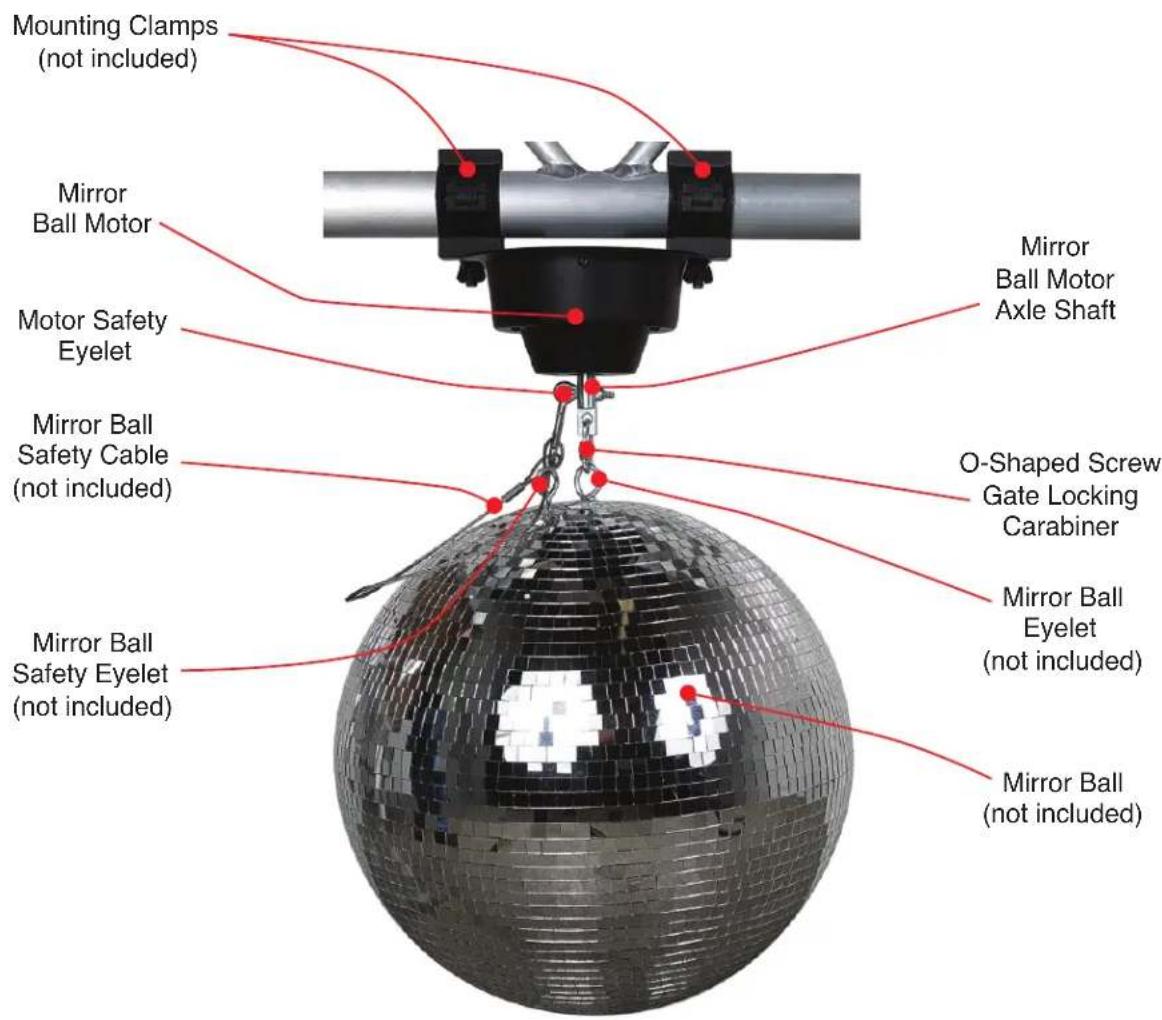
INCLUDED ITEMS
Mirror Ball Motor (x1)
Mirror Ball Motor Safety Eyelet (x1)
O-Shaped Screw Gate Locking Carabiner (x1)
INSTALLATION GUIDELINES

FLAMMABLE MATERIAL WARNING
Keep devices at least 5.0 feet )1.5m) away from flammable materials and/or pyrotechnics.

ELECTRICAL CONNECTIONS
A qualified electrician should be used for all electrical connections and/or installations.

DO NOT INSTALL THE DEVICES IF YOU ARE NOT QUALIFIED TO DO SO!
OVERHEAD RIGGING REQUIRES EXTENSIVE EXPERIENCE, INCLUDING CALCULATING WORKING LOAD LIMITS, KNOWLEDGE OF INSTALLATION MATERIAL BEING USED, AND PERIODIC SAFETY INSPECTION OF ALL INSTALLATION MATERIAL AND THE MOTOR, AMONG OTHER SKILLS. IF YOU LACK THESE QUALIFICATIONS, DO NOT ATTEMPT TO PERFORM THE INSTALLATION YOURSELF. IMPROPER INSTALLATION CAN RESULT IN BODILY INJURY.
BEFORE RIGGING/MOUNTING DEVICES TO ANY METAL TRUSS/STRUCTURE OR CEILING, A PROFESSIONAL EQUIPMENT INSTALLER MUST BE CONSULTED TO DETERMINE IF THE METAL TRUSS/STRUCTURE OR CEILING IS PROPERLY CERTIFIED TO SAFELY HOLD THE COMBINED WEIGHT OF THE MOTOR, MIRROR BALL, LIGHT, CLAMPS, CABLES, AND ACCESSORIES.
BEFORE MOUNTING DEVICES TO ANY SURFACE OR STRUCTURE, MAKE SURE THE SURFACE OR STRUCTURE CAN HOLD A MINIMUM POINT LOAD OF 10 TIMES THE WEIGHT OF THE DEVICES.
MAKE SURE SCREWS AND/OR ANCHOR BOLTS (NOT INCLUDED) FIT INTO MOUNTING HOLES!
MAKE SURE TO DRILL SCREWS AND/OR ANCHOR BOLTS INTO WOOD OR METAL! DO NOT MOUNT THE MOTOR TO A CEILING SURFACE MADE OF DRY WALL!
MOTOR MUST ONLY BE INSTALLED IN A HORIZONTAL VIBRATION-FREE POSITION!
MOTOR MUST ONLY BE INSTALLED IN AN OSCILLATION-FREE LOCATION!
FOR ADDED PROTECTION, MOUNT DEVICES IN AREAS OUTSIDE WALKING PATHS, SEATING AREAS, OR IN AREAS WERE UNAUTHORIZED PERSONNEL CAN REACH THE DEVICES.
MIRROR BALL BE SECURED WITH A SECONDARY SAFETY ATTACHMENT, SUCH AS AN APPROPRIATELY RATED SAFETY CABLE. (NOT INCLUDED)
NEVER STAND DIRECTLY BELOW THE DEVICES WHEN MOUNTING, REMOVING OR SERVICING.
DEVICES MUST ALL BE INSTALLED FOLLOWING ALL LOCAL, NATIONAL, AND COUNTRY COM-MERICAL ELECTRICAL AND CONSTRUCTION CODES AND REGULATIONS.
FOR USE WITH UP TO 20-INCH (51CM) MIRROR BALL. MAX LOAD 22 LBS. (10KG)
INSTALLATION GUIDELINES
CLAMP / TRUSS MOUNTING
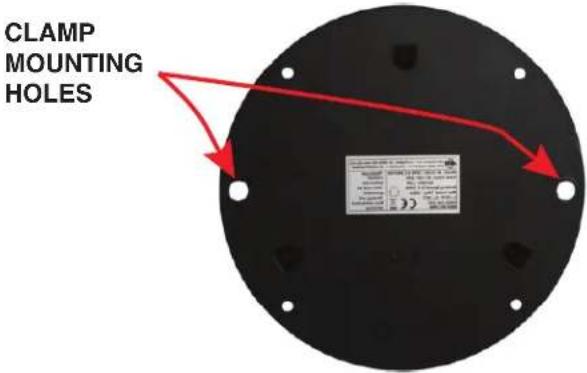
The motor can be mounting to a truss by attaching two (2) mounting clamps (not included) to the two (2) large mounting holes located on each side of the top of the motor, as shown in the image to the right.
natural_image
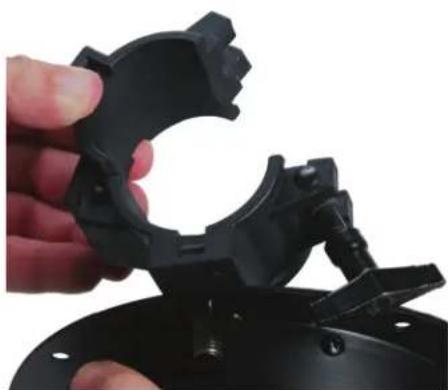
Close-up of a hand holding a black plastic mechanical component, no visible text or symbolsAttach the clamps securely to the mounting holes on the motor. Make sure the clamps are firmly attached to the motor before mounting to the truss.
natural_image
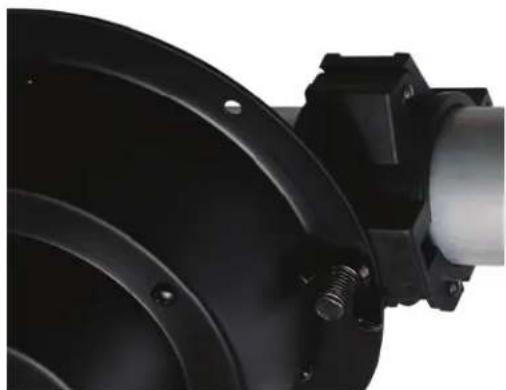
Close-up of a black industrial fan or pump component with threaded screw and central shaft (no visible text or symbols)Attach to motor to the truss with both clamps. Always verify that the motor is fully and securely attached.
CEILING MOUNTING
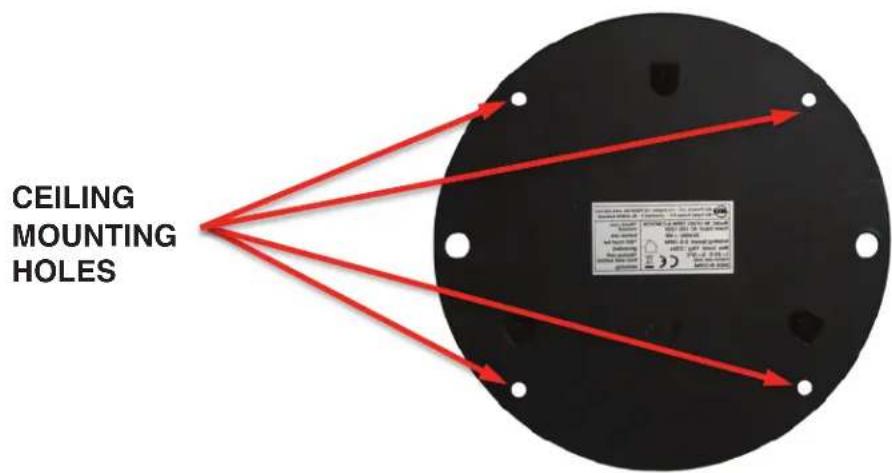
The motor can be mounted onto a flat ceiling surface using the four (4) mounting holes along the outside edges. The ceiling surface must be rated to support at least 10 times the combined total weight of the motor and the attached mirror ball.
INSTALLATION GUIDELINES
ATTACHING MIRROR BALL TO MOTOR
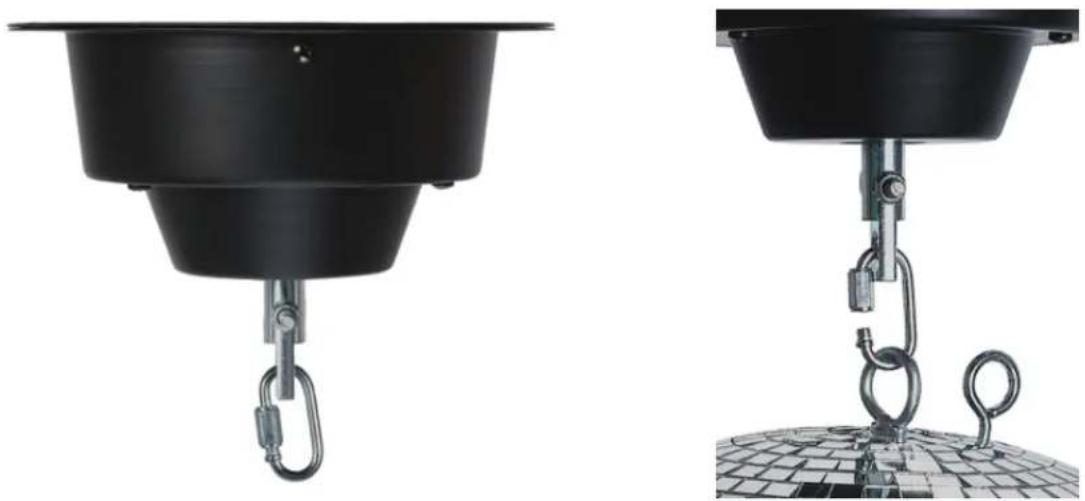
Attach the mirror ball to the motor axle using the included carabiner. Always make sure to securely close the carabiner after inserting the mirror ball eyelet!
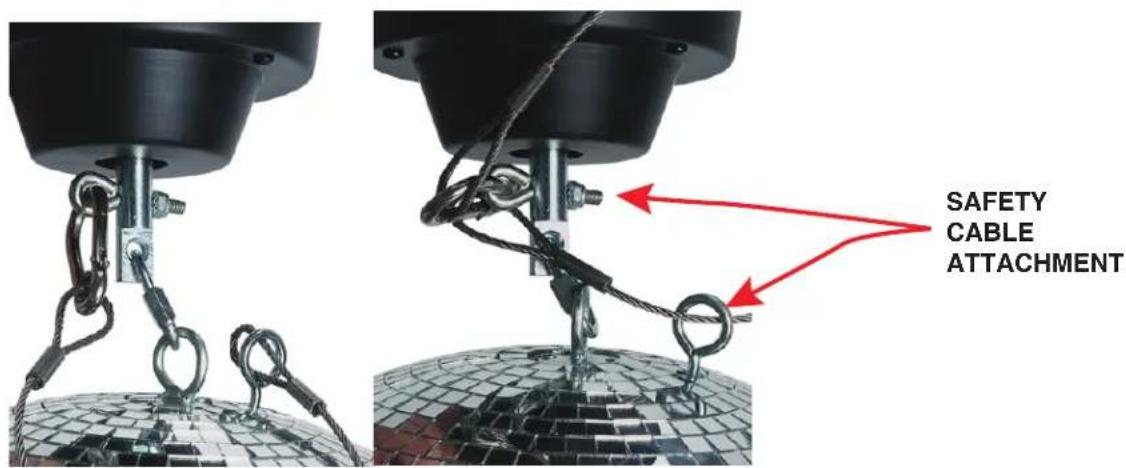
If the mirror ball that you are installing includes a safety cable eyelet, install an appropriately rated safety cable by connecting one end of the safety cable to the mirror ball safety cable eyelet and the other end to the motor safety cable eyelet. Please note that the safety cable is sold separately.
Switch the motor on and confirm that mirror ball rotation is not obstructed.
PLEASE CONSULT A PROFESSIONAL FOR CEILING INSTALLATION GUIDANCE!
TROUBLE SHOOTING
Mirror ball attached to motor does not rotate, or rotates inconsistently.
- Confirm the motor has AC power.
- Check if circuit breaker that controls the power outlet is not tripped.
- Confirm the AC power cord from the motor is not damaged or cut.
- Confirm the eyelet attached to the mirror ball is not damaged or loose.
- If none of these solutions work, please contact ADJ Customer Service.
Motor makes noise when rotating.
- Disconnect AC power from the motor, remove mirror ball, and uninstall the motor.
- Inspect the motor for any signs of damage such as from water or moisture.
- Place the motor on a flat surface and connect to an AC power source. If motor makes noise while rotating under power, please contact ADJ Customer Service.
- If the motor does not make noise under power, confirm that the weight of the mirror ball is within the operating limits of the motor.
- If none of these solutions work, please contact ADJ Customer Service.
FREQUENTLY ASKED QUESTIONS
What is the maximum size of the mirror ball that can be attached to the motor?
The motor can handle mirror balls up to 20 inches (51cm) in size.
What is the rotation speed, and can it be adjusted?
The maximum rotation speed is approximately 2.5 - 3 RPM (rotations per minute) and cannot be adjusted. The actual rotation speed may vary depending on the weight of the mirror ball attached.
Can the motor be mounted onto to a ceiling?
Yes, it can be installed onto any flat ceiling surface that can support at least 10 times the combined weight of the motor and the attached mirror ball. Careful planning must be used when calculating the combined weight and determining if the flat ceiling surface can support the weight of the motor and mirror ball. PLEASE CONSULT A PROFESSIONAL FOR CEILING INSTALLATION GUIDANCE!
Can the motor be installed to truss?
Yes, it can be installed to truss using two (2) professional truss clamps (not included). First attach the two (2) clamps to the motor securely using hardware included with the clamps. Then attach the clamps and motor to the truss, making sure the motor is level with the horizontal, with the axle shaft pointing straight down toward the ground.
Can the motor be connected to a dimmer pack?
The motor should NEVER be connected to a dimmer pack! However, the motor can be connected to an ON/OFF switch/replay pack.
TECHNICAL SPECIFICATIONS
• Heavy-duty 3 R.P.M. Mirror Ball Motor
- For use with up to a 20-inch (50cm) mirror ball
- Great for night clubs and other permanent installations, mobile entertainers & bands
- Easy-to-use: plug and play
- Rotation speed: 2.5–3 R.P.M.
- Indoor Use Only
• Max load: 22 lbs. /10kg.
• Power: AC 120V/60Hz or 230V/50Hz (non switchable)
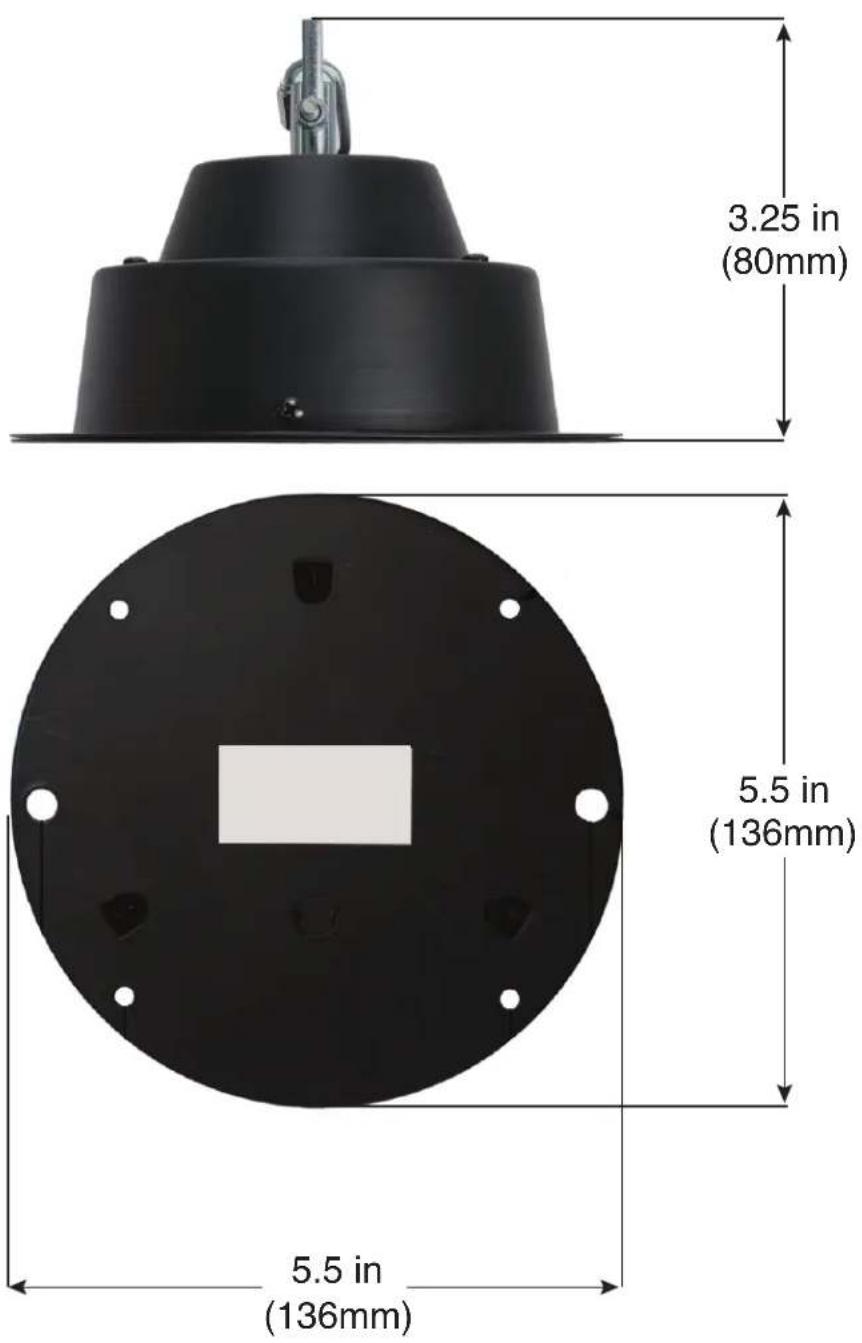
- Dimensions (LxWxH): 5.5"x5.5"x3.25"/136x136x80mm
• Weight: 2.5 lbs. / 1.055 kgs.
- ETL Approved

Intertek 4005818
OPTIONAL ACCESSORIES
| SKU DESCRIPTION |
| EM12 12” Diameter Mirror Ball |
| EM16 16” Diameter Mirror Ball |
| EM20 20” Diameter Mirror Ball |
| S-Cable/60 Safety Cable, 60-pound weight rating |
| O-Clamp Truss O-Clamp, 3 available sizes: 2, 1.5, & 1 |
| PL-1000 Pinspot PAR Light |
| LL-4515 Replacement Lamp: 6V 30W Halogen PAR-36 |
| SAB673 Saber Spot RGBL |
DIMENSIONAL DRAWINGS
- MBMHD3
- Eliminator Lighting
- ADJ SUPPLY Europe B.V
- ADJ PRODUCTS GROUP Mexico
- DOCUMENT VERSION
- CONTENTS
- GENERAL INFORMATION
- INTRODUCTION
- UNPACKING
- CUSTOMER SUPPORT
- WARRANTY RETURNS
- LIMITED WARRANTY (USA ONLY)
- LIMITED WARRANTY PERIODS
- SAFETY GUIDELINES
- PROTECTION CLASS 1 – DEVICES MUST BE PROPERLY GROUNDED
- MAINTENANCE GUIDELINES
- DISCONNECT POWER BEFORE PERFORMING ANY MAINTENANCE!
- CLEANING
- MAINTENANCE
- OVERVIEW
- INCLUDED ITEMS
- INSTALLATION GUIDELINES
- CLAMP / TRUSS MOUNTING
- CEILING MOUNTING
- TROUBLE SHOOTING
- Motor makes noise when rotating.
- FREQUENTLY ASKED QUESTIONS
- What is the rotation speed, and can it be adjusted?
- Can the motor be mounted onto to a ceiling?
- Can the motor be installed to truss?
- Can the motor be connected to a dimmer pack?
- TECHNICAL SPECIFICATIONS
- OPTIONAL ACCESSORIES
- DIMENSIONAL DRAWINGS
Brand : Eliminator Lighting
Model : MBMHD3
Category : Lighting