
BT9377 - Loudspeaker Lenoxx - Free user manual and instructions
Find the device manual for free BT9377 Lenoxx in PDF.


| Product Type | Portable Bluetooth Speaker |
| Brand | Lenoxx |
| Model | BT9377 |
| Dimensions (W x H x D) | 200 x 100 x 100 mm |
| Weight | 0.5 kg |
| Power Source | Built-in rechargeable battery, USB-C charging |
| Battery Life | Up to 8 hours |
| Charging Time | 2-3 hours |
| Bluetooth Version | 5.0 |
| Wireless Range | 10 meters |
| Audio Inputs | Bluetooth, AUX 3.5mm, USB |
| Speaker Output Power | 10 W |
| Frequency Response | 80 Hz - 20 kHz |
| Controls | Power, Volume, Play/Pause, Next/Previous, Bluetooth pairing |
| Features | Hands-free calling, microSD card playback, FM radio |
| Cleaning | Wipe with a soft, dry cloth |
| Safety | Do not expose to water or extreme temperatures |
| Spare Parts | Not available individually |
| Repairability | Not user-serviceable; contact support for issues |
| Warranty | 1 year |
| Included Accessories | USB charging cable, AUX cable |
Frequently Asked Questions - BT9377 Lenoxx
User questions about BT9377 Lenoxx
0 question about this device. Answer the ones you know or ask your own.
Ask a new question about this device
Download the instructions for your Loudspeaker in PDF format for free! Find your manual BT9377 - Lenoxx and take your electronic device back in hand. On this page are published all the documents necessary for the use of your device. BT9377 by Lenoxx.
USER MANUAL BT9377 Lenoxx
natural_image
Black electronic device with exposed speaker and fan components, no visible text or symbolsThe illustrations used in this manual are to illustrate the operation method and product structure of the product. Where there is a small difference between the physical item and the illustrations, please take the physical as the standard.

WARNING: TO AVOID THE DANGER OF FIRE OR ELECTRIC SHOCK, DO NOT EXPOSE THIS APPLIANCE, IT'S CHARGE CORD, MICROPHONE AND REMOTE TO RAIN OR MOISTURE. NEVER OPEN THE CABINET, AS DANGEROUS HIGH VOLTAGES ARE CONTAINED INSIDE. ONLY A QUALIFIED SERVICE TECHNICIAN SHOULD ATTEMPT TO OPEN THE CABINET. THERE ARE NO USER SERVICEABLE PARTS INSIDE. REFER SERVICING TO QUALIFIED SERVICE PERSONNEL
CAUTION:
This equipment generates, uses and can radiate radio frequency energy, if not installed and used in accordance with the instructions, may cause harmful interference to radio communication. However, this is no guarantee that interference will not occur in a particular installation. If this equipment does cause harmful interference to radio or television reception, which can be determined by turning the equipment off and on, the user is encouraged to try to correct the interference by one of the following measures;
• Reorient or relocate the receiving antenna
- Increase the separation between the equipment and receiver
- Connect the equipment into an outlet on a circuit different from that to which the receiver is connected
- Consult the dealer or an experienced radio/TV technician for help


The lightning flash with an arrowhead symbol within an equilateral triangle is intended to alert the user to the presence of uninsulated "dangerous voltage" within the product's

The exclamation point within an equilateral triangle is intended to alert the user to the presence of important operating and maintenance (servicing) instructions in the literature
WARNING: DO NOT EXPOSE THIS APPLIANCE TO RAIN OR MOISTURE, DUE TO THE HIGH RISK OF FIRE OR ELECTRIC SHOCK, DO NOT OPEN THE CABINET, DANGEROUS HIGH VOLTAGES ARE PRESENT INSIDE THE ENCLOSURE. ONLY QUALIFIED SERVICE PERSONNEL SHOULD ATTEMPT THIS.
Portable speakers







IMPORTANT SAFETY INSTRUCTIONS:
CAUTION:
To reduce the risk of fire or electric shock, do not expose this equipment, it's charger and remote to rain or moisture; do not use it anywhere near water or where water splashes or drips; do not touch the plug with wet hands.
In the event of water or other liquids entering the device, unplug it immediately and clean and dry it as best as possible. Then have it checked for damage by a qualified technician or contact the after-sales support line.
Electrical safety and cord handling:
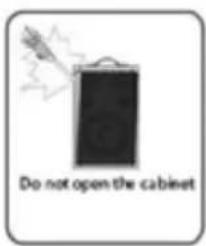
- To prevent contact with high voltage components inside, do not attempt to open the equipment.
- Before installing this equipment, make sure your outlet voltage corresponds to the voltage stated on the appliance rating label.
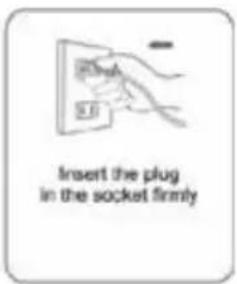
- When connecting the equipment, align the plug properly and insert it fully to prevent electric shock.
- Only use this equipment with the charge cord supplied, and do not overload the power outlet.
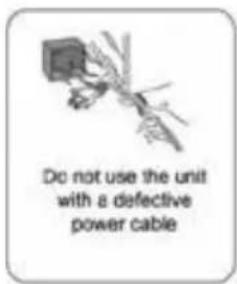
- If the charge cord becomes damaged, do not use the equipment. The charge cord must be replaced by the manufacturer or similarly qualified personnel to avoid a hazard. Contact the after-sales support line for advice.
- Do not repair the unit yourself. This product has no user-serviceable parts.
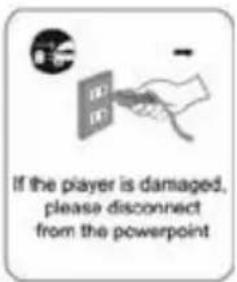
Only have it serviced by qualified personnel. Contact the after-sales support line for advice. - Unplug the unit from the power outlet after use to avoid possible damage during electrical storms, or when the equipment will be unattended or unused for an extended period.
- Do not let the charge cord hang over the edge of a table or counter or touch any hot surface. Do not allow anything to rest on or roll over the charger's cord and run any cords so that no one steps on or trips over them.
- Do not run the charger's cord near heat-producing appliances such as radiators, stoves or irons. Excessive heat could melt insulation and expose live wires.
- Always grasp the plug, not the cord, when disconnecting the charger from the unit. Pulling the cord can damage the internal wires and may cause a fire.
Installation:
When installing the unit, make sure to place it:
- Away from heat sources, radiators or other products that produce heat.
- Away from areas with hot temperatures, high humidity or direct sunlight.
- Away from excess dirt and dust.
- Away from open windows and any place where water may get into the unit and damage it.
- Make sure there is free circulation of air around the unit. Do not place it on a thick carpet, a bed or any place where ventilation holes are obstructed. Leave at least 10cm clearance around the unit.
- Make sure the mains socket is always readily accessible.
Usage conditions and restrictions:
- Do not place heavy objects on top of the equipment or step on it.
- Do not place objects filled with water (such as vases) or any naked flame sources (such as lit candles, incense sticks or cigarettes) on top of the unit.
- The equipment is not intended for use by persons (including children) with reduced physical, sensory or mental capabilities, or lack of experience and knowledge, unless they have been given supervision or instruction concerning use of the equipment by a person responsible for their safety.
- Young children should be supervised to ensure they do not play with the equipment. Close supervision is always necessary when an appliance is used by or near children.
- We assume no liability for any damage caused by noncompliance with these instructions or any other improper use or mishandling of the equipment.
- Usage of controls, adjustments or performance of procedures other than those specified herein may result in hazardous radiation exposure. Repairs may not be carried out by anyone except qualified service personnel.
Getting Started
Before First Use:
- The unit may become hot during operation. Always leave sufficient space around the unit for ventilation.
- The voltage supplied to the unit should match the voltage that is printed on the rear panel. If you have any doubts concerning this matter, consult an electrician.
- Avoid placing the unit in direct sunlight or close to any sources of heat. Also avoid locations subject to vibrations and excessive dust, heat, cold or moisture.
- Do not expose the unit to water.
- Do not place the unit on an amplifier or receiver.
- Do not open the cabinet as this might result in damage to the circuits or an electric shock. If a foreign object gets into the unit, contact your dealer or service company.
PAGE 6
Cleaning:
- Unplug the unit from the power outlet before cleaning.
- Do not clean the unit with chemical solvents as this may damage the finish. Use a clean, dry cloth.
- Do not submerge the unit, its charger or remote in water.
Remote control battery warning:
This product contains a coin/button cell battery inside.
If swallowed, go straight to a hospital emergency room.

- WARNING - KEEP BATTERIES OUT OF REACH OF CHILDREN
- Swallowing may lead to serious injury in as little as 2 hours or death, due to chemical burns and potential perforation of the oesophagus.
- If you suspect your child has swallowed or inserted a button battery immediately call the 24-hour Poisons Information Centre on 13 11 26 (in Australia) or 24-hour National Poisons Centre on 0800 764 766 (in New Zealand) for fast, expert advice.
- Examine devices and make sure the battery compartment is correctly secured, e.g. that the screw or other mechanical fastener is tightened. Do not use if compartment is not secure.
- Dispose of used button batteries immediately and safely. Flat batteries can still be dangerous.
- Tell others about the risk associated with button batteries and how to keep their children safe.
How to charge the battery:
Connect the AC power cord, turn the unit switch to AC ON, the charging red light indicator will come on. When the battery is fully charged the red light will turn off. Charging time from empty is approximately 8 hours.
Maximum run time on full charge is 2 – 3 hours, when the volume is set to the middle of the adjustment range. Note that using lower volumes will increase the battery run time, and higher volumes will decrease the battery run time. Also using the flashing strobe light function will decrease the battery run time.
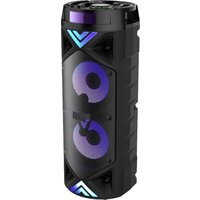
This item is portable speaker system, with USB/SD card play function, AUX in, FM radio, Bluetooth. It includes 1 x wireless microphone, a built in 12V/8Ah rechargeable battery and wheels and carry handle for easy transportation.
Products Features:
Power output: 160W
Sensitivity: 700MV
Frequency range: 62-
16KHz
Voltage range: 110-240V AC 50/60Hz
You have the choice to operate the unit on AC or DC power. Please use the switch at the front of the unit to select AC or DC operation. Before using DC operation, please ensure the battery is charged.
FLASHING LIGHTS:
This unit features flashing lights which will come on when the music volume level is turned higher. The louder the music is, the more lights will flash with high brightness. Please note: the louder the music and flashing lights combined will use more battery then lower music volume and no flashing lights.
USB/SD CARD:
Connect the USB flash stick or insert an SD card into the card slot. Use the mode button on the unit or remote control to change the mode to USB/CARD mode. When the correct mode has been selected, you can then use the backward, play/pause and forward controls on the unit/remote control for music playback.
Support MP3 file only.
Max capacity size: 16GB
AUX:
To connect an AUX in device such as an MP3 player/mobile phone using its earphone socket, connect it to the AUX IN port at the rear of the unit using the 3.5mm AUX in lead which is included.
To connect an AUX in device (EG: DVD player) to the back of the unit, using an RCA lead which is not included.
Use the mode button on the unit or remote control to change the mode to AUX mode. When the correct mode has been selected, you can then use the backward, play/pause and forward controls on the unit/remote control for music playback.
AUX in port on the front of the unit: use with a 3.5mm AUX in lead with a 3.5mm jack on each end – not included.
FM RADIO:
Use the mode button on the unit or remote control to change the mode to FM mode.
Hold the PP/SCAN button on the remote control, it will auto search though all FM radio stations and auto store the FM radio station in range.
The unit can store a maximum of 30 stations; the number stored will depend on the quantity available in range.
Press the ◀◀ and ▶◀▶ buttons on the remote control to change the stations which have been auto stored.
The numerical buttons on the remote control can be used to select a stored radio station to play.
BLUETOOTH:
Use the mode button on the unit or remote control to change the mode to USB/CARD mode.
Access your devices Bluetooth settings and pair your device to the unit. The Bluetooth pair name is "BT9377N"
When the correct mode has been selected, you can then use the backward, play/pause and forward controls on the unit/remote control for music playback.
ADJUSTMENT:
VOLUME: You can adjust the volume on the unit using the VOLUME knob on the unit or the VOL+ and VOL- buttons on the remote control.
GRAPHIC EQUALISER: use the controls to adjust the equalizer during music playback. EQ: You can adjust the equalizer on the unit using the EQ button on the unit or remote control. There are 5 different EQ effects.
Press the EQ button to change between the effects.
MICROPHONE EFFECT: use the MIC ECHO and MIC VOLUME controls on the unit to adjust the mic volume and echo when using a connected or wireless microphone.
GUITAR EFFECT: use the GUITAR VOL control on the unit to adjust the guitar volume when using the guitar input.
BASS AND TREBLE: use the bass and treble controls on the unit to adjust the bass and treble during guitar input.

- Power light
- Charge light
- LED display
- USB slot
- CARD slot(SD/MMC)
6.remote receive window - FUNC button
- Pause/play button
-
PREV button
-
NEXT button
- EQ button
- REP button
- Power switch
- EQ volume adjustment
- MIC input
- MIC volume adjustment
- Bass adjustment
-
MIC echo adjustment
-
AUX in port
- Guitar volume adjustment
- Treble adjustment
- Main volume adjustment
- Guitar input
- DC OUT(5V 1A) slot
- DC OUT(5V 1A) slot
REMOTE CONTROL:

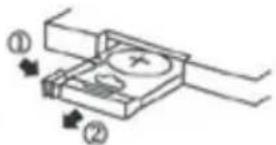
Battery installation
Remove the cover of the battery compartment of the remote control according to the diagram on the right.
Step 1: Press the ridged area rightward.
Step 2: At the same time, pull the battery tray out.
Step 3: Place a CR2025 lithium battery on the tray with the positive side facing upward.
Step 4: Replace the cover.
Remote control
Back panel silk screen:

- AC power in
- AUX in external audio input L
- AUX in external audio input R
Accessories included:
1 x wireless
microphone 1 x
remote control
1 x 12V/8Ah rechargeable battery fitted
inside the unit 1 x AUX in lead
LENOXX
www.lenoxx.com.au

1300 666 848

LenoxxElectronics

LenoxxElectronics

@LenoxxAustralia


- CAUTION:
- IMPORTANT SAFETY INSTRUCTIONS:
- Electrical safety and cord handling:
- Installation:
- Usage conditions and restrictions:
- Getting Started
- Before First Use:
- PAGE 6
- Cleaning:
- Remote control battery warning:
- This product contains a coin/button cell battery inside.
- How to charge the battery:
- Products Features:
- FLASHING LIGHTS:
- USB/SD CARD:
- AUX:
- FM RADIO:
- BLUETOOTH:
- ADJUSTMENT:
- REMOTE CONTROL:
- Battery installation
- LENOXX
Brand : Lenoxx
Model : BT9377
Category : Loudspeaker