GCDF220B - Ventilateur domestique GoldAir - Free user manual and instructions
Find the device manual for free GCDF220B GoldAir in PDF.


| Product Type | 30cm Drum Style Desk Fan |
| Model Number | GCDF220B (Black) / GCDF220W (White) |
| Fan Diameter | 30 cm (12 inches) |
| Dimensions (Approx.) | 45 cm (H) x 30 cm (W) x 25 cm (D) |
| Weight | 2.5 kg |
| Power Supply | 220-240 V AC, 50/60 Hz |
| Power Consumption | 45 W |
| Speed Settings | 3 speeds (Low, Medium, High) |
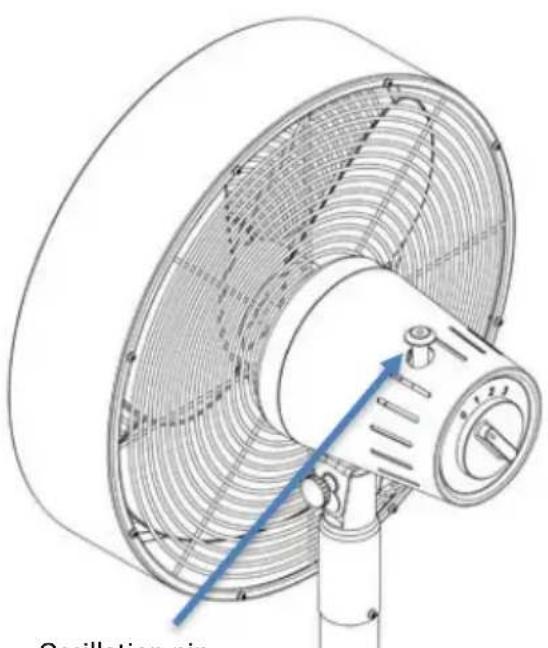
| Oscillation | Yes, with oscillation pin on top of motor |
| Tilt Adjustment | Yes, via tilt adjustment knob and bolt |
| Control Type | Rotary dial (On/Off and speed) |
| Base Type | Sturdy round base with thumb screw |
| Material | Plastic and metal components |
| Cord Length | 1.5 m (approx.) |
| Assembly Required | Yes (base, post, head assembly) |
| Cleaning | Wipe with soft damp cloth; do not immerse |
| Safety Features | Overheating protection via dust removal; keep 1m clearance; no immersion |
| Usage | Indoor household use only |
| Warranty | 1 year (domestic use) |
| Manufacturer | Goldair / CDB Goldair (NZ & Australia) |
Frequently Asked Questions - GCDF220B GoldAir
User questions about GCDF220B GoldAir
0 question about this device. Answer the ones you know or ask your own.
Ask a new question about this device
Download the instructions for your Ventilateur domestique in PDF format for free! Find your manual GCDF220B - GoldAir and take your electronic device back in hand. On this page are published all the documents necessary for the use of your device. GCDF220B by GoldAir.
USER MANUAL GCDF220B GoldAir
Operating Instructions
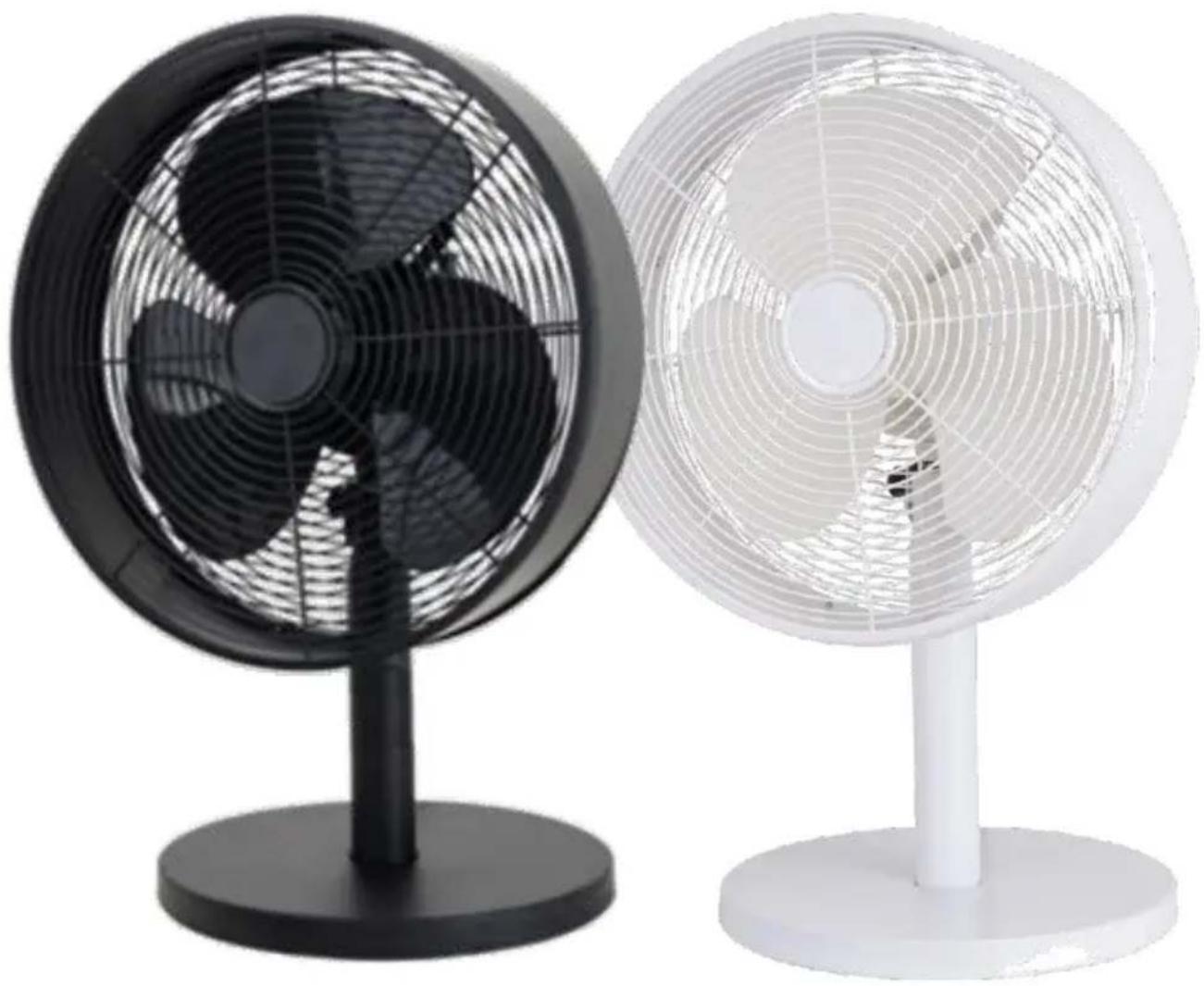
30cm Drum Style Desk Fan
natural_image
Two desktop fans, one black and one white, displayed against a plain background (no text or symbols visible)Item: GCDF220B / GCDF220W
General Care and Safety Guide
Thank you for choosing this Goldair product. This Goldair appliance has been designed and manufactured to high standards of engineering and with proper use and care, as described in this leaflet, will give you years of useful service. Please read these instructions carefully and keep them for future reference.
- Use only the voltage specified on the rating plate of the appliance.
- Keep all objects at least 1 Metre from the front, sides and rear of the appliance
- This appliance is intended for household use only and not for commercial or industrial use.
- Use this appliance only as described in this manual. Any other use is not recommended by the manufacturer and may cause fire, electric shock or injury.
- The common cause of overheating is deposits of dust or fluff in the appliance. Ensure these deposits are removed regularly by unplugging the appliance and vacuum cleaning the air vents and grills.
- Always unplug appliance when not in use.
- When the appliance has been unpacked, check it for transport damage and ensure all parts have been delivered. If parts are missing or the appliance has been damaged, contact the CDB Customer Services Team.
- If your appliance does not work, or is not working properly, contact the place of purchase. Repair work on the appliance by unqualified persons can cause serious risk to the user.
- Ensure hands are dry before handling the plug or the main unit.
- Carry out regular checks of the supply cord to ensure no damage is evident.
- Children should be supervised to ensure that they do not play with the appliance.
- Ensure that the cord is fully extended (not coiled) while in use.
- Avoid contact with the moving parts. Keep hands, hair, clothing, away from blade of the fan during operation to reduce the risk of injury to person and/or damage to the unit.
- Switch off and use handles provided when moving.
- This appliance is not intended for use by persons (including children) with reduced physical, sensory or mental capabilities or lack of experience and knowledge, unless they are supervised or have been given instruction concerning the use of the fan by a person responsible for their safety.
- It is recommended that this fan is plugged directly into the wall socket.
-
A correctly specified, undamaged extension cord may be used with this fan provided it is used in a safe manner.
-
Never place appliance close to radiant heat source.
- Never operate in areas where petrol, paint or other flammable liquids are used or stored.
- Never use the appliance to dry clothes.
- Never insert or allow foreign objects to enter any ventilation or exhaust opening, as this may cause an electric shock, fire or damage to the appliance.
- Never use abrasive cleaning products on this appliance. Clean with a damp cloth (not wet) rinsed in hot soapy water only.
- Ensure that the fan is switched off from the supply mains before removing the guard.
- Never connect the appliance to mains supply until completely assembled and adjusted.
- Never remove plug from power socket until the appliance has been switched off.
- Never remove plug from power socket by pulling cord – always grip plug.
- Never twist, kink or wrap the cord around the appliance, as this may cause the insulation to weaken and split. Always ensure that all cord has been removed from any cord storage area and is unrolled before use.
- Never use this appliance in the immediate surrounds of a bath, a shower, or a swimming pool or other liquids. The appliance must not be immersed in any liquids.
- Due to the risk of injury, never use this appliance for any purpose other than its intended use. This appliance is intended for use in household and similar applications such as staff kitchen areas in shops, offices and other working environments; farm houses, by clients in hotels, motels, bed and breakfast type environments and other residential type environments
- Never use this appliance outdoors.
- Never operate the appliance with a damaged cord or plug, after it malfunctions, or if it has been damaged in any manner. Have the appliance checked and repaired by a qualified electrician if repair is necessary. If the supply cord is damaged, it must be replaced by the manufacturer, its service agent or similarly qualified persons in order to avoid a hazard.
- Never place the unit in wardrobes or other enclosed spaces as this may cause fire hazards.
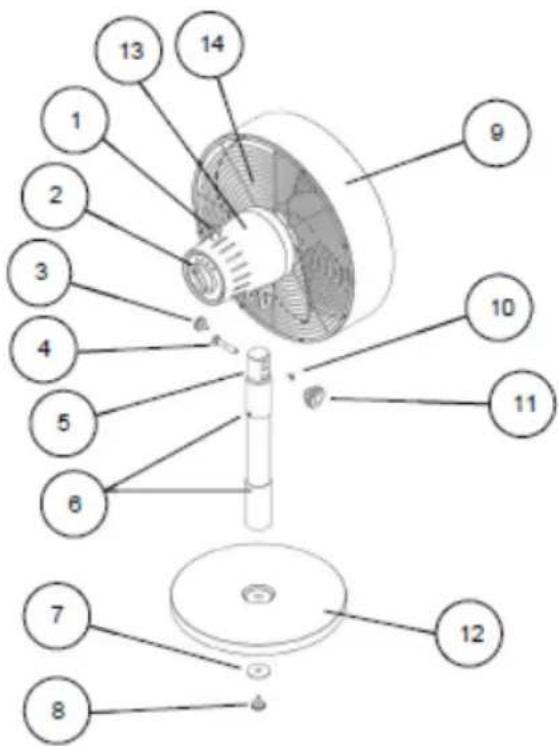
Components
- Oscillating knob
- On / Off / Speed Control
- Tilt range knob
- Tilt adjustment bolt
- Post top
- Post
- Base washer
- Base thumb screw
- Fan head assembly
- Tilt range screw
- Tilt adjustment knob
- Base
Assembly
Your fan has been boxed unassembled to minimise packaging waste. Each part is designed to fit together and be disassembled easily for cleaning and storage.
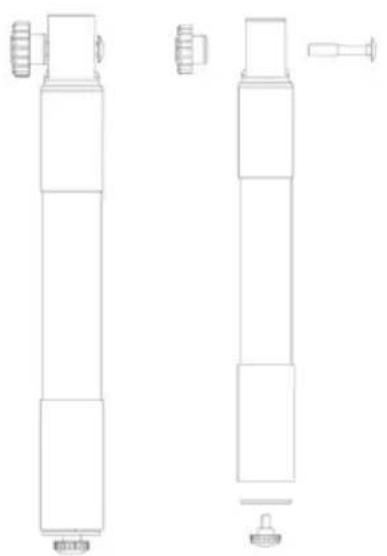
Start with the base and post as follows.
Remove the tilt adjustment knob by unscrewing the knob and slide the tilt adjustment bolt out. Remove the base thumb screw and the base washer by unscrewing as shown.
Fit the post into the recess in the top of the base and whilst holding it in place, turn over to access underneath. Place the washer over the hole and then insert the base thumb screw. Tighten securely, then turn the assembly the right way up and sit on a flat surface.
natural_image
Technical line drawing of two cylindrical mechanical components with mounting flanges (no text or symbols)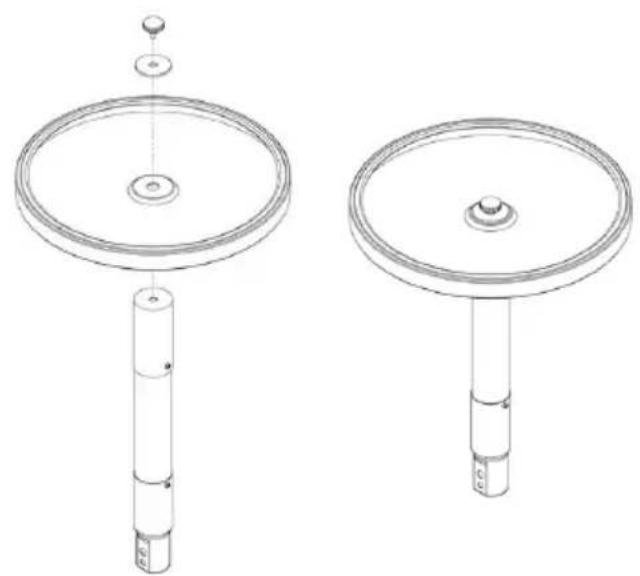
natural_image
Technical line drawing of two circular mechanical components with cylindrical bases and mounting holes (no text or symbols)Assembly (cont.)
Using a Philips screwdriver, remove the small tilt range screw from the coupling bracket on the fan neck and then unscrew the tilt range knob.
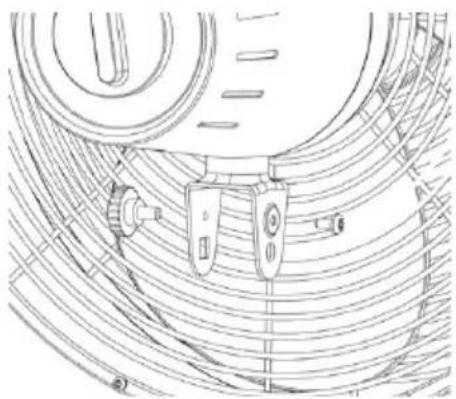
natural_image
Technical line drawing of a mechanical component with curved surfaces and mounting holes (no text or symbols)NOTE: It is important that the post and fan head are in the correct orientation when assembled.
The top section of the post has a small horizontal open slot on one side and a small horizontal depression on the other side as shown.
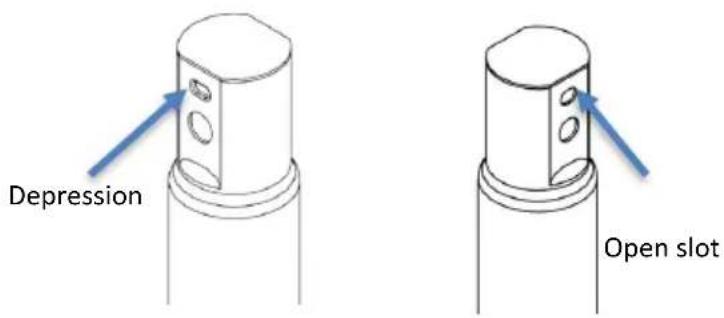
The side with the open slot is for the small tilt range screw. The side with the small depression is for the tilt range knob to tighten up onto.
Take the head assembly and position the mating section over the post end as shown.
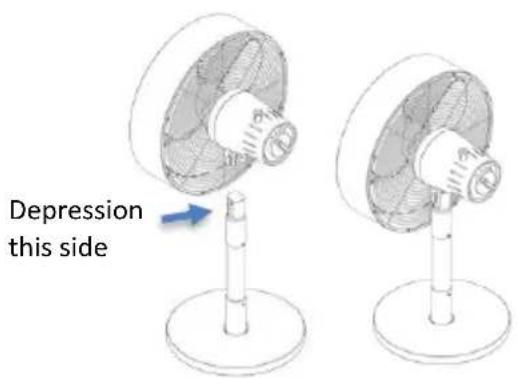
Slide the tilt adjustment bolt all the way through as shown.
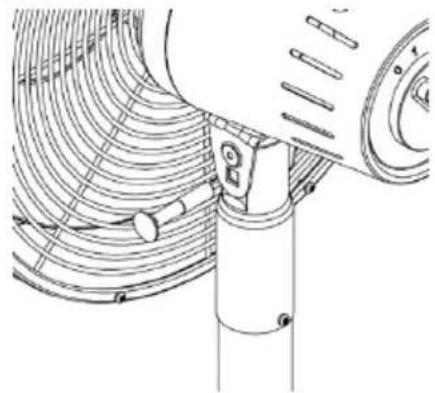
natural_image
Technical line drawing of a mechanical component with coiled cable and mounting bracket (no text or symbols)Screw in the tilt range knob to loosely secure.
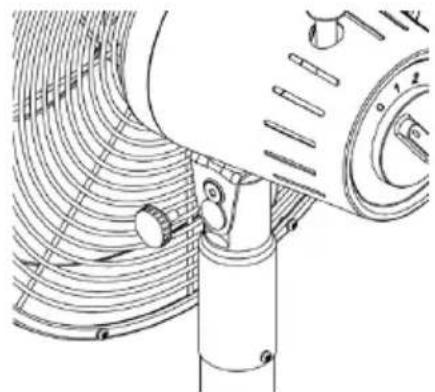
natural_image
Technical line drawing of a mechanical component with coiled tubing and a cylindrical shaft (no text or symbols)Using a Philips head screwdriver, screw in the small tilt range screw and tighten.
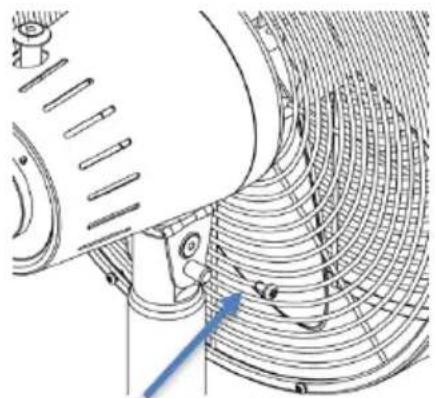
natural_image
Technical line drawing of a mechanical component with no visible text or symbolsScrew on the tilt adjustment knob and tighten.
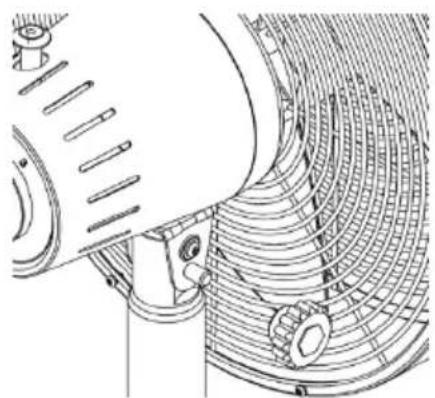
natural_image
Technical line drawing of a mechanical component with internal gears and tubing (no text or symbols)Operating your Fan
Always choose a safe location for the Fan, keeping in mind the safety precautions outlined. Ensure all packaging has been removed from the unit before use. This appliance requires no installation, it should be used solely as a portable appliance.
WARNING Keep all objects at least 1 metre from the front, sides and rear of the appliance.
IMPORTANT! NEVER COVER THIS APPLIANCE!
Fan control switch
The control switch positions are:
- 0 = OFF
• 1 = Low Speed - 2 = Medium Speed
• 3 = High Speed
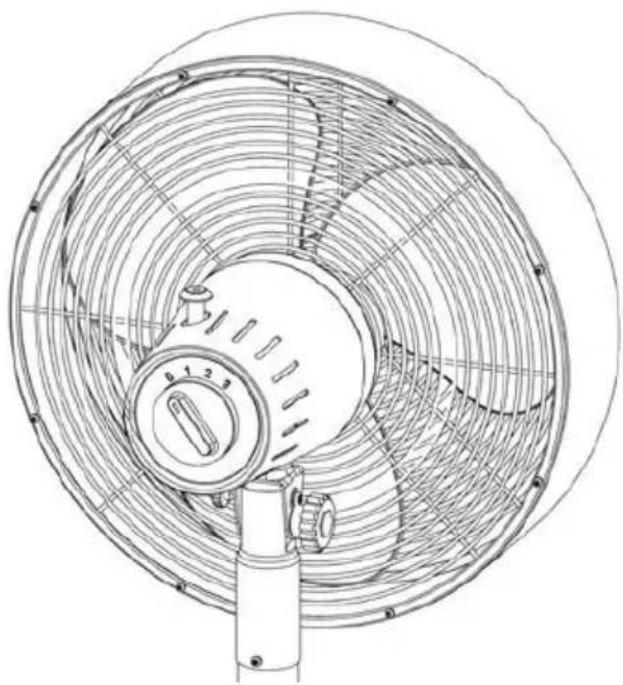
natural_image
Technical line drawing of a circular fan with internal blades and central hub (no text or symbols)Place the fan on a dry, level and sturdy surface.
Plug the power cord into the socket, making sure the speed control is at OFF position.
To operate the fan, turn speed control dial clockwise until desired wind speed is achieved.
To adjust the tilt angle, loosen both the larger tilt adjustment knob and the smaller tilt range knob, then tilt the head to the desired angle and tighten both knobs.
To activate the oscillation function, push down the oscillation pin on the top of the motor. The fan will then oscillate until the pin is pulled back up.
natural_image
Technical line drawing of a fan with an attached spiral fan and a blue directional arrow indicating airflow or movement (no text or symbols)Oscillation pin
Cleaning
To avoid risk of electric shock, before cleaning, you MUST ALWAYS switch off and unplug the fan before cleaning.
Use only a soft, damp cloth to gently wipe the fan and dry well.
Do not immerse the fan in water and never allow water to enter the motor housing.
Do not use harsh chemicals to clean the fan.
PROOF OF PURCHASE
To receive warranty retain receipt as proof of purchase. (Refer to back of booklet).
GOLDAIR
SUPPORT AND TECHNICAL ADVICE
Goldair – New Zealand
Monday – Friday 8am-5pm
Phone +64 (0)9 917 4000
Phone 0800 232 633
info@cdb.co.nz
Goldair – Australia
Monday – Friday 8am-5pm
Phone +61 (0)3 9365 5100
Phone 1300 465 324
info@cdbgoldair.com.au
CDB GOLDAIR
One Year Warranty
Thank you for purchasing this Goldair product. Your product is warranted against faults and manufacture when used in normal domestic use for a period of one year. In non-domestic use Goldair limits the voluntary warranty to three months.
Goldair undertake to repair or replace this product at no charge if found to be defective due to a manufacturing fault during the warranty period.
This warranty excludes damage caused by misuse, neglect, shipping accident, incorrect installation, or work carried out by anyone other than a qualified electrical service technician.
PLEASE KEEP YOUR RECEIPT AS THIS WILL HELP VERIFY YOUR WARRANTY.
The benefits to you given by this warranty are in addition to other rights and remedies available to you under a law in relation to the goods or services to which this warranty relates.
In Australia, our goods come with guarantees that cannot be excluded under the Australian Consumer Law. You are entitled to a replacement or refund for a major failure and compensation for any other reasonably foreseeable loss or damage. You are also entitled to have the goods repaired or replaced if the goods fail to be of acceptable quality and the failure does not amount to a major failure.
In New Zealand this warranty is additional to the conditions and guarantees of the Consumers Guarantee Act (1993).
Goldair – New Zealand
CDB Goldair
PO Box 100-707
N.S.M.C
Auckland, 0745
Phone +64 (0)9 917 4000
Phone 0800 232 633
www.goldair.co.nz
Goldair – Australia
CDB Goldair Australia Pty
PO Box 574
South Morang
Victoria, 3752
Phone +61 (0)3 9365 5100
Phone 1300 GOLDAIR (1300 465 324)
www.goldair.com.au
Goldair One Year Warranty (IMPORTANT: Please complete and retain this warranty card)
Name
Address
Place Of Purchase Date of Purchase
Name Of Product Model Number
Attach a copy of the purchase receipt to this warranty card
Brand : GoldAir
Model : GCDF220B
Category : Ventilateur domestique