OAPC167 - Air conditioner Omega Altise - Free user manual and instructions
Find the device manual for free OAPC167 Omega Altise in PDF.


| Product Type | Portable Air Conditioner |
| Brand | Omega Altise |
| Model | OAPC167 |
| Cooling Capacity | 16000 BTU/h |
| Power Consumption | 1800 W |
| Current | 8.2 A |
| Power Supply | 220-240 V / 50 Hz |
| Refrigerant | R410A |
| Compressor Type | Rotary |
| Fan Speeds | 3 (High, Medium, Low) |
| Thermostat Range | 16 °C - 31 °C |
| Timer | 0 - 24 hours |
| Modes | Auto, Cool, Fan, Dry |
| Sleep Mode | Yes |
| Swing Function | Yes (vertical auto air flow) |
| Remote Control | Included |
| Dimensions (W x H x D) | 47 x 76.4 x 37 cm |
| Gross Weight | 36 kg |
| Water Drainage | Auto-evaporating system; manual drain when full (W.F. indicator) |
| Filter Cleaning | Every 2 weeks; wash with warm water and mild detergent |
| Clearance Required | Minimum 50 cm from walls and obstacles |
| Installation | Window kit and exhaust hose included |
| Parts Included | Main unit, exhaust hose, hose connectors, window kit, remote control |
Frequently Asked Questions - OAPC167 Omega Altise
User questions about OAPC167 Omega Altise
0 question about this device. Answer the ones you know or ask your own.
Ask a new question about this device
Download the instructions for your Air conditioner in PDF format for free! Find your manual OAPC167 - Omega Altise and take your electronic device back in hand. On this page are published all the documents necessary for the use of your device. OAPC167 by Omega Altise.
USER MANUAL OAPC167 Omega Altise
Table of Contents
Table of Contents 2
Important Safeguards 3-4
Placement and Installation....5-6
Parts List....6-7
Control Panel 8
Remote Control....9
Operation Methods 9-10
Water Drainage....11
Maintenance ....12
Troubleshooting....13
Technical Data....14
Circuit Diagram ...... Appendix A
Important Safeguards
Please read this manual
Inside you will find many helpful hints on how to use and maintain your air conditioner properly. Just a little preventative care on your part can save you a great deal of time and money over the life of your air conditioner. You will find many answers to common problems inside this manual.
CAUTION
- Contact the authorized service center for repair of this air conditioner
- This air conditioner is not intended for use by young children or infirm persons, without Supervision.
- Young children should be supervised to ensure that they do not play with the appliance.
- If the power cord is damaged it must be repaired by an authorized agent of Omega Altise
SAFETY RULES
To prevent injury to the user or other people and to prevent property damage, the following instructions must be followed. Incorrect operation due to not reading the instructions may cause harm or damage.
- Your portable air conditioner should be used in such a way that it is protected from moisture (e.g. condensation or water) do not store or place the air conditioner where it can fall from an elevated surface.
- Always transport the air conditioner in a vertical position and stand it on a stable, level surface during operation.
- Turn off the air conditioner when not in use.
• Always contact an authorized qualified service agent to carry out repairs.
- If the supply cord is damaged it must be repaired by a qualified repairer
- Keep the area clear around the air conditioner. There needs to be an air path of a Minimum of 50cm all around the air conditioner from walls, furniture and curtains.
- If the air conditioner is knocked over during use turn off the air conditioner and unplug it from the power point.
- Do not operate the air conditioner in a wet room such as a bathroom or laundry
- Do not touch the air conditioner with wet hands
- Do not press buttons on the air conditioner with anything but fingers.
- Do not remove fixed covers. Do not use this air conditioner if it is malfunctioning or has been dropped or damaged
- Never use the power point switch to start or stop the air conditioner. Use the control panel first.
- Do not obstruct the inlet or outlet grills
- Do not use harsh chemicals to clean the air conditioner.
- Do not run the air conditioner near dangerous chemicals and or hazardous chemicals.
- Do not use this air conditioner for functions other than those described in this instruction manual.
ENERGY SAVING
- Use the air conditioner in the recommended room size
- Locate the air conditioner where furniture cannot obstruct air flow
- Keep blinds and curtains closed to keep out the sun
- Keep the filters clean
- Keep doors and windows closed to keep cool air in and hot air out
Placement and Installation
Placement
Place the unitflat and dry ground, and keep at least 50 cm from walls
etc. (figure 1)
Installation
- Spin slide bar connector into exhaust hose first, then spin the exhaust hose into exhaust connector (counter-clockwise).
- Put slide bar connector into adjustable slide bar, adjust window open width in order slide bar match window well, and the length of slide bar is adjustable. (figure 2)

FIGURE 1
Installation Errors
- Free access of exhaust pipe is important; If air is not taken out it will affect performance of the appliance.
- Avoid sharp bends in the exhaust-pipe (figure 2)
• Make sure air in exhaust pipe can run smoothly (figure 3)
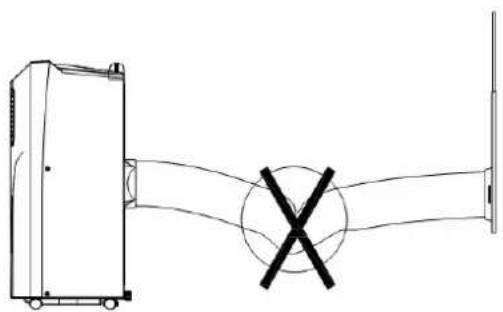

FIGURE 2 FIGURE 3
Warning
Use only the exhaust pipe supplied. Longer or extended pipes may damage the appliance
Note: maximum length of unfolding exhaust pipe is 1500mm, please shorten the length as much as possible and keep it level as much as possible when installing
Parts List
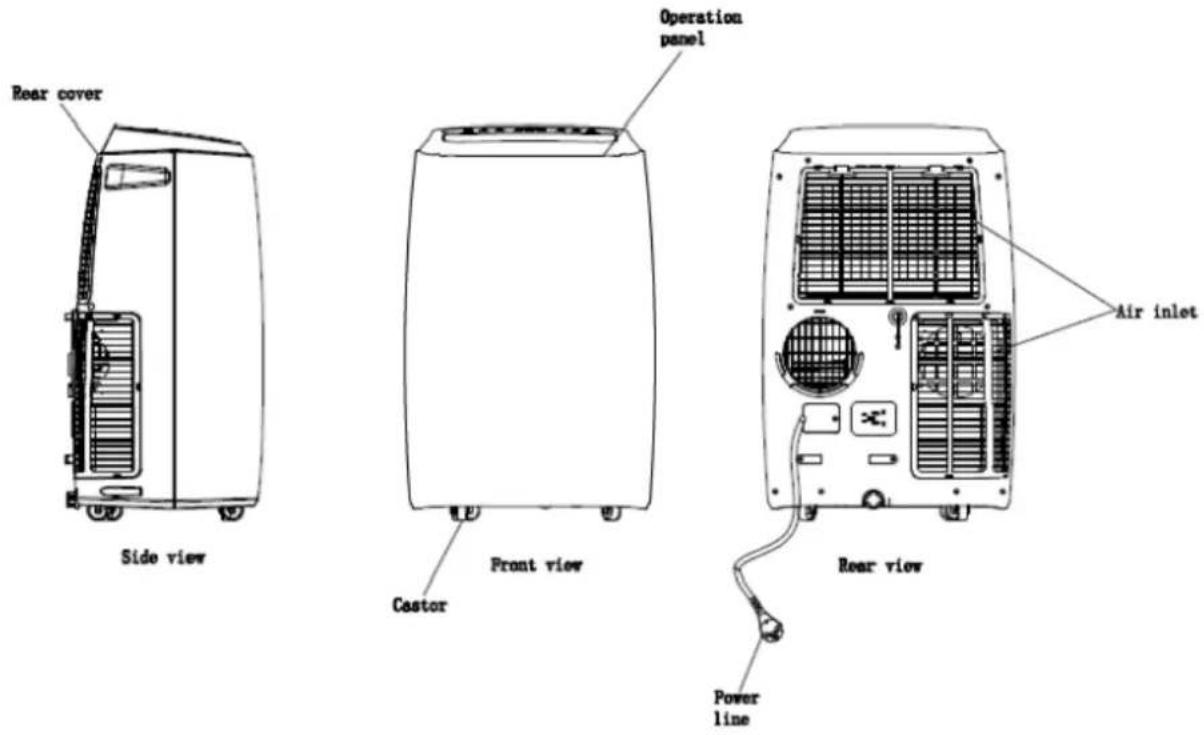
| Part | Description | Quantity |
 | Main Air Conditioner Unit | 1 |
 | Hot-Air exhaust hose | 1 |
 | Hose Connector(Window end) | 1 |
 | Hose Connector(Air Conditioner end) | 1 |
 | Window Kit | 1 |
 | Remote Control | 1 |
Control Panel
Sleep
Button

Swing Button
Timer On/Off Button
Operation
Down
Button
Up Button
Fan Speed Button
Power Button
Mode Button
- POWER: press this key to turn air conditioner On or Off. After air conditioner turns on, default value is Auto mode with medium fan speed.
- OPERATION MODE BUTTON: after air conditioner turns on, for auto mode, press this key to select the other modes: Fan, Dry/dehumidify, Cool or Auto.
- FAN SPEED: after air conditioner turns on, press this key to select between 3 fan speeds (high, medium or low).
- DOWN: under cooling mode, press this key to decrease the setting temperature from 16\~31\~; under timer mode, press this key to decrease the on/offtime.
- UP: under cooling mode, press this key to increase the temperature from 16\~31\~; under timer mode, press this key to increase the on/off timer.
- SLEEP: under cooling, press this key to turn on/off sleep function.
- ON/OFF TIMER: When the air conditioner is in standby/off mode press Timer to between 1 - 24 hours and it will turn on after selected time is reached.
When the air conditioner is in On mode press the timer to between 1 – 24 hours and it will Turn off after the selected time is reached.
NOTE: Once the air conditioner has been operated, the air conditioner will revert to the settings prior to it being switched off.
Remote Control
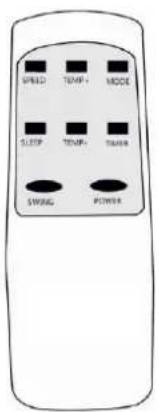
1: POWER, On/ Off Switch
2: MODE, Fan, Dry, cool and Auto
3: TIMER, Hourly Programming
4: FAN SPEED, Fan Speed Selector
– high medium or low
5: TEMP+, Temperature Selector Up
6: TEMP-, Temperature Selector Down
7: SLEEP, Night Operation Selector
8: SWING, Vertical auto Air Flow Selector
Operation Methods
Auto Mode
According to the current room temperature, once you select AUTO it automatically selects the relevant mode.
Operating mode "AUTO" (Automatic)
The appliance decides the must suitable operation mode as shown in the following table:
| Room temperature | Operating mode | Temperature setting |
| < 23 °C | Fan | --- |
| ≥ 23 °C - < 26 °C | Dehumidifying | 23 °C |
| ≥ 26 °C | Cooling | 25 °C |
Cooling Mode
- After air conditioner turns on, the air conditioner will revert to setting that was last used.
- Press "OPERATING MODE BUTTON"" to select cooling mode, once this option is selected cooling mode inductor turns on.
- Press "UP" or "DOWN" to adjust temperature (from 16\~to 31\~).
- Press "FAN Speed Button" to select high, Medium or low fan speeds.
Fan Mode
- Press "OPERATING MODE BUTTON" to select fan mode, once this option is selected fan mode indicator will turn on.
- Press "FAN Speed Button" to select high, Medium or low fan speeds.
• Temperature and sleep function cannot be setup in this mode
Timer Mode
- When in off/ standby, press "TIMER" to setup the power-on timer, press "UP or "DOWN" to adjust the timer (from 1-24 hours) press "TIMER" to confirm selection.
- "Under power-on mode, press "TIMER" to setup power-off, Press "UP or "DOWN" to adjust the timer (from 1-24 hours) press "TIMER" to confirm selection
Dry/ Dehumidifying Mode
- Press "OPERATING MODE BUTTON" to select dehumidifying mode, once this option is selected dehumidifying mode indicator turns on.
• Under dehumidifying mode fan speed is low.
• Temperature and sleep function cannot be setup in this mode.
Sleep Mode
- Press "SLEEP" to enter into sleeping mode, default value of fan speed is low.
- Sleep mode is invalid under dehumidifying and fan mode. Under water full, air conditioner standby and mode conversion, sleep mode will be cancelled.
Compressor Protection
If turned ON/OFF/ON at startup it takes 3 minutes for the compressor to start.
Water Drainage
This air conditioner has an auto-water-evaporating system. Condensed-water cycle is used to cool down the condenser, which not only improves cooling efficiency, but also saves energy.
- If inner water tank is full, "W.F" indicator will light on the screen, after 5 minutes the compressor stops working.
- Power off and unplug the air conditioner, pull out the drainage plug at the back bottom of the air conditioner to drain the water, reinstall drainage plug, power on the air conditioner to resume normal operation.
Continuous Drainage
- When you plan to leave this air conditioner unused for a long time, please remove the rubber blockage from the drainage hole at the middle of the air conditioner, and connect a drain hose to the lower fixing clip. The other side of the hose can be placed in the sink and the water drained.
- If water pump is damaged, continuous drainage can be used, and under this condition, the water pump is not activated. The air conditioner can also work well.

Maintenance
Note: in order to avoid electric shocks, please turn off at the control panel, switch off the power point then unplug the appliance before cleaning
Cleaning
- Please switch off at the control panel, then at the power point then unplug before cleaning.
- Use soft semi-dry cloth to clean the air conditioner. Don't use chemical agents, such as benzene, alcohol, gasoline etc.; otherwise the air conditioner surface can be damaged.
- Use only a moist cloth not a wet or dripping cloth as if water enters the control panel or the air conditioner it will cause damage.
•
Filter
- Clean the filters as required, or every two weeks, if filters are blocked by dust, air conditioner efficiency will be reduced.
- Clean the filters in warm water with neutral detergent then dry the cleaned filters in the shade.
Note: Don't run the air conditioner without filters.
Seasonal Cleaning
If the air conditioner is not being used for a long time, please follow these steps.
• Pull out drainage plug upper / lower to empty any water out.
- Let the air conditioner run under fan mode for 2 hours to dry out the air conditioner internals
- Turn off the air conditioner, switch off the power point and remove the plug.
- Clean and dry filters then reinstall them.
• Pull out exhaust pipe for safe keeping.
- Put the air conditioner into a plastic bag and place it in a dry place.
Troubleshooting
Please contact professional serviceman without delay in following situation
| Trouble | Cause | Solution |
| Air conditioner cannot work | Power off | Power on |
| “P2” flashes on screen or water-full indicator turns on | Drain water out | |
| Timer-off turns on | Turn off air conditioner for three minutes, Then restart it. | |
| Air conditioner auto- restarts frequently | Direct sunlight | Draw the curtains |
| Door and windows are open, many heat sources in the room. | Close the door and windows, move out heat sources. | |
| Filters are too dirty. | Clean or replace filters | |
| Air-inlet or air out-let is blocked | Remove blockage | |
| Too noisy | Air conditioner is not on flat ground. | Place it on flat and solid ground, avoiding shaking |
| Compressor cannot work | Compressor time-delay protection turns on | Wait for 3 minutes, then restart the Air conditioner after temperature reduces. |
Note: If the air conditioner is not working please contact your authorized agent.
Technical Data
| Model | OAPC167 | |
| Cooling capacity | BTU/h | 16000 |
| Mains | ||
| Power consumption | W | 1800 |
| Current | A | 8.2 |
| Refrigerant | R410A | |
| Compressor | Rotary | |
| Fan speeds | 3 | |
| Thermostat | °C | 16-31 |
| Timer | h | 0-24 |
| Dimensions(W*H*D) | mm | 47 x 76.4 x 37 |
| Gross Weight | kg | 36 |
Appendix A
Circuit Diagram
![graph TD A["REC. PCB"] --> B["DISPLAY PCB"] B --> C["CN2"] C --> D["6"] D --> E["IN/T"] E --> F["P.T"] F --> G["RD OR WH 2"] G --> H["WATER SWITCH"] H --> I["SM"] I --> J["5"] J --> K["POWER PCB"] K --> L["CN13 MOTOR"] K --> M["CN93 WATER (HEEPA)"] K --> N["CN8 WAT"] K --> O["CN7 CHILL"] K --> P["CN…](/content/2026/05/939057/images/3efa8cd965e08d50d0df29b85ce79aabd05a82af8740986ef9c8ccab82fb2a27.jpg)
Omega Altise air conditioners are distributed in Australia by Shriro Australia Pty Ltd.
Locked Bag 5002, Kingsgrove NSW 2208
Phone: 1300 795 572 Fax (02) 9415 5525
Web: http://www.omegaaltise.com.au


- Table of contents
- Important safeguards
- Please read this manual
- Caution
- Safety rules
- Energy saving
- Placement and installation
- Placement
- Installation
- Installation errors
- Warning
- Parts list
- Control panel
- Remote control
- Operation methods
- Auto mode
- Cooling mode
- Fan mode
- Timer mode
- Dry/ dehumidifying mode
- Sleep mode
- Compressor protection
- Water drainage
- Continuous drainage
- Maintenance
- Cleaning
- Filter
- Seasonal cleaning
- Troubleshooting
- Appendix a
Brand : Omega Altise
Model : OAPC167
Category : Air conditioner