u-blox 8 NL-8005P - Gps Navilock - Free user manual and instructions
Find the device manual for free u-blox 8 NL-8005P Navilock in PDF.


| Product Type | GPS Receiver Module |
| Brand | Navilock |
| Model | NL-8005P |
| Chipset | u-blox 8 |
| Receiver Type | 72-channel u-blox 8 engine |
| Dimensions (approx.) | 57 x 34 x 10 mm |
| Weight | 28 g (approx.) |
| Power Supply | 5V DC via USB |
| Interface | USB 2.0 |
| Operating Temperature | -10°C to +60°C |
| Sensitivity | Tracking: -162 dBm |
| Position Accuracy | < 2.5 m (autonomous) |
| Update Rate | Up to 10 Hz |
| Features | SBAS (WAAS, EGNOS, MSAS), Anti-jamming, Assisted GPS (A-GPS) |
| LED Indicator | Power and Fix status |
| Compatibility | Windows, Linux, macOS |
| Software Support | u-center, NMEA and UBX protocols |
| Antenna | Built-in patch antenna |
| Cable Length | 1.5 m USB cable with ferrite core |
| Maintenance | Keep dry and clean; avoid physical shock |
Frequently Asked Questions - u-blox 8 NL-8005P Navilock
User questions about u-blox 8 NL-8005P Navilock
0 question about this device. Answer the ones you know or ask your own.
Ask a new question about this device
Download the instructions for your Gps in PDF format for free! Find your manual u-blox 8 NL-8005P - Navilock and take your electronic device back in hand. On this page are published all the documents necessary for the use of your device. u-blox 8 NL-8005P by Navilock.
USER MANUAL u-blox 8 NL-8005P Navilock
natural_image
Illustration of a stylized globe with green and blue continents, no text or symbols present.NAVILOCK®


natural_image
Close-up of a black and gold audio device with a connector, no visible text or symbols1. Introduction
The NL-8005P is a serial GNSS receiver with an internal antenna and a u-blox 8 multi GNSS chipset. The serial port enables the connection with a notebook, UMPC, tablet / car PC. The small size and superior receive sensitivity predestine the NL-8005P for any mobile use.
1.1. Contents\*
1x Navilock NL-8005P
1x 8cm CD ROM including operation manual
* Before using the device, please make sure that all the parts are included in the package. If any parts are missing or damaged, please contact your dealer immediately.
Important health and safety information
When using this product, take the following precautions in order to avoid possible damages and legal consequences. Always follow all safety and operation manuals exactly and keep them for future reference. Observe all warnings in the operation manual and on the product. In order to avoid injuries, electrocution, fire and damages to the product, observe the following precautions:
ELECTRIC SECURITY
This product is designed for operation with power supply via the USB or PS/2 port. Any other operation mode can be dangerous and may void the warranty claims for this product. This unit contains an internal back-up battery.
NOTE: RECYCLE OR DISPOSE OF USED BATTERIES OR RECHARGEABLE BATTERIES IN ACCORDANCE WITH ALL APPLICABLE REGULATIONS AND THE INSTRUCTIONS INCLUDED WITH THE PRODUCT.

natural_image
Symbol of a trash bin crossed with no visible text or labelsPRECAUTIONS REGARDING DIRECT SUNLIGHT
Make sure the unit is not exposed to very high humidity and temperatures. Never leave the unit, the battery or the rechargeable battery for an extended period in a vehicle or plate, where the temperature can increase to over 60irc C ( 140irc F), for example on the dashboard of a car, the window sill or behind a pane of glass, which is directly exposed to the sun or very strong UV light. Otherwise the unit or the vehicle may be damaged, and the battery or the rechargeable battery may overheat.
Damages requiring repairs
Disconnect the unit from the AC supply in the following cases; also disconnect the rechargeable battery and contact an authorized repair man or your dealer.
- Liquid or an object has entered the product.
• The product has fallen down or was damaged. - There are visible signs of overheating.
- When operated normally, the product does not function flawlessly.
Avoid using the unit directly after strong temperature changes.
If the unit is exposed to strong temperature and humidity fluctuations, condensation can form in the unit. In order to avoid damage to the unit, please wait until the condensation has dried off before using the unit.
NOTE: If you bring the unit from a cold to a warm environment, or vice versa, first let it get accustomed to the new temperature before turning it on.
2. Starting operation
2.1. Microsoft Windows with adapter cable to USB A61264
Plug the USB cable in a free USB port on your notebook etc. The NL-8005P will be recognized by your Windows operating system, which will attempt to install a driver. Abort this process, and start “u-center 8.xx Installer.exe” from the CD-ROM, or download the driver from the Navilock website. Follow the installation instructions. After the installation is completed, restart your computer. Then the GNSS COM port will be available in the device manager under connections. Set this port in your navigation or route planner software. Do not use another program that accesses this port at the same time.

This GNSS receiver does have LED indicator!
- White lights: USB connection on
- White flashes: GNSS satfix
4. Application environment
The NL-8005P can be used as a serial GNSS receiver under Windows Vista/7/8. The corresponding Microsoft Windows driver is available on the CD-ROM
5. Functional test and GNSS system selection with u-center 8.xx in MS Windows
- Load u-center software from: http://www.navilock.de/produkte/G_62526/software.html?setLanguage=en. Install the software on your unit. Select the version suitable for your system. U-center is a pure test program and cannot be used for navigation or orientation. It must always be closed after the test. It blocks the COM port and does not allow any access of the navigation or route software to the COM port. It also serves for updating the Assist GNSS data and other configuration switches as SBAS properties.
If the NMEA protocol is displayed in u-center, but you cannot find a receiver in the application software, the connection problem is not with the receiver, but with the selected software setting. In this case, the software manufacturer support center may be able to help you.
![COM26 - U-center 8.11 File Edit View Player Receiver Tools Window Help Configure - Rates DNF (InMessage) ITFM (Removing/Interference Monitor) LOG FILTER (Log setting) MSG (Messages) NAVS (Navigation S) NAVS5 (Navigation Expert S) NMEA (NMEA Protocol) ODO (Odometer/Low-Speed COG filter) PM (Power Management) PM2 (Extended Power Management) PRT (Port) PWR (Power) RATE (Rate S) RUNV (Remote Inventory) RUT (Rate S) RXM (Receiver Manager) REAS (ReEAS Settings) Send Poll USB - CFG (Config) RATE (Rates) Time Source 1 GPS time Measurement Period 100 [ms] Measurement Frequency 10.00 [Hz] Navigation Rate 1 [Hz] Navigation Frequency 10.00 [Hz] Data View Longitude 13.268902 Longitude 52.409198 Altitude 113.775 m TTF File Mode 3 ID Acc. 2D Acc. 0 11.20m HOP 0 11.2 HOP 0 10.8 Satellites Deviation Map 52.409197* 13.268557 ERROR: Field has an invalid format or exceeds its parameters range COM26 3609 Reserved No file open NMEA 00:14:19 07:27:25 7 6 5 4 u-center 6.01 File Edit View Player Receiver Tools Window Help 1 2 Satellite Signal History](/content/2026/05/937156/images/65a183e0b63a6ec847f8ca60149f05f15e7f97580c88a068d911c671981ae340.jpg)
After starting the u-center software, check the functionality of your NL-8005P.
- Selecting the COM port
- Selecting the baud rate
- Downloading Assist GNSS and updating the receiver (single GNSS)
- Visual display of the NMEA data
- Configuration manager
- NMEA/UBX message console
- NMEA text console
As seen below, you can set up your u-center by yourself. Everything important can be connected and displayed immediately. The green bars at the bottom of the picture show the reception quality at your position. If no bars are displayed, please change your position. The NL-8005P cannot receive anything in a closed building. If the blue bars are displayed, the receiver is still acquiring the data and verifying the receipt data.
- The choice of which GNSS want to use, take as follows


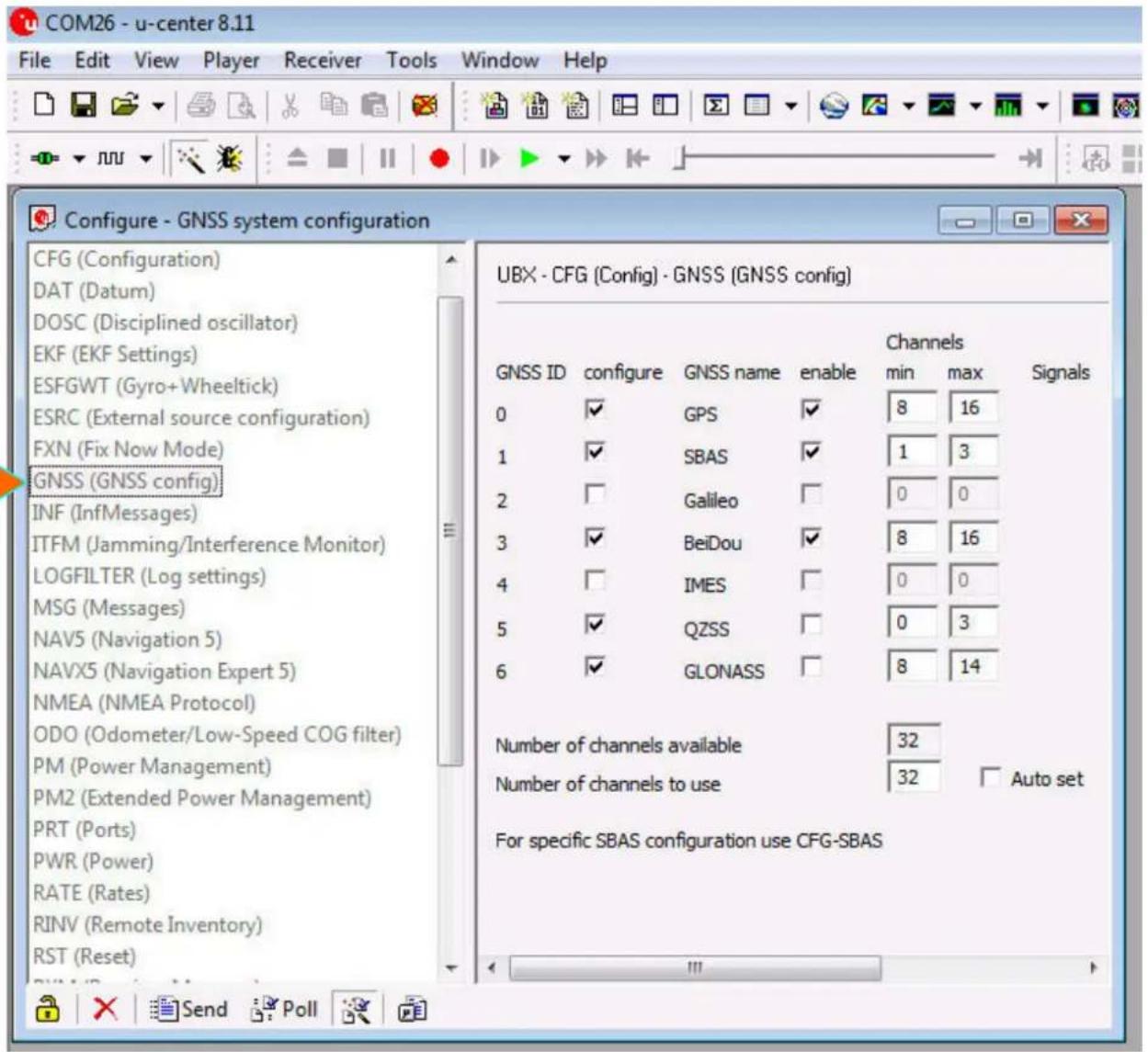
You can select your GNSS system or your combination of several systems on the right side. The following combinations are possible:
| V | GNSS | SBAS | RTCM2.3 | |||||||||
| Galileo(EU)* | GPS(USA) | GLONASS(RUS) | BeiDou(CHN) | QZSS(J) | EGNOS(EU) | WAAS(USA) | MSAS(J) | GAGAN(IND) | SDCM(RUS)* | SNAS(CHN) | GPS | |
| I | x x | x x x x x (x) | x | |||||||||
| II | x x | x x x x x (x) | x | |||||||||
| III | x x | |||||||||||
| IV | x x | x x x x (x) | x | |||||||||
| V | x x | x x x x (x) | x | |||||||||
| VI | x x x | x x x | x x (x) | x | ||||||||
| VII | x x x | x x x | x x (x) | x | ||||||||
| VIII | x | x x x x x (x) | ||||||||||
| IX | x | x x x | x x (x) | |||||||||
* expected to be available in 2015, please visit our website for updates
** Expected to be available in 2015
6. EGNOS configuration with u-center 8.xx

NL-8005P use EGNOS as default. In the configuration menu you can check these options. For detailed information please use the documentation from u-blox http://www.u-blox.com/images/downloads/Product_Docs/u-Center_User_Guide_(UBX-13005250).pdf.
7. Assist GNSS configuration with u-center 8.xx
The NL-8005P supports AssistNow.
AssistNow is a standard A-GNSS service, which increases the performance of the GNSS receiver, by calculating a position almost immediately, even under difficult reception conditions. A-GNSS improves all GNSS capable applications, especially those that require a continuous state of readiness, for example applications for fleet management or GNSS capable hand-held devices, whose users would like to access local services immediately, independently of the reception conditions.
Without A-GNSS, a GNSS receiver must localize at least 4 satellites in direct line of vision, and then download their location data. This process takes 26 seconds under optimal reception conditions, but under less favorable conditions it may take much longer, e.g. in an urban environment or in a building, where the GNSS reception is weaker. AssistNow sends the data directly to the GNSS receiver, thus enabling a quick calculation of the position.
The offline service provides support data, which are valid up to 14 days. The user can thus profit for longer periods from the increased satellite acquisition performance, and they need an internet connection only occasionally, in order to update the support data.
The call-up and data transmission functions can be found in the menu bar of the u-center. Click on the A-GNSS function in the menu bar to update AssistNow and to load the NL-8005P.

Please use the following server token in the AssisNow configuration menu:

Further information to the u-center can be found in the u-blox documentation under http://www.u-blox.com/products/u_center.html. If you have any questions, please contact u-blox directly.
Danger of explosion at contact with fire!
Do not permanently expose the receiver to temperatures of over 60irc C ( 140irc F).
8. Possible sources of error and their elimination
8.1 After connecting to the USB port of the receiver is not recognized. Make sure that the PC or notebook is turned on, and test the USB port, possibly with another USB device. If this other USB device works fine, please contact the support center. If this other USB device works fine, please contact the support center.
8.2 You still don't get a satfix. The NL-8005P needs up to 20 minutes for its first satfix on another continent. To get a satfix the view to the sky must be unobstructed. Move the
NL-8005P as far as possible from the wall. A house wall reflects the signal strongly and contributes to the satfix time delay.
8.3 Your PC doesn't support the auto start function, and doesn't start the CD-ROM automatically. Please check under http://msdn2.microsoft.com/en-us/library/Aa969329.aspx.
8.4. The NL-8005P came in touch with jet water (water jet from a shower head or strong rain when it was mounted on a car roof). Do not connect the receiver with the notebook etc. under any circumstances, because it will otherwise be completely and irreparably destroyed. Return the receiver to our support center, mentioning “water damage”. The support center will disassemble the receiver, dry it and check its functionality.
The Navilock repair center tries to be as obliging as possible, so please tell us the real reason for the defect. During the error analysis, we can generally detect if the cause for the defect was an external cause, water damage, fall, over-voltage or the wrong handling of the unit.

Failures are often the result of little causes. It is not always necessary to exchange the product immediately, because this will not solve the cause of the failure if it is not a GNSS hardware problem.
Before visiting your dealer, please contact the Navilock support center. They will try to help you quickly and without further ado, so that the circumstances of an exchange, which might in any case be unnecessary, are avoided.
In this case, please write down a detailed description of the error, add this information to your end device and the software used in this device, as well as the operation environment (operating system, service pack version, CPU type, storage size, hard disk drive and interface etc.), and send an e-mail to support@navilock.de.
A support member will look into your problem and work out a solution.
We hope your Navilock product brings you fun and enjoyment!
9. Specifications
Chip set manufacturer/type u-blox 8 multi GNSS
Channels: 72 channels
Sensitivity -167 dBm
Frequency: GPS: L1, 1575.4200 MHz
BEIDOU COMPASS: B1, 1561.0980 MHz
GALILEO: E1, 1575.4200 MHz
GLONASS: G1, 1602.5625 \~ 1615.5000 MHz
Target precisions:
Position horizontal: GPS/SBAS/QZSS+GLONASS: 2.0 m CEP
Time: 1 microsecond synchronized with GPS time
Speed: 0.1m/s
Date: WGS-84
Protocol: NMEA-0183 V3.01 GGA, GSA, GSV, RMC, VTG
Detection rates:
Cold start 26 s average
Hot start 1 s average
Re-Acquisition: 1 s average
Update rate: single GNSS: 18 Hz (for example GPS solo)
multi GNSS: 10 Hz (for example GPS+GLONASS)
Dynamic prerequisites:
Acceleration limit: smaller than 4g
Height limit: 50000 m
Speed limit: 500 m/s
Performance:
Power supply: 5 Volt via USB or PS/2
Connection: MD6
Cable length: 5.00 m
Operating temperature: -20ircC 60ircC
Dimensions (LxWxH): ca. 65 x 45 x 22 mm
8. Certificate
CE
9. Warranty period
Your GNSS receiver will be repaired free of charge within the legal warranty period, unless it was damaged due to external cases, humidity dropping or other damages due to improper usage. Your dealer is always ready to help you. Please send your unit for repairs directly to:
Navilock Repair Center
Beeskowdamm 13/15
Postage must always be paid by the client.
Please add a proof of purchase and a detailed error description. Time based error, meaning how often an error occurs, must be expressly mentioned.
For logistic reasons, we cannot accept returned packages without the postage being paid by the client.
10. Support
For additional support questions, please contact our support center: support@navilock.de / www.navilock.com or by telephone: +49 30 84716503*. You can also call the Service Hotline at the following hours: Mo – Fr.: 9:00 – 16:30.
* You will be charged a connection fee for a telephone call to Germany/Berlin, in accordance with the connection fee overview of your telephone service provider. Callers from Germany, who subscribed to a national telephone flat-rate service and can call nation-wide fixed-telephone numbers free of charge, can call us without incurring additional charges.
You can also find current product information on our homepage. www.navilock.com
11. Final provision
The information and data contained in this manual may be changed without prior notice. Errors and misprints reserved.
12. Copyright
No part of this instruction manual may be duplicated or transmitted for any purpose and by any means, be they electronic or mechanical, without the express written authorization from Navilock.
The brand Navilock is a registered trademark and may not be used without the written authorization of the trademark owner. In no case may it be altered or completed by additions.
13. Brands of third parties
Brands, trade names, product names and logos of third parties mentioned in this documentation may be trademarks or registered trademarks of the respective owners.
Conformity declaration
Please download the Declaration of Conformity from http://www.navilock.de/support/ in the conformity area.


WEEE note
The WEEE (Waste Electrical and Electronic Equipment) directive, which came into force on 13 February 2003, lead to a comprehensive change in the disposal of used electric products. It is the main purpose of this directive to avoid electric waste products (WEEE), while simultaneously promoting the re-usage, recycling and other forms of reconditioning in order to reduce the amount of waste. The WEEE logo on the product and the package shows that the product should not be disposed of with regular garbage. You are responsible for disposing all used electric and electronic devices at the corresponding collection sites. The separate collection and meaningful re-usage of electronic waste helps to deal with natural resources more economically. In addition, re-using electronic waste contributes to the preservation of the environment and human health. Additional information regarding the disposal of electric and electronic devices, their re-usage and the collection sites can be found at your local authorities, disposal companies, specialist shops and the manufacturer of the product.
RoHS conformity
This product meets the requirements of directive 2002/95/EC of the European Parliament and of the Council of 27 January 2003, concerning the limited usage of dangerous substances in electric and electronic devices (RoHS) and its amendments. This product complies with the directive 2011/65/EU from January 3rd 2013.
EU Import:
- Introduction
- Contents\*
- Important health and safety information
- ELECTRIC SECURITY
- PRECAUTIONS REGARDING DIRECT SUNLIGHT
- Damages requiring repairs
- Avoid using the unit directly after strong temperature changes.
- Starting operation
- Microsoft Windows with adapter cable to USB A61264
- Application environment
- Functional test and GNSS system selection with u-center 8.xx in MS Windows
- EGNOS configuration with u-center 8.xx
- Assist GNSS configuration with u-center 8.xx
- Danger of explosion at contact with fire!
- Possible sources of error and their elimination
- Specifications
- Certificate
- Warranty period
- Navilock Repair Center
- Beeskowdamm 13/15
- Support
- Final provision
- Copyright
- Brands of third parties
- Conformity declaration
- WEEE note
- RoHS conformity
Brand : Navilock
Model : u-blox 8 NL-8005P
Category : Gps