
FS14IEBIKEA - Electric bike Fortis - Free user manual and instructions
Find the device manual for free FS14IEBIKEA Fortis in PDF.


| Product Type | Electric Bike |
| Brand | Fortis |
| Model | FS14IEBIKEA |
| Unfolded Dimensions | 1200 x 400 x 1100 mm |
| Seat Height (from ground) | 770-980 mm (adjustable) |
| Wheelbase | 830 mm |
| Wheel Size | 14 inches |
| Net Weight (incl. battery) | 17 kg |
| Brake System | Front and rear disc brakes |
| Frame Material | Aluminium Alloy Weld |
| Battery Type | Lithium-ion |
| Battery Capacity | 36V / 5.2Ah |
| Battery Weight | 1 kg |
| Charging Current | Max 1.5A |
| Charging Time | 3-5 hours |
| Power Consumption | 0.3-0.4 Wh per charge |
| Rated Input | 100-240V 50/60Hz 1.8A |
| Rated Output | 42V 1.5A |
| Battery Lifespan | Over 500 cycles |
| Charging Temperature | 0°C to 45°C |
| Discharge Temperature | -20°C to 60°C |
| Speed Levels | 0 (no assist), 1 (max 12 km/h), 2 (max 18 km/h), 3 (max 25 km/h) |
| Display | Battery status, speed, trip/odometer/time |
| Foldable | Yes |
| Safety Requirement | Helmet and safety gear required |
Frequently Asked Questions - FS14IEBIKEA Fortis
User questions about FS14IEBIKEA Fortis
0 question about this device. Answer the ones you know or ask your own.
Ask a new question about this device
Download the instructions for your Electric bike in PDF format for free! Find your manual FS14IEBIKEA - Fortis and take your electronic device back in hand. On this page are published all the documents necessary for the use of your device. FS14IEBIKEA by Fortis.
USER MANUAL FS14IEBIKEA Fortis
14 36V 5.2AH FOLDABLE ELECTRIC BIKE
FS14IEBIKEA
SAFETY & WARNINGS
IMPORTANT: Read this user guide and keep for future reference.
The rider must wear a helmet and appropriate safety gear when operating this bike. Ensure local laws and regulations for electric bike use are followed at all times.
ATTENTION: This bike is designed for city roads and must not be operated in non-urban road or off-road environments.


WARNING:

Riding on motorways or other dangerous roads is strictly prohibited.

Only operate with two hands on the handlebars. Do not ride with one hand, do not ride with no hands.
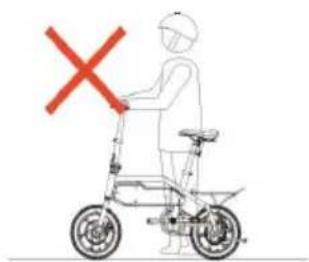
Be careful to not operate the throttle when pushing the bike.
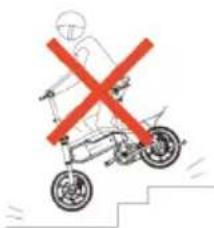
Do not ride on stairways.
CAUTION:
- User must read all local traffic regulations before operating on public roads and pathways.
- The rider must wear a helmet and appropriate safety gear when operating this bike. Examples of safety gear include (but not limited to) gloves, elbow pads, knee pads, etc.
- Always check your bike before riding. Ensure that the brakes work well, the battery is fully charged, tyre pressure is correct, and that no screws have become loose. Listen for any abnormal sounds.
-
Not for use in poor weather conditions, such as slippery roads. Never operate in snow, hail or medium to heavy rain.
-
If you must ride when in light rain, keep at a low speed and ensure a long distance from the vehicles in front of you in case of emergency stops. Ensure you are using the headlight.
• Do not ride on slopes steeper than 15° .
• Not for use by children below the age of 12. - Avoid sudden acceleration and deceleration.
• Do not exaggerate leaning, either forward or backward, while riding. - If remaining battery power is low, ride on low constant speed and charge the battery as soon as possible.
• If a fall is inevitable, always prioritise your own safety before the bike. - Do not put your hands in the pocket while riding – only operate with two hands on the handlebars at all times.
• Do not store your bike in car boot/trunk for long periods of time during hot weather.
• Always stay aware of your surroundings while operating. Be aware of the conditions and avoid any potential collisions. - Keep a safe distance from others while riding and do not ride "neck by neck" (closely beside) with others.
- Do not ride in dim, dark, or poorly lit locations. If necessary for travel, we recommend not riding and instead pushing the bike while walking, and ensure you are using the headlight.
- Do not ride backwards and do not perform any actions that might endanger yourself or others while riding.
• Do not lend this bike to those who have not read this user guide. - Do not ride while you feel unwell, nor after consuming alcohol or drugs. This product has the potential to endanger yourself and others if not operated responsibly.
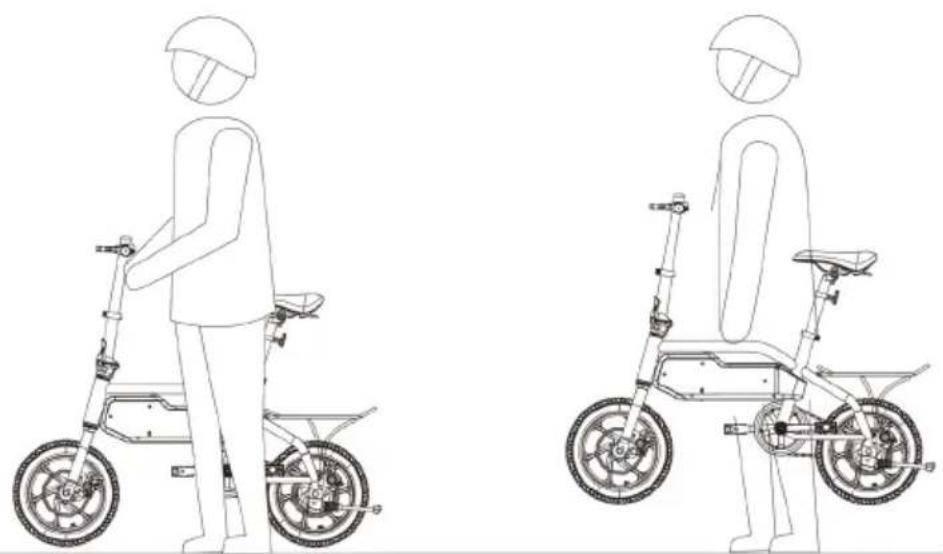
• Do not lift your bike off of its tyres. - At all times avoid that your fingers get stuck between the tyre and the casing, or between the wheels and the bike frame.
• Only accelerate slowly. Sudden acceleration may lead to loss of balance and injury. - Check the brakes before riding. Regularly adjust the brake wire tension to ensure it is safe.
• The brake lever control is left for the front brake, right for the rear brake. - The Power Assist Sensor (PAS) will start to work when pedalling 3/4 -1 cycle. Beware of the crank rotating while walking.
Carrying Guide
COMPONENTS
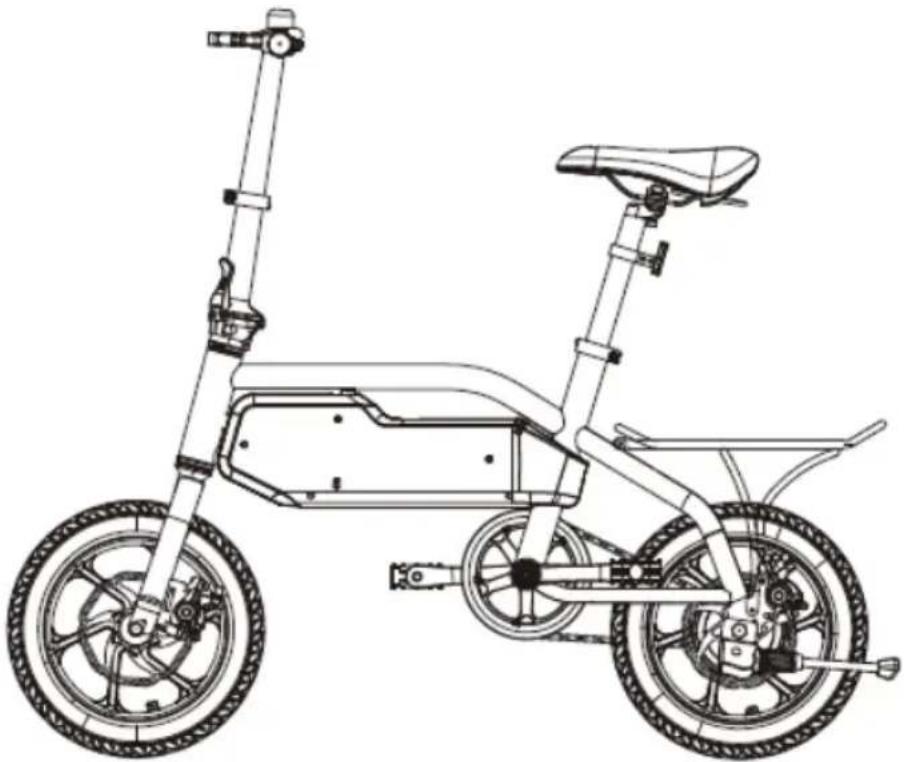
1x Foldable Electric Bike

1x Charger / Adapter

User Manual
1x User Guide
OVERVIEW
Bike overview:

Display overview:

| A | Battery status | Battery status as percentage | |
| B | Battery status as gr | graphic | |
| C + Button | Long press to turn on/off headlight.Short press to increase speed level. | ||
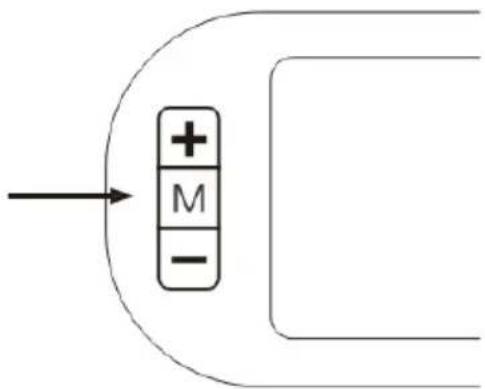
| D | Mode Button | Long press 3 seconds to turn on/off power.Short press to cycle through Trip / Odo / Time display mode. | |
| E | - Button | Short press to decrease speed level. | |
| F | Current Speed | Displays the current speed in KM/H | |
| G | Speed level | 0 Pure riding without power support. | |
| 1 Low speed, max around 12km/h. | |||
| 2 Middle speed, max around 18km/h. | |||
| 3 High speed, max around 25km/h. | |||
Additional display icons:
 | Displays when headlights are activated |
 | Displays when brakes are activated |
 | Error indicator: Motor |
 | Error indicator: Controller |
| TRIP ODO TIME | Displays the current mode for the meter/time display |
| 88:88.8 | Trip meter / Odometer / trip time display |
ASSEMBLY
1. Unfold Folding Stem
Hold the bike frame, unfold the stem upright and ensure it connects seamlessly with the frame below.
Fasten the stem folding lever upright.
Ensure the stem is securely fixed into position.
It should not wobble or give when shaken.
Continue to Step 2 to continue assembly.
To fold the bike, press in on the stem folding lever and fold it down to release the stem.

2. Install the Handlebars
Insert the handlebars into the stem, ensuring you are positioning it at a comfortable riding height.
Fasten the headset and tighten the screw to secure the handlebars.
When tightened, press down hard to check whether the handlebars are secure in the stem.

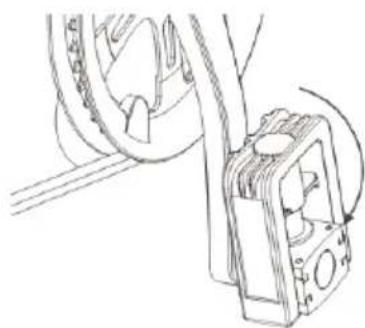
3. Unfold the Pedals
Unfold the pedal as per the picture.
To fold the pedals back, push in towards the crankshaft and then fold upwards.

4. Install the Seat Post and Seat
Loosen the seat post clamp, and install the seat post while holding the bike frame.
Ensure it is set to a comfortable riding height.
The rider must be able to touch both feet on the ground while on the seat.
Also note the MIN and MAX lines on the seat post. If this seat post is not suitable for your height, consult a local bike store or help.Kogan.com for support.
Fasten the seat post clamp and tighten the screw to secure the post.
When tightened, press down hard to check whether the seat post is secure and doesn't slide down.

5. Power On
Ensure the bike is fully charged prior to first use.
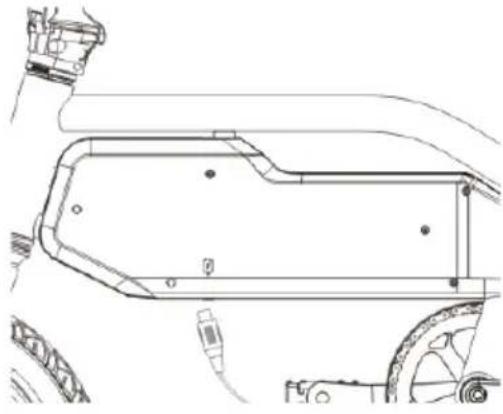
Long-press the Mode button (M) for 3 seconds to power on.
CHARGING ADVICE
Battery and Charging
- Ideal environmental temperature for charging is 0° C - 45° C, for discharging (general operation) is -20° C - 60° C. Keep the battery in dry condition. Do not put the battery in acidic or alkaline liquid; keep it away from rain, fire, excessive heat and high-temperature environments.
- Do not disconnect the negative and positive electrodes of the battery; breaking, disassembling and short-circuiting the battery is prohibited and will void your warranty.
- Only charge the battery with the original charger of the bike, another charger may cause battery leaking, heating, smoking and in serious situation cause fire and explosion.
- If the bike is not to be used for a long time, keep the battery in a dry and cool environment and charge it for 2 hours every two months.
- Charging only in a dry and cool environment, do not charge in closed or high-temperature areas.
- Unplug the charger when charging is complete, and do not leave the charger plugged into a power source while not charging.
- When charging, plug the battery first, then connect the power source; when charging finished, disconnect the power source first, then unplug the charger.
- If the charger indicator stops working, or the charger overheats, unplug the charger immediately and contact help.kogan.com for support.
- Keep the charger away from fluids while using and storing, in case of a short circuit. Avoid any penetrations to the charger.
- Try not to carry the charger around with your bike. If you must, make sure the charger is well protected and stored securely (for example, safely in a toolbox).
- Try to avoid the fully discharging the battery to 0% when using. To keep the battery in good condition and for a longer lifespan, try to only use the bike between battery level 100% and 20%. Once at 20%, we recommend charging.
- Do not disassemble or replace any parts of the charger by yourself.
- Due to the capacity fade mechanisms of Lithium-Ion battery, the battery capacity will fade at different temperatures, at -10° C the capacity will be 70%, at 0° C the capacity will be 80%, at 20° C the capacity will be 100%.
- Do not put the battery in places that may fall to the ground, in case it may cause battery leakage, or overheating that could lead to fire or explosion.
CLEANING & CARE
- Keep the electric bike in a place where there is no direct sunlight or no rain after riding.
- Always check your bike before riding. Ensure that the brakes work well, the battery is fully charged, tyre pressure is correct, and that no screws have become loose. Listen for any abnormal sounds.
- If there is a stain on the surface of the electric bike body, use a soft cloth to wipe by a small amount of water; do not use alcohol, petrol or other chemical solvents with corrosive and volatile, otherwise, it will seriously damage the appearance or internal structure of the electric bike body.
- If experiencing issues with the disc brakes or disc plate friction, adjust the position to make sure there is no interference or friction while the wheels freely spin. If the disc plates skew heavy or the disc brake is disabled, then the disc or disc brake needs to be replaced.
- Every 3 months apply grease to the frame folding wrench screws and maintain the chainring and chain with anti-rust oil.
Regular Maintenance and Check
| Maintenance part | Maintenance |
| Brake | Check the brake function; prevent accidents caused by brake dysfunction. |
| Tyre | Check the condition and pressure of the tyres, in case tyres bursting or overpower consumption during riding. |
| Tyre Rim | Check the rim conditions, clean dirt, in case of the rim, breaks or get stuck. |
| Shock absorber | Check the shock absorber condition, clean and lubricant; keep it in a good working condition. |
| I hrottle | Check throttle condition, in case dysfunction or malfunction. |
| Wires | Check if the wires ports are loose or broken in case of wiring faulty. |
| Screws | Check the screws in the main parts, in case they get loose or fall off. |
| Battery | Check the appearance and the battery performance, in case of wiring faulty, extend the lifespan of the battery. |
| Charger | Check if the charger cables are impact, input and output plug are reliable. |
| Lubrication | Check if the axles and brake lights need lubrication or not. |
| Cleaning | Keep the bike surface in a clean condition. |
Tip: Ensure the electric bike is checked and maintained regularly to keep it in the best riding condition.
SPECIFICATIONS
| Mechanical configuration | |
| Unfolded dimensions | 1200 x 400 x 1100mm |
| Seat height (from ground) | 770-980mm (adjustable) |
| Wheelbase | 830mm |
| Iyre dimension | |
| Net weight (inc. battery) | 17kg |
| Brake System | Front and rear disc brake |
| Frame material | Aluminium Alloy Weld |
| Battery instalment | Built-in/non-detachable |
| Battery Specification | |
| Battery capacity | 36V / 5.2Ah |
| Battery Type | Lithium ion battery |
| Battery Weight | 1kg |
| Charging current | Max. 1,5A |
| Charging time | 3-5 hours |
| Power consumption | 0.3-0.4Wh per charge |
| Rated Input | 100-240V 50 / 60Hz 1,8A |
| Rated Output | 42V 1.5A |
| Battery Lifespan | Over 500 cycles |
| Charging Temperature | 0°C to 45°C |
TROUBLESHOOTING
| Issue | Possible cause | Solution |
| No power assistance when bike turned on | No power | Check the battery is installed correctly. |
| Check battery whether need charging. | ||
| Mileage not enough | Battery not fully charged after 5 hours. | Check the charger is working well. |
| Tyre pressure is low. | Check the pressure before riding. | |
| Frequent brakes / starts / very fast riding. | Ride with good habits. Reach high speeds gradually and prioritise “slower, consistent” riding over “faster, stop-start” riding. | |
| The battery is aged or decreasing. | Replace battery. | |
| Low temperature, battery attenuation. | Normal phenomenon. See ‘Charging Advice’ page. | |
| Battery cannot be charged | The charger is not plugged probably. | Ensure the charger is connected securely, both to the bike and to the power outlet. Double check the power outlet is switched on. |
| Battery temperature is too low. | Wait for the temperature to warm up. Try another location to charge if possible. | |
| Battery temperature is too high. | Wait for the temperature to cool down. Try another location to charge if possible. If battery too hot because of recent use, make sure the battery has had time to cool down before charging. | |
| Display not work | No Power. | Check battery condition. |
| Adapter Damaged. | Contact help.kogan.com for support. | |
| Meter faulty. | Contact help.kogan.com for support. | |
| Motor doesn’t work after power on | Brakes not working. | Check brakes. |
| Meter faulty. | Contact help.kogan.com for support. |
NOTES
NOTES
NOTES
Need more information?
We hope that this user guide has given you the assistance needed for a simple set-up. For the most up-to-date guide for your product, as well as any additional assistance you may require, head online to help.kogan.com
kogan.com
- 14 36V 5.2AH FOLDABLE ELECTRIC BIKE
- SAFETY & WARNINGS
- WARNING
- CAUTION
- COMPONENTS
- OVERVIEW
- ADDITIONAL DISPLAY ICONS
- ASSEMBLY
- UNFOLD FOLDING STEM
- INSTALL THE HANDLEBARS
- UNFOLD THE PEDALS
- INSTALL THE SEAT POST AND SEAT
- POWER ON
- CHARGING ADVICE
- BATTERY AND CHARGING
- CLEANING & CARE
- SPECIFICATIONS
- TROUBLESHOOTING
- NOTES
- NEED MORE INFORMATION
Brand : Fortis
Model : FS14IEBIKEA
Category : Electric bike