
407730 - Measurement Extech - Free user manual and instructions
Find the device manual for free 407730 Extech in PDF.


| Product Type | Digital Sound Level Meter |
| Model | 407730 |
| Brand | Extech |
| Measurement Range | 40 to 130 dB (A weighting), 45 to 130 dB (C weighting) |
| Accuracy | ±2 dB @ 1kHz (under reference conditions) |
| Resolution | 0.1 dB |
| Frequency Weighting | Selectable 'A' and 'C' |
| Response Time | FAST (125 ms) and SLOW (1 second) |
| Display | LCD with bargraph |
| Microphone | 0.5 inch (10 mm) Electret condenser |
| Measurement Bandwidth | 300 Hz to 8 kHz |
| Calibration Source | 1 kHz sine wave @ 94 or 114 dB |
| AC Output | 0.707 Vrms full scale |
| Power Supply | 4 AAA batteries (1.5V each) |
| Battery Life | Approximately 30 hours (typical) |
| Auto Power Off | After 20 minutes (can be disabled) |
| Operating Temperature | 32 to 122°F (0 to 50°C) |
| Operating Humidity | 10 to 90% RH |
| Storage Temperature | -4 to 140°F (-20 to 60°C) |
| Dimensions | 9 x 2.3 x 1.7 inches (230 x 57 x 44 mm) |
| Weight | 6 oz (172 g) |
| Warranty | 2 years (limited on parts and workmanship) |
| Maintenance | Keep dry; avoid high temperature and humidity; remove battery for long-term storage |
| Safety | Dispose of batteries properly; do not incinerate; follow local regulations for disposal |
| Spare Parts / Reparability | Calibration and repair services available; contact Extech support |
Frequently Asked Questions - 407730 Extech
User questions about 407730 Extech
0 question about this device. Answer the ones you know or ask your own.
Ask a new question about this device
Download the instructions for your Measurement in PDF format for free! Find your manual 407730 - Extech and take your electronic device back in hand. On this page are published all the documents necessary for the use of your device. 407730 by Extech.
USER MANUAL 407730 Extech
Congratulations on your purchase of the Extech 407730 Digital Sound Level Meter. The 407730 measures and displays sound pressure levels in dB from 40 to 130dB. User selectable features include Frequency Weighting ('A' and 'C'), Response Time (Fast and Slow), Max Hold, and Max/Min recording. Careful use of this meter will provide years of reliable service.
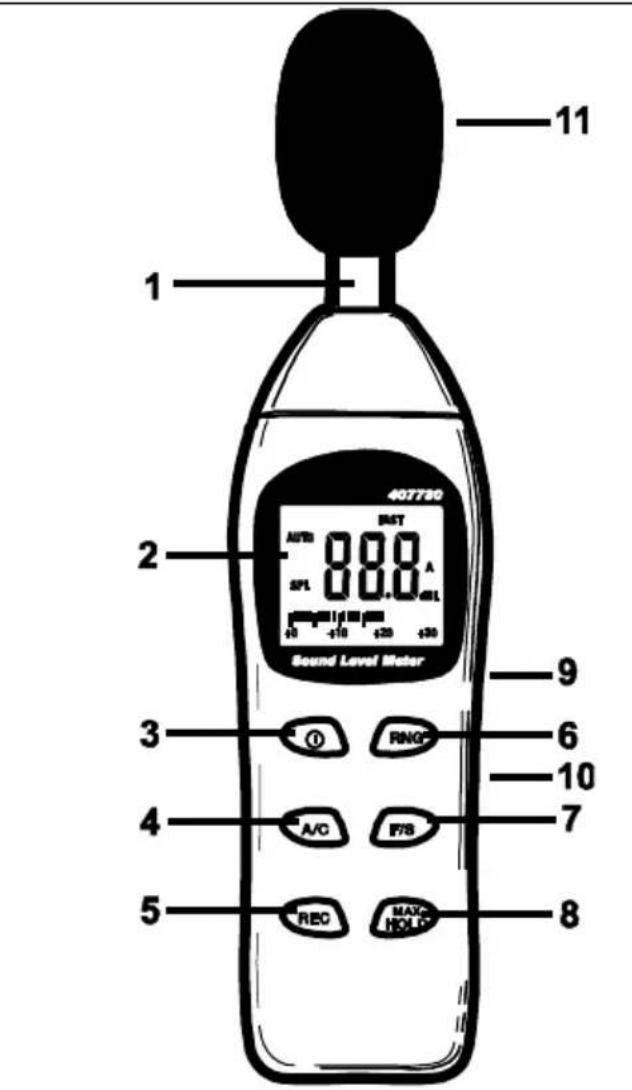
Meter Description
- Microphone
- LCD Display
- ON-OFF button
- A/C weighting selection button
- Min/Max Record button
- Range selector button
- F/S response selection button
- Max Hold selector button
- Calibration adjustment
- AC analog output jack
- Windscreen
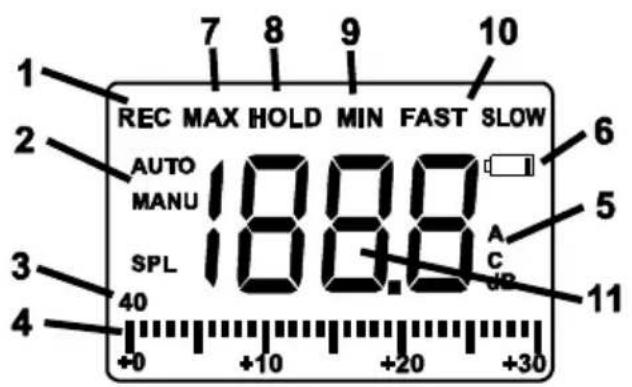
- Record icon
- Auto or Manual range
- Range indicator
- Bargraph
- A or C weighting
- Low bat icon
- Max level indicator
- Hold indicator
- Min indicator
- Fast or Slow weighting
-
dB display
-
Power the meter by pressing the Ⓐ power button. The meter will begin displaying sound level readings. If the LCD does not switch on, check the 9V battery located in the rear battery compartment.
- Hold the meter away from the body.
- View the measurement on the meter's display. If the meter is in the autoranging mode, the display may briefly indicate "HI" or "LO" if the noise level is above or below the currently selected range. The meter will change the range as needed to display the dB level.
'A' and 'C' Frequency Weighting
Use the 'A/C' button to select 'A' or 'C' frequency weighting.
With ‘A’ weighting selected, the frequency response of the meter is similar to the response of the human ear. ‘A’ weighting is commonly used for environmental or hearing conservation programs. ‘C’ weighting is a much flatter response and is suitable for the sound level analysis of machines, engines, etc. “A” or “C” icons will appear in the display.
Most noise measurements are performed using 'A' Weighting and SLOW Response.
'FAST' and 'SLOW' Response Time
Use the 'F/S' button to select FAST (125 ms) or SLOW (1 second) response time. Select FAST to capture noise peaks and noises that occur very quickly. Select the SLOW response to monitor a sound source that has a consistent noise level or to average quickly changing levels. "FAST" or "SLOW" icons will appear in the display.
Select Slow response for most applications.
Auto or Manual Ranging
The meter will turn on in the auto-ranging mode and “AUTO” will be indicated on the display. In this mode the meter will automatically select the best range for the noise level being measured. If the measured dB level exceeds the range of the meter or the range of a selected range, “HI” will appear in the display. If the measured dB level is lower than the selected range, “LO” will appear in the display.
-
Press the RNG button to manually select the range, "MANU" will be indicated on the display. The four ranges are: 40-70, 60-90, 80-110 and 100-130. Press the RNG button to step through the ranges.
-
Press and Hold the RNG button for 2 seconds to exit the manual range mode.
MAX HOLD
In this mode the meter only updates the LCD when a higher reading than the one presently on the display is detected.
-
Press the MAX HOLD button to enter the Max Hold mode.. The "MAX HOLD" icon will appear in the display.
-
Press the MAX HOLD button again to exit this mode.
MAX/MIN Recording
In this mode the meter records the Maximum and Minimum readings and stores them into memory.
- Press the REC button to enter the RECORD mode. The "REC" icon will appear in the display.
- Press the REC button again to display the minimum value recorded since the mode was entered. The "MIN" icon will appear in the display. The meter is not recording during this time.
- Press the REC button again to display the maximum value recorded since the mode was entered. The "MAX" icon will appear in the display. The meter is not recording during this time.
- Press the REC button again to display the present dB level and continue recording.
- Press and hold the REC button until the "REC" icon clears to exit the mode.
Auto-Power Off
The meter will automatically shut off after 20 minutes of operation. To disable this feature:
- With the meter OFF, Press the ① and MAX HOLD buttons simultaneously.
- will appear in the display
- Release the Ⓐ button and then release the MAX HOLD button.
- The meter will remain on until the power button is pressed.
Calibration
To calibrate the meter, an external calibrator such as the Extech 407744 or the Extech 407766 is required in addition to a small screw-driver.
- Turn the meter ON
- Select the 80 to 110dB range
- Select 'A' weighting and 'SLOW' response
- Place the microphone into the calibrator. Set the calibrator to output a 1kHz sine wave @ 94dB
- Adjust the calibration potentiometer for a display as close as possible to the calibrator's output
Battery Replacement
When the ☐ low battery icon appear replace the battery by removing the screw securing the rear battery compartment and replacing the 4 AAA batteries.
You, as the end user, are legally bound (Battery ordinance) to return all used batteries and accumulators; disposal in the household garbage is prohibited!
You can hand over your used batteries / accumulators at collection points in your community or wherever batteries / accumulators are sold!
Disposal: Follow the valid legal stipulations in respect of the disposal of the device at the end of its lifecycle
Tripod Mount
A camera tripod mount is located on the rear of the meter for increased stability and elimination of body reflections.
Measurement Considerations
- Wind blowing across the microphone increases the noise measurement. Use the supplied windscreen to cover the microphone when applicable.
- Calibrate the instrument before each use if possible. Especially if the meter has not been used for a long period of time.
- Do not store or operate the instrument in areas of high temperature or humidity.
- Keep meter and microphone dry.
- Avoid severe vibration.
- Remove the battery when the meter is to be stored for long periods of time.
Specifications
| Display | LCD with bargraph |
| Microphone | 0.5"(10mm) Electret condensor |
| Measurement Bandwidth | 300Hz to 8KHz |
| Measurement Range | 40 to 130dB (A wtg), 45 to 130dB (C wtg) |
| Frequency weighting | 'A' and 'C' (selectable) |
| Accuracy / Resolution | ±2dB @1kHz (under reference conditions) / 0.1dB |
| Response time | Fast: 125 milliseconds / Slow: 1 second |
| Calibration source | 1KHz sine wave @ 94 or 114dB |
| AC output | 0.707Vrms full scale |
| Power | 4 AAA Batteries |
| Battery life | 30 hours (typical); low battery indicator alerts user |
| Automatic power off | After approx. 20 minutes |
| Operating temperature | 32 to 122°F (0 to 50°C) |
| Operating humidity | 10 to 90% RH |
| Storage temperature | -4 to 140°F (-20 to 60°C) |
| Dimensions/weight | 9 x 2.3 x 1.7"(230 x 57 x 44mm) / 6oz.(172g) |
Two-year Warranty
Teledyne FLIR LLC warrants this Extech brand instrument to be free of defects in parts and workmanship for two years from date of shipment (a six-month limited warranty applies to sensors and cables). To view the full warranty text please visit: http://www.extech.com/support/warranties.
Calibration and Repair Services
Teledyne FLIR LLC offers calibration and repair services for the Extech brand products we sell. We offer NIST traceable calibration for most of our products. Contact us for information on calibration and repair availability, refer to the contact information below. Annual calibrations should be performed to verify meter performance and accuracy. Product specifications are subject to change without notice. Please visit our website for the most up-to-date product information: www.extech.com.
Contact Customer Support
Customer Support Telephone List: https://support.flir.com/contact
Calibration, Repair, and Returns: repair@extech.com
Technical Support: https://support.flir.com
Copyright © 2021 Teledyne FLIR LLC
All rights reserved including the right of reproduction in whole or in part in any form
www.extech.com
Brand : Extech
Model : 407730
Category : Measurement