
CO230 - Measurement Extech - Free user manual and instructions
Find the device manual for free CO230 Extech in PDF.


| Product Type | Carbon Monoxide Meter |
| Brand | Extech |
| Model | CO230 |
| Measurement Range | 0 to 1000 ppm |
| Resolution | 1 ppm |
| Accuracy | ±5% or ±5 ppm (whichever is greater) |
| Sensor Type | Electrochemical |
| Display | Backlit LCD |
| Alarm | Audible and visual for high CO levels |
| Data Hold | Yes |
| Auto Power Off | Yes, after 15 minutes of inactivity |
| Power Supply | 9V battery (included) |
| Battery Life | Approximately 100 hours continuous use |
| Dimensions | 6.7 x 2.4 x 1.1 in (170 x 61 x 28 mm) |
| Weight | 7.2 oz (204 g) including battery |
| Operating Temperature | 32°F to 122°F (0°C to 50°C) |
| Storage Temperature | -4°F to 140°F (-20°C to 60°C) |
| Humidity | 0 to 90% RH (non-condensing) |
| Warranty | 1 year |
| Certifications | CE, RoHS |
Frequently Asked Questions - CO230 Extech
User questions about CO230 Extech
0 question about this device. Answer the ones you know or ask your own.
Ask a new question about this device
Download the instructions for your Measurement in PDF format for free! Find your manual CO230 - Extech and take your electronic device back in hand. On this page are published all the documents necessary for the use of your device. CO230 by Extech.
USER MANUAL CO230 Extech
Wall-Mount CO _2 Monitor
Model CO230
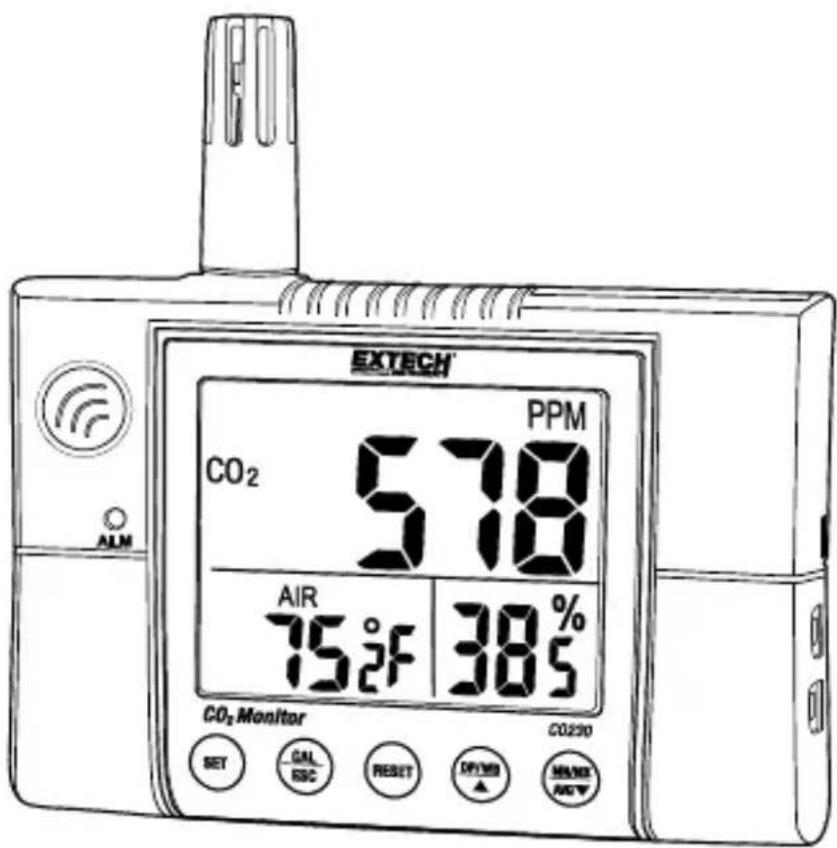
Thank you for selecng the Model CO230 Carbon Dioxide Monitor. This meter measures CO_2 concentraon, air temperature, dew point, wet bulb temperature and relave humidity.
The audio-visual alarm and alarm relay output make this is an ideal instrument for indoor air quality (IAQ) diagnoses. Carbon dioxide (CO2) is a gaseous component of the earth's atmosphere. The concentraon of CO2 in natural ambient air is approximately 0.04% or 400ppm.
The NDIR (non-dispersive infrared) sensor provides stable, long term monitoring.
This meter is shipped fully tested and calibrated and, with proper use, will provide years of reliable service. Please visit our website (www.extech.com) to check for the latest version of this User Guide, Product Updates, and Customer Support.
FEATURES
- LCD simultaneously displays CO _2 Level, Relave Humidity, and Temperature (air, dew point, or wet bulb)
- Stable NDIR sensor for CO _2 detecon
- Weighted averaging: TWA (8 hours) & STEL (15 minutes)
- Automac Baseline Calibraon (ABC). Can be disabled for use in areas with connuously elevated CO _2 levels (>400ppm)
- Manual CO 2 calibraon
• Audio-visual CO 2 concentraon warning alarm - Dew Point and Wet Bulb temperature calculaons
- Relay output for connecng external indicators or controllers
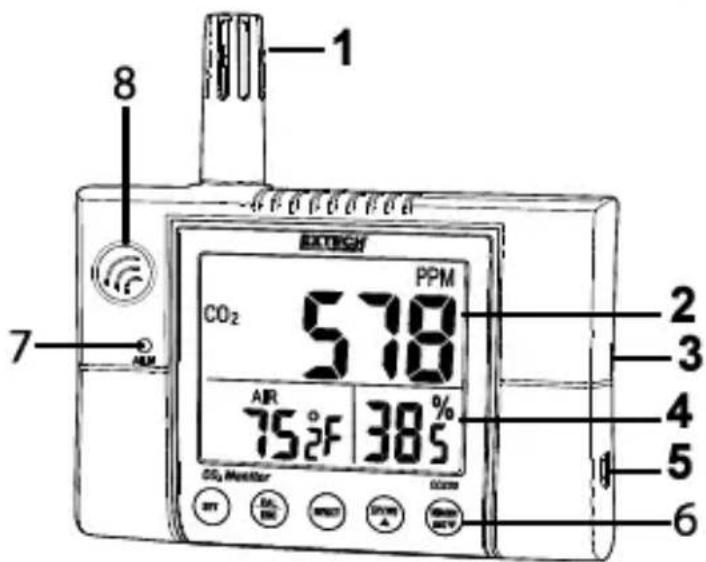
Meter Descripon
- Temperature/RH sensor
- Main Display
- Alarm Relay Output
- Aux. Displays
- 12V AC Adaptor jack
- Keypad
- Alarm alert lamp
- CO_2 sensor
Note: Wall mount hole and relay
wiring screws are located on the back
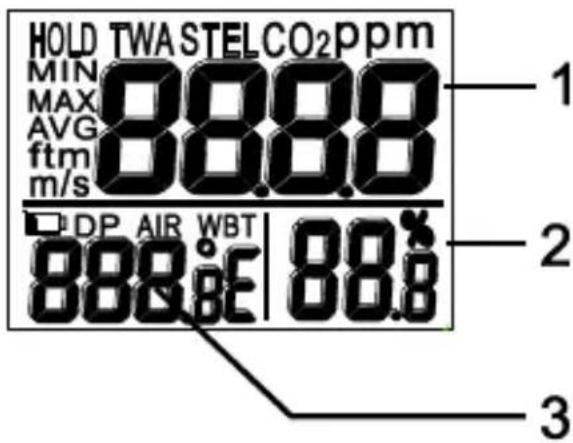
Display Descripon
- CO_2 concentraon (ppm)
- Relave Humidity (%)
- Air Temperature, Dew Point or Wet Bulb Temperature (°C / °F)
Display Icons
TWA Time weighted average (8 hours)
STEL Short-term exposure limit (15-min. weighted average)
HOLD Holds reading on display
MIN/MAX Minimum/Maximum readings
DP Dew point temperature
AIR Air temperature
WBT Wet bulb temperature
% Relave Humidity measurement unit
°E (C/F) Temperature units (Celsius/Fahrenheit)
Keypad Descripon
SET Meter ON/OFF power Setup mode Save sengs
CAL/ESC CO _2 calibraon with ▲/DP WB RH calibraon with MXN/AVG/▼ Exit setup mode
RESET Reset the meter and clear MAX/MIN readings Terminate Calibraon
▲/DP WB Selects AIR, DP, or WBT temperature display Selects units or increases value in calibraon and setup
MXN/AVG/▼ Acvates MIN, MAX, STEL, TWA funcons Select mode or decrease value in calibraon and setup
Operaon
POWER ON/OFF
The meter is powered by a 12VDC adaptor.
Power the unit by plugging the AC adaptor into the meter and into an AC source. The meter will switch ON with a short beep.
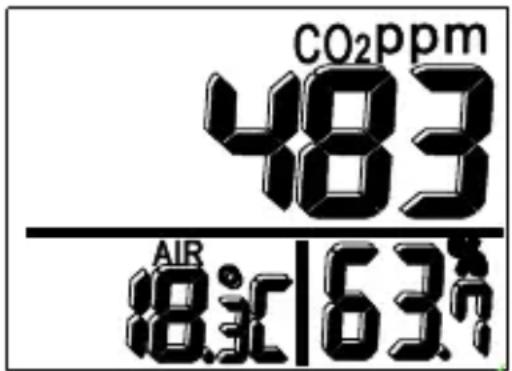
The LCD will perform a 30 second countdown and then displays the current CO_2 concentraon, air temperature, and relave humidity.
TAKING MEASUREMENTS
The meter starts to measure when powered on and readings update every second. If the operang environment changes (from high to low temperature, for example) the meter requires 30 seconds for the CO_2 sensor and 30 minutes for the RH sensor to stabilize.
NOTE: Do not obstruct the sensors or hold the meter close to the mouth or any source of CO_2 when measuring.
AIR, DP and WBT Temperature
Use the DP/WBT buon to step through AIR (air temperature), DP (dew point temperature) and WBT (wet bulb temperature) shown on the lower le display.
MIN, MAX, STEL, TWA MODES
In the normal mode, use the Max/AVG buon to see the minimum, maximum, and weighted average readings. Use the Max/AVG buon to step through MIN, MAX, STEL, and TWA modes in sequence and then back to the normal mode.
In MIN and MAX modes, the meter shows the minimum and maximum readings of CO_2 (main display), AIR, DP or WB temperatures (lower le display) and Humidity (lower right display).
In STEL and TWA modes, the main display shows the weighted average of CO_2 readings for the prior 15 minutes (STEL) or 8 hours (TWA). The lower display shows the current AIR, DP/WB temperature and humidity.
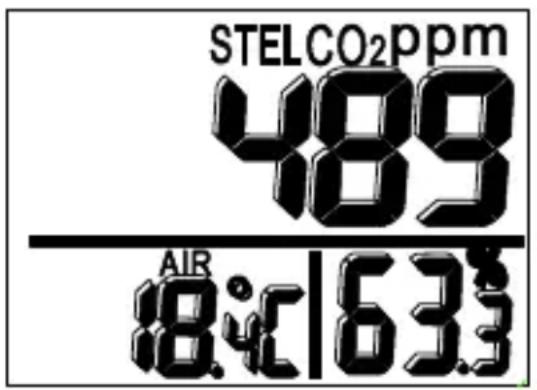
NOTES:
-
If the meter has been powered on for less than 15 minutes, the STEL value will be the weighted average of readings taken since power on. The TWA mode will display a weighted average of the readings taken during the prior 8 hours of operaon.
-
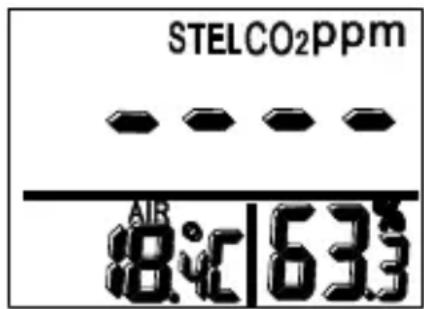
The CO230 requires at least 5 minutes to calculate STEL and TWA values. The display shows “----” during this me.
ALARM OVERVIEW
Audio-visual alarms give warnings when CO_2 concentraon exceeds the high limit. The meter beeps ( 80dB ) and ashes the LED when the CO_2 level exceeds the high limit. The beeper stops when any key is pressed or if the reading falls below the low setpoint limit.
Press and hold SET to stop the beeper. The LED lamp will connue to ash when the beeper is manually shut o if there is sll an alarm condion. The LED will stop ashing when readings return to normal.
ALARM RELAY OUTPUT
The meter includes an internal reed relay that can be connected to an external device (not supplied). When the CO_2 readings exceed the high limit, the relay closes. When the CO_2 readings fall below the low limit, the relay will open. This relay can be used to switch in an external device. The meter can be connected to a device to control such things as alert signs/beepers or venlaon systems for condioning the air quality.
SETUP MODE (for Alarm limits and Temperature units)
In normal mode, press and hold SET to enter the setup mode. To exit the setup mode, press CAL/ESC when P1.0, P3.0, or P4.0 is displayed.
P1.0 CO2 ALARM Upper and lower limit
When setup mode is accessed, P1.0 and "AL" are displayed.
Press SET to scroll to P1.1 to set the CO2 upper limit. The current CO2 set value will be blinking.
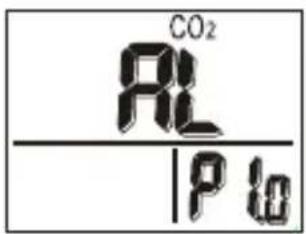
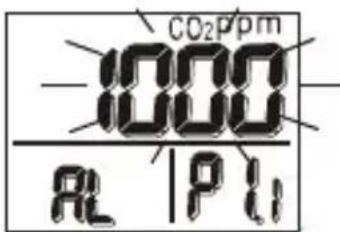
Use the arrow ▲▼ buons to adjust the value. Each buon-press adjusts by 100 ppm (100\~9900ppm). When the desired value is set, press SET to enter P1.2 to set the lower limit (using the same method as for the high limit). When nished, press SET to save or CAL/ESC to exit without saving and return to P1.0.
P3.0 TEMPERATURE UNITS (C/F)
Use the ▲/DP WB buon from the P1.0 display to access P3.0. Press SET to enter P3.1 for seng the temperature units. The currently selected unit (°C / °F) will be blinking in the lower display. To switch units press ▲/DP WB or MXN/AVG/▼. Press SET to save the seng or press CAL/ESC to exit without saving and return to
P3.0.

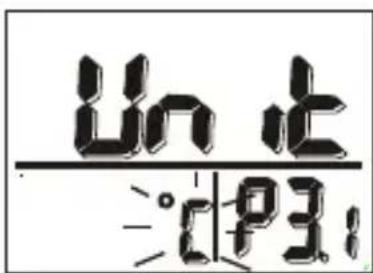
P4.0 AUTOMATIC BASELINE CALIBRATION (ABC) ON/OFF
ABC (Automac Baseline Calibraon) is used to implement a baseline CO_2 calibraon to eliminate the zero dri of the sensor. See the next secon (Calibraon) for instrucons on performing the calibraon. The ABC funcon defaults to the ON state. To disable this feature: press ▲/DP WB while in P3.0 mode (or MXN/AVG/▼ when in P1.0 mode) to access the P4.0 sengs. Press SET to enter P4.1. The screen will ash “en” in the lower display. To disable the ABC funcon press ▲/DP WB or MXN/AVG/▼ unl “dis” is displayed on the LCD. Press SET to save the sengs or CAL/ESC to exit without saving and return to P4.0.
Calibraon
CO _2 CALIBRATION
The meter is factory calibrated to a 400ppm CO _2 standard concentraon.
NOTE: The meter should be returned to Extech for calibraon once per year or whenever the accuracy of the meter is in queson.
CAUTION: Do not calibrate the meter in an atmosphere of unknown CO_2 concentraon.
There are 2 opons for calibraon; Automac Baseline Calibraon and Manual Calibraon; see below
AUTOMATIC CO _2 BASELINE CALIBRATION (ABC)
Automac Baseline Calibraon (ABC) will calibrate the meter at the minimum CO_2 reading detected during 7 days of connuous monitoring. The ABC default is ON. To disable the ABC funcon, please refer to the P4.0 Setup mode secon above. Perform the calibraon in a well venlated area with a CO_2 level near 400ppm.
MANUAL CO _2 CALIBRATION
Recommendation: The manual calibraon should be performed by a qualified laboratory every 12 months.
-
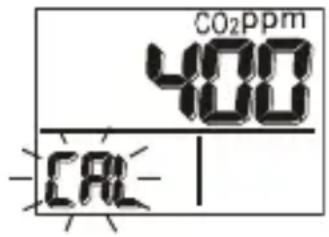
Place the meter in the 400ppm calibraon chamber. Turn the meter on and hold down the CAL/ESC and ▲/DP WB buons simultaneously to enter CO _2 calibraon mode. 400ppm and “CAL” will blink on the LCD.
-
Wait approximately 5 minutes until the blinking stops. The calibraon is then complete and the meter will automatically return to the normal mode.
-
To abort the calibraon at any me, press RESET.
RH CALIBRATION
The meter is calibrated to standard 33% and 75% salt soluons.
To abort calibraon press and hold the RESET buon for > 1 second.
CAUTION: Do not calibrate the humidity without standard calibraon salt boles. Otherwise, the meter will have to be returned for specialized calibraon service. Contact Extech for calibraon salts or calibraon service.
33% calibraon
- Plug the sensor into the 33% salt bole.
-
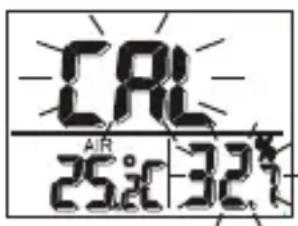
Press and hold CAL/ESC and MXN/AVG/▼ to enter the 33% calibraon. “CAL” and the calibraon value (32.7%, if at 25°C) will blink on the LCD with the current temperature shown on the le.
-
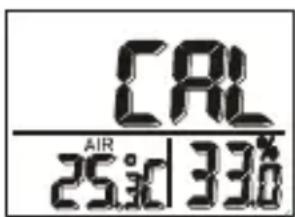
The meter is now calibrang and will nish in approximately 60 minutes (when “CAL” and the humidity reading are no longer blinking).
75% calibraon
- Aer the 33% calibraon, plug the sensor into the 75% salt bole.
- Press SET to enter the 75% calibraon.
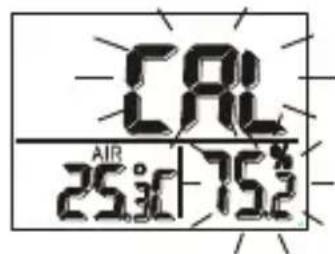
- “CAL” and the calibraon value (75.2%, if at
25°C) will blink on the LCD with the current temperature shown on the le side of the display.
- The meter is now calibrang and will nish in approximately 60 minutes (blinking stops). The meter will automacally return to the normal mode.
NOTE: Single point calibraons can also be performed. To calibrate 33% only, press CAL/ESC and stop aer the 33% calibraon is completed. To calibrate 75% only, press ▲/DP WB or MXN/AVG/▼ within 5 minutes of inializing the 33% calibraon.
| Funcon | Range | Resoluon | Accuracy | |
| CO2 | 0~2000ppm | 1ppm | ±(5%rdg + 50ppm) | |
| 2001~9999ppm | 1ppm | Not specied | ||
| Pressure dependent: ±1.6% reading per kPa deviaon from normal pressure (100kPa) | ||||
| Temperature | -10~60°C14~140°F | 0.1° | ±0.6°C (0.9°F) | |
| Humidity | 0.0~99.9% | 0.1% | ±3% (10 to 90%)±5% (< 10 or >90%) | |
| Wet Bulb | -5 to 60°C23 to 140°F | 0.1° | Calculated from RH and Temperature | |
| Dew Point | -20 to 60°C-4 to 140°F | 0.1° | ||
Display Backlit LCD with three display windows
Sensors CO2: NDIR (non-dispersive infrared) type
Humidity: Capacitance type
Temperature (air): Thermistor
Alarm relay 30VDC/1A (125VAC/0.5A) Form C Reed relay
30W (DC) 62.5VA (AC) max. Switching power
Warm-up Time 30 seconds
Operang Condions 0 to 50 °C (32 to 122°F); < 95% RH non-condensing
Storage Condions -20 to 60 °C (-4 to 140°F); <99% RH non-condensing
Power Supply 12VDC, 1.0A adaptor (100-240VAC 50/60Hz)
CLEANING AND STORAGE
- The meter should be cleaned with a damp cloth and mild detergent when necessary. Do not use solvents or abrasives.
- Store the meter in an area with moderate temperature and humidity (see specicaons secon above).
TROUBLESHOOTING
No Power
Check that the AC adaptor is properly connected.
Slow response
Ensure that air ow channels on the back of meter are not blocked.
Error messages
E01: CO 2 sensor damage
E02: Under-range measurement
E03: Over-range measurement
E04: Humidity, Dew Point, or Wet Bulb error
E07: Low voltage; check that the AC adaptor output is 12V.
E11: Calibraon error; retry the humidity calibraon
E17: Calibraon error; retry the CO 2 calibraon
E31: Temperature sensor damage
E34: Humidity sensor damage
Reference levels (for general purpose only)
- 250\~350 ppm: Background (normal) outdoor air level
- 350\~1,000 ppm: Typical level for occupied spaces with good air exchange.
- 1,000\~2,000 ppm: Level associated with complaints of drowsiness and poor air.
- 2,000\~5,000 ppm: Level associated with headaches, sleepiness, and stagnant, stale, stuy air. Poor concentraon, loss of aenon, increased heart rate and slight nausea may also be present.
-
5,000 ppm: Exposure may lead to serious oxygen deprivaon resulting in permanent brain damage, coma, and death.
Regulatory exposure limits
- ASHRAE Standard 62-1989: 1000ppm: CO _2 concentraon in occupied building should not exceed 1000ppm.
- OSHA: 5000ppm: Time weighted average over ve 8-hour work days should not exceed 5000ppm.
- Building bullen 101 (Bb101): 1500ppm. UK standards for schools specify that CO₂, averaged over one school day (i.e. 9:00am to 3:30pm), should not exceed 1500ppm.
- Germany, Japan, Australia, UK...: 5000ppm (8-hour weighted average occupaonal exposure limit is 5000ppm).
Note: The informaon provided in this secon is intended for general reference purposes only. It is the responsibility of the end user to obtain current informaon for the specic locaon where this device is to be used and to interpret the meter readings accordingly.
Copyright © 2016 FLIR Systems, Inc.
All rights reserved including the right of reproducon in whole or in part in any form
www.extech.com
- Wall-Mount CO _2 Monitor
- Model CO230
- FEATURES
- Meter Descripon
- Display Descripon
- Display Icons
- Keypad Descripon
- Operaon
- POWER ON/OFF
- TAKING MEASUREMENTS
- AIR, DP and WBT Temperature
- MIN, MAX, STEL, TWA MODES
- NOTES:
- ALARM OVERVIEW
- ALARM RELAY OUTPUT
- SETUP MODE (for Alarm limits and Temperature units)
- P1.0 CO2 ALARM Upper and lower limit
- P3.0 TEMPERATURE UNITS (C/F)
- P4.0 AUTOMATIC BASELINE CALIBRATION (ABC) ON/OFF
- Calibraon
- CO _2 CALIBRATION
- AUTOMATIC CO _2 BASELINE CALIBRATION (ABC)
- MANUAL CO _2 CALIBRATION
- RH CALIBRATION
- 33% calibraon
- 75% calibraon
- CLEANING AND STORAGE
- TROUBLESHOOTING
- No Power
- Slow response
- Error messages
- Reference levels (for general purpose only)
- Regulatory exposure limits
Brand : Extech
Model : CO230
Category : Measurement