
Boulevard Easy Way - Scooter Infiniton - Free user manual and instructions
Find the device manual for free Boulevard Easy Way Infiniton in PDF.


| Product Type | Electric Kick Scooter |
| Brand | Infiniton |
| Model | Boulevard Easy Way |
| Dimensions (folded) | 90 x 42 x 29 cm |
| Dimensions (unfolded) | 81 x 42 x (92-102) cm |
| Net Weight | 7.6 kg |
| Maximum Load | 90 kg |
| Maximum Speed | 24 km/h (speed levels: 5, 15, 23 km/h) |
| Range | 8-12 km (depending on terrain, weight, etc.) |
| Maximum Climbing Angle | 15 degrees |
| Battery Type | Lithium-ion, 25.2 V, 4400 mAh |
| Charging Time | 3 hours |
| Tire Type | Solid (no puncture) |
| Platform Height | 90 mm |
| Lighting | LED with 3 modes (flashing short, flashing long, permanent) |
| Display | Shows ODO, VOL, TIME, DIS, RPM |
| Brakes | Electric brake (priority) + rear physical brake |
| Folding Mechanism | Quick fold with lever, seconds |
| Adjustable Handlebar | 3 height levels via extension pole and lock buckle |
| Auto Power-Off | After 5 minutes of inactivity |
| Operating Temperature | -15°C to 50°C (charging: 0°C to 40°C) |
| Storage Temperature | -20°C to 25°C |
| Included Accessories | Charger, user manual |
| Recommended Safety Gear | Helmet, knee/elbow pads |
Frequently Asked Questions - Boulevard Easy Way Infiniton
User questions about Boulevard Easy Way Infiniton
0 question about this device. Answer the ones you know or ask your own.
Ask a new question about this device
Download the instructions for your Scooter in PDF format for free! Find your manual Boulevard Easy Way - Infiniton and take your electronic device back in hand. On this page are published all the documents necessary for the use of your device. Boulevard Easy Way by Infiniton.
USER MANUAL Boulevard Easy Way Infiniton
Thank you for purchasing our product. For optimum performance and safety, please read these instructions carefully before operating the product. Please keep this manual for future reference.
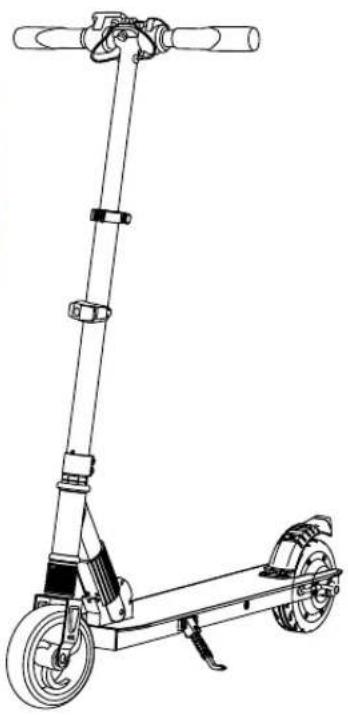
natural_image
Line drawing of a scooter with wheels and handle (no text or symbols)CATALOG
- General Information 01
- Product Overview 02
2.1 General information 02
2.2 What you need to know 02
- Product Description 02
3.1 Unfolding 02
3.2 Assembly 02
3.3 Folding 03
3.4 How to adjust height of extension pole 03
-
How to ride 03
-
SCOOTER SAFETY PRECAUTIONS 04
- Weight and Speed Limitations 05
6.1 Weight Restrictions 05
6.2 Speed Limits 05
- Operating Range 05
- Battery Information and Specifications 06
- Charging your scooter 07
- Inspection, Maintenance, and Storage 08
- Scooter Specifications 08
-
Thank you 08
-
General Information
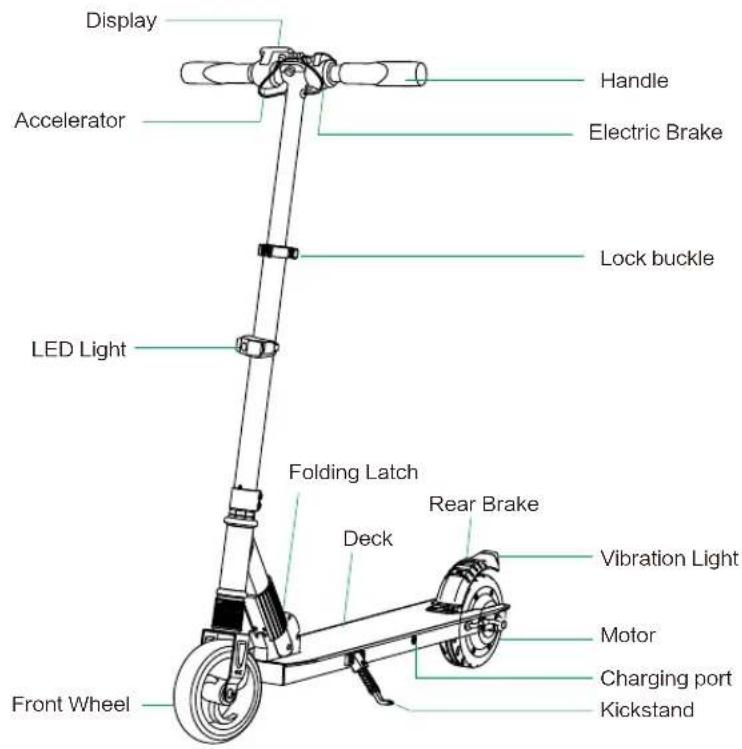
natural_image
Technical line drawing of a mechanical device with levers and gears (no text or symbols)2. Product Overview
2.1 General information
The original scooter is an intuitive, technologically advanced solution. Using the latest technology and production processes, each scooter undergoes strict testing for quality and durability. With its lightweight, portable design, ease of use, range, and low carbon footprint.
2.2 What you need to know
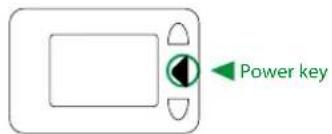
Before you first experience your scooter, please read the USER MANUAL thoroughly and learn the basics to ensure your safety and the safety of others. The power will be shut down if nobody operate in five minutes, you need press power button before you ride.

WARNING Failure to follow the basic instructions and safety precautions listed in the USER MANUAL, can lead to damage to your scooter, other property damage, serious bodily injury, and even death.
3. Product Description
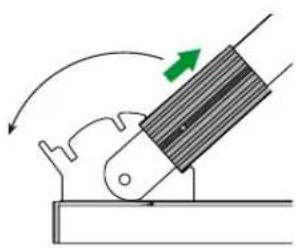
3.1 Unfolding
You can unfold the Smart Kick Scooter without any inconvenience in seconds.
- Pull up the tube of the folding construction, then pull up the the front pole, when bottom of the folding tube goes into the slot, the unfolding completed.
natural_image
Diagram of a mechanical lever mechanism with motion arrows (no text or symbols)3.2 Assembly
The Smart Kick Scooter can be assembled within 2 minutes: • Install the Handlebars and tighten the handles.
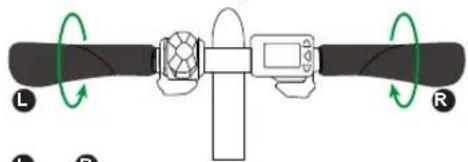
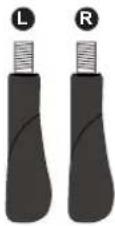
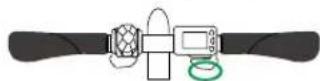
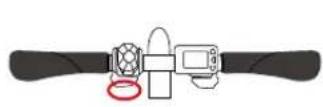
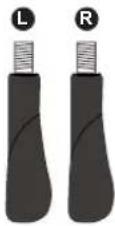
Before installing the handles, please make sure to differentiate the left & right handles carefully. Please see the difference of left & right handles from below images.
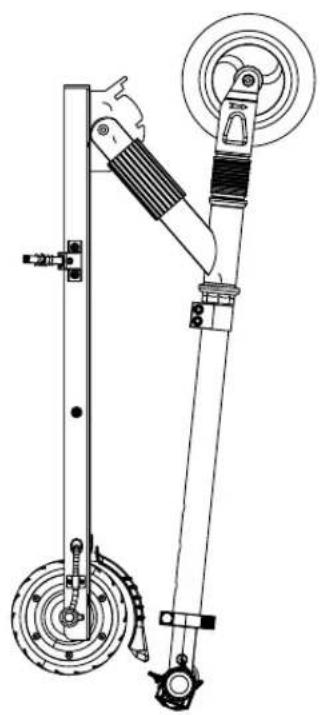
3.3 Folding
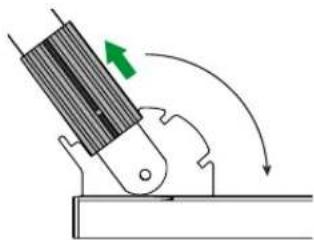
The Smart Kick Scooter can be folded in a few seconds at the press of a single lever.
• Pull up the tube of the folding construction, then push down the front pole, when bottom of the folding tube goes into the slot, the folding completed.
natural_image
Diagram of a mechanical device with directional arrows indicating motion (no text or symbols)3.4 How to adjust height of extension pole
- Open the lock buckle of extension pole.
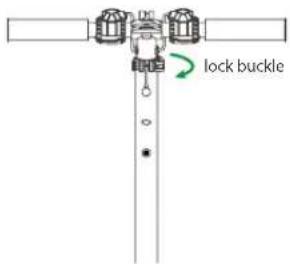
- Press down height-limit button (the metal bead in hole of extension pole), and pull extension pole to the length(3 levels of height for option) to fit rider's height. When the bead goes into the hole, the height is fixed.
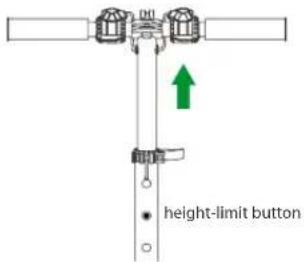
- Close the lock buckle.
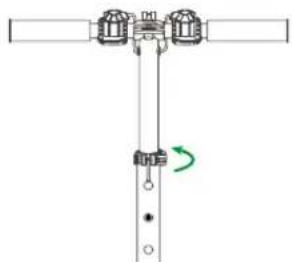
natural_image
Pure mechanical assembly diagram without any text, numbers, or symbols
The extensive height is prohibited to exceed the first upper Limit hole. Limit ball must be perfectly placed into the limit hole when the extensive height is finalized. Before riding, it's a must to fasten lock buckle first. Any operation violating above instructions causes falling down by the loose front pole.
4. How to ride
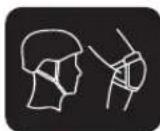
Warning: There is risk of falling down during learning, so make sure to wear helmet and protection kits all the time.
4.1 How to ride
- Turn on the scooter by press 3S and check the battery power.
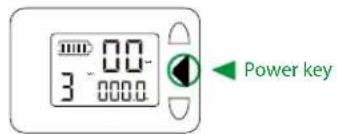
- Once the power is on it is safer to start riding with one foot on the deck keeping the other foot on the ground for pull off, once the speed up to 10km/h then push accelerator and place the other foot on the deck, this is safer and more controlled than pulling off with two feet on the deck as you will have less control and stability with two feet on the deck. Skillfully use the accelerate throttle valve to speed up or slow down when riding.
gradually coast to a stop then step off the scooter one foot at a time. Be extra cautions when dismounting for the first time.
- Turn off the scooter when finish using the product. .3. To stop riding, release the throttle and use th
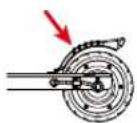
Warning: If scooter has both electric brake and rear physic brake, the electric brake is prior to rear brake, which is only used as auxiliary brake when electric brake does not work properly. DO NOT step on rear brake for a long time. Or it will break the tire and fender
4.2 Display description
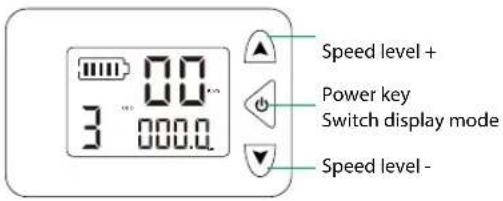
Display mode: ODO, VOL, TIME, DIS, RPM
Speed level: 1--Max 5km/h
2--Max 15km/h
3--Max 23km/h
4.3 Light description
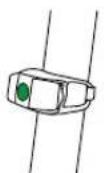
You can choose 3 lighting modes by pressing the button.
-
Press the button to switch on, the LED flashes with short intervals.
-
Pressing again, the LED flashes with longer intervals.
-
Press the button again to activate the permanent lighting.
Press the button the fourth time to turn off the light.





5. SCOOTER SAFETY PRECAUTIONS
Failure to follow any of the following safety precautions can and may lead to damage to your scooter, void your manufacturer warranty, lead to property damage, cause serious bodily injury, and can lead to death.
- Please wear all appropriate safety and protective gear as previously mentioned in the User Manual before operating the scooter.
- Make sure to wear comfortable clothes and flat closed toe shoes when operating your scooter.
- Please carefully read the User Manual, which will assist in explaining the basic working principles and provide tips on how to best enjoy your scooter experience.
- Do not try to open or modify your scooter, as doing so will vlid your manufacturer warranty, and may cause failure to your device leading to serious bodily injury or death.
- Do not use the scooter to place yourself or anyone else and their property in danger.
- Do not operate the scooter while under the influence of drugs and/or alcohol.
- Do not operate the scooter when you are restless or sleepy.
- Use your best judgment to keep yourself out of dangerous situations with your scooter.
- Do not ride your scooter off of curbs, ramps, or attempt to operate in a skate park, empty pool, or in any ways similar to a skateboard or scooter. THE SCOOTER IS NOT A SKATEBOARD.
- Do not turn sharply, especially at high speeds.
- Do not abuse your scooter, doing so can damage your unit and cause failure to the operating system leading to injury.
- Do not drive in or near puddles of water, mud, sand, stones, gravel, debris or near rough and rugged terrain.
- The scooter can be used on paved roads that are flat and even. If you encounter uneven pavement, please lift your scooter over and past the obstruction.
- Do not ride in inclement weather: snow, rain, hail, sleek, on icy roads or in extreme heat.
- Do not ride in or near pools or other large bodies of water.
- For Bumps and Uneven pavement-Bend your knees when riding on bumpy or uneven pavement to absorb the shock and vibration and help you keep your balance. If you are unsure if you can safely ride on a specific terrain, step off and carry your scooter. ALWAYS ERR ON THE SIDE OF CAUTION.
- Do not attempt to ride over bumps or objects greater than 1.5cm even when prepared and bending your knees.
- PAY ATTENTION - look at where you are riding and be cognoscente of the road conditions, people, places, property and objects around you.
- Do not operate the scooter in crowded areas.
- Operate your scooter with extreme caution when indoors, especially around people, property, and narrow spaces like doorways and other narrow spaces.
-
Operate your scooter with extreme consideration for people and property at all times.
-
Do not operate the scooter while talking, texting, or looking at your phone.
- Do not ride your scooter where it is not permitted.
- Do not ride your scooter near motor vehicles or on public roads.
- Do not climb or travel down steep hills with your scooter.
- The scooter is intended for use by a single individual, DO NOT attempt to operate the scooter with two or more people.
- Do not carry anything while reding the scooter.
- Individuals with lack of balance should not attempt to operate the scooter.
- Women who are pregnant or who may become pregnant should not operate the scooter.
- Young children and the elderly should not operate the scooter without proper instruction and supervision from a Certified scooter trainer.
- At higher speeds, always take into consideration longer stopping distances.
- Do not step forward off your scooter.
- Do not attempt to jump on or off your scooter.
- Do not attempt any stunts or tricks with your scooter.
- Do not ride the scooter in dark or poorly lit areas.
- Do not ride the scooter near or over potholes, cracks or uneven pavement.
- Do not operate yout scooter off-road.
- Do not exceed the maximum or minimum weight limits.
- Avoid driving the scooter in unsafe places, including near areas with flammable gas, steam, liquid, dust, fiber, which could cause fire and explosion accidents.
6. Weight and Speed Limitations

PLEASE NOTICE
Speed and weight limits are set for your own safety. Please do not exceed the limits listed in the User Manual.
6.1 Weight Restrictions
Maximum Weight: 90 kg.
6.2 Speed Limits
Maximum Speed: 24 km/h
7. Operating Range
Please notice the scooter can travel a distance of 8-12 km on a fully charged battery in ideal conditions. The following are some of the major factors that will affect the operating range of your scooter.
Terrain: A smooth, flat surface will increase your driving distance, while driving uphill, as well as rough or uneven terrain will reduce your distance significantly.
Weight: The weight of the user can affect driving distance, a lighter user will have further range than a heavier user.
Ambient temperature: Please ride and store the scooter under recommended temperatures, which will increase driving distance; battery life, and overall performance of your scooter.
Maintenance: Reasonable battery charging and maintenance will increase the distance. Overcharging the battery can reduce range.
Speed and Driving Style: Maintaining a moderate speed will increase your distance; while travelling at high speeds for extended periods, frequent starts, stops, idling, along with frequent acceleration and deceleration will reduce your overall distance.
8. Battery Information and Specifications
This section is intended to provide you basic information about your battery and charger. Please read this section carefully to ensure you. For user safety and to prolong the life of your battery, as well as improve battery performance, please follow these instructions.
When the battery indicator shows lowbattery capacity, please charge your battery 3 hours utilizing the charger that you received in your scooter package. To fully recharge your battery please follow the instructions under charging your scooter.
8.1 Weight Restrictions
Battery Specifications
| Battery Lithium Battery | |
| Charging time | 3 hours |
| Voltage | 25.2 V |
| Initial Capacity | 4400 mAh |
| Working Temperature | -15 °C - 50 °C |
| Charging Temperature | 0 °C - 40 °C |
| Storage Time | 6 months |
| Storage Temperature | -20 °C - 25 °C |
| Storage Humidity | 5 % -95 % |
BATTERY WARING
Failure to follow the Safety Precautions listed in the Battery Warning could lead to serious bodily injury and death. Seek immediate medical attention if you are exposed to any substance that is emitted from the battery.
- Do not attempt to modify, change, or replace your battery.
- Do not use your scooter if the battery begins to emit odor, overheats, or begins to leak.
- Do not touch any leaking materials, or breathe fumes emitted.
- Do not allow children and animals to touch the battery.
- The battery contains dangerous substances, do not open the battery, or insert anything into the battery.
- Please only use the charger provided by scooter.
-
Do not attempt to charge the scooter if the battery has discharged or emitted any substances. In that case, the battery should be abandoned for safety.
-
Please follow all local, state and federal laws in regards to recycling, handling and disposing of Lithium Ion batteries.
- The scooter should only be shipped in its original packaging.
- Do not throw away your box as you need you scooter packaging for future use.
9. Charging your scooter
Step 1: Ensure that the charging port is clean and dry.
Step 2: Plug the charger into the power socket, then connect the cable with the power supply (100V \~ 240V; 50,60Hz), make sure the light on the charger is lit GREEN.
Step 3: Male DC connector plug into the charging port of the scooter. The indicator light on the charger should change to RED, indicating that your scooter is now, being charged. When the RED indicator light on your charger turns to GREEN then your scooter is fully charged. A full charge typically occurs within 3 hours.
Step 4: Please unplug the charger from your scooter and from the power outlet.

IMPORTANT NOTES ABOUT CHARGING
If the green light on your charger does not turn RED when you plug it into your scooter, it could mean you have to check the cables to ensure you have a proper connection; or that your scooter is already fully chaged. Push and hold your power button next to the charging port to check the status of your battery in the display.
- Do not overcharge, as this will affect the life of the battery.
- The best charging temperatures are between 0^ 40^ . Extreme cold and extreme heat will prevent your battery from charging fully.
- Make sure to unplug your charger before standing on or operating you scooter, as this can be very dangerous.
- Use only the scooter charger that you received in your box.
- If the scooter is powered on when you enter the plug, the Battery Indicator will begin blinking, if the scooter is powered off when you enter the plug, the Battery Indicator will not blink.

NOTE
Only the indicator light on the charger will tell you the status of the battery during charging.
10. Inspection, Maintenance, and Storage
Your scooter requires routine inspection and maintenance. This chapter describes maintenance steps and important operating tips. Before you perform the following operations, ensure the power and charging cable is disconnected.
Inspecting and Cleaning your scooter
Disconnect the charger and turn off your scooter.
Routinely check the body of the scooter and tires for damage or excessive wear. Avoid using water or other liquids and cleaners on the scooter for cleaning. Wet a clean cloth with clean soapy water, rinse the cloth thoroughly, and wipe the body of the scooter making sure that water does not get into the power button, charging port, the foot mats, or tires.
Storing your scooter
Fully charge your battery before storing.
If you are storing your scooter for an extended period of time, please fully charge your scooter at least once every three month.
If the ambient temperature of the storage location is below 0^ , please do not charge. You must bring the scooter into a warmer environment before charging. Check under Battery Information and Specifications for more details.
To prevent dust from getting into your scooter, try wrapping it or sealing it with its original packaging.
Store your scooter indoors, in a dry and suitable temperature.

NOTE
Users who disassemble the scooter will forfeit their right of warranty.
11. Scooter Specifications
- Net Weight: 7.6 kg
- Load: 90 kg
• Max. Speed Limit: 24 km/h - Range: 8-12 km
• Max. Climbing Limit: 15 degree
• Battery: Lithium-ion, 4.4 Ah, 25.2 V
• Power Requirement: AC 100-240V / 50-60Hz
• Size (fold): 90 x 42 x 29 cm
• Size (unfold): 81 x 42 x (92-102) cm - Platform Height: 90mm
- Tire: solid tire
12. Thank you
Thank you for the purchase of your new scooter, and thank for taking the time to read the User Manual. We hope that the information that you obtained from this manual will help you safely operate, maintain and enjoy your scooter for years to come. We appreciate your consideration and sincerely hope you enjoy and share your scooter experience with all of your friends, family members, and loved ones.
Thank you and welcome to the scooter movement! Enjoy your scooter!
INFINITON
Boulevard
EASY WAY
MANUAL DE USUARIO
natural_image
Line drawing of a scooter with wheels and handlebars (no text or symbols)ÍNDICE
natural_image
Technical line drawing of a mechanical device with levers and gears (no text or symbols)natural_image
Diagram of a mechanical lever mechanism with motion arrows (no text or symbols)3.2 Montaje
natural_image
Diagram of a mechanical device with directional arrows indicating motion (no text or symbols)natural_image
Pure mechanical assembly diagram without any text, numbers, or symbols
natural_image
Line drawing of a scooter with wheels and handle (no text or symbols)ÍNDICE
natural_image
Technical line drawing of a mechanical device with levers and gears (no text or symbols)natural_image
Diagram of a mechanical lever mechanism with green directional arrows indicating motion (no text or symbols)3.2 Assembly
natural_image
Diagram of a mechanical device with directional arrows indicating motion (no text or symbols)natural_image
Pure mechanical assembly diagram without any text, numbers, or symbols
natural_image
Empty white rectangle with black border (no text or symbols)- CATALOG
- Product Overview
- General information
- What you need to know
- Product Description
- Unfolding
- Assembly
- Folding
- How to adjust height of extension pole
- How to ride
- How to ride
- Display description
- Light description
- SCOOTER SAFETY PRECAUTIONS
- Weight and Speed Limitations
- PLEASE NOTICE
- Weight Restrictions
- Speed Limits
- Operating Range
- Battery Information and Specifications
- Weight Restrictions
- BATTERY WARING
- Charging your scooter
- IMPORTANT NOTES ABOUT CHARGING
- NOTE
- Inspection, Maintenance, and Storage
- Inspecting and Cleaning your scooter
- Storing your scooter
- Scooter Specifications
- Thank you
- INFINITON
- Boulevard
- MANUAL DE USUARIO
- ÍNDICE
- Montaje
Brand : Infiniton
Model : Boulevard Easy Way
Category : Scooter