
Oreck DualMax AIR16UK - Air purifier VAX - Free user manual and instructions
Find the device manual for free Oreck DualMax AIR16UK VAX in PDF.


| Product Type | Air Purifier |
| Brand | VAX |
| Model | Oreck DualMax AIR16UK |
| Dimensions (approx.) | 300 x 200 x 500 mm |
| Weight (approx.) | 4 kg |
| Power Supply | 220-240 V, 50 Hz |
| Power Consumption | 50 W |
| Coverage Area | Up to 30 m² |
| Filter Type | HEPA + Activated Carbon |
| Number of Fan Speeds | 3 speeds |
| Noise Level | 25 - 50 dB |
| Timer | 1, 4, 8 hours |
| Air Quality Sensor | Yes (PM2.5) |
| Display | Digital with air quality indicator |
| Control Type | Touch panel + Remote control |
| Auto Mode | Yes |
| Sleep Mode | Yes |
| Child Lock | Yes |
| Pre-filter Cleaning | Monthly with vacuum cleaner |
| HEPA Filter Replacement | Every 6 months |
| Spare Parts | Replacement HEPA filter (model XYZ) |
| Warranty | 2 years |
Frequently Asked Questions - Oreck DualMax AIR16UK VAX
User questions about Oreck DualMax AIR16UK VAX
0 question about this device. Answer the ones you know or ask your own.
Ask a new question about this device
Download the instructions for your Air purifier in PDF format for free! Find your manual Oreck DualMax AIR16UK - VAX and take your electronic device back in hand. On this page are published all the documents necessary for the use of your device. Oreck DualMax AIR16UK by VAX.
USER MANUAL Oreck DualMax AIR16UK VAX
natural_image
Exterior view of a modern ORECK air purifier with ventilation grilles and control panel (no text or symbols on body)ORECK®
THANK YOU
for purchasing an Oreck® product
TABLE of CONTENTS
1 IMPORTANT SAFETY INSTRUCTIONS....4
Technical Specifications....5
2 FEATURES 6
3 OPERATION 8
4 CLEANING 9
Cleaning Intervals 9
Cleaning the Pre-Filter 10
Cleaning the Truman Collector Cell ^® 10
Drying the Truman Cell ^® 12
Dry Operation Mode 13
Cleaning the Exhaust Grille 13
5 TROUBLESHOOTING GUIDE....14
6 WARRANTY....15
IMPORTANT SAFETY INSTRUCTIONS
SAVE THESE INSTRUCTIONS
When using an electrical appliance, basic precautions should always be followed, including the following: READ ALL INSTRUCTIONS BEFORE USING THIS APPLIANCE.
WARNING: TO REDUCE THE RISK OF FIRE, ELECTRIC SHOCK OR INJURY:
This air purifier is intended for household use only and NOT for commercial or industrial use.
- Only use the air purifier indoors and keep away from wet areas.
- Keep fingers, hair and loose clothing away from moving parts and openings whilst using the air purifier.
- This appliance can be used by children aged from 8 years and above and persons with reduced physical, sensory or mental capabilities or lack of experience and knowledge if they have been given supervision or instruction concerning use of the appliance in a safe way and understand the hazards involved. Children shall not play with the appliance. Cleaning and user maintenance shall not be made by children without supervision.
- Always position the air purifier on a flat, stable, solid surface and never over stretch the power cord.
- Position the air purifier where dirty air is not drawn across your body or head while sitting or sleeping.
- Don't place air purifier near sources of heat, such as stove tops, ovens, radiators or computers.
- Don't use the air purifier if the power cord or plug is damaged. Please contact our Customer Care Line.
- Don't use the air purifier if it has been dropped, damaged or left outdoors.
- Don't run the power cord under rugs, runners or carpets as it can be a trip hazard.
- Don't pull, carry or trap the power cord under doors or sharp edges.
- Don't handle the plug or air purifier with wet hands.
- Don't unplug the air purifier by pulling on the power cord.
- Don't use the air purifier in an area with toxic/explosive vapours/liquids, oxygen tanks or near to flammable, combustible materials (lighter fluid, petrol, kerosene, chlorine, bleach and ammonia drain cleaner etc).
- Don't use the air purifier with incorrect voltage as this may result in damage or injury to the user. The correct voltage is listed on the ratings label.
- Don't use without all filters in place.
-
Inspect the air purifier regularly and remove any dust/dirt build up as this may affect the airflow.
-
Keep all openings/grills clear and free from obstruction and sources of heat, open flames including candles. Don't attempt to remove blockages with sharp objects as this may cause damage to the air purifier.
- Turn off all controls on the air purifier before disconnecting or connecting the power cord.
- Always replace the fuse in the plug with a 5amp fuse. Always protect the power cable from heat.
- Use only CE approved 5amp extension cords, non-approved extension cords may overheat.
- Care should be taken to arrange the extension cord as it can be trip hazard.
- Always switch off and unplug the air purifier before performing maintenance or troubleshooting checks.
PLEASE KEEP INSTRUCTIONS FOR FURTHER USE.
TECHNICAL SPECIFICATIONS
AIR16UK
| Wattage | 40W |
| Weight | 7.2kg |
| Noise Level | 37dB(A) |
2. FEATURES
CARTON CONTENTS

Pre-Filter
Filters large particles such as dust, hair and lint.

Cleaning Brush
Use to clean the front and back grills. Stores snuggly in the compartment under the cover.

Odour Absorber
This component combines advanced catalytic technologies to reduce odors and chemical fumes from glues, solvents, and synthetic materials when air passes through the filter and is activated by the DualMax ^® internal lights. (The Odour Absorber System cannot be removed.)

Truman Cell®
Electrostatically charges and collects small particles such as dust, smoke, pollen and mold from the air that passes through the filter.

Exhaust Grill
Directs the flow of air as it exits the unit.

Power Cord
Plug into the outlet to begin use.

Night Light
The Oreck logo on the front panel & the indicators on the control panel will illuminate when the night light is activated.

Collector Cell Light
A solid amber light is included as a handy reminder to clean the Truman Cell after 30 days. A blinking light indicates a malfunction that has caused the Truman Cell to shut down and requires attention.

Speed Indicator Light
The speeds will be cumulatively indicated: 1 = low; 1 + 2 = medium ; 1 + 2 + 3 = high .

Odour Absorber Button
This button turns the internal lights on or off as desired. If turned off, the unit will continue to filter particles from the air that passes through the filter but its odor and VOC capability will be greatly reduced.
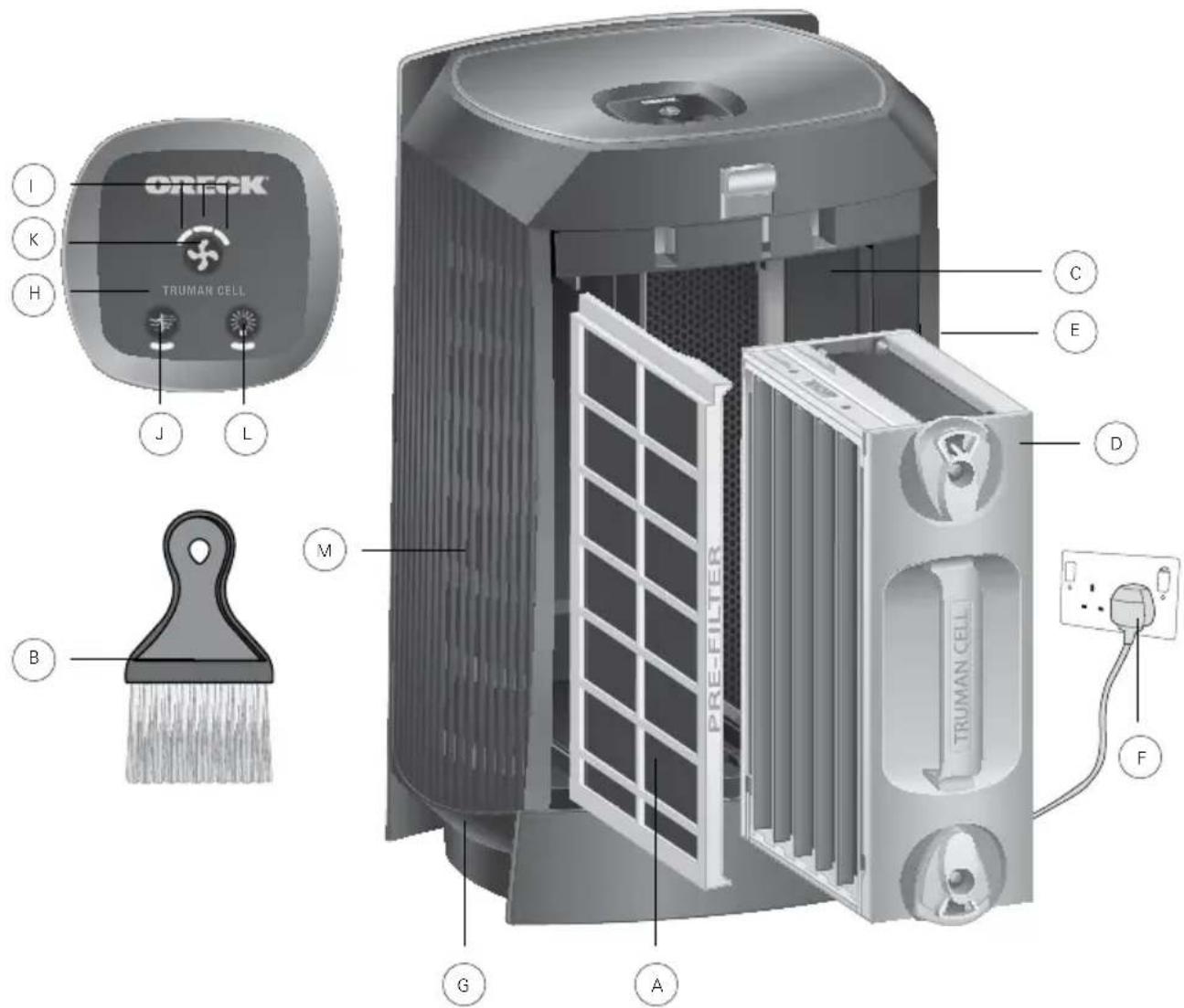

Motor Speed/Power Button
Press the power buttons repeatedly for the desired speed.
• Low for Silence Technology
• Medium for normal use
• High for maximum cleaning

Night Light Button
Repeatedly press this button to change the lighting scheme to best suit your preference.

Front Grill
Air enters here for the first stage of cleaning.
Remove all parts from carton and identify each item shown.
Make sure all parts are located before disposing of packing materials.
3. OPERATION
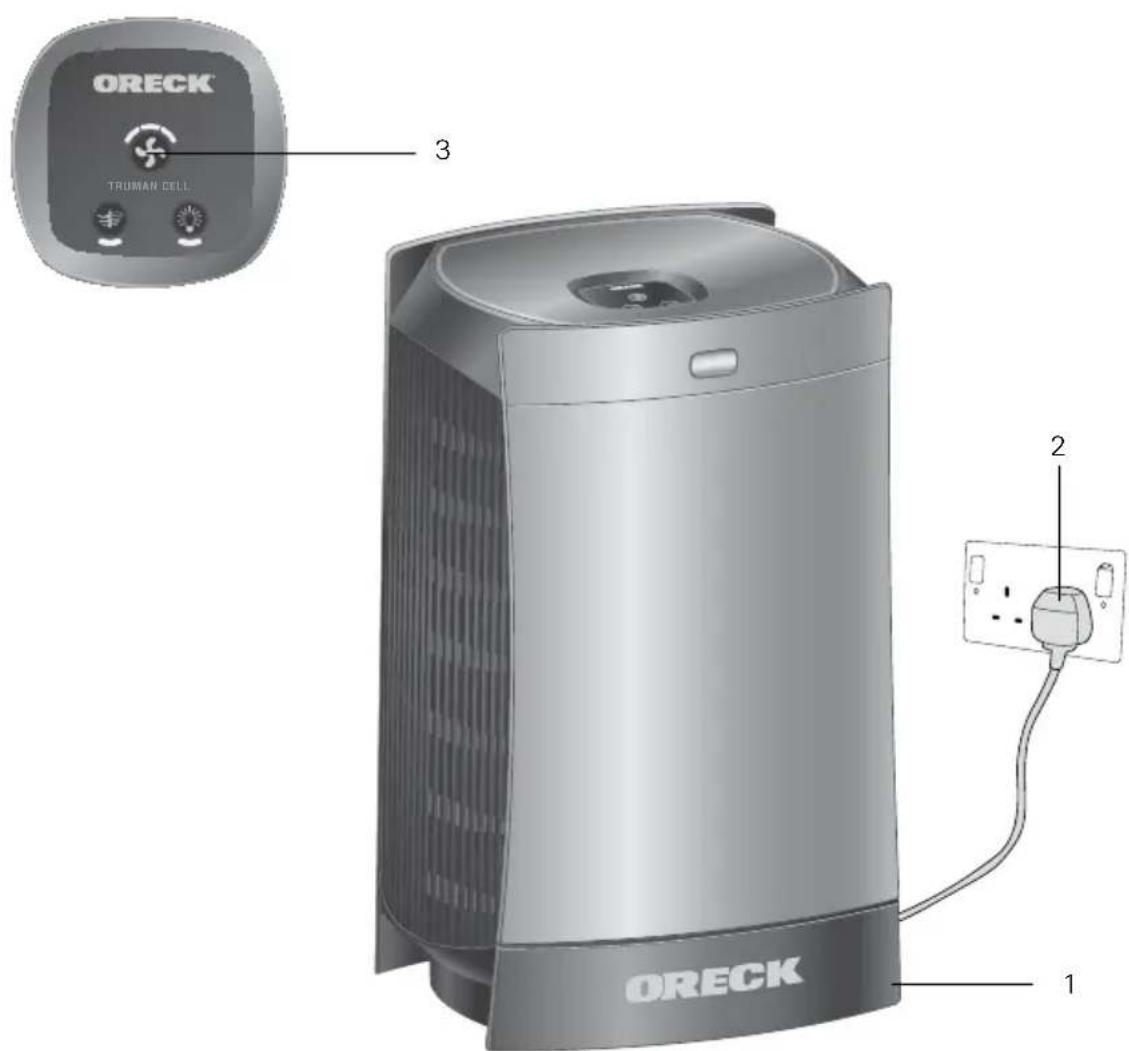
PLACE
- Locate the air purifier on a hard surface such as a table or desk. Be sure the grille is not blocked by other objects and there are no flames near the unit.
PLUG IN
- Plug into the nearest standard electrical outlet that accepts a polarized plug.
SELECT
- Press the motor speed/power button until you reach the desired air cleaning speed.
4. CLEANING

WARNING!
Cleaning the unit while it is plugged in may result in electric shock, electric spark and serious injury. Unplug the unit before cleaning or maintenance.
CLEANING INTERVALS
- Proper care and cleaning of the air purifier is critical to performance. The following chart shows the cleaning intervals and method.
| PART CLEANING TIME | METHOD | |
| CABINET AS NEEDED WIPE WITH DAMP CLOTH FIRST. IF | REQUIRED, FOLLOW WITH MILD,NON-ABRASIVE CLEANER. | |
| TRUMAN CELL 2 TO 4 WEEKS | SPRAY ORECK® ASSAIL-A-CELL | CLEANEROR SOAK IN WARM WATER OR WARMWATER WITH MILD LIQUID DETERGENT.RINSE AND DRY THOROUGHLY. |
| PRE-FILTER 2 TO 4 WEEKS | INSE THOROUGHLY IN WARM WATER | WATEROR AS NEEDED. |
| AIR DIRECTION GRILL AS NEEDED USE THE BRUSH PROVIDED WITH THEAIR PURIFIER TO BRUSH AWAY DEBRISIN BETWEEN THE SLOTS. | ||
CLEANING THE PRE-FILTER
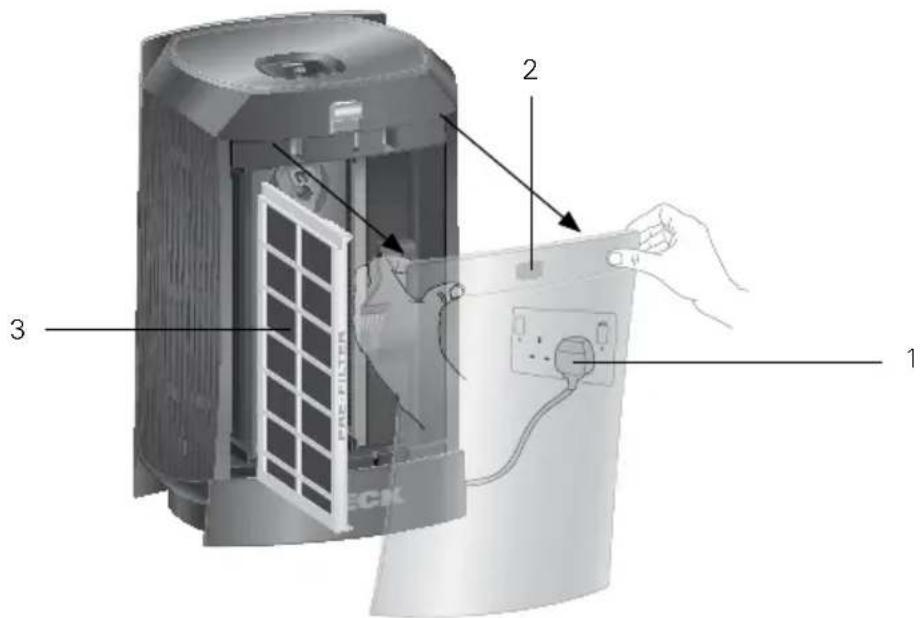
- Unplug the air purifier.
- Open the Cover by gently pulling from the top corners.
- Pull the Pre-Filter straight out of the Cabinet.
- Thoroughly rinse the Pre-Filter and let it air dry before placing it back in the Cabinet. Do not use heated or compressed air as part of the drying process.
- Slide the Pre-Filter back into the unit.
- Close the Cover securely.
CLEANING THE TRUMAN COLLECTOR CELL
Note: The Truman Cell ^® may require more frequent cleaning if “arcing” occurs. Arcing is a sharp snapping sound that occurs when large particles are collected in the Truman Cell ^® . If prolonged or continuous arcing occurs the Truman Cell ^® should be cleaned.
- Unplug the air purifier.
- Open the Cover by gently pulling from the top corners.
- Remove the Truman Cell ^® by unlocking top and bottom knobs and pulling straight out.
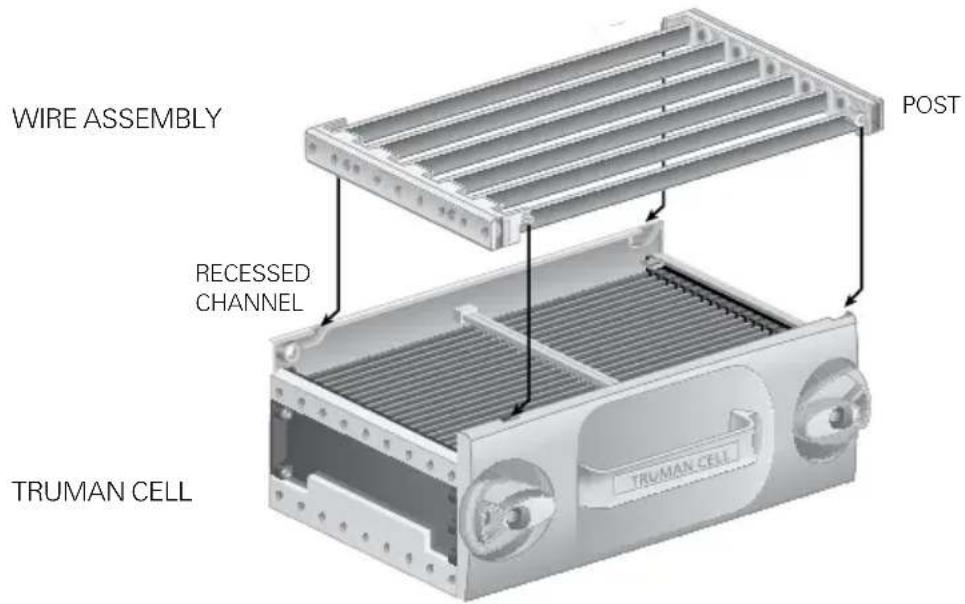
- Separate the Truman Cell ^® from the Wire Assembly for easier access to each during cleaning.
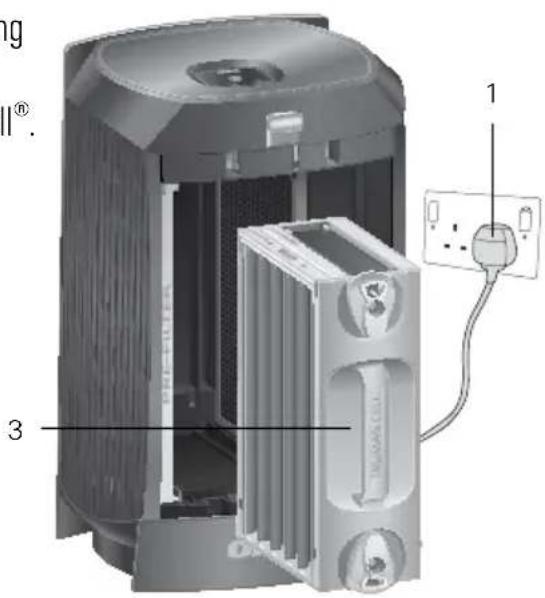
- Place each in sink, bathtub or other location where cleaner can cover every surface.
- Spray Oreck Assail-a-Cell ^® cleaner between each Cell Plate and cover each surface. Allow the cleaner to soak for a few minutes but do not let it dry. Thoroughly rinse the Truman Cell ^® with clean water.
An alternative method to clean the Truman Cell ^® is to rinse or soak it in warm water for loose debris. Mild liquid dish detergent in water may also be used to help break down tough dirt and residue. Thoroughly rinse the Truman Cell ^® with clean water.
Note: To prevent damage to the components of the Truman Cell ^® , do not put in dishwasher or use a cotton swab.
Tough residue such as tar from tobacco smoke may need additional cleaning or longer soaking.
- Shake excess water from the Truman Cell ^® to speed up drying time. Do not use heated or compressed air to dry.
- Reassemble the Wire Assembly and Truman Cell ^® by inserting the post located on the outside edges of the Wire Assembly into the recessed channels of the Truman Cell ^® . After guiding the post into the recessed channels, slide the Wire Assembly until it locks into place.
- Place the Truman Cell ^® back into the unit by sliding it straight in and turning each knob to its locking position. The Truman Cell ^® is specially designed so that it can only be inserted in one direction.
- Close the Cover securely.
DRYING THE TRUMAN CELL
Note: The Truman Cell ^® must be completely dry after cleaning to operate properly. A drying mode is available to help remove any residual moisture. While in this mode, the fan will be running on Medium speed and no power will be supplied to the Truman Cell ^® . Once the unit detects that the Truman Cell ^® is completely dry, it will return to its original operating settings and function as normal.
If the power supply detects that the Truman Cell® is wet, it shuts down power to the cell and causes the Collector Cell light to blink rapidly.
- While the collector cell light is blinking, press and hold the power button to initiate "Dry Mode"
-
Next, the following will all happen simultaneously:
-
The lights directly above and below the power button will flash 3 times.
- The unit will switch to medium speed.
-
The Collector Cell light will start to blink in a slow pattern.
-
Once in "Dry Mode"
-
The unit will run for 60 minutes and then attempt to reset the power supply to the Truman Cell ^* .
- If the power supply successfully restarts, the unit will return to its original speed and run as normal.
- If not successful, it will go through the same process up to two more times.
- If still not successful after the third try, the cell is likely damaged or is shorting out due to the presence of a foreign object; it will return to the original speed and the Collector Cell light will blink with a rapid blink pattern indefinitely until the unit is reset.
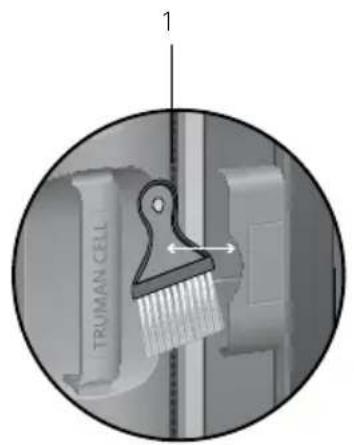
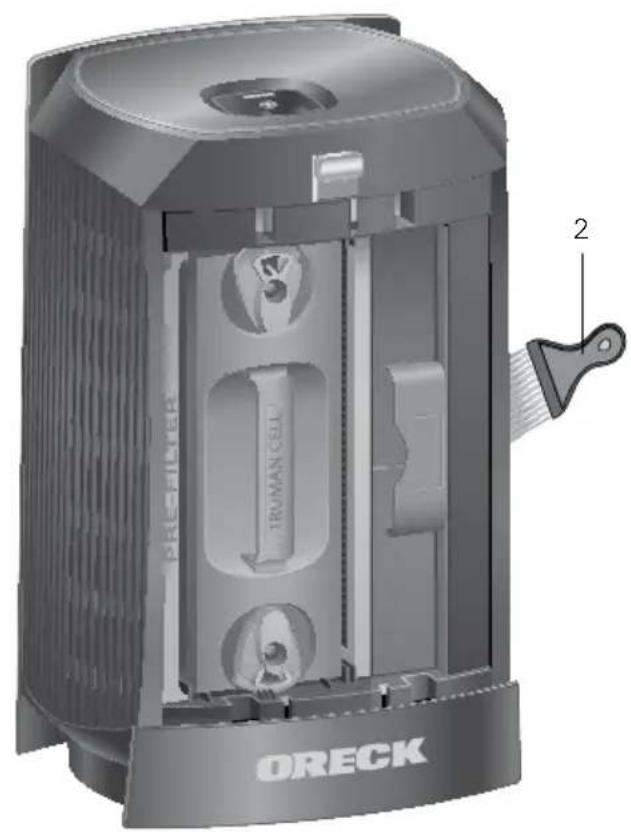
- Remove the Cleaning Brush from the storage slot located under the Cover.
- Brush away debris that has collected between the Grill Slots.
- Return the Cleaning Brush to the storage slot.
5. TROUBLESHOOTING
Service problems that appear to be major can often be solved easily. This guide can help you troubleshoot.
For any other service problems, contact our customer service team at 0845 603 0153.
| PROBLEMCHECK SOLUTION | ||
| UNIT DOES NOT TURN ON | POWER CORDSELECTOR SWITCHCOVER | PLUG IN POWER CORDSET SELECTOR SWITCH FOR DESIRED FAN SPEED.MAKE SURE THE TOP COVER IS SECURELY CLOSED |
| TRUMAN CELL LIGHT HAS TURNED SOLID AMBER. | TRUMAN CELL ^® | A SOLID AMBER LIGHT IS A 30 DAY CLEANINGREMINDER. WASH COLLECTOR CELL. MAKESURE IT IS THOROUGHLY CLEAN AND DRYBEFORE REINSTALLING. |
| TRUMAN CELL LIGHT IS BLINKING AMBER | TRUMAN CELL ^® | FAST BLINKING LIGHT INDICATES THE POWER SUPPLY HAS SHUT DOWN DUE TO ARCING OR SHORT CIRCUIT. THE CELL SHOULD BE INSPECTED AND CLEANED, REPAIRED, OR REPLACED.A SLOW BLINKING LIGHT INDICATES THE UNIT IS IN DRY MODE. |
| UNIT DOES NOT REMOVE POLLUTANTS. | TRUMAN CELL ^® | CLEAN THE TRUMAN CELL ^® AND MAKE SURE IT IS COMPLETELY DRY BEFORE REINSTALLING.TRUMAN CELL ^® MAY BE DAMAGED. CONTACT ORECK ^® CUSTOMER SERVICE AT 0845 603 0153. |
| UNIT SPARKS, CRACKLES AND POPS. | TRUMAN CELL ^® | SPARKING OR POPPING NOISE (ARCING) CAN OCCUR WHEN A LARGE PARTICLE IS CAPTURED IN THE TRUMAN CELL ^® . IF THE UNIT IS ARCING EXCESSIVELY, THE CELL MAY BE DIRTY. TRY CLEANING THE TRUMAN CELL ^® .IF EXCESSIVE ARCING CONTINUES AFTER PROPER CLEANING, THE TRUMAN CELL ^® MAY BE DAMAGED OR WET. IF DAMAGED, CONTACT ORECK ^® FOR SERVICE. |
| UNIT STILL DOES NOT OPERATE PROPERLY | REVIEW ALL OF THE ABOVE | CONTACT ORECK ^® CUSTOMER SERVICE AT 0845 603 0153. |
6. WARRANTY
Oreck® MANUFACTURING COMPANY: (Oreck® Manufacturing Company gives you the following limited warranty for this product only if it was originally purchased for residential use, not for resale, from Oreck® or an Oreck® Authorized Retail Dealer.)
Oreck ^® will repair or replace, free of charge, to the original purchaser, any part that is found to be defective in material or workmanship within two (2) years following the date of purchase for all residential models. NOTE: If the unit is used commercially, a one (1) year overall warranty applies. This limited warranty does not cover the replacement of expendable or consumable parts such as filters, cartridges, and other parts subject to normal wear unless they are defective in material or workmanship.
This limited warranty does not apply to any part subjected to accident, abuse, commercial use, alteration, misuse, damage caused by an act of God, the use of voltages other than on the data plate of this product or service of this product by other than Oreck ^® or a participating Factory Authorized Service Center.
Oreck ^® does not authorize any person or representative to assume or grant any other warranty obligation with the sale of this product.
Oreck ^® 's limited warranty is valid only if you retain proof of purchase from Oreck ^® or an Oreck ^® Authorized Retail Dealer for this product. If you purchase this product from any other source, your purchase is "AS IS," which means Oreck ^® grants you no warranty, and that you, not Oreck ^® , assume the entire risk of the quality and performance of this product, including the entire cost of any necessary servicing or repairs of any defects.
Oreck ^® 's liability for damages to you for any costs whatsoever arising out of this statement of limited warranty shall be limited to the amount paid for this product at the time of original purchase, and Oreck ^® shall not be liable for any direct, indirect, consequential or incidental damages arising out of the use or inability to use this product. Some states do not allow the exclusion or limitation of incidental or consequential damages, so the above limitation or exclusion may not apply to you.
ALL EXPRESS AND IMPLIED WARRANTIES OTHER THAN THE LIMITED WARRANTY SET FORTH ABOVE, FOR THIS PRODUCT, INCLUDING IMPLIED WARRANTIES OF MERCHANTABILITY AND FITNESS FOR A PARTICULAR PURPOSE ARE EXPRESSLY DENIED.
This warranty gives you specific legal rights, and you may also have other rights which vary from state to state.
ORECK®
Quillgold House, Kingswood Road, Hampton Lovett, Droitwich, Worcs. WR9 0QH AIR16UK #1-1-134322-00
- THANK YOU
- TABLE of CONTENTS
- IMPORTANT SAFETY INSTRUCTIONS
- SAVE THESE INSTRUCTIONS
- WARNING: TO REDUCE THE RISK OF FIRE, ELECTRIC SHOCK OR INJURY:
- TECHNICAL SPECIFICATIONS
- FEATURES
- CARTON CONTENTS
- Pre-Filter
- Cleaning Brush
- Odour Absorber
- Truman Cell®
- Exhaust Grill
- Power Cord
- Night Light
- Collector Cell Light
- Speed Indicator Light
- Odour Absorber Button
- Motor Speed/Power Button
- Night Light Button
- Front Grill
- OPERATION
- PLACE
- PLUG IN
- SELECT
- CLEANING
- WARNING!
- CLEANING INTERVALS
- CLEANING THE PRE-FILTER
- CLEANING THE TRUMAN COLLECTOR CELL
- DRYING THE TRUMAN CELL
- TROUBLESHOOTING
- WARRANTY
- ORECK®
Brand : VAX
Model : Oreck DualMax AIR16UK
Category : Air purifier