
AP02 - Air purifier VAX - Free user manual and instructions
Find the device manual for free AP02 VAX in PDF.


| Type of product | Air purifier |
| Brand | Vax |
| Model | AP02 |
| Dimensions (W x D x H) | 30 cm x 20 cm x 50 cm |
| Weight | 4.5 kg |
| Power supply | 220-240V, 50Hz |
| Power consumption | 30 W (max) |
| Filtration technology | HEPA H13 + activated carbon pre-filter |
| Number of fan speeds | 3 speeds + turbo |
| Timer | 2, 4, 8 hours |
| Auto mode | Yes, with air quality sensor |
| Air quality indicator | LED ring (blue, green, red) |
| Noise level | 25 - 55 dB |
| Coverage area | Up to 30 m² |
| Clean Air Delivery Rate (CADR) | 180 m³/h (dust) |
| Filter replacement indicator | Yes, light indicator |
| Filter life | 6-12 months (depending on usage) |
| Maintenance | Vacuum pre-filter monthly; replace HEPA every 12 months |
| Safety features | Auto shut-off when front cover removed, child lock |
| Spare parts available | Replacement filters (HEPA + carbon) |
| Warranty | 2 years |
Frequently Asked Questions - AP02 VAX
User questions about AP02 VAX
0 question about this device. Answer the ones you know or ask your own.
Ask a new question about this device
Download the instructions for your Air purifier in PDF format for free! Find your manual AP02 - VAX and take your electronic device back in hand. On this page are published all the documents necessary for the use of your device. AP02 by VAX.
USER MANUAL AP02 VAX
 Basic safety precautions Basic safety precautions | This air purifier is intended for household use only and NOT for commercial or industrial use.Only use the air purifier indoors and keep away from wet areas.Keep fingers, hair and loose clothing away from moving parts and openings whilst using the air purifier.Always position the air purifier on a flat, stable, solid surface and never over stretch the power cord. |
| [AXG7]Don'ts | Don't place the air purifier near sources of heat, such as stove tops, ovens, radiators or computers.Don't use the air purifier if the power cord or plug is damaged. Please contact our Customer Care Line on: 0330 026 8455 (Mon-Fri 8:30am to 6:30pm, Sat 9:00am to 5:00pm).Don't use the air purifier if it has been dropped, damaged or left outdoors.Don't run the power cord under rugs, runners or carpet as it can be a trip hazard.Don't pull, carry or trap the power cord under doors or sharp edges.Don't handle the plug or air purifier with wet hands. |
 Do's Do's | Inspect the air purifier regularly and remove any dust/dirt build up as this may affect the airflow.Keep all openings/grilles clear and free from obstruction and sources of heat, open flames including candles. Don't attempt to remove blockages with sharp objects as this may cause damage to the air purifier.Turn off all controls on the air purifier before disconnecting or connecting the power cord. |
- Position the air purifier where dirty air is not drawn across your body or head while sitting or sleeping.
- This appliance can be used by persons with reduced physical, sensory or mental capabilities or lack of experience and knowledge if they have been given supervision or instruction concerning use of the appliance in a safe way and understand the hazards involved. Children shall not play with the appliance. Cleaning and user maintenance should not be made by children.
- Don't unplug the air purifier by pulling on the power cord.
- Don't use the air purifier in an area with toxic/explosive vapours/liquids, oxygen tanks or near to flammable, combustible materials (lighter fluid, petrol, kerosene, chlorine, bleach and ammonia drain cleaner etc).
- Don't use the air purifier with incorrect voltage as this may result in damage or injury to the user. The correct voltage is listed on the ratings label.
- Don't use without all filters in place.
- Always replace the fuse in the plug with a 5amp fuse. Always protect the power cable from heat.
- Use only CE approved 5amp extension cords, non-approved extension cords may overheat.
- Care should be taken to arrange the extension cord as it can be trip hazard.
- Always switch off and unplug the air purifier before performing maintenance or troubleshooting checks. PLEASE KEEP INSTRUCTIONS FOR FURTHER USE.
Contents:
Lets talk safety 2
Getting to know your machine 5
Getting started 6
Using your machine 7
Taking care of your machine: replacing the filters 8
What to do if it goes wrong... 9
Getting in touch... 10
Don't forget your accessories! 11
Technical specifications 11
Getting to know your machine:
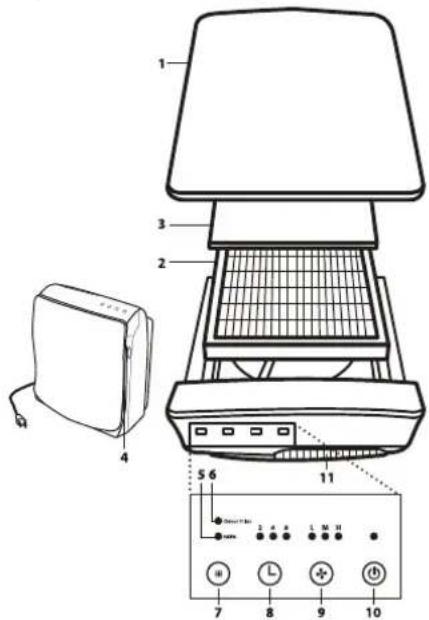
1 Air Purifier Door: Easily removed to gain access to the filter at front of machine.
2 HEPA Media Filter: Filters particles from the air that passes through the filter.
3 Odour Filter: Reduce odours from the air that passes through the filter.
4 Side Intake Grille: Where air enters the unit.
5 Main Filter Light: Indicates the main filter may need to be replaced when lit.
6 Odour Filter Light: Indicates the odour filter may need to be replaced when lit.
7 Light Reset Button: This button resets both the main filter and odour filter lights.
8 Timer: Set the run time for two, four or eight hours, before automatically turning OFF.
9 Fan Speed: The fan runs at three speeds. The lights indicate the current fan speed.
L: Low for the Silence Technology
M: Medium for typical use
H: High for maximum cleaning
10 Power: Turn the unit ON and OFF.
11 Exhaust Grille: Direct the flow of air as it exits the unit.
Included in your machine: HEPA Media Filter and odour filter.
Technical specifications see page 11.
Getting started:
BEFORE YOU BEGIN
Important: Remove all packaging covering the air purifier and filters. Make sure the filters are in place and correctly fitted before turning on. Stand the air purifier on a hard flat surface away from candles and flames. Never block the inlet grilles, keep air grilles free from any oostruction.
- IMPORTANT -
This unit is equipped with a smart panel that senses your touch. Heavy pushing of buttons is not recommended.
natural_image
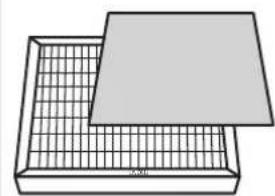
Simple line drawing of a grid-patterned tray with a flat lid (no text or symbols)1 Check the air purifier for the filters. Be sure the supplied filters are properly in place and all plastic is removed before turning the unit on.
natural_image
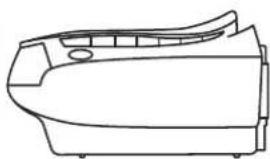
Line drawing of a car front bumper (no text or symbols)HORIZONTAL POSITION
2 Place the air purifier on a hard surface such as the floor, a table or desk. Be sure the grilles are not blocked by other objects, and there are no candles or flames near the unit. The air purifier can be placed in a horizontal or vertical position.
3 PLUG IN into nearest standard electrical outlet.
4 LIGHTLY TOUCH the power button to turn the air purifier on. Touch the power button again to turn the air purifier off.
5 SELECT THE FAN SPEED. To select the speed, lightly touch and release the fan speed button until the desired speed is reached.
L: Low for the Silence Technology®
M: Medium for typical use
H: High for maximum cleaning
6 ADJUST THE TIMER feature. The time can be selected from two, four or eight hours. The unit will turn off once it runs for the selected hours.
Note: The unit will run continuously if all the timer lights are off.
Using your machine:
- IMPORTANT -
The control panel is touch sensitive, lightly press controls.
natural_image
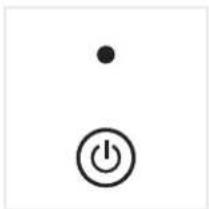
Simple electrical symbol icons: a dot above a power button with a circle (no text or labels)Press On/Off control to switch on/off.
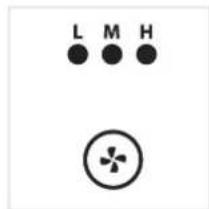
Press fan control. The fan speed indicator light will illuminate displaying selected speed. L = Low (Silence Technology ^® ) M = Medium H = High
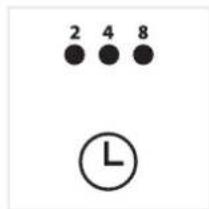
Press timer control. The timer light will illuminate showing time selected: 2 hours, 4 hours or 8 hours. The air purifier will turn off once the selected time has completed.
Taking care of your machine: replacing the filters
WARNING!
DO NOT WASH FILTERS.
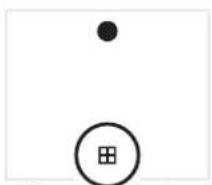
1 Turn the unit off and unplug it from the power outlet.
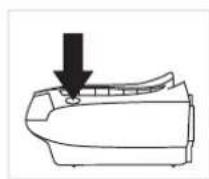
2 Press buttons on sides of unit to release front cover.
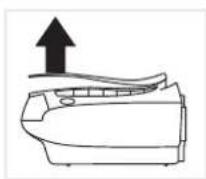
3 Lift and remove the used filter. Note: the odour filter is attached with hook and loop closure to the main filter. The odour filter is an optional feature. The unit will continue to clean the air without it.
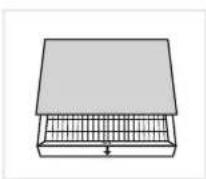
4 Line up odour filter, (the odour filter is reversible and can be fitted either side) press onto the hook and loop tabs to attach to main filter.
- IMPORTANT -
Unplug and switch off the air purifier before performing maintenance or troubleshooting checks.
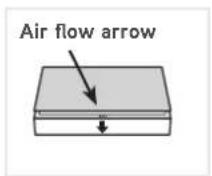
5 Re-fit main filter into air purifier following the direction of the air flow arrow.
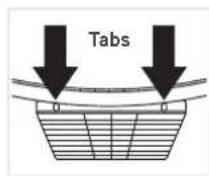
6 Line up tabs on filter cover.
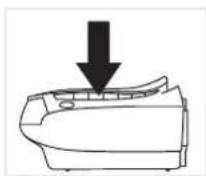
7 Lower until it clicks into place on both sides.
TIP: The filters will need replacing more often when using the air purifier in smoke filled or dusty environments.
What to do if it goes wrong...
Why does my air purifier have no power?
- The plug may not be fully pushed into the electrical socket.
- Check the fuse in the plug if this needs replacing, always replace with a 5amp fuse.
- The front cover may not be secure, check the front cover is securely fitted. Go to 'Taking care of your machine'
- The filter may not be fitted correctly, check the filter. Go to 'Taking care of your machine'.
- Timer may have finished, re-set the timer.
My fan isn't turning?
- Fan speed is set to L = Low (Silence Technology ^ ), indicator light will illuminate, change fan speed to desired setting.
Why is my air purifier making an excessive noise?
- The air inlet grilles may be blocked. Make sure they are free from any obstruction.
- The filter may need replacing. Go to 'Taking Care of your machine'.
Getting in touch...
It's quick and easy to register for your FREE 2 year guarantee ^‡
Online at: vax.co.uk/guarantees
Please retain your original receipt for proof of purchase.
We're here if you need us
Online vax.co.uk/support
Call: (UK) 0330 026 8455 (ROI) 1-800 928 308
Monday-Friday 8:30am to 6:30pm, Saturday 9:00am to 5:00pm*
Alternatively, you can write to us at:
Vax Ltd, Plot 302, Stonebridge Cross Business Park, Hampton Lovett, Droitwich, WR9 OLW, UK
† Registration required. Terms and conditions apply, see vax.co.uk for details.
* Calls are charged at the UK local rate. Please make a note of the serial number and model number of the product before calling.
Don't forget your accessories!
Order at: www.vax.co.uk/spares-and-solutions
| AP01 / AP04 | Filter kit type 113 | Part number 1-1-134509-00 |
| AP02 / AP05 | Filter kit type 114 | Part number 1-1-134510-00 |
| AP03 / AP06 | Filter kit type 115 | Part number 1-1-134511-00 |
Technical specifications:
AP01 / AP04 AP02 / AP05 AP03 / AP06
| Input voltage | 220-240v |
| Rated frequency | 50Hz |
| Weight | 3.6kg |
| Noise level | ≥slant 42dBA |
| Input voltage | 220-240v |
| Rated frequency | 50Hz |
| Weight | 4.7kg |
| Noise level | ≥slant 40dBA |
| Input voltage | 220-240v |
| Rated frequency | 50Hz |
| Weight | 6.5kg |
| Noise level | ≥slant 49dBA |
vax
Vax Ltd., 5th Floor 2 Colmore Square, 38 Colmore Circus, Queensway, Birmingham, B4 6BN, UK
email: info@vax.co.uk website: vax.co.uk

EEC Statement of Compliance: Manufacturer/EEC importer: Vax Limited, hereby on our own responsibility, declare that the AP Series is manufactured in compliance with the following Directives:
Safety: 2006/95/EC Low Voltage Directive. EMC: 2004/108/EC Electromagnetic Compatibility Directive.

Waste electrical products should not be disposed of with household waste. Please recycle where facilities exist. Check with your Local Authority or retailer for recycling advice.
Brand : VAX
Model : AP02
Category : Air purifier