Music Edition 2 VPB-400 - Loudspeaker Victrola - Free user manual and instructions
Find the device manual for free Music Edition 2 VPB-400 Victrola in PDF.


| Product Type | Portable Bluetooth Speaker |
| Model | Victrola Music Edition 2 VPB-400 |
| Weight | 1.35 kg |
| Drivers | 90 mm + 52 mm |
| Frequency Response | 55 Hz – 20 kHz |
| Battery Type | Rechargeable Li-ion 7.4 V, 4400 mAh |
| Battery Life | Up to 20 hours (varies with volume and content) |
| Charging Time | 5 hours |
| Charging Port | USB-C |
| Bluetooth Version | 5.0 |
| Bluetooth Profiles | A2DP V1.3, AVRCP V1.6 |
| Wireless Charging | Qi-compatible (111.8 – 145.2 kHz) |
| Dual Speaker Pairing | Yes (with another Music Edition 2) |
| Audio Inputs | AUX 3.5 mm, USB-C (MP3 playback) |
| Controls | Power, Volume, Multi-function, Bluetooth, Charger, Wireless Charging |
| LED Indicators | Battery level, pairing status, mode |
| Cleaning | Dry cloth only |
| Safety Class | Class II (double insulation) |
| Warranty | 1 year limited |
| Included Accessories | Speaker, Manual, Power Adaptor, USB-C Charging Cable |
Frequently Asked Questions - Music Edition 2 VPB-400 Victrola
User questions about Music Edition 2 VPB-400 Victrola
0 question about this device. Answer the ones you know or ask your own.
Ask a new question about this device
Download the instructions for your Loudspeaker in PDF format for free! Find your manual Music Edition 2 VPB-400 - Victrola and take your electronic device back in hand. On this page are published all the documents necessary for the use of your device. Music Edition 2 VPB-400 by Victrola.
USER MANUAL Music Edition 2 VPB-400 Victrola
natural_image
Line drawing of a VICTROLA portable electronic device with geometric pattern and control panel (no text or symbols on body)MODEL: VPB-400 INSTRUCTION MANUAL
PLEASE READ INSTRUCTION MANUAL CAREFULLY BEFORE USE AND KEEP IT FOR FUTURE REFERENCE
OVERVIEW
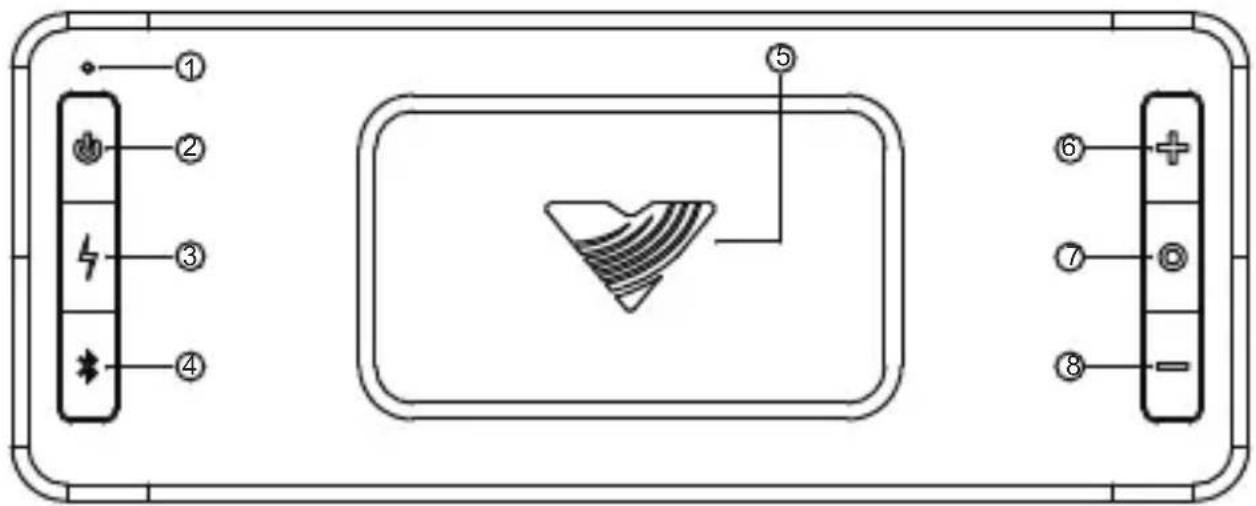
① LED Indicator
③ Charger Button ( 4 )
⑤ Wireless Charging Pad
⑦ Multi-Function Button (O)
② Power Button ( ⏻ )
④ Bluetooth Button (*)
⑥ Volume Up
⑧ Volume Down
Power On / Off .... Long Press (1 sec) ⏻ button
Volume Up ....Press + button
Volume Down .... Press – button
Play/Pause ...... Single Press O button
Next Track Double Press O button
Previous Track .... Triple Press O button
Enter MP3 USB Mode .... Press and hold (5 sec) O button
Bluetooth Mode .... Single Press ✱ button
AUX Mode .... Single Press ✝ button again
Pair a Device .... Long Press (1 sec) ✝ button
Disconnect Bluetooth Device .... Press and hold (5 sec) ✝ button
Check Charging Status .... Press 4 button
Wireless Charging On/Off .... Long Press (1 sec) 4 button
Factory Reset ...... Press and hold O button (10 sec)
BLUETOOTH PAIRING
Press the ✝ button to begin Bluetooth Pairing. (Flashing Blue light)
Wait for the “Victrola ME2” to appear on your available devices list of your external device and press “Victrola ME2”
Once paired, the ME2 will play a paired chime and the light will turn solid Blue for 2 seconds
AUX-IN
To enter AUX-IN Mode, Press the *button to cycle between AUX and Bluetooth Modes. AUX Mode will have a Yellow LED.
Plug an Auxiliary Cord (not included) from your ME2 to your external device to begin playback.
NOTE: If an AUX-IN cord is inserted while in Bluetooth mode, AUX-IN will override the Bluetooth function.
USB-C MP3 PLAYBACK

Long Press the O Button until the LED flashes Orange, then turns solid Orange.
The unit is now in USB MP3 Playback mode. Use the O button to play, pause and skip MP3 files from a connected USB-C Flash drive (See Overview Controls) (USB-C Flash drive not included).
DUAL SPEAKER PAIRING

Press the ✝ and O button simultaneously for 1 second on BOTH speakers to enter Dual Speaker Pairing Mode (Flashing Purple light)
PAIRING COMPLETE: Chime and solid purple LED indicate speakers are connected (speakers always connect in MONO mode)
MONO/STEREO CHANNEL SWITCHING: After Dual
Speaker Pairing is connected, press the ✕ and O button on EITHER speaker to switch between MONO and STEREO pairing mode
STEREO MODE – The right channel will flash purple 3 times quickly
MONO MODE – Both units will be solid purple for 2 seconds
TO DISCONNECT: Press and hold ✝ and O button on EITHER speaker for 5 seconds to disconnect dual-speaker pairing
PLEASE NOTE:
-If BOTH devices are in Dual Speaker Pairing Mode and do not connect, try placing speakers closer together.
-Dual Speaker Pairing only works with another Victrola Music Edition 2 speaker.
WIRELESS CHARGING
Wireless charging pad is ALWAYS ON when unit is plugged in to power, whether unit is turned on or not.
WIRELESS CHARGER (ON BATTERY POWER):
Charger is OFF by default when on battery power
TURN WIRELESS CHARGING ON & OFF
Long press the 4 button (1 Second)
WIRELESS CHARGER ON/OFF STATUS
Single Press the button
If LED flashes, charger is ON, if LED does not flash, charger is OFF
Wireless charger automatically turns OFF after 5 minutes if no phone is charging.
BATTERY STAT US
CHECK BATTERY LEVEL
Single press ⏻ button when unit is powered on to view battery level
LED Indicator Color Battery Level
Green 50-100%
Orange 26-49%
Red 10%-25%
Flashing White .... Charging
OFF (while plugged in) ...... Fully Charged
SPECIFICATIONS
GENERAL
Weight 1.35kg
Drivers.... φ90mm+φ52mm
Frequency response 55Hz-20KHz
Battery working time .... 20 hours (varies by audio content and volume level)
Charging time 5 hours
Charging port type . . . . . . . . . . . . . . . . . . . . . . . . . . . . . . . . . . . . . . USB-C
Battery type .... Rechargeable Li-ion
Battery (7.4V / 4400mAh)
BLUETOOTH
Bluetooth Version .... Bluetooth V5.0
Bluetooth Profile A2DP V1.3, AVRCP V1.6
Bluetooth Frequency Range 2402-2480MHz
Bluetooth Transmitting Power 3.95dBm
Bluetooth Transmitting Modulator .... GFSK, π/4DQPSK, 8DPSK
WIRELESS POWER CONSORTIUM
Operation Frequency 111.8kHz to 145.2kHz
INCLUDED:
ME2 Speaker, Manual, Power Adaptor, USB-C Charging Cable
Design and specification are subject to change without notice
Bluetooth is a registered trademark of Bluetooth SIG, Inc.
Other trademarks and trade names are those of their respective owners
Designed in Denver, Colorado | Made in China
SAFETY INSTRUCTIONS
- Read these instructions – All the safety and operating instructions should be read before this product is operated.
- Keep these instructions – The safety and operating instructions should be retained for future reference.
- Heed all warnings – All warnings on the appliance and in the operating instructions should be adhered to.
- Follow all instructions – All operating and use instructions should be followed.
- Clean only with a dry cloth.
- Do not block any ventilation openings. Keep at least 5 cm around the apparatus for sufficient ventilations. Install in accordance with the manufacturer's instructions.
- Do not install near any heat sources such as radiators, heat registers, stoves, or other apparatus (including amplifiers) that produce heat.
- Do not defeat the safety purpose of the polarized or grounding plug. A polarized plug has two blades with one wider than the other. A grounding plug has two blades and a third grounding prong. The wide blade or the third prong is provided for your safety. If the provided plug does not fit into your outlet, consult an electrician for replacement of the obsolete outlet.
- Protect the power cord from being walked on or pinched particularly at the plugs, convenience receptacles, and at the point where they exit from the apparatus.
- Only use attachments/accessories specified by the manufacturer.
- Use only with the cart, stand, tripod, bracket, or table specified by the manufacturer, or sold with the apparatus. When a cart or rack is used, use caution when moving the cart/apparatus combination to avoid injury from tip-over.
- Unplug the apparatus during lightning storms or when unused for long periods of time.

- Refer all servicing to qualified personnel. Servicing is required when the apparatus has been damaged in any way, such as power supply cord or plug is damaged, liquid has been spilled or objects have fallen into the apparatus, does not operate normally, or has been dropped.
- Please keep the unit in a well ventilated environment.
- Only use attachments/accessories specified or provided by the manufacturer
- The main plug is used as disconnect device, the disconnected device shall remain readily operable.
- This product is not intended for commercial use. Household Use Only.
- This equipment is a Class II or double insulated electrical appliance. It has been designed in such a way that it does not require a safety connection to electrical earth.
19.
| The lightning flash with arrowhead within an equilateral triangle is intended to alert the user to the presence of uninsulated "dangerous voltage" within the product's enclosure that may be of sufficient magnitude to constitute a risk of electric shock. | CAUTION RISK OF ELECTRIC SHOCK DO NOT OPEN CAUTION: TO PREVENT RISK OF ELECTRIC SHOCK, DO NOT REMOVE COVER (OR BACK), NO USER-SERVICEABLE PARTS INSIDE. REFER SERVICING TO QUALIFIED SERVICE PROFESSIONAL. | The exclamation point within an equilateral triangle is intended to alert the user to the presence of important operating and maintenance (servicing) instructions in the literature accompanying the appliance. |
Warning: To reduce the risk of fire or electrical shock, do not exposed the apparatus to rain or moisture. No naked flame sources such as candles shall be placed on top of the apparatus.
Caution: Changes or modifications not expressly approved by the manufacturer could void the user's authority to operate this device. Usage of controls or adjustments or performance of procedures other than those specified herein may result in hazardous exposure.
Battery Risk of explosion if the battery is replaced by an incorrect
Caution: type; disposal of a battery into fire or a hot oven, or mechanically crushing or cutting of a battery, that can result in an explosion; leaving a battery in an extremely high temperature surrounding environment that can result in an explosion or the leakage of flammable liquid or gas; a battery subjected to extremely low air pressure that may result in an explosion or the leakage of flammable liquid or gas.
FCC WARNINGS
FCC REGULATORY COMPLIANCE
This device complies with Part 15 of the FCC Rules. Operation is subject to the following two conditions: (1) this device may not cause harmful interference, and (2) this device must accept any interference received, including interference that may cause undesired operation.
Changes or modifications not expressly approved by the party responsible for compliance could void the user's authority to operate the equipment. This equipment has been tested and found to comply with the limits for a Class B digital device, pursuant to Part 15 of the FCC Rules. These limits are designed to provide reasonable protection against harmful interference in a residential installation. This equipment generates, uses and can radiate radio frequency energy and, if not installed and used in accordance with the instructions, may cause harmful interference to radio communications.
However, there is no guarantee that interference will not occur in a particular installation. If this equipment does cause harmful interference to radio or television reception, which can be determined by turning the equipment off and on, the user is encouraged to try to correct the interference by one or more of the following measures:
- Reorient or relocate the receiving antenna.
- Increase the separation between the equipment and receiver.
- Connect the equipment into an outlet on a circuit different from that to which the receiver is connected.
- Consult the dealer or an experienced radio/TV technician for help.
FCC RADIATION EXPOSURE STATEMENT
This equipment complies with FCC and Canada radiation exposure limits set forth for an uncontrolled environment. This equipment should be installed and operated with minimum distance 20cm between the radiator and your body. This transmitter must not be co-located or operating in conjunction with any other antenna or transmitter.
This device contains licence-exempt transmitter(s) / receiver(s) that comply with Innovation, Science and Economic Development Canada's licence-exempt RSS(s). Operation is subject to the following two conditions: (1) This device may not cause interference. (2) This device must accept any interference, including interference that may cause undesired operation of the device.
ISED RADIATION EXPOSURE STATEMENT
This equipment complies with IC RSS-102 radiation exposure limits set forth for an uncontrolled environment. This equipment should be installed and operated with minimum distance 20 cm between the radiator and your body. This transmitter must not be co-located or operating in conjunction with any other antenna or transmitter.
Victrola is a registered trademark of Innovative Technology Electronics, LLC.
United States
Victrola (Innovative Technology Electronics, LLC) warrants to the original retail purchaser that this product will be free from defective materials and workmanship for one (1) year from the date of purchase, subject to the limitations below. This warranty period is not extended if we replace the product.
To obtain a replacement under the terms of this warranty, you must contact the dealer from which it was purchased with your original receipt. If assistance from the dealer from which it was purchased is impossible, you may contact our customer service for warranty assistance at victrola.com/contact.
Except as limited below, if the product proves defective in either material or workmanship within one (1) year from the date of purchase, Victrola will replace the product at no charge. If the product model is no longer available and cannot be replaced with an identical model, Victrola will issue a merchandise credit for the purchase price to be redeemed at victrola.com.
Limitations:
- This limited warranty does not cover failure of the product arising, in whole or in part, from improper installation, storage, transportation, misuse, abuse, accident, neglect, mishandling, unauthorized repair, modification, or wear from ordinary use or environmental deterioration.
- This limited warranty does not cover cosmetic damage, including paint damage, or consequential damage to other components or premises which may result for any reason from the failure of the product.
- This limited warranty is null and void for products not used in accordance with Victrola's instructions.
- This limited warranty terminates if the original retail purchaser sells o otherwise transfers this product.
- This limited warranty is null and void for defects or damage caused by installation or repair performed by any person or entity other than a Victrola authorized installer or dealer.
This warranty gives you specific legal rights, and you may also have other rights which vary from state to state, jurisdiction to jurisdiction or country to country. All express and implied warranties for the product, including but not limited to any implied warranties of merchantability and fitness for a particular purpose, are limited in time to the term of this warranty. Some states, jurisdictions or countries do not allow the exclusion of certain implied warranties or conditions, or limitations on how long an implied warranty or condition lasts, so this limitation may not apply to you. Victrola's responsibility for malfunctions and defects in hardware is limited to replacement or repair as set forth in this warranty statement. Victrola does not accept liability for special, punitive, consequential or incidental damages or losses, whether direct or indirect, including without limitation, any liability for third party claims against you for damages or losses or for products not being available for use. The maximum liability for which Victrola may be responsible will be no more than the amount you paid for the product that is the subject of the claim. Some states, jurisdictions or countries do not allow the exclusion or limitation of special, indirect, incidental or consequential damages, so the above limitation or exclusion may not apply to you.
Canada and US Territories
The Warranty on this product shall comply with applicable law when sold to a consumer in Canada or a US Territory. To obtain any applicable warranty service, please contact the dealer from which you purchased the product, or the distributor that supplied the product, with your original receipt. If assistance from the dealer from which it was purchased is impossible, you may contact our customer service for warranty assistance at victrola.com/contact. If this product proves defective in either material or workmanship, Victrola will replace the product at no charge. If the product model is no longer available and cannot be repaired effectively or replaced with an identical model, Victrola at its sole option may replace the unit with a current model of equal or greater value.
Outside the U.S, Canada, and US Territories
The Warranty on this product shall comply with applicable law when sold to a consumer outside of the United States, Canada, and US Territories. To obtain any applicable warranty service, please contact the dealer from which you purchased the product, or the distributor that supplied the product, with your original receipt.
- MODEL: VPB-400 INSTRUCTION MANUAL
- OVERVIEW
- BLUETOOTH PAIRING
- AUX-IN
- USB-C MP3 PLAYBACK
- DUAL SPEAKER PAIRING
- PLEASE NOTE:
- WIRELESS CHARGING
- WIRELESS CHARGER (ON BATTERY POWER):
- TURN WIRELESS CHARGING ON & OFF
- WIRELESS CHARGER ON/OFF STATUS
- BATTERY STAT US
- CHECK BATTERY LEVEL
- LED Indicator Color Battery Level
- SPECIFICATIONS
- GENERAL
- BLUETOOTH
- WIRELESS POWER CONSORTIUM
- INCLUDED:
- SAFETY INSTRUCTIONS
- FCC WARNINGS
- FCC REGULATORY COMPLIANCE
- FCC RADIATION EXPOSURE STATEMENT
- ISED RADIATION EXPOSURE STATEMENT
- Victrola is a registered trademark of Innovative Technology Electronics, LLC.
- United States
- Limitations:
- Canada and US Territories
- Outside the U.S, Canada, and US Territories
Brand : Victrola
Model : Music Edition 2 VPB-400
Category : Loudspeaker