
EH505e - Projector OPTOMA - Free user manual and instructions
Find the device manual for free EH505e OPTOMA in PDF.

 FR
FR
 AR
AR
 CS
CS
 DA
DA
 DE
DE
 EL
EL
 EN
EN
 ES
ES
 FA
FA
 FI
FI
 HU
HU
 ID
ID
 IT
IT
 JA
JA
 KO
KO
 NL
NL
 PL
PL
 PT
PT
 RO
RO
 RU
RU
 SK
SK
 SV
SV
 TH
TH
 TR
TR
 VI
VI
 ZH
ZH
 ZH-TW
ZH-TW
| Product type | DLP Projector |
| Native resolution | WUXGA (1920 x 1200) / 1080P |
| Display technology | Texas Instruments single-chip DLP® |
| Vertical keystone correction | ±30° (digital) |
| Lens shift | Vertical: +55% to -15% (WUXGA), Horizontal: ±5% |
| Zoom / Focus | Manual (rings) |
| Input sources | HDMI, DVI-D, VGA (x2), BNC, DisplayPort, Composite, S-Video, YPbPr |
| Video compatibility | NTSC, PAL, SECAM, HDTV (720p, 1080i, 1080p) |
| 3D support | DLP Link, VESA 3D, SBS, Top-Bottom |
| Network functions | LAN RJ45, control via Crestron/Extron/AMX/PJLink |
| Power | 365 W (bright mode), standby < 0.5 W |
| Lamp life (estimated) | Up to 3000 hours in standard mode |
| Lens cleaning | Optical cleaning product on soft cloth, circular motion |
| Case cleaning | Damp cloth with mild detergent, wipe and rinse |
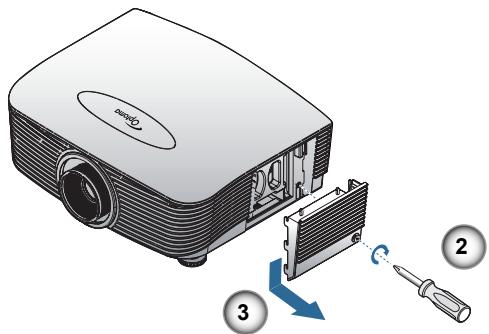
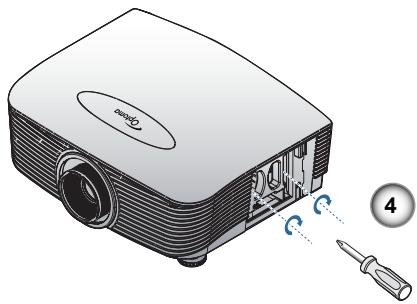
| Lamp replacement | Unlock cover, remove screws, replace module, reset counter |
| Security | Password, key lock, clock security |
| Included accessories | Power cord, VGA cable, remote control, batteries, documentation |
| General information | Brand: Optoma, Model: EH505e |
Frequently Asked Questions - EH505e OPTOMA
User questions about EH505e OPTOMA
0 question about this device. Answer the ones you know or ask your own.
Ask a new question about this device
Download the instructions for your Projector in PDF format for free! Find your manual EH505e - OPTOMA and take your electronic device back in hand. On this page are published all the documents necessary for the use of your device. EH505e by OPTOMA.
USER MANUAL EH505e OPTOMA
natural_image
Symbolic image of a computer monitor with a red X mark and eye, enclosed in a circle (no text or numbers present)UXGA, SXGA+, SXGA, WXGA, XGA, SVGA, VGA
natural_image
Illustration of a projector with lens and viewing lens (no text or symbols)natural_image
Line drawing of two connected U2D connectors (no text or symbols)natural_image
Pure diagram of a USB cable with multiple connectors (no text or symbols)
natural_image
Illustration of a projector with a magnified view showing internal components (no text or symbols)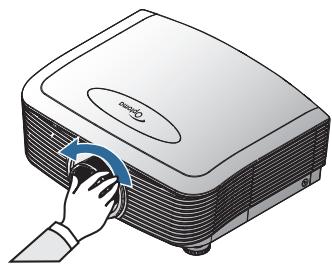
natural_image
Illustration of a projector with a hand operating the button (no text or symbols visible)natural_image
Illustration of a projector with a blue arrow indicating direction (no text or symbols)natural_image
Illustration of a projector with a hand pressing down on its side panel (no text or symbols present)natural_image
Technical line drawing of a projector housing with mounting base and internal components (no text or symbols)geo
| Dimension | Percentage (%) | | :--- | :--- | | Top Section | W | | Middle Section | H | | Bottom Section | H10 | | Height | H45 | XGAnatural_image
Technical illustration of a circular component with internal mesh structure, showing directional arrows (no text or symbols)Bague de zoom
Marche directe
Activer ou désactiver Marche directe.
The projector will automatically shutdown after 60 sec.
Options | Avancé
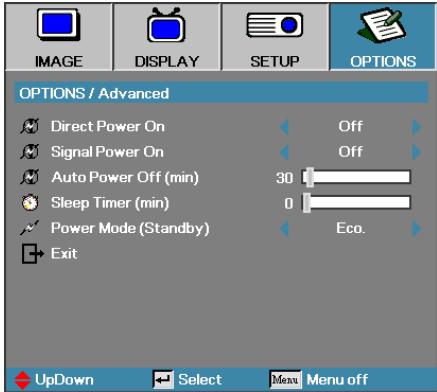
Mode Veille (min)
The projector will automatically shutdown after 60 sec.
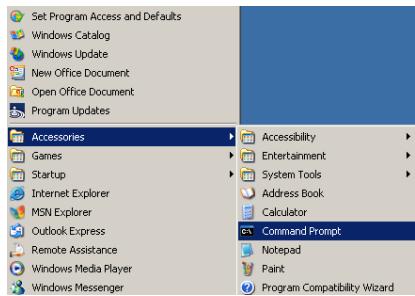
- Démarrer => Tous les programmes => Accessoires => Invite de commandes.
natural_image
Illustration of a projector with screwdriver and ventilation slots, no text or symbols present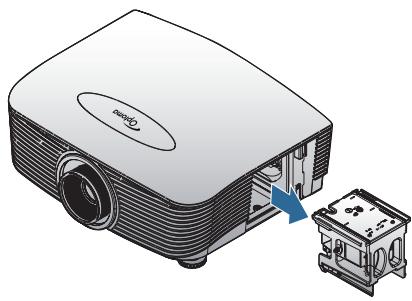
natural_image
Illustration of a projector with an internal component and a separate mechanical housing (no text or symbols)Projector Return (Pass): P
Projector Return (Fail): F
Note : There is a
0D is the HEX code for
XX=01-99, projector's ID, XX=00 is for all projectors
SEND to projector
| 232 ASCII Code | HEX Code | Function | Description |
| ~XX00 1 | 7E 30 30 30 30 20 31 0D | Power ON | |
| ~XX00 0 | 7E 30 30 30 30 20 30 0D | Power OFF | (0/2 for backward compatible) |
| ~XX00 1-nnnn | 7E 30 30 30 30 20 31 20 a ODPower ON with Password | ~nnnn = ~0000 (a=7E 30 30 30 30) | |
| ~XX01 1 | 7E 30 30 30 31 20 31 0D | Resync | |
| ~XX02 1 | 7E 30 30 30 32 20 31 0D | AV Mute | On |
| ~XX02 0 | 7E 30 30 30 32 20 30 0D | ||
| ~XX03 1 | 7E 30 30 30 33 20 31 0D | Mute | On |
| ~XX03 0 | 7E 30 30 30 33 20 30 0D | ||
| ~XX04 1 | 7E 30 30 30 34 20 31 0D | Freeze | |
| ~XX04 0 | 7E 30 30 30 34 20 30 0D | Unfreeze | |
| ~XX05 1 | 7E 30 30 30 35 20 31 0D | Zoom Plus | |
| ~XX06 1 | 7E 30 30 30 36 20 31 0D | Zoom Minus | |
| ~XX12 1 | 7E 30 30 31 32 20 31 0D | Direct Source Commands | HDMI |
| ~XX12 2 | 7E 30 30 31 32 20 32 0D | ||
| ~XX12 4 | 7E 30 30 31 32 20 34 0D | ||
| ~XX12 5 | 7E 30 30 31 32 20 35 0D | VGA1 Component | |
| ~XX12 6 | 7E 30 30 31 32 20 36 0D | VGA2 Component | |
| ~XX12 8 | 7E 30 30 31 32 20 38 0D | S-Video | |
| ~XX12 9 | 7E 30 30 31 32 20 39 0D | Video | |
| ~XX12 10 | 7E 30 30 31 32 20 31 30 0D | VGA 2 Component | |
| ~XX12 13 | 7E 30 30 31 32 20 31 33 0D | Component | |
| ~XX12 14 | 7E 30 30 31 32 20 31 34 0D | ||
| ~XX12 20 | 7E 30 30 31 32 20 32 30 0D | ||
| DisplayPort | |||
| ~XX20 1 | 7E 30 30 32 30 20 31 0D | Display Mode | Presentation |
| ~XX20 2 | 7E 30 30 32 30 20 32 0D | Bright | |
| ~XX20 3 | 7E 30 30 32 30 20 33 0D | Movie | |
| ~XX20 4 | 7E 30 30 32 30 20 34 0D | sRGB | |
| ~XX20 5 | 7E 30 30 32 30 20 35 0D | User | |
| ~XX20 7 | 7E 30 30 32 30 20 37 0D | Blackboard | |
| ~XX20 13 | 7E 30 30 32 30 21 33 0D | DICOM SIM. | |
| ~XX20 9 | 7E 30 30 32 30 20 39 0D | 3D | |
| ~XX21 n | 7E 30 30 32 31 20 a 0D | Brightness | n = -50 (a=2D 35 30) ~ 50 (a=35 30) |
| ~XX22 n | 7E 30 30 32 32 20 a 0D | Contrast | n = -50 (a=2D 35 30) ~ 50 (a=35 30) |
| ~XX23 n | 7E 30 30 32 33 20 a 0D | Sharpness | n = 1 (a=31) ~ 15 (a=31 35) |
| ~XX44 n | 7E 30 30 34 34 20 a 0D | Tint | n = -50 (a=2D 35 30) ~ 50 (a=35 30) |
| ~XX45 n | 7E 30 30 34 35 20 a 0D | Color | n = -50 (a=2D 35 30) ~ 50 (a=35 30) |
| ~XX327 n | 7E 58 58 33 32 37 20 a 0D | Color Matching | Red Hue |
| ~XX328 n | 7E 58 58 33 32 38 20 a 0D | Green Hue | |
| ~XX329 n | 7E 58 58 33 32 39 20 a 0D | Blue Hue | |
| ~XX330 n | 7E 58 58 33 33 30 20 a 0D | Cyan Hue | |
| ~XX331 n | 7E 58 58 33 33 31 20 a 0D | Yellow Hue | |
| ~XX332 n | 7E 58 58 33 33 32 20 a 0D | Magenta Hue | |
| ~XX333 n | 7E 58 58 33 33 33 20 a 0D | Cyan Hue | |
| ~XX333 n | 7E 58 58 33 33 33 20 a 0D | Red Satitlon | |
| ~XX334 n | 7E 58 58 33 33 34 20 a 0D | Green Saturation | |
| ~XX335 n | 7E 58 58 33 33 35 20 a 0 | Blue Saturation | |
| ~XX336 n | 7E 58 58 33 33 36 20 a 0D | Cyan Saturation | |
| ~XX337 n | 7E 58 58 33 33 37 20 a 0D | Yellow Saturation | |
| ~XX338 n | 7E 58 58 33 33 38 20 a 0D | Magenta Saturationn | |
| ~XX339 n | 7E 58 58 33 33 39 20 a 0D | Red Gain | |
| ~XX340 n | 7E 58 58 33 34 30 20 a 0D | Green Gain | |
| ~XX341 n | 7E 58 58 33 34 31 20 a 0D | Blue Gain | |
| ~XX342 n | 7E 58 58 33 34 32 20 a 0D | Cyan Gain | |
| ~XX343 n | 7E 58 58 33 34 33 20 a 0D | Yellow Gain | |
| ~XX344 n | 7E 58 58 33 34 34 20 a 0D | Magenta Gain | |
| ~XX345 n | 7E 58 58 33 34 35 20 a 0D | White/R | |
| ~XX346 n | 7E 58 58 33 34 36 20 a 0D | White/G | |
| ~XX347 n | 7E 58 58 33 34 37 20 a 0D | White/B | |
| ~XX215 1 | 7E 30 30 32 31 35 20 31 0D | Reset | |
| ~XX24 n | 7E 30 30 32 34 20 a 0D | RGB Gain/Bias | Red Gain |
| ~XX25 n | 7E 30 30 32 35 20 a 0D | Green Gain | |
| ~XX26 n | 7E 30 30 32 36 20 a 0D | Blue Gain | |
| ~XX27 n | 7E 30 30 32 37 20 a 0D | Red Bias | |
| ~XX28 n | 7E 30 30 32 38 20 a 0D | Green Bias | |
| ~XX29 n | 7E 30 30 32 39 20 a 0D | Blue Bias | |
| ~XX33 n | 7E 30 30 33 33 20 a 0D | Reset | |
| ~XX34 n | 7E 30 30 33 34 20 a 0D | BrilliantColorTM | |
| ~XX196 n | 7E 30 30 31 39 36 20 a 0D | Noise Reduction | |
| ~XX35 1 | 7E 30 30 33 35 20 31 0D | Gamma | Film |
| ~XX35 3 | 7E 30 30 33 35 20 33 0D | Graphics | |
| ~XX35 5 | 7E 30 30 33 35 20 35 0D | 1.8 | |
| ~XX35 6 | 7E 30 30 33 35 20 36 0D | 2.0 | |
| ~XX35 7 | 7E 30 30 33 35 20 37 0D | 2.2 | |


(5 minutes for each step).
| ~XX107 n | 7E 30 30 31 30 37 20 a 0D | Sleep Timer (min) | n = 0 (a=30) ~ 995 (a=39 39 35) |
| (30 minutes for each step). | |||
| ~XX114 1 | 7E 30 30 31 31 34 20 31 0D | Power Mode(Standby) | Active (<=0.5W) |
| ~XX114 0 | 7E 30 30 31 31 34 20 30 0D | Eco. (0/2 for backward compatible) | |
| ~XX109 1 | 7E 30 30 31 30 39 20 31 0D | Lamp Reminder | On |
| ~XX109 0 | 7E 30 30 31 30 39 20 30 0D | Off (0/2 for backward compatible) | |
| ~XX110 1 | 7E 30 30 31 31 30 20 31 0D | Brightness Mode | Bright |
| ~XX110 2 | 7E 30 30 31 31 30 20 32 0D | Eco | |
| ~XX110 5 | 7E 30 30 31 31 30 20 35 0D | Power | |
| ~XX326 n | 7E 30 30 33 32 36 20 a 0D | Power | 350W/340W/330W/320W/310W/300W/290W/280W(n=0/n=1/n=2/n=3/n=4/n=5/n=6/n=7/n=8) |
| ~XX111 1 | 7E 30 30 31 31 31 20 31 0D | Lamp Reset | Yes |
| ~XX111 0 | 7E 30 30 31 31 31 20 30 0D | No (0/2 for backward compatible) | |
\~XX112 1 7E 30 30 31 31 32 20 31 0D Reset
| ~XX99 1 | 7E 30 30 39 39 20 31 0D | RS232 Alert Reset | Reset | System Alert | ||
| ~XX210 n | 7E 30 30 32 30 30 20 n 0D | Display message on the OSD | n: 1-30 charact | ers | ||
| SEND to emulate Remote | ||||||
| ~XX140 10 | 7E 30 30 31 34 30 20 31 30 0D | Up | ||||
| ~XX140 11 | 7E 30 30 31 34 30 20 31 31 0D | Left | ||||
| ~XX140 12 | 7E 30 30 31 34 30 20 31 32 0D | Enter (for projection MENU) | ||||
| ~XX140 13 | 7E 30 30 31 34 30 20 31 33 0D | Right | ||||
| ~XX140 14 | 7E 30 30 31 34 30 20 31 34 0D | Down | ||||
| ~XX140 15 | 7E 30 30 31 34 30 20 31 35 0D | Keystone + | ||||
| ~XX140 16 | 7E 30 30 31 34 30 20 31 36 0D | Keystone – | ||||
| ~XX140 17 | 7E 30 30 31 34 30 20 31 37 0D | Volume – | ||||
| ~XX140 18 | 7E 30 30 31 34 30 20 31 38 0D | Volume + | ||||
| ~XX140 19 | 7E 30 30 31 34 30 20 31 39 0D | Brightness | ||||
| ~XX140 20 | 7E 30 30 31 34 30 20 32 30 0D | Menu | ||||
| ~XX140 21 | 7E 30 30 31 34 30 20 32 31 0D | Zoom | ||||
| ~XX140 28 | 7E 30 30 31 34 30 20 32 38 0D | Contrast | ||||
| ~XX140 47 | 7E 30 30 31 34 30 20 34 37 0D | Source | ||||
SEND from projector automatically
| 232 ASCII Code | HEX Code | Function | Projector Return | Description |
| when Standby/Warming/Cooling/Out of Range/Lamp fail/Fan Lock/Over Temperature/Lamp Hours Running Out/Cover Open | ||||
| INFOn | n : 0/1/2/3/4/6/7/8/ = Standby/Warming/Cooling/Out of Range/Lamp fail/Fan Lock/Over Temperature/Lamp Hours Running Out/Cover Open | |||
READ from projector
| 232 ASCII Code | HEX Code | Function | Projector Return | Description |
| ~XX121 1 | 7E 30 30 31 32 31 20 31 0D | Input Source Commands | OKn | n: 0/1/2/3/4/5/7/10/15 = None/DVI/VGA1/VGA2/S-Video/Video/BNC/HDMI/Component/DisplayPort |
| ~XX122 1 | 7E 30 30 31 32 32 20 31 0D | Software Version | Okddd | dddd: FW version |
| ~XX123 1 | 7E 30 30 31 32 33 20 31 0D | Display Mode | OKn | n: 0/1/2/3/4/7/9/12 |
| None/Presentation/Bright/Movie/sRGB/Blackboard/DICOM SIM./3D | ||||
| ~XX124 1 | 7E 30 30 31 32 34 20 31 0D | Power State | OKn | n: 0/1 = Off/On |
| ~XX125 1 | 7E 30 30 31 32 35 20 31 0D | Brightness | OKn | |
| ~XX126 1 | 7E 30 30 31 32 36 20 31 0D | Contrast | OKn | |
| ~XX127 1 | 7E 30 30 31 32 37 20 31 0D | Format | OKn | n: 1/2/3/5/6/7 =4:3/16:9/16:10/LBX/Native/Auto |
| *16:9 or 16:10 depend on Screen Type setting | ||||
| ~XX128 1 | 7E 30 30 31 32 38 20 31 0D | Color Temperature | OKn | n: 3/0/1/2 = Warm/Standard/Cool/Cold |
| ~XX129 1 | 7E 30 30 31 32 39 20 31 0D | Projection Mode | OKn | n: 0/1/2/3 = Front-Desktop/ Rear-Desktop/ Front-Ceiling/ Rear-Ceiling |
| ~XX150 1 | 7E 30 30 31 35 30 20 31 0D | Information | OKabbbbccddde | a: 0/1 = Off/Onbbb: LampHourcc: source 00/01/02/03/04/05/07/10/15 = |
| None/DVI/VGA1/VGA2/S-Video/Video/BNC/HDMI/Component/DisplayPort | ||||
| dddd: FW versione: Display mode 0/1/2/3/4/7/9/10= None/Presentation/Bright/Movie/sRGB/Blackboard/3D/DICOM. | ||||
| ~XX151 1 | 7E 30 30 31 35 31 20 31 0D | Model name | OKn | n: 1/2/3=X605/W505/EH505 |
| ~XX108 1 | 7E 30 30 31 30 38 20 31 0D | Lamp Hours | OKbbb | bbb: LampHour |
| ~XX108 2 | 7E 30 30 31 30 38 20 31 0D | Cumulative Lamp Hours | OKbbb | bbbb: (5 digits) Total Lamp Hours |
| ~XX87 1 | 7E 30 30 38 37 20 31 0D | Network Status | Okn n =0/1 | |
| Disconnected/Connected | ||||
| ~XX87 3 | 7E 30 30 38 37 20 33 0D | IP Address | Okaaa_bbb_ccc_ddd | |
Commandes Telnet
| Lead Code | Projector ID | Command ID | Space | Variable | Carriage Return | |||
| ~ | X | X | X | X | X | n | CR | |
| Fix code One Digit~ | 00 | Defined by Optoma 2 or 3 Digit. See the Follow content | One Digit | Per item Definition | Fix code One Digit | |||

| Command | Description | Remark (Parameter) |
| Device-UUID | MAC address (Hex value without'':' separator) | 12 digits |
| Device-SKDClass | The Duet DeviceSdk class name | VideoProjector |
| Device-Make | Maker name | MakerPXLW |
| Device-Model | Model name | Projector |
| Config-URL | Device's IP addressLAN IP address is shown up if LAN IP address is valid.Wireless LAN IP address is shown up if Wireless LAN IP address is valid. | http://xxx.xxx.xxx.xxx/index.html |
| Revision | The revision must follow a major.minor.micro scheme. The revision is only increased if the command protocol is modified. | 1.0.0 |

| Command | Description | Remark (Parameter) |
| POWR | Power control | 0 = Standby |
| 1 = Power on | ||
| POWR? | Inquiry about the power state | 0 = Standby |
| 1 = Power on | ||
| 2 = Cooling down | ||
| 3 = Warming up | ||
| INPT | INPT Input switching | 11 = VGA1 |

| Command | Description | Remark (Parameter) |
| INPT? | Inquiry about input switching | 12 = VGA2 |
| 13 = Component | ||
| 14 = BNC | ||
| 21 = VIDEO | ||
| 22 = S-VIDEO | ||
| 31 = HDMI 1 | ||
| 32 = HDMI 2 | ||
| AVMT | Mute control | 30 = Video and audio mute disable |
| AVMT? | Inquiry about the mute state | 31 = Video and audio mute enable |
| ERST? | Inquiry about the error state | 1st byte: Fan error, 0 or 2 |
| 2nd byte: Lamp error, 0 to 2 | ||
| 3rd byte: Temperature error, 0 or 2 | ||
| 4th byte: Cover open error, 0 or 2 | ||
| 5th byte: Filter error, 0 or 2 | ||
| 6th byte: Other error, 0 or 2 | ||
| 0 to 2 mean as follows:0 = No error detected, 1 = Warning, 2 = Error | ||
| LAMP? | Inquiry about the lamp state | 1st value (1 to 5 digits):Cumulative LAMP operating time (This item shows a lamp operating time (hour) calculated based on that LAMP MODE is LOW.) |
| 2nd value: 0 = Lamp off, 1 = Lamp on | ||
| INST? | Inquiry about the available inputs | The following value is returned.“11 12 21 22 31 32” |
| NAME? | Inquiry about the projector name | The projector name set on the NETWORK menu or the ProjectorViewSetup window is returned |
| INF1? | Inquiry about the manufacturer name | “Optoma” is returned. |
| INF2? | Inquiry about the model name | “EH7700” is returned. |
| INF0? | Inquiry about other information | No other information is available. No parameter is returned. |
| CLSS? | Inquiry about the class information | “1” is returned. |
Trademarks
▶ DLP is trademarks of Texas Instruments.
IBM is a trademark or registered trademark of International Business Machines Corporation.
Macintosh, Mac OS X, iMac, and PowerBook are trademarks of Apple Inc., registered in the U.S. and other countries.
Microsoft, Windows, Windows Vista, Internet Explorer and PowerPoint are either a registered trademark or trademark of Microsoft Corporation in the United States and/or other countries.
HDMI, the HDMI Logo and High-Definition Multimedia Interface are trademarks or registered trademarks of HDMI Licensing LLC.
AMX Device Discovery
The projector is monitored and controlDEL by the control system of AMX.
Crestron RoomView Connected™
The projector is monitored and controlDEL by the control system and software of Crestron Electronics, Inc.
PJLink™
PJLink trademark is a trademark applied for registration or is already registered in Japan, the United States of America and other countries and areas.
This projector supports standard protocol PJLink ^™ for projector control and you can control and monitor projector's operations using the same application among projectors of different models and different manufacturers.
Other product and company names mentioned in this user's manual may be the trademarks or registered trademarks of their respective holders.
About Crestron RoomView Connected™
Electronics, Inc. to facilitate configuration of the control system of Crestron and its target devices.
For details, see the website of Crestron Electronics, Inc.
URL http://www.crestron.com
URL http://www.crestron.com/getroomview/

2420 Meadowpine Blvd., Suite #105
Mississauga, ON, L5N 6S2, Canada
Tel: 888-289-6786
Unit 1, Network 41, Bourne End Mills,
Hemel Hempstead, Herts, HP1 2UJ, UK
www.optomausa.com.br Service: www.optomausa.com.mx
Corée
WOOMI TECH.CO.,LTD
4F, Minu Bldg.3.tw3-14, Kangnam-Ku, seoul, 135-815, KOREA
Tél : +82+2+34430004 Télécopie : +82+2+34430005
Japon
東京都足立区綾瀬3-25-18
株式会社オーエスエム
E-mail: info@osscreen.com www.os-worldwide.com
Taiwan
Unit A, 27/F Dragon Centre, 79 Wing Hong Street,
Cheung Sha Wan, Kowloon, Hong Kong
5F, No. 1205, Kaixuan Rd., Changning District
Shanghai, 200052, China
Notice: Shielded cables
All connections to other computing devices must be made using shielded cables to maintain compliance with FCC regulations.
Caution
Changes or modifications not expressly approved by the manufacturer could void the user's authority, which is granted by the Federal Communications Commission, to operate this projector.
Disposal instructions

Do not throw this electronic device into the trash when discarding. To minimize pollution and ensure utmost protection of the global environment, please recycle it.
Brand : OPTOMA
Model : EH505e
Category : Projector