
CAC-J1510FW - Other Household Appliances Cuckoo - Free user manual and instructions
Find the device manual for free CAC-J1510FW Cuckoo in PDF.


| Product Type | Air Purifier |
| Model | CAC-J1510FW |
| Dimensions (in) | D10.6 x W11.9 x H19.6 |
| Dimensions (mm) | D270 x W303 x H493 |
| Weight | 10.1 lbs (4.6 kg) |
| Power Supply | AC 100-240V, 50/60Hz (USA: AC120V, 60Hz) |
| Rated Power Input | 50W |
| CADR | 329.3 m³/h |
| Noise Level | ≤ 61 dB |
| Coverage Area | Up to 726 sq ft (67.5 m²) at 2 air changes per hour |
| Filter Type | True HEPA 3-Stage (Pre-Filter, True HEPA, Active Carbon) |
| Filter Replacement Cycle | Every 6 months (based on 12h/day usage) |
| Fan Speeds | Auto, High, Medium, Sleep |
| Timer | 2H, 4H, 8H |
| Air Quality Display | 3-color LED (Blue=Excellent, Yellow=Moderate, Red=Poor) |
| UV LED | Yes (for sterilization) |
| Child Lock | Yes (press and hold Light button for 3 seconds) |
| Dust Sensor | Real-time automatic detection |
| Handle | Portable design with easy-carry handle |
| Maintenance | Do not wash filter; clean exterior with soft cloth |
| Safety Features | Overheat protection, child lock, auto shut-off |
Frequently Asked Questions - CAC-J1510FW Cuckoo
User questions about CAC-J1510FW Cuckoo
0 question about this device. Answer the ones you know or ask your own.
Ask a new question about this device
Download the instructions for your Other Household Appliances in PDF format for free! Find your manual CAC-J1510FW - Cuckoo and take your electronic device back in hand. On this page are published all the documents necessary for the use of your device. CAC-J1510FW by Cuckoo.
USER MANUAL CAC-J1510FW Cuckoo
natural_image
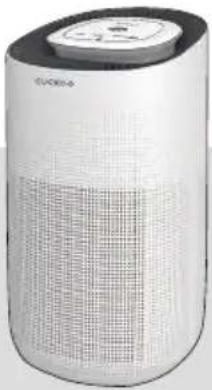
White Cuckoo air purifier with grid pattern and top control panel (no visible text or symbols on body)CUCKOO
Dear customers, Thank you for purchasing CUCKOO Air Purifier.
Please keep this User Manual for your reference. This manual will guide you if you have any questions or troubleshooting problems.
natural_image
Exterior view of a modern cylindrical device with grid pattern and top panel (no visible text or symbols)Top Features of CUCKOO Air Purifier
Air Purification
This product filters out fine dust, allergens, and more that is airborne using a True HEPA 3-Stage Filter mounted in the base of the product.
Timer Setting
You can set the timer from 2 to 8 hours depending on preference.
● Automatic Operation function through Dust Sensor
The product detects the pollution status of the air indoors in real time through the dust sensor. When automatic operation setting is selected, the product automatically adjust the fan speed according to the surrounding pollution degree to make the indoor environment pleasant.
3 Color LED Air Quality Display
The product automatically detects the cleanliness of the indoor air through the dust sensor and displays the cleanliness. The air quality display screen represents the pollution degree of solid contaminants in the air with 3 colors.
UV LED
UV light helps kill airborne mold and germs.
Filter Replacement Indicator
Built-in replacement indicator reminds user when the filter is needed to be replaced.
Portable Design
Easy-to-carry handle and portable design. Perfect size for a large space like a living room or family room.
True HEPA 3-Stage Filter
Collect pet dander, ultrafine dust, harmful gases and much more with this 3 in 1 True HEPA Filter.
Please read the instructions carefully before using the product and keep them properly.
CONTENTS
Before Use Top Features of CUCKOO Air Purifier 2
Description of Parts 4
During Use ● How to Replace Filter 5\~6
Names and Functions of Control / Display Panel 7\~8
About the Filter 9\~10
Caution / Attention 11\~14
Before Asking for ● Troubleshooting 15\~16
Support
Service Information ● Product Specifications and Inquiry about Malfunction 17
Description of Parts
Unboxing
To unbox the air purifier, open the box, take out the foam lining, and take out the internal accessories and user manual.
Pull the air purifier out of the box and pull down the plastic covering surrounding it.
Keep the product box in a safe location for future use. After clearing the inner packaging of the air purifier, open the base of the air purifier, take out the True HEPA filter and remove plastic packaging.
Description of Parts
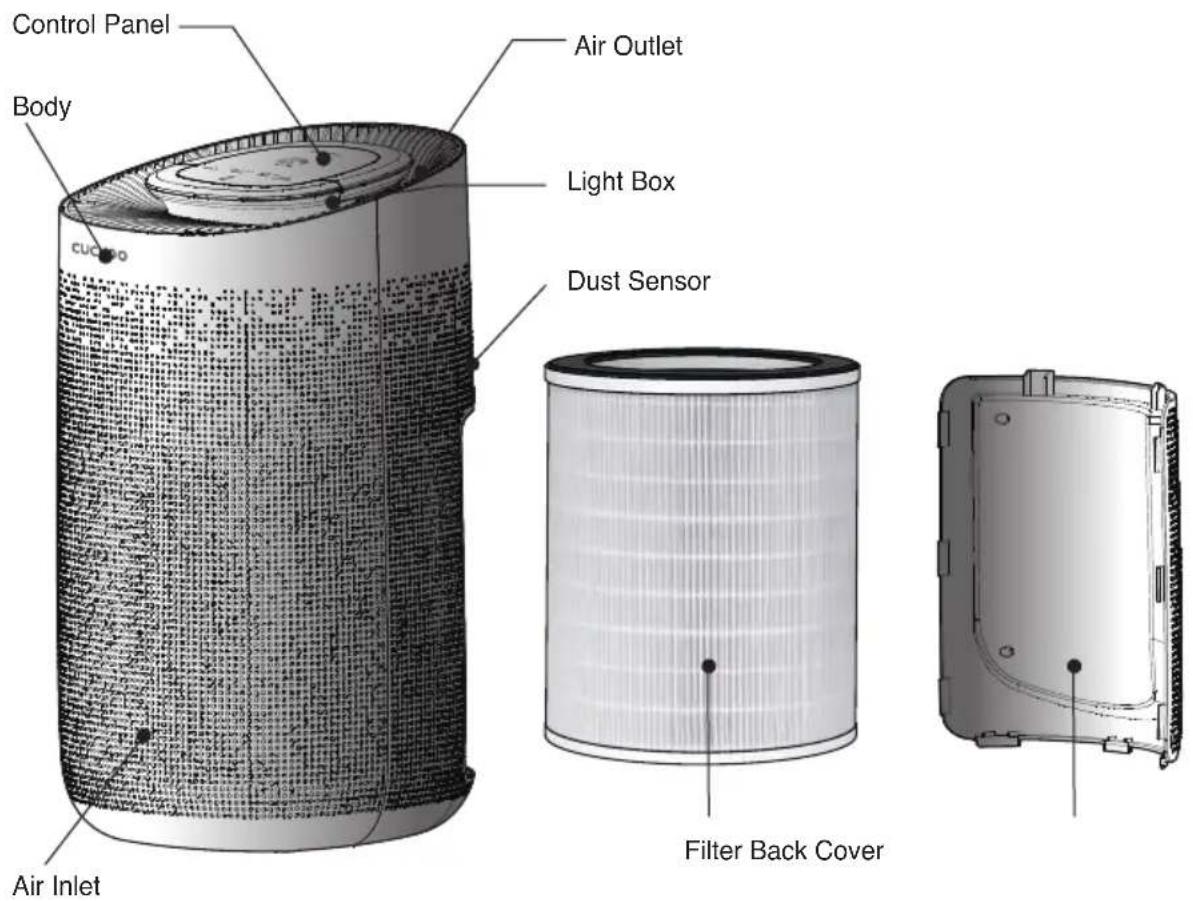
Accessories
User Manual
*The picture may differ from the actual product.
How to Replace Filter
* Note :
- Please remove the packaging from the filter before using it.
- Ensure the product is unplugged before removing or installing the filter.
- Please wipe the dust on the filter regularly, do not wash or use it repeatedly.
- Please do not use other filters that are not designed for this air purifier.
1 When the icon on the bottom of the control panel continuously blinks red, it means the filter needs to be changed.
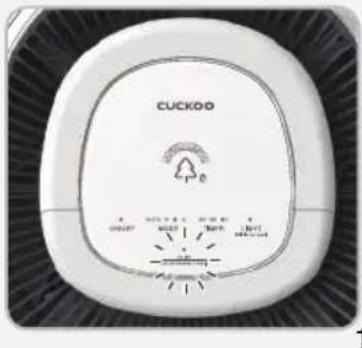
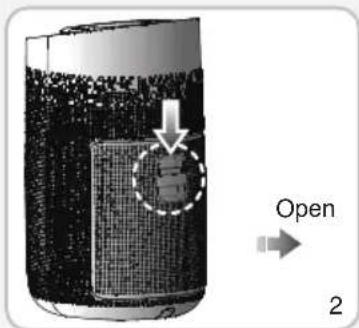
2 To remove the Back Cover of the air purifier, push the lever down and pull.
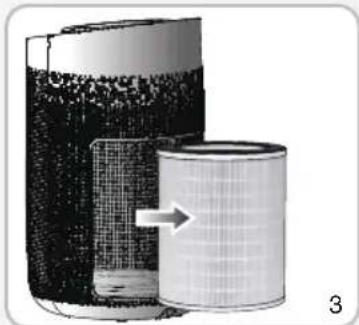
3 Take out the old filter from the air purifier.
natural_image
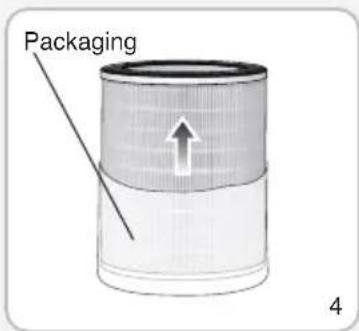
Diagram of a cylindrical device with internal components and an arrow indicating flow or direction (no text or symbols)4 Remove the packaging around the new filter.
How to Replace Filter
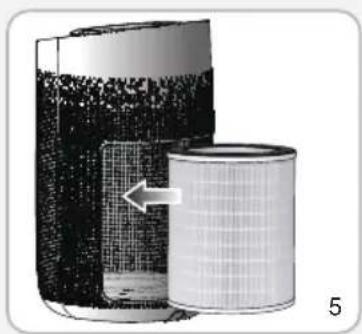
5 Place the new filter into the base of the air purifier.
natural_image
Diagram of a cylindrical filter or filter device with mesh structure, showing internal components and an arrow indicating direction (no text or symbols present)6 Place the Back Cover while pressing the Sliding Block.
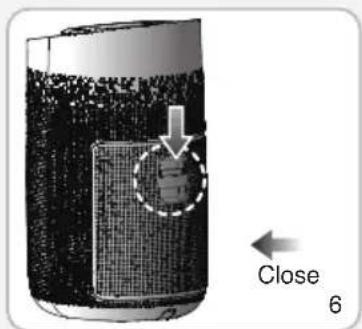
* Note
Failure to properly place the filter and back cover on the air purifier, may result in air purifier not working properly.
Resetting the Filter Replacement Alert
Please press the Filter change button for 7 seconds to reset the filter replacement alert after installing a new filter.
If it is the first time using the product, do not reset the product.
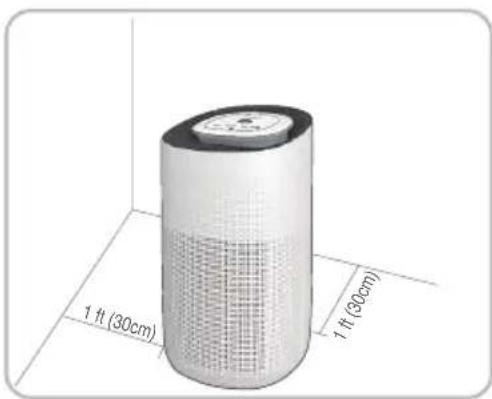
Maximum Purification Efficiency
In order to keep the best purification effect, it is recommended to keep the air purifier standing on the floor and keep it at least 1 ft (30cm) away from the wall.
Names and Functions of Control / Display Panel
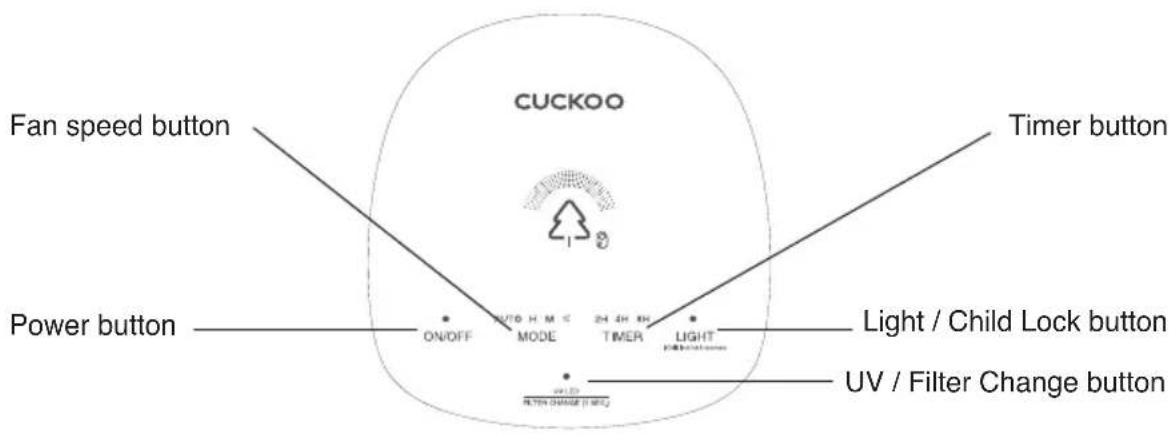
\* Note
When the product connects to the power outlet, the buzzer will ring for once.
The product enters the pre-processing mode (the indicator light will change in blue, cyan, green, yellow, red, purple, and after 30 seconds of pre-processing, the color corresponding to the current air quality will be displayed.
Button Description
| ON/OFF | Power Button1. When turning on the air purifier, the air purifier will beep and the default fan speed will be medium.2. The air purifier will asses the air quality for 30 seconds and will be indicated by 7 revolving colors (Blue, Cyan, Green, Yellow, Orange, Red, Purple). After the 30 seconds, the air purifier will indicate the current air quality by the color it shows. (Blue = Excellent, Yellow = Moderate, Red = Poor)3. Press again to turn off the machine, all the light will be off, then the machine is in standby mode. |
| AUTO H M & MODE | Fan Speed ButtonThere are 4 options for fan speed. H or High, is the fastest fan speed. M or Moderate, is the second fastest fan speed. Or Sleep, is the lowest fan speed and most quiet.AUTO automatically adjusts the fan speed according to air quality.1. Auto ModeThe fan speed will automatically adjust itself according to the current air quality. And the wind speed will auto-change according to the air quality among high mode, middle mode and sleep mode.2. H Mode (High)When the machine work in a High Mode, the corresponding Indicator will be on. |
Names and Functions of Control / Display Panel
| AUTO H M & MODE | 3. M Mode (Moderate)When the machine works in a M Mode, the corresponding indicator will be on.4. ⚙ Mode (Sleep)The lowest and quietest fan speed. After this mode has been on for 5 seconds, the lighting will be dimmed.The sleep Indicators will be on again and touching any button. |
| 2H 4H 8HTIMER | Timer Button1. To use the timer, press the timer button until you reach desired timer time.You can select between 2 hours, 4 hours, or 8 hours.2. When the timer is up, the air purifier will turn off the fan and all lights and be on standby mode. |
| LIGHT(CHM lock for 3 seconds) | Light / Child lock ButtonThere are three different light brightnesses you can control: standard, dimmed, and off. Push the light button repeatedly until you reach your desired brightness preference.(Note : You cannot change the light brightness while the air purifier is assessing the air quality the first 30 seconds the machine turns on.)To child safe lock, press and hold the light button for 3 seconds until the lock icon shows. To unlock, press and hold for 3 seconds until the lock icon disappears.(Note : Any functions cannot operated in the mode of Child lock function unless you long press this button to unlock it.) |
| UV LEDFILTER CHANGE (7 SEC.) | UV LED / Filter Change Button1. UV LED uses light to help sterilize and kill the bacteria in the air. To turn on the UV LED, make sure the air purifier is on, press the UV LED button and the UV LED will turn on. To turn off the UV LED, press the UV LED button again.*NOTE* Please do not stare into the UV LED light, this may cause visual impairment.2. Filter Change Button: After your air purifier has been running for 2200 hours or if it detects the filter is saturated before the 2200 hours, the filter indicator will flash red. After replacing the filter, press and hold the Filter Change Button for 7 seconds or until the light stops flashing.This will reset the system to adapt for the new filter. |
Connect the power
Please confirm that the input voltage is 100-240V, 50Hz/60Hz, and ensure that the power plug and your hands are dry before you insert the power cord plug into the outlet.
Note: Contact Customer Service when the power cord or plug is damaged or the power outlet is loose.
We strongly recommend that the damaged parts be repaired or replaced.
To replace the damaged power cord or plug, please visit CUCKOO website and contact Customer Service.
About the Filter
Air Purification
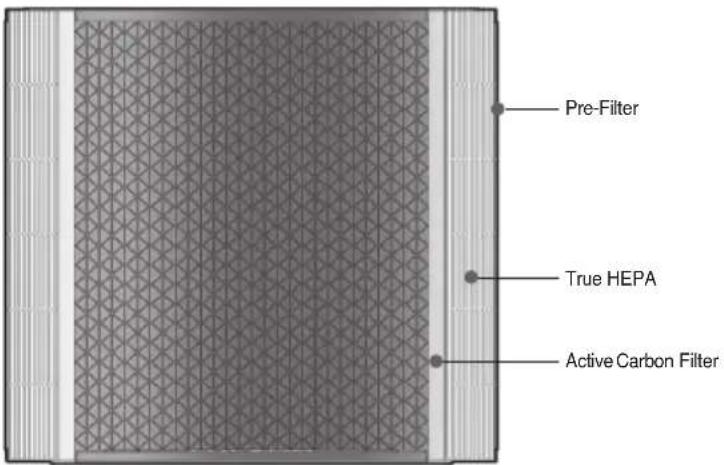
* The picture may differ from the actual product.
| True HEPA 3-Stage Filter | |
| Stage 1 Pre Filter | |
| Stage 2 True HEPA | |
| Stage 3 Active Carbon Filter | |
About the Filter
| True HEPA3-Stage Filter | Pre-Filter | It removes large dust, hair, fur which maximizes the filter's life. |
| True HEPA | It removes at least 99.97% of particles as small as 0.3 microns such as smoke, dust pollen, dander and mites. | |
| Active Carbon Filter | It absorbs unpleasant odors, harmful gases, food smell, cigarette smoke, fur, and VOCs. |
About the Filter
Filter Replacement Cycle
| Filter | Room size When to Replace | |
| True HEPA3-Stage Filter | Up to 726 sqft | On average, every 6 months |
* The expected filter replacement cycle is estimated by a close review of the filters to display its proper performance. This is determined based on the product usage time (12 hours) per day and indoor pollution index of 150 g/m^3 . Thus the cycle may shorten as the usage time or indoor pollution index goes up. (Based on GB/T 18801-2015 standard)
Maintenance
- Ensure the product is unplugged before maintenance.
- Do not immerse the air purifier into water or any liquid.
- Do not use abrasive, corrosive or flammable cleansers (such as bleach or alcohol) to clean any part of the unit.
- Do not wash the filter.
- Do not use a vacuum cleaner to clean the filter.
Cleaning and Storage
- Ensure the product is powered-off and unplugged.
- Use a soft cloth with neutral cleanser to clean away any dust or debris from the surface of the product and air intake/vent.
- If you do not use it for a long time, please turn on the product for a few minutes from time to time to ensure a good performance.
- Please do not drop any water into the product when cleaning the air outlet.
Caution
* Please comply with the 'Caution' as they are provided to ensure safe and proper use of the product and prevent accidents and dangerous situations.
Safety Instructions

natural_image
Icon of an open book with an information symbol (i) on the right page, no text or labels present.Introduction
Thank you for choosing a device from CUCKOO.
Intended use
- The device is used exclusively for cleaning the ambient air indoors.
- Please read these operating instructions before using the machine and please follow the safety instructions.
The operating instructions must be kept available at all times.

Safety instructions
- Keep packing material, such as plastic wrapping, away from children! (Risk of suffocation)
- Please follow the safety instructions to prevent fire or electric shock. Only use the device indoors.
- Only use a socket that supplies the correct voltage (see rating plate).
- Do not modify or repair the device.
- Do not use the device if the power cable or mains plug is damaged or if the connection at the socket is not stable.
- Make sure that the power cable does not get crushed while you are using the device and that it cannot be damaged in any other way. Place the cable so that no one will trip over it. Do not pull the power cable tight.
- Disconnect the plug from the socket for cleaning purposes and whenever the device is not in use for a significant period of time.
- Do not touch the plug or the device if you have wet hands.
- Do not spray any insect repellent.
- Do not use in rooms where the device may come into contact with fuel vapour, oil vapour or metal dust.
- Do not use any volatile liquids, petroleum, kerosene, paint thinner or polishing paste to clean the device. Such liquids may damage the surface of the device.
- Do not expose the device to rain, water, moisture or high humidity, and do not set it up in a bathroom or kitchen next to a sink.
• Make sure that no foreign objects get into the outlet grilles. - Do not use near a naked flame or sparks.
- The device is not suitable for removing harmful gases (carbon monoxide, e.g. from heating appliances).
- Unless they are supervised, the device must not be used by those(including children) with reduced, physical, sensory and mental abilities or who do not have the required experience and knowledge.
Caution
Safety Instructions

Safety instructions
- Do not block the air intake or outlet.
- Do not expose the air purifier to direct sunlight, a naked flame or heat.
- Only use the air purifier in living quarters and within the specified technical parameters. Improper usage may pose a threat to life and health.
- Do not use the device near a smoke detector. Air blowing towards a smoke detector could delay the alarm or not trigger at all.
natural_image
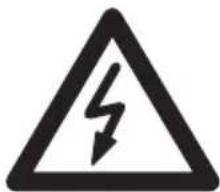
Warning sign depicting a lightning bolt symbol (no text or numbers present)Caution
Risk of injury due to electric shock.
Always disconnect the mains plug prior to :
- Maintenance and cleaning
- Moving the device
- Changing the filter
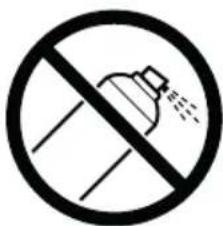
Caution
- Do not use any spray cans with flammable contents near to the air purifier!
natural_image
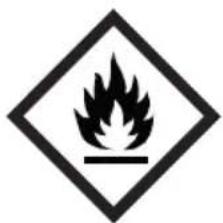
Warning symbol of a flame inside a diamond shape (no text or numbers)Caution
- Do not use any flammable cleaning agents
Any replacement of the UV lamp must be of the same wavelength
Attention
natural_image
Simple line icon of an open book with an information symbol (no text or numbers present)Préface
natural_image
Warning symbol of a lightning bolt inside a triangle (no text or numbers)Attention
Attention
natural_image
Warning symbol of a flame inside a diamond shape (no text or numbers)Attention
▼ Not following this user manual may result in your device not working.
Please read the following measures accordingly if you are having problems with your device. If you are still having problems, please contact our Customer Service Centers.
| Problem RecommendationChecklist | ||
| The product won't work even if I press the Power button. | Are you in a black out? Check the power supply. | |
| Is the power cord plugged into the power outlet? | Put the power plug in a power outlet. | |
| No air is blowing out. | Is there material blocking the intake or air vent? | Remove material from vent/intake.Check if plastic packaging has been removed from filter. |
| Is the air purifier placed where the intake or blocked preventing air from moving freely? | Remove objects blocking the air purifier or place it elsewhere. | |
| Air purifier is on but fan does not work. | Unplug from the wall and contact Cuckoo customer service.USA : www.cuckooamerica.comIndia : www.cuckooindia.inVietnam : www.cuckoovina.comIndonesia : www.cuckoo.co.idMalaysia : www.cuckoo.com.my | |
| Loud Noises | Is there anything stuck in the fan or air intake/vent? | Please remove any objects you see from the fan intake/vent. |
| Is the air purifier tilted on its side? | Make sure the base is level on a flat surface. | |
| Is the fan really loud? Set your air purifier to a lower fan speed to reduce the noise. | ||
| Coming out nasty smell | Is the air purifier in a place with a lot of smoke and odor? | The performance of the air purifier may decrease over time if there is excessive smoke and odor in the area. To remedy this, please air out the room before using the air purifier. |
| Should I clean or replace my filter? | Check the filter replacement indicator and clean or replace the filter if necessary. | |
| Do you smell plastic? | It is common that in the first uses the smell of plastic will be emitted. It will eventually go away. If not, please call our customer service centers. | |
| Is there a burning smell? Turn off your air purifier, unplug it from the wall and call our customer service center. | ||
| The air purifier is not purifying the area well. | The air purifier may be placed in an area with no ventilation, or there is an obstacle near it. | Ventilate the room and then use the product. Use the product in an area not exceeding its coverage limit.(Avoid placing the device where it is well ventilated like a door or window.) |
| Is there any dust in the pre-filter? Wipe the Pre-Filter | ||
| Are there any objects blocking the air intake/vent? | Please remove any objects from the intake/vent. | |
| Have you removed the filter from it's packaging? | The plastic bag of the filter may not have been removed, so please open the cover and check if the plastic bag is removed. | |
| Is the filter dusty? Maybe it is time to replace the filter. | Change the filter if it looks like it needs to be replaced. | |
| Is intake/vent dusty? Clean the air vent/intake. | ||
| The filter replacement alert is still blinking after I changed the filter. | Have you reset the filter change button? | Press and hold the filter button for 7 seconds to reset the filter replacement alert. |
Note : If these suggestions do not work accordingly, please contact CUCKOO customer service and await instructions. Do not disassemble, repair or fix anything by yourself.
Product Specifications
| Category Air Purifier | |
| Model | CAC-J1510FW |
| Power Supply | AC100-240V, 50/60Hz※ USA : AC120V, 60Hz |
| Rated Power Input | 50W |
| CADR(Clean Air Delivery Rate)* | 329.3 m3/h |
| Noise | ≤ 61dB |
| Coverage Area** | Replaces the air 2x per hour in 726 sqft (67.5m2)Replaces the air 4x per hour in 363 sqft (33.8m2) |
| Dust Collecting Method | Mechanical dust collecting method |
| Product Size | D10.6 x W11.9 x H19.6 inch / D270 x W303 x H493 mm |
| Product Weight | 10.1 lbs (4.6kg) |
| Place for Use | For indoors |
- The information (exterior, design, and specifications) provided in this User Manual is subject to change without prior notice to improve the quality of the device.
- CADR (Clean Air Delivery Rate) ^* is tested based on GB/T 18801-2015 Standard.
- Room Coverage ^** is based on the Air Change Per Hour or ACPH which is how many times per hour the air in your room will be fully purified.
The air purifier will clean the air 2 times per hour in a 726 sq. ft. Room and 4 times per hour in 363 sq. ft. room.
Inquiry about Malfunction
Product parts may wear out due to heat, moisture, dust and other causes over time, which in turn may cause malfunction of the product.
In the case that
Something other than the symptoms coming under "Troubleshooting" in page 15\~16 occurs;
② You can feel electricity when you touch the product with your hands;
③ The power is supplied, but the motor does not work
④ Other malfunctions occur

Please stop using the product.
Please unplug the product and contact our Customer Service Center.
Warranty
For questions about our warranty or to look at our other products, please visit our website.
USA : www.cuckooamerica.com India : www.cuckooindia.in
Vietnam : www.cuckoovina.com Indonesia : www.cuckoo.co.id
Malaysia: www.cuckoo.com.my
MEMO
MEMO
CUCKOO
USA : www.cuckooamerica.com India : www.cuckooindia.in Vietnam : www.cuckoovina.com Indonesia : www.cuckoo.co.id Malaysia : www.cuckoo.com.my
We provide satisfying consultation and services concerning your complaints, suggestions, and recommendations upon receiving your troubled product model name, status, and contact information.
♣ After reading this manual, keep it in a place easily accessible to the user for future reference.
♣ Caution : Please read this manual carefully to ensure safety and a longer product lifespan.
- Dear customers, Thank you for purchasing CUCKOO Air Purifier.
- Top Features of CUCKOO Air Purifier
- Air Purification
- Timer Setting
- ● Automatic Operation function through Dust Sensor
- Color LED Air Quality Display
- UV LED
- Filter Replacement Indicator
- Portable Design
- True HEPA 3-Stage Filter
- CONTENTS
- Support
- Description of Parts
- Unboxing
- Accessories
- How to Replace Filter
- Resetting the Filter Replacement Alert
- Maximum Purification Efficiency
- Names and Functions of Control / Display Panel
- \* Note
- Button Description
- Connect the power
- About the Filter
- Maintenance
- Cleaning and Storage
- Caution
- Safety Instructions
- Introduction
- Intended use
- Attention
- Préface
- Product Specifications
- Inquiry about Malfunction
- In the case that
- Please stop using the product.
- Warranty
- CUCKOO
Brand : Cuckoo
Model : CAC-J1510FW
Category : Other Household Appliances