
Whisper - Vacuum Cleaner FAKIR - Free user manual and instructions
Find the device manual for free Whisper FAKIR in PDF.


| Product Type | Vacuum Cleaner |
| Brand | Fakir |
| Model | Whisper |
| Voltage | 220-240 V |
| Frequency | 50 Hz |
| Motor Power | 700 W |
| Energy Efficiency Class | A |
| Annual Energy Consumption | 25 kWh |
| Carpet Cleaning Performance | C |
| Hard Floor Cleaning Performance | A |
| Dust Re-emission Class | A |
| Sound Power Level | 69 dB |
| Dust Bag Type | Replaceable Fakir dust bag |
| Filtration System | Sponge filter and HEPA filter |
| Usage Life | 10 years |
| Included Accessories | Upholstery tool, crevice tool, dusting brush, telescopic tube, main brush |
| Intended Use | Household dry vacuuming of hard floors, carpets, upholstery, curtains |
| Power Cord Rewind | Yes, with button |
| LED Dust Indicator | Blue (normal), red (blocked or bag full) |
Frequently Asked Questions - Whisper FAKIR
User questions about Whisper FAKIR
0 question about this device. Answer the ones you know or ask your own.
Ask a new question about this device
Download the instructions for your Vacuum Cleaner in PDF format for free! Find your manual Whisper - FAKIR and take your electronic device back in hand. On this page are published all the documents necessary for the use of your device. Whisper by FAKIR.
USER MANUAL Whisper FAKIR
natural_image
Exterior view of a white and black vacuum cleaner with handle and control panel (no visible text or symbols)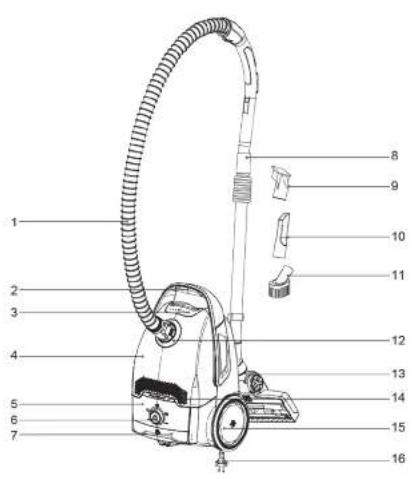
natural_image
Line drawing of a car's exhaust pipe being inserted into a container (no text or symbols)natural_image
Illustration of a hand holding a cylindrical object with an arrow indicating motion (no text or symbols)natural_image
Illustration of hands holding a cylindrical object with a double-headed arrow indicating motion (no text or symbols)natural_image
Diagram of a mechanical device with a downward arrow indicating force or movement (no text or symbols present)natural_image
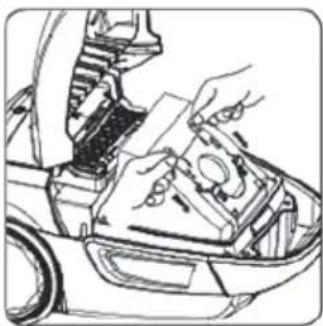
Line drawing of a hand opening a car's hood with an arrow indicating motion (no text or symbols)Staubdeckel öffnen
natural_image
Line drawing of a hand using a tool to adjust or install a mechanical component on a vehicle (no text or symbols visible)natural_image
Line drawing of a robotic vacuum cleaner with directional arrows indicating motion (no text or symbols)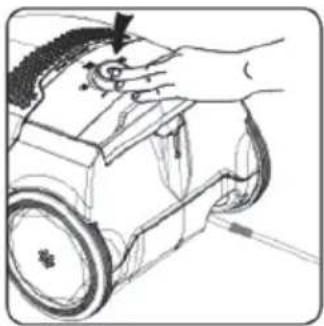
natural_image
Illustration of a hand operating a small wheeled robot with a curved head (no text or symbols visible)natural_image
Hand operating a robotic car with a curved handle (no text or symbols visible)natural_image
Line drawing of a robotic arm with a hand holding a tool, showing no text or symbolsnatural_image
Line drawing of a mechanical device with gears and a handle (no text or symbols)natural_image
Technical line drawing of a mechanical device with wheels and components (no text or symbols)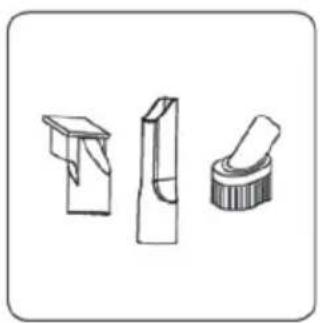
natural_image
Three technical line drawings of mechanical components or parts, no text or symbols presentnatural_image
Diagram of a cleaning or cleaning process with a tool and spray bottle (no text or symbols)natural_image
Line drawing of a car interior with hand holding a component (no text or symbols)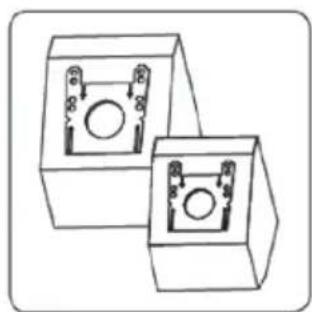
natural_image
Two identical 3D mechanical components with circular cutouts and mounting holes, shown in isometric view (no text or symbols)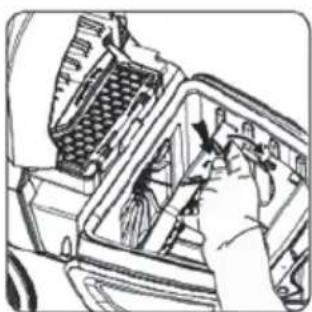
natural_image
Hand inserting a component into a device (no text or symbols visible)natural_image
Illustration of a hand holding a rectangular object next to a fan-shaped device (no text or symbols visible)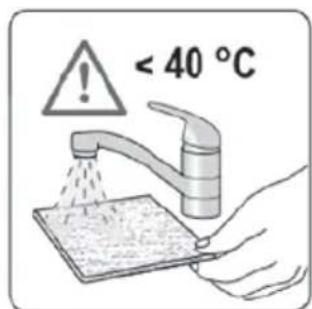
natural_image
Technical line drawing of a car engine bay with visible internal components (no text or symbols)natural_image
Mechanical assembly diagram showing a hand inserting a component into a car body (no text or symbols visible)natural_image
Illustration of a hand using a brush to clean or store items from a container (no text or symbols visible)Information about the operating instructions ....13
Liability 13
Notices in the operating instructions ....13
CE Declaration of Conformity 13
Intended use 13
Unauthorized use 13
General Safety Information 14
Product description and scope of delivery 15
Operation 16
Question and answer 19
Disposal 20
Dispatch....20
Thank you,
for choosing a Fakir Whisper vacuum cleaner of high energy efficiency and therefore with low energy consumption and without loss of suction performance. The vacuum cleaner was developed and manufactured to guarantee a trouble-free operation for many years.
Information about the operating instructions
These operating instructions are intended to enable the safe and proper handling and operation of the appliance.
Read these operating instructions carefully before using the appliance for the first time. Keep the operating instructions in a safe place. Include these operating instructions when passing the appliance on to another user.
Liability
We will accept no liability for damages resulting from failure to comply with the operating instructions.
We cannot assume any liability in case the appliance is used for other purposes than its intended use or handled, repaired or serviced improperly.
Notices in the operating instructions

WARNING!
Indicates notices which, if ignored, can result in risk of injury or death.

ATTENTION!
Indicates notices of risks that can result in damage to the appliance.

NOTICE!
Emphasizes tips and other useful information in the operating instructions.
CE Declaration of Conformity
The appliance fulfils the requirements of the Appliance and Product Safety Law -ProdSG-, and Energy-related Products Act, as well as the EU Directives 2004/108/EC "Electromagnetic Compatibility", 2006/95/EC "Low-Voltage Directive", 2001/95/EC "General product safety", 2011/65/EC "RoHSDirective". 2009/125/EG "Eco design Directive".
The appliance bears the CE-Mark on the rating plate Fakir reseves the right to change design and equipment.
Intended use
The appliance may only be used in households. It is not suitable for commercial use.
It may be used only for dry cleaning hard floors and textile coverings, carpets, upholstery furniture, mattresses, furniture, radiators and curtains.
Check if all filters have been inserted properly before using the appliance. The appliance must not be used without filters.
Use only original Fakir filters and accessories.
Unauthorized use
Any other use is considered unauthorized and is prohibited. The examples of unauthorized use listed here can result in malfunctions, damage to the appliance or personal injury:
General Safety Information
Warning:
Your safety is important to us. To reduce the risk of fire, electrical shock, injury to person or damage when using your vacuum cleaner, follow basic safety precautions including the following:
- Read this manual before assembling or using your vacuum cleaner.
- To reduce the risk of electric shock. - Do not use outdoors or on wet surfaces.
- Disconnect electrical supply before servicing or cleaning out brush area. Failure to do so could result in electrical shock or brush suddenly starting.
- Do not unplug by pulling on cord. To unplug, grasp the plug, not the cord.
- Hold plug when rewinding onto cord reel. - Do not allow plug to whip when rewinding.
- Do not use with damaged cord or plug. If cleaner is not working as it should, has been dropped, damaged, left outdoors, or dropped into water. Return it to a sears service center / department.
- Do not pull or carry by cord, use cord as a handle, close door on cord, or pull cord around sharp edges or corners. Do not run cleaner over cord. Keep cord away from heated surfaces.
- Do not leave cleaner when plugged in. Unplug from outlet when not in use and before servicing.
- Do not allow to be used as a toy. Close attention is necessary when used by or near children.
- Do not handle plug or cleaner with wet hands.
- Do not put any objects into openings.
- Do not use with any opening blocked, Keep free of dust, lint, hair, and anything that may reduce airflow.
- Keep hair, loose clothing, fingers, and all parts of body away from openings and moving parts.
- Do not use cleaner without dust bag and /or filters in place.
-
Always change the dust bag after vacuuming carpet cleaners or freshener, powders and fine dust. These products clog the bag, reduce airflow and can cause the bag to burst. Failure to change bag could cause permanent damage to the cleaner.
-
Do not use cleaner to pick up sharp hard objects, small toys, pins, paper clips, etc. they may damage the cleaner or dust bag.
- Do not use cleaner to pick up anything that is burning or smoking, such as hot ashes, cigarette, matches.
- Do not use cleaner to pick up flammable or combustible liquids (cleaning fluid, gasoline, perfumes, etc.) or use in areas where they may be present. The fumes from these substances can create a fire hazard or explosion.
- Use extra care when cleaning on stairs. Do not put on chairs, table, etc. keep on floor.
Product description and scope of delivery
- Hose
- Handle
- Dust cover release button
- Dust cover
- Indicator panel
- Switch and power regulator
- Cord rewinder button
- Telescopic tube
- Upholstery tool
- Crevice
- Dusting brush
- Hose inlet
- Main brush
- LED dust indicator
- Rear Wheel
- Cord
Vacuum cleaner:
Fakir Whisper
Mains voltage: 220-240 V
Nominal frequency: 50 Hz
Motor power: 700 W
Energy efficiency class: A
Annual energy consumption: Energy consumption per year is calculated on the basis of 50 test cycles and is 25 kWh. The actual energy consumption could vary, depending on how the device is used.
Carpet cleaning performance: C
Hard floor cleaning performance: A
Dust re-emission class: A
Sound power level: 69 dB
Usage Life: 10 Years
*Indicative annual energy consumption (kWh per year), based on 50 cleaning tasks.
Actual annual energy consumption will depend on how the appliance is used.
Operation
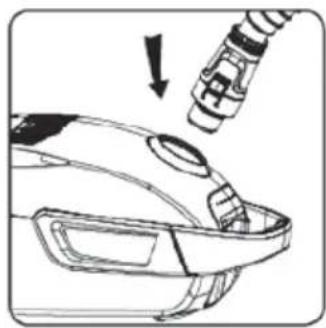
natural_image
Diagram of a car's exhaust pipe being inserted into a vehicle's hood, showing mechanical components and exhaust flow direction (no text or labels)Attach hose to the main body
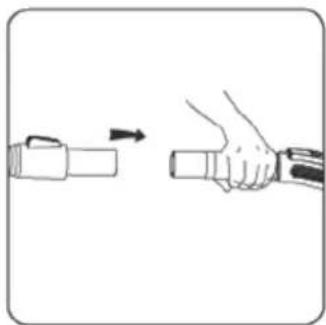
natural_image
Illustration of a hand holding a flashlight with an arrow indicating motion (no text or symbols)Attach telescopic tube Extend telescopic tube Attach main brush
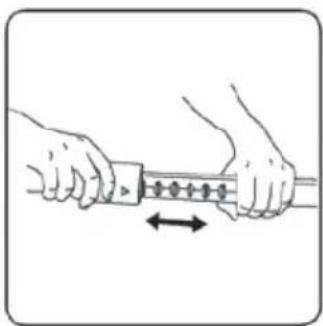
natural_image
Illustration of hands holding a cable with a spring, showing a directional arrow (no text or symbols)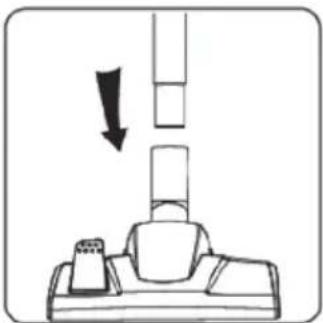
natural_image
Diagram of a mechanical device with a downward arrow indicating force or movement (no text or symbols present)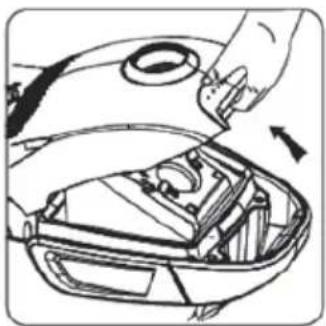
natural_image
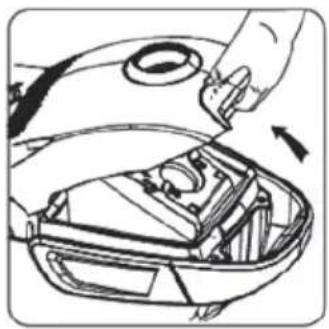
Line drawing of a car hood with hand holding part, showing internal components and a directional arrow (no text or symbols)Open dust cover
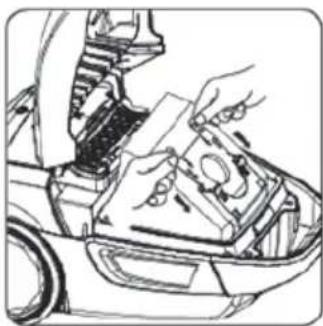
natural_image
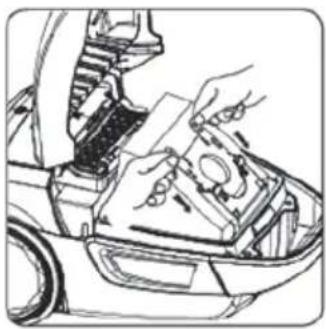
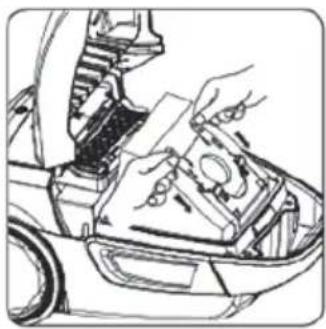
Line drawing of a robotic arm assembling a mechanical component (no text or symbols)Put dust bag in and keep it be fixed
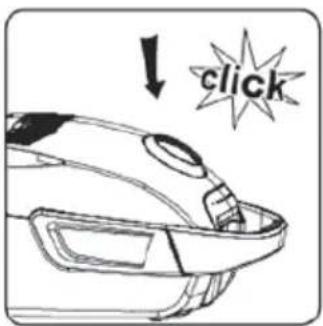
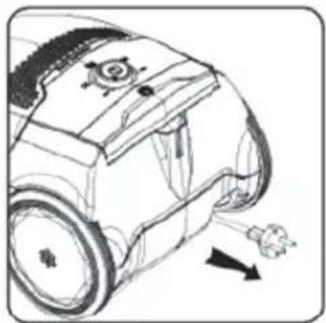
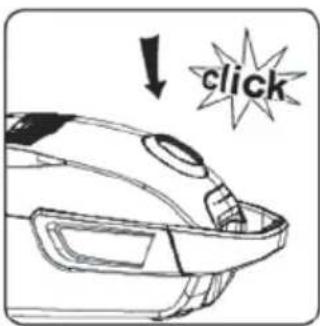
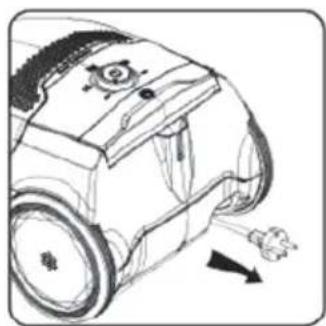
Close dust cover stretch out the cord to be sure long enough for using
natural_image
Line drawing of a robotic vacuum cleaner with motion arrows indicating airflow (no text or symbols)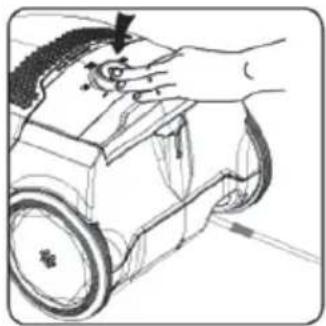
natural_image
Illustration of a hand operating a small robot with a curved handle (no text or symbols)Press switch button to turn on the vacuum cleaner
Operation
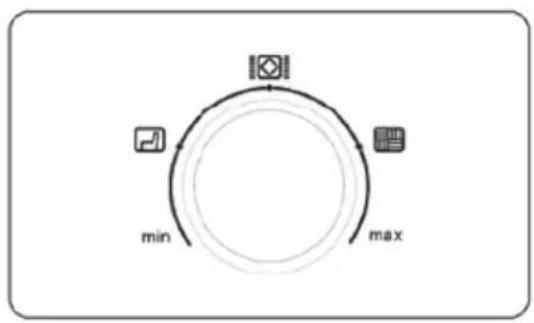
flowchart
graph TD
    A["Start"] --> B["Mid"]
    B --> C["Max"]
    C --> A
Turn the power regulator to the right level for different cleaning purpose: min
sofa, curtain or textile 📋 carpet a
max hardfloor
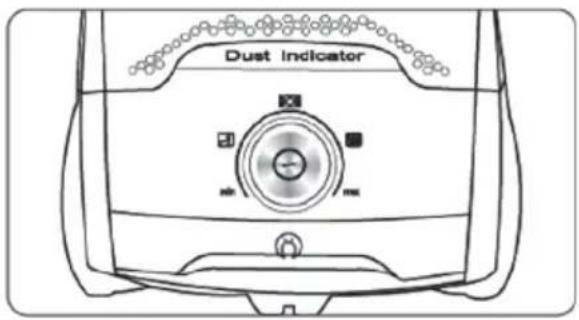
When machine operating, the dust indicator will be in blue, and once blocked it will be red. then please check if bag be full or the air channel be blocked. The dust indicator will not be red if power lower than ☐. if the noise is different or low suction, please check whether bag is full.
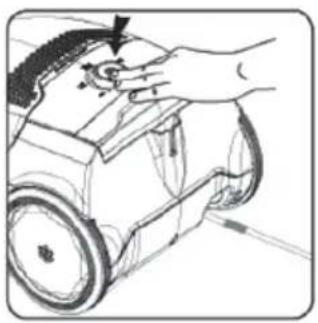
natural_image
Hand operating a robotic car with a tool on top (no text or symbols visible)Press switch button to turn off the vacuum cleaner
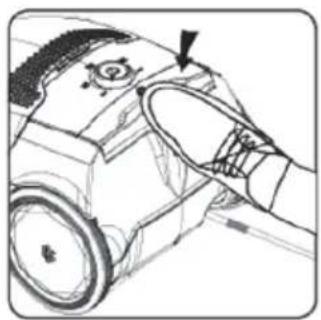
natural_image
Technical line drawing of a mechanical component with an arrow pointing to a feature (no text or symbols present)Press cord rewind button after cleaning
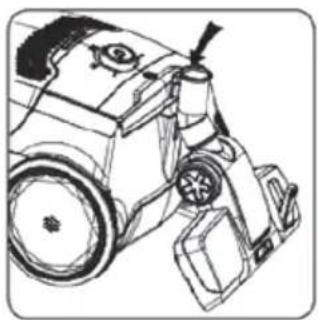
natural_image
Line drawing of a mechanical device with gears and a wheel (no text or symbols)Park the main brush in the park slot
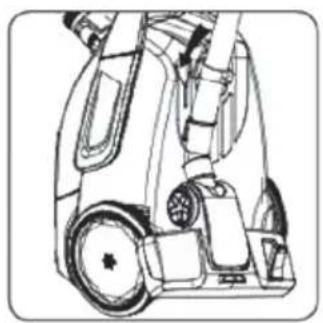
natural_image
Technical line drawing of a mechanical device with wheels and components (no text or symbols)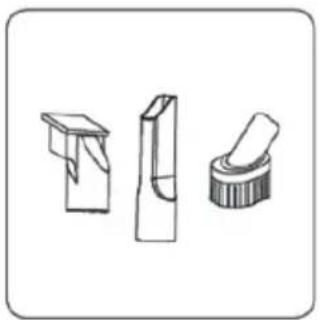
natural_image
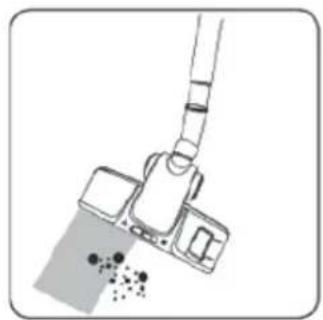
Three technical line drawings of mechanical components or parts, no text or symbols presentUpholstery tool, crevice, dusting brush
natural_image
Illustration of a mopener being inserted into a tray with a blue liquid, showing no text or symbols.Main brush for carpet and hardfloor
'Different version should have different accessories
Maintenance
natural_image
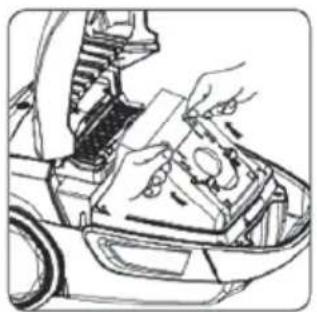
Line drawing of a hand cleaning a car interior with tools and components (no text or symbols)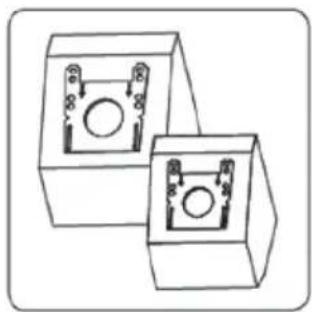
natural_image
Two identical 3D mechanical components with circular cutouts and mounting holes, shown in line drawing style (no text or symbols)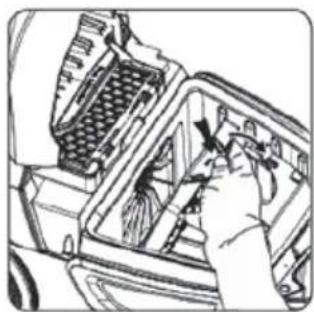
natural_image
Illustration of a hand inserting a component into a device (no text or symbols visible)Replace the dust bag when it is full Take out the sponge to clean it
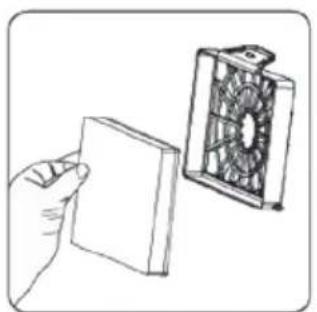
natural_image
Illustration of a hand holding a rectangular object next to a fan-shaped device (no text or symbols visible)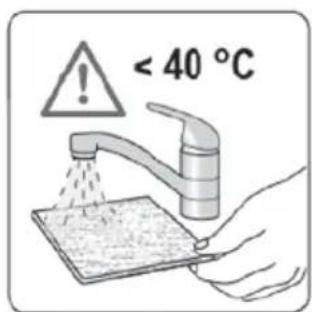
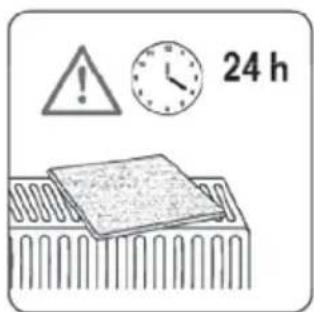
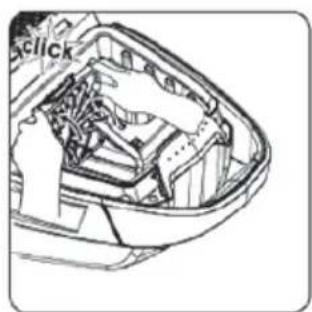
natural_image
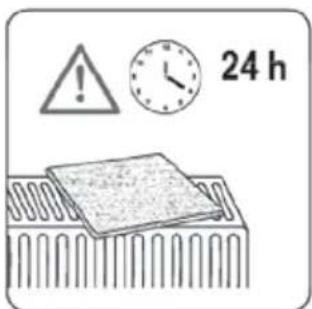
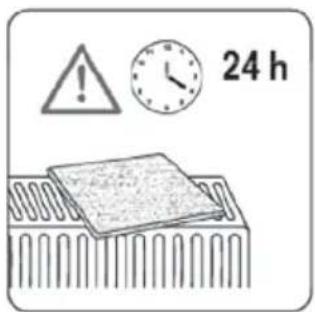
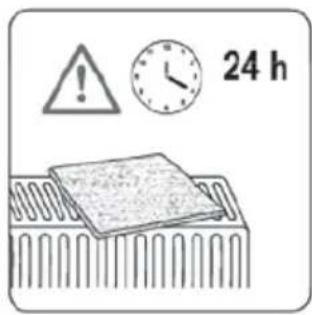
Technical line drawing of a car engine bay with visible internal components (no text or symbols)Wash all parts and assembly after they are dry
Put the sponge back in the machine
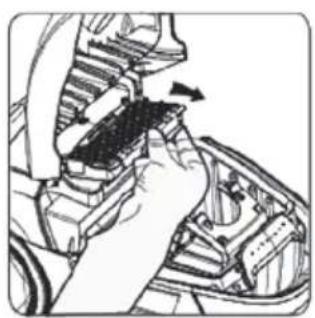
natural_image
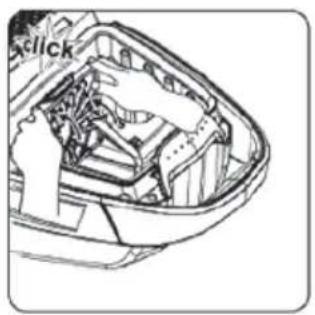
Mechanical assembly diagram showing a hand operating a component with arrows indicating motion (no text or symbols present)Take out the HEPA filter
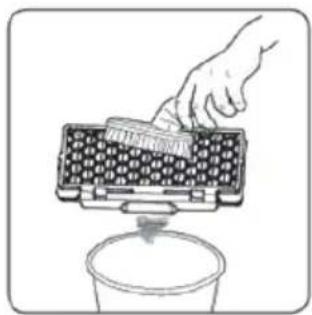
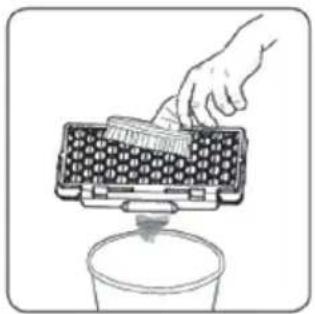
natural_image
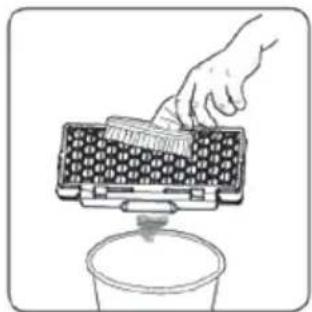
Illustration of a hand using a brush to clean or store contents from a container (no text or symbols visible)Clean HEPA filter with dusting brush
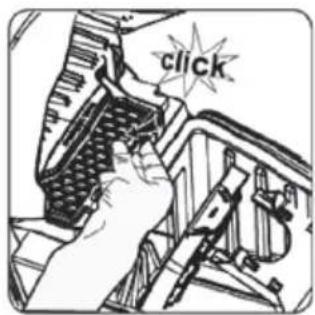
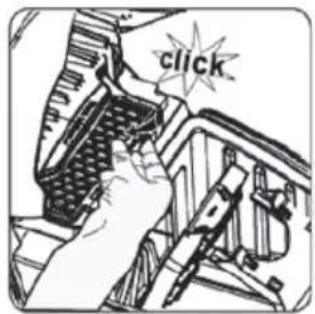
Put the HEPA in the machine and press to fix it
Note: all daily maintenance should be implemented after pulling out the plug from power socket.
Question and answer
Fault and Repair:
Please deal with abnormal conditions according to the following methods. If the cleaner still cannot operate normally, please contact the store in which this product is bought or special maintenance stores.
| Fault description | Countermeasure |
| Cleaner does not work | 1. Check whether the power plug is loose or not, pull out it and insert it into power socket again;2. Check whether the power socket is electrified or not;3. Check whether the cleaner is switched on or off. |
| Weak suction power | 1. May be the tube, handle or hose not be connected correctly;2. May be the filter be blocked and clean the filter (sponge and HEPA);3. May be the dust full and replace the dust bag bepre using; |
| Why dust escaping from cleaner | 1. Check whether the filter in right position;2. Check whether the filter be dry or not and dry it before using; |
| Abnormal noise | 1. Immediately stop using the cleaner;2. Check whether the brush, hose and main suction tube are blocked and promptly remove blocking objects; |
Disposal
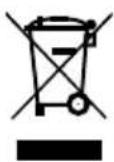
When the appliance has reached the end of its service life, in particular when malfunctions start occurring render the appliance unserviceable by pulling the mains plug out of the socket and cutting off the mains lead.

Dispose of the appliance in accordance with the applicable environmental regulations for your country.
Do not dispose of electrical equipment with the household refuse.
Take the appliance to a central recycling facility.
The packaging of the appliance is made of recyclable materials.
Sort the packaging material and recycle accordingly.
For information about recycling, please contact your local authorities or your retail dealer.
You can dispose used dust bags and filters in the household waste system.
This appliance complies with the Directive 2012/19/EG - WEEE Directive.
Dispatch:
Carry the appliance in the original package or a similar, well-padded package to prevent damage to the appliance.
natural_image
Diagram of a car's exhaust pipe being inserted into a body panel, showing mechanical components and exhaust flow direction (no text or symbols)natural_image
Illustration of a hand holding a cylindrical object with an arrow indicating motion (no text or symbols)natural_image
Illustration of hands holding a tool with a spring-like object, showing a double-headed arrow indicating motion (no text or symbols)natural_image
Diagram of a mechanical device with a downward arrow indicating force or movement (no text or symbols present)Ana fırçayı takın
natural_image
Line drawing of a hand opening a car's hood with a valve, showing internal components and a directional arrow (no text or symbols)Toz kapağını açın
natural_image
Line drawing of a hand inserting a component into a vehicle's head panel (no text or symbols)natural_image
Line drawing of a robotic car with a gear and directional arrow (no text or symbols)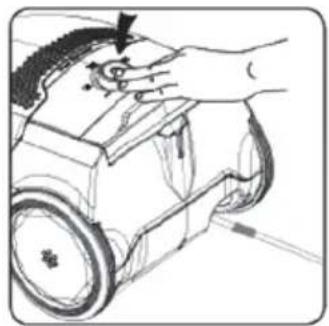
natural_image
Line drawing of a hand operating a small wheeled robot with a curved handle (no text or symbols)natural_image
Hand operating a robotic device with a curved handle (no text or symbols visible)natural_image
Technical line drawing of a mechanical component with an arrow indicating a feature (no text or symbols present)natural_image
Line drawing of a mechanical device with gears and a handle (no text or symbols)natural_image
Technical line drawing of a mechanical device with wheels and components (no text or symbols)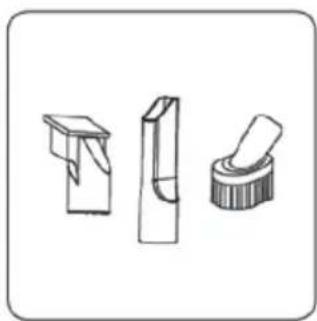
natural_image
Three technical line drawings of mechanical components or tools, no text or symbols presentnatural_image
Diagram of a cleaning or cleaning process with a tool and debris (no text or symbols)natural_image
Line drawing of a hand using a tool to adjust or install a component on a vehicle (no text or symbols visible)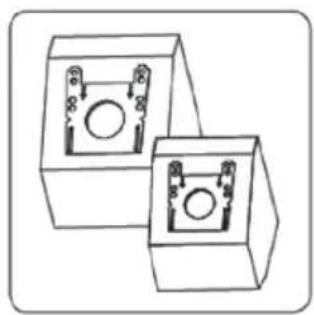
natural_image
Two identical 3D rectangular blocks with internal circular features, no text or symbols visible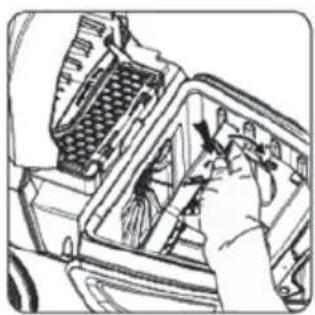
natural_image
Illustration of a hand inserting a component into a device (no text or symbols visible)natural_image
Illustration of a hand holding a flat panel next to a fan-shaped device (no text or symbols visible)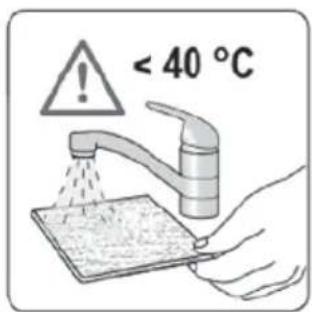
natural_image
Technical line drawing of a car engine bay with internal components (no text or symbols)natural_image
Hand installing or adjusting a mechanical component in a vehicle engine compartment (no visible text or symbols)natural_image
Illustration of a hand using a brush to clean or store contents in a container (no text or symbols visible)natural_image
Diagram showing a car's exhaust pipe being inserted into a body panel, with an arrow indicating the process (no text or symbols present)natural_image
Illustration of a hand holding a flashlight with an arrow indicating motion (no text or symbols)natural_image
Illustration of hands holding a tool with a spring-like object, showing motion direction (no text or symbols)natural_image
Diagram of a mechanical device with a downward arrow indicating force or movement (no text or symbols present)natural_image
Line drawing of a hand opening a car hood with an arrow indicating direction (no text or symbols)natural_image
Line drawing of hands installing or adjusting a mechanical component on a vehicle (no text or symbols visible)natural_image
Line drawing of a robotic vacuum cleaner with motion arrows indicating movement (no text or symbols)natural_image
Line drawing of a hand operating a car with a scroll wheel (no text or symbols)natural_image
Line drawing of a hand using a tool to press or install a small electronic device (no text or symbols visible)natural_image
Line drawing of a car interior with a hand holding the steering wheel (no text or symbols)natural_image
Line drawing of a mechanical device with wheels and components (no text or symbols)natural_image
Technical line drawing of a mechanical device with wheels and components (no text or symbols)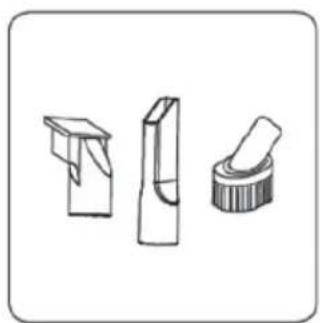
natural_image
Three mechanical component illustrations: a folded paper clip, a bent rectangular block, and a flanged cylindrical part (no text or symbols)natural_image
Diagram of a cleaning or cleaning process with a tool and spray bottle (no text or symbols)natural_image
Line drawing of a car interior with hand holding tool, no visible text or symbolsnatural_image
Two identical 3D rectangular blocks with internal circular components, no text or symbols visible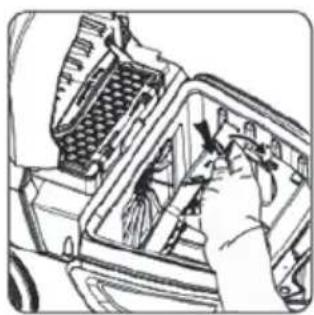
natural_image
Hand inserting a component into a device (no visible text or symbols)natural_image
Illustration of a hand holding a rectangular object next to a fan-shaped device (no text or symbols visible)natural_image
Technical line drawing of a car engine bay with visible internal components (no text or symbols)natural_image
Mechanical assembly diagram showing a hand inserting a component into a car body (no text or symbols visible)Выньте фильтр НЕРА
natural_image
Illustration of a hand using a brush to clean or store items from a container (no text or symbols visible)natural_image
Diagram showing a car's exhaust pipe being inserted into a body panel (no text or symbols present)natural_image
Illustration of a hand holding a cylindrical object with an arrow indicating motion (no text or symbols)natural_image
Illustration of hands holding a cable with a spring, showing a double-headed arrow indicating motion (no text or symbols)natural_image
Diagram of a mechanical device with a downward arrow indicating force or movement (no text or symbols present)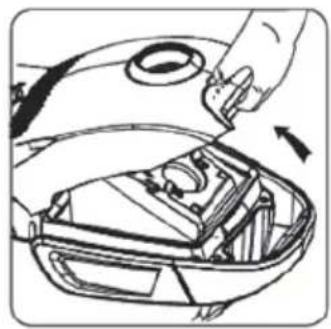
natural_image
Line drawing of a car's hood and engine compartment with hand holding part (no text or symbols)افتتح غطاء الهغير
natural_image
Line drawing of a car interior with hand holding a device (no text or symbols)الهداخل وثبته جيدا
natural_image
Line drawing of a robotic vacuum cleaner with directional arrows indicating motion (no text or symbols)natural_image
Line drawing of a hand operating a small robot with a curved head (no text or symbols)natural_image
Hand operating a robotic car with a tool, no visible text or symbolsnatural_image
Technical line drawing of a mechanical component with an arrow pointing to a feature (no text or symbols present)natural_image
Line drawing of a mechanical device with gears and a handle (no text or symbols)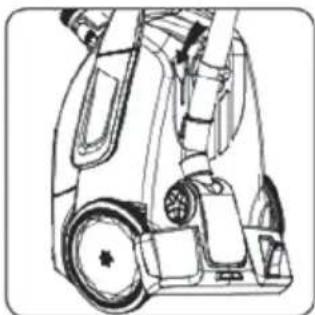
natural_image
Technical line drawing of a mechanical device with wheels and components (no text or symbols)natural_image
Three technical line drawings of mechanical components or parts, no text or symbols presentnatural_image
Diagram of a hand holding a cleaning tool with a surface and scattered particles (no text or symbols)natural_image
Line drawing of a hand using a tool to adjust or install a mechanical component on a vehicle (no text or symbols visible)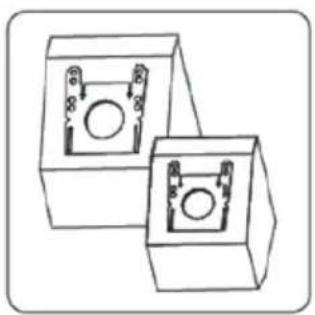
natural_image
Two identical 3D box-shaped electronic components with circular ports, shown in side view (no text or symbols)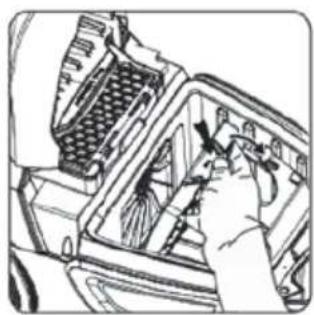
natural_image
Line drawing of a hand inserting a component into a vehicle airfoil (no text or symbols)natural_image
Illustration of a hand holding a flatboard next to a fan-shaped device (no text or symbols visible)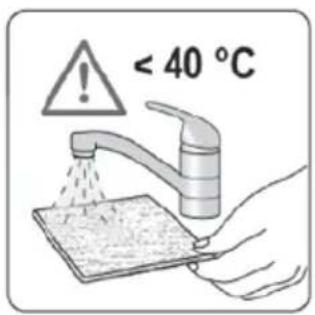
natural_image
Technical line drawing of a mechanical component with internal parts (no text or symbols)natural_image
Mechanical assembly diagram showing a hand operating a component with an arrow indicating direction (no text or symbols present)HEPA اخرج فلاتر
natural_image
Illustration of a hand using a tool to clean granular material into a container (no text or symbols)نظف الإ为代表ر بفرشاة
الإغبار
أعد فلاتر إلى HEPA
- Thank you,
- Information about the operating instructions
- Liability
- Notices in the operating instructions
- WARNING!
- ATTENTION!
- NOTICE!
- CE Declaration of Conformity
- Intended use
- Unauthorized use
- General Safety Information
- Warning:
- Product description and scope of delivery
- Vacuum cleaner:
- Fakir Whisper
- Operation
- Maintenance
- Question and answer
- Fault and Repair:
- Disposal
- Dispatch:
Brand : FAKIR
Model : Whisper
Category : Vacuum Cleaner