
010-12831-10 - Hob Fusion - Free user manual and instructions
Find the device manual for free 010-12831-10 Fusion in PDF.


| Product Type | Universal Swivel Bracket for Waketower Speakers |
| Brand | Fusion |
| Model | 010-12831-10 |
| Material | Bracket: aluminum alloy; Grommet: silicone; Spacer: plastic |
| Compatible Pipe Diameters | 33.4 mm (1.31 in.), 42.2 mm (1.66 in.), 48.3 mm (1.90 in.), 50.8 mm (2.00 in.), 57.2 mm (2.25 in.), 60.3 mm (2.37 in.), 63.5 mm (2.50 in.) outer diameter |
| Bracket Side Dimensions | 174 mm (6 7/8 in.) x 120 mm (4 3/4 in.) |
| Bracket Top Dimension | 52 mm (2 1/16 in.) |
| What's Included | Two universal waketower brackets, two silicone grommets, plastic inserts (for adjusting to pipe diameter), eight hex screws and washers |
| Required Tools | Drill and 12 mm (1/2 in.) drill bit; 6 mm, 4 mm, and 2.5 mm hex drivers or hex keys; scissors; wire strippers; solder and heat-shrink tubing |
| Safety Warnings | Disconnect power before installation; wear safety goggles, ear protection, and dust mask; check for hidden obstructions before drilling; avoid hearing loss by limiting exposure to high volume |
| Maximum Sound Pressure Level | Continuous exposure over 100 dBA may cause hearing loss |
| Installation Requirements | Professional installation recommended; mount on waketower with pipe diameter 33.4-63.5 mm; route speaker and LED wires through waketower |
| Rotation Adjustment | Built-in rotation stop with four adjustable stop screw positions for desired angle |
| Angle Adjustment | Loosen lock screw with 4 mm hex driver to adjust speaker angle, then tighten |
| Compatible Speakers | FUSION Waketower Can speakers (8.8 in., sold separately) |
| Warranty | See product box for warranty information |
| Support | www.fusionentertainment.com for product support |
Frequently Asked Questions - 010-12831-10 Fusion
User questions about 010-12831-10 Fusion
0 question about this device. Answer the ones you know or ask your own.
Ask a new question about this device
Download the instructions for your Hob in PDF format for free! Find your manual 010-12831-10 - Fusion and take your electronic device back in hand. On this page are published all the documents necessary for the use of your device. 010-12831-10 by Fusion.
USER MANUAL 010-12831-10 Fusion
Universal Swivel Bracket for 8.8 in. Waketower Can Speakers Installation Instructions....2
Garmin ® , the Garmin logo, FUSION ® , and the Fusion logo, are trademarks of Garmin Ltd. or its subsidiaries, registered in the USA and other countries. These trademarks may not be used without the express permission of Garmin.
Universal Swivel Bracket for 8.8 in. Waketower Can Speakers Installation Instructions
Important Safety Information
WARNING
See the Important Safety and Product Information guide in the product box for product warnings and other important information.
WARNING
This device must be installed according to these instructions.
Disconnect the vehicle's or vessel's power supply before beginning to install this device.
CAUTION
Continuous exposure to sound pressure levels over 100 dBA may cause permanent hearing loss. The volume is typically too loud if you cannot hear people speaking around you. Limit the amount of time you listen at high volume. If you experience ringing in your ears or muffled speech, stop listening and have your hearing checked.
Always wear safety goggles, ear protection, and a dust mask when drilling, cutting, or sanding.
NOTICE
When drilling or cutting, always check what is on the opposite side of the surface.
It is strongly recommended that you have your audio system installed by a professional installer to ensure optimum performance.
You must read all installation instructions before beginning the installation. If you experience difficulty during the installation, go to www.fusionentertainment.com for product support.
What's In the Box
- Two universal waketower brackets
- Two silicon grommets
- Plastic inserts to adjust for the waketower pole diameter These inserts allow the brackets to attach securely to a waketower with a pipe diameter from 33.4 mm (1.31 in.) to 63.5 mm (2.5 in.). See the specifications for a complete list of compatible pipe diameters.
- Eight hex screws and washers for securing the brackets to the speakers and the waketower
Tools Needed
- Drill and 12 mm ( 1/2 in.) drill bit
- 6 mm, 4 mm, and 2.5 mm hex drivers or hex keys
- Scissors
- Wire strippers
- Solder and heat-shrink tubing for wire connections
NOTE: For customized installations, additional tools and materials may be needed.
Preparing the Bracket
The swivel bracket has a built-in rotation stop that prevents the speaker from rotating completely around and twisting the speaker cable. You may need to adjust the stop screw on the bracket to provide the proper rotation angle for the mounting location on your waketower.
There are four positions for the stop screw that determine where the bracket stops the rotation in relation to the bow of the boat ①:
![graph TD A["Top Component"] --> B["Left Side"] A --> C["Right Side"] A --> D["Bottom Side"] A --> E["Center Point"] style A fill:#f9f,stroke:#333 style B fill:#ccf,stroke:#333 style C fill:#cfc,stroke:#333 style D fill:#fcc,stroke:#333 style E fill:#cff,stroke:#333 note1["①"] --> A](/content/2026/05/932503/images/81cc2935235f92ff6b0059d28978d8d18547cfa4b122dc8a37d1741caf091c75.jpg)
1 Hold the base of the bracket against the waketower at the mounting location.
2 Rotate the bracket to the right and left and observe the full angle of rotation.
3 Select an option:
- If the bracket rotates within your preferred angle, set the bracket aside and repeat this procedure for each additional bracket.
- If the bracket stops rotating before it reaches your preferred angle, using a 2.5 mm hex driver or hex key, remove the set screw on the bottom of the bracket.
4 Rotate the bracket to the right and left to determine which set screw hole allows the bracket to rotate within your preferred angle.
5 Using a 2.5 mm hex driver or hex key, install the set screw in the hole that works best for the mounting location.
6 Repeat this procedure for each additional bracket.
Mounting the Bracket
You can mount FUSION ® Waketower Can speakers (sold separately) to a waketower using the included brackets.
1 If necessary, mark the locations on the waketower where you plan to mount the speakers.
2 If necessary, drill a 12 mm ( 1/2 in.) cable pass-through holes in the bottom of the waketower pipe.
3 If necessary, route the speaker and LED power wires (not included) through the waketower to the mounting locations.
4 If necessary, starting with one mounting location, place the included silicon grommet onto the hole in the bottom of the waketower pipe.
The grommet protects the speaker cable from sharp edges on the waketower pipe.
5 Select the appropriate plastic spacer to mount the bracket to the waketower pipe.
6 Push each half of the spacer into the base and top of the bracket.
The spacer halves should fit securely into each half of the bracket.
7 Feed the speaker cable from the FUSION Waketower Can speaker through the base of the bracket and attach the bracket to the speakers using the included screws with a 6 mm hex driver or hex key.
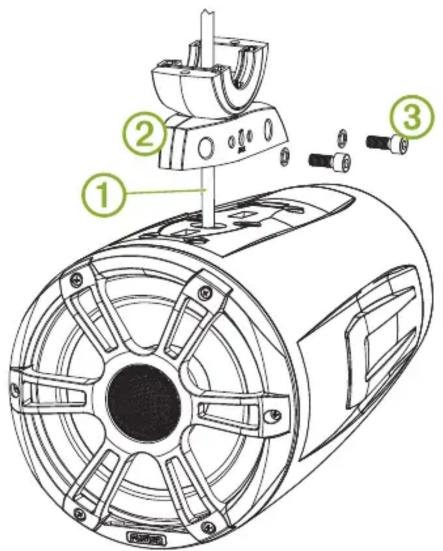
8 Using the installation instructions provided with the FUSION Waketower Can speakers, connect the speaker and LED wires.
9 Feed the connected wires through the pass-through hole and grommet into the waketower pipe.
10 Place the top of the bracket over the pipe, and hold it against the base of the bracket.

11 Attach the top of the bracket to the base of the bracket using the included screws with a 6 mm hex driver or hex key.
12 Repeat these steps for additional brackets.
Adjusting the Angle of the Speaker
1 If necessary, loosen the lock screw on the side of the bracket using a 4 mm hex driver or hex key.

2 Adjust the angle of the speaker.
3 Tighten the lock screw.
Specifications
| Material Bracket: aluminum alloyGrommet: siliconSpacer: plastic | |
| Supported waketower pipe sizes | 33.4 mm (1.31 in.), 42.2 mm (1.66 in.), 48.3 mm (1.90 in.), 50.8 mm (2.00 in.), 57.2 mm (2.25 in.), 60.3 mm (2.37 in.), and 63.5 mm (2.50 in.) outer diameter using the included spacers |
Bracket Side Dimensions

| 1 | 174 mm ( 67/8 in.) |
| 2 | 120 mm ( 43/4 in.) |
Bracket Top Dimensions
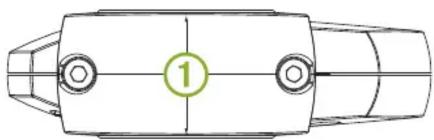
| 1 | 52 mm ( 21/16 in.) |
Brand : Fusion
Model : 010-12831-10
Category : Hob