
PN-75HC1 - Interactive whiteboard SHARP - Free user manual and instructions
Find the device manual for free PN-75HC1 SHARP in PDF.


| Product Type | Interactive Whiteboard (4K BIG PAD) |
| Model | PN-75HC1 |
| Screen Size | 75 inches (diagonal) |
| Resolution | 3840 x 2160 (Ultra HD, 4K) |
| Touch Technology | Infrared (IR), 20-point multi-touch, 125Hz touch sampling |
| Pen Support | Passive pen with Pen-on-Paper experience; also finger touch |
| Integrated System | System on Chip (SoC) with Media Player, Whiteboard, Overlay, wireless screen share |
| Connectivity | HDMI, USB (front terminals); OPS slot for expansion; wireless for Android/Windows |
| Power Consumption | 360W (typical, without OPS option), standby <0.5W |
| Dimensions (without stand) | Approximately 173.8 x 106.2 x 8.8 cm (68.4 x 41.8 x 3.5 inches) |
| Weight (without stand) | Approximately 60 kg (132 lb) |
| Installation Orientation | Landscape |
| Control Buttons | Bezel-mounted: Freeze, Input, Power, Volume; Touch OSD menu |
| Software | Sharp Pen software for annotation on photos, videos, PDFs, Microsoft files |
| Cleaning and Maintenance | Use a soft, dry cloth to clean the screen; avoid harsh chemicals or abrasive materials |
| Safety | Designed for indoor use; do not expose to moisture or extreme temperatures; use supplied power cord |
| Repairability and Spare Parts | Contact Sharp support or authorized service centers for repairs; OPS slot allows third-party add-ons |
| Warranty | Standard manufacturer warranty; check local regulations |
Frequently Asked Questions - PN-75HC1 SHARP
User questions about PN-75HC1 SHARP
0 question about this device. Answer the ones you know or ask your own.
Ask a new question about this device
Download the instructions for your Interactive whiteboard in PDF format for free! Find your manual PN-75HC1 - SHARP and take your electronic device back in hand. On this page are published all the documents necessary for the use of your device. PN-75HC1 by SHARP.
USER MANUAL PN-75HC1 SHARP
PN-86HC1/75HC1/70HC1E
4K BIG PAD interactive displays
A better way to educate.
Take collaborative learning to the next level in any educational and training environment with a highly responsive, interactive display that allows group work at the screen.
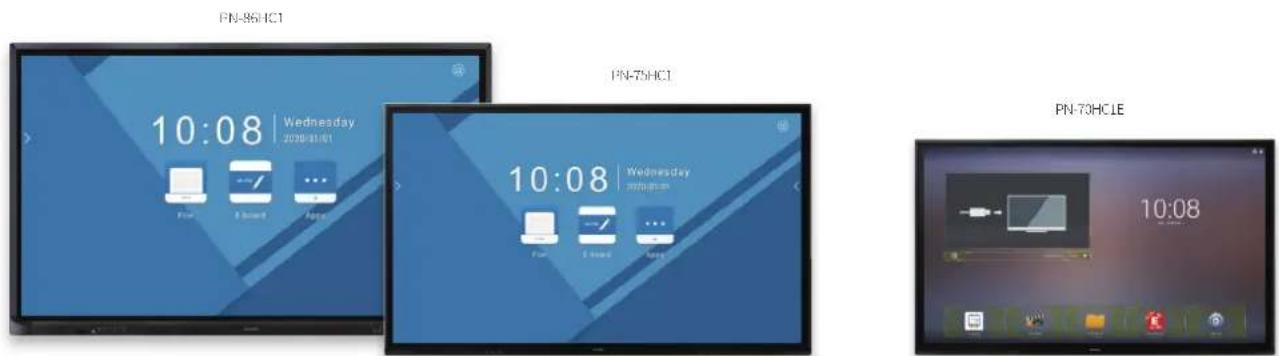
Images for illustration purposes only.
The Sharp PN-86HC1/75HC1/70HC1E BIG PAD smart interactive display enables ultra clear '4K Reading' of detailed 4K screen data and makes presenting really easy with an intuitive Pen-on-Paper user experience. It also has the tools you need for effortless productivity, such as an integrated System on Chip (SoC) player with launcher, whiteboard, overlay and wireless functionality.
It is the ideal choice for environments that require quick responsive operation, with Ultra HD (UHD), 4K resolution and a range of smart collaboration features. Whether you are teaching, working in a meeting room or reviewing detailed documents it is great for enabling more effective learning, promoting idea sharing and encouraging group interactivity.
See more clearly
It can sometimes be a challenge to keep everyone in a classroom or a meeting focused and engaged. The PN-86HC1/75HC1/70HC1E BIG PAD lets you display, create and collaborate with ease and precision – and keeps everyone “eyes up”.
As well as offering a choice of 86", 75" and 70" screen sizes to suit all types of room, it features a true 3840 x 2160 Ultra High Definition (UHD) 4K resolution display and touchscreen. The high contrast and visual clarity of its LCD technology is optimised for 4K reading and presentation, so you can see even the finest details with great clarity.

natural_image
Three professionals in a modern office setting, one pointing at a large digital dashboard displaying data visualizations (no readable text or symbols)A real natural experience
The Sharp PN-86HC1/75HC1/70HC1E BIG PAD provides a really natural Pen-on-Paper experience. Writing on the screen using the supplied passive pen or your finger is just as easy as writing with a real pen on paper, so you can quickly highlight and annotate key information. It's perfect for fast moving discussions or interactive sessions. You can also easily explore very detailed and technical information, such as architectural drawings, graphic designs and scientific or engineering data.
Its Infrared (IR) touch technology is the industry benchmark for a fast, accurate, and responsive touch experience. With a 125Hz Touch Sampling rate it enables smooth annotation and an instantaneous response with minimised latency. You can also enjoy much more intuitive control with its gesture support for smooth pinching, zooming and rotating. Additionally, to enable much greater interactivity, it provides multi-user support with up to 20-point* multi-touch.
As a result it:
- Builds confidence – students can easily view and interact with information, so they are more engaged and willing to contribute to discussions and can learn more effectively.
- Increases productivity – the highly responsive technology allows users to focus on delivery and content with no technical distractions.
- Improves collaboration – participants can easily work together as a group straightaway with no training, which encourages more user engagement and interactivity.
Teach more freely.
In busy environments no class or meeting is ever the same, so you need to be able to adapt quickly to any situation.
The Sharp PN-86HC1/75HC1/70HC1E BIG PAD's Open Architecture ensures maximum flexibility and freedom of use in educational and corporate settings. It includes a wide choice of integration options that let you display almost any type of content. So you can boost collaboration, enhance the visual impact or simply increase lesson effectiveness, without being hampered by any unnecessary technical complexity.
In particular, you can connect to any type of PC source with a 4K resolution or any type of 4K video content player with HDMI output.
Or, for maximum case of use, it can be wirelessly attached to any Windows ^™ and Android ^™ mobile device without any trailing cables, bulky add-on peripherals, or unsightly power supplies.
The inclusion of an OPS slot also provides a straightforward way to extend the BIG PAD's functionality with third-party add-ons and solutions.

natural_image
A young girl smiling while looking at a hand-drawn cartoon monkey on a whiteboard (no text or symbols visible)
Software made Sharp.
Enhanced interactivity & learning
With the multi-touch capabilities of the PN-86HC1/75HC1/70HC1E BIG PADs and pen software, multiple people can write and annotate on the screen at any one time, allowing for a greater sense of engagement in meetings and the classroom. The user interface incorporates a menu comprising of smartly arranged icons that provide easy access to pen settings and functions.
SHARP Pen software
Sharp's Pen software allows you to add annotations directly onto photos, videos, PDFs, and common Microsoft® files, either saving locally or on a connected network. Enhanced functionality including sticky notes and Cloud storage are available through additional licensing options (PN-SU01).
SHARP Pen software interface


natural_image
Man standing in front of a curved wall with a digital screen displaying a blue bird graphic, viewed from behind two other audience members (no visible text or symbols)Simply all you need.
Running an impactful and interactive teaching or training session doesn't have to be a technological challenge.
The Sharp PN-86HC1/75HC1/70HC1E BIG PAD includes an integrated System on Chip (SoC), so you can quickly and easily utilise a range of tools and applications* to enable more effective ways of teaching and encourage collaborative learning.
In particular you can:
- Easily playback images and video with an integrated Media Player app.
- Annotate directly on any other external PC or video signal with overlay mode** where you can write on-screen annotations directly onto photos, videos, and document using the integrated Whiteboard app.
- Screen share with a mobile device using the integrated wireless connectivity.
- Brainstorm using a Whiteboard app without any external PC equipment.
Without having to buy or set-up any additional equipment, you can introduce a whole new level of dynamic interactivity and engaging multimedia to classrooms or meetings – so everyone stays more engaged and is able to learn and work more effectively.

Fast, intuitive controls
Everything you need to adjust and optimise the performance of the Sharp PN-86HC1/75HC1/70HC1E BIG PAD is in easy reach with its bezel-mounted button controls, allowing you to quickly adjust input source, volume and power.

bar
| Month | Furniture | Kitchen & Dining | Home Electronics | Bathroom | |-------|-----------|------------------|------------------|----------| | Sep | 100 | 50 | 50 | 50 | | Oct | 100 | 50 | 50 | 50 | | Nov | 100 | 50 | 50 | 50 | | Dec | 100 | 50 | 50 | 50 | | Jan | 100 | 50 | 50 | 50 |One-touch buttons
The Touch OSD (on screen display) menu provides simple and intuitive access to other frequently used functions and settings, such as brightness, contrast, language selection, and more.

Freeze button (a)
A press of this button lets you temporarily freeze or unfreeze the screen. While the display continues to show a paused onscreen image, you can stop and explain your point.
Input button (b)
At the touch of a button, a list of inputs appears on-screen. You can then instantly select the input terminal you want.

Front terminals
These make it easy to access teaching materials or other content stored on sources connected via HDMI™ and USB.
Such easy-to-use controls are vital to the effective running of a class, as teachers and trainers are not distracted by the technology, so they can focus on delivering the content and the needs of their students.
The BIG PAD's role as a learning aid is unmistakable, making a fantastic contribution to all working environments.
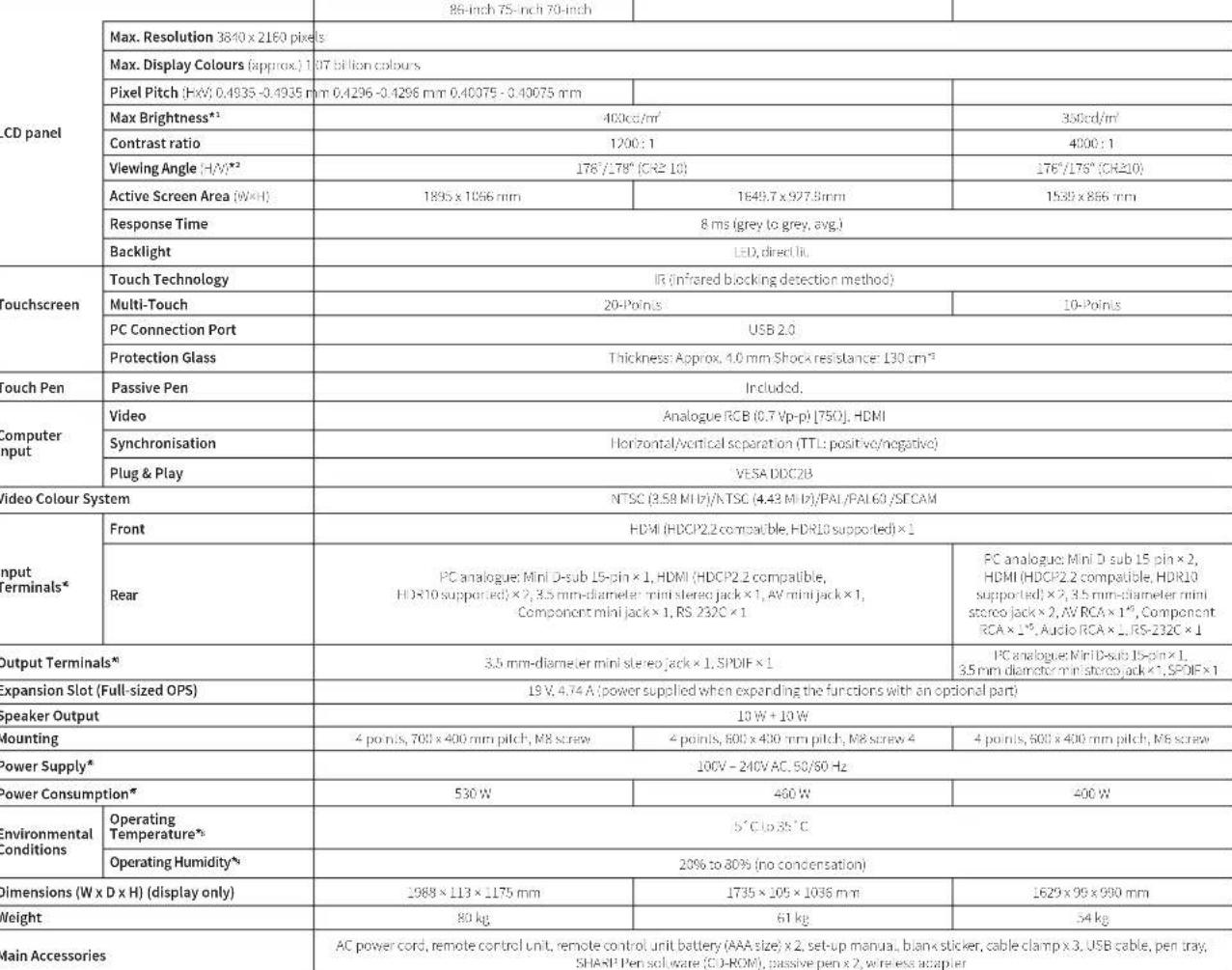
Specifications
Model name PN-86HC1 PN-75HC1 PN-70HC1E
| Installation Landscape | |
 |
Dimensions
(PN-86HC1)
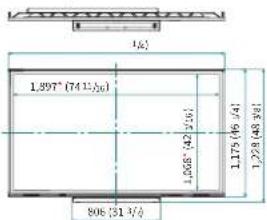

(PN-75HC1)
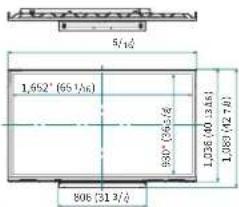
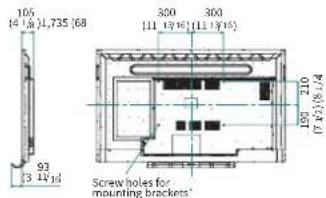
(PN-70HC1E)


* Brightness depends on input mode and other picture settings. Brightness level will decrease slightly over the lifetime of the product. Due to the physical limitations of the equipment, it is not possible to maintain a precisely constant level of brightness. * Excluding the touch sensor part around the LCD panel. * Approximate distance at which the glass panel can withstand the impact of a 500-gram iron ball dropped on its centre. * Use a commercially available connection cable for PC and other video connections. * Composite video and component cannot be used simultaneously. * The AC power cord is an inlet type. The cable is bundled (3 pins). * When an option is installed on the expansion slot. When not installed: PN 86HC1: 420 W, PN 75HC1: 360 W, PN 70HC1E: 295 W * Temperature conditions may change when using the monitor together with the optional equipment. In such cases, please check the temperature conditions specified by the optional equipment. * Check the requirements of the computer and other devices to be connected, and make sure that all requirements are satisfied.
The terms HDMI, HDMI High-Definition Multimedia Interface, and the HDMI Logo are trademarks or registered trademarks of HDMI Licensing Administrator, Inc. All other brand names and product names may be trademarks or registered trademarks of their respective owners. Design and specifications are subject to change without prior notice. PN-86HC1/75HC1/70HC1 August 2019. Job No.19666. All trademarks acknowledged E&OE.
- PN-86HC1/75HC1/70HC1E
- A better way to educate.
- See more clearly
- A real natural experience
- As a result it:
- Teach more freely.
- Software made Sharp.
- Enhanced interactivity & learning
- SHARP Pen software
- Simply all you need.
- In particular you can:
- Fast, intuitive controls
- One-touch buttons
- Freeze button (a)
- Input button (b)
- Front terminals
- Specifications
- Dimensions
Brand : SHARP
Model : PN-75HC1
Category : Interactive whiteboard