HBO-V659GCDRC-GBK - Oven Heinner - Free user manual and instructions
Find the device manual for free HBO-V659GCDRC-GBK Heinner in PDF.


| Product Type | Built-in Electric Oven |
| Brand | Heinner |
| Model | HBO-V659GCDRC-GBK |
| Energy Class | A |
| Volume | 69 L |
| Weight | 29 kg |
| Dimensions (H x W x D) | 595 x 557 x 575 mm |
| Power Supply | 220-240 V~, 50/60 Hz |
| Oven Functions | Static, Fan, Turbo, Pizza, Grilling, Faster Grilling, Double Grill and Fan, Defrost, Oven Lamp |
| Temperature Range | Approx. 50-250 °C (estimated) |
| Timer Functions | Minute minder, Semi-automatic (cooking period/finishing time), Full-automatic programming |
| Cleaning Type | Catalytic liners (side/rear panels) |
| Door Type | Removable inner glass for easy cleaning |
| Safety Features | Key lock, Auto shut-off, Child lock, Overheat protection |
| Accessories Included | Wire grid, Shallow tray, Water collector, Telescopic rails, Turnspit wire grid |
| Oven Lamp | 25 W, 300 °C resistant, E14 socket |
| Installation Type | Built-in under worktop or in wall unit |
| Energy Consumption (conventional) | 0.87 kWh/cycle |
| Energy Consumption (fan forced) | 0.79 kWh/cycle |
| Warranty | Standard 2 years (check local regulations) |
Frequently Asked Questions - HBO-V659GCDRC-GBK Heinner
User questions about HBO-V659GCDRC-GBK Heinner
0 question about this device. Answer the ones you know or ask your own.
Ask a new question about this device
Download the instructions for your Oven in PDF format for free! Find your manual HBO-V659GCDRC-GBK - Heinner and take your electronic device back in hand. On this page are published all the documents necessary for the use of your device. HBO-V659GCDRC-GBK by Heinner.
USER MANUAL HBO-V659GCDRC-GBK Heinner
natural_image
Exterior view of a modern kitchen oven with digital gauges and a visible inner tray (no text or symbols on the main subject)- Cuptor incorporabil
- Clasa energetica A
- Capacitate 69 L
natural_image
Technical diagram of a mechanical device with directional arrows indicating motion or force (no text or symbols)natural_image
Technical line drawing of a square frame with bolt holes and internal lines (no text or symbols)Grilajul de sarma
natural_image
Line drawing of a corrugated metal sheet with ribbed texture (no text or symbols)natural_image
Technical line drawing of a metal grate with a curved panel and an arrow indicating direction (no text or symbols)Colectorul de apă
natural_image
Technical line drawing of a mechanical component with an arrow indicating direction (no text or symbols)VIII. CURATARE SI INTRETINERE
natural_image
Diagram showing two views of an oven with internal compartments and mounting base (no text or symbols)Pentru a remonta geamul interior:
natural_image
Technical line drawing of a mechanical device with labeled components (B and V), no readable text or symbols beyond labelsnatural_image
Technical line drawing of a mechanical assembly with no visible text or symbolsnatural_image
Simple line drawing of a person pressing down on a screen with a ruler, no text or symbols presentIntretinere
natural_image
Exterior view of a modern kitchen oven with digital dials and a visible inner pan (no text or symbols on the oven itself)• Built In Oven
- Energy Class A
• Volume 69 L
I. INTRODUCTION
Before using the appliance, please read carefully this instruction manual and keep it for future reference.
This instruction manual is designed to provide you with all required instructions related to the installation, use and maintenance of the appliance.
In order to operate the unit correctly and safety, please read this instruction manual carefully before installation and usage.
II. CONTENT OF YOUR PACKAGE
Built In Oven
User manual
Warranty card

| Icon | Type | Meaning |
| WARNING | Serious injury or death risk | |
| RISK OF ELECTRIC SHOCK | Dangerous voltage risk | |
| FIRE | Warning; Risk of fire / flammable materials | |
| CAUTION | Injury or property damage risk | |
| IMPORTANT / NOTE | Operating the system correctly |
III. SAFETY PRECAUTIONS
1. Safety instructions
- Carefully read all instructions before using your appliance and keep them in a convenient place for reference when necessary.
- This manual has been prepared for more than one model therefore your appliance may not have some of the features described within. For this reason, it is important to pay particular attention to any figures whilst reading the operating manual.
1.1 General safety warnings
- This appliance can be used by children aged from 8 years and above and by persons with reduced physical, sensory or mental capabilities or lack of experience and knowledge if they have been given supervision or instruction concerning use of the appliance in a safe way and understand the hazards involved. Children should not play with the appliance. Cleaning and user maintenance should not be made by children without supervision.
⚠ WARNING: The appliance and its accessible parts become hot during use. Care should be taken to avoid touching heating elements. Keep children less than 8 years of age away unless they are continually supervised.
CAUTION: The cooking process has to be supervised. A short term cooking process has to be supervised continuously.
⚠ WARNING: The appliance and its accessible parts become hot during use. Care should be taken to avoid touching heating elements. Keep children less than 8 years of age away unless they are continually supervised. ⚠ CAUTION: The cooking process has to be supervised. A short term cooking process has to be supervised continuously.
⚠ WARNING: Danger of fire: do not store items on the cooking surface.
⚠ WARNING: If the surface is cracked, swithc off the appliance to avoid the possibility of electric shock.
- Do not operate the appliance with an external timer or separate remote-control system.
- During use the appliance will get hot. Care should be taken to avoid touching heating elements inside the oven.
- Handles may become hot after a short period during use.
- Do not use harsh abrasive cleaners or scourers to clean oven surfaces. They can scratch the surfaces which may result in shattering of the door glass or damage to surfaces.
- Do not use steam cleaners to clean the appliance.
⚠ WARNING: To avoid the possibility of electric shock, make sure that the appliance is switched off before replacing the lamp.
CAUTION: Accessible parts may be hot when cooking or grilling. Keep young children away from the appliance when it is in use.
- Your appliance is produced in accordance with all applicable local and international standards and regulations.
- Maintenance and repair work should only be carried out by authorised service technicians. Installation and repair work that is carried out by unauthorised technicians may be dangerous. Do not alter or modify the specifications of the appliance in any way. Inappropriate hob guards can cause accidents.
- Before connecting your appliance, make sure that the local distribution conditions (nature of the gas and gas pressure or electricity voltage and frequency) and the specifications of the appliance are compatible. The specifications for this appliance are stated on the label.
CAUTION: This appliance is designed only for cooking food and is intended for indoor domestic household use only. It should not be used for any other purpose or in any other application, such as for non-domestic use, in a commercial environment or for heating a room.
- Do not use the oven door handles to lift or move the appliance.
- All possible measures have been taken to ensure your safety. Since the glass may break, care should be taken while cleaning to avoid scratching. Avoid hitting or knocking the glass with accessories.
- Make sure that the supply cord is not trapped or damaged during installation. If the supply cord is damaged, it must be replaced by the manufacturer, its service agent or similarly qualified persons in order to prevent a hazard.
- Do not let children climb on the oven door or sit on it while it is open.
- Please keep children and animals away from this appliance.
1.2 Installation warnings
- Do not operate the appliance before it is fully installed.
- The appliance must be installed by an authorised technician. The manufacturer is not responsible for any damage that might be caused by incorrect placement and installation by unauthorised people.
- When the appliance is unpacked, make sure that it is has not been damaged during transportation. In the case of defect, do not use the appliance and contact a qualified service agent immediately. The materials used for packaging (nylon, staplers, styrofoam, etc.) may be harmful to children and they should be collected and removed immediately.
- Protect your appliance from the atmosphere. Do not expose it to sun, rain, snow, dust or excessive humidity.
- Materials around the appliance (i.e. cabinets) must be able to withstand a minimum temperature of 100^ .
- The appliance must not be installed behind a decorative door, in order to avoid overheating.
1.3 During use
- When you first use your oven you may notice a slight smell. This is perfectly normal and is caused by the insulation materials on the heater elements. We suggest that, before using your oven for the first time, you leave it empty and set it at maximum temperature for 45 minutes. Make sure that the environment in which the product is installed is well ventilated.
• Take care when opening the oven door during or after cooking. The hot steam from the oven may cause burns. - Do not put flammable or combustible materials in or near the appliance when it is operating.
- Under no circumstances should the oven be lined with aluminium foil as overheating may occur.
• Always use oven gloves to remove and replace food in the oven. - Do not place dishes or baking trays directly onto the base of the oven whilst cooking. The base becomes very hot and damage may be caused to the product.

Do not leave the oven unattended when cooking with solid or liquid oils.
They may catch fire under extreme heating conditions. Never pour water on to flames that are caused by oil, instead switch the cooker off and cover the pan with its lid or a fire blanket.
- If the product will not be used for a long period of time, turn the main control switch off. Turn the gas valve off when gas appliances are not in use.
- Make sure the appliance control knobs are always in the "0" (stop) position when the appliance is not in use.
- The trays incline when pulled out. Take care not to spill or drop hot food when removing it from the oven.
- Do not hang towels, dishcloths or clothes from the appliance or its handles.
1.4 During cleaning and maintenance
- Make sure that your appliance is turned off at the mains before carrying out any cleaning or maintenance operations.
- Do not remove the control knobs to clean the control panel.
- To maintain the efficiency and safety of your appliance, we recommend you always use original spare parts and to call our authorised service agents when needed.
This appliance has been designed to be used only for home cooking. Any other use (such as heating a room) is improper and dangerous. The operating instructions apply to several models. You may notice differences between these instructions and your model.
IV. PRODUCT DESCRIPTION

Important: specifications for the product vary and the appearance of your appliance may differ from that shown in the figures below:
List of components
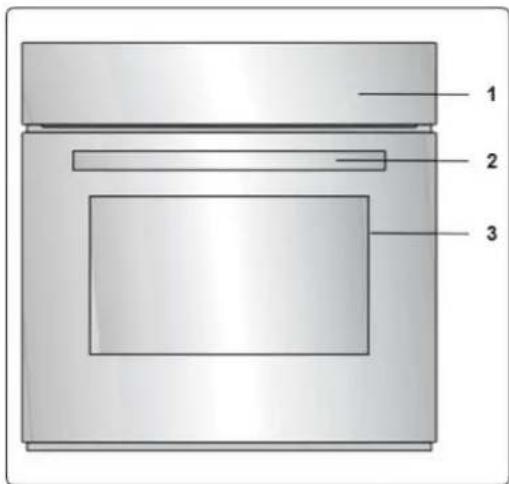
⚠ WARNING : This appliance must be installed by an authorised service person or qualified technician, according to the instructions in this guide and in compliance with the current local regulations.
- Incorrect installation may cause harm and damage, for which the manufacturer accepts no responsibility and the warranty will not be valid.
- Prior to installation, ensure that the local distribution conditions (electricity voltage and frequency and/or nature of the gas and gas pressure) and the adjustments of the appliance are compatible. The adjustment conditions for this appliance are stated on the label.
- The laws, ordinances, directives and standards in force in the country of use are to be followed safety regulations, proper recycling in accordance with the regulations, etc).
Instructions for the installer ventilation requirements
• After removing the packaging material from the appliance and its accessories, ensure that the appliance is not damaged. If you suspect any damage, do not use it and contact an authorised service person or qualified technician immediately.
• Make sure that there are no flammable or combustible materials in the close vicinity, such as curtains, oil, cloth etc. which may catch fire.
- The worktop and furniture surrounding the appliance must be made of materials resistant to temperatures above 100°C.
- The appliance should not be installed directly above a dishwasher, fridge, freezer, washing machine or clothes dryer.
Installation of the oven
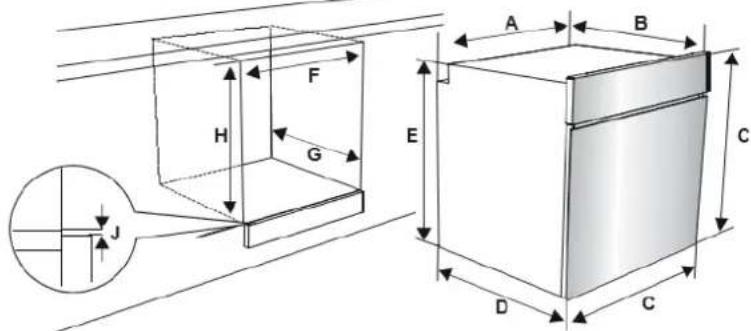
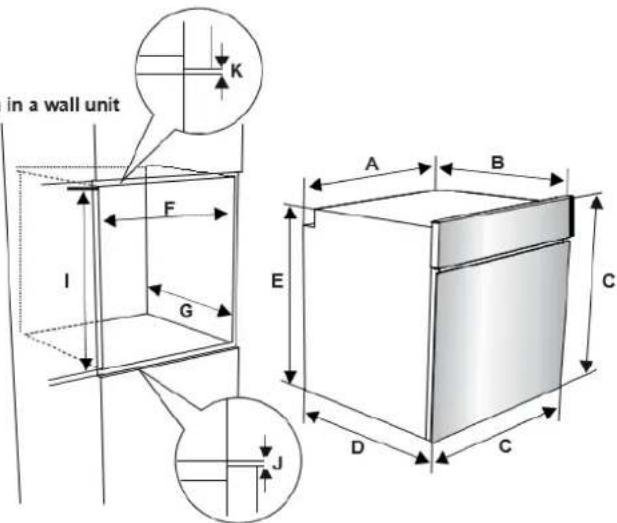
The appliances are supplied with installation kits and can be installed in a worktop with the appropriate dimensions. The dimensions for hob and oven installation are given below.
| A (mm) | 557 | mln./max. F (mm) | 560/580 |
| B (mm) | 550 | min. G (mm) | 555 |
| C (mm) | 595 | min. H/I (mm) | 600/590 |
| D (mm) | 575 | mln. J/K (mm) | 5/10 |
| E (mm) | 574 | ||
Installation under a worktop
Installation in a wall unit
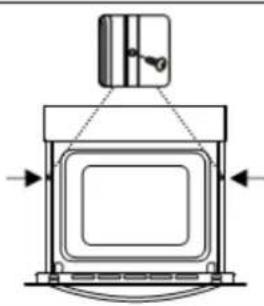
After making the electrical connections, insert the oven into the cabinet by pushing it forward. Open the oven door and insert 2 screws in the holes located on the oven frame. While the product frame touches the wooden surface of the cabinet, tighten the screws.
natural_image
Technical line drawing of a mechanical assembly with no visible text or symbolsElectrical Connection and Safety

WARNING: The electrical connection of this appliance should be carried out by an authorised service person or qualified electrician, according to the instructions in this guide and in compliance with the current local regulations.

WARNING: THE APPLIANCE MUST BE EARTHED.
- Before connecting the appliance to the power supply, the voltage rating of the appliance (stamped on the appliance identification plate) must be checked for correspondence to the available mains supply voltage, and the mains electric wiring should be capable of handling the appliance's power rating (also indicated on the identification plate).
uring installation, please ensure that isolated cables are used. An incorrect connection could damage your appliance. If the mains cable is damaged and needs to be replaced this should be done by a qualified personnel.
- Do not use adaptors, multiple sockets and/or extension leads.
- The supply cord should be kept away from hot parts of the appliance and must not be bent or compressed. Otherwise the cord may be damaged, causing a short circuit.
- If the appliance is not connected to the mains with a plug, a all-pole disconnector (with at least 3 mm contact spacing) must be used in order to meet the safety regulations.
- The appliance is designed for a power supply of 220-240 V\~. If your supply is different, contact the authorized service personnel or qualified electrician.
- The power cable (H05VV-F) must be of sufficient length to be connected to the appliance.
- The fused switch must be easily accessible once the appliance has been installed.
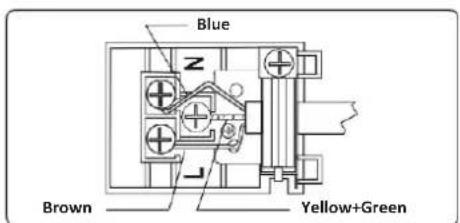
- Ensure all connections are adequately tightened.
- Fix the supply cable in the cable clamp and then close the cover.
- The terminal box connection is placed on the terminal box.
VI. USING THE PRODUCT
Oven Controls
Oven function control knob
Turn the knob to the corresponding symbol of the desired cooking function. For the details of different functions see 'Oven Functions'.
Oven thermostat knob
After selecting a cooking function, turn this knob to set the desired temperature. The oven thermostat light will illuminate whenever the thermostat is in operation to heat up the oven or maintain the temperature.
Oven Functions
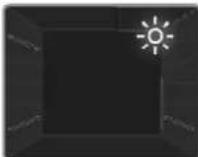
Oven Lamp: Only the oven light will switch on. It will remain on for the duration of the cooking function.
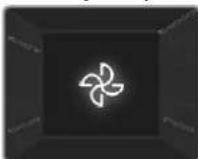
Defrost Function: The oven's warning lights will switch on and the fan will start to operate. To use the defrost function, place your frozen food in the oven on a shelf in the third slot from the bottom. It is recommended that you place an oven tray under the defrosting food to catch the water accumulated due to melting ice. This function will not cook or bake your food, it will only help to defrost it.
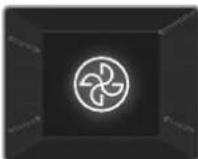
Turbo Function: The oven's thermostat and warning lights will switch on, and the ring heating element and fan will start operating. The turbo function evenly disperses the heat in the oven so all food on all racks will cook evenly. It is recommended that you preheat the oven for about 10 minutes.
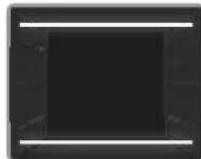
Static Cooking Function: The oven's thermostat and warning lights will switch on, and the lower and upper heating elements will start operating. The static cooking function emits heat, ensuring even cooking of food. This is ideal for making pastries, cakes, baked pasta, lasagne and pizza. Preheating the oven for 10 minutes is recommended and it is best to use only one shelf at a time in this function.
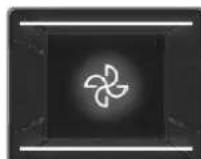
Fan Function: The oven's thermostat and warning lights will switch on, and the upper and lower heating elements and fan will start operating. This function is good fo baking pastry. Cooking is carried out by the lower and upper heating elements within the oven and by the fan, which provides air circulation, giving a slightly grilled effect to the food. It is recommended that you preheat the oven for about 10 minutes.
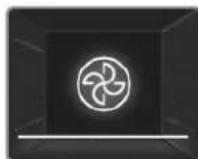
Pizza Function: The oven's thermostat and warning lights will switch on, and the ring, lower heating elements and fan will start operating. This function is ideal for baking food, such as pizza, evenly in a short time. While the fan evenly disperses the heat of the oven, the lower heating element ensures baking of the food.
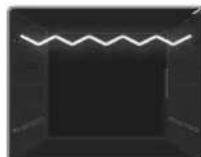
Grilling Function: The oven's thermostat and warning lights will switch on, and the grill heating element will start operating. This function is used for grilling and toasting foods on the upper shelves of the oven. Lightly brush the wire grid with oil to stop food sticking and place food in the centre of the grid. Always place a tray beneath the food to catch any drips of oil or fat. It is recommended that you preheat the oven for about 10 minutes.
⚠ Warning: When grilling, the oven door must be closed and the oven temperature should be adjusted to 190^ C.
Faster Grilling Function: The oven's thermostat and warning lights will switch on, and the grill and upper heating elements will start operating. This function is used for faster grilling and for grilling food with a larger surface area, such as meat. Use the upper shelves of the oven. Lightly brush the wire grid with oil to stop food sticking and place food in the centre of the grid. Always place a tray beneath the food to catch any drips of oil or fat. It is recommended that you preheat the oven for about 10 minutes.
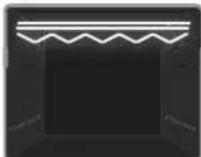
⚠ Warning: When grilling, the oven door must be closed and the oven temperature should be adjusted to 190^ C.
Double Grill and Fan Function: The oven's thermostat and warning lights will switch on, and the grill, upper heating elements and fan will start operating. This function is used for faster grilling of thicker food and for grilling of food with a larger surface area. Both the upper heating elements and grill will be energised along with the fan to ensure even cooking. Use the upper shelves of the oven. Lightly brush the wire grid with oil to stop food sticking and place food in the centre of the grid. Always place a tray beneath the food to catch any drips of oil or fat. It is recommended that you preheat the oven for about 10 minutes.
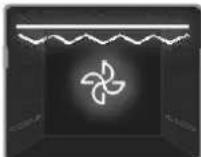
⚠ Warning: When grilling, the oven door must be closed and the oven temperature should be adjusted to 190^ C.
Cooking table
| Function | Dishes | min. | ||
| Static | Puff Pastry | 1-2 | 170-190 | 35-45 |
| Cake | 1-2 | 170-190 | 30-40 | |
| Cookie | 1-2 | 170-190 | 30-40 | |
| Stew | 2 | 175-200 | 40-50 | |
| Chicken | 1-2 | 200 | 45-60 | |
| Fan | Puff Pastry | 1-2 | 170-190 | 25-35 |
| Cake | 1-2-3 | 150-170 | 25-35 | |
| Cookie | 1-2-3 | 150-170 | 25-35 | |
| Stew | 2-1-2 | 175-200 | 40-50 | |
| Chicken | 1-2-3 | 200 | 45-60 | |
| Turbo | Puff Pastry | 1-2-3 | 170-190 | 35-45 |
| Cake | 1-2-3 | 150-170 | 30-40 | |
| Cookie | 1-2-3 | 150-170 | 25-35 | |
| Stew | 2 | 175-200 | 40-50 | |
| Two-tray cake | 1-4 | 160-180 | 30-40 | |
| Two-tray pastry | 1-4 | 170-190 | 35-45 | |
| Grilling | Grilled meatballs | 4 | 200 | 15-Oct |
| Chicken | 4 | 190 | 50-60 | |
| Chop | 3-4 | 200 | 15-25 | |
| Beefsteak | 4 | 200 | 15-25 |
Use of the Digital Touch Timer
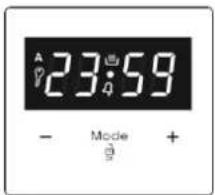
| Function Description | |
| A | Auto cooking |
| Manual cooking | |
| Key Lock | |
| 4 | Minute minder |
| Mode | Mode function |
| - | Decrease timer |
| + | Increase timer |
| 23 59 | Timer display |
Time adjustment
The time must be set before you start using the oven. Following the power connection, the symbol "A" and "00:00" or "12:00" will flash on the display.
- Press the "MODE" for 2 sec to deactive keylock and the dot in the middle of the screen will start to flash.
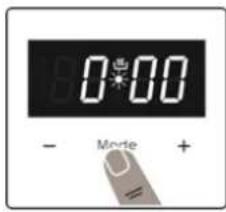
- Adjust the time while the dot is flashing using the "+" and "-" keys.
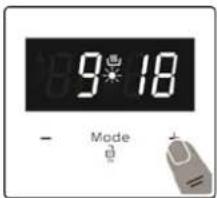
- After a few seconds, the dot will stop flashing and will remain illuminated.
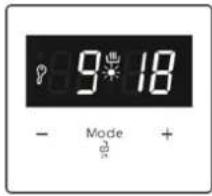

Key Lock: The key lock automatically activates after the timer has not been used for 7 seconds. “☐” symbol will appear and remain illuminated. To unlock the timer buttons, press and hold the “MODE” button for 2 seconds. The desired operation can then be carried out.
Audible warning time adjustment
The audible warning time can be set to any time between "00:00" and "23:59" hours. The audible warning time is for warning purposes only. The oven will not be activated with this function.
- Press "MODE". The symbol "4" will begin to flash and "000" will be displayed.
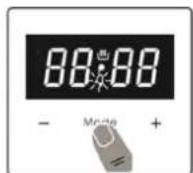
- Select the desired time period using the "+" and "-" keys while "Q" is flashing.
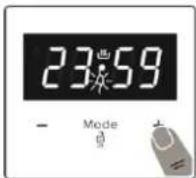
- The symbol “4” will remain illuminated, the time will be saved and the warning will be set.
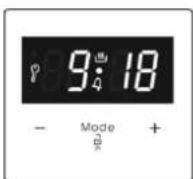
When the timer reaches zero, an audible warning will sound and the symbol “4” will flash on the display. Press any key to stop the audible warning. Press “MODE” for 2 seconds the “4” symbol will disappear and the clock will be displayed
Semi-automatic time adjustment (cooking period)
This function helps you to cook for a fixed period of time. A time range between 0 and 10 hours can be set. Prepare the food for cooking and put it in the oven.
-
Select the desired cooking function and the temperature using the control knobs.
-
Press "MODE" until you see "dur" symbol on the display screen. The symbol "A" will flash.
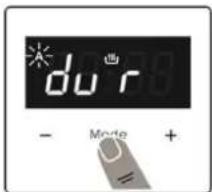
- Select the desired cooking time period using the "+" and "-" keys.
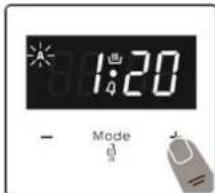
- The current time will reappear on the screen, and the symbols "A", and "Will" will remain illuminated.
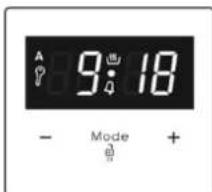
When the timer reaches zero, the oven will switch off and an audible warning will sound. The symbols “A” will flash. Turn both control knobs to the “0” position and press any key on the timer to stop the warning sound. Press “MODE” for 2 seconds the “A” symbol will disappear and the timer will switch back to manual function.
Semi-automatic time adjustment (finishing time)
This function automatically starts the oven so that cooking will finish at a set time. You can set an end time of up to 10 hours after the current time of day. Prepare the food for cooking and put it in the oven.
-
Select the desired cooking function and the temperature using the control knobs
-
Press "MODE" until you see "end" symbol on the display screen. "A" and the current time of day will flash.
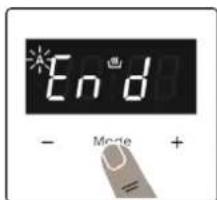
- Use the "+" and "-" buttons to set the desired finishing time.
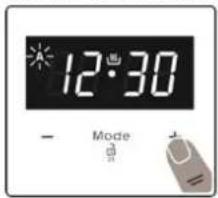
- The current time will reappear on the screen, the symbols “A” and “” will remain illuminated.
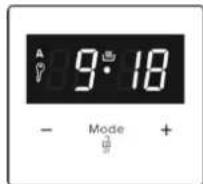
When the timer reaches zero, the oven will switch off and an audible warning will sound. The symbol “A” will flash. Turn both control knobs to the “0” position and press any key on the timer to stop the sound. Press “MODE” for 2 seconds the “A” symbol will disappear and the timer will switch back to manual function.
Full-automatic programming
This function is used to start cooking after a certain period of time and for a certain duration. A time of up to 23 hours and 59 minutes after the current time of day can be set. Prepare the food for cooking and put it in the oven.
-
Select the desired cooking function and the temperature using the control knobs
-
Press "MODE" until you see "dur" symbol on the screen. The symbol "A" will flash.
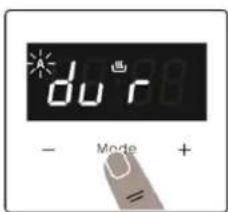
- Select the desired cooking time period using the “+” and “-” keys
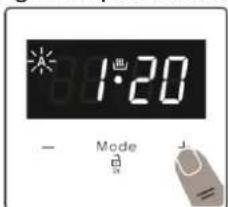
- Press "MODE" until you see "end" symbol on the screen. The time and the symbols "A" will flash.
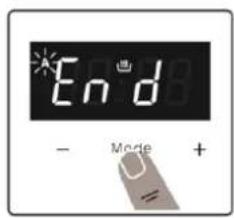
- Select the desired finishing time using the "+" and "-" keys. " 🔊" symbol will disappear. Add the cooking period to the current time of day. You can set a time of up to 23 hours and 59 minutes after this.
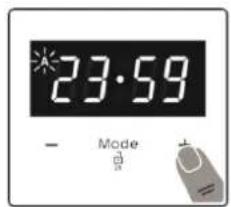
- The current time will reappear on the screen, and the symbols "A", and will remain illuminated.
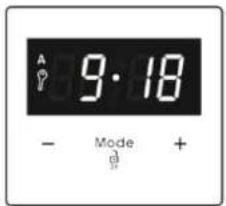
The operating time will be calculated and the oven will automatically start “☐” symbol will reappear on the screen so that cooking will finish at the set finishing time. When the timer reaches zero, the oven will switch off, an audible warning will sound and the symbols “A” will flash. Turn both control knobs to the “0” position and press any key to stop the sound. The symbol will disappear and the timer will switch back to manual function. Press “MODE” for 2 seconds the “A” symbol will disappear and the timer will switch back to manual function.
Sound Adjustment
To adjust the volume of the audible warning sound, while the current time of day is displayed, press "+" and "-" keys and the dot in the middle of the screen will start to flash. Press "MODE" to display current signal sound. After this, each time the "-" button is pressed, a different signal will sound. There are three different types of signal sounds. Select the desired sound and do not press any other buttons. After a short time, the selected sound will be saved.
VII. ACCESSORIES
The EasyFix Wire Rack
- Insert the accessory to the correct position inside the oven
- Allow at least a 1 cm space between the fan cover and accessories.
• Take care removing cookware and/or accessories out of the oven. Hot meals or accessories can cause burns. - The accessories may deform with heat. Once they have cooled down, they will recover their original appearance and performance.
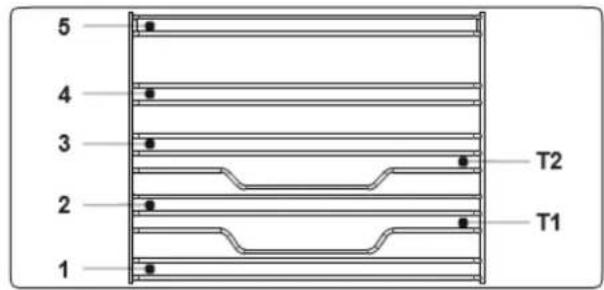
- Trays and wire grids can be positioned on any level from 1 to 5.
- Telescopic rails can be positioned on levels T1, T2, 3, 4, 5.
• Level 3 is recommended for single level cooking. - Level T2 is recommended for single level cooking with the telescopic rails.
- The turnspit wire grid must be positioned on Level 3.
- Level T2 is used for the turnspit wire grid positioning with telescopic rails.
The shallow tray
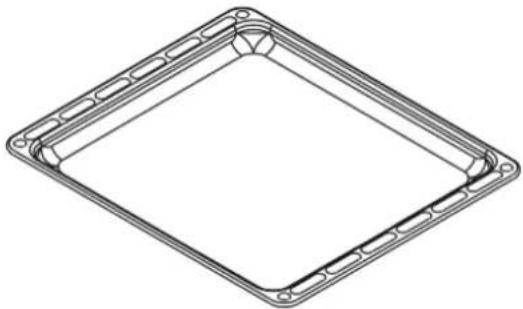
The shallow tray is best used for baking pastries. Put the tray into any rack and push it to the end to make sure it is correctly placed.
natural_image
Technical line drawing of a square frame with bolt holes and internal ribs (no text or symbols)The wire grid
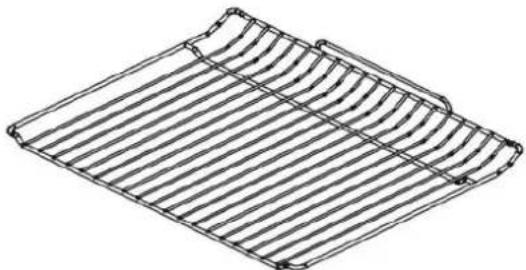
The wire grid is best used for grilling or for processing food in oven-friendly containers.
natural_image
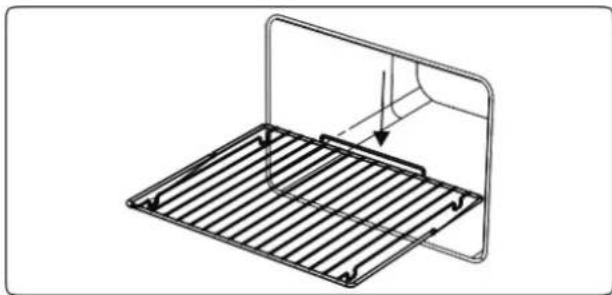
Line drawing of a corrugated metal tray with ribbed sides and curved top edge (no text or symbols)▲ Warning: place the grid to any corresponding rack in the oven cavity correctly and push it to the end.
natural_image
Technical line drawing of a metal rack with a curved top panel and internal structure (no text or symbols)The Water Collector
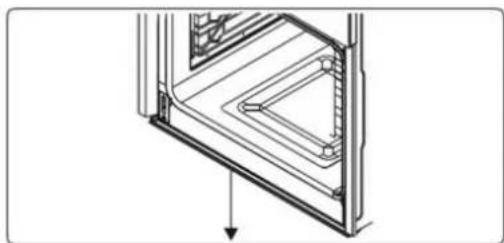
In some cases of cooking, condensation may appear on the inner glass of the oven door. This is not a product malfunction.
Open the oven door into the grilling position and leave it in this position for 2 seconds. Water will drip to the collector.
Cool the oven and wipe the inside of the door with a dry towel. This procedure must be applied regularly.
natural_image
Technical line drawing of a mechanical component with an arrow indicating direction (no text or symbols)VIII. CLEANING AND MAINTENANCE
⚠ Warning: Switch off the appliance and allow it to cool before cleaning is to be carried out.
General Instructions
- Check whether the cleaning materials are appropriate and recommended by the manufacturer before use on your appliance.
- Use cream cleaners or liquid cleaners which do not contain particles. Do not use caustic (corrosive) creams, abrasive cleaning powders, rough wire wool or hard tools as they may damage the cooker surfaces.

Important
Do not use cleaners that contain particles, as they may scratch the glass, enamelled and/or painted parts of your appliance.
Should any liquids overflow, clean them immediately to avoid parts becoming damaged.
Do not use steam cleaners for cleaning any part of the appliance.
Cleaning the inside of the oven
• The inside of enamelled ovens are best cleaned while the oven is warm.
- Wipe the oven with a soft cloth soaked in soapy water after each use. Then, wipe the oven over again with a wet cloth and dry it.
- You may need to use a liquid cleaning material occasionally to completely clean the oven.
Cleaning the glass parts
- Clean the glass parts of your appliance on a regular basis.
- Use a glass cleaner to clean the inside and outside of the glass parts. Then, rinse and dry them thoroughly with a dry cloth.
Cleaning the stainless steel parts (if available)
- Clean the stainless steel parts of your appliance on a regular basis.
- Wipe the stainless steel parts with a soft cloth soaked in only water. Then, dry them thoroughly with a dry cloth.

Do not clean the stainless steel parts while they are still hot from cooking. Do
not leave vinegar, coffee, milk, salt, water, lemon or tomato juice on the stainless steel for a long time.
Catalytic Cleaning
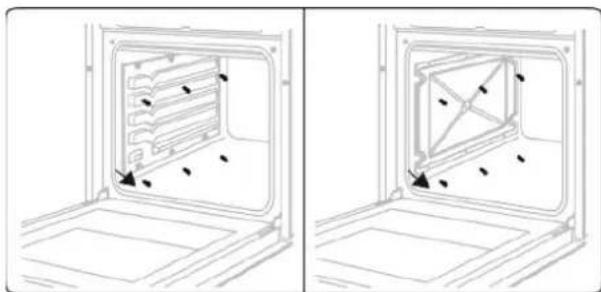
Catalytic liners are installed within the oven cavity. These are the matte-finished, light-coloured panels on the sides and/or the matte-finished panel at the rear of the oven. They work by collecting any grease and oil residue during cooking.
The liner self-cleans by absorbing fats and oils and burning them to ash, which can then be easily removed from the floor of the oven with a damp cloth. The lining must be porous to be effective. The liner may discolour with age.
If a large amount of fat is spilled onto the liner it may reduce its efficiency. To overcome this problem, set the oven to maximum temperature for about 20 - 30 minutes. After the oven has cooled, wipe out the floor of the oven.
Manual cleaning of the catalytic liners is not recommended. Damage will occur if a soap-impregnated steel wool pad or any other abrasives are used. In addition, we do not recommend the use of aerosol cleaners on the liners. The walls of a catalytic liner may become ineffective due to excess grease.
The excess grease can be removed with a soft cloth or sponge soaked in hot water, and the cleaning cycle can be carried out as described above.
Removal of the Catalytic Liner
To remove the catalytic liner, remove the screws holding each catalytic panel to the oven.
natural_image
Diagram showing two views of a refrigerator interior with internal compartments and mounting base (no text or symbols)Cleaning Painted Surfaces (if available)
- Spots of tomato, tomato paste, ketchup, lemon, oil derivatives, milk, sugary foods, sugary drinks and coffee should be cleaned with a cloth dipped in warm water immediately. If these stains are not cleaned and allowed to dry on the surfaces they are on, they should NOT be rubbed with hard objects (pointed objects, steel and plastic scouring wires, surface-damaging dish sponge) or cleaning agents containing high levels of alcohol, stain removers, degreasers, surface abrasive chemicals. Otherwise, corrosion may occur on the powder painted surfaces, and stains may occur. The manufacturer will not be held responsible for any damage caused by the use of inappropriate cleaning products or methods.
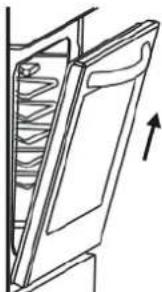
Removal of the oven door
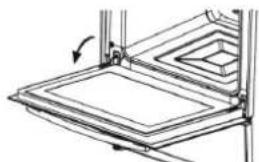
Before cleaning the oven door glass, you must remove the oven door, as shown below.
- Open the oven door
natural_image
Technical line drawing of a mechanical assembly with no visible text or symbols- Open the locking catch (a) (with the aid of a screwdriver) up to the end position.
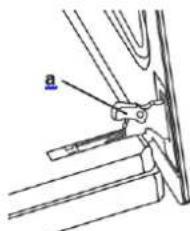
- Close the door until it almost reaches the fully closed position and remove the door by pulling it towards you.
natural_image
Line drawing of a door with a spring inside, showing an upward arrow (no text or symbols)Removal of the Inner Glass
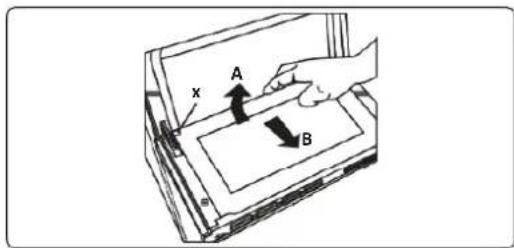
You must remove the oven door glass before cleaning, as shown below.
Push the glass in the direction of B and release from the location bracket (x). Pull the glass out in the direction of A.
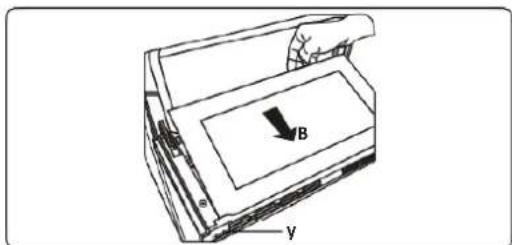
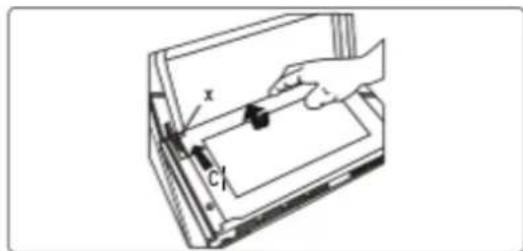
To replace the inner glass:
- Push the glass towards and under the location bracket (y), in the direction of B.
- Place the glass under the location bracket (x) in the direction of C.
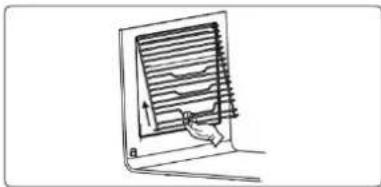
Removal of the Wire Shelf
To remove the wire rack, pull the wire rack as shown in the figure. After releasing it from the clips (a), lift it up.
natural_image
Simple line drawing of a laptop with a screen and a hand holding the screen (no text or symbols)Maintenance
⚠ Warning: the maintenance of this appliance should be carried out by an authorised service person or qualified technician only.
Changing the Oven Lamp
⚠ Warning: Switch off the appliance and allow it to cool before cleaning your appliance.
- Remove the glass lens, then remove the bulb.
- Insert the new bulb (resistant to 300 °C) to replace the bulb that you removed (230 V, 15-25 Watt, Type E14).
- Replace the glass lens, and your oven is ready for use.

The lamp is designed specifically for use in household cooking appliances.
It is not suitable for household room illumination.

IX. TROUBLESHOOTING
If you still have a problem with your appliance after checking these basic trouble shooting steps, please contact an authorized service person or wualified technician.
| Problem | Possible Cause | Solution |
| Oven does not switch on. | Power is switched off. | Check whether there is power supplied.Also check that other kitchen appliances are working. |
| No heat or oven does not warm up. | Oven temperature control is incorrectly set.Oven door has been left open. | Check that the oven temperature control knob is set correctly. |
| Oven light (if available) does not operate. | Lamp has failed.Electrical supply is disconnected or switched off. | Replace lamp according to the instructions.Make sure the electrical supply is switched on at the wall socket outlet. |
| Cooking is uneven within the oven. | Oven shelves are incorrectly positioned. | Check that the recommended temperatures and shelf positions are being used.Do not frequently open the door unless you are cooking things that need to be turned.If you open the door often, the interior temperature will be lower and this may affect the results of your cooking. |
| The timer buttons cannot be pressed properly. | There is foreign matter caught between the timer buttons.Touch model: there is moisture on the control panel.The key lock function is set. | Remove the foreign matter and try again.Remove the moisture and try again.Check whether the key lock function is set. |
| The oven fan (if available) is noisy. | Oven shelves are vibrating. | Check that the oven is level.Check that the shelves and any bake ware are not vibrating or in contact with the oven back panel. |
Transport
If you need to transport the product, use the original product packaging and carry it using its original case. Follow the transport signs on the packaging. Tape all independent parts to the product to prevent damaging the product during transport.
If you do not have the original packaging, prepare a carriage box so that the appliance, especially the external surfaces of the product, is protected against external threats.
X. TECHNICAL SPECIFICATIONS
| BUILT IN OVEN | ||
| Type of Oven | ELECTRIC | |
| Mass | Kg | 29,0 |
| Energy Efficiency Index - conventional | 103,6 | |
| Energy Efficiency Index - fan forced | 94,1 | |
| Energy Class | A | |
| Energy consumption (electricity) - conventional | kWh/cycle | 0,87 |
| Energy consumption (electricity) - fan forced | kWh/cycle | 0,79 |
| Number of cavities | 1 | |
| Heat Source | ELECTRIC | |
| Volume | L | 69 |
| This oven complies with EN 60350-1 | ||
Energy Saving Tips
Oven
- Cook the meals together, if possible.
- Keep the pre-heating time short.
- Do not elongate cooking time.
- Do not forget to turn-off the oven at the end of cooking.
- Do not open oven door during cooking period.
Environment friendly disposal
You can help protect the environment!
Please remember to respect the local regulations: hand in the non-working electrical equipment's to an appropriate waste disposal center.

HEINNER is a registered trademark of Network One Distribution SRL. Other brands and product names are trademarks or registered trademarks of their respective holders.
No part of the specifications may be reproduced in any form or by any means or used to make any derivative such as translation, transformation, or adaptation without permission from NETWORK ONE DISTRIBUTION.
Copyright © 2013 Network One Distribution. All rights reserved.
www.heinner.com, http://www.nod.ro
http://www.heinner.com, http://www.nod.ro

This product is in conformity with norms and standards of European Community
Importer: Network One Distribution
Marcel Iancu Street, 3-5, Bucharest, Romania
Tel: +40 21 211 18 56, www.heinner.com, www.nod.ro
HEINNER
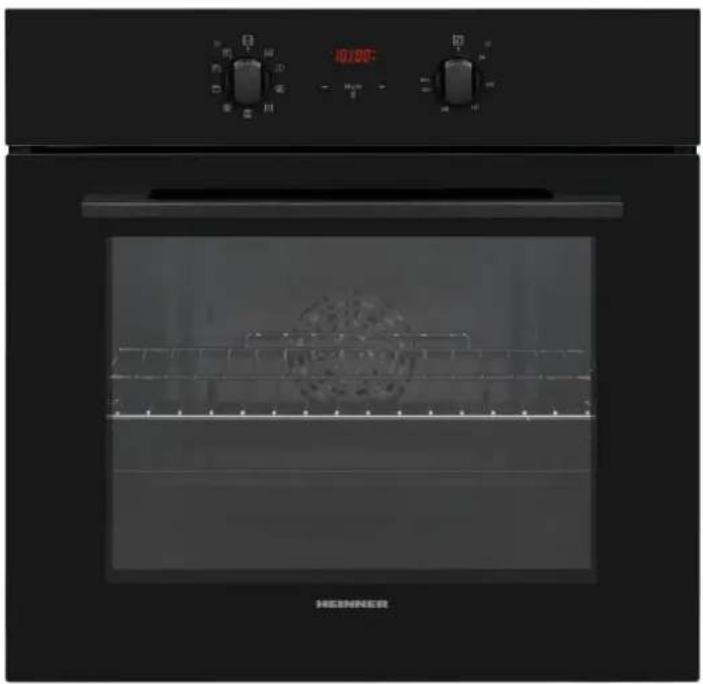
ВГРАДЕНА ФУРНА Модел: HBO-V659GCDRC-GBK
natural_image
Exterior view of a modern kitchen oven with digital dials and a visible interior grating (no text or symbols)• ВГРАДЕНА ФУРНА
• КЛАС НА ЕНЕРГИЯТА А
- ОБЕМ 69 L
natural_image
Technical line drawing of a mechanical device with mounting bracket and control panel (no text or symbols)natural_image
Line drawing of a square frame with bolt holes, no text or symbols presentРешетъчна скара
natural_image
Line drawing of a corrugated metal sheet with ribbed texture (no text or symbols)natural_image
Technical line drawing of a metal rack with a curved panel and directional arrow (no text or symbols)Колекторът за вода
natural_image
Technical line drawing of a mechanical or architectural component with layered structure and an arrow indicating direction (no text or symbols)natural_image
Diagram showing two views of a refrigerator interior with internal compartments and mounting base (no text or symbols)natural_image
Technical line drawing of a mechanical assembly with layered components and an arrow indicating motion (no text or symbols)natural_image
Line drawing of a laptop with a screen displaying text (no readable symbols or text)natural_image
Technical line drawing of a mechanical device with labeled components A, B, and γ (no text or symbols beyond labels)natural_image
Illustration of a hand holding a small object through a rectangular box, with no visible text or symbols.Поддръжка
natural_image
Exterior view of a modern kitchen oven with digital gauges and a glass oven (no visible text or symbols)natural_image
Technical line drawing of a mechanical device with no visible text or symbolsnatural_image
Line drawing of a square frame with rounded corners and a central hole (no text or symbols)A sütörács
natural_image
Line drawing of a corrugated metal sheet with ribbed texture (no text or symbols)natural_image
Technical line drawing of a metal grate with a curved top and an arrow indicating direction (no text or symbols)A vízgyűjtő
natural_image
Technical line drawing of a mechanical component or bracket with an arrow indicating direction (no text or symbols present)natural_image
Diagram showing two views of an oven with internal compartments and mounting points (no text or symbols)natural_image
Technical line drawing of a mechanical assembly with no visible text or symbolsnatural_image
Line drawing of a door with a rack and an arrow indicating upward motion (no text or symbols)natural_image
Line drawing of a laptop with a screen showing text and symbols (no readable text or symbols)natural_image
Technical line drawing of a mechanical device with labeled axes (x, y) and internal components (no text or symbols beyond labels)natural_image
Illustration of a hand holding a small object inside a rectangular box, with no visible text or symbols.Karbantartás
- Grilajul de sarma
- Colectorul de apă
- CURATARE SI INTRETINERE
- Pentru a remonta geamul interior:
- Intretinere
- INTRODUCTION
- CONTENT OF YOUR PACKAGE
- SAFETY PRECAUTIONS
- Safety instructions
- General safety warnings
- Installation warnings
- During use
- Do not leave the oven unattended when cooking with solid or liquid oils.
- During cleaning and maintenance
- PRODUCT DESCRIPTION
- List of components
- Instructions for the installer ventilation requirements
- Installation of the oven
- Electrical Connection and Safety
- WARNING: THE APPLIANCE MUST BE EARTHED.
- USING THE PRODUCT
- Oven Controls
- Oven function control knob
- Oven thermostat knob
- Oven Functions
- Use of the Digital Touch Timer
- Time adjustment
- Audible warning time adjustment
- Semi-automatic time adjustment (cooking period)
- Semi-automatic time adjustment (finishing time)
- Full-automatic programming
- Sound Adjustment
- ACCESSORIES
- The EasyFix Wire Rack
- The shallow tray
- The wire grid
- The Water Collector
- CLEANING AND MAINTENANCE
- General Instructions
- Important
- Cleaning the inside of the oven
- Cleaning the glass parts
- Cleaning the stainless steel parts (if available)
- Catalytic Cleaning
- Removal of the Catalytic Liner
- Cleaning Painted Surfaces (if available)
- Removal of the oven door
- Removal of the Inner Glass
- To replace the inner glass:
- Removal of the Wire Shelf
- Maintenance
- Changing the Oven Lamp
- TROUBLESHOOTING
- Transport
- TECHNICAL SPECIFICATIONS
- Energy Saving Tips
- Oven
- Environment friendly disposal
- HEINNER
- Решетъчна скара
- Колекторът за вода
- Поддръжка
- A sütörács
- A vízgyűjtő
- Karbantartás
Brand : Heinner
Model : HBO-V659GCDRC-GBK
Category : Oven