AMP-025BT - Docking Station Steren - Free user manual and instructions
Find the device manual for free AMP-025BT Steren in PDF.


| Product Type | Docking Station with Bluetooth |
| Brand | Steren |
| Model | AMP-025BT |
| Dimensions (Approx.) | 200 x 100 x 50 mm |
| Weight | ~500 g |
| Power Supply | AC 100-240V, 50/60Hz; Output: DC 12V, 2A |
| Bluetooth Version | 5.0 |
| Supported Devices | Smartphones, tablets, laptops with Bluetooth |
| Speaker Output | 2 x 10W RMS |
| Charging Port | USB-A (5V/2.1A) for smartphone charging |
| Audio Input | 3.5 mm AUX, Bluetooth |
| Controls | Buttons for power, volume, play/pause, track skip |
| Remote Control | Included (battery CR2025) |
| LED Indicators | Power and Bluetooth pairing status |
| Housing Material | Plastic with metal grille |
| Cleaning Instructions | Wipe with a soft, dry cloth. Do not use liquids or abrasives. |
| Safety Precautions | Do not expose to water or moisture. Use only supplied power adapter. |
| Spare Parts | Power adapter and remote control available separately. |
| Repairability | Limited; contact Steren support for service options. |
| Operating Temperature | 0°C to 40°C |
Frequently Asked Questions - AMP-025BT Steren
User questions about AMP-025BT Steren
0 question about this device. Answer the ones you know or ask your own.
Ask a new question about this device
Download the instructions for your Docking Station in PDF format for free! Find your manual AMP-025BT - Steren and take your electronic device back in hand. On this page are published all the documents necessary for the use of your device. AMP-025BT by Steren.
USER MANUAL AMP-025BT Steren
natural_image
3D rendering of a black industrial device with an orange cover, no visible text or symbolsnatural_image
Technical line drawing of a mechanical device with internal components and mounting brackets (no text or symbols)Amplificador
Control remoto
natural_image
Line drawing of a handheld electric shock absorber with cable and connector (no text or symbols)natural_image
Technical line drawing of a portable electronic device with a labeled component (A), no text or symbols present.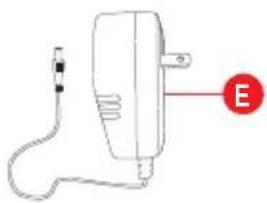
natural_image
Simple line drawing of a handheld device with a cable and a labeled 'E' (no text or symbols on the device itself)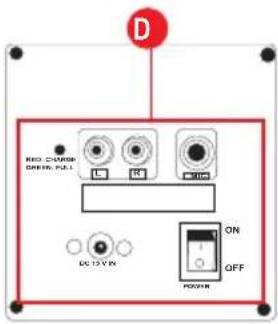
Descripción general
AMP-025BT
a) Amplificador
natural_image
Technical line drawing of a battery housing with labeled component A (no text or symbols beyond label)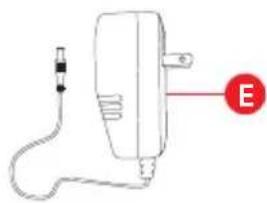
natural_image
Simple line drawing of a medical or electrical device with a red circle labeled 'E' pointing to it (no text or symbols on the device itself)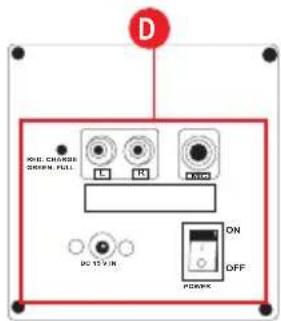
PARTES
b) Control remoto
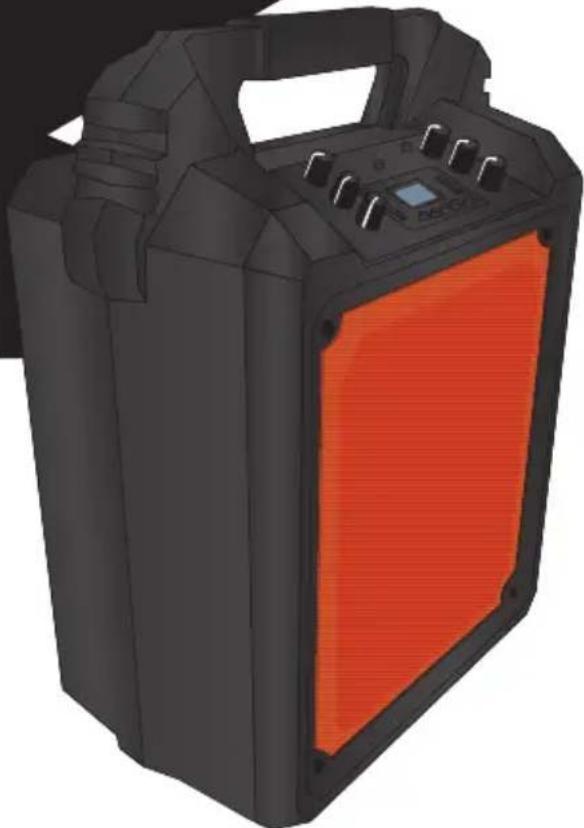
80 W PMPO portable amplifier with rechargeable battery
AMP-025 AMP-025BT
natural_image
3D rendering of a black and orange portable electronic device with control panel (no visible text or symbols)V0.0 0517A Instruction manual
CAUTIONS
IMPORTANT
Before using the product, carefully read this instruction manual to avoid any malfunction.
The information presented serves only as a reference on the product. Due to updates there may be differences. See our website www.steren.com for the latest version of this manual.
CAUTIONS
• This product is not a toy; Keep out of children reach.
• Always use a dry, soft cloth to clean the equipment.
- Do not use abrasive liquids to clean it.
- Do not use or store equipment in dripping or splashing places.
- Do not expose the equipment to extreme temperatures.
- Any unauthorized repair may cause malfunction and void the warranty.
"Operation of this equipment is subject to the following two conditions: (1) this device or device may not cause harmful interference, and (2) this device or device must accept any interference, including interference that may cause undesired operation".
CONTENT
natural_image
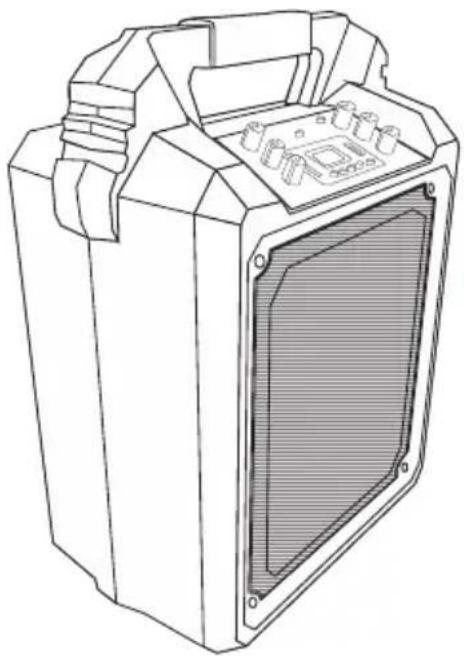
Technical line drawing of a mechanical device with internal components (no text or symbols)Amplifier
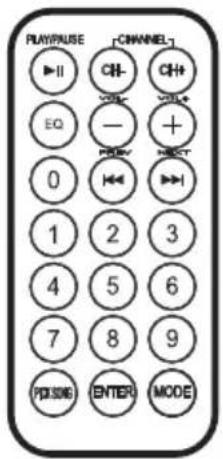
Remote control
natural_image
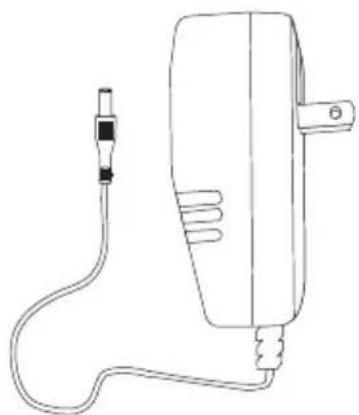
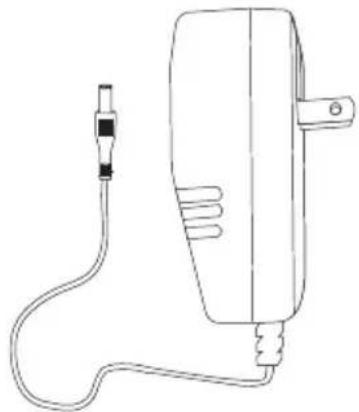
Line drawing of a handheld electric shock absorber with cable and connector (no text or symbols)Power converter
General description
AMP-025
a) Amplifier
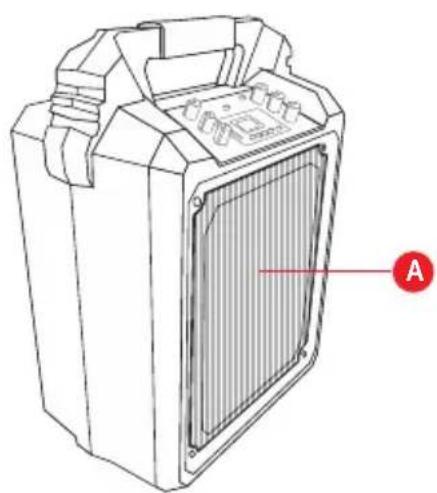
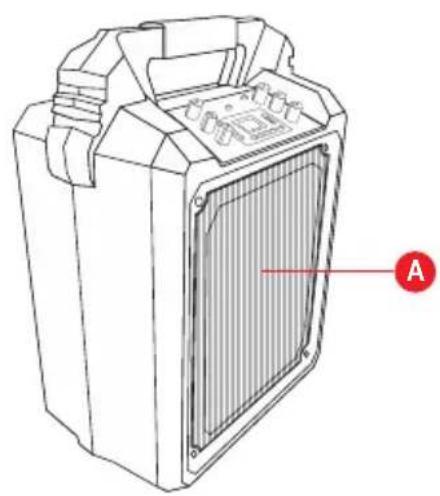
A) Speaker
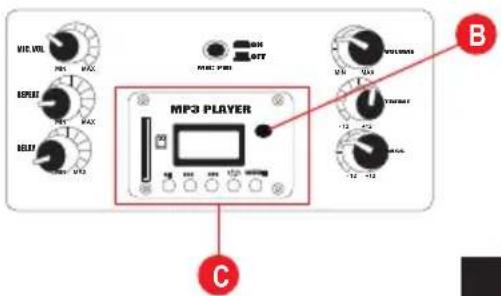
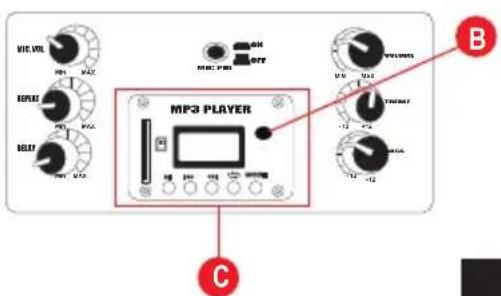
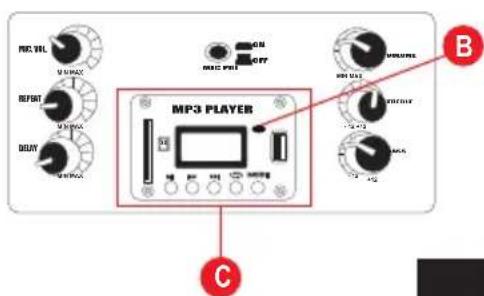
B) IR receiver
C) MP3 player
D) Controls and connectors
E) Voltage converter
natural_image
Technical line drawing of a mechanical device with a labeled component (A), no text or symbols present.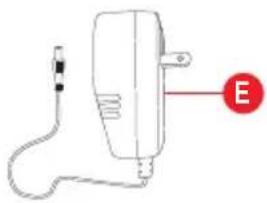
natural_image
Simple line drawing of a handheld electric motor with a cable and labeled pointer (no text or symbols beyond the label)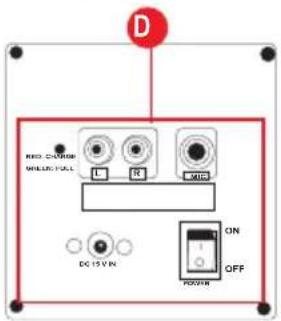
General description
AMP-025BT
a) Amplifier
A) Speaker
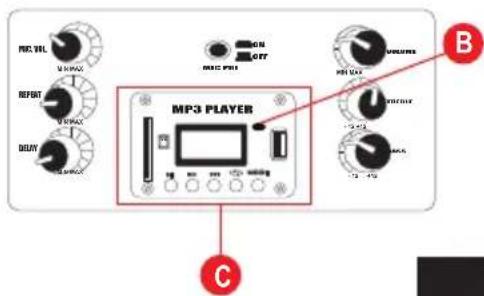
B) IR receiver
C) MP3 player
D) Controls and connectors
E) Voltage converter
natural_image
Technical line drawing of a battery housing with internal panel and mounting bracket (no text or symbols)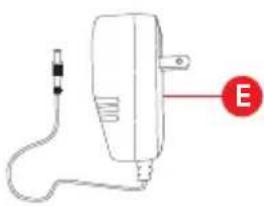
natural_image
Simple line drawing of a handheld device with a cable and connector, no text or symbols present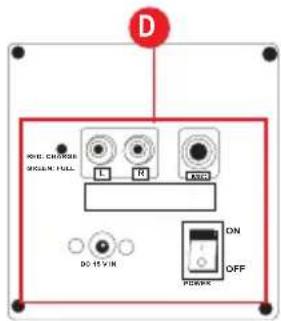
PARTS
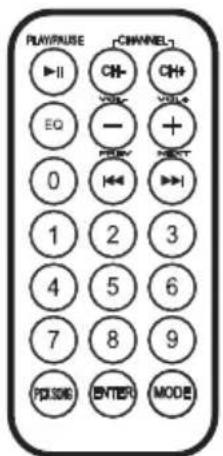
b) Remote control
1) Play / Pause
2) Forward / Backward 10 tracks
3) Equalizer
4) Decrease / increase volume
5) Previous track / Next track
6) Numeric panel
7) No function
8) Repeat tracks
9) Change usage mode
10) Battery compartment (CR2025)
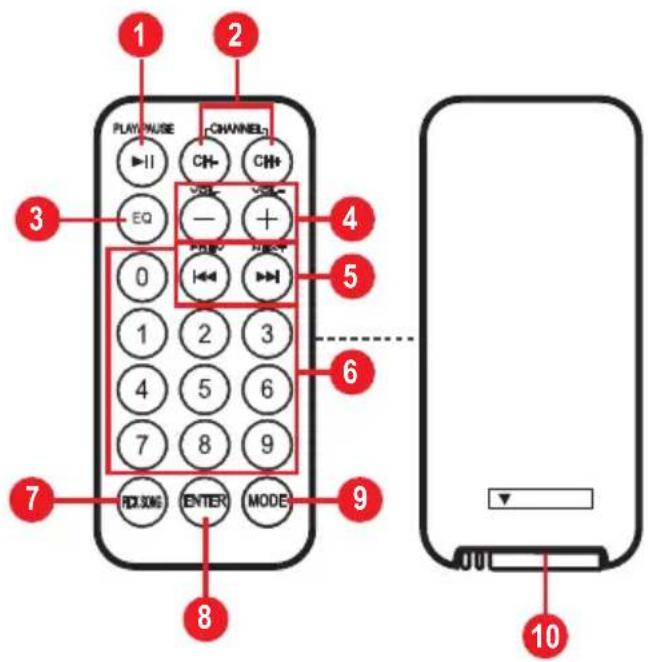
PARTS
AMP-025
c) MP3 player
1) Play / Pause
2) Previous track / Volume -
3) Next track / Volume +
4) Activate repetition
5) Change usage mode
6) LCD screen
7) SD card slot
d) Controls and connectors
1) Master volume
2) Treble (amplifier)
3) Basses (amplifier)
4) Mic priority button
5) Microphone volume
6) Repeat effect (microphone)
7) Echo effect
8) RCA auxiliary input
9) Wired microphone input
10) On / Off switch
11) Power input
12) LED charging indicator:
Red (charging) / Green (full charge)
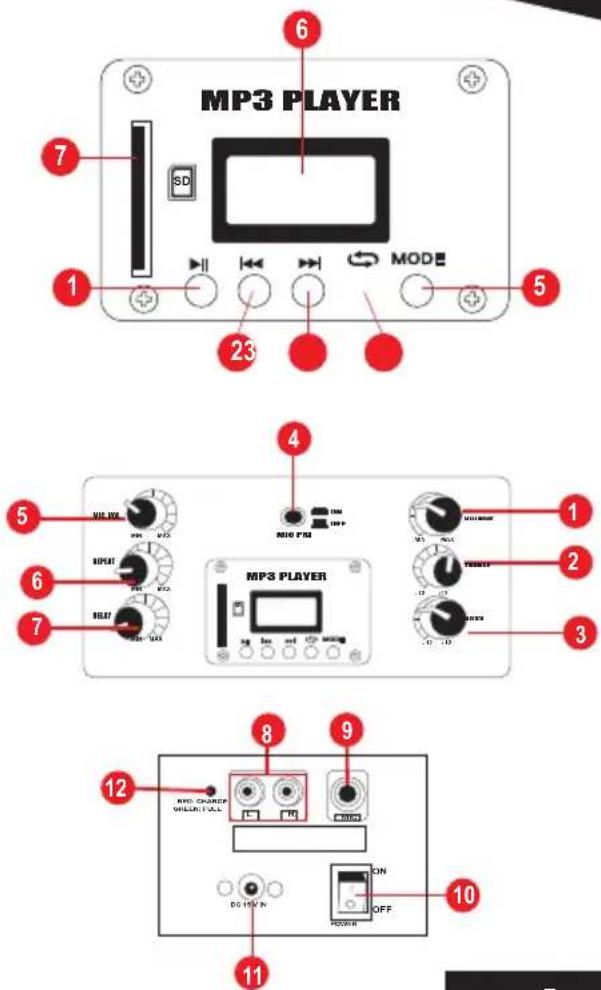
PARTS
AMP-025BT
c) MP3 player
1) Play Pause
2) Previous track / Volume -
3) Next track / Volume +
4) Activate repetition
5) Change usage mode
6) USB port
7) LCD screen
8) SD card slot
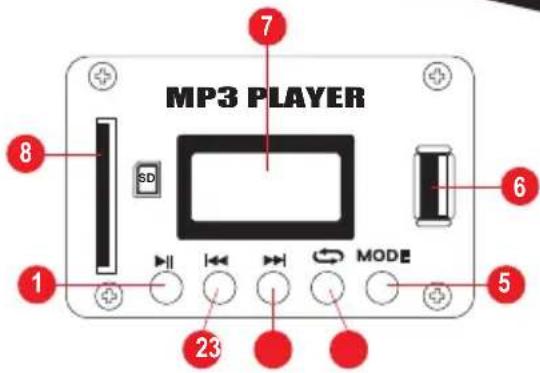
Before using the amplifier for the first time, charge the battery for 12 continuous hours.
Insert the voltage converter into the corresponding input of the amplifier and connect it to the electric current. The charging LED on the amplifier will turn red in the process; Will turn green when charging is complete.
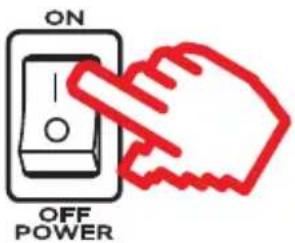
Turning the amplifier on / off
Make sure that all volume controls Are at the lowest level.
Press the switch to turn it on or off.
Using the remote control for the first time
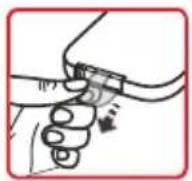
Remove the protective plastic from the battery. To control playback at a distance, Remote control towards the front of the amplifier
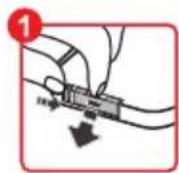
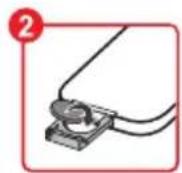
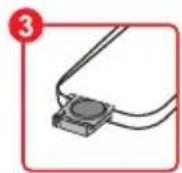
Replace Battery
MODALITIES
AMP-025BT
Use the MODE button to select one of the modes of use (AUX, SD) (FM, USB and BT only for model AMP-025BT).
Bluetooth mode (Only model AMP-025BT)
-
Press the MODE button to switch to Bluetooth mode. The display will show "no-b".
-
Activate the bluetooth on your device.
-
Search and select Steren AMP-025BT.
If the connection is successful, the display will read "blue".
BUTTONS
| Remote control | MP3 Player Functions | |
| ▶II | ▶II | Play / pause playback |
| - + | ◀◀ ▶▶ | * | Increase / decrease volume |
| ◀◀ ▶▶ | ◀◀ ▶▶ | Change track (previous / next) |
* Hold down the button
MODALITIES
AUX mode
- Connect an external device (smartphone, tablet, PC, etc.) using an RCA-3.5 mm audio cable into the AUX input of the amplifier.
- Press the MODE button to switch to AUX mode.
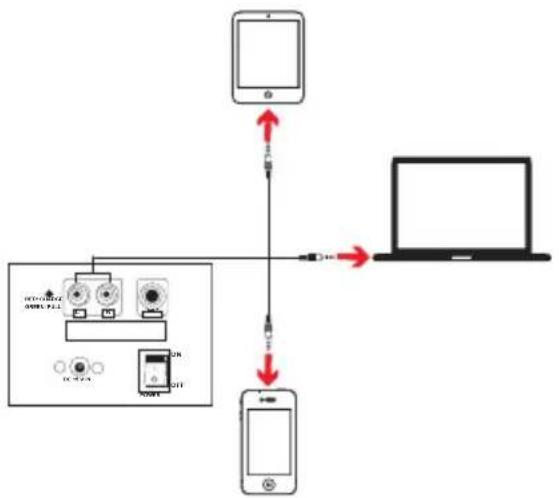
flowchart
graph TD
    A["Smartphone"] -->|USB cable| B["Laptop"]
    A -->|USB cable| C["Smartphone"]
    C -->|USB cable| D["Laptop"]
    style A fill:#f9f,stroke:#333
    style B fill:#ccf,stroke:#333
    style C fill:#cfc,stroke:#333
    style D fill:#fcc,stroke:#333
BUTTONS
| Remote control | MP3 Player Functions | ||
| — + | * | Increase / decrease volume | |
* Hold down the button
MODALITIES
AMP-025BT
FM radio mode
- Press the MODE button to switch to radio mode.
BUTTONS
| Remote control | MP3 player Functions | |
| ▶II | ▶II | Automatic station search.The stations found will beRecorded in the programming. |
| CH- CH+ | Manual Frequency Selection | |
| — + | ◀◀ ▶▶* | Increase / decrease volume |
| ◀◀ ▶▶ | ◀◀ ▶▶ | Change the preset station(Previous next) |
* Hold down the button
MODALITIES
USB Mode (Model AMP-025BT only) / SD
Insert a USB / SD memory card with MP3 audio files into the corresponding slot. Playback will start immediately.
BUTTONS
| Remote control | MP3 player Functions | |
 | [TYW] | Play / pause playback |
| [CSZ3] [7Y93] | Forward / Backward 10 tracks | |
  |   * * | Increase / decrease volume |
| ENTER |  | Enable repeat tracks: ONE(Repeat same track) ALL (repeat all) |
| EQ | Selection of one of the 5 typesPreset equalizer | |
* Hold down the button
TROUBLE SHOOTING
| The amplifier does not turn on | •Check the status of the power cord.•Probably does not have enough load; Let it charge until the charging LED turns green. |
| There is no sound | •Check that the master volume control is not at the minimum level.•Check the condition of the cables and connections. |
| Poor sound quality | •Adjust the levels in the treble and bass gain (TREBLE / BASS).•Choose another audio file.•Avoid connecting the amplifier and other equipment to the same wall outlet. |
| Does not link to Bluetooth device (Model AMP-025BT only) | •Some devices may require a PIN number, enter 0000.•Do not exceed the 8 m distance between the amplifier and your mobile device. |
SPECIFICATIONS
Input: 15 V--- 1,2 A (Power converter)
Internal Battery: 12 V--- 3 Ah
Power: 80 W máx.
Frequency Response: 55-18 000 Hz
Sensitivity: 88 +/- 3 dB
Power converter
Input: 100-240 V\~ 50/60 Hz 250 mA
Output: 15V--- 1,2 A
Consumption: 22 W/h
Standby power consumption: Not applicable
Remote control
Input: 3V--- (CR2025)

natural_image
Four black-and-white social media icons: YouTube, Facebook, Twitter, and Google+ (no text or symbols beyond logos)www.steren.com
- Descripción general
- AMP-025BT
- a) Amplificador
- PARTES
- b) Control remoto
- CAUTIONS
- IMPORTANT
- CONTENT
- General description
- AMP-025
- a) Amplifier
- PARTS
- b) Remote control
- c) MP3 player
- d) Controls and connectors
- Turning the amplifier on / off
- Using the remote control for the first time
- Replace Battery
- MODALITIES
- Bluetooth mode (Only model AMP-025BT)
- AUX mode
- FM radio mode
- USB Mode (Model AMP-025BT only) / SD
- TROUBLE SHOOTING
- SPECIFICATIONS
Brand : Steren
Model : AMP-025BT
Category : Docking Station