
MSH317 - Loudspeaker MAGNAVOX - Free user manual and instructions
Find the device manual for free MSH317 MAGNAVOX in PDF.


| Product Type | Wireless Speaker with Voice Assistant |
| Model | MSH317 |
| Brand | Magnavox |
| Voice Assistant | Amazon Alexa built-in |
| Waterproof Rating | IP44 (dust and water ingress protection) |
| Battery Type | Built-in rechargeable Li-ion 3.7V 1800mAh (6.66Wh) |
| Charging Method | Micro USB (DC 5V) |
| Charging Time | Approximately 4 hours for full charge |
| Bluetooth Version | 4.1 |
| Bluetooth Range | Up to 32 feet (10 meters) in open area |
| WiFi Connectivity | Yes, via MAGNAVOX BT Player app for Alexa setup |
| AUX Input | Yes, 3.5mm stereo jack |
| Controls | Volume +/-, Mode, Alexa microphone button, microphone off button |
| Indicators | BT/AUX, Alexa, Alexa Microphone Off, Charging |
| Compatibility | iOS and Android devices |
| Cleaning Instructions | Use mild soap and damp cloth; disconnect from power |
| Operating/Storage Temperature | 5°C to 35°C (40°F to 95°F) |
| Accessories Included | Owner's manual, USB charging cable, audio connection cable |
| Warranty | 180 days limited warranty |
| FCC Compliance | Class B digital device |
Frequently Asked Questions - MSH317 MAGNAVOX
User questions about MSH317 MAGNAVOX
0 question about this device. Answer the ones you know or ask your own.
Ask a new question about this device
Download the instructions for your Loudspeaker in PDF format for free! Find your manual MSH317 - MAGNAVOX and take your electronic device back in hand. On this page are published all the documents necessary for the use of your device. MSH317 by MAGNAVOX.
USER MANUAL MSH317 MAGNAVOX
VOICE ACTIVATED WATER PROOF
OWNER'S MANUAL
PLEASE READ BEFORE OPERATING THIS EQUIPMENT.
MODEL: MSH317
IMPORTANT SAFETY INSTRUCTIONS
FCC NOTICE:
This equipment has been tested and found to comply with the limits for a Class B digital device, pursuant to part 15 of the FCC Rules. These limits are designed to provide reasonable protection against harmful interference in a residential installation. This equipment generates, uses and can radiate radio frequency energy and, if no installed and use n accordance with the instructions, may cause harmful interference to radio communications.
However, there is no guarantee that interference will not occur in a particular installation. If this equipment does cause harmful interference to radio or television reception, which can be determined by turning the equipment off and on, the user is encouraged to try to correct the interference by one or more of the following measures:
• Reorient or relocate the receiving antenna.
- Increase the separation between the equipment and receiver.
- Connect the equipment into an outlet on a circuit different from that to which the receiver is connected.
- Consult the dealer or an experienced radio/TV technician for help.
FCC WARNING:
To assure continued compliance, follow the attached installation instructions and use only shielded cables when connecting to other devices. Modifications not authorized by the manufacturer may void user's authority to operate this device.
Location of Controls
TOP VIEW

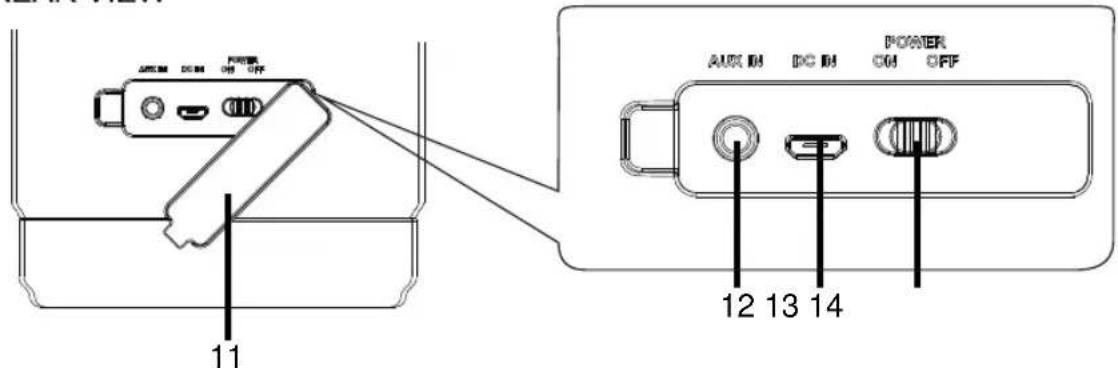
REAR VIEW
- Built-in Microphones
- ⚠ Alexa Microphone Button
- Alexa Microphone Off Button
- VOL- (Volume Down) Button
- MODE Button
- VOL+ (Volume Up) Button
-
BT/AUX (Bluetooth/Aux In) Indicator
-
Alexa Indicator
- Alexa Microphone Off Indicator
- CHARGE Indicator
- Rubber Cover (The cover is for Dust/water Ingress Protection, always keep it closed)
- AUX IN Jack
- DC IN (Micro USB) Port
- POWER ON/OFF Switch
Power Source
The unit has a built-in Li-ion rechargeable battery, charge it before first time use or when it is drained as below:
- Open the rubber cover on the rear of unit as illustrated below:

-
Connect the Micro USB Plug from the supplied USB Charging Cable to the DC IN (Micro USB) Port.
-
Connect the full size USB plug from the supplied USB Connection Cable to the USB Port on the Personal Computer or USB Charger (Computer and USB Charger not included).
To Computer or any USB Charger

To DC IN (Micro USB) Port on the rear of unit
-
While charging, the Red Charging Indicator on the top of unit will illuminate. When finished charging, it will turn off.
-
When charging, you can also play and listening music at the same time.
Notes:
Your battery will last longer if you follow these simple guidelines for caring and storing:
A. Before first time use, charge it approximately 4 hours until the unit is fully charged.
B. Recharge and store the unit within the temperature range of 5irc C\~ 35irc C ( 40irc F\~ 95irc F).
C. Do not charge longer than 24 hours. Excessive charging or running the unit until the battery fully drains will damage battery. Battery life will be extended if you keep the battery fully charged.
D. Battery life naturally shortens slowly over time.
E. The rechargeable battery incorporated in this product is not user replaceable.
WiFi Setup
You can stream music to the unit from a mobile device on your Wifi network by using the “MAGNAVOX BT Player” app. To use this feature, the unit MUST join the same Wifi network as the mobile device:
- Download the "MAGNAVOX BT Player" app from Google Play or Apple App Store into your mobile device then install it following the on screen instructions.
-
Pair the unit to your mobile device through BT (Bluetooth) as follows:
-
Slide the POWER ON/OFF Switch on the rear of unit to ON position to power on the unit. You will hear an audible say “Power on; prompt Bluetooth mode; waiting for connection”. The BT/AUX Indicator on the top of unit will illuminate and blink.
- Power on the external Bluetooth Device and enter the Bluetooth search mode. Start pairing following the on screen instructions from the external Bluetooth Device. When paired, the unit will sound to prompt "Bluetooth connected" and the BT/AUX Indicator will stop blinking.
Notes:
- When the mobile device searched the unit, our model number "MSH317_XXX" will appear on the display of mobile device. (XXXis the identify number of the exciting unit).
-
If while pairing you are asked for a code please try "0000" or "1234".
-
Open the "MAGNAVOX BT Player" app on your mobile device. Wait a few seconds, the follows screens will appear on your mobile device oneby

flowchart
graph LR
    A["MAGNAVOX"] --> B["Pair Device"]
    B --> C["Paired"]
    C --> D["Amazon Alexa Login"]
- Tap/touch the "Amazon Alexa Login" Button on the screen. The followingscreen will appear on your mobile device.
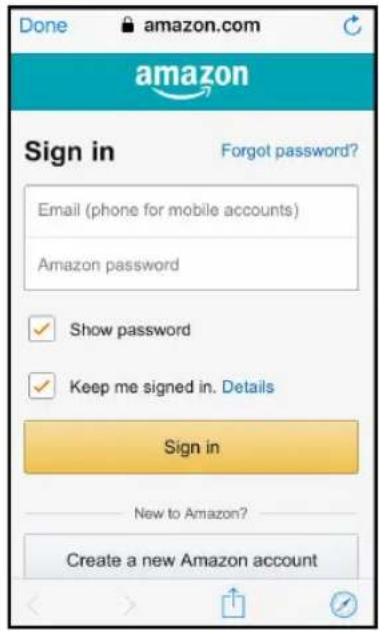
- Sign in or create an Amazon account follows the on screen instructions. When signed in, following appear on your mobile device:

-
Tap/touch theAllow" Button on the screen to continue.
-
The following screen will appear, select and set the region you are in, then touch "Next" Button to continue.

- When the following screen appear, touch the "Done" Button on it to complete settings.

Operation
Music playback and Alexa:
-
Connect the unit to your Wifi network as previously instructed.
-
Recharge the built-in Li-ion battery as previously instructed.
-
Paired the unit to your mobile device.
-
Power on the external BT Device and enter to BT mode.
-
Slide the POWER ON/OFF Switch on the rear of unit to ON position to power on the unit. You will hear an audible say “Power on; Bluetooth mode; waiting for connection”. The BT/AUX Indicator on the top of unit will illuminate and blink.
-
Wait a few seconds until the unit is automatically paired to the mobile device. The unit will sound a proBluetooth connected"
BT/AUX Indicator will stop blinking.
- After pairing is complete you may now play music and answer calls with your mobile device. During playback:
- Using the controls on the paired mobile device to pause; skip tracks as usual.
- Press the VOL +/- buttons to adjust volume level as desired.
- Play music or ask questions with Alexa:
- Open the "MAGNAVOX BT Player" app in your mobile device. Wait a few seconds until following screen on your mobile device:
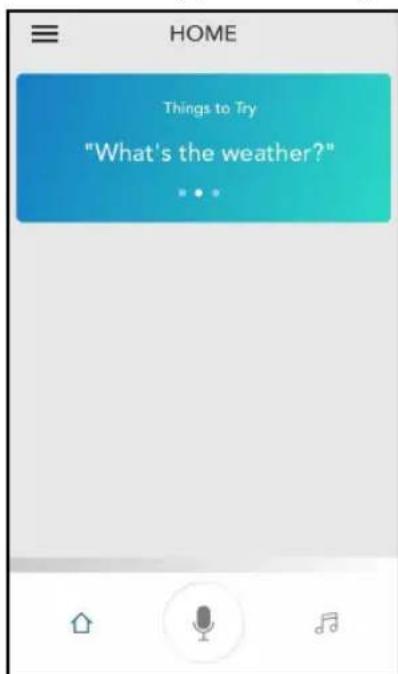
- Say “Alexa” to the microphone or press the Alexa Microphone Button on unit, the Alexa Indicator on the top of unit will illuminate. Questioned or instructions to the microphone on the top of press (the “☐” Microphone Button on the mobile device, then speak questions or instructions to the microphone on the mobile device). Wait for the reply from Alexa. Examples of Voice Commands when speaking to Alexa:
● (Alexa) Who are you?
● (Alexa) What's the time now?
● (Alexa) What's the news today?
● (Alexa) Play the song.
● (Alexa) Stop (or Pause) the song.
ETC.
- When the unit is paired to a Cell Phone:
- If a call is incoming during an active music session:
➢ Press any button on the top of unit then speak to the Microphone to answer the call. When your call is complete, press any button to disconnect or end the call and resume to music playback.
➢ Press and hold the “ ” Alexa Microphone Off Button approximately 1 second to decline the incoming phone call then resume to music playback.
-
To avoid activating Alexa by accident, press and hold "the" Alexa Microphone Off Button until the color of the Alexa Indicator and Microphone Indicator turn red to signal the microphone is turned off. Press and hold to turn on again.
-
When finished, slide the POWER ON/OFF Switch to OFF position to shut off the unit. You will hear an promise say "Power off".
AUX IN:
Listen to music from an external Audio Player suck as MP3 Player, Discman .... ETC:
- In power off mode, connect one end of the Audio Connection Cable (not included) to the AUX Out / Line Out / Phone Jack on the external Audio Player.
- Connect the other end of the cable to the "AUX IN" Jack on the rear of the unit.
To the AUX IN" Jack on the rear of the unit
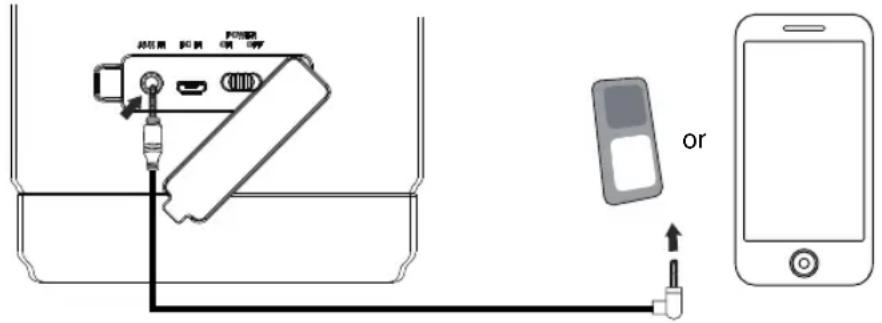
- In power on mode, press the "MODE" Button to turn to AUX IN mode. The color of the BT/AUX Indicator will turn to Green. You will also hear an audible say "AUX IN".
- Play the music on the connected Player as usual. (Make sure the volume level of the connected Audio Player is turned to high level.)
- Press the VOL +/- buttons to adjust volume level as desired.
- When finished, slide the POWER ON/OFF Switch to OFF position to shut off the unit. You will hear an audible say "Power off".
Cleaning
- To prevent fire or shock hazard, disconnect your unit from the AC wall outlet when cleaning.
- The finish on your unit may be cleaned with a dust cloth and cared for as other furniture. Use caution when cleaning and wiping the plastic parts.
- Mild soap and a damp cloth may be used.
Troubleshooting Guide
Check the following before requesting service:
| SYMPTOM | POSSIBLE CAUSE POSSIBLE | SOLUTION |
| Can't power on | Built in battery drained Recharge | the battery |
| No sound or sound weak | Volume level in minimum position | Rise the volume level by press the VOL+ Button on the top of unit |
| Volume level of paired/connected device is in low level | Rise the volume level of the paired/connected device | |
| Sound distortion | Volume level too high | Reduce the volume level by press the VOL- Button on the top of unit |
| Volume level of the connected/paired device too high | Reduce the volume level of the connected/paired device | |
| BT not functioning | The external BT device had NOT to the unit | paid the external BT device to the unit as page5 |
| The external BT device too far from unit | Place the external BT device close to the unit | |
| Wi-Fi not functioning | The unit had NOT add in the Wi-Fi network and/or had NOT sign in Amazon account | Add the unit into the Wifi network and sign in Amazon account as page 5-7 |
| Alexa not functioning | The unit is not in the Amazon Alexa operation mode | Install and open the "Alexa BT Player" in your mobile device |
General Specifications
Power source: Built-in DC 3.7V, 1800mAh (6.66WH) rechargeable Li-ion Battery, Recharge by DC 5V through DC IN (Micro USB) Port
BT Version: 4.1
BT Operation Distance: Up to 32 Feet in open area
Dust/water Ingress Protection Level: IP44
Accessories
1 x Owner's Manual
1 x USB Charging Cable
1 x Audio Connection Cables with 3.5mm Stereo Plugs
SPECIFICATIONS AND ACCESSORIES ARE SUBJECT TO CHANGE WITHOUT NOTICE
LIMITED WARRANTY
Craig Electronics warrants this product to be free from manufacturing defects in material and workmanship under normal use for a period of 180 days from date of purchase. If service is required, please return the product to the store where it was purchased for exchange; or, pack the unit in the original packing material with all accessories if applicable, a copy of your sales receipt and a Cashier's check or Money Order for \$12 (to cover shipping and handling costs) payable to Craig Electronics Inc. For consumers in Canada, please make sure that the cashier check or money order is redeemable through a U.S. bank. Ship your product freight pre-paid. Your unit will be repaired, replaced or if the unit cannot be repaired or replaced, a refund will be forwarded to you within four weeks of receipt of your unit. Please ship your unit to:
Craig Electronics Inc.
1160 NW 163 Drive
Miami, Fl 33269
This warranty is void if the product has been: a) Used in a commercial application or rental. b) Damaged through misuse, negligence, or abuse. c) Modified or repaired by anyone other than an authorized Craig service center. d) Damaged because it is improperly connected to any other equipment.
Note: This warranty does not cover: a) Ordinary adjustments as outlined in the Owner's Manual which can be performed by the customer. b) Damage to equipment not properly connected to the product. c) Any cost incurred in shipping the product for repair. d) Damage to the product not used in the USA.
This warranty is not transferable and only applies to the original purchase. Any implied warranties, including the warranty of merchantability, are limited in duration to the period of this expressed warranty and no warranty whether expressed or implied shall apply to the product thereafter.
Under no circumstance shall Craig be liable for any loss or consequential damage arising out of the use of this product. This warranty gives specific legal rights. However, you may have other rights which may vary from state to state. Some states do not allow limitations on implied warranties or exclusion of consequential damage. Therefore, these restrictions may not apply to you.
This product has been manufactured by and is sold under the responsibility of Craig Electronics Inc, and Craig Electronics Inc is the warrantor in relation to this product. MAGNAVOX and SMART. VERY SMART are registered trademarks of Koninklijke Philips N.V. and are used under license from Koninklijke Philips N.V.
To Obtain Service on your Product email: magnavox@craigelectronics.com
Printed in China MSH317_WC_E0CL1_B0US
- IMPORTANT SAFETY INSTRUCTIONS
- FCC NOTICE:
- FCC WARNING:
- Location of Controls
- Power Source
- Notes:
- WiFi Setup
- Operation
- Music playback and Alexa:
- AUX IN:
- Cleaning
- Troubleshooting Guide
- General Specifications
- Accessories
- SPECIFICATIONS AND ACCESSORIES ARE SUBJECT TO CHANGE WITHOUT NOTICE
- LIMITED WARRANTY
Brand : MAGNAVOX
Model : MSH317
Category : Loudspeaker