
FU-S51A - Air purifier SHARP - Free user manual and instructions
Find the device manual for free FU-S51A SHARP in PDF.


| Product Type | Air Purifier |
| Model | FU-S51A |
| Brand | Sharp |
| Power Supply | 220V, 50Hz |
| Filter Type | HEPA Filter (blue) + Washable Active Carbon Filter |
| HEPA Filter Efficiency | Removes 99.97% of dust particles as small as 0.3 microns |
| Plasmacluster Ion Technology | Generates positive and negative ions; Clean Mode and Ion Control Mode |
| ION SHOWER Mode | Concentrated ion release for 15 minutes, alternating strong and gentle airflow |
| Operation Modes | AUTO, SILENT, Pollen Mode (indicator only), ION SHOWER |
| Fan Speeds | HIGH, MEDIUM, SILENT (auto-switching in AUTO mode) |
| Clean Sign Light | Green (clean), Yellow (slightly impure), Red (very impure) |
| Plasmacluster Indicator Light | Blue (Clean Mode), Green (Ion Control Mode), cycling (ION SHOWER) |
| Sensors | Dust sensor and Odour sensor |
| Washable Active Carbon Filter | Hand wash with mild detergent every 2 months; do not tumble dry |
| Filter Replacement Period | Up to 5 years after opening; depends on usage environment |
| Replacement Filter Model | FZ-S51SEF (includes HEPA and Active Carbon Filter) |
| Main Unit Cleaning | Wipe with dry soft cloth; damp cloth for stubborn dirt; no solvents or detergents |
| Sensor Cleaning | Clean sensor openings with vacuum cleaner periodically |
| Safety Features | Auto shut-off when front panel removed? Not specified; do not operate without filters; keep away from water |
| Installation Clearance | At least 60 cm from wall; avoid direct wind on sensors; keep away from TVs/radios (2m) |
| Operating Temperature | 0°C to 35°C |
Frequently Asked Questions - FU-S51A SHARP
User questions about FU-S51A SHARP
0 question about this device. Answer the ones you know or ask your own.
Ask a new question about this device
Download the instructions for your Air purifier in PDF format for free! Find your manual FU-S51A - SHARP and take your electronic device back in hand. On this page are published all the documents necessary for the use of your device. FU-S51A by SHARP.
USER MANUAL FU-S51A SHARP
natural_image
Illustration of a white rectangular device with a triangular top and a small heart symbol on the front panel (no text or labels)FU-S51A
Please read before operating your new Air Purifier
The air purifier draws in room air from its air intake, lets the air pass through a Active Carbon Filter (deodorization filter) and a HEPA Filter (dust collection filter) inside of the unit, then discharges the air from its air outlet. The air purifier unit repeats this process by moving its internal fan.
As air passes through, a new HEPA Filter can remove 99.97% of dust particles, of as small as 0.3 microns. The Active Carbon Filter gradually absorbs odour elements as they repeatedly pass through the filter. (Odour elements are absorbed by HEPA Filter as well.)
Some odour ingredients absorbed by the filters may become separated and may be discharged through the air outlet and result in additional odour. Depending on the usage environment, especially when the product is used in a condition significantly more severe than household use, this odour may become strong in a shorter period than expected.
If the odour persists, then the filters are fully expended and it is necessary to purchase the optional replacement filter.
NOTE
- The air purifier is designed to remove air-suspended dust and odour, but not harmful gases (for example, carbon monoxide contained in cigarette smoke). If the odour sources still exist, it cannot completely remove the odour. (for example, odours from construction materials and pet odours).
- It is suggested to open the window a bit when you are smoking in order to facilitate ventilation.
ENGLISH
FEATURES
ION SHOWER
New ION SHOWER Operation Mode releases the concentrated Plasmacluster lons, and effectively removes the pollen and mold, and also controls the activity of airborne virus, mold, and allergen.
Plasmacluster Ion Control
Your new air purifier will control the ratio of negative ions and positive ions depending on the condition of the room.
- Clean Mode
Approximately the same numbers of positive and negative ions are discharged.
• AUTO Plasmacluster Ion Mode
The unit will switch between Clean Mode and Ion Control Mode ^* automatically depending on the amount of impurities in the air detected by the odour and dust sensors.
\*Ion Control Mode
Negative ions will be released in an increased rate and controls the ion balance.
- Filters
1) Washable Active Carbon Filter Absorbs odour elements. Washable to maintain optimum deodorization performance.
CONTENTS
IMPORTANT SAFETY INSTRUCTIONS ....E-2
• W ARNING E-2
• CAUTIONS CONCERNING OPERATION ... E-3
• INSTALLATION GUIDELINES ..... E-3
• FILTER GUIDELINES ......E-3
PART NAMES ...... E-4
• MAIN UNIT DISPLAY E-4
• ILLUSTRATIVE DIAGRAM .....E-4
• BACK E-5
• INCLUDED E-5
PREPARATION..... E-6
• FILTER INSTALLATION ....E-6
OPERATION E-8
• MAIN UNIT OPERATION ......E-8
CARE AND MAINTENANCE ...... E-10
• MAIN UNIT ...... E-10
• FILTER E-10
• SENSORS ...... E-10
• WASHABLE ACTIVE CARBON FILTER CARE .... E-11
• FILTER REPLACEMENT
GUIDELINES E-12
SPECIFICATIONS ...... E-12
TROUBLESHOOTING..... E-13
IMPORTANT SAFETY INSTRUCTIONS
When using electrical appliances, basic safety precautions should be followed, including the following:
WARNING - To reduce the risk of electrical shock, fire or injury to persons:
- Read all instructions before using the air purifier.
- Use only a 220 volt outlet with a polarized receptacle.
- Do not use the air purifier if the power cord or plug is damaged or the connection to the wall outlet is loosened.
• Periodically remove dust from the power plug. - Do not insert fingers or foreign objects into the intake or air outlet.
- When removing the power plug, always hold the plug and never pull the cord.
Electrical shock and/or fire from short circuit may occur as a result. - Do not remove the plug when your hands are wet.
- Do not use this air purifier near gas appliances or fireplaces.
- Remove the power plug from the wall outlet before cleaning the unit and when not using the unit.
Electrical shock from bad insulation and/or fire from short circuit may occur as a result.
• If the power cord is damaged, it must be replaced by the manufacturer, its service agent, Sharp authorized Service Centre or similarly qualified person in order to avoid a hazard.
- Do not operate when using aerosol insecticides or in rooms where there is oily residue, incense, sparks from lit cigarettes, chemical fumes in the air or in very high humidity condition, such as a bathroom.
- Be cautious when cleaning the air purifier. Strong corrosive cleansers may damage the exterior.
- Only Sharp Authorized Service Centre should service this air purifier. Contact the nearest Service Centre for any problems, adjustments, or repairs.
NOTE - Radio or TV Interference
If this air purifier should cause interference to radio or television reception, try to correct the interference by one or more of the following measures:
Deciduals and accelerates the oscillation effects
IMPORTANT SAFETY INSTRUCTIONS
CAUTIONS CONCERNING OPERATION
- Do not block the intake and air outlet.
- Do not use the unit near or on hot objects, such as stoves or heaters or where it may come into contact with steam.
- Do not lay the unit down when using.
• Always hold the handle on the back of the unit when moving it.
Holding the front panel when carrying may cause it to detach, thus dropping the unit and resulting in bodily injury. - Do not operate the unit without the filter.
- Do not wash and reuse HEPA filter.
It not only does not improve filter performance, it may cause electric shock or malfunction. - Clean the exterior with a soft cloth only.
The unit surface may be damaged or cracked.
In addition, the sensors may malfunction as a result.
ENSOLID
INSTALLATION GUIDELINES
- During the operation of the product, please place the unit at least 2m away from equipments which involve electric wave such as televisions, radios or wave clocks, in case electrical interference occurs to such equipment.
- A void a location where the sensor is exposed to direct wind.
The unit may not operate properly.
- A void locations where curtains, etc., come into contact with the intake or air outlet.
Curtains, etc., may become dirty or a malfunction may occur. - Avoid locations where the unit is exposed to condensation, due to drastic temperature changes.
(Use under appropriate conditions between 0 and 35°C in the room.)
- Place on a stable surface with sufficient air circulation.
When placing the unit on a heavily carpeted area, it may cause the unit to vibrate slightly. - Do not install when there is generation of lampblack, such as in a kitchen, etc.
The unit surface may crack or the sensor may malfunction as a result. - Leave about 60cm of space from the wall.
PART NAMES
MAIN UNIT DISPLAY
AUTO Operation Indicator Light
Pollen Mode Indicator Light
Fan Speed Indicator Lights
Plasmacluster Ion Mode Indicator Lights
Plasmacluster Ion Mode Selection Button ____
Mode Selection Button
ION SHOWER Indicator Light

ILLUSTRATIVE DIAGRAM


PREPARATION
Be sure to remove the power plug from the wall outlet.
FILTER INSTALLATION
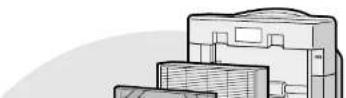
To maintain the quality of the filters, they are installed in the main unit and packed in plastic bags. Be sure to remove the filters from the plastic bags before using the unit.

Remove the filters
1
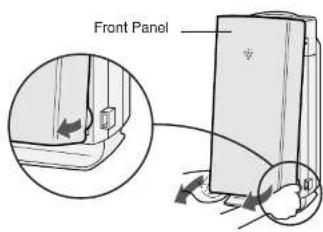
Remove the Front Panel. Pull the Front Panel on the lower sides, and lift up.
2
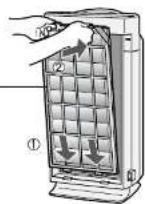
Remove the Filter Support. Push in the hooks on top, then pull the Filter Support.
3
Remove the HEPA Filter.

Filter Support


Install the filters
1 Place the HEPA Filter into the main unit.
Please make sure that the HEPA Filter(blue) and the tab is placed in proper direction.
Do not install the filter backwards or the unit will not operate properly.
2 Place the Filter Support through the bands (2 places) located at the corners of the Active Carbon Filter.
3 Replace the Filter Support and Active Carbon Filter back to the main unit.
- Fill in the usage start date on the



OPERATION
MAIN UNIT OPERATION


Power ON/OFF Button
• Used to start operation (short beep) and stop operation (long beep)
- Plasmacluster Indicator Light and Fan Speed Indicator Light turn on/off.
- Unless unplug the power cord, the operation starts in the previous mode the unit was operated in
- When stop operation during ION SHOWER Operation, the unit will back to the prior operation of ION SHOWER Operation.
MODE
MODE Selection Button
• The operation mode can be switched.
AUTO operation
The fan speed is automatically switched (HIGH*, MEDIUM, SILENT) depending on the amount of impurities in the air. The sensors detect the impurities for efficient


SILENT operation
The unit will operate quietly using minimal air intake.

CARE AND MAINTENANCE
To maintain optimum performance of this air purifier, please clean the unit including the sensor and filters periodically.
When cleaning the unit, be sure to unplug the power cord, and never handle the plug with wet hands. Electrical shock and/or bodily injury may occur as a result.
MAIN UNIT
Care Cycle 1 month
To prevent dirt or stains on the main unit, clean as often as necessary. If stains are allowed to remain, they may become hard to clean.
Wipe with a dry, soft cloth
For stubborn stains or dirt, use a soft cloth dampened with warm water.
Do not use volatile fluids
Benzene, paint thinner, polishing powder, etc., may damage the surface.
Do not use detergents
Detergent ingredients may damage the unit.
Keep the unit away from water
FILTER
Care Cycle 2 months
Clean the top surface of the Washable Active Carbon Filter lightly with a vacuum cleaner.
Washable Active Carbon Filter

SENSORS
(DUST SENSOR, ODOUR SENSOR)

WASHABLE ACTIVE CARBON FILTER CARE
Care Cycle 2 months
HAND WASH ONLY!
DO NOT TUMBLE DRY!

1 Fill a large container with lukewarm water, add a mild kitchen detergent and stir.
Dilute as indicated on the detergent container.

2 Allow the filter to soak approximately 10 minutes before wash-
Remove excess water.
The filter will be saturated with water after rinsing. To decrease drying time, wrap the filter in an old thick towel so that excess water can be removed.
CAUTION
Some carbon may adhere to the towel, but it is harmless.
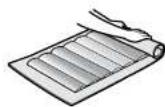
5 Dry the filter outdoors if possible in a well ventilated area.

CAUTION
- The wet filter is heavy. Fix it securely for drying to make sure it does not fall down. - The filter takes longer time to dry in win-
CARE AND MAINTENANCE
FILTER REPLACEMENT GUIDELINES
The replacement period differs depending on the room environment, the usage hours and location of the Air Purifier.
If dust or odours persists, replace the filters.
(Refer to "Please read before operating your new Air Purifier")
HEPA Filter / Washable Active Carbon Filter
Up to 5 years after opening
Guide for filter replacement timing
- Filter life can be greatly reduced in poor environment.
The presence of cigarette smoke, pet dander and other concentrations of airborne particles will cause filters to become clogged in less time. Please check filters regularly and replace as needed.
Replacement Filters
Model · HEPA Filter : 1 unit
FZ-S51SEF · Washable Active Carbon Filter : 1 unit
REPLACING THE FILTERS
-
See page E-6,7 for directions on how to install the filters when replacing.
-
Fill in the usage start date of the filters on the Date Label.
Disposal of Filters
Please dispose of replaced filters according to the local disposal laws and regulations.
HEPA Filter Materials:
- Filter: Polypropylene - Frame: Polyester
Active Carbon Filter Materials:
- Deodorizer: Activated charcoal - Net: Polypropylene 60%, Polyester 40%
SPECIFICATIONS
| Model | FU-S51A |
| Power supply | 220V 50Hz |
TROUBLESHOOTING
Before calling for repair, please review the list below, since the problem may not be a unit malfunction.
| SYMPTOM | REMEDY (not a malfunction) |
| Odours and smoke are not removed. | • Clean or replace the filters if they appear to be heavily soiled. (Refer to E-11, E-12) |
| The CLEAN-SIGN Light lights green even when the air is impure. | • The air could be impure at the time the unit was plugged in. (Refer to E-5) Pull out the plug from the electrical outlet, and insert the plug one minute later. |
| The CLEAN-SIGN Light lights yellow or red even when the air is clean. | • The sensitivity of the sensors become unstable when the opening of the odour sensor or dust sensor is dirty or is clogged. Clean the dust around the sensor opening using a vacuum cleaner. (Refer to E-10) |
| The Plasmacluster Indicator Light remains green (or blue) and does not change. | • When in Ion Control Mode (or Clean Mode), the Plasmacluster Indicator Light colour will not change. |
| A clicking or ticking sound is heard from the unit. | • Clicking sound is emitted when the unit is in the Ion Control Mode, and ticking sound is emitted when the unit is generating ions. If the sound is irritating, set the unit away from you. |
| The discharged air has an aroma or odour. | • Check to see if the filters are heavily soiled. Replace the filters.• Plasmacluster Air Purifiers emit small traces of ozone which may produce an odour. These ozone emissions are well below safety levels . |
| The unit does not operate when cigarette smoke is in the air. | • Is the unit installed in a location that is difficult for the sensor to detect cigarette smoke?• Are the dust or odour sensor openings blocked or clogged? (In this case, clean the openings.) (Refer to E-10) |
| The Plasmacluster Indicator Light or the CLEAN-SIGN Light | • Check to see if the Lights OFF Mode is selected. If so, then press the Plasmacluster Ion Mode Selection Button for 3 |
ENGLISH
聲寶空氣清新機操作原理
natural_image
Illustration of a multi-tiered storage unit or rack with no visible text or symbols中文
特點
強力離子簇除菌

- Please read before operating your new Air Purifier
- NOTE
- ENGLISH
- FEATURES
- ION SHOWER
- Plasmacluster Ion Control
- - Clean Mode
- • AUTO Plasmacluster Ion Mode
- \*Ion Control Mode
- - Filters
- CONTENTS
- IMPORTANT SAFETY INSTRUCTIONS
- CAUTIONS CONCERNING OPERATION
- INSTALLATION GUIDELINES
- PART NAMES
- MAIN UNIT DISPLAY
- ILLUSTRATIVE DIAGRAM
- PREPARATION
- FILTER INSTALLATION
- Remove the filters
- Install the filters
- OPERATION
- Power ON/OFF Button
- MODE
- MODE Selection Button
- AUTO operation
- SILENT operation
- CARE AND MAINTENANCE
- MAIN UNIT
- Care Cycle 1 month
- FILTER
- Care Cycle 2 months
- SENSORS
- WASHABLE ACTIVE CARBON FILTER CARE
- Remove excess water.
- CAUTION
- FILTER REPLACEMENT GUIDELINES
- HEPA Filter / Washable Active Carbon Filter
- REPLACING THE FILTERS
- SPECIFICATIONS
- TROUBLESHOOTING
- 聲寶空氣清新機操作原理
- 中文
- 特點
- 強力離子簇除菌
Brand : SHARP
Model : FU-S51A
Category : Air purifier