
PYNG-HUB - Home Automation Controller Crestron - Free user manual and instructions
Find the device manual for free PYNG-HUB Crestron in PDF.


| Product Type | Crestron Pyng Control Hub |
| Model | PYNG-HUB |
| Dimensions (HxWxD) | 1.35 in x 5.04 in x 5.04 in (35 mm x 129 mm x 129 mm); with bracket: 1.77 in x 5.36 in x 5.04 in (45 mm x 137 mm x 129 mm) |
| Weight | 9.9 oz (281 g); with bracket: 11.3 oz (321 g) |
| Power Source Options | PoE (IEEE 802.3at Type 1, Class 0), Cresnet, or included 24V DC power pack (PW-2407WU) |
| Power Pack Input | 100-240 VAC, 0.4 A max, 50/60 Hz |
| Power Pack Output | 24 VDC, 0.75 A |
| Wireless Connectivity | infiNET EX 2-way RF, 2.4 GHz ISM (channels 11-26), IEEE 802.15.4 compliant, range up to 50 ft (15 m) to nearest mesh device |
| Wired Connectivity | Cresnet master port, High-Speed LAN port (PoE capable), optional COM port expander (RS-232) |
| Memory Card Slot | Micro SD (for event logging, not included) |
| Mounting Options | Surface or DIN rail mount (bracket included), optional rack mount and pole mount |
| Compliance | UL Listed for US and Canada, CE, IC, FCC Part 15 Class B |
| Indicators | PWR (green), NET (amber), PAIR (red); LAN PoE LEDs (green link, amber activity) |
| Controls | HW-R (hardware reset), SW-R (software reset) |
| Enclosure | Crestron IFE (Integrator Friendly Enclosure) |
| Cloud Backup | Supports cloud backup for system configuration |
| Compatible Devices | Wireless and wired Crestron devices: lighting controls, shades, thermostats, security systems, door locks, sensors, AV equipment; third-party via RS-232 |
Frequently Asked Questions - PYNG-HUB Crestron
User questions about PYNG-HUB Crestron
0 question about this device. Answer the ones you know or ask your own.
Ask a new question about this device
Download the instructions for your Home Automation Controller in PDF format for free! Find your manual PYNG-HUB - Crestron and take your electronic device back in hand. On this page are published all the documents necessary for the use of your device. PYNG-HUB by Crestron.
USER MANUAL PYNG-HUB Crestron
Communicates with the Crestron Pyriq App via an internet connection
Interfaces with wireless and wired lighting controls, motorized shades, thermostats, security systems, door locks, occupancy sensors, daylight sensors, AV, and other equipment
Built-in INFINITE EX wireless network gateway ^1,2
Cresnet master port for wired devices ^[1]
High-Speed LAN port for Ethernet devices and Internet connection
Optional COM port expander adds an RS-232 interface for third-party devices ^[2]
Stores system configuration settings onboard
Cloud backup for reliability and serviceability
Memory card slot for event logging (Micro SD card not included)
Cressron "IFE" Integrator Friendly Enclosure
Surface or DIN rail mountable using bracket provided
Available rack mount and pole mount option
PoE, Crosnet, or line powered
External 100-240 VAC universal power pack included
The Crestron Pyng® Control Hub (PYNG-HUB) communicates with the Crestron Pyng App (CRESTRON-PYNG) via an internet connection to enable control and monitoring of AV, lights, shades, thermostats, security systems, door locks, occupancy sensors, daylight sensors, and other equipment. It also enables control of the equipment using Crestron® touch screens and keypads.
Built-in infINET EX ^® , Cresnet ^® , and Ethernet provide both wireless and wired connectivity to support a wide range of Crestron devices. ^[1] A variety of third-party devices and services can also connect to the control hub

natural_image
Exterior view of a white and blue electronic device labeled 'DRESTRON pyng' with control buttons (no readable text beyond branding)Wireless Communications ^[1]
RF Transceiver: InfinET EX 2-way RF, 2.4 GHz ISM Channels 11-26 (2400 to 2483.5 MHz), default channel 15; IEEE 802.15.4 compliant
Range: 50 ft (15 m) to nearest mesh network device(s), subject to site-specific conditions and individual device capabilities, range between floors or ceilings is limited to one level ^[3]
Note: Do not rackmount or stack multiple units when using wireless. Use care when positioning the device to avoid interference from nearby RF devices, obstructions, and metal surfaces.
Connectors
MEMORY: (1) Micro SD memory card slot;
Accepts one Micro SD card for storage of log files
COMPUTER: (1) USB Type Micro-B connector, female;
Service port for factory use only
PYNG-HUB Crestron Pyng ^® Control Hub

Rear View
Controls & Indicators
PWR: (1) Green LED, indicates operating power is supplied via PoE, a power pack, or Cresnet
NET: (1) Amber LED, indicates communication with Cresnet devices
PAIR: (1) Red LED, Indicates when pairing with an infINET EX wireless device
HW-R: (1) Pushbutton, initiates hardware reset
SW-R: (1) Pushbutton, initiates software reset
LAN PoE (rear): (1) Green and (1) amber LEDs, green indicates Ethernet link status, amber indicates Ethernet activity
Power
Power Source Options: PoE, power pack, or Cresnet; safe to connect PoE simultaneously with either Cresnet or power pack
Power over Ethernet: IEEE 802.3at Type 1 (802.3af compatible) Class 0 (12.95 W) PoE Powered Device
Power Pack (included):
Input: 0.4 Amps maximum @ 100-240 Volts AC, 50/60 Hz;
Output: 0.75 Amps @ 24 Volts DC;
Model: PW-2407WU
Dimensions
Height: 1.35 in (35 mm); 1.77 in (45 mm) with bracket
Width: 5.04 in (129 mm); 5.36 in (137 mm) with bracket
Depth: 5.04 (129 mm)
Weight
9.9 oz (281 g):
11.3 oz (321 g) with bracket
Compliance
UL Listed for US and Canada, CE, IC, FCC Part 15 Class B digital device
MODELS & ACCESSORIES
Available Models
PYNG-HUB: Crestron Pyng® Control Hub
Included Accessories
PW-2407WU: 24 Volt DC Power Pack
PYNG-HUB Crestron Pyng ^® Control Hub
Notes:
- The Crosnet port and infNET EX transceiver are strictly for use with specific Crestron devices that work with Crestron Pyng. For a list of compatible devices, please visit:
http://www.stosron.co - Itemist sold separately.
- The total range of an INFNET EX wireless network is dependent on the placement and capabilities of each network device. A mesh network topology is employed so every "EX" device on the network acts as a routing node or "expander." which reays the signals it receives on to other EX devices within range. This effectively extends the total range of the network and provides multiple redundant signal paths for active reliability, a maximum of 6x "nodes" across routing notes is allowed, although a maximum of three is recommended. Please note that battery-powered INFNET EX devices any operation as leaf nodes and do not provide expander functionality. Up to 100 mINF EX devices, permitted, although best practices suggest a limit of 50. Up to three external gateways (CERN-CWFXR) split separately may be added to support additional devices "RF conditions allowing." Refer to the "installation and Setup of CNAtron RF Products. Best Practices" guide Doc #6889 for additional guidelines.
This product may be purchased from an authorized Crestron dealer. To find a dealer, please contact the Crestron sales representatives for your area. A list of sales representatives is available online at www.crestron.com/salesraps or by calling 800-237-2041.
The specific patents that cover Cresiron products are listed online at: patents.cresiron.com.
Certain Crestron products contain open source software. For specific information, please visit www.crestor.com/opensource.
Crestron, the Crestron Logo, Crestron, Crestron Pyng, and IntiB1 EX are either trademarks or registered trademarks of Crestron Electronics, Inc. in the United States and/or other countries. Other trademarks, registered trademarks, and trade names may be used in this document to refer to either the entities claiming the mark and names or their products. Crestron disclaims any proprietary interest in the mark and names of others. Crestron is not responsible for errors in typography or photography. Specializations are subject to change without notice. ©2017 Crestron Electronics, Inc.

natural_image
Simple line drawing of a spiral shape inside a square frame (no text or symbols)5.04 in

natural_image
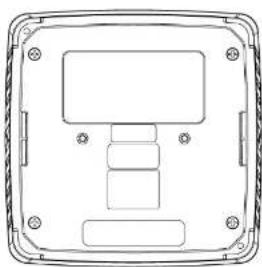
Pure technical diagram of a rectangular enclosure with internal components and mounting holes (no text or symbols)
Brand : Crestron
Model : PYNG-HUB
Category : Home Automation Controller