
PFT1200 - Network Card/Adapter Dahua Technology - Free user manual and instructions
Find the device manual for free PFT1200 Dahua Technology in PDF.


| Product Type | Hi-PoE Midspan (Network Adapter) |
| Brand | Dahua Technology |
| Model | PFT1200 |
| Ports | 1x RJ45 10/100/1000M (Data IN, non-PoE), 1x RJ45 10/100/1000M (PoE OUT) |
| PoE Standard | Hi-PoE (60W) |
| Max PoE Power | 60W |
| Lightning Protection | Level 3 |
| Indicators | Power (green), PoE (green) |
| Power Input | AC 100-240V, 50/60Hz |
| Power Output | DC 53V, 1.2A |
| Power Consumption | 65W (unit device) |
| Operating Temperature | -30°C to 65°C |
| Operating Humidity | 10% to 90% |
| Dimensions (W x H x D) | 150mm x 70mm x 39mm |
| Weight | 390g |
| Installation | Wall mount (screws not included) |
| Application | PoE transmission for IP cameras, supports multilevel cascade |
| Safety | Avoid lampblack, steam, dust; do not expose to high temperature or humidity; use proper power line; do not disassemble without professional instruction |
| Maintenance | Clean with dry cloth; do not use liquid cleaners |
| Data Rate | 10/100/1000 Mbps per port |
Frequently Asked Questions - PFT1200 Dahua Technology
User questions about PFT1200 Dahua Technology
0 question about this device. Answer the ones you know or ask your own.
Ask a new question about this device
Download the instructions for your Network Card/Adapter in PDF format for free! Find your manual PFT1200 - Dahua Technology and take your electronic device back in hand. On this page are published all the documents necessary for the use of your device. PFT1200 by Dahua Technology.
USER MANUAL PFT1200 Dahua Technology
Hi-PoE Midspan User's Manual
Important Safeguards and Warnings
Please read the following safeguards and warnings carefully before using the product in order to avoid damages and losses.
Note
- Do not expose the device to lampblack, steam or dust. Otherwise it may cause fire or electric shock.
- Do not install the device at position exposed to sunlight or in high temperature. Temperature rise in device may cause fire.
- Do not expose the device to humid environment. Otherwise it may cause fire.
- The device must be installed on solid and flat surface in order to guarantee safety under load and earthquake. Otherwise, it may cause device to fall off or turnover.
- Do not place the device on carpet or quilt.
- Do not block air vent of the device or ventilation around the device. Otherwise, temperature in device will rise and may cause fire.
- Do not place any object on the device.
- Do not disassemble the device without professional instruction.
Warning:
- Please use battery properly to avoid fire, explosion and other dangers.
- Please replace used battery with battery of the same type.
- Do not use power line other than the one specified. Please use it properly. Otherwise, it may cause fire or electric shock.
Table of Contents
1 Product Overview ...... - 1 -
1.1 Features....- 1 -
1.2 Typical Application....- 1 -
2 Device Structure ...... - 2 -
2.1 Appearance Port....- 2 -
Front panel....- 2 -
Rear panel - 2 -
3 Installation Guide....- 3 -
4 Appendix 1 Technical Specification ....- 4 -
1 Product Overview
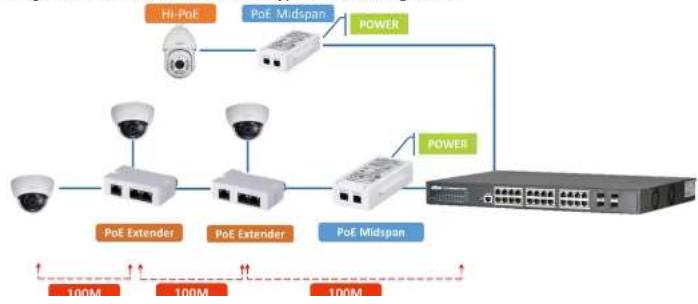
Hi-PoE Midspan is mainly used to provide PoE transmission for IPC. Meanwhile, it is equipped with PoE extender with multilevel cascade, providing long-distance PoE transmission for IP Camera.
1.1 Features
● Support Hi-PoE 60W PTZ camera PoE transmission.
- Port: 1*RJ45 10/100/1000M non-PoE port, 1*RJ45 10/100/1000M PoE port.
- Indicator status: power (normal power on), PoE (Ethernet power supply).
- Operating temperature: -30°C \~ 65°C.
● Installation mode: wall mount.
1.2 Typical Application
See Figure 1-1 for mode details about typical networking scene.
flowchart
graph TD
    A["Security Camera"] --> B["Midspan Device"]
    B --> C["Power"]
    C --> D["Switch"]
    D --> E["100M Capacity"]
    A --> F["Midspan Device"]
    F --> G["Power"]
    G --> D
    style A fill:#f9f,stroke:#333
    style D fill:#bbf,stroke:#333
    style E fill:#dfd,stroke:#333
2 Device Structure
2.1 Appearance Port
Front panel
The front panel is shown in Figure 2-1.
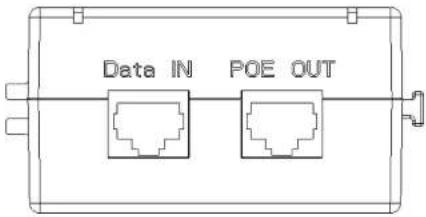
Figure 2-1
Refer to Table 2-1 and Table 2-2 for more details.
| Indicator | Note | Color | Device Status |
| PWR | Power status indicator | Green | Normal power connection |
| PoE | PoE power output indicator | Green | Normal power supply transmission |
Table 2-1
| Port Name | Note |
| DATA | 1*10/100/1000M RJ45 port, used to connect to uplink device, it only transmits Ethernet data for non-PoE port. |
| PoE | 1*10/100/1000M RJ45 port, used to connect to IP Camera or PoE extender, PoE power supply. |
3 Installation Guide
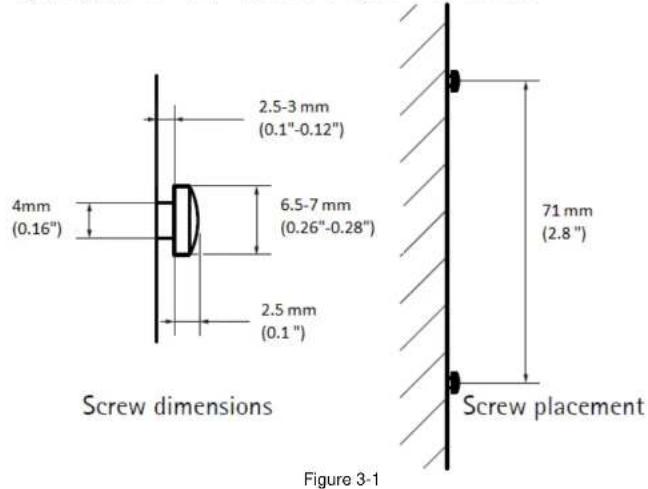
Hi-PoE Midspan supports wall mount. Please refer to Figure 3-1 for more details.
4 Appendix 1 Technical Specification
| Technical Parameter | PFT1200 |
| Port | 1*10/100/1000 Base-T1*10/100/1000 Base-T POE power supply |
| PoE Power Supply | Support Hi-PoE 60W |
| Lightning Protection Level | Level 3 |
| Indicator | Power indicator, PoE status indicator |
| Power | AC 100~240 V, 50/60HZ inputDC53V 1.2A output |
| Power Consumption | Unit device 65W |
| Operating Humidity | 10%~90% |
| High & Low Temperature | -30°C~65°C |
| Weight | 390g |
| Dimension | 150mm*70mm*39mm |
Table 4-1
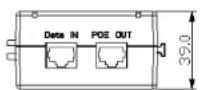
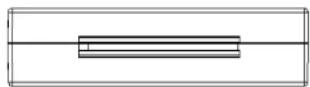
Please refer to Figure 4-1 for the device dimension.
Note
● This user's manual is for reference only.
● Slight difference may be found in user interface.
● All the designs and software here are subject to change without prior written notice.
- All trademarks and registered trademarks are the properties of their respective owners.
- If there is any uncertainty or controversy, please refer to the final explanation of us.
- Please visit our website for more information.
Brand : Dahua Technology
Model : PFT1200
Category : Network Card/Adapter