
PB-CJ6000 - Power bank Laser - Free user manual and instructions
Find the device manual for free PB-CJ6000 Laser in PDF.


| Product Type | Jump Starter Power Bank |
| Model | PB-CJ6000 |
| Brand | Laser |
| Battery Capacity | 6000 mAh |
| Input | Micro USB (5V, 2A) |
| USB Output | 5V, 2.1A |
| Jump Start Current | 200A peak |
| Dimensions | 200 x 100 x 30 mm |
| Weight | 500 g |
| LED Light | Yes, single lamp |
| Charging Time | 4-6 hours |
| Operating Temperature | -10°C to 50°C |
| Warranty | 12 months |
| Package Contents | Power bank, alligator clip cables, 3-in-1 USB charging cable, cigarette lighter USB charger, quick start guide |
Frequently Asked Questions - PB-CJ6000 Laser
User questions about PB-CJ6000 Laser
0 question about this device. Answer the ones you know or ask your own.
Ask a new question about this device
Download the instructions for your Power bank in PDF format for free! Find your manual PB-CJ6000 - Laser and take your electronic device back in hand. On this page are published all the documents necessary for the use of your device. PB-CJ6000 by Laser.
USER MANUAL PB-CJ6000 Laser
Product Connection and Use
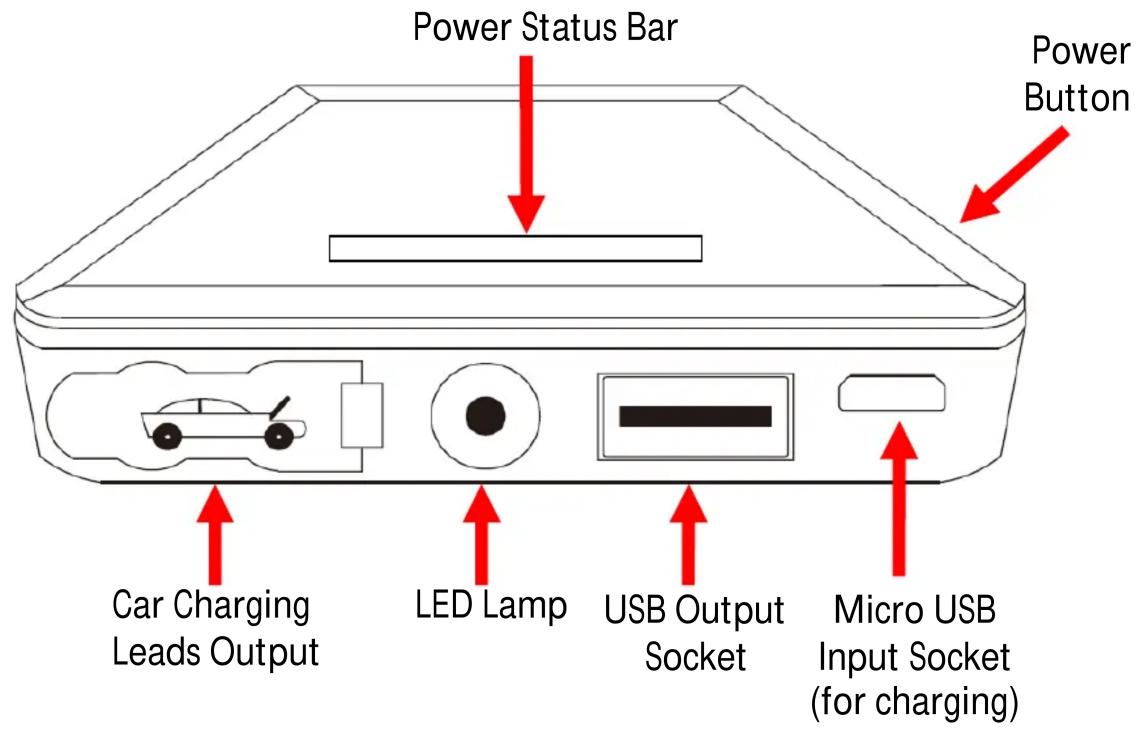
What's in the box
Back up Battery, Charger alligator clip cables, 3 in 1 USB charging cable, Cigerette Lighter USB Charger, Quick start guide (this document)
Indicator Lights
| Indicator Lights | No Light | All flash | 1 Lights | 2 Light | 3 Light | 4 Light | 5 Light |
| State Of Charge | 0% | 10% | 20% | 40% | 60% | 80% | 100% |
On/ Off button
To turn the device on, press the POWER BUTTON.
To turn the LED LIGHT on, press the POWER BUTTON twice.
To turn the LED LIGHT off, press repeatedly (refer to the diagram on the back of the battery)
Charging the Power Bank
Using a USB mains powered charger, plug the cable into the PW-CJ6000 (mini-USB end) or you can use the car charger provided, however this will take longer than the mains charger. The LED light display will then start to flash. It is recommended that you charge the unit overnight before the first use, then top up the unit as needed.
PB-CJ6000
QUICK START GUIDE
Charging from your power bank
Once you have connected your device for charging (an iPhone for example), press the power button on the power bank. The charging bar on your power bank will then illuminate and charging will begin.
Connection and Use
Step 1:
Connect positive & negative clips to car battery

Step 2:
Connect battery clips to the jump start battery
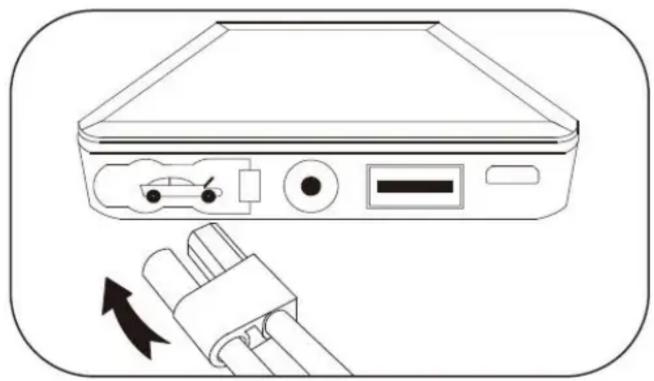
NOTE: TAKE NOTE OF THE BATTERY POLARITY BEFORE CONNECTING
Step 3:
Start car normally
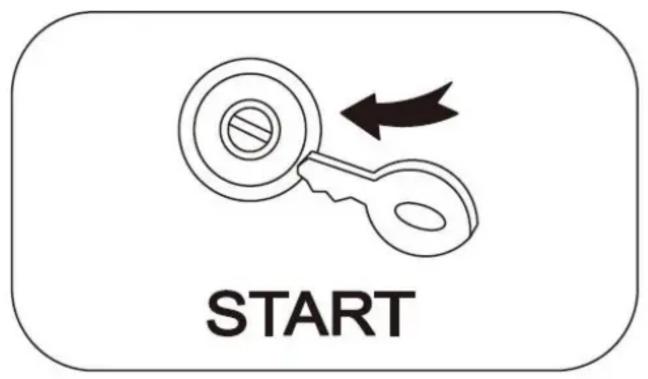
Step 4:
Remove battery clips from jump start battery

Product Specification
USB OUTPUT - 5V 2.0AMP: Suits any USB chargeable device such as iPhone, iPad, Samsung P1000, Moto MH900 and MID Contains intelligent protection for over-charge, over-discharge and short-circuit protection
Warranty Against Defects
Laser Corporation Pty Ltd (“Laser”) warrants your new product to be free from defects in materials and workmanship for 12 months, from the date of purchase, provided that the product is used in accordance with accompanying recommendations or instructions where provided. The benefit of this warranty is in addition to your rights under the Australian Consumer Law and to other rights and remedies of the consumer under a law in relation to the goods or services to which the warranty relates.
Through a network of retailers and resellers, Laser will provide you with your choice of a repair, exchange (where possible) or refund (within Dead on Arrival period) for this product if it becomes defective within the warranty period. This warranty will no longer apply where the defect is a result of alteration, accident, misuse, abuse, normal wear and tear, neglect or improper storage. Please retain your receipt as proof of purchase How to make a product warranty claim:
Step 1: Find your receipt which proves the date of purchase. Where the date of purchase cannot be verified, your place of purchase or Laser will make an assessment based on the date of manufacture, the condition of the Laser Product and the type of defect.
Step 2a): Contact your place of purchase. They will assess the nature of the fault and repair, replace or fund the product as per their store refund or warranty policy. Step 2b): If your place of purchase cannot be contacted, then you can contact Laser. Customer Service with details of your defective Laser Product: Phone: (02) 9870 3388; or Email: support@laserco.com.au or online www.laserco.com.au/warranty (click on “Consumers (End Users)”). Our business address is at 1/6-8 Byfield Street, North Ryde, NSW 2113. Step 3: Laser will issue you with a Return Authorisation (RA) number within 48 hours. When requested, send us the defective Product and a copy of your receipt. Laser will cover the cost of the return delivery. Step 4: Wait for us to contact you. Once we have received your defective Laser Product for inspection, we will inform you of our assessment of your claim within 7 days. When we contact you, we will firstly let you know whether you have a valid claim under this Warranty, and if so, we will inform you whether your defective Laser Product will be replaced or repaired, together with the number of days you can expect to wait to receive your replaced or repaired Laser Product. Step 5: For further details on warranty cover and returns, please check Terms and Conditions for Warranty Returns section on http://www.laserco.com.au/warranty
Our goods come with guarantees that cannot be excluded under the Australian Consumer Law. You are entitled to a replacement or refund for a major failure and compensation for any other reasonably foreseeable loss or damage. You are also entitled to have the goods repaired or replaced if the goods fail to be of acceptable quality and the failure does not amount to a major failure.

Brand : Laser
Model : PB-CJ6000
Category : Power bank