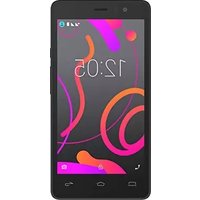
Aquaris A4.5 - Smartphone bq - Free user manual and instructions
Find the device manual for free Aquaris A4.5 bq in PDF.


| Product Type | Smartphone |
| Brand | bq |
| Model | Aquaris A4.5 |
| Display Size | 4.5 inches |
| Resolution | 480 x 854 pixels (FWVGA) |
| Processor | 1.3 GHz quad-core |
| RAM | 1 GB |
| Internal Storage | 8 GB (expandable via microSD up to 32 GB) |
| Rear Camera | 8 MP with autofocus and LED flash |
| Front Camera | 2 MP |
| Battery Capacity | 2100 mAh (removable) |
| Operating System | Android 5.1.1 Lollipop (upgradable to 6.0 Marshmallow) |
| Connectivity | 3G, Wi-Fi 802.11 b/g/n, Bluetooth 4.0, GPS, microUSB 2.0, 3.5 mm jack |
| Sensors | Accelerometer, proximity, ambient light |
| Dimensions | 134 x 66 x 8.8 mm |
| Weight | 125 g |
| Power Input | 5V / 1A via microUSB |
| Battery Charging Time | Approx. 2.5 hours (0-100%) |
| Standby Time | Up to 350 hours (3G) |
| Talk Time | Up to 8 hours (3G) |
| SIM Card | Micro-SIM (single or dual SIM variant) |
| Colors Available | Black, White |
Frequently Asked Questions - Aquaris A4.5 bq
User questions about Aquaris A4.5 bq
0 question about this device. Answer the ones you know or ask your own.
Ask a new question about this device
Download the instructions for your Smartphone in PDF format for free! Find your manual Aquaris A4.5 - bq and take your electronic device back in hand. On this page are published all the documents necessary for the use of your device. Aquaris A4.5 by bq.
USER MANUAL Aquaris A4.5 bq
The BQ team would like to thank you for purchasing your new Aquaris A4.5. We hope you enjoy using it.
Icon guide

Danger: This icon indicates situations that could pose a risk to personal safety or health.

Warning: Situations which pose no risk to personal safety or health, but could pose a risk to the correct functioning of the device.

Tip: Additional information to help you get the best out of your device.
Contents
07 Before You Start
07 Box Contents
08 Product Overview
09 Getting Started
09 Inserting a SIM Card
10. Inserting and Removing the MicroSD Cord
23 Phone
23 Managing Contacts
23 Adding a Contact
24 Editing an Existing Contact
24 Using a Contact
25 Contacts to Display
25 Importing and Exporting Contacts
26 Calls
28 Options Available During a Phone Call
29 Hiding Your Caller ID
29 SMS and MMS
30MessageSettings
31 Settings
31 WI-FI AND NETWORK SETTINGS
31 Wi-Fi
32 Bluetooth
33 SIM cards
34 Data Usage
34 More...
36 DEVICE SETTINGS
36 Display
36 Sounds and Notifications
38 Storage
38 Battery
38 Apps
38 Users
49PerformanceSettings
49 Optimising Battery Life
49 Monitoring Battery Usage Information
50Emailaddress
50 Setting up a Gmail Account
50 Sending an Email
50 Replying to an Email
51 Multimedia
52 Camera Mode
53 Video Mode
54 Settings
55PanoramicMode
55 Photo Sphere mode
55 Lens Blur mode
56 Photos
57 Play Music
57 Play Movies
58 Apps
58 Play Store
58 Apps from Unknown Sources
58PreinstalledApps
58InternetBro
59 Hangouts
59 Calendar
60 Maps and GPS Navigation
- Delby Audio
// Aquaris A4.5
Complete User Manual - English Before You Start
Before You Start
Box Contents
Before using your BQ smartphone for the first time, please check the contents of the box. If any of the following items are missing, please contact the vendor that sold you the device.
Aquaris A4.5
√ USB to micro-USB cable
√ SIM key
√ Documentation: Quick Start Guide Warranty and Safety Manual BQ Accessories
// Aquaris A4.5
Complete User Manual - English Before You Start
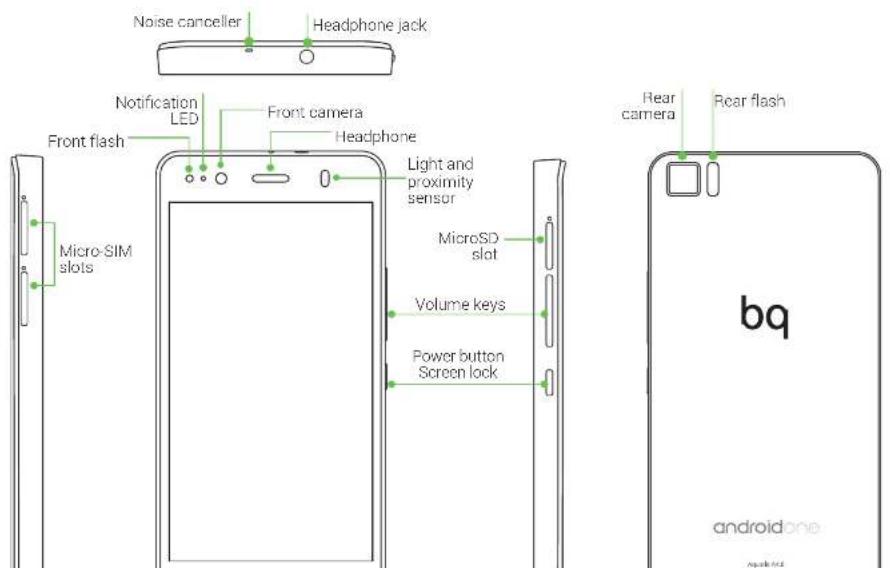
Product Overview
// Aquaris A4.5
Complete User Manual - English Getting Started

Getting Started
Inserting a SIM card
Your Aquaris A4.5 is a dual SIM smartphone (micro-micro) which accepts 4G cards in both slots.

You can access the SIM trays from the exterior of the device. Do not attempt to remove the battery cover.
You will find the SIM key inside the box containing your device. Make sure the device is switched off first, then insert it into the SIM slot and extract the tray. Place your SIM card into the tray. Make sure it is in the correct position by using the notch on the corner to guide you (see image). Insert the tray into the slot with the SIM inside it.
// Aquaris A4.5
Complete User Manual - English Getting Started

Inserting and Removing the MicroSD Card
The internal memory of your Aquaris A4.5 can be expanded to 64 GB using a MicroSD card.
To insert a MicroSD card, follow these steps:

Insert the end of the SIM key into the hole of the MicroSD tray.
Extract the tray and insert the MicroSD card, making sure the metal pins are at the bottom and facing towards the back of the device (see image).
To remove the MicroSD card, follow the steps above in reverse, bearing in mind the following recommendations:
a. For greater security, we recommend switching the device off before removing the MicroSD card
b. If you need to remove the MicroSD card while the device is switched on, unmount it
// Aquaris A4.5
Complete User Manual - English Getting Started

Switching the Device On and Off
To switch on your Aquaris A4.5, press and hold down the power button for a few seconds, which is located on the side of the smartphone.
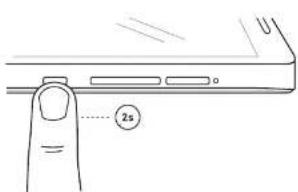

If you have inserted two micro-SIM cards into your device, you will need to enter the pin for each card when you switch it on. Every time your Aquaris A4.5 detects a new SIM, a pop-up window will appear informing you of the default settings for making phone calls, video calls, SMS and the data connection.
To switch off your device, hold down the power button for a few seconds. A menu will appear with various options. Select Power off.

If you press briefly on the power button, the screen will switch off but not the device.
// Aquaris A4.5
Complete User Manual - English Getting Started
Charging the Device and Transferring Files
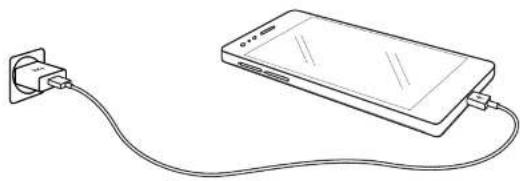
Your smartphone contains a rechargeable (non-removable) 2470 mAh battery, which is charged via the micro-USB port located at the bottom of the device. A USB (type A) to micro-USB (type B) cable is provided with the phone for charging the battery. To charge it, follow these simple steps:
A) Using a mains adapter (not included):
- Plug the USB cable into the mains adapter.
- Connect the mains adapter to any standard plug socket (220 V/50 Hz).
- Connect the other end of the cable to the micro-USB port on your smartphone.
natural_image
Line drawing of a smartphone connected to a plug, showing cable routing (no text or symbols)B) Using a laptop or desktop computer:
- Connect the USB cable to a compatible USB port on your computer.
- Connect the other end of the cable to the micro-USB port on your smartphone.
// Aquaris A4.5
Complete User Manual - English Getting Started
If you connect your smartphone to a computer using the USB cable, you can also transfer files between the two devices (to/from the internal memory, or the MicroSD card, if in use). This will allow you to use, copy or store images, videos, music, text documents, etc. on one or both devices.
You can select the file transfer mode when you connect your Aquaris A4.5 to a computer. When you connect it, press the Touch for other USB options message to see the USB computer connection menu. You can connect it as a Media device (MTP) or Camera (PTP).
There are a number of ways to transfer files. The steps below will show you how to transfer them via USB:

// Aquaris A4.5
Complete User Manual - English Getting Started
Setup Wizard
The first time you switch on your Aquaris A4.5, a setup wizard will help you to configure the basic settings for your device:
- Language
- SIM cards
• Wi-Fi network - Protect your phone
- Name of phone
- Google services


// Aquaris A4.5
Complete User Manual - English Desktop

Desktop
Screen Lock
Your smartphone screen will lock itself automatically after a prolonged period of inactivity. To configure the screen timeout interval, press the Menu button 🎨 go to Settings > Display > Sleep and select the desired interval. To switch the screen off manually, press the power button briefly.
To unlock the screen, press (but do not hold down) the power button and the screen will come on, displaying the unlock option. To change the unlock option, press the Menu button, go to Settings > Security > Screen lock and choose from the following options: None, Swipe, Pattern, PIN and Password. For more information on each of these options, go to Settings > Security.

If you forget how to unlock the screen, after various wrong attempts, the Forgot pattern message will appear at the bottom of the screen. If you press it you will be asked to enter the email address and password used to set up your smartphone. The screen lock will then be removed.
Your Aquaris A4.5 includes a new feature that enables you to lock and unlock your phone by double-tapping the screen. Simply tap any part of the screen twice in quick succession so that it lights up and requests the unlock pattern. When the screen is activated, a double tap anywhere in the notifications bar will lock and deactivate it.
This feature is disabled by default. You can activate it via Settings > Display > Double tap control.
// Aquaris A4.5
Complete User Manual - English Desktop

Home Screen
The Home screen or Desktop is your main access route to the tools and apps installed on your Aquaris A4.5. From here, you can check the status of your device, visit websites, open apps, and much more.

// Aquaris A4.5
Complete User Manual - English Desktop

Customising the Home Screen
The Home screen contains an initial desktop which can be extended to the right. To scroll through the Home screen and extended screens, simply slide your finger left or right across the screen.

You can customise these screens with images, shortcuts, apps and widgets. To change the wallpaper or add a widget, press and hold on one of the screens until a pop-up window appears containing these options:
- Wallpapers: Select the image you want to use as a background for the Home screen and extended screens and press Set wallpaper to confirm. If the image selected is too large, you will need to crop it.
- Widgets: Select the widgets you want to appear on the Home screen.
- Settings: A shortcut to the device Settings menu.
To create a new shortcut to an app or contact, go to the Apps menu, press on the relevant icon and drag it into the desired position on the desktop.
Moving and Deleting Icons on the Home Screen
To move an element on the Home screen, press and hold to detach it from the background, then drag it to the desired position and release. You can also move icons from one extended screen to another by dragging them to the edge.
To delete an icon, drag it to the top of the screen until on V and the word "Domovo" appear
// Aquaris A4.5
Complete User Manual - English Desktop

Adjusting Screen Rotation
For some apps, the screen will rotate automatically from portrait (vertical) into landscape (horizontal) mode and vice versa, depending on how you are holding your device. To lock the screen rotation, go to Settings > Display > When device is rotated and select Stay in current orientation.
You can also enable and disable automatic screen rotation using the Auto-Rotate toggle in the quick settings menu.
Learning to Use the Multi-Touch Screen
Your smartphone has a capacitive multi-touch screen with five simultaneous detection points. Different movements can be made over these points which are linked to different functions:

Touch. Touch the screen briefly to select an icon, open an app, activate a text-entry box, etc.

// Aquaris A4.5
Complete User Manual - English Desktop

Swipe or slide. Press briefly on the Home screen and slide your finger left or right across it to access the extended screens, or slide your finger up and down the screen to scroll through a website, list or menu.
Pinch. Place two fingers on the screen at the same time and move them towards one another or spread them apart to reduce or enlarge an image.

natural_image
Line drawing of two hands demonstrating finger movement with arrows indicating direction (no text or symbols)Double-tap. Tap the screen twice in quick succession to increase the zoom. Repeat the action to decrease it. You can also use it to activate the screen.

// Aquaris A4.5
Complete User Manual - English Desktop

Icons
The navbar is shown by default on screen to enable you to navigate through your device more easily.
When using an app, you can return to the previous screen by pressing the Back icon ◀.
You can go to the Home screen at any time by pressing the Home button ○. You can also touch and hold to access the Google Now application.
You can access the recent applications list by pressing the Menu button □.
Status Bar
The Status bar contains important information on the device and is always visible at the top of the screen.
Battery almost empty.
Battery charging.
Battery fully charged.
WiFi enabled and connected to a network.
sound off and vibrate on.
sound and vibrate off..
Aeplane mode.
// Aquaris A4.5
Complete User Manual - English Desktop

Notifications Bar
To view your notifications, pull the bar down with one finger. Delete all notifications by pressing the icon, or delete them individually by swiping it to the side. Using the icon, you can access the other quick settings and the multi-user option. You can also access this screen by pulling the bar down with two fingers. The notifications and quick settings have now been integrated into one screen. To receive notifications, you will need to configure the settings of each app that you download and/or for each account by going to: Settings > Accounts > Add an account. To go back to the Home screen, slide the bar upwards.


// Aquaris A4.5
Complete User Manual - English Desktop
Keyboard
Pressing on any text field will bring up the virtual keyboard.
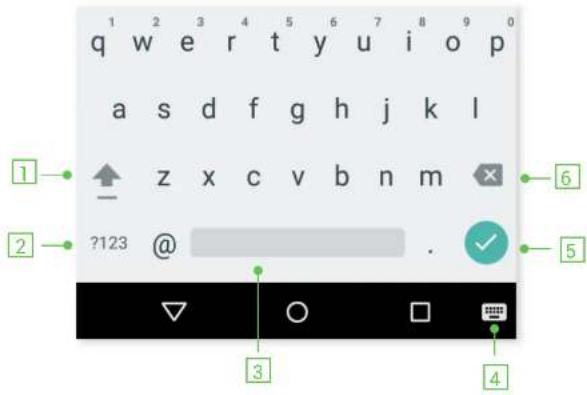
1 Enable/disable caps lock.
2 Change from letters to numbers and symbols, or vice versa.
3 Space.
4 Enables the keyboard function.
// Aquaris A4.5
Complete User Manual - English Phone
Phone
Managing Contacts
The Contacts application provides access to all of your saved contacts on your SIM card, the internal memory of your device and any online accounts you have set up. Different options will be available depending on where you have saved your contacts.
Using this application you can:
- Create new contacts.
- Update existing contacts.
- Create a group of contacts.
- Select the lists to be displayed.
• Make phone calls or send SMS.
Adding a Contact
You can add a new contact manually to your list via the Contacts app or via the Call history.
To add a contact manually:
- Access the Contacts app via the Home screen.
-
Press the + button and the list of available accounts will appear on screen enabling you to save the contact in the desired list of contacts.
-
Fill in the fields as desired:
a. First name and surname
b. Photo
// Aquaris A4.5
Complete User Manual - English Phone
To add a contact via Call history, press on Add to contacts or the icon to the left of the number you want to add (pressing directly on the number will call it) and then press the icon in the top right corner followed by Add to contacts. You can also select an existing contact and add a new number to it. Then select the account where you want to store the new contact, and fill in the details as described above.
Editing an Existing Contact
- Access the Contacts app via the Home screen.
- Select the contact you want to edit.
- Press the icon.
- Press on an existing field to edit it.
- Press on to save the changes.
Using a Contact
You can use the Contacts app to make a call, send a text message or communicate with the contacts you have added to the list via various channels.
Simply press the name of the person you want to contact and select the corresponding option. You can also press on the contact photo to bring up a quick menu. Here you can:
- Make a phone call
- Press the phone icon of the number you want to call.
- Send an SMS
- Press on 📋 and enter your message.
- Send an email
// Aquaris A4.5
Complete User Manual - English Phone
Contacts to Display
Select which contacts you want to be displayed from those saved to your Gmail account, your phone, your Facebook contacts and other lists.
To select the lists:
- Open the contacts list and press the : icon.
- Select the Contacts to display option.
- Select which contact groups you want to be displayed:
a. All contacts.
b. Gmail contacts.
c. SIM 1 contacts.
d. SIM 2 contacts.
e. Phone contacts.
f. Customise: Select sub-groups from within any of the previous options (family, friends, etc.)
Importing and Exporting Contacts
This option allows you to copy a series of contacts from one source and paste it to another account, app or the internal phone memory. To do this:
- Press on the : icon in the contact list.
- Press on Import/Export.
- Select the location for copying contacts.
- Select the destination for planting them
// Aquaris A4.5
Complete User Manual - English Phone
Calls
Press the phone icon on the Home screen to access the call menu where favourites and the numbers you call frequently will appear. Press on the Contacts app to access the list of contacts. From Recents, you can access the incoming and outgoing Call history, in chronological order. You can also access this menu when your device is locked by swiping from the bottom left corner to the right. This menu enables you to:
- View the contacts that you call the most
- View the incoming and outgoing call history
- Make calls
There are a number of ways to make a phone call:
VIA CONTACTS
- Access the Contacts list by any of the above methods.
- Press the name of the contact you want to call.
- Press on the number or the icon to call.
VIA CALL HISTORY
- Press the phone icon on the Home screen.
- Press on Recents.
- Press the contact you want to call and then select Call Back.
VIA THE KEVPAN
// Aquaris A4.5
Complete User Manual - English Phone

When you receive an incoming call, you can choose to answer it, reject it or respond via text message.
When a call is received, the screen will display the phone number calling you and a circle of blinking dots. Choose from the following options:
- Press the circle and drag it to the left to reject the call.
- Press the circle and drag it to the right to answer the call.
- Press the circle and drag it upwards to respond with a text message.
If you receive a call when your device is not locked, a dialogue box will appear at the top of the screen to notify you. Press on Answer to take the call or Diemise to reject it

Samantha
Incoming call
11:50
[Non-Text]
// Aquaris A4.5
Complete User Manual - English Phone

Options Available During a Phone Call
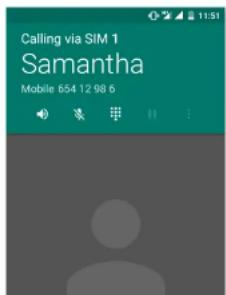
If you have answered the call, the top of the screen will show the caller's name (if stored on your lists of contacts), the phone number (mobile and/or landline) and the SIM card network in use for this call.
Various options will be displayed at the bottom of the screen during the call:
Activate the external speaker for hands-free operation.
Aute the internal microphone.
Open the keypad.
Hause the call and place the caller on hold.
- Enables you to add another call and start recording.
End the call.
// Aquaris A4.5
Complete User Manual - English Phone
Hiding Your Caller ID
- Press the Icon on the Home screen
- Press the icon and select Settings.
- Select Calling accounts.
- Select the SIM that you want to configure.
- Additional settings
- Press Caller ID.
- Select the Hide number option.

Making a test call is recommended to check that you have hidden your number correctly. Some network operators do not allow hidden numbers and your number may still be displayed on outgoing calls.
SMS and MMS
Go to Messenger via the apps menu or the shortcut on the Home screen.
You can then specify the recipient(s) by entering their name(s) in the bar at the top of the screen or by pressing on the contact. If the recipient's number is not stored on your contact list you can type it in directly.
You also have to option to send an MMS (multimedia message). Press the 📄 icon located to the left of the text entry bar. On pressing this icon, a variety of multimedia options will appear for attaching files to the MMS:
- Capture picture.
C. 10.2.1.1
// Aquaris A4.5
Complete User Manual - English Phone
Message Settings
Via the Messenger app you can configure various options for sending and receiving SMS and MMS. Press the icon and go to Settings to configure:
- Default SMS app.
- Outgoing message sounds.
- Notifications.
- Sound.
- Vibrate.
-
Advanced options.
-
MMS
* Your phone number.
* Auto-retrieve.
* Roaming auto-retrieve.
- Advanced options.
- SMS delivery reports.

// Aquaris A4.5
Complete User Manual - English Settings
Settings
Wi-Fi and Network Settings

W|FI
Go to Settings > Wireless and networks > Wi-Fi.
If Wi-Fi is disabled, move the selector to the right and your BQ device will automatically search for and display a list of available Wi-Fi networks, which updates automatically.

// Aquaris A4.5
Complete User Manual - English Settings
To access the Network notification, Scanning always available, Keep Wi-Fi on during sleep, Install certificates, Wi-Fi Direct, WPS Push Button and PIN options, go to Settings > Wireless and networks > Wi-Fi. Then press the icon and select Advanced settings.
PIN-WPS. Depending on the router you are using, this tool makes it easier to connect to your Wi-Fi network securely, using a pin. You can connect and sync your smartphone with your router by going to Menu > WPS PIN or by pressing the physical WPS PIN button on your router.

BLUETOOTH
Enable Bluetooth by going to Settings > Bluetooth and moving the tab to the right.
To rename your smartphone, show received files or access the advanced settings, press the icon.

// Aquaris A4.5
Complete User Manual - English Settings

SIM CARDS
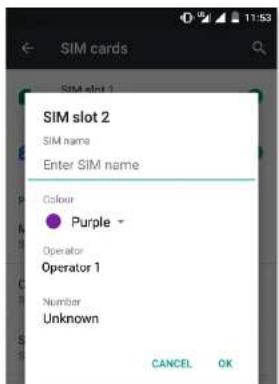
If you are using two SIM cards in your device, you can configure them here. To access information on the two cards, you will need to enable them first by sliding each of the tabs to the right.
You can enable, disable and configure each card for making voice calls, video calls, sending texts and for mobile internet. You can also customise each SIM with a different colour. This way it will be easier for you to identify the notifications received for each of your SIMs.

// Aquaris A4.5
Complete User Manual - English Settings


DATA USAGE
In this section, you can view the statistics of each application for data transfers via Wi-Fi or mobile internet.
You can also Restrict background data, Show data consumption on the Lock screen and see how much data is consumed by the various resources and apps for each SIM card.
If you set a limit for mobile data usage, the data connection will be disabled once the limit has been reached.

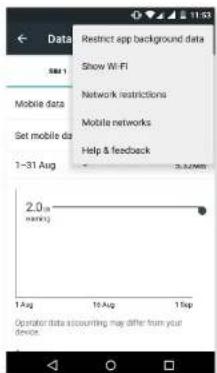
Press the icon to access the advanced settings and Restrict background data, Show Wi-Fi, Network restrictions and Mobile networks options, where you can enable roaming.

Both SIM slots support 4G coverage and you can choose the either one of them.
// Aquaris A4.5
Complete User Manual - English Settings

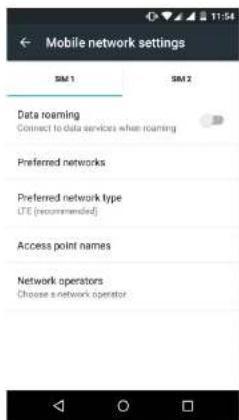
To share your connection via USB, connect your BQ to a computer using the cable and select the USB tethering option.
To share your connection via Bluetooth, select the Bluetooth Tethering option. To share your device's network with a computer, Bluetooth must be enabled on both devices.
VPN: This option enables you to configure a virtual private network.
Mobile networks: Access the settings for both SIM cards where you can enable data roaming, select the preferred network type, set up the APN and select a network operator.
// Aquaris A4.5
Complete User Manual - English Settings
Device settings

DISPLAY
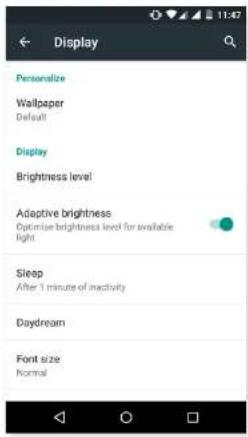
Wallpaper: Select an image or video to use as wallpaper. You can choose between live wallpaper, system wallpaper or photos from your Gallery or video images.
Brightness level: Adjust the brightness of the screen.
Adaptive brightness: Optimise the brightness level to the light available.
Sleep: Set the time delay before the screen automatically switches off.
Screensaver: Enable or disable this option.
Font Size: Choose from four different font sizes.
When device is rotated: Enable or disable automatic screen rotation when turn your smartphone sideways.
Double tap control: Enable or disable this option so you can switch the display on or off by double tapping the screen.

SOUNDS AND NOTIFICATIONS
// Aquaris A4.5
Complete User Manual - English Settings

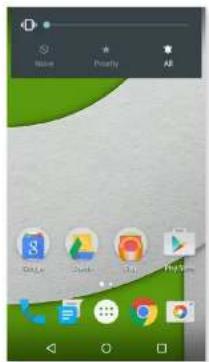
You can quickly access these settings using the volume keys. You can also configure interruptions. Choose from the following options: None; Allow only priority interruptions (you can also configure it by pressing ⚙), or All, which enables sound for all notifications.

Dolby Audio
Under Dolby Audio, you can Launch the app to configure it, which is explained later, or you can select a Profile.
Notification
// Aquaris A4.5
Complete User Manual - English Settings


STORAGE
You can also check the usage of the various storage units, unmount the SD card to remove it safely and erase all data from the SD card or internal memory.
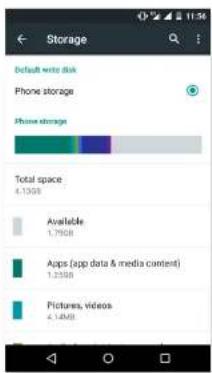


If you remove the MicroSD card from the device and continue using it, some of your apps might not function until you reinsert it. Make sure you switch off the phone or safely remove the MicroSD card (via the Storage menu) every time you remove it or insert it, otherwise the card could get damaged and data could be lost.
// Aquaris A4.5
Complete User Manual - English Settings
Personal Settings

LOCATION
Activating this option allows access to your location to apps that request it (such as preinstalled navigation maps). The Power Control widget also allows you to activate the GPS satellites option, or alternatively, it can be activated by pulling the Notifications bar down with two fingers and selecting the Location option.

// Aquaris A4.5
Complete User Manual - English Settings

SECURITY
Here you can configure the Screen lock (the locking method and the owner information displayed on screen when locked), enable Encryption with an access password or PIN number, and set up SIM card lock.
The Smart Lock option allows you to add Trusted devices, Trusted places or a Trusted face. Trusted places can be easily added by dragging the marker on the map or searching by name of location. The device will not request the password, PIN or pattern if you are in a location which has been saved as a Trusted place.


// Aquaris A4.5
Complete User Manual - English Settings

CCOUNTS
Here you can choose which email accounts (POP, IMAP or Exchange) you want to sync with your BQ. To add a new account, press the Add account icon. Select an Exchange (email for business) or Google account. Set up the account by following the instructions that appear on the screen. Then press on the email address to sync your email, contacts, calendar and other options (provided that syncing is permitted by the service provider). You can enable or disable automatic syncing by pressing the ● icon.

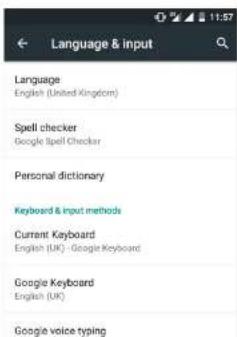
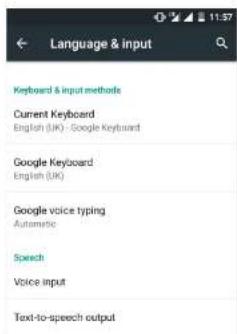
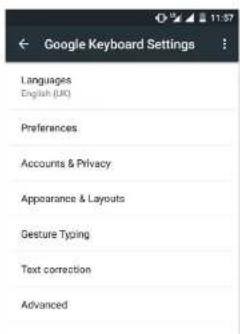
LANGUAGE AND INPUT
Here you can set up the system language, activate spell checker and personal dictionary. You can also configure the keyboard, text input methods, voice typing and pointer speed.
// Aquaris A4.5
Complete User Manual - English Settings


ACKUP AND RESET
Here you can back up your data, app settings, Wi-Fi passwords, etc. to the Google data servers. To back up your data, a Google account must be configured on your device.

You can also carry out a factory data reset and delete all pending DRM (digital content protection) licences if you have already deleted the corresponding files.
// Aquaris A4.5
Complete User Manual - English Settings
System Settings

DATE AND TIME

Automatic date and time: Adjust the time automatically based on location information or mobile network. Disabling this option will activate manual date and time configuration.
// Aquaris A4.5
Complete User Manual - English Settings

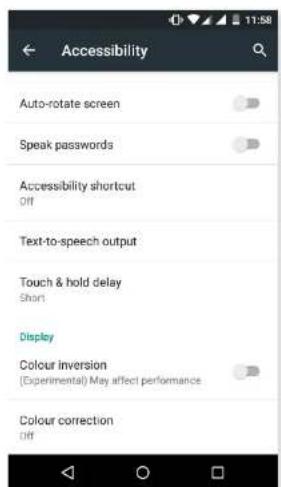
ACCESSIBILITY
Here you can access certain system services to facilitate access to the device, such as large text, spoken word, physical buttons and virtual buttons, spoken passwords, quick boot, etc.

// Aquaris A4.5
Complete User Manual - English Settings
Speak when screen is off: This option enables/disables voice notifications when the screen is off.
Use proximity sensor: Enables/disables the proximity sensor to turn off speech whenever you want.
Shake to start continuous reading: Enable the continuous reading function by shaking your device.
Speak caller ID: Enables/disables the option to say the name of the person calling.
Vibration feedback: Enables/disables vibration feedback when an option is selected.
Sound: Enables/disables sound feedback when an option is selected.
Focus speech audio: Enables/disables the option to reduce multimedia volume during a conversation.
Sound volume: Adjust the sound volume in relation to multimedia volume.
Explore by touch: Enables/disables the touch navigation feature which allows you to browse your smartphone using gestures, pressing once to select and twice to accept.
Automatically scroll list: Enables/disables automatic scrolling of lists.
Single-tap selection: Enables/disables the option to select with a single tap, when the option has been selected beforehand.
Launch 'Explore by touch' tutorial: Launches the tutorial for touch navigation.
Manage gestures: Modify and configure a range of gestures in order access various accessibility options.
Manage customised labels: Edit the contents of your custom labels.
Resume from suspend: You can specify whether the program resumes when the screen is activated, when the screen is locked or only via the Notifications bar.
// Aquaris A4.5
Complete User Manual - English Settings
Magnification gestures: This function enables you to zoom in or out of the screen. The following gestures are available:
To zoom in, triple-tap the area you want to magnify.
To zoom out, triple-tap the magnified area.
To scroll freely, slide two or more fingers left, right, up or down.
To decrease the zoom, pinch the screen with two fingers or spread them apart to increase it.
To expand the content temporarily, triple-tap the area you want to expand and move around the page without lifting your finger off the screen.
Zoom does not affect the keypad or the navigation bar.
Large text: Enables/disables magnification of the system font size and the font size for apps to facilitate viewing of content.
High contrast text: An experimental feature that changes the text displayed on the device to black or white (depending on the colour of the original text) for easier reading.
Power button ends call: Enables/disables the option to hang up by pressing the power button.
Auto-rotate screen: Enables/disables automatic screen rotation when the screen is placed in a horizontal position. This option is not activated via the Home screen and the native Apps menu.
Speak passwords: Enables/disables the option to speak passwords when the TalkBack service is activated.
Accessibility shortcut: Using YES/NO commands, you can enable or disable direct access to accessibility features by pressing the power button until you hear a sound or feel a vibration. Then touch and hold the screen with two fingers until a confirmation is received.
Text-to-speech output: Direct access to options for text-to-speech output. To adjust these options, go to Settings > Language and input > Text-to-speech output.
// Aquaris A4.5
Complete User Manual - English Settings


PRINTING
Android 5.1 1 comes with wireless printing included as standard and the application also allows you to connect your printer to the internet (check compatibility with your printer manufacturer). This feature lets you wirelessly sync the printer with your smartphone, tablet or computer and print your documents from any location.

ABOUT PHONE
This section displays the status of the device (battery, network, serial number, etc.), legal information, Android version, model number, baseband, kernel versions and the build number. You can search manually for updates (for more information on firmware updates, see APPENDIX A at the end of this manual).
// Aquaris A4.5
Complete User Manual - English Settings
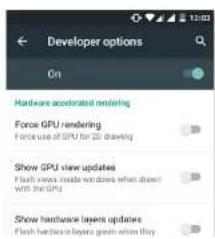
{ } DEVELOPER OPTIONS
This section is intended for advanced users only, as it contains settings that are useful for app developers. These settings should not be modified if you are not an advanced user.
The menu includes various options, such as:
• Take bug report.
- Stay awake.
- Process stats.
- USB debugging.
- Allow mock locations.
- Force GPU rendering.
- Show CPU usage.
- Background process limit.


// Aquaris A4.5
Complete User Manual - English
Performance Settings
Performance Settings
Optimising Battery Life
You can prolong the life of your battery by disabling features you don't need. You can also can control how the application and system resources consume battery power. To optimise the configuration, press the Apps menu 🎨 and go to Settings.
- If you are not using Wi-Fi, Bluetooth or GPS, you can configure it under Settings, as explained earlier.
- Any maps and navigation apps that you are not using should be closed, as they require GPS access and consume more power.
- Optimise the brightness level to the ambient light available under Adaptive brightness. You can adjust it by going to Settings > Display > Adaptive brightness.
- Select a short screen timeout interval, by going to Settings > Display > Sleep.
- Disable the auto-sync feature for certain apps, by going to Settings > Accounts. Note that you need to sync your email accounts manually, and you will not receive any notification when updates becoming available.
- Switch to Aeroplane mode by holding down the power button until a window displaying this option appears, or go to Settings then Network to select it.
Monitoring Battery Usage Information
To optimise your battery configuration, go to Settings > Battery. The list at the bottom of the screen shows battery use for the various apps and services on your device. Press the graph to access more detailed information. The screen showing use details for some apps also has buttons with recommendations on how to adjust your settings for maximum energy saving...
// Aquaris A4.5
Complete User Manual - English Email address
Email address
Setting Up a Gmail Account
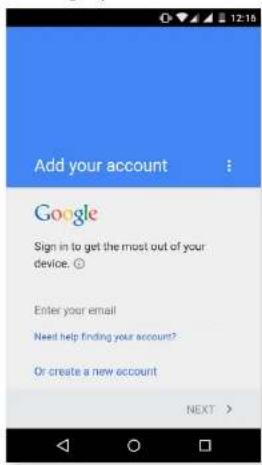
You will need to set up a Gmail account the first time you switch your device on or whenever you carry out a factory reset (deleting all data).
If you don't have an account already, the system will ask you to set one up to access certain features of the device. If you already have an account, you can use it for this initial setup process.
Some apps will not be available until you have correctly configured an account. Make sure that Gmail is always updated to avoid any issues.
From within Gmail (which can be accessed via the Apps menu) you can access your inbox and adjust various settings, such as how emails are displayed, how you can read and reply to them, and notifications. You can also group several accounts together, so that you receive emails from different addresses at the same time.
Any account is accountable with the Gmail app.
Sending an Email
- Open the Email app and press Compose

// Aquaris A4.5
Complete User Manual - English Multimedia
Multimedia
Your smartphone has both front and rear cameras. To enable them go to Apps menu > Camera. To switch from one to other, press on the..., icon at the bottom right of the screen and then press. Both cameras can be used to take pictures and record videos. The rear camera also has autofocus and flash.


natural_image
Profile portrait of a man wearing a hat and glasses, outdoors with green foliage background (no text or symbols visible)
natural_image
Portrait of a bearded man wearing a hat and glasses, with a green circular icon overlay (no readable text or symbols)Swipe gently from left to right to access these options: Photo Sphere, Panorama, Lens Blur, Camera or Video.
// Aquaris A4.5
Complete User Manual - English Multimedia
Camera Mode
You can access the settings by pressing the icon in the bottom right corner.

natural_image
Profile portrait of a man wearing a hat and glasses, outdoors with blurred greenery background (no text or symbols visible)
natural_image
Portrait of a man wearing a hat and glasses, outdoors with greenery background (no visible text or symbols)Here is a brief explanation of the icons:
: Enables or disables the countdown timer. You can select an interval of 3 or 10 seconds.
: Creates a grid to make it easier to frame photos.
und · High Dynamic Range is a photo mode that increases the contrast of images without
// Aquaris A4.5
Complete User Manual - English Multimedia
Video Mode
You can access the settings by pressing the icon in the bottom right corner. Here is a brief explanation of the icons of the menu:

natural_image
Portrait of a man wearing a beige hat and glasses, outdoors with blurred greenery background (no text or symbols visible)
natural_image
Portrait of a man with glasses and a hat, outdoors with blurred greenery background (no visible text or symbols): Creates a grid to make it easier to frame the video.
A: You can select automatic flash mode or to enable and disable it manually.

// Aquaris A4.5
Complete User Manual - English Multimedia

SETTINGS
You can access the settings by swiping gently to the left to right.


On swiping to the right, a Settings 🔒, icon and a menu to adjust the Photo Sphere, Panorama, Lens Blur, Camera and Video settings will appear.
Resolution & quality
- Camera
- Rear camera photos: Set the resolution for photos taken with the rear camera.
- Front camera photos: Set the resolution for photos taken with the front camera.
Video
// Aquaris A4.5
Complete User Manual - English Multimedia
Help and feedback
Access instructions and tips on how to use the camera.
Panoramic Mode
To access the settings, press the ☐ in the bottom right corner, which will enable you to select the panoramic mode from these options: horizontal, vertical, wide angle and fish eye. Try to keep the movement as straight as possible to capture the best shots. A number of white circles will guide you through the process, which turn blue as you start to capture the image. Once you have completed the process, the frames will be saved automatically.
You can also interrupt the panorama by pressing the √ button half-way through the process.
Photo Sphere mode
This feature enables you to take spherical photos in any direction with an angle of up to 360°.
A number of white circles will guide you through the process, which turn blue as you start to capture the image.
Press the √ icon to finish the capture.
Lens Blur mode
This feature enables you to take pictures with one or various objects in focus and the rest out of focus.
Try to hold it as straight as possible and follow the white arrow to achieve optimum results.
You can access the settings menu by pressing the ••• icon in the bottom right corner, where you will see the following icons:
// Aquaris A4.5
Complete User Manual - English Multimedia

Photos
To view the images and videos stored on your device, go to the Photos app located on the Home screen.
The main screen of the Photos app allows you to browse the images and videos stored in various different locations on your device.
Press a folder to access its content. Press on an image to view it. To view a video, press on it and the Video player will open.
To access the gallery after taking a photo or recording a video, press the circle in the bottom right corner or swipe gently to the left.

natural_image
Side-by-side comparison of a man wearing a hat and glasses, showing a change in the image from left to right (no text or symbols visible)While you are viewing an image you can also access the following options:
// Aquaris A4.5
Complete User Manual - English Multimedia

Play Music
Your smartphone comes with a preinstalled audio player, which allows you to play your favourite music and audio tracks and is also integrated with the app store, enabling you to purchase and download music.
There are two ways you can load music onto your device:
- Connect your phone to your computer in Mass storage mode and transfer the music to the internal memory. To do this, simply connect the phone to the computer using the USB cable provided, copy the files from your computer and paste them into the Music folder in your phone's internal memory or onto the MicroSD card, if one is in use.
- Open the Play Music app and go to the Play Store via the icon in the main menu, where you can search for and browse a large quantity of artists and songs, purchase them and add them to your own music collection.
Once you have downloaded the music onto your phone, you can find it by going to the main menu in the Play Music app and selecting the My Library option. You can organise your music by genre, artist, album or song list.

The artist, album and other information used by the app to create the playlists can also be modified using your computer. Right-click on the file you wish to edit, then select Properties > Details in the pull-down and pop-up menus, respectively.
You can also conduct a keyword search within your music library in order to locate all the albums, songs, etc. that match the description you have entered.
Once you have selected a song, simply press it and a bar will scroll across the screen displaying information on the song currently playing. To open the panel of player options, press the bar located at the bottom of the screen. This panel gives you options such as continuous playback (press the icon on the left to play the list of selected songs again when it has finished), repeat the last song, pause, skin and random.
// Aquaris A4.5
Complete User Manual - English Apps

Apps
Play Store
The App store gives you access to a huge range of programs, games, music, movies, books, and more. Each category contains further sub-categories to help you find exactly what you are looking for.

Important: Be aware that not all downloads are free, and additional costs may be incurred. For paid downloads, the price will appear next to app description, and you will be asked to confirm before downloading to avoid being charged unintentionally.
Apps from Unknown Sources
To order to download apps from another app store or a website, you will first need to configure the system to accept apps installed from unknown sources. Go to Settings > Security and move the Unknown sources slider to the right. Remember to only install apps from trusted sources.
To install apps from outside a website, you must be able to access the *.apk file on your device. These apps are usually compressed using a program such as WinRAR, which means the downloaded file is a *.rar file and will need to be unzipped using a computer..
On opening the *.apk file, the system will ask you to confirm installation of the app. After pressing Accept. the

// Aquaris A4.5
Complete User Manual - English Apps
Press the Menu button to access the following options:
- Go back/forward ← →: This option enables you return to websites you have recently visited, and move forward again to the most recently viewed page.
- Add bookmark ☆: This option enables you save a page so that you can easily return to it later. Bookmarks can be grouped into folders.
- Reload pageUpdate the current page to refresh its content.
- New tab: Opens a new tab so you can browse different websites at the same time.
- New incognito tab: browse in a private tab that is not stored in the browser history.
- Bookmarks: Lets you access the list of saved bookmarks.
- Recent tabs: Access the list of recently-closed tabs and restore them if desired.
- History: Provides a chronological list of the websites you have recently visited.
- Share: Enables you to share a website with other users.
- Print: Enables you to print the current page to a compatible wireless printer.
- Find in page: Search for a specific word or phrase on the current page.
- Add to home screen: Select a website to appear as your home page on opening the browser.
- Request desktop site: By ticking this box, you will be able to view a website exactly as you would on a computer and eliminate special versions for mobile devices.
- Settings: Gives you access to the basic and advanced browser settings.
- Help & feedback: This option allows you to view feedback from other users, give your own opinion and access the Help section.
// Aquaris A4.5
Complete User Manual - English Apps

Maps and GPS Navigation
Your smartphone comes with a preinstalled Maps application which enables you to find your current location on the map (for greater accuracy, enable the GPS), view satellite images or even an actual view of a given location. You can also select the Navigation option to enable your device to give you instructions on how to reach your destination from your current position, whether travelling on foot or by car. It also provides a location service to identify affiliated companies and establishments.
Bear in mind that none of the above information (including the maps) is preloaded onto your device; therefore, whenever you use the navigation feature, it will need to access your data connection, which could have cost implications depending on your network operator's mobile price plan and tariffs.
Dolby Audio
To access the Dolby app and adjust the audio on your device, go to Apps menu > Dolby. You can also access it via Settings > Sound and notifications > Dolby Audio > Launch app.
You can choose any of the four preset modes from within the app or select them directly by going to Settings >Audio profiles>Profile and choosing from Video, Music, Game or Voice.
When enabled, the Dolby icon will be displayed on any video or music players you have installed, improving the sound quality of audio and video files. You can deactivate the app by pressing.

If you use any other apps that have their own equaliser, the Dolby app will be automatically deactivated in order to prevent any conflict between the two equalisers.
News & Weather (Genie Widget)
// Aquaris A4.5
Complete User Manual - English Tools
Tools
Calculator


You will find various tools on your smartphone, such as a practical calculator, which allows you to make basic as well as scientific or advanced calculations. When you launch the app, only the basic options are shown. To access the advanced calculations, simply swipe the screen to the left or you can also rotate the screen.
Clock
Go to the Apps menu > Clock and you will find the Alarms option, where you can manage all your alarms with ease.
You can set up different alarms at the same time and select the name of the alarm, the number of times it sounds, which days of the week it is repeated, the alarm tone and enable vibrate.

// Aquaris A4.5
Complete User Manual - English Appendices
Appendices
Appendix A: OTA Updates.
OTA stands for "Over the Air", which refers to the way that firmware updates are sent to your device; i.e. via your data connection, with minimal intervention required on the part of the user and without the need for complex update procedures.
Your device will periodically check for new updates to the operating system, which generally include performance improvements or additional features for your smartphone. When the system detects that an update is available, a pop-up window will notify you of this and will request confirmation to install it. We recommend using a Wi-Fi connection to download the update package.
The system will guide you through the installation process, to ensure that it is completed as quickly and conveniently as possible.
You can also check for updates manually by going to Settings > About phone > System updates > Update. A message will appear to tell you that the system is searching for available updates. If an update is found, the installation process is the same as described above.
Appendix B: Technical Specifications.
You can find all the technical information for your device by visiting this link and selecting the corresponding model: http://www.bq.com/gb/smartphones
If you click on Specifications you will find information such as:
- Dimensions and weight.
- Screen.
- Internal memory.
// Aquaris A4.5
Complete User Manual - English Appendices
Appendix C: Cleaning and Safety.
CLEANING
Before cleaning your device, make sure you have switched it off and disconnected all cables. After cleaning, make sure the screen is completely dry before reconnecting any cables and switching the device back on. Do not pour or spray any liquids directly onto the device.
Screen: Use a clean, soft, lint-free cloth to remove dust and dirt from the screen. To remove fingerprints and marks, you may apply a small amount of mild cleaning product to the cloth.
Casing: Use a soft cloth with a small amount of mild cleaning product. After cleaning, rinse the cloth in clean water, wring it out thoroughly and wipe the casing to remove any leftover cleaning product.
SECURITY
To reduce the risk of an accident, follow these safety instructions:
- Do not use power cables, connectors or plugs that are damaged or contain loose wiring. Do not bend or damage the power cable. Do not touch the power cable with wet hands. Do not pull on the cable to unplug the charger.
- Do not use the device while it is charging. Do not touch it with wet hands.
- Do not hit the charger or cause it to fall. Do not charge the battery using chargers that have not been approved by the manufacturer.
- Do not use the device during electrical storms. Handle and dispose of the battery and charger with caution.
- Do not handle Li-ion batteries that are damaged or leaking.
// Aquaris A4.5
Complete User Manual - English Appendices
- Switch off the device upon boarding an aeroplane. The electronic components of a motor vehicle may malfunction as a result of radio frequency interference from the device.
- Prolonged exposure to high levels of sound pressure may cause permanent damage to hearing. It is recommended that you do not wear headphones while cycling, running or walking through areas with heavy traffic or excessive noise.
- Use of the device while driving: Some car manufacturers prohibit the use of mobile devices in their vehicles unless they are equipped with a hands-free kit and external antenna. Ask the vendor of your vehicle whether your mobile device or hands-free Bluetooth kit will interfere with your car's electrical systems. Always devote your full attention to the road while driving and respect the local regulations and laws on the use of wireless devices while at the wheel.
- Location/GPS-based functions: Location-based functions are offered "as is" and "for all corresponding effects". Mundo Reader, S.L. does not claim or in any way guarantee the accuracy of any location-based information.
- When the device is using location-based information, it may suffer from interruptions or failures and its dependence on network availability will increase. Note that functionality may be reduced or obstructed in certain areas, such as inside buildings or in areas close to buildings.
- Always devote your full attention to the road while driving and respect the local regulations and laws on the use of wireless devices while at the wheel.
- Emergency calls: Being able to make calls cannot be guaranteed under all conditions. Never place your trust solely in mobile phones for making emergency calls. With certain mobile networks, certain network services or certain functions enabled and in certain areas, it may not be possible to make a call.
- Antenna: Use of the device with an antenna other than that supplied by Mundo Reader, S.L. may damage the phone, impair its performance and generate SAR levels (see Appendix D below) which exceed the limits established by law. Do not cover the antenna with your hand, as this may affect call quality and energy consumption and may shorten the talk time and standby availability.
// Aquaris A4.5
Complete User Manual - English Appendices

APPENDIX D: Information on Exposure to Radio Waves and SAR (Specific Absorption Rate).
The design of this smartphone complies with the current regulations governing exposure to radio waves. These regulations are based on scientific guidelines that include safety margins designed to ensure the safety of everyone, regardless of age or state of health.
The guidelines on exposure to radio waves use a unit of measurement known as the SAR (Specific Absorption Rate). SAR tests are carried out using standardised methods, with the phone transmitting at the highest certified level of power on all the frequency bands it uses.
The maximum SAR levels recommended by the ICNIRP (International Commission on Non Ionizing Radiation Protection) is 2 W/kg, measured on 10 g of tissue.
The highest SAR levels recorded for this phone are as follows:
| Aquaris A4.5 | |
| Auditory use 0,315 W/Kg (10 g) | |
| When used in direct contact with the body 0,580 W/Kg (10 g) | |
This device complies with the guidelines on exposure to radio frequency both when it is used in the normal position next to the ear and when it is positioned at least 1.5 cm from the body. In order to send data files or messages, this device requires an adequate network connection. On certain occasions, the transmission of data files or messages may be delayed until an adequate connection becomes available. Until the transmission has been completed, make sure you follow the instructions on the separation distance mentioned above.
Appendix E: Disposing of this Product Correctly.
// Aquaris A4.5
Complete User Manual - English Appendices
Appendix F: Declaration of Conformity.
Mundo Reader, S.L.
Pol. Ind. Európolis
Calle Sofia, 10
28232 - Las Rozas - Madrid (Spain)
Tel. +34 91 787 58 59
Corporate tax ID: B85991941
Made in China
Declares that this smartphone:
Aquaris A4.5
complies with the provisions of Directive 1999/5/EC on Radio and Telecommunications Terminal Equipment (R&TTE), Directive 2006/95/EC on Electrical Safety for Low Voltage Equipment, and Directive 2004/108/EC on Electromagnetic Compatibility, in addition to the following harmonised standards:
EN 60950-1: 2006+A11:2009+A1:2010+A12:2011+A2:2013, EN 62479: 2010, EN 50360: 2001/A1:2012, EN 50566: 2013, EN 62209-1: 2006, EN 62209-2: 2010, EN 301 489-1 V 1.9.2, EN 301 489-3 V 1.6.1, EN 301 489-7 V 1.3.1, EN 301 489-17 V 2.2.1, EN 301 489-24 V 1.5.1, EN 55022:2010, EN 55024:2010, EN 55013:2013, EN 55020:2007/A11:2011, EN 300 328 V 1.8.1, EN 301 511 V 9.0.2, EN 301 908-1 V 6.2.1, EN 301 908-2 V 6.2.1, EN 300 440-2 V 1.4.1, EN 301908-13 V 6.2.1.
You can request a copy of the Declaration of Conformity by writing to the above address.
- Icon guide
- Contents
- Phone
- Settings
- WI-FI AND NETWORK SETTINGS
- DEVICE SETTINGS
- 49PerformanceSettings
- 50Emailaddress
- Multimedia
- Apps
- Before You Start
- Box Contents
- Getting Started
- Inserting a SIM card
- Inserting and Removing the MicroSD Card
- Switching the Device On and Off
- Charging the Device and Transferring Files
- Setup Wizard
- Desktop
- Screen Lock
- Home Screen
- Customising the Home Screen
- Moving and Deleting Icons on the Home Screen
- Adjusting Screen Rotation
- Learning to Use the Multi-Touch Screen
- Icons
- Status Bar
- Notifications Bar
- Keyboard
- Phone
- Managing Contacts
- Adding a Contact
- // Aquaris A4.5
- Editing an Existing Contact
- Using a Contact
- Contacts to Display
- Importing and Exporting Contacts
- Calls
- VIA CONTACTS
- VIA CALL HISTORY
- Options Available During a Phone Call
- Hiding Your Caller ID
- SMS and MMS
- Message Settings
- Settings
- Wi-Fi and Network Settings
- BLUETOOTH
- SIM CARDS
- DATA USAGE
- Device settings
- DISPLAY
- SOUNDS AND NOTIFICATIONS
- STORAGE
- Personal Settings
- LOCATION
- SECURITY
- CCOUNTS
- LANGUAGE AND INPUT
- ACKUP AND RESET
- System Settings
- ACCESSIBILITY
- PRINTING
- ABOUT PHONE
- Performance Settings
- Optimising Battery Life
- Monitoring Battery Usage Information
- Email address
- Sending an Email
- Multimedia
- Camera Mode
- Video Mode
- Resolution & quality
- Help and feedback
- Panoramic Mode
- Photo Sphere mode
- Lens Blur mode
- Photos
- Play Music
- Apps
- Play Store
- Apps from Unknown Sources
- Maps and GPS Navigation
- Dolby Audio
- Tools
- Clock
- Appendices
- Appendix A: OTA Updates.
- Appendix B: Technical Specifications.
- Appendix C: Cleaning and Safety.
- CLEANING
- APPENDIX D: Information on Exposure to Radio Waves and SAR (Specific Absorption Rate).
- Appendix F: Declaration of Conformity.
- Aquaris A4.5
Brand : bq
Model : Aquaris A4.5
Category : Smartphone