
24965 - Remote control GE - Free user manual and instructions
Find the device manual for free 24965 GE in PDF.


| Product Type | Universal Remote Control |
| Brand | GE |
| Model | 24965 |
| Batteries Required | 2 x AAA (Alkaline recommended, not included) |
| Battery Saver | Automatic shut-off after 8 seconds of inactivity |
| Code Saver | Retains programmed codes for up to 10 minutes during battery change |
| Number of Devices | Up to 4 |
| Compatible Device Types | TV, DVD, DVR, Cable/Satellite, Audio (AUX) |
| Programming Methods | Direct Code Entry, Auto Code Search |
| Master Volume Feature | Assign volume control to a specific device |
| Reset Function | Yes, factory reset available |
| Indicator Light | Red LED |
| Warranty | 90-day limited warranty |
| Included Accessories | Remote control, instruction manual, code list |
| Buttons | Numeric keypad (0-9), transport controls (Play, Pause, Record, Stop, Rewind, Fast Forward), navigation arrows, Volume, Channel, Menu, Mute, Input, Power, etc. |
| FCC Compliance | Part 15 Class B |
| Manufacturer | Jasco Products Company |
Frequently Asked Questions - 24965 GE
User questions about 24965 GE
0 question about this device. Answer the ones you know or ask your own.
Ask a new question about this device
Download the instructions for your Remote control in PDF format for free! Find your manual 24965 - GE and take your electronic device back in hand. On this page are published all the documents necessary for the use of your device. 24965 by GE.
USER MANUAL 24965 GE
Universal Remote Instruction Manual
Control Remoto Universal Manual de Instrucciones
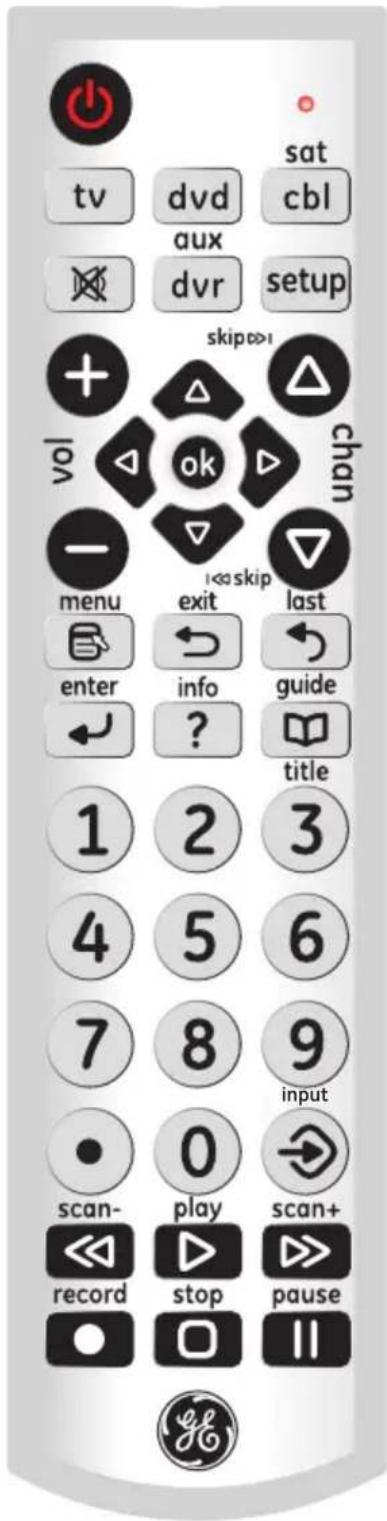
Table of Contents
Introduction 2
Setup 3
Battery Installation 3
Battery Saver 3
Code Saver 3
Button Functions 4
Programming Your Remote 6
Direct Code Entry....6
Auto Code Search 8
Controlling Combo Devices 9
Using Your Remote 10
Master Volume Feature 10
Code Identification 11
Reset to Factory Settings 11
Troubleshooting 12
Warranty 13
FCC Statement 14
Congratulations on your purchase of the GE Universal Remote Control. The GE Universal Remote Control is one of the most easy to use remote controls available today. With the GE Universal Remote Control, juggling multiple remote controls is a thing of the past!
Your GE Universal Remote Control controls multiple devices, including the most popular brands of TV, DVR, DVD, CBL, and SAT. The GE Universal Remote Control is easy to use, easy to program, and it gives you total control—at the touch of your fingertips!
IMPORTANT: SAVE THIS MANUAL AND CODE LIST FOR FUTURE REFERENCE
Setup
Your universal remote requires two (2) AAA Alkaline batteries (not included).
To Install the Batteries
- On the back of the remote, push down on the tab and lift the cover off.
- Match the (+) and (-) marks on the batteries to the (+) and (-) marks inside the battery compartment, then insert two (2) AAA Alkaline batteries. Be sure to use fresh batteries.
- Press the battery cover back into place.
NOTE: If your remote stops operating properly, replace the batteries with new ones. The remote will retain the codes you have programmed for up to 10 minutes after the batteries are removed.
Battery Precautions
- Do not mix old and new batteries.
- Do not mix alkaline, standard (carbon-zinc), or rechargeable (Ni-Cd, Ni-MH, etc.) batteries.
- Always remove old, weak or worn-out batteries promptly and recycle or dispose of them in accordance with local and national regulations.
Battery Saver
Your remote automatically turns off if the buttons are depressed more than 8 seconds. This will save your batteries should your remote get stuck in a place where the buttons remain depressed (e.g., between the sofa cushions).
Code Saver
You will have up to 10 minutes to change the batteries in your remote without losing codes you have programmed. However, do not press any buttons until batteries are installed in the remote. If buttons are pressed without batteries in the remote, all codes will be lost.
Button Functions
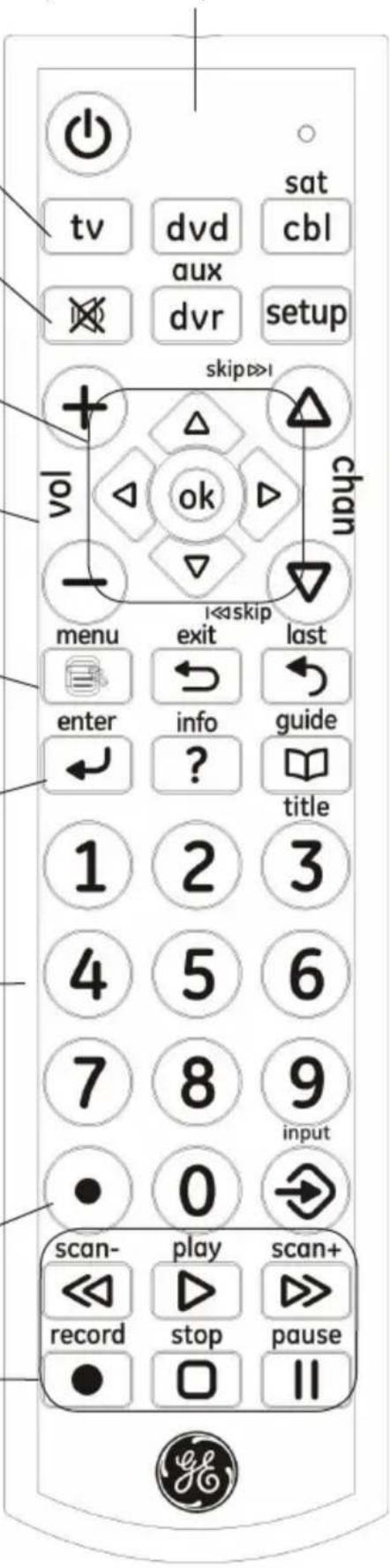
TV, DVD, CBL/SAT, DVR/AUX
Selects device to control.
MUTE Turns off the TV sound while the picture remains.
UP, DOWN, LEFT & RIGHT Navigation buttons.
VOLUME UP/DOWN
Changes the volume level of the product, normally the TV.
MENU Displays the Menu on the TV.
ENTER
For some TV models, used after direct channel number entry to immediately change to the selected channel.
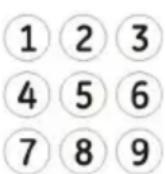
NUMBERS
Enter numbers for direct channel selection. Some devices require ENTER to be pressed after channel selection.
DOT Used to select digital channels, e.g., 2.3.
RECORD, PLAY, STOP, REW, FF, PAUSE
Control buttons that operate your DVR even when the remote is set to operate the TV. Also operates DVD Scan -/+
Red Indicator Lights when any button is pressed.
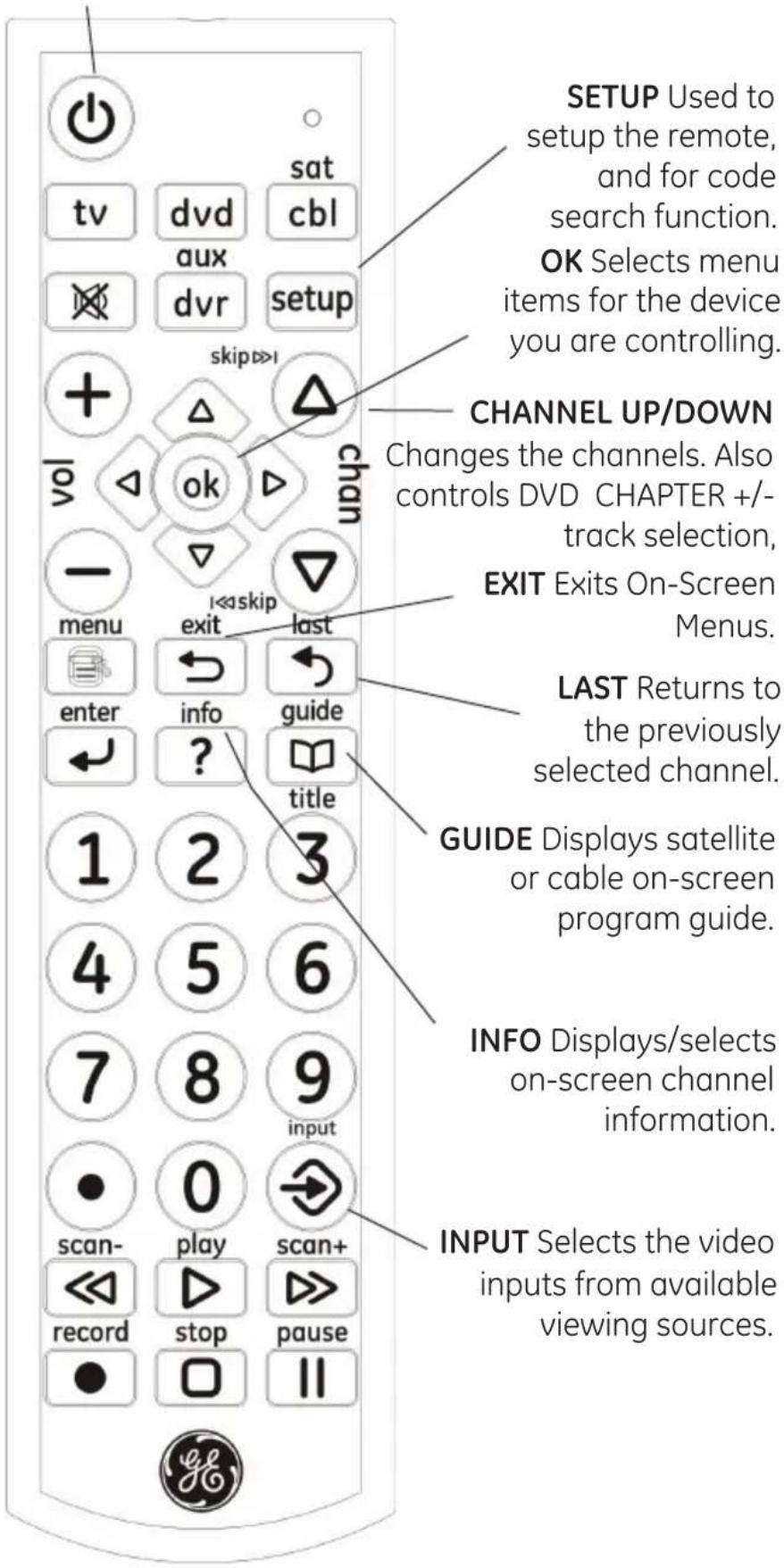
Button Functions, cont.
ON•OFF Turns devices On or Off.
Programming Your Remote
Your GE universal remote control is designed to control multiple audio/video devices such as TV, DVD, DVR, satellite, cable and audio using only one remote. To use this remote, you will need to program it to control the devices of your choice. There are two ways to program the remote - direct code entry or auto code search.
Direct Code Entry (Recommended)
- Locate the Remote Code List provided in this manual. Find the DEVICE CATEGORY you wish to program (for example TV, DVD, CBL/SAT, DVR/AUX) and then find the BRAND of that device. Circle all the codes under that brand. Example: For a GE TV, locate the TV code section then circle all of the GE TV codes.
- Manually turn on the device you wish to control.
- Press and hold the SETUP button until the red indicator light stays on (approximately 4 seconds) and then release the SETUP button.
- Press and release the desired device button on the remote (TV, DVD, CBL/SAT, DVR/AUX). The red indicator will blink once and then remain on.
- Enter the first 4-digit code previously found in the code list using the number buttons on the remote. If the code entered is a valid code, the red indicator light will turn off. If the code entered is not a valid code, the red indicator light will flash and remain on allowing you to re-enter the code.
Note: If no buttons are pressed for 10 seconds, the remote will exit the SETUP mode and you will have to start over.
setup
tv
Programming Your Remote, cont.

-
Point the remote at the device. Press the POWER button—if the device turns off, no further programming is required for that device. If the device does not turn off, return to step 3 and use the next code found in the code list. Continue this process until a code for your device is found.
-
Repeat this process for each device (for example TV, DVD, CBL, SAT, DVR, AUX) in your home entertainment system you wish to control. Four devices can be programmed.
Programming Notes
- If your device does not respond to the remote after trying all codes listed or your brand is not listed in the code list, use the Auto Code Search method to program your remote.
- Sometimes the first code that “works” with your device may operate only a few functions of your device. There may be another code in the code list that performs more functions. Try other codes from the code list for more functionality.
- With the Direct Code Entry method, you can program any device button to control any device in your home entertainment system.
For example, you can use the DVR/AUX device button to control an audio receiver or a DVD, VCR, satellite device, etc. - For combination devices, you may have to enter a code for each device. For example, for a VCR/DVD device, you may have to enter a code for the DVD under the DVD button and enter a code for the VCR using a different device button on the remote.
- Write down the code found to operate your device for future reference.
Programming Your Remote, cont.
Auto Code Search
The Auto Code Search searches automatically through all of the codes stored in this remote. Read all the following steps prior to starting the auto search as you will need to be prepared to lock-in the proper code when found.
setup
- Manually turn on the device you wish to control.
- Press and hold the SETUP button until the red indicator light stays on (approximately 4 seconds) and then release the button.
- Press and release the desired device button on the remote (TV, DVD, CBL/SAT, DVR/AUX). The red indicator will blink once and then remain on.
- Point the remote at the device and press and release the POWER button (for TV) or PLAY button (for DVD, VCR, etc.) to start the search. The red indicator will flash (approximately every 2 seconds) as the remote searches. Note: The remote must be pointed at the device for the duration of this search.
- Place your finger on the #1 button so you are prepared to lock-in the code.
- When the device shuts off or begins playing, press the #1 button to lock-in the code. The red indicator light will turn off. Note: You have approximately two seconds after the device shuts off or begins playing to lock-in the code.
- Point the remote at the device and check to see if the remote operates the device as desired. If it does, no further programming is required for that device. If it does not, return to step 2 and start the auto search again.
- Press and release the desired device button on the remote (TV, DVD, CBL/SAT, DVR/AUX). The red indicator will blink once and then remain on.
- Point the remote at the device and press and release the POWER button (for TV) or PLAY button (for DVD, VCR, etc.) to start the search. The red indicator will flash (approximately every 2 seconds) as the remote searches. Note: The remote must be pointed at the device for the duration of this search.
- Place your finger on the #1 button so you are prepared to lock-in the code.
- When the device shuts off or begins playing, press the #1 button to lock-in the code. The red indicator light will turn off. Note: You have approximately two seconds after the device shuts off or begins playing to lock-in the code.
tv
[Non-Text]
1
1
Programming Your Remote, cont.
- Repeat this process for each device (for example TV, DVD, SAT, AUX) in your home entertainment system you wish to control. Four devices can be programmed.
Programming Notes
- This process may take several minutes as the remote contains many codes.
- When using the Auto Code Search programming method, the device button corresponding to the type of device you want to control must be selected (for example, the TV device button must be selected in step 3 if you want to control a TV, the DVD device button for a DVD player, etc.)
- The SETUP button can be used during the search process to reverse the direction of the search of the remote codes. For example, if you miss the code for your device and the remote is continuing to search (as indicated by the blinking red light), press the SETUP button and the code search will reverse direction and return to the code.
- Sometimes the first code that “works” with your device may operate only a few functions of your device. There may be another code in the code list that performs more functions. Continue the auto code search as directed above until the best code is found.
Controlling Combo Devices
Some Combo devices (e.g. TV/VCR, TV/DVD, DVD/VCR, etc.) will require you to set up two different Mode buttons to control both parts of the Combo device. For example, if you have a TV/DVD Combo, you might need to set up one code under the TV button to control the TV part AND a separate code (under any other Mode button) to control the DVD part.
Master Volume Feature
The Master Volume Feature allows you to select a single device (TV or audio receiver) that the volume control always controls. For example, the remote can be in TV mode while the volume buttons control the volume on your audio receiver instead of your TV.
Enabling the Master Volume Feature
- Press and hold the SETUP button until the red indicator stays on (approximately 4 seconds) and then release the button.
- Press and release desired device button (TV, DVD, CBL/SAT, DVR/AUX) for the device you wish to setup to control the volume.
- Press and release the MUTE button.
- Press and release the VOL + button. The red indicator will blink twice and then go off.


To test the feature put the remote in another mode such as the TV mode if you programmed the audio receiver to be the Master Volume Device. Point the remote at the audio receiver, press and hold either the VOL - or the VOL + button. If the audio receiver volume changes then the remote is programmed correctly. If the TV volume changes and not the audio receiver, you will have to repeat the steps above and test again.
Disabling the Master Volume Feature
- Press and hold the SETUP button until the red indicator stays on (approximately 4 seconds) and then release the button.
- Press and release the device button (TV, DVD, CBL/SAT, DVR/AUX) which is programmed to control the Master

Using Your Remote, cont.

setup

Volume Feature.
- Press and release the MUTE button.
- Press and release the VOL - button. The red indicator light will blink twice and go off.
Code Identification
- Press and hold the SETUP button until the red indicator stays on (approximately 4 seconds) and then release the button.
- Press and release the desired device button (TV, DVD, CBL/SAT, DVR/AUX) you would like the code for.
- Press and release ENTER button.
- Press and release the #1 button. Count the number of times the remote light flashes. This is the number corresponding to the first digit of the code. Repeat the process by pressing the #2, #3 and #4 buttons for the remaining digits.
- Press and release ENTER button to exit this mode.
Reset to Factory Settings
- Press and hold the SETUP button until the red indicator stays on (approximately 4 seconds) and then release the button.
- Press and release the MUTE button.
- Press and release the number #0 button. The red indicator light will flash twice.
Troubleshooting
Remote does not operate your device.
- Press the device button of the device you want to control.
- Program the remote with a new code.
- Install new batteries. (You might have to reprogram your remote after installing new batteries.)
- Remote may not be compatible with your device.
Remote does not operate some features of your device.
- Sometimes a particular code might operate some features but not all. Try programing remote with a new code.
- Remote may not be able to operate all features of your device or button names might be different than your device.
Red Indicator blinks and stays on after you program a product code.
- Remote did not accept the code.
- Try to program the code again or try a different code.
Remote Code is not available for a combo device (e.g. TV/VCR)
• See section for controlling combo devices.
For additional troubleshooting information please visit www.jascoproducts.com
90 Day Limited Warranty
Jasco Products Company warrants this product to be free from manufacturing defects for a period of ninety days from the original date of consumer purchase. This warranty is limited to the repair or replacement of this product only and does not extend to consequential or incidental damage to other products that may be used with this unit. This warranty is in lieu of all other warranties express or implied. Some states do not allow limitations on how long an implied warranty lasts or permit the exclusion or limitation of incidental or consequential damages, so the above limitations may not apply to you. This warranty gives you specific rights, and you may also have other rights which vary from state to state. If unit should prove defective within the warranty period, return prepaid with dated proof of purchase to:
Jasco Products Company
10 East Memorial Road
Oklahoma City, OK 73114
www.jascoproducts.com
FCC Statement
This device complies with part 15 of the FCC rules. Operation is subject to the following two conditions: (1) this device may not cause harmful interference, and (2) this device must accept any interference received, including interference that may cause undesired operation.
FCC NOTE: The manufacturer is not responsible for any radio or TV interference caused by unauthorized modifications to this equipment. Such modifications could void the user's authority to operate the equipment.
NOTE: This equipment has been tested and found to comply with the limits for a Class B digital device, pursuant to Part 15 of the FCC Rules. These limits are designed to provide reasonable protection against harmful interference in a residential installation. This equipment generates, uses and can radiate radio frequency energy and, if not installed and used in accordance with the instructions may cause harmful interference to radio communications. However, there is no guarantee that interference will not occur in a particular installation. If this equipment does cause harmful interference to radio or television reception, which can be determined by turning the equipment off and on, the user is encourage to try to correct the interference by one or more of the following measures:
- Reorient or relocate the receiving antenna.
- Increase the separation between the equipment and receiver.
- Connect the equipment into an outlet on a circuit different from that to which the receiver is connected.
- Consult the dealer or an experienced radio/TV technician for help.
This Class B digital apparatus complies with Canadian ICES-003.
Jasco Products Company
10 East Memorial Road
Oklahoma City, OK 73114
www.jascoproducts.com
| Star Equip | 625 | 182 |
| Fiber Pack | 631 | 185 |
| Honeywell | 670 | 177 |
| Stagni | 902,205 | 5,458,912 |
| Sagulls | 935 | 252, 258 |
| Dorman | 935 | 252,258 |
| Browns | 935 | 252, 258 |
| STS | 181 | 1838,184 |
| Boys St. Air | 167 | |
| Safran | 105 | |
| Supermax | 628 | |
| Syriales | 142 | |
| Tobacco | 629 | |
| Iberian | 250 | |
| Teckel | 145 | |
| Thompson | 250 | |
| Thomson | 414 | |
| Lemon Water | 931 | |
| True Name Carce | 931 | |
| Tusk | 935 | 935 |
| Taxam | 504, 250 | 5,200 |
| Lion | 707 | |
| Toothia | 541 | |
| Tokyo | 928,928 | 5,200,287 |
| Tokyo | 944,955 | 1,315,118 |
| JLTA | 1,378,178 | 1,511,187, 188 |
| Toyota | 982 | |
| Toro | 905 | |
| Tyde | 266 | |
| LVA | 115 | |
| Ultrate IV | 718, 618 | 184, 185 |
| U-Box | 1,438, 922 | 1,318, 146,182 |
| Ulta | 967 | |
| United | 111, 873 | 924, 925,927 |
| United Gold | 632 | 928, 946 |
| Universal | 637 | |
| VISA | 611,516 | 5,200,267 |
| USA | 628,628 | 5,200,267 |
| US Elasthenics | 902,243 | 5,200,238 |
| Zara | 27 | |
| Cyber Computer | 637 | |
| Cryo Tech | 102 | |
| Rockwell | 102 | |
| Vermonty | 301,763 | |
| Vermower | 902 | |
| Vonterra | 530, 938 | 925, 927 |
| Vonterra | 1,016 | |
| Vermonty | 102 | |
| Vorner | 116 | |
| Woolf | 209 | |
| Vance View | 530 | |
| Nash TV | 718,611 | |
| Vonorge | 718,718 | |
| Zscity | 291 | |
| Vistry | 978, 978 | 5,200, 258 |
| Tracy | 978, 978 | 5,200, 258 |
| Vistry | 978, 978 | 5,200, 258 |
| Vistry | 1,157, 142,142 | 1,315,134, 134 |
| Zscity Tigrup | 139 | |
| Paloak | 223 | |
| HDTV Set Top Boxes | ||
| Xerox | 216 | |
| Al-Bin | 211 | |
| Alcoa | 225 | |
| Aren | 212 | |
| Coleda | 211 | |
| Digital | 220 | |
| Oil | 215 | |
| Gasoline | 215 | |
| Hinch | 161 | |
| Highs | 197 | 201 |
| Healy | 118 | |
| LCI | 118 | 101 |
| Magnolia | 224 | |
| Moscillo | 182 | |
| Maricola | 174 | |
| Plains | $18 | |
DVD
| Ticker | Symbol | Price | Closing Price |
| B.A.S. Tech | B.A.S. Tech | 6079 | 6082 |
| B.A.S. Tech | B.A.S. Tech | 6079 | 6082 |
| B.A.S. Tech | B.A.S. Tech | 6079 | 6082 |
| B.A.S. Tech | B.A.S. Tech | 6079 | 6082 |
| B.A.S. Tech | B.A.S. Tech | 6079 | 6082 |
| A.A.S. Tech | A.A.S. Tech | 6079 | 6082 |
| A.A.S. Tech | A.A.S. Tech | 6079 | 6082 |
| A.A.S. Tech | A.A.S. Tech | 6079 | 6082 |
| A.A.S. Tech | A.A.S. Tech | 6079 | 6082 |
| A.A.S. Tech | A.A.S. T-15 | 6151 | 6162 |
| A.A.S. Tech | A.A.S. Tech | 6151 | 6162 |
| A.A.S. Tech | A.A.S. Tech | 6151 | 6162 |
| A.A.S. Tech | A.A.S. Tech | 6151 | 6162 |
| A.A.S. Tech | A.A.S. Tech | 6151 | 6162 |
| A.A.S. Tech | A.A.S. Tech | 6172 | 6182 |
| A.A.S. Tech | A.A.S. Tech | 6172 | 6182 |
| A.A.S. Tech | A.A.S. Tech | 6172 | 6182 |
| A.A.S. Tech | A.A.S. Tech | 6172 | 6182 |
| A.A.S. Tech | A.A.S. Tech | 6172 | 6182 |
| Buchstefler | 5825 |
| Ela | 6130 |
| Eaton | 6130 |
| Enel | 6281, 6542, 9127, 8167, 5165, 8208 |
| Enkicate | 9037 |
| Enlink | 7007, 7007 |
| Enl | 5657, 5657 |
| Forecht | 5222 |
| Faba | 9735 |
| Funz | 6012, 5005, 0167, 0160 |
| Galway | 6077, 5852 |
| Gill | 6007, 5067, 0067, 0067 |
| General Dynamics | 6708 |
| Gal. Star | 9827, 9827 |
| Gal. Valer | 8912 |
| Gal. V | 8078, 8078, 7031, 6707 |
| Gal. W | 8078, 8045, 0067, 0067 |
| Gal. W | 9077, 9087, 9125, 9142 |
| Gal. Vell | 8718, 8718, 8718, 5120, 6225, 6255 |
| Gladre | 6074, 5415, 0111, 0184 |
| GrootNI | 9529, 9749 |
| Guang | 9028, 9027 |
| Haw | 6734, 703 |
| Haw | 6704 |
| HumanVicet | 9743 |
| Hartem | 6021 |
| Hitch | 6021 |
| Hindi | 6488 |
| Hindi | 8757 |
| ILO | 6738, 6731, 5997 |
| Inglia | 9526, 9195, 9036, 9679 |
| Inglia | 8823 |
| Ingos | 8013, 8127, 7141, 6167 |
| IPT | 9005 |
| JBL | 5145 |
| JMB | 3905 |
| JVC | 5905 |
| JW | 9078, 9078, 6067, 6067 |
| JW | 8139, 8139, 8187, 6393 |
| JW | 6450, 5689, 6561, 6768 |
| Jahn | 9074, 8747, 8747, 5324, 6326 |
| Keuweir | 6527, 6513 |
| Kenwood | 6001, 6007, 6121, 6167 |
| KDD | 9144 |
| KLH | 6025 |
| Kiss | 6072, 6075, 5112, 7149, 6167 |
| Kiss | 9007 |
| Kirk | 9137, 9137, 9138, 5182 |
| Katz | 9817, 9817, 9734, 6734 |
| Lester | 5175 |
| Lasano | 6014, 6160, 6216 |
| Lasco | 6299 |
| Lasco | 8023, 8127, 8127, 6167 |
| Lasco | 6520 |
| LS | 5881 |
| Liu | 9127, 9221, 5987, 6545 |
| Liu | 9005 |
| Loren | 9005 |
| Loren | 6077, 6084, 5173, 6175 |
| Loren | 9627, 9241, 9492, 5946, 8345 |
| Loren | 6201 |
| Logis | 6738 |
| Magnacore | 6020 |
| Magnacore | 6392 |
| Husht | 8038, 9019, 9065, 6542 |
| Husht | 6139, 6139, 6167, 6167 |
| Husht | 6190, 6228, 6285, 6289 |
| Husht | 6240, 6242, 6262, 6280, 6923, 6925 |
| Husht | 6240, 6242, 6262, 6280, 6923, 6925 |
| Kanada | 6787 |
| Kanada | 6088, 6082, 6129, 5127, 6185, 6260 |
| Kanada | 9742, 9719 |
| Kanada | 9742, 9719 |
| NAD | 8021 | 8172 | 8140 |
| Berkshire | - | - | 8146 |
| CCT | 6074 | 5977 | 5877 |
| Yoga | 5020 | 5146 | 5024 |
| Newmont | - | - | 5005 |
| Boston | 6354 | 6051 | 5923 |
| Buffalo | 6101 | 5978 | 5845 |
| S&P 500 | 6258 | 6058 | 5929 |
| Nomura I | - | - | 5956 |
| Oxford | 6770 | 6197 | 5858 |
| Chicago | - | - | 6700 |
| Cincinnati | 6214 | 6128 | 5924 |
| Oklahoma | - | - | 6525 |
| Pittsburgh | - | - | 6525 |
| Orlando | - | 6725 | 6118 |
| Pittsburgh | - | 6124 | 6000 |
| Pacific | - | - | 5344 |
| Riverside | - | - | 5871 |
| Panama | - | - | 5741 |
| San Diego | 6502 | 6011 | 5926 |
| San Francisco | 8236 | 8027 | 8023 |
| San Jose | 6127 | 6156 | 5929 |
| San Diego | 5471 | 5390 | 5341 |
| Pittsburg | 9286 | 9548 | 9129 |
| Pittsburg | - | - | 5002 |
| St. Louis | 6250 | 6029 | 5922 |
| St. Louis | 6764 | 6055 | 6123 |
| St. Louis | 9139 | 9157 | 9165 |
| St. Louis | 6206 | 6028 | 5928 |
| St. Louis | 6104 | 6458 | 6045 |
| El Paso Magrache | - | - | 6016 |
| Lima de la Vieja | 9128 | 9139 | 9228 |
| Las Vegas | - | - | 5800 |
| Lima de la Vieja | - | - | 6000 |
| Los Angeles | 6214 | 6016 | 5815 |
| Los Angeles | 6229 | 6236 | 5923 |
| Miami | - | - | 5805 |
| Miami | - | - | 6017 |
| Rockville | 6768 | 6112 | 6329 |
| Rockville | 6286 | 6128 | 6240 |
| Rockville | - | 6005 | 6155 |
| Rockville | - | - | 6005 |
| Phoenix | 6022 | 6023 | 5402 |
| Phoenix | - | - | 6227 |
| Phoenix | - | - | 6227 |
| Phoenix | 6764 | 6136 | 6171 |
| Phoenix | - | - | 5970 |
| Phoenix | - | - | 5127 |
| Phoenix | - | - | 5127 |
| Indian States | - | - | 6731 |
| Indian States | 6102 | 6106 | 6151 |
| Indian States | - | - | 5472 |
| Rural Pradesh | - | - | 5804 |
| Rural Pradesh | - | - | 5804 |
| Rural Pradesh | - | - | 5804 |
| Rural Pradesh | - | - | 5804 |
| Rural Pradesh | - | - | 5804 |
| Rural Pradesh | - | - | 5804 |
| Rural Pradesh | - | - | 5804 |
| Rural Pradesh | - | 6102 | 6023 |
| Rural Pradesh | - | - | 5805 |
| Rural Pradesh | - | - | 5805 |
| Rural Pradesh | - | - | 5805 |
| Rural Pradesh | - | - | 5805 |
| Rural Pradesh | - | - | 5805 |
| Rural Pradesh | - | - | 5805 |
| Rural Pradesh | - | - | 5805 |
| Rural Pradesh | - | 6102 | 6023 |
| Rural Pradesh | - | - | 5805 |
| Rural Pradesh | - | - | 5805 |
| Rural Pradesh | - | - | 5805 |
| Rural Pradesh | - | 6102 | 6023 |
| Rural Pradesh | - | - | 5805 |
| Rural Pradesh | - | - | 5805 |
| Rural Pradesh (East) | 6120 | 6147 | 5945 |
| Rural Pradesh (East) | 6275 | 6118 | 5925 |
| Rural Pradesh (East) | - | - | 5805 |
| Rural Pradesh (East) | 6122 | 6022 | 5925 |
| Rural Pradesh (East) | 6120 | 6147 | 5945 |
| Rural Pradesh (East) | 6120 | 6147 | 5945 |
| Rural Pradesh (East) | 6275 | 6118 | 5925 |
| Rural Pradesh (East) | - | - | 5805 |
| Rural Pradesh (East) | 6122 | 6022 | 5925 |
| Rural Pradesh (East)(East) | 6120 | 6147 | 5945 |
| Rural Pradesh (East) | 6120 | 6147 | 5945 |
| Rural Pradesh (East) | 6120 | 6147 | 5945 |
| Rural Pradesh (East) | 6120 | 6147 | 5945 |
| Rural Pradesh (East) | 6120 | 6147 | 5945 |
| Solutions | 6185 | 8738 |
| Fanx | 6079 | 8241 |
| Gelene | 6015 | 8275 |
| Superior | 9042 | 8167 |
| Sanskys € | 6174 | |
| EV 1710 | 601 | 601 |
| GVC | 601 | 601 |
| Syndrica | 618 | 618 |
| Société | 6052, 6052, 6176, 6183, 6211, 6256 | |
| Symptons | 6012, 6016, 6167, 6169 | |
| Tacoos € | 5128 | |
| Tortez | 6071, 6082, 6183, 6183 | |
| India Capital | 601 | 601 |
| Techex | 606, 610, 6236, 621 | |
| Tritax | 6052, 6142, 6183, 621 | |
| Tataca | 601 | 601 |
| Indes | 605 | 605 |
| Tokyo | 6054, 6054, 6161, 6163, 6163, 6161 | |
| Theca Digital | 6011 | |
| Thermo | 6004 | |
| Liquide | 602 | 602 |
| Tohara | 6154, 6187 | |
| Toho Bo | 6002 | |
| Tobacco | 6038, 6072, 6082, 6081 | |
| Tobacco | 6076, 6172, 6183, 6183, 6183, 6183 | |
| Soto | 6091, 6073, 6145, 6146, 6026, 6042 | |
| Trocoa | 6002 | |
| Truistock | 6008, 6008, 6008, 6008, 6008, 6008, 6008, 6008, 6008, 6008, 6008, 6008, 6008, 6008, 6008, 6008, 6008, 600 | |
| TVF | 6027 | |
| Utdad | 6154 | |
| Utdad | 6154 | |
| Utdad S.p.A. | 6154 | |
| Utdad Cangul | 6042, 6048 | |
| USI-kg | 6028 | |
| Vermilion | 6050, 6050, 6050, 6050, 6050, 6050, 6050, 6050, 6050, 6050, 6050, 6050, 6050, 6050, 6050, 6050, 6050, 605 | |
| Viatr | 6151 | |
| Viatr | 6053, 6052, 6052, 6052, 6052, 6052, 6052, 6052, 6052, 6052, 6052, 6052, 6052, 6052, 6052, 6052, 6052, 6052, 6 | |
| Wolfeche | 6053, 6078, 6078, 6078, 6078, 6078, 6078, 6078, 6078, 6078, 6078, 6078, 6078, 6078, 6078, 6078, 6078, 6078, 6 | |
| White Square | 6138, 6137 | |
| White Nettledhouse | 6138 | |
| White House | 6054, 6141, 6141, 6141, 6141, 6141, 6141, 6141, 6141, 6141, 6141, 6141, 6141, 6141, 6141, 6141, 6141, 6141, 6 | |
| Xenkar | 6114 | |
| Yamada | 9021 | |
| Yamada | 6028, 6028, 6028, 6028, 6028, 6028, 6028, 6028, 6028, 6028, 6028, 6028, 6028, 6028, 6028, 6028, 6028, 602 | |
| Yamakawa | 6134, 6135, 6135, 6135, 6135, 6135, 6135, 6135, 6135, 6135, 6135, 6135, 6135, 6135, 6135, 6135, 6135, 6135, 6 | |
| Zenta | 6052, 6051, 6143, 6143, 6143, 6143, 6143, 6143, 6143, 6143, 6143, 6143, 6143, 6143, 6143, 6143, 6143, 6143, 6143, 6 | |
| Chroma | 6052, 6052, 6052, 6052, 6052, 6052, 6052, 6052, 6052, 6052, 6052, 6052, 6052, 6052, 6052, 6052, 605 |
Blue-Ray-DVD
| HP | 6416 |
| Dengs | 6707 |
| Memorex | 95.0 |
| Cayns | 8529 |
| Gap | 8625 |
| Paraservice | 6480 |
| Philips | 6489 |
| Pioneer | 8503 |
| Samsung | 6488 |
| Sharp | 6712 |
| Sherwood | 6512 |
| Sunny | 6447 |
| Raytheon | 6711 |
| Tobacco | 65-5 |
| Vizzi | 65-3 |
| Yumich | 8524 |
HD-DVD
| Tahara | 5471 |
| Tahba | 5472 |
| DVD-R | |
| California Air & Gas | 6681 |
| COSY | 5560 |
| Galway | 7839 |
| JX | 6651 |
| Licon | 5642 |
| Magneto | 6590 |
| Mercre | 6470 |
| Magnacorp | 5820 |
| Paramount | 6344 |
| Top-Net | 576,56492 |
| DVR/PVR | |
| A/B | 6878 |
| A. Inc. | 5812 |
| Austria | 5817 |
| A.BI | 5345 |
| Cyber Pester | 6872 |
| Sul | 6612 |
| Jsh Networks | 6490 |
| Green TV | 6737 |
| Sanskow | 6872 |
| How to Packard | 6872 |
| Nowcom Partners | 5329 |
| It | 6752 |
| Hughes | 6464 |
| Hugic Network Systems | 6249 |
| Lithia | 5335, 6240, 5792 |
| Iush | 6729 |
| Buypower | 5872 |
| LG | 5840 |
| Keepee | 5327 |
| New | 5501 |
| Media Center PC | 5872 |
| Morgan Stanley | 5872 |
| Mint | 5372 |
| Nex & Medix | 6379 |
| Nordance | 6379 |
| Panasonic | 6113, 6948, 5822, 5472 |
| Pfizer | 5349 |
| Pfizer | 6410, 6411, 5675, 5792 |
| Patrick | 5903 |
| Poncey | 6184, 6236 |
| PLC | 5170 |
| Regency TV | 6317, 6318 |
| Samsung | 6849 |
| Sun Bin | 6241, 6248 |
| Sonic | 6710, 6516, 5821, 6272, 6161, 6410, 6475 |
| Sonic V | 5872 |
| Slate Software | 5216 |
| Thompson | 5901 |
| Trio | 6164 |
| Tec | 6187, 6849, 5851, 5723 |
| S&P 500 | 6441, 6441, 6458, 5465, 5408 |
| Tetra | 6732, 6737, 6737 |
| Textron | 6737 |
| Vow Solar | 6872 |
| Vocalor | 6252 |
| Viatry | 6218 |
| CT Corp. | 6737 |
| VCR | |
| A/B | 6872 |
| Avolo | 5446 |
| Actmore | 6311 |
| 6710, 6719, 5721, 5627, 5638, 5842, 5874 | |
| Avonix | 5827, 5828, 5365, 5374 |
| Ams | 5381 |
| Xen | 5912, 6395, 6261, 6872, 6875, 5403 |
| Avail | 5381 |
| 6737, 6739, 6737, 6737, 6738, 6741, 5418, 5435 | |
| Abo | 6858 |
| Aon | 6858 |
| Ashtin | 6317 |
| 6743, 6745, 6750, 6383, 5433 | |
| Ameris | 5877, 5878, 5381, 5381, 5382, 5412 |
| American Rail | 6511, 6525, 5412 |
| American Rail | 5709 |
| Ameris | 6177 |
| Ameris | 6617 |
| Ameris | 6828, 6446 |
| Ameris | 6737, 6739, 6741 |
| Audio Synthems | 6824, 5882, 5427 |
| Cus# | 6312 | 6316 | 6317 | 6318 | 6319 | 6410 |
| Coca | - | - | - | - | - | - |
| Canton | - | - | 5821 | 5412 | 6487 | - |
| Capacat | - | - | 6238 | 5832 | 6432 | - |
| Clemor | - | - | - | - | - | - |
| Cave | - | - | 6311 | 6335 | 6344 | - |
| OCE | - | - | - | 6392 | 6446 | - |
| Coca Marel | - | - | - | 6312 | 6361 | - |
| Claver | - | - | - | - | - | - |
| 6311 | 5312 | 7531 | 6336 | - | - | |
| 6942 | 6858 | 6372 | 6382 | - | - | |
| 6336 | 6357 | 6360 | 6392 | 6372 | - | |
| Cleaves | - | - | - | - | - | - |
| Coloryme | 5311 | 5316 | 632 | 6358 | - | - |
| Crack | - | - | - | 6327 | 6314 | - |
| 6318 | 6316 | 6322 | 6345 | 6346 | - | |
| Citrocler | - | - | - | - | - | - |
| Crickley | 6207 | 6811 | 6825 | 5822 | - | - |
| Cutis Mathera | - | - | - | - | 6307 | - |
| 6311 | 5317 | 7537 | 6372 | - | - | |
| 6309 | 5341 | 6309 | 6372 | 6373 | - | |
| Glycine | 6872 | 6382 | 6412 | 6434 | 6445 | 6438 |
| Glycine | - | - | - | 6336 | 6446 | - |
| Copper Miner | - | - | - | - | - | - |
| Dawaco | - | - | - | - | 6307 | - |
| 6972 | 6816 | 637 | 6389 | - | - | |
| 6831 | 6831 | 637 | 6389 | 6372 | - | |
| 6336 | 6362 | 6385 | 6407 | 6434 | - | |
| Dayton | - | - | - | - | 6372 | - |
| - | - | 6324 | 6384 | 6377 | - | |
| DBS | - | - | - | - | 6372 | - |
| Dressa | - | - | 5314 | 5325 | 6436 | - |
| Diamond diction | - | - | - | - | 6372 | - |
| Dressa | - | - | - | - | 6372 | - |
| Dressa | - | - | - | - | 6346 | - |
| Dish herewith | - | - | - | - | 6497 | - |
| Dish | - | - | - | - | 6377 | - |
| Dubz zin | - | - | - | 6312 | 6318 | - |
| Dyndash | 6207 | 6526 | 6339 | 6339 | 6339 | - |
| Dutia | - | - | - | - | 6372 | - |
| 6938 | 6875 | 6412 | 6485 | - | - | |
| Echinolytic | - | - | - | - | 6307 | - |
| Echinolytic | 6311 | 6322 | 6534 | 6534 | 6534 | 6534 |
| Echinolytic | - | - | 6312 | 6322 | - | - |
| Emoal | - | - | - | - | 6326 | - |
| Emoal | - | - | - | - | 6326 | - |
| Emoal | - | - | - | - | 6326 | - |
| 6159 | 6307 | 7505 | 6312 | - | - | |
| 6016 | 6378 | 6382 | 6382 | - | - | |
| 6928 | 6928 | 6325 | 6325 | - | - | |
| 6338 | 6369 | 6350 | 6372 | - | - | |
| 6376 | 6379 | 7401 | 7401 | - | - | |
| 6856 | 6856 | 6325 | 6325 | - | - | |
| 6924 | 6955 | 6395 | 6395 | - | - | |
| 6338 | 6360 | 6445 | 6445 | - | - | |
| 6471 | 6471 | 6471 | 6471 | - | - | |
| 6411 | 6412 | 6412 | 6482 | - | - | |
| 6429 | 6423 | 6485 | 6485 | - | - | |
| ESA | - | - | - | - | 6307 | - |
| Fisher | 6919 | 6917 | 6318 | 6338 | - | - |
| 6327 | 6344 | 6552 | 6542 | 6542 | 6542 | |
| - | - | 6330 | 6311 | 6371 | 6312 | |
| Fujitsu | - | - | - | - | 6307 | - |
| Fujitsu | - | - | - | - | 6167 | - |
| 6918 | 6918 | 6325 | 6325 | 6325 | 6325 | |
| - | - | 6320 | 6339 | - | - | |
| - | - | - | - | 6372 | - | |
| 6911 | 6910 | 6321 | 6321 | - | - | |
| 6332 | 6330 | 6360 | 6360 | - | - | |
| 6307 | 6410 | 6410 | 6410 | 6410 | 6410 | |
| Household Cap. | 852 |
| HCA | 637, 831, 501 |
| Holding | 921, 9514, 8816, 852 |
| - | $337, 6376, 8418, 8465, 8424 |
| Home Assets | 84 |
| Investment Companies | 507 |
| HP | 9372 |
| Hudson | 6464 |
| Hunting Barns Group | 507 |
| Lumex | 3437, 2545, 676 |
| Lush | 6372 |
| Land | 809, 818 |
| Leasing | 5377 |
| Mtrty | 6188 |
| MTC | 5296, 5414 |
| Maruti Pupus | 8536, 5412 |
| Trec | 9319 |
| TTN Ltda | 9376 |
| Janeli | 938 |
| JC Purnes | 5089 |
| Kohl | 6312, 6379, 5014, 507 |
| KMB, 6478, 5415, 5456, 6456, 6457 | |
| JCL | 9412 |
| Jersey | 8328, 8478, 5624 |
| JVC | 80 |
| Klarna | 6178, 6379, 5014, 506 |
| KLA | 6382, 6390, 8402, 8418, 8457 |
| KC | 67 |
| Concord | 5517 |
| CER | 6384, 6392, 6426, 6416, 5427 |
| CUH | 94 |
| Cuba | 5311, 6312, 8152, 8412 |
| CUV | 5007 |
| CLI | 9274, 9538, 8843, 5891 |
| Crocs | 8572, 8575, 8432, 8428 |
| Crocy | 5277 |
| Crocy | 6452 |
| Crocy | 9939, 9376 |
| Crocy's | 6501, 8238 |
| Crocy's | 535 |
| Log 4 | 6837, 6836, 5445 |
| LNGA | 5963 |
| LNGA | 5963 |
| XL | 6707 |
| XLII, 6312, 6314, 6226, 6872, 5975 | |
| LXON | 4618 |
| Magnetoast | 6330 |
| Magnetoast | 6706, 6716, 7076, 5972 |
| Magnetoast | 2407 |
| GNC | 9199, 9628, 8972, 5871 |
| GNC | 8313, 8319, 8321, 8325 |
| GNC | 6706, 6716, 6717, 6718 |
| GNC | 6348, 6879, 6871, 5972 |
| GNC, 6879, 6879, 5823, 5405, 6400, 6412, 6452 | |
| Magnon | 8536, 8445 |
| Magnon | 50 |
| GMS | 6382, 6508, 6835, 5844 |
| GMS, 6840, 6410, 6427, 6427 | |
| GMX | 6134, 6134, 6134, 6134 |
| Meta | 6372, 7331 |
| Meta-2000 | 6371 |
| Meta-2000 | 6255, 6238, 6841, 6836, 6412 |
| Meta-2000 | 6134 |
| Meta-2000 | 6311, 6311 |
| Meta Electric | 8524 |
| Meta Compc. PC | 8524 |
| Mercantec | 5367 |
| MICA | 6311, 6312, 6313, 5371 |
| MICA | 6318, 6819, 6822, 5827 |
| MICA | 6330, 6538, 6826, 5821 |
| MICA | 6338, 6339, 6341, 5840 |
| MICA | 6354, 6355, 6356, 5821 |
| MICA | 6372, 6574, 6875, 5452 |
| MICA | 5412, 6412, 6422, 6422, 6425, 6426 |
| Meta | 6310 |
| Meta | 6326, 6536, 6854, 5411 |
| MGI Technology | 5288, 5288, 5288, 5288 |
| Microsoft | 5370 |
| MTS | 4397 | |
| Bullich | 631, 6375, 6378 | 5076, 5047, 5037 |
| NAC | 5920, 5927, 5936 | |
| REC | 6224 | |
| Hochstow | 6317, 6392, 7381 | 6181, 6146, 5617, 6145, 6167 |
| Niko | 6317, 6392, 6392 | 6181, 6146, 5617, 6145, 6167 |
| Niu | 6317, 6392, 6392 | 6181, 6146, 5617, 6145, 6167 |
| Niu | 6317, 6392, 6392 | 6181, 6146, 5617, 6145, 6167 |
| Ningbo Media | 5972 | |
| Ningbo Media | 6317, 6392, 6392 | 6181, 6146, 5617, 6145, 6167 |
| Notgaz | 6317, 6392, 6392 | 6181, 6146, 5617, 6145, 6167 |
| Omplice | 6317, 6392, 6392 | 6181, 6146, 5617, 6145, 6167 |
| Olo | 6317, 6392, 6392 | 6181, 6146, 5617, 6145, 6167 |
| Opraxa | 6317, 6392, 6392 | 6181, 6146, 5617, 6145, 6167 |
| Olo | 6317, 6392, 6392 | 6181, 6146, 5617, 6145, 6167 |
| Pangua | 6317, 6392, 6392 | 6181, 6146, 5617, 6145, 6167, 6145, 6167 |
| Parcay | 6317, 6392, 6392 | 6181, 6146, 5617, 6145, 6167, 6145 |
| Parcay | 6317, 6392, 6392 | 6181, 6146, 5617, 6145, 6167, 6145 |
| Petro | 6317, 6392, 6392 | 6181, 6146, 5617, 6145, 6167, 6145 |
| Petro | 6317, 6392, 6392 | 6181, 6146, 5617, 6145, 5617, 6145 |
| Petro | 6317, 6392, 6392 | 6181, 6146, 5617, 6145, 5617, 6145 |
| Petro | 6317, 6392, 6392 | 6181, 6146, 6181, 6145, 6145 |
| Petro | 6317, 6392, 6392 | 6181, 6146, 6181, 6145, 6145 |
| Petro | 6317, 6392, 6392 | 6181, 6146, 6181, 607 |
| Petro | 6317, 6392, 6392 | 6181, 6146, 6181, 6145, 6145, 6145, 6145 |
| Petro | 6317, 6392, 6392 | 6181, 6146, 6181, 6145, 6145, 6145 |
| Petro | 6317, 6392, 6392 | 6181, 6146, 6181, 6145, 6145, 6145 |
| Petro | 6317, 6392, 6392 | 607 |
| Petro | 6317, 6392, 6392 | 607 |
| Petro | 6317, 6392, 6392 | 607 |
| Petro | 6317, 6392, 6392 | 607 |
| Petro | 6317, 6392, 639 | 607 |
| Petro | 6317, 6392, 6392 | 607 |
| Petro | 6317, 6392, 6392 | 607 |
| Petro | 6317, 6392, 6392 | 607 |
| Petro | 6317, 6392, | 607 |
| Petro | 6317, 6392, 6392 | 607 |
| Petro | 6317, 6392, 6392 | 607 |
| Petro | 6317, 6392, 6392 | 607 |
| Petro | 6317, 6392, |
| Samsung | 698 |
| Samsung | 6195, 6710, 7027, 7031 |
| Samsung | 612, 6736, 7032, 7042 |
| Samsung | 9556, 9578, 9886, 9483 |
| Samsung | 9445, 8448, 9454, 9494 |
| Samsung | 6133, 6139, 6071, 6073 |
| Samsung | 6226, 9221, 9306, 9304 |
| Samsung | 6733, 6739, 6741, 6742 |
| Samsung | 6390, 6410, 6422, 6427 |
| Samsung | 6627 |
| Samsung | 9321, 9319, 9342, 9343 |
| Samsung | 9405, 6415, 6445, 6453 |
| Samsung | 6315 |
| Samsung | 9576, 9528, 9582, 9583 |
| Samsung | 6256, 6256, 5550, 5411, 5425 |
| Samsung | 6119 |
| Samsung | 6167, 6756, 5977, 5977 |
| Samsung | 9511, 9512, 9513, 9514 |
| Samsung | 9315, 9318, 9317, 9317 |
| Samsung | 6719, 6739, 6731, 6731 |
| Samsung | 9254, 9257, 9257, 9257 |
| Samsung | 9357, 9344, 9369, 9372 |
| Samsung | 8400, 8405, 8412, 8414 |
| Samsung | 6306 |
| Samsung | 6506, 6510, 6519, 6521 |
| Samsung | 9552, 9554, 9574, 9575 |
| Samsung | 6447, 6451, 6446, 6453 |
| Samsung | 6307 |
| Samsung | 6319, 6316, 6319, 6321 |
| Samsung | 9522, 9529, 9542, 9572, 9575 |
| Samsung | 9338, 9342, 9411, 6446 |
| Samsung | 6347, 6748, 6741, 6741 |
| Samsung | 597 |
| Samsung | 9119 |
| Samsung | 6359, 6359, 6370, 6371 |
| Samsung | 6300, 6300, 6300, 6300 |
| Samsung | 6357, 6555, 6872, 5977 |
| Samsung | 9457, 9428, 9446, 9451 |
| Samsung | 6456, 6457, 6456, 6456 |
| Samsung | 6307 |
| Samsung | 5972 |
| Samsung | 9214, 9217, 9412, 9414 |
| Samsung | 6307 |
| Samsung | 6310 |
| Samsung | 6319, 6320, 6311, 6311 |
| Samsung | 672, 6735, 6739, 6741 |
| Samsung | 6336, 6340, 6371, 6376, 6441, 6441 |
| Samsung | 6159 |
| Samsung | 6359, 6326, 6335, 6333 |
| Samsung | 6356, 6379, 6379, 6371 |
| Samsung | 6370 |
| Samsung | 8507, 8507, 8507, 8507 |
| Samsung | 6372, 6375, 6379, 6371 |
| Samsung | 6307, 6307, 6307, 6307 |
| Samsung | 6319, 6326, 6326, 6326 |
| Samsung | 6324, 6329, 6329, 6329 |
| Samsung | 6324, 6329, 6329, 6329 |
| Samsung | 6307 |
| Samsung | 6319, 6326, 6326, 6326 |
| Samsung | 6307, 6311, 6311 |
| Samsung | 580 |
| Samsung | 6307 |
| Samsung | 8842 |
| Samsung | 6357, 6357, 6357 |
| Samsung | 6371, 6371, 6371, 6371 |
| Samsung | 6340 |
| Samsung | 6326, 6326, 6326, 6326 |
| Samsung | 6326 |
| Samsung | 6356, 6391, 6410, 6415 |
| Samsung | 6370 |
| Samsung | 6328 |
| Samsung | 6328 |
| Vocar | 8218 |
| Verm Research | 6378 5809 7067 6467 |
| MCO | 9826 9497 |
| Mino glass | 6216 |
| MVC | 6378 5809 7067 6467 |
| Greenery | |
| Brockeye | 6877 6385 6840 |
| New Bank | 3922 |
| Wash | 6707 |
| West | 6378 |
| Airbus | 9518 |
| Nada | 8212 |
| Nord | 6378 5809 7067 6467 |
| Oxford | 6015 5809 6397 6768 |
| RICH | 9819 5820 9321 6282 |
| Roche | 9525 5820 9321 6282 |
| SANS | 8339 5842 5575 6754 |
| Stoxx | 6075 5809 7067 6467 |
| Sainsbury | 6416, 6430, 6428, 6445, 6445, 6445 |
| Whitbread | 6378 |
| White Househouse | 6378 |
| Dods | 6389, 6389, 6389, 6389 |
| A UNNECON | 8459 |
| Xilinx | 6707 |
| Yumon | 6011 6385 6019 6743 6467 |
| Zscaler | 5824, 5824, 6418, 6418 |
| Zurich | 6378 |
| Zurich | 6318 6318 6318, 6318, 6318 |
| Zurich | 6033 6349 6349, 6349, 6349 |
| Zurich | 9829 5872 5874, 6378 |
| Zurich | 8317 5850 5850, 6389 |
| Zurich | 6352 5851 5850, 6389 |
| Zurich | 6432, 6430, 6432, 6432 |
| ZT Group | 8872 |
AUX
| ABS | 7926 |
| Air comp | 7025, 7075 |
| Airbus | 7005 |
| ADC | 7056 |
| Admiral | 7041 |
| Auto vs. car | 7037 |
| Air | 7085, 7084, 714, 7117 |
| Air | 7756, 721, 724, 726, 728 |
| Airbus | 7035 |
| Air | 7116 |
| Alstomac | 7008 |
| Alstomac | 7063 |
| Alstomac | 7057, 7074, 7126 |
| Alstomac | 7156 |
| AHIC | 7037 |
| Arista | 7076, 714 |
| Airbus | 7034 |
| Airbus | 7083 |
| Airbus Digital | 7009, 7112 |
| Airbus | 7029, 7113, 7182 |
| Airbus port | 7035 |
| Airbus | 7036 |
| Airbus | 7101 |
| Airbus | 7005 |
| Airbus Opti | 7005 |
| Airbus | 7064 |
| Airbus | 7116, 7135 |
| AIRVIC | 7816, 7815 |
| Barclays | 7101 |
| Barclays | 7035 |
| BASF | 7058, 7037, 7167 |
| Buffalo ABS | 7816 |
| Gazette Sculptures | 7036 |
| Capricentra | 7036 |
| Cavex | 7036 |
| Cavex | 7036, 7037, 7084, 7091, 720 |
| Cavex | 7045 |
| Centrate | 7703, 7735 |
| Centrate | 7034 |
| Citizen | 7036 |
| Cartile | 7043 |
| Classo | 7101 |
| Classo | 71012005, 7/02, 7/23, 7/29, 7/25, 7/22 |
| BAC | 7399 |
| Cameron | 7501, 7576 |
| Eagle | 7829 |
| Exxon | 8022 |
| Fairney | 7003 |
| 7/04, 7/01, 7/23, 7/29, 7/25, 7/22 | |
| Fidgillie | 7169 |
| Gas and Gas | 7/04, 7/05, 7/24, 7/24 |
| Canopy | 7016 |
| GP | 7016 |
| SO Electronics | 7001 |
| Oil & Gas | 7002 |
| Car Value | 7185, 7138 |
| Gold & Crude | 7148, 7116 |
| Chemicals | 7004 |
| GPS | 7004 |
| Chemicals | 7319 |
| Homes | 7078 |
| Harmony | 7057, 7220, 7224 |
| How to Packard | 7001, 7038, 7032 |
| Hybrid | 7001 |
| Honey | 7004 |
| Howford Companies | 7005 |
| HP | 7001, 7038 |
| Ishes | 7001 |
| Lippon | 7005 |
| Mega | 7147 |
| Mitsa | 7142 |
| Migars | 7351 |
| Morg | 7068, 7106, 7150 |
| Pcs | 7161 |
| Procter | 7188, 7138 |
| RJohnson | 7001 |
| Jensen | 7005 |
| JVC | 7001 |
| Alec. 7/02, 7/05, 7/11 | |
| 7164, 7209, 7279, 7321 | |
| Korea | 7005 |
| Korea | 7116 |
| Kumara | 7142 |
| Kosmanto | 7005 |
| 7045, 7049, 7049, 7162 | |
| 7164, 7149, 7178, 7224 | |
| 7036, 7042, 7047, 7057 | |
| Kelt | 7119, 7119 |
| Kelt | 7056, 7119, 7171 |
| CG | 7017, 7096, 7096, 7096, 7096 |
| Lennar | 7026, 7014, 7034 |
| Leasing | 7316 |
| Log of Ice | 7110 |
| Log of Gas | 7042 |
| Logarith | 7042 |
| Log | 7042 |
| Micro Image Technology | 7005 |
| Magnos | 7391 |
| Magnos | 7042 |
| 7050, 7056, 7056, 7056, 7056, 7056, 7056, 7056, 7056, 7056, 7056, 7056, 7056, 7056, 7056, 7056, 7056, 7056, 7 | |
| Manure | 7084 |
| 7084, 7091, 7107, 7128, 7128 | |
| Marblek | 7076 |
| Mckwood | 7047 |
| Mck's Company AG | 7005 |
| Mershey | 7015 |
| Mersenius | 7005 |
| Microsoft | 7005 |
| Mio | 7038 |
| Microny | 7081 |
| Micrane | 7081 |
| Micronix | 7019 |
| Myd | 7019 |
| Myriad | 7055 |
| Nordson | 7133, 7133, 7133 |
| Nokia | 7132 |
| Nutcoil | 7151 |
| Nutan | 7154 |
| Nutan | 7155, 7155, 7155, 7155, 7155, 7155, 7155, 7155, 7155, 7155, 7155, 7155, 7155, 7155, 7155, 7155, 7155, 715 |
| 2018 | 2017 | 2016 | |
| City | 303 | 305 | 298 |
| St. Louis | 304 | 304 | 297 |
| Cairo | 304 | 305 | 297 |
| Dairo | 304 | 305 | 297 |
| Buenos Aires | 304 | 305 | 297 |
| Cairo | 304 | 305 | 297 |
| Cairo | 304 | 305 | 297 |
| Cairo | 304 | 305 | 297 |
| Cairo | 304 | 305 | 297 |
| Cairo | 304 | 305 | 297 |
| Cairo | 304 | 305 | 297 |
| Team | 2016 | 2015 |
| Toro | 7378, 7116, 7116 | 7111 |
| Toro | 7378, 7116, 7116 | 7111 |
| Top Pick | 7116 | 7116 |
| Toro | 7378, 7149, 7213 | 7220 |
| Toro | 7378, 7157, 7213 | 7213 |
| Teamwood | 7018, 7018, 7018 | 7011 |
| Teamwood | 7018, 7018, 7018 | 7011 |
| Teamwood | 7018, 7018, 7018 | 7011 |
| Teamwood | 7018, 7018, 7018 | 7011 |
| Teamwood | 7018, 7018, 6966 | 7014 |
| Teamwood | 7018, 7018, 7018 | 7014 |
| Teamwood | 7018, 7018, 7018 | 7014 |
| Teamwood | 7018, 7018, 7018 | 7014 |
| Teamwood | 7018, 7018, 7018 | 7014 |
| Teamwood | 7018, 7116, 7116 | 7116 |
| Teamwood | 7018, 7216, 7216 | 7216 |
| Teamwood | 7018, 7216, 7216 | 7216 |
| Teamwood | 7018, 7216, 7216 | 7216 |
| Teamwood | 7018, 7216, 7216 | 7216 |
| Teamwood | 7018, 7216 | 7216 |
| Teamwood | 7018, 7216 | 7216 |
| Teamwood | 7018, 7216 | 7216 |
| Teamwood | 7018, 7216 | 7216 |
| Teamwood | 7018, 7216 | 7216 |
| Teamgold | 7018, 7216, 7216 | 7216 |
| Teamgold | 7018, 7216, 7216 | 7216 |
| Teamgold | 7018, 7216, 7216 | 7216 |
| Teamgold | 7018, 7216, 7216 | 7216 |
| Teamgold | 7216, 7216, 7216 | 7216 |
| Teamgold | 7216, 7216, 7216 | 7216 |
| Teamgold | 7216, 7216, 7216 | 7216 |
| Teamgold | 7216, 7216, 7216 | 7216 |
| NEO | 714 | |
| Newshen | 714 | 714 |
| Nordstrom | 715, 716, 715, 716, 715, 716, 715, 716 | 715 |
| Norfolk | 716 | 720 |
| Oregon | 717, 720, 720, 720, 720, 720 | 720 |
| Pennsylvania | 718, 719, 719, 718, 719, 719, 719 | 719 |
| Riversford | 720 | 720 |
| Pittsburgh | 721, 722, 723, 724, 724, 725, 726, 726, 726, 726, 726, 726, 726, 726, 726, 726, 726, 726, 726, 726, 726, 726, 726, 726, 726, 726, 728 | 726 |
| Providence | 727, 728, 727, 728, 728, 728, 728, 728, 728, 728, 728, 728, 728, 728, 728, 728, 728, 728, 728, 728, 728, 728, 728, 726 | 728 |
| Red River Bank | 729, 730, 730, 730, 730, 730, 730, 730, 730, 730, 730, 730, 730, 730, 730, 730, 730, 730, 730, 730, 730, 731 | 730 |
| Riversford | 731, 732, 732, 732, 732, 732, 732, 732, 732, 732, 732, 732, 732, 732, 732, 732, 732, 732, 732, 732, 732, 733 | 732 |
| HCA | 733, 734, 734, 734, 734, 734, 734, 734, 734, 734, 734, 734, 734, 734, 734, 734, 734, 734, 734, 734, 734, 736 | 734 |
| Iowa | 735, 736, 736, 736, 736, 736, 736, 736, 736, 736, 736, 736, 736, 736, 736, 736, 736, 736, 736, 736, 736, 738 | 736 |
| Kansas City | 737, 738, 738, 738, 738, 738, 738, 738, 738, 738, 738, 738, 738, 738, 738, 738, 738, 738, 738, 738, 738, 739 | 738 |
| Louisville | 739, 740, 740, 740, 740, 740, 740, 740, 740, 740, 740, 740, 740, 740, 740, 740, 740, 740, 740, 740, 740, 741 | 740 |
| Maryland | 741, 742, 742, 742, 742, 742, 742, 742, 742, 742, 742, 742, 742, 742, 742, 742, 742, 742, 742, 742, 742, 743 | 742 |
| Nebraska | 743, 744, 744, 744, 744, 744, 744, 744, 744, 744, 744, 744, 744, 744, 744, 744, 744, 744, 744, 744, 744, 745 | 743 |
| Netherlands | 745, 746, 746, 746, 746, 746, 746, 746, 746, 746, 746, 746, 746, 746, 746, 746, 746, 746, 746, 746, 746, 748 | 745 |
| Netherlands | 746, 747, 747, 747, 747, 747, 747, 747, 747, 747, 747, 747, 747, 747, 747, 747, 747, 747, 747, 747, 748 | 746 |
| Netherlands | 748, 749, 749, 749, 749, 749, 749, 749, 749, 749, 749, 749, 749, 749, 749, 749, 749, 749, 749, 749, 749, 748 | 748 |
| Netherlands | 750, 751, 751, 751, 751, 751, 751, 751, 751, 751, 751, 751, 751, 751, 751, 751, 751, 751, 751, 751, 751, 752 | 751 |
| Netherlands | 752, 753, 753, 753, 753, 753, 753, 753, 753, 753, 753, 753, 753, 753, 753, 753, 753, 753, 753, 753, 753, 754 | 753 |
| Netherlands | 754, 755, 755, 755, 755, 755, 755, 755, 755, 755, 755, 755, 755, 755, 755, 755, 755, 755, 755, 755, 755, 756 | 755 |
| Netherlands | 756, 757, 756, 756, 756, 756, 756, 756, 756, 756, 756, 756, 756, 756, 756, 756, 756, 756, 756, 756, 756, 756, 758 | 756 |
| Netherlands | 758, 759, 759, 759, 759, 759, 759, 759, 759, 759, 759, 759, 759, 759, 759, 759, 759, 759, 759, 759, 759, 758 | 758 |
| Netherlands | 760, 761, 761, 761, 761, 761, 761, 761, 761, 761, 761, 761, 761, 761, 761, 761, 761, 761, 761, 761, 761, 762 | 760 |
| Netherlands | 762, 763, 763, 763, 763, 763, 763, 763, 763, 763, 763, 763, 763, 763, 763, 763, 763, 763, 763, 763, 763, 764 | 760 |
| Netherlands | 764, 765, 765, 765, 765, 765, 765, 765, 765, 765, 765, 765, 765, 765, 765, 765, 765, 765, 765, 765, 765, 766 | 760 |
| Netherlands | 766, 767, 767, 767, 767, 767, 767, 767, 767, 767, 767, 767, 767, 767, 767, 767, 767, 767, 768 | 760 |
| Netherlands | 768, 769, 769, 769, 769, 769, 769, 769, 769, 769, 769, 769, 769, 769, 769, 769, 769, 769, 769, 769, 769, 768 | 760 |
| AMP | |
| Box | 7310 |
| Carney | 7810 |
| Carta Kansas | 7510 |
| Carl Silver | 7010 |
| Hamman-Kurden | 7500 |
| JVC | 7810 |
| Left Door | 7300 |
| Mercury | 7010 |
| Modularie | 7550 |
| OpD Tube | 7250, 7257, 7300, 7300 |
| Pilotu | 7300 |
| Pioneer | 7307, 7300, 7300 |
| Pink Audio | 7306 |
| Radio Shock | 7290 |
| RCA | 7207, 7214, 7214, 7214 |
| Redside | 7296, 7297, 7297 |
| Sunny | 7304, 7307 |
| Viction | 7301 |
| Warco | 7197 |
| Yamake | 7295, 7292 |
24965

Universal Remote Instruction Manual
Control Remoto Universal Manual de Instrucciones
Inscro Products Company
- Universal Remote Instruction Manual
- Table of Contents
- Setup
- To Install the Batteries
- Battery Precautions
- Battery Saver
- Code Saver
- Button Functions
- TV, DVD, CBL/SAT, DVR/AUX
- VOLUME UP/DOWN
- ENTER
- NUMBERS
- RECORD, PLAY, STOP, REW, FF, PAUSE
- Button Functions, cont.
- Programming Your Remote
- Direct Code Entry (Recommended)
- tv
- Programming Your Remote, cont.
- Programming Notes
- Auto Code Search
- [Non-Text]
- 1
- Controlling Combo Devices
- Master Volume Feature
- Enabling the Master Volume Feature
- Disabling the Master Volume Feature
- Using Your Remote, cont.
- Code Identification
- Reset to Factory Settings
- Troubleshooting
- Remote does not operate your device.
- Remote does not operate some features of your device.
- Red Indicator blinks and stays on after you program a product code.
- Remote Code is not available for a combo device (e.g. TV/VCR)
- For additional troubleshooting information please visit www.jascoproducts.com
- Day Limited Warranty
- FCC Statement
Brand : GE
Model : 24965
Category : Remote control