FD91185SS - Refrigerator SERVIS - Free user manual and instructions
Find the device manual for free FD91185SS SERVIS in PDF.


| Product Type | American Style Fridge Freezer |
| Brand | Servis |
| Model | FD91185SS |
| Energy Efficiency Class | A+ |
| Total Net Capacity | 526 L |
| Refrigerator Net Capacity | 362 L |
| Freezer Net Capacity | 164 L |
| Freezing Capacity | 18 kg/24h |
| Dimensions (H x W x D) | 1850 x 910 x 750 mm |
| Weight | 147.5 kg |
| Power Supply | 220-240 V, 50 Hz |
| Power Consumption | 459 kWh/year, 323 W total |
| Noise Level | 45 dB(A) |
| Climate Class | T/N (16°C to 43°C) |
| Refrigerant | R600a (Isobutane) |
| No Frost Technology | Yes, automatic defrosting |
| Multi-Zone Technology | Yes, independent temperature control for zones |
| Control Type | Touch screen control panel |
| Door Material | Anti-fingerprint stainless steel |
| Child Lock | Yes, can lock control panel |
| Holiday Mode | Yes |
| Eco Mode | Yes |
| LED Interior Lighting | Yes, door LEDs and interior light |
| Warranty | See manual for terms |
| Spare Parts Availability | Genuine parts from approved service agents |
| Repairability | Repairs only by authorized personnel |
Frequently Asked Questions - FD91185SS SERVIS
User questions about FD91185SS SERVIS
0 question about this device. Answer the ones you know or ask your own.
Ask a new question about this device
Download the instructions for your Refrigerator in PDF format for free! Find your manual FD91185SS - SERVIS and take your electronic device back in hand. On this page are published all the documents necessary for the use of your device. FD91185SS by SERVIS.
USER MANUAL FD91185SS SERVIS
natural_image
Pure electrical circuit lines without any symbolsSERVIS
EFFICIENCY BY DESIGN
Visit servis.co.uk

Contents>
01 Welcome
02 Safety Instructions
07 Your Fridge Freezer
13 Technical Specification
14 Installation
17 Usage
28 Food Storage Tips
32 Cleaning and Care
35 Troubleshooting
39 Guarantee
41 Index
WELCOME >
SAFETY

WELCOME>
Thank you for choosing this Servis FD91185SS American Style Fridge Freezer, which has been designed and manufactured to give you many years of trouble-free service.
You may already be familiar with using a similar product but please take time to read these instructions, which have been written to ensure you get the very best from your purchase.
WARRANTY >
Servis provides you with a guarantee which will protect you should your Fridge Freezer develop an electrical or mechanical fault during the guarantee period. To ensure that you get a prompt and efficient service, please register your Fridge Freezer immediately.
You will find a warranty card included within the packaging. To register, complete the form, or:
» Visit us at www.servis.co.uk
» Call us on 0333 577 7232
ITEMS INCLUDED>


T: 0333 577 7232 T: 0333 577 7232

Visit servis.co.uk
To ensure your safety and the safety of others, please read the following safety precautions before you use your Fridge Freezer.
Your Fridge Freezer conforms to current safety requirements. Inappropriate use can, however, lead to personal injury and damage to property. To avoid the risk of accidents and damage to your Fridge Freezer, read this user manual carefully before using it for the first time. It contains important information on the installation, safety, use and maintenance of your Fridge Freezer. Retain this user manual for future use and pass it on to any new owners. Read this user manual before using or installing your Fridge Freezer.
» Do not expose your Fridge Freezer to moisture or rain.
» Always remove the mains plug from the wall socket when not in use or before any service operation.
This appliance can be used by children aged from 8 years and above and persons with reduced physical, sensory or mental capabilities or lack of experience and knowledge if they have been given supervision or instruction concerning use of the appliance in a safe way and understand the hazards involved. Children shall not play with the appliance. Cleaning and user maintenance shall not be made by children without supervision.
Before setting up your Fridge Freezer, check for any external visible damage. Do not install or use your Fridge Freezer if it is damaged.
Before connecting your Fridge Freezer, ensure that the information on the data plate (voltage and connected load) matches that of the mains electricity supply. If in doubt, consult a qualified electrician.
Do not store any containers with flammable materials, such as spray cans or fire extinguisher refill cartridges in the vicinity of the Fridge Freezer.
WARNING: Do not damage the refrigerant circuit.

Visit servis.co.uk
SAFETY INSTRUCTIONS >
» Do not connect your Fridge Freezer to the mains electricity supply using an extension lead.
» A damaged power cord/plug can cause fire or give you an electric shock. When damaged it must be replaced, this should only be done by qualified personnel.
» Never remove the plug from the socket by pulling the cord. Always hold the plug.
» Never touch the power cord/plug with wet hands as this could cause a short circuit or electric shock.
» Never let the power cord be crushed by the Fridge Freezer itself or other heavy objects.
» Never bend the power cord excessively.
» Never let the power cord touch or pass over heating appliances.
» Do not remove items from the freezer if your hands are damp/wet. This could cause skin abrasions or frost/freezer burns.
» Do not place fizzy drinks, bottles and cans in the freezer compartment as they can burst as the contents freeze.
Unauthorised repairs could result in unforeseen dangers for the user. Repairs should only be undertaken by an approved service agent using genuine spare parts.
》 WARNING: Do not use other electrical appliances inside the Fridge Freezer.
» Do not refreeze food once it has thawed out.
» Do not make any alterations to your Fridge Freezer, unless authorised to do so by Servis.
The packaging of the machine could be hazardous to children. Please refer to the disposal instructions on the rear cover.
» This Fridge Freezer is intended to be used in household and similar applications such as:
- Staff kitchen areas in shops, offices and other working environments
- Farm houses and by clients in hotels, motels and other residential type environments
- Bed and breakfast type environments
- Catering and similar non-retail applications
» Please take care when moving your Fridge Freezer. It is heavy and we recommend that a minimum of four people lift it. Your Fridge Freezer has a wheel in each back corner. You will find it easiest to move your Fridge Freezer when it is tilted backwards and pushed into position.
The small quantity of refrigerant used in the Fridge Freezer is eco-friendly RG00a (an isobutenel) and is flammable/explosive if ignited in enclosed conditions.
Because of the very low temperatures in the Freezer compartment, some foods, such as ice lollies could cause frost burns if consumed immediately.
》 WARNING: Keep the ventilation openings of the Fridge Freezer clear from obstruction.
» Do not store medicine or academic research samples that require strict temperature control in the Fridge Freezer.
» When cleaning, do not use sharp implements as they may damage the Fridge Freezer.
» Store pre-packed frozen foods in accordance with their instructions and use by date.
» WARNING: Do not use mechanical devices or other means to accelerate the defrosting process.
SAFETY INSTRUCTIONS >
Ecological Hints and Tips:
We have provided a few important hints and tips, so that you can save on the cost of energy and help protect the environment.
» Do not install the Fridge Freezer close to sources of heat such as a radiator.
» Install the Fridge Freezer in a well ventilated room and keep the openings clear from obstruction.
Do not install the Fridge Freezer on a wet floor or in a location with high humidity/moisture content.
» Food which is to be frozen (when cool) should be placed in the fridge compartment before being transferred to the freezer.
» Pack all foods into airtight packages before placing them into the freezer compartment.
» Ensure there are no obstructions preventing the doors from closing properly.
Try to avoid keeping the doors open for long periods or opening the doors too frequently as warm air will enter the cabinet and cause the compressor to switch on unnecessarily often.
Environmental Information:
» Once installation is complete, please dispose of the packaging with due regard to safety and the environment. Disposal instructions can be found on the rear cover.
Your Fridge Freezer does not contain gases which damage the ozone layer, in either its refrigerant circuit or insulation materials.
Advanced Features >
Your Servis Fridge Freezer contains several advanced features including:
» Multi-Zone Technology: this allows you to independently control the different zones of your Fridge Freezer. For example you may wish to decrease your freezer capacity while increasing your refrigerator capacity. For more information please refer to page 25.
Energy Efficiency: the fan runs independently of the compressor. This maintains and balances air circulation between the cooler shelves.
Anti-Finger Inox Doors: a special layer over the coated stainless door sheet prevents unsightly finger marks from appearing.
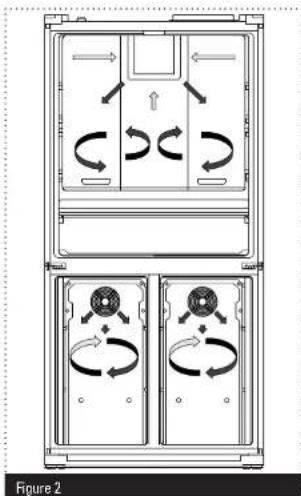
No Frost Technology
Your Fridge Freezer differs from many other standard Fridge Freezers.
Other Fridge Freezers may experience freezing in the freezer compartment due to door openings and the humidity in the food. In such Fridge Freezers defrosting is required; the fridge has to be periodically turned off, the frozen food moved to a suitable container and the ice gathered in the freezer compartment removed.
Your 'No Frost' Fridge Freezer prevents such problems by evenly blowing dry cold air into the fridge and freezer compartments through a blower fan. This cools your food evenly and uniformly, preventing humidity and freezing.
natural_image
Technical diagram of a multi-panel air conditioning unit with directional arrows indicating circulation (no text or labels)Figure 3
07
T:0333 577 7232 T:0333 577 7232

Visit servis.co.uk
The following information will help you to identify the different parts of your Fridge Freezer and provide suggestions on the best way to use them.
① Cooler Zone; the main refrigeration compartment
② Top door shelf; for storing butter and cheese
③ Middle door shelf; for storing smaller items of food
4 Bottom door shelf; for storing smaller items of food
⑤ Zone 2; right freezer compartment
6 Zone 1; left freezer compartment
7 Bottom basket; place food that has been in the top basket for more than 24 hours here.
8 Top basket; place food to be frozen here
9 Crispers; for storing loose vegetables
10 miller; preserves food at 2-3 °C and is suitable defrosting and short term food storage
11. Adjustable glass shelf; for storing commonly accessed foods

Visit
servis.co.uk
Your Fridge Freezer has a touch screen control panel to allow you to easily select the required function.
Buttons


Mode Button
Cooler (refrigerator Control Button)
Beverage Cooling Alarm Button
Zone 1 Control Button
Zone 2 Control Button

Screen Saver Button
Figure 4
09
T:03335777232 T:03335777232

Visit servis.co.uk
Icons


Beverage Cooling Timer Segment

Vita Store Mode

Beverage Cooling Alarm

Eco Mode

Night Sensor

Child Lock
Store Demo Mode
Low Voltage Warning
Alarm

Cooler
Information
Zone 1
Information
Zone 2
Information
SC indicates that the Supercool function is in use.
SF indicates that the Superfreeze function is in use.
Standby display is protected against faulty contact. Therefore, you must touch any key on the display before you take any action. After 2 seconds, as in this case, beep-beep tone will be open to display for use. If you wait 20 seconds at the end of the process, display will go back to the same protection case.
Figure 5

Visit ser
SERVICE.CO.DK
① Condenser.
② Vaporisation Container; Part of the 'No Frost' technology which allows water collected during automatic defrosting to naturally evaporate.
ELECTRICAL INFORMATION >
Your Fridge Freezer requires a 220-240V, 50Hz mains supply. Do not use any other supply.
Your Fridge Freezer may be fitted with a moulded, earthed plug, which cannot be rewired.
» If the fuse cover becomes damaged, you must not use the plug.
If your plug requires changing because it is not suitable for your socket, or it is damaged, you should consult a qualified electrician.
Fuse:
Replacement fuses should be ASTA-approved to BS1362 and have the correct 13 Amp rating.
» Replacement fuses can be purchased from an electrical supplier.
TECHNICAL SPECIFICATION INSTALLATION

TECHNICAL SPECIFICATION >
| Model Number FD91185SS | |
| Power Source 220-240 V AC, 50Hz | |
| Power Consumption (W) 459 KW/year | |
| Energy Efficiency Rating A+ Class | |
| Climate Class T/N (16 | ^ - 43 ^ ) |
| Refrigerant Gas R600a | |
| Star Class 4 (-18 | ^ or cooler) |
| Total Gross/Net Volume 620 lt/526 lt | |
| Refrigerator Compartment Gross/Net Volume 410 lt/362 lt | |
| Freezer Compartment Gross/Net Volume | 210 lt/164 lt |
| Zone 1 Compartment Volume | 82 lt |
| Zone 2 Compartment Volume | 82 lt |
| Freezing Capacity | 18 kg/24 hours |
| Noise Level | 45 dB(A) |
| Height x Width x Depth | 1850 x 910 x 750 mm |
| Weight | 147.5 kg |
| Total Power | 323 W |
INSTALLATION REQUIREMENTS >
Before unpacking and manoeuvring your Fridge Freezer, please take the time to read and become familiar with the following points:
» Make sure that your Fridge Freezer can fit through all doorways on route to its final location. The dimensions of your Fridge Freezer are 1850 mm high x 910 mm wide x 780 mm deep.
To avoid risk of injury, please take care when moving your Fridge Freezer. It is heavy and we recommend that a minimum of four people lift it. Your Fridge Freezer has a wheel in each back corner. You will find it easiest to move your Fridge Freezer when it is tilted backwards and pushed into position.
Your Fridge Freezer should be positioned in a location that meets the following requirements:
» In a dry room that can be ventilated and out of direct sunlight.
» Away from any heat source such as a radiator. If this is unavoidable, a suitable heat insulator should be used (this is not supplied).
On a suitable floor that will not become damaged, or sag under the weight of the Fridge Freezer.
At least 500 mm away from stoves, ovens and heater cores and 50 mm away from electrical ovens.
» At least 20 mm away from another freezer.
» Clearance of at least 150 mm is required at the top and back of your Fridge Freezer. Do not place anything on top of your Fridge Freezer.
INSTALLATION >
ADJUSTING THE FEET >
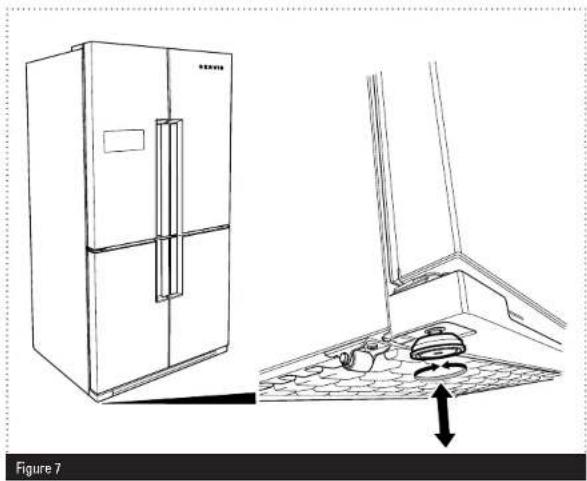
For safe operation, it is important that your Fridge Freezer is stable and balanced. The two adjustable feet at the front are used to level your Fridge Freezer. Make sure that your Fridge Freezer is level before placing any foodstuffs inside it.
To increase the height of the front of the Fridge Freezer, turn the feet clockwise (Figure 7).
2 To decrease the height of the front of Fridge Freezer, turn the feet anti-clockwise (Figure 7).
natural_image
Line drawing of a refrigerator and kitchen interior with a floor plan view showing appliance placement (no text or symbols)When using your Fridge Freezer for the first time, or after transportation, keep it in an upright position for at least 3 hours before plugging into the mains. This allows efficient operation and prevents damage to the compressor.
» We recommend that you wipe all shelving and trays with a cloth soaked in warm water mixed with a teaspoon of sodium bicarbonate before use. After cleaning, rinse with warm water and dry.
You may notice a slight odour when using your Fridge Freezer for the first time. This is perfectly normal and will fade away once the fridge starts to cool.
Before using your Fridge Freezer, make sure that it has been connected to an appropriate mains power supply and is switched on at the socket.
When using your Fridge Freezer for the first time, set the refrigerator compartment to 4 °C and zones 1 and 2 to -18°C. Please see page 17 for information on setting the temperature.
Your Fridge Freezer has a 5 minute built in delay function, designed to prevent damage to the compressor. When power is applied to your Fridge Freezer, it will begin to operate normally after 5 minutes.
USAGE XUSAGE

TEMPERATURE CONTROL >
The Control Panel (Figure 4) is used to regulate the temperature in the fridge and freezer compartments.
Refrigerator Compartment
You can select a temperature setting for the refrigerator compartment by using the cooler button:
» Press cooler button until the desired temperature is reached. The available temperatures are: 2, 3, 4, 5, 6, 7 or 8°C.
Freezer Zone 1
You can adjust the temperature of the Zone 1 compartment by pressing the zone 1 until the desired temperature is reached:
If this compartment is set as a freezer the available temperatures are: -16, -17, -18, -19, -20, -21, -22, -23 or -24^ .
If this compartment is set as a refrigerator the available temperatures are: 2, 3, 4, 5, 6, 7 or 8°C.
Please Note: Pressing the zone 1 button for 3 seconds will allow your Fridge Freezer to toggle between refrigerator and freezer modes.
Freezer Zone 2
You can adjust the temperature of the Zone 2 compartment by pressing the zone 2 until the desired temperature is reached:
If this compartment is set as a freezer the available temperatures are: -16, -17, -18, -19, -20, -21, -22, -23 or -24°C.
If this compartment is set as a refrigerator the available temperatures are: 2, 3, 4, 5, 6, 7 or 8^ .
Please Note: Pressing the zone 2 button for 3 seconds will allow your Fridge Freezer to toggle between refrigerator and freezer modes.
Under normal conditions we recommend setting the temperature of the refrigerator compartment to between 4 ^ C and 6 ^ C, and the freezer compartments to approximately -18 ^ C.
USAGE>
FUNCTIONS >

Beverage Cooling Alarm
This function allows you to cool beverages for up to 30 minutes before an audible alarm sounds. The coldest area of the refrigerator is the lower part. We suggest placing your beverage there. To activate the Beverage Cooling Alarm Function:
» Press the loutdoinhance.
While the can is flashing you can increase the duration in 5 minute intervals by pressing the cupdrink
When you have selected the desired alarm duration, wait and allow the icon to stop flashing. This means the alarm and has been set. The timer segment will flash as the countdown begins.
» Once the alarm sounds, press the butdrink to stop it.
To cancel the Beverage Cooling Alarm:
» Press q. drink button once while the timer is counting down.
The icon and timer segment both flash before disappearing from the Control Panel. This means that the beverage cooling alarm has been cancelled.
Please Note:
This function should not be confused with cooling. It is only a helpful way or reminding you that a beverage has been in the refrigerator long enough to cool.
This function will not be activated if you are using Zone 2 as a refrigerator.
Important: Please remember to remove your beverages after the audible alert as there is a risk that bottles left in the refrigerator for too long may explode.

nomic Mode
Selecting this function ensures that your refrigerator runs within the ideal temperature range. To activate Eco mode:
» Press the mode button until eco and E is displayed on the Control Panel.
To de-activate this function:
» Press the mode button until the main screen is displayed and 📄 and E is no longer shown on the Control Panel.

Holiday Mode
The Holiday Mode Function should be selected if you are not intending to use your refrigerator for a sustained period of time. To select this function:
» Press the mode button until and H appears on the control panel.
To de-activate this function:
» Press the mode button until the main screen is displayed and 🙏 and H is no longer shown on the Control Panel.
USAGE>
Quick Freezing (SUPERFREEZE) Mode
This mode allows you to freeze prepared meals or large amounts of food quickly. To select the quick freezing function:
» Ensure that the zone where you wish to activate the superfreeze function is set as a freezer (see page 25 for further information).
» Press either the zone 1 or zone 2 button (depending on where you wish to freeze the food) until the available temperatures have been cycled through and sf and SF appear on the Control Panel accompanied by an audible beep. The mode is activated once SF stops flashing.
Please Note: We recommend that Zone 1 be used for this function.
This mode will be automatically de-activated after 24 hours, or once the freezer compartment sensor has reached a sufficiently low temperature. The zone will then return to its previously set temperature.
Quick Cooling (SC SUPERCOOL) Mode
This mode allows you to cool prepared meals or large amounts of food quickly. To select the quick cooling function:
Press cooler button until the available temperatures have been cycled though and SC and appear on the Control Panel accompanied by an audible beep. The mode is activated once stops flashing.
This mode will automatically be de-activated after 4 to 6 hours depending on the environmental temperature or when the sensor in the refrigerator reaches a sufficiently low temperature.
Lights
Your Fridge Freezer contains a series of LEDs hidden within the door handles and an interior light (that is illuminated upon door opening). To turn the LEDs and interior light on:
» Press the mode button for at least 3 seconds until door light on is displayed on the Control Panel.
To turn the LEDs and interior light off:
» Press the mode button for at least 3 seconds until light off is displayed. on the Control Panel.
Please Note: If the door light mode is selected, the LEDs will be continuously illuminated unless Night Sensor Mode has been activated (see below) in which case the LEDs will only illuminate once your Fridge Freezer has detected that its is dark enough for them to do so.
Night Sensor Mode
This is an energy saving mode that only turns your LEDs on when the built-in sensor detects that the ambient light is low enough for them to be required. To activate Night Sensor Mode:
Press mode button and save button simultaneously for at least 3 seconds until is displayed on the Control Panel.
To de-activate Night Sensor Mode:
Press mode button and the save button simultaneously for at least 3 seconds until is no longer shown on the Control Panel.
USAGE>
Screensaver
This mode allows you to save energy by turning the Control Panel off when it is not required. To activate screensaver mode:
» Press S. saver button for at least 3 seconds until the Control Panel display is turned off.
To de-activate the screensaver mode:
» Press s.saver button for at least 3 seconds until the Control Panel is turned on.
Child Lock
Your Fridge Freezer Control Panel is equipped with a Child Lock Function that de-activates the control panel buttons and prevents any settings from being altered. To activate the Child Lock:
» Press the cooler button and zone 2 button simultaneously for at least 5 seconds until is displayed on the Control Panel.
To de-activate the Child Lock Function:
» Press the cooler button and the zone 2 button for at least 5 seconds until is no longer displayed on the Control Panel.
! Alarm
If the ⚠ symbol appears on the Control Panel accompanied with an audible beep, you should contact the Servis helpdesk as your Fridge Freezer may not be operating as intended.
23 T:0333 577 7232 T:0333 577 7232
Visit servis.co.uk
You can turn the audible beep off by pressing the s. saver button. The wll continue to be displayed on the Control Panel until the fault is fixed.
USING THE ZONES >
In order to save energy you can turn off zones that you do not require.
Zone 1
To turn the Zone 1 compartment off:
» Press the mode and zone 1 buttons simultaneously for at least 5 seconds until the image indicating the zone on the Control Panel disappear.
To turn the Zone 1 Compartment back on:
» Press the mode and zone 1 buttons simultaneously for at least 5 seconds, until the image indicating the zone re-appear on the Control Panel.
Zone 2 and Refrigerator
To turn both Zone 2 and the refrigerator compartment off:
» Press the mode and zone 2 buttons simultaneously for at least 5 seconds, until the graphics indicating the zones on the Control Panel disappear.
To turn both Zone 2 and the refrigerator compartments back on:
» Press the mode and zone 2 buttons simultaneously for at least 5 seconds until the graphics indicating the zones on the Control Panel re-appear.
Visit servis.co.uk
USAGE>
Refrigerator
To turn just the refrigerator off:
» Press the mode and cooler buttons simultaneously for at least 5 seconds until all graphics indicating the compartment on the Control Panel disappear.
To turn the refrigerator compartment back on:
» Press the mode and cooler buttons simultaneously for at least 5 seconds until all graphics indicating the compartment re-appear.
Changing the Use of your Fridge Freezer Zones
Zones 1 and 2 can be independently changed to work as either refrigerator or freezer compartments.
Please Note: If you require more refrigerator space we recommend that you use zone 1 for this purpose.
To toggle between freezer and refrigeration usage for zones 1 and 2:
Press either the zone 1 or zone 2 button (depending on the zone you wish to change) for a minimum of 3 seconds, until the temperature range changes on the Control Panel. In refrigeration mode the available temperatures will range from 2 to 8 °C and in freezer mode they will range from -16 to -24°C.
If you are changing a zone from a freezer to a refrigerator, empty the zone completely and leave the door open for 4 hours before refilling and using as a refrigerator.
If you are changing a zone from a refrigerator to a freezer, empty the zone completely and leave the door open for 2 hours before re-filling and using.
Please Note:
If you have set Zone 1 or Zone 2 for use as a refrigerator they will not be affected by Holiday or Eco mode settings.
» Do not use Zone 2 as a refrigerator in ambient temperatures above 38 °C.
» We do not recommend that you use your Fridge Freezer in environments colder than 10 °C.
VITASTORE
Vitastore works to protect the flavor and texture of food. By maintaining ideal temperature and humidity levels we create the conditions for longer shelf life. To switch the appliance to VitaStore mode, press [mode] button until "VitaStore symbol" light comes on. Zone 1 button will be off and you cannot change the Zone1 compartment temperature. If Zone 1 is being used as freezer, observe the following rules before using VitaStore mode.
Important: The Zone1/Zone2 compartment will be converted from freezer to cooler. Empty the food in the related compartment and clean the compartment, then leave the door closed for 4 hours. After that, baskets and/or shelves removed from the compartment should be re-fitted and the food placed in the relevant compartment.
Notes:
» VitaStore mode should not be activated if Zone 1 is being used as a freezer.
» Food should not be put in front of the fan.
USAGE>
The Chiller Compartment
This compartment ensures that your food is preserved at between 2-3 °C. It is suitable for defrosting food taken from the freezer compartment. It can also eliminate the need for freezing by storing meat and fish in plastic bags or packets that will be consumed in 1 to 2 days.
Crisper Air Adjustment Switch
When you have a large amount of food in the crisper, slide the Crisper Air Adjustment Switch to the open position, as shown in Figure 8. This will increase air flow in the crisper and ensure that your food remains fresher for longer.

natural_image
Technical line drawing of an open refrigerator with internal compartments and a close-up view of the front panel (no text or symbols)To help you use your Fridge Freezer efficiently, please take the time to read the following tips and guidance.
Storage Areas:
The circulation or air within your Fridge Freezer causes areas of different temperatures. It is recommended that you make use of these areas when storing your food. The coldest area of the refrigerator compartment is at the bottom above the chiller compartment. We recommend that you use this area to store food that will perish easily, such as fish, ready meals, baked goods and dairy products.
The warmest area of your refrigerator is the top shelf of the door. We recommend that you store butter and cheeses in this shelf.
Storing Food:
It is best to store your food covered or packaged to prevent it from drying out and to prevent smells affecting other food items in your refrigerator. Store fruit and vegetable items loose in the crisper containers. Avoid storing potatoes, onions and garlic in your refrigerator.
Other tips you might find helpful are:
» Wash your food before storage.
» Allow warm or hot food to cool down before storing. This helps to reduce power consumption.
» Keep as much space as possible between your items of food. This allows the cold air to circulate freely around them.
FOOD STORAGE TIPS >
Take care when storing tropical fruit such as pineapples as they can quickly deteriorate in lower temperatures.
» Divide and separate food into smaller pieces before storage.
» Cover or wrap food to prevent odours. We recommend that you store meat loosely covered as this allows air to circulate around the meat causing the surface to dry slightly, helping to prevent the growth of bacteria.
» Do not store food close so that it blocks the Crisper Air Adjustment Button.
The table below is a quick guide, showing you the most efficient way to store the major food groups in your refrigerator compartment.
| Food Storage Duration Location | ||
| Fruits and Vegetables 1 week Loose in Vegetable Holder | ||
| Fish and Meat 2-3 Days Wrapped on Glass Shelf | ||
| Fresh Cheese 3-4 Days | Top Door Shelf | |
| Butter and Margarine 1 Week | Top Door Shelf | |
| Bottles, Yogurt and Milk | Refer to Packaging | Top Door Shelf |
| Eggs | 1 month | In Egg Holder |
The Freezer Compartment:
You should use the freezer compartments for storing food for long periods and making ice. Aim to freeze fresh food as quickly as possible so that it keeps its taste and appearance.
We recommend that you place food you would like to freeze in the upper tray of the freezer compartment for 24 hours before placing it next to other frozen foods. It is important that you do not exceed the maximum freezing capacity of your Fridge Freezer, this will help to ensure that your food freezes as quickly as possible. The maximum freezing capacity for freezing within a 24 hour period is 18 kg.
The storage durations of frozen food can be changed by a variety of factors, such as; the frequency of the doors opening and closing, thermostat settings, food types and the period of time that elapsed from when the food was acquired to the time it entered the freezer. It is important that you follow the packaging on frozen foods and do not exceed the storage duration. The table below contains some recommendations on freezing.
| Food | Preparation | Storage Duration (Months) | Thawing Period at Room Temperature (Hours) |
| Beef Steak | Cut into single portions | 6-10 | 1-2 or until completely thawed |
| Lamb Cut into single portions | 6-8 | 1-2 or until completely thawed | |
| Minced Meat Packed in convenient portions | 1-3 | 2-3 or until completely thawed | |
| Sausage Must be packed | 1-2 | Until completely thawed | |
| Chicken and Turkey | Packed in convenient portions | 1-2 | 10-12 or until completely thawed |
FOOD STORAGE TIPS >
CLEANING AND CARE >
| Food Preparation Storage Duration | (Months) | Thawing Period at Room Temperature (Hours) | |
| Freshwater Fish (such as trout) Cleaned well inside | 2 | U thawed | |
| Lean Fish (such as Sea Bass) | and scaled. Washed and dried. Cut off head and tail where necessary | 4-8 Until completely | thawed |
| Fatty fish (such as Mackerel) | 2-4 Until completely | thawed | |
| Peas Shelled and washed 12 May Be Used From Frozen | |||
WARNING: Do not re-freeze frozen food once it has thawed. It may be a danger to your health.
Ice Cube Tray:
Your can make ice cubes using the ice cube tray supplied with your Fridge Freezer;
» Fill the ice cube tray three quarters full with water and place it on the bottom of one of the freezer drawers.
Power Disruption:
In the event of a power cut, please do not open any of the doors of your Fridge Freezer. Your Fridge Freezer will preserve your frozen food in an ambient environmental temperature of up to 25 °C for approximately 13 hours. This time period will be shorter if the ambient temperature is higher. When power is re-applied after a power cut your Fridge Freezer will not operate for 4-5 minutes. This is to allow the gas in the cooling system to balance and is perfectly normal.
CLEANING AND CARE >
From time to time it will be necessary to carry out cleaning of your Fridge Freezer.
» Before cleaning your Fridge Freezer, turn your mains power supply off and remove the plug from the socket.
» Do not wash your Fridge Freezer by pouring water on it.
» Use a warm, soapy cloth or sponge to the wipe the interior and exterior of your Fridge Freezer.
» Carefully remove all shelves and drawers by sliding outwards or upwards and clean with soapy water. Do not wash in a washing machine or dish washer.
» Clean the condenser at the back of your Fridge Freezer at least once a year with a soft brush or vacuum cleaner.
» Do not use solvents, abrasive cleaners, glass cleaners or all purpose cleaning agents to clean your Fridge Freezer. They may damage the plastic surfaces and other components with the chemicals they contain.
CLEANING AND CARE >
Cleaning The Vaporisation Container:
Your Fridge Freezer uses 'No Frost' technology and performs fully automatic defrosting. The water formed as a result of this automatic defrosting flows into the vaporisation container at the rear of your Fridge Freezer and evaporates. We recommend cleaning the vaporisation container at regular intervals to prevent odours from building up.
To clean the vaporisation container:
1 Remove the vaporisation container by unscrewing the 2 screws (a and b) (Figure 9)
② Clean the vaporisation container with warm soapy water and dry with a cloth.
② Re-fit the vaporisation container by screwing it back into position.

natural_image
Technical diagram of an internal combustion chamber with labeled components (a and b), no readable text or symbols present.Replacing the LEDs:
If the internal light or any of the LEDs need replacing please contact the Servis helpdesk as they should only be changed by authorised personnel.
TROUBLESHOOTING>
FAULT DETECTION SYSTEM >
Your Fridge Freezer is equipped with a built-in fault detection system, which is able to offer guidance should your Fridge Freezer not operate as expected. In the event of an error, a symbol will be displayed on the Control Panel. The most common error symbols are shown below. If your Fridge Freezer displays a code not shown, consult the Servis helpdesk.
| Error Symbol Meaning | g Advice | |
 | Error Warning. Part of your Fridge Freezer nay not be working properly or there could be a cooling problem. | Contact the Servis helpdesk. |
 | The freezer department is not cold enough. This could result from a power supply disruption or failure of the cooling equipment. | Use the SUPERFREEZE mode or set the freezer department to a lower temperature until the warning symbol disappears.Do not place fresh food in the freezer compartment when this warning symbol is shown. |
 | The refrigerator compartment is not cold enough. | Use the SUPERCOOL mode or set the refrigerator to a lower temperature until the warning symbol disappears.Do not open the door while the warning symbol is displayed. |
| Error Symbol Meaning Advice | ||
 | The refrigerator compartment is too cool. Food in the refrigerator is at risk of being frozen. | Cancel the SUPERCOOL function if it is active. Decrease the temperature of the refrigerator compartment. |
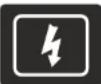 | The supply voltage has dropped below 170 V. | This symbol is intended for advice and to act as a precaution. It will disappear once the supply voltage rises above 170 V. |
TROUBLESHOOTING>
TROUBLESHOOTING INFORMATION >
If your Fridge Freezer is not operating as expected, you may find a simple solution listed in the table below.
If your Fridge Freezer has developed a fault not covered in this manual, please contact the Servis helpdesk.
| Fault Possible Cause Solution | ||
| Your Fridge Freezer does not operate. | It is switched off at the mains. | Check that your Fridge Freezer is plugged in and turned on at the mains. |
| The different compartments of your Fridge Freezer do not get cold enough. | The temperature is set too high. | Set the temperature to a lower value. |
| The doors are opened and closed too frequently. | Try to reduce the number of times the doors are opened and closed. | |
| The door seals are faulty. Contact Servis. | ||
| The refrigerator compartment is overfilled. | Check that there is enough space between items to allow air circulation.Make sure that no items are food are blocking the air vents. | |
| Fault Possible Cause Solution | ||
| Food in the Freezer compartment is colder than necessary. | The temperature setting may be too low. | Select a higher value for the temperature setting. |
| Your Fridge Freezer is noisy. Your | Fridge Freezer may not be level. | Adjust the feet to level your Fridge Freezer. See page 15. |
| Please note that certain noises may heard from your Fridge Freezer during use. They are perfectly normal from a frost free Fridge Freezer and are not damaging your Fridge Freezer. Contact the Servis helpdesk if you have any concerns. | ||
| There is moisture on the inner parts of your Fridge Freezer. | The doors are opened and closed too frequently. | Try to reduce the number of times the doors are opened and closed. |
| The doors do not close properly. | Items of food may prevent them from closing. | Make sure that the doors are free from obstruction. |
| The shelves and drawers are not correctly in position. | Check that the shelves and drawers are properly placed in position. | |
| The door seal is damaged. Contact the Servis helpdesk. | ||
| Your Fridge Freezer is not level. | Adjust the feet to level your Fridge Freezer. See page 15. | |
GUARANTEE >
DISPOSAL >
All packaging and materials used are environmentally friendly and recyclable. Please dispose of any packaging in an environmentally friendly manner. Consult your local council for further details.
When the Fridge Freezer is to be scrapped, cut off the electrical supply cable and destroy the plug and cable. Disable the door catch in order to prevent children from becoming trapped inside.
A cut off plug inserted into a 13 amp socket is a serious safety (shock) hazard. Please ensure the cut off plug is disposed of safely.

Please refer to the rear cover for disposal instructions.
GUARANTEE >
The Servis guarantee covers the cost of parts/labour/call out charges to repair an appliance should any covered component fail in its normal functions necessitating a repair or replacement to resume those functions.
The Servis guarantee does not cover:
» Accidental damage
»Use in a commercial environment
»Incorrect or faulty installation
» Deliberate damage or neglect
» Repairs to cosmetic parts
39
T: 0333 577 7232 T: 0333 577 7232

Visit
servis.co.uk
» Damage caused by foreign objects or substances
» Claims in respect to routine inspection or maintenance
The Servis guarantee is not transferable.
For your Servis guarantee to be valid, you will need to retain your original purchase receipt and be able to provide it when you make a claim.
The above summary does not include all of the terms and conditions and exclusions which can be found on our website www.servis.co.uk.
KNOW YOUR RIGHTS >
Household contents insurance
Your household insurance may cover you for accidental damage, fire or theft of your product.
Data Protection Act (1988)
Please note that any information provided will be processed by us or our agents in compliance with the provisions of the Data Protection Act 1988, for the purpose or providing cover and handling claims, if any, which may necessitate providing such information to third parties.

Visit
servis.co.uk
INDEX>
A
Adjusting the feet 15
Advanced features 06
Alarm 23
C
Child lock....23
Chiller 27
Cleaning and care 32
Crisper air adjustment switch 27
D
Door lights 22
E
Ecological hints and tips 05
Eco mode 20
Electrical connection....12
Environmental information 05
F
Fault detection system 35
Feet, adjustment of 15
Food storage guidance 28
Functions 19
Fuse....12
G
Guarantee 39
H
Holiday mode 20
1
Ice cube tray 31
Installation requirements....14
N
Night sensor 22
No frost technology ...... D6
P
Power disruption 32
0
qdrink function....19
Quick cooling 21
Quick freezing 21
R
Replacing the LEDs 34
S
Safety instructions 02
Screen saver 23
Supercool....21
Superfreeze....21
T
Technical specification 13
Temperature control 17
U
Using the zones 24
V
VitaStore....26
W
Warranty....01
T:03335777232
E: info@servis.co.uk

Visit servis.co.uk
SERVIS
EFFICIENCY BY DESIGN

The owner of the product, or its packaging manufacturer, that this product may not be treated as household waste, indeed it shall be heated over to the applicable collection plant for the application of residential and commercial environment. By ensuring this product is disposed of correctly, you will have a power, potential negative consequences for the consumer and human beauty, which should otherwise be prescribed by manufacturers whose handling of this product. You are also called in order to assist with this product, please contact your local city office, your household waste disposal service or the shop where you attended the product.
0000000000
- Contents>
- WELCOME >
- SAFETY
- WELCOME>
- WARRANTY >
- To ensure your safety and the safety of others, please read the following safety precautions before you use your Fridge Freezer.
- SAFETY INSTRUCTIONS >
- Ecological Hints and Tips:
- Environmental Information:
- Advanced Features >
- No Frost Technology
- ELECTRICAL INFORMATION >
- Fuse:
- TECHNICAL SPECIFICATION INSTALLATION
- INSTALLATION REQUIREMENTS >
- INSTALLATION >
- ADJUSTING THE FEET >
- USAGE XUSAGE
- TEMPERATURE CONTROL >
- Refrigerator Compartment
- Freezer Zone 1
- Freezer Zone 2
- USAGE>
- FUNCTIONS >
- Beverage Cooling Alarm
- Please Note:
- nomic Mode
- Holiday Mode
- Quick Freezing (SUPERFREEZE) Mode
- Quick Cooling (SC SUPERCOOL) Mode
- Lights
- Night Sensor Mode
- Screensaver
- Child Lock
- ! Alarm
- USING THE ZONES >
- Zone 1
- Zone 2 and Refrigerator
- Refrigerator
- Changing the Use of your Fridge Freezer Zones
- VITASTORE
- The Chiller Compartment
- Crisper Air Adjustment Switch
- Storage Areas:
- Storing Food:
- FOOD STORAGE TIPS >
- The Freezer Compartment:
- CLEANING AND CARE >
- Ice Cube Tray:
- Power Disruption:
- Cleaning The Vaporisation Container:
- Replacing the LEDs:
- TROUBLESHOOTING>
- FAULT DETECTION SYSTEM >
- TROUBLESHOOTING INFORMATION >
- GUARANTEE >
- DISPOSAL >
- KNOW YOUR RIGHTS >
- Household contents insurance
- Data Protection Act (1988)
- INDEX>
- A
- C
- D
- E
- F
- G
- H
- 1
- N
- P
- 0
- R
- S
- T
- U
- V
- W
Brand : SERVIS
Model : FD91185SS
Category : Refrigerator