
SWHOM-DC820P2 - Doorbell SWANN - Free user manual and instructions
Find the device manual for free SWHOM-DC820P2 SWANN in PDF.


| Product Type | Wireless Door Chime |
| Brand | Swann |
| Model | SWHOM-DC820P2 |
| Number of Receivers | 2 (Twin Pack) |
| Receiver Power Supply | Mains (230V UK/AU, 120V US) |
| Doorbell Power Supply | 12V via 23A battery (included) |
| Doorbell Battery Type | 23A/12V |
| Transmission Frequency | 433 MHz |
| Range (Line of Sight) | Up to 50 m (165 ft) |
| Typical Range | 20 m (66 ft) |
| Number of Chimes | 32 |
| Volume Control | Adjustable (increase/decrease buttons) |
| Chime Selection | Next/previous buttons with test |
| Mounting Method | Adhesive strip (included) |
| Water Resistance | Yes (with rubber seal) |
| Pairing Capability | Add additional doorbells or receivers |
| Certifications | FCC Part 15 Class B |
| Warranty Period | 1 year limited |
| Included Accessories | 2 receivers, 1 doorbell, 1 battery, adhesive strips, operating guide |
Frequently Asked Questions - SWHOM-DC820P2 SWANN
User questions about SWHOM-DC820P2 SWANN
0 question about this device. Answer the ones you know or ask your own.
Ask a new question about this device
Download the instructions for your Doorbell in PDF format for free! Find your manual SWHOM-DC820P2 - SWANN and take your electronic device back in hand. On this page are published all the documents necessary for the use of your device. SWHOM-DC820P2 by SWANN.
USER MANUAL SWHOM-DC820P2 SWANN
natural_image
Three Swann phone devices with sound waves and signal lights, displayed against a blue background (no text or symbols on devices)Wireless Door Chime
Twin Pack
with Mains Power Connection
MDC820P205I112E
Operating Guide
Thank you for choosing the Swann Wireless Door Chime Twin Pack. It's an ideal unit for easily installing a doorbell without the hassle of wiring. Simply plug into a mains outlet, mount the doorbell where needed and you are ready to go!
Each receiver features 32 chimes and adjustable volume to suit your needs and can reach a distance of up to 50m/approx 165ft when there are no obstructions. Both receivers will sound each time the doorbell is pressed.
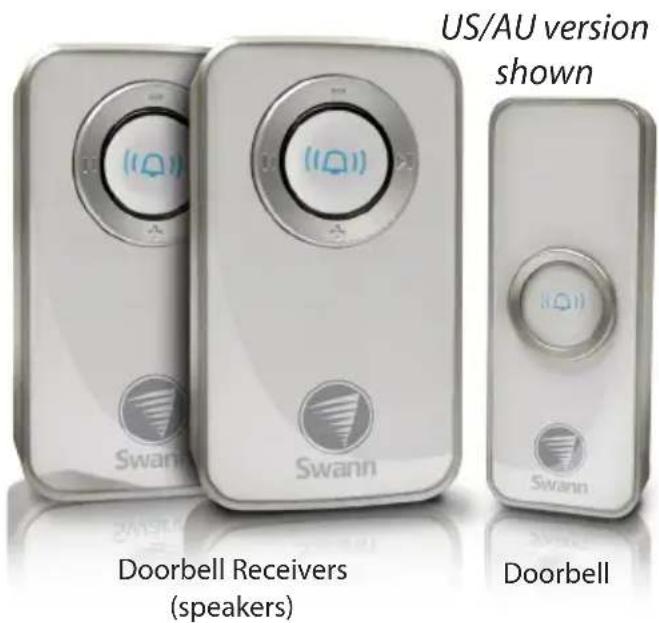
Doorbell receiver
- The doorbell receivers do not require any mounting or batteries. Simply plug them into any mains power socket and you are ready to go.
Batteries (doorbell unit)
- The doorbell requires 1 x 23A/12V battery (included).
- To install the battery, carefully pry off the back cover using a small, flat-head screwdriver in the small notch at the bottom of the doorbell and fit the battery as indicated inside the battery compartment.
- To finish, note the arrows on the cover and doorbell are facing the same direction and clip the back cover back onto the doorbell unit making sure the rubber seal is fitted properly to ensure the unit remains water resistant.
Mounting the doorbell
The doorbell is mounted by simply sticking it to a wall using the included adhesive strip(s).
- Peel off one side of the adhesive strip and attach it to the rear of the backing plate, ensuring none of it is visible from the front.
• Find the area you want to mount the doorbell. Flat, smooth surfaces are ideal. Make sure they are clean and dry before mounting. - Peel off the other side of the adhesive strip and attach the doorbell to the mounting surface.
Specifications
Operating current (receiver unit): Operating current (doorbell unit): Transmission Frequency: Transmission Range: Internal Sounds:
UK, AU: 230v, US: 120V 12V (1 x 23A Battery, included) 433Mhz Up to 50m/165ft (line of sight) - 20m/66ft typical 32 chimes
Operating Guide
Setting the volume and chime
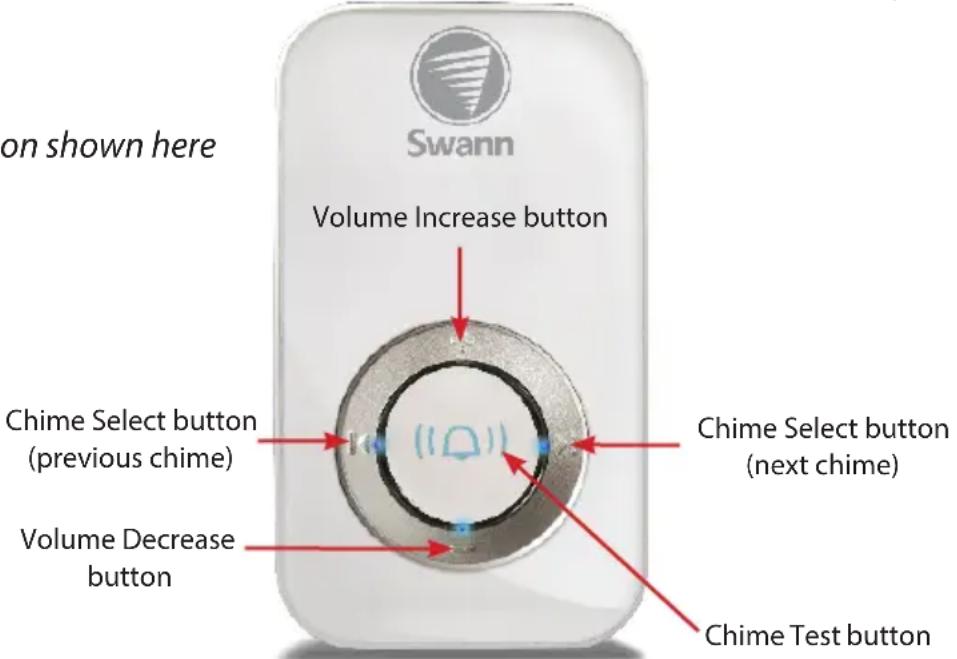
- To increase the volume, press the Volume Increase button.
- To decrease the volume, press the Volume Decrease button.
- To change chimes, press the Chime Select button (next) to move to the next chime or the Chime Select button (previous) to move to the previous chime. A chime will play each time you move forwards or backwards through the chimes. You do not need to confirm your selection. The chime playing is the chime selected and the one which will be heard when the doorbell is pressed.
- The Chime Test button can be used to check which tune is currently selected.
UK version shown here
Pairing and Re-Pairing your Doorbell and Recievers
Your Wireless Doorbell comes with 1 doorbell and 2 paired receivers, but you can add more.
To pair a new Doorbell or Receiver:
- Press and hold the Reciever's Chime Test button for 5 seconds, the chime will play until you hear two beeps.
- Press the doorbell button within 15 seconds, you should instantly hear one beep from the receiver confirming the pairing.
- Press the Chime Test button again to confirm the pairing and exit pairing mode.
- Now when someone presses a paired button, all the receivers will chime.
- To remove all pairing and reset the chime to the default, remove the Receiver from the power socket then press and hold the Chime Test button while plugging the receiver back in. You will then have to Re-Pair the Doorbell as shown above.
Helpdesk / Technical Support Details
Swann Technical Support
All Countries E-mail: tech@swannsecurity.com
Telephone Helpdesk
USA toll free
1-800-627-2799
(Su, 2pm-10pm US PT)
(M-Th, 6am-10pm US PT)
(F 6am-2pm US PT)
USA Exchange & Repairs
1-800-627-2799 (Option 1)
(M-F, 9am-5pm US PT)
AUSTRALIA toll free
1300 138 324
(M 9am-5pm AUS ET)
(Tu-F 1am-5pm AUS ET)
(Sa 1am-9am AUS ET)
NEW ZEALAND toll free
0800 479 266
UK
0203 027 0979
See http://www.worldtimeserver.com for information on time zones and the
current time in Melbourne, Australia compared to your local time.
Warranty Information
Swann Communications USA Inc.
12636 Clark Street
Santa Fe Springs CA 90670
USA
Swann Communications
Unit 13, 331 Ingles Street,
Port Melbourne Vic 3207
Swann Communications LTD.
Stag Gates House
63/64 The Avenue
SO171XS
United Kingdom

Swann
© Swann Communications 2012
Swann Communications warrants this product against defects in workmanship and material for a period of one (1) year from it's original purchase date. You must present your receipt as proof of date of purchase for warranty validation. Any unit which proves defective during the stated period will be repaired without charge for parts or labour or replaced at the sole discretion of Swann. The end user is responsible for all freight charges incurred to send the product to Swann's repair centres. The end user is responsible for all shipping costs incurred when shipping from and to any country other than the country of origin.
The warranty does not cover any incidental, accidental or consequential damages arising from the use of or the inability to use this product. Any costs associated with the fitting or removal of this product by a tradesman or other person or any other costs associated with its use are the responsibility of the end user. This warranty applies to the original purchaser of the product only and is not transferable to any third party. Unauthorized end user or third party modifications to any component or evidence of misuse or abuse of the device will render all warranties void.
By law some countries do not allow limitations on certain exclusions in this warranty. Where applicable by local laws, regulations and legal rights will take precedence.
For Australia: Our goods come with guarantees which cannot be excluded under Australian Consumer Law. You are entitled to a replacement or refund for a major failure and for compensation for any other reasonably foreseeable loss or damage. You are also entitled to have the goods repaired or replaced if the goods fail to be of acceptable quality and the failure does not amount to major failure.
FCC Verification
This equipment has been tested and found to comply with the limits for Class B digital device, pursuant to part 15 of the FCC Rules. These limits are designed to provide reasonable protection against harmful interference in a residential installation. This equipment generates, uses and can radiate radio frequency energy and, if not installed and used in accordance with the instructions, may cause harmful interference to radio or television reception, which can be determined by turning the equipment off and on, the user is encouraged to try to correct the interference by one or more of the following measures:
• Reorient or relocate the receiving antenna
- Increase the separation between the equipment and the receiver
- Connect the equipment into an outlet on a circuit different from that to which the receiver is connected
- Consult the dealer or an experienced radio/TV technician for help
WARNING: Modifications not approved by the party responsible for compliance could void user's authority to operate the equipment.
Brand : SWANN
Model : SWHOM-DC820P2
Category : Doorbell